DNSNuevo
Edit a domain's DNS records in place, with the records Mail and your pages need added for you.
Once Magpie hosts a domain, its records are a table on the domain's page in DNS. A team admin adds, edits and removes records, and each edit saves as soon as it is made. Mail, Stores, websites and Link-In-Bio Lists at the domain add the records they need, and the page shows whether the latest changes have been published.
Get started free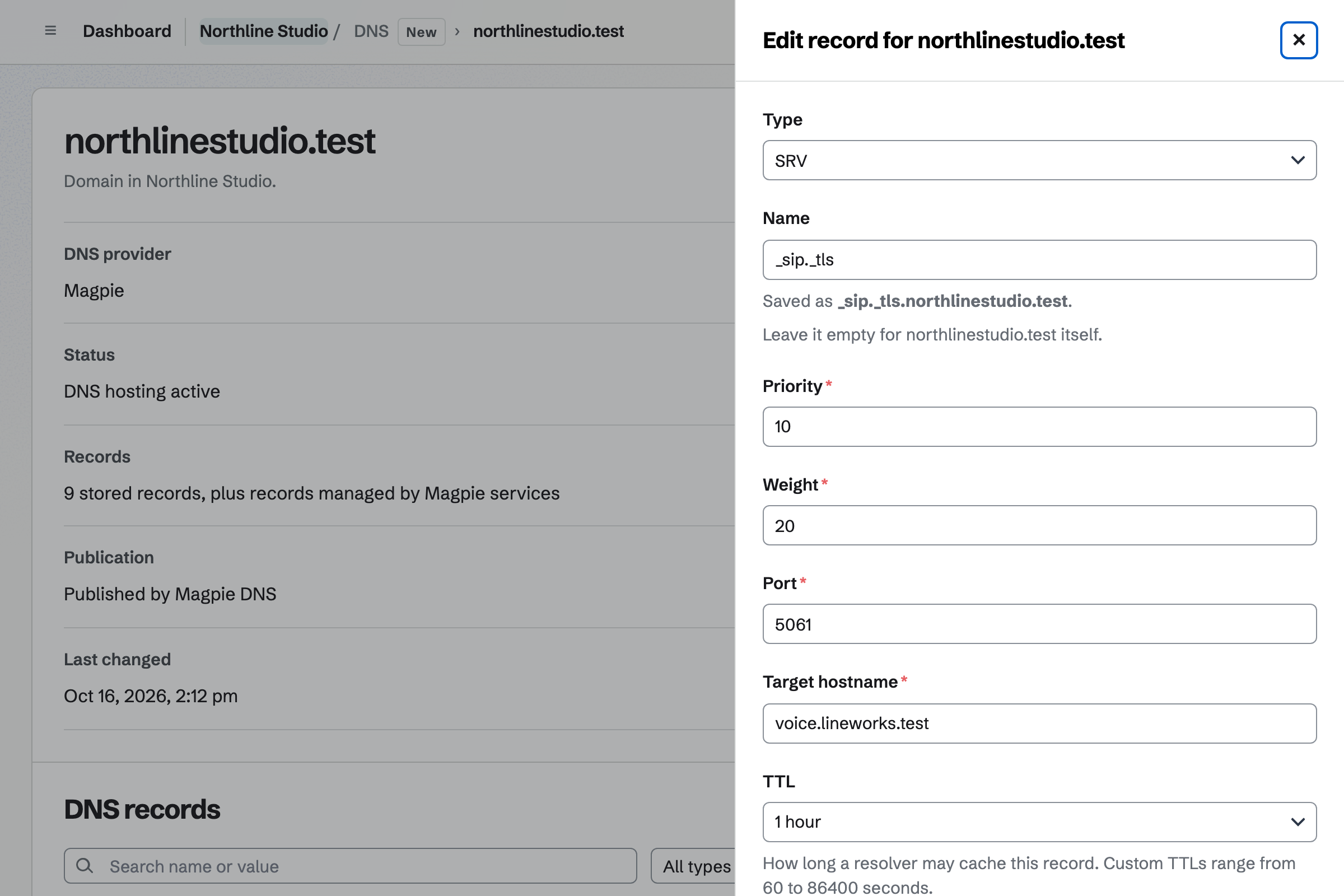
Record types
Add record asks for a type, a name and its values. @ means the domain itself, www means www.example.com, and * is a wildcard. Each type has its own fields, so no record is typed in zone-file syntax.
- A and AAAA
- An IPv4 or an IPv6 address.
- CNAME
- A target hostname. A CNAME is the only record at its name and cannot be used for the domain itself.
- MX
- A priority and a mail server's hostname. A domain can have several MX records.
- TXT
- The text itself, such as an SPF record or a verification value, pasted without zone-file quotes. Spaces, quotes and long strings are handled for you.
- CAA
- Separate flags, tag and value fields, to name the certificate authorities that may issue certificates for the domain.
- SRV
- Separate priority, weight, port and target fields, under a service name such as _sip._tcp.
- NS
- Hands a subdomain to other nameservers. Magpie manages the domain's own nameservers.
Editing records
- Edit in place
- Click a record's name, value or TTL to change it. The change saves immediately and is recorded in the change history.
- Edit
- The pencil on a record opens it in a form, to change its type or several values together.
- Delete
- Deletes a record at once, and Undo puts it back. Tick several records to delete them together.
- TTL
- How long resolvers may cache a record: Automatic (3,600 seconds), 5 minutes, 30 minutes, 1 hour, 4 hours, 1 day, or a custom number of seconds. Records with the same name and type share their shortest TTL.
- Search and filters
- Search records by name or value, and filter them by type and by Yours or Set by Magpie.
Mail's records
Enable Mail, under Connected services on the domain's page, turns on Mail for the same domain and needs the plan Mail requires. Magpie creates Mail's required records and keeps them right: they change with Mail's settings, on the domain's Mail page, rather than one at a time.
An existing SPF record keeps its other entries, and Mail adds its include when the record is published; you can still edit the original SPF text. If the domain already receives mail elsewhere, its MX records stay until you create the mailboxes and choose Move mail to Magpie. Messages stored at the previous provider are not copied.
Records for Stores, websites and Link-In-Bio Lists
When a Store, a website or a Link-In-Bio List is connected to an address under a domain Magpie hosts, its Custom domain page offers Add the records for me. Magpie adds them to the zone, and if records with the same names are already there, it lists them and asks before replacing them. Magpie keeps those records up to date.
Connected services on the domain's page lists Mail and every address under the domain. The Mail row says whether mail arrives at Magpie, with the number of mailboxes, or at another provider, with its MX hosts. Each address shows the page it serves and whether it is Live, Not live yet, with how many of its steps are done, or has a Problem found.
Take over hands such a record to you, after a warning that a change to it can stop its address working. Disconnecting an address removes the records Magpie added for it; records you added stay.
Checking that a change is live
- Publication
- Shows whether Magpie's DNS servers have accepted the latest zone. A pending or failed publication stays on the page, Magpie retries automatically, and Check again retries at once.
- Check record
- Compares a record's configured values with each of the domain's Magpie nameservers and with a public resolver, as separate results. A public resolver may still give an older cached answer after the nameservers have changed. Anyone who can see the domain can run the check.
- Change history
- Lists record changes with their previous and new values and who made them, along with imports and hosting events, newest first. Earlier changes shows older ones.
- Download zone file
- Exports every configured record, including Mail's, as a standard zone file.
Edit your domain's records in Magpie.
Create a Magpie account, open DNS, add your domain and choose Host DNS with Magpie. Its records will appear on the domain's page once they are copied.