
Auto repair garages and detailers
A garage with bays books cars into the workshop and keeps parts on the shelves.
Mobile mechanics
Everything works in your own Magpie account, from the job request to the paid invoice. If you take on a second mechanic, you can both work in a team.
Crear cuenta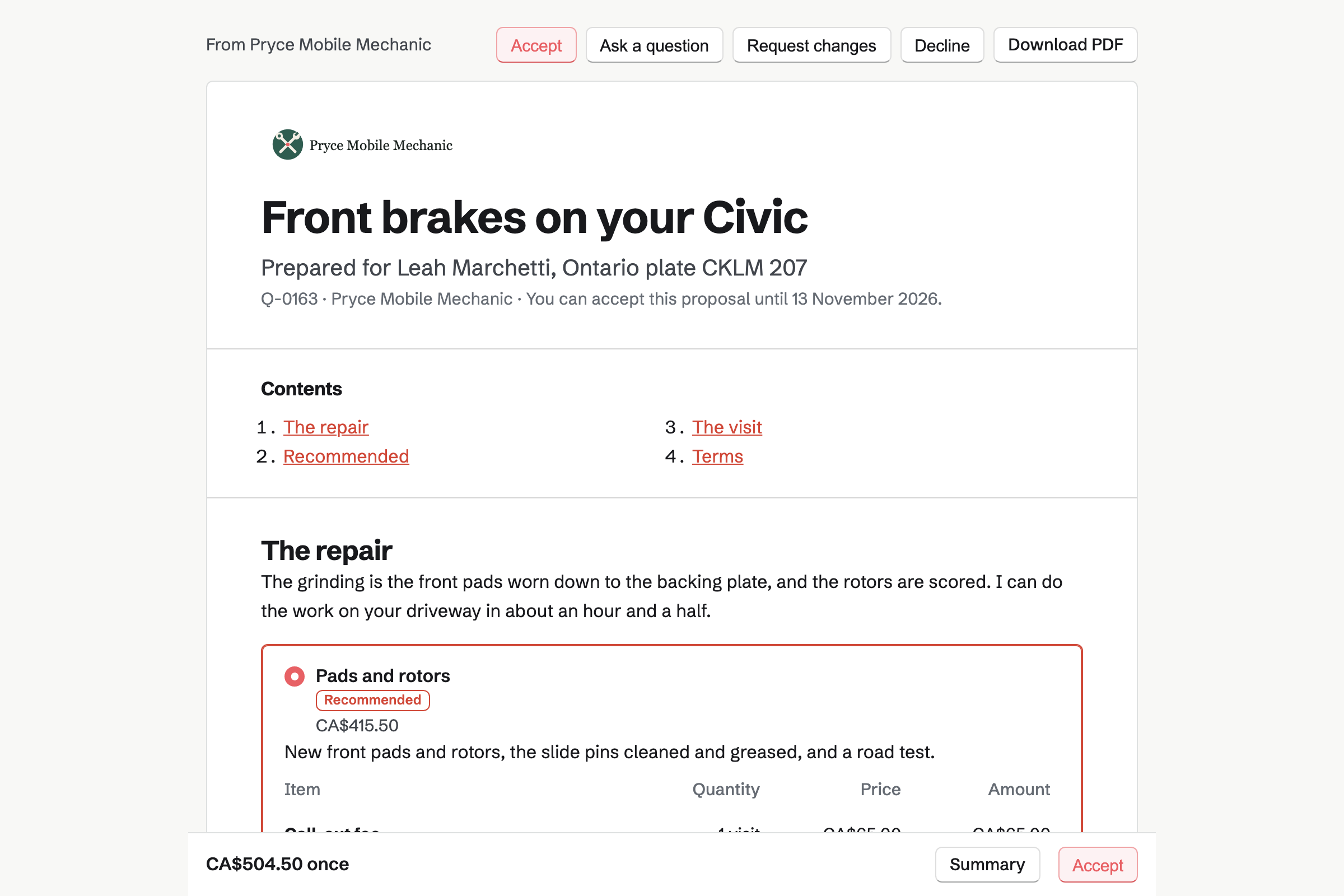
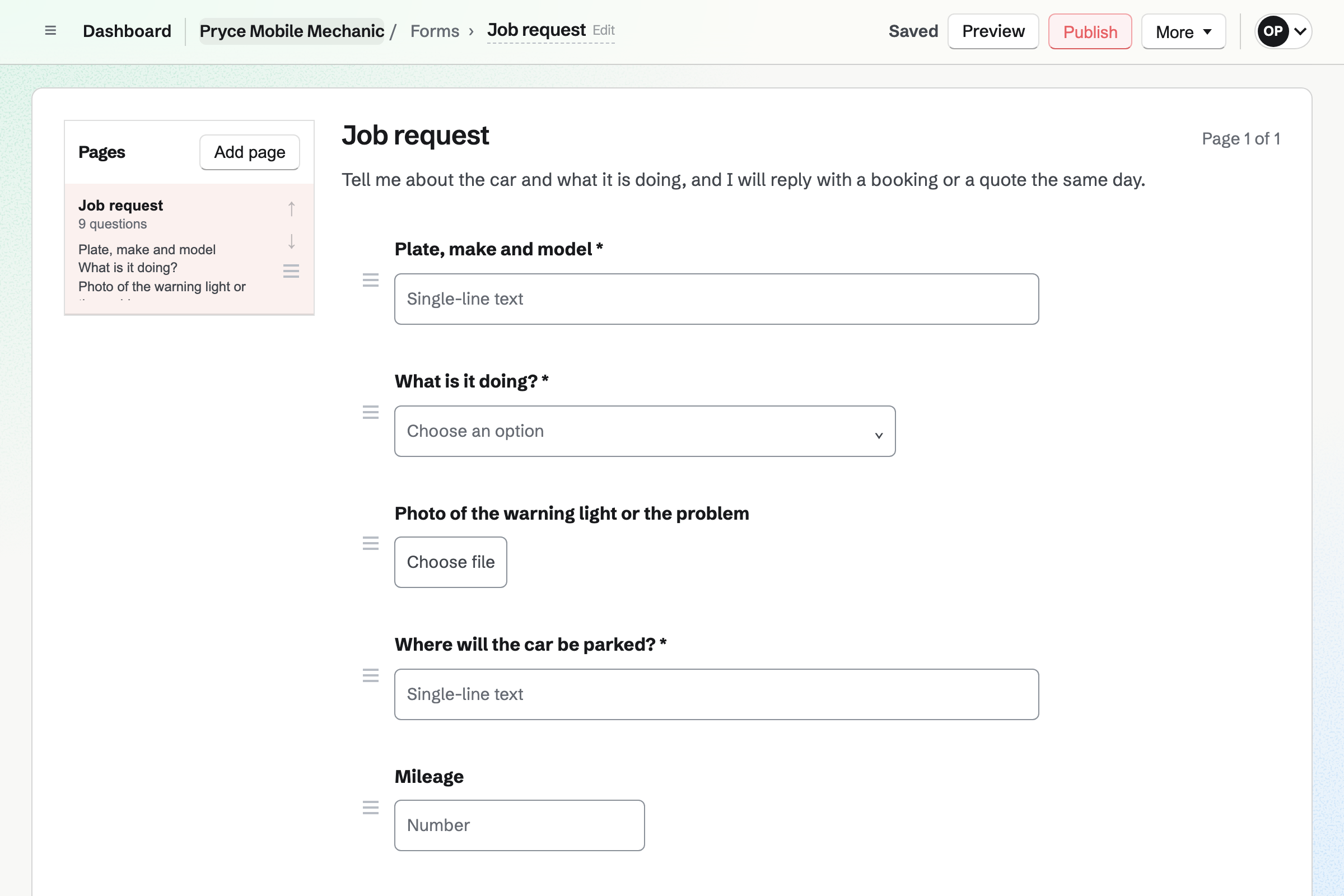
Forms builds your job request, with its own address to link to or text. It asks for the plate, the mileage and what the car is doing. A File question takes a photo of the warning light. Another asks where the car will be parked.
Each request is emailed to you, and the responses are kept in one list. You answer with a booking, a quote or a call.
Appointments gives you a booking page with your services. An oil change, a full service and a new battery each have a price. The service's location says that you come to the car. Customers book without signing up first.
A buffer after each booking keeps time to drive to the next car. The page offers only the times your hours and calendar leave free. You add a phone booking yourself, with the address in its internal notes.
Proposals sends the quote for a set of brakes or a clutch. The parts, the labour and the call-out fee are its lines. Packages can offer pads alone, or a full brake job. Recommended work, such as a brake fluid change, is an optional line.
The quote opens in the customer's Magpie account, or a free one made for them. They sign it on their phone, and can pay a deposit for the parts by card. You will see when they open it.
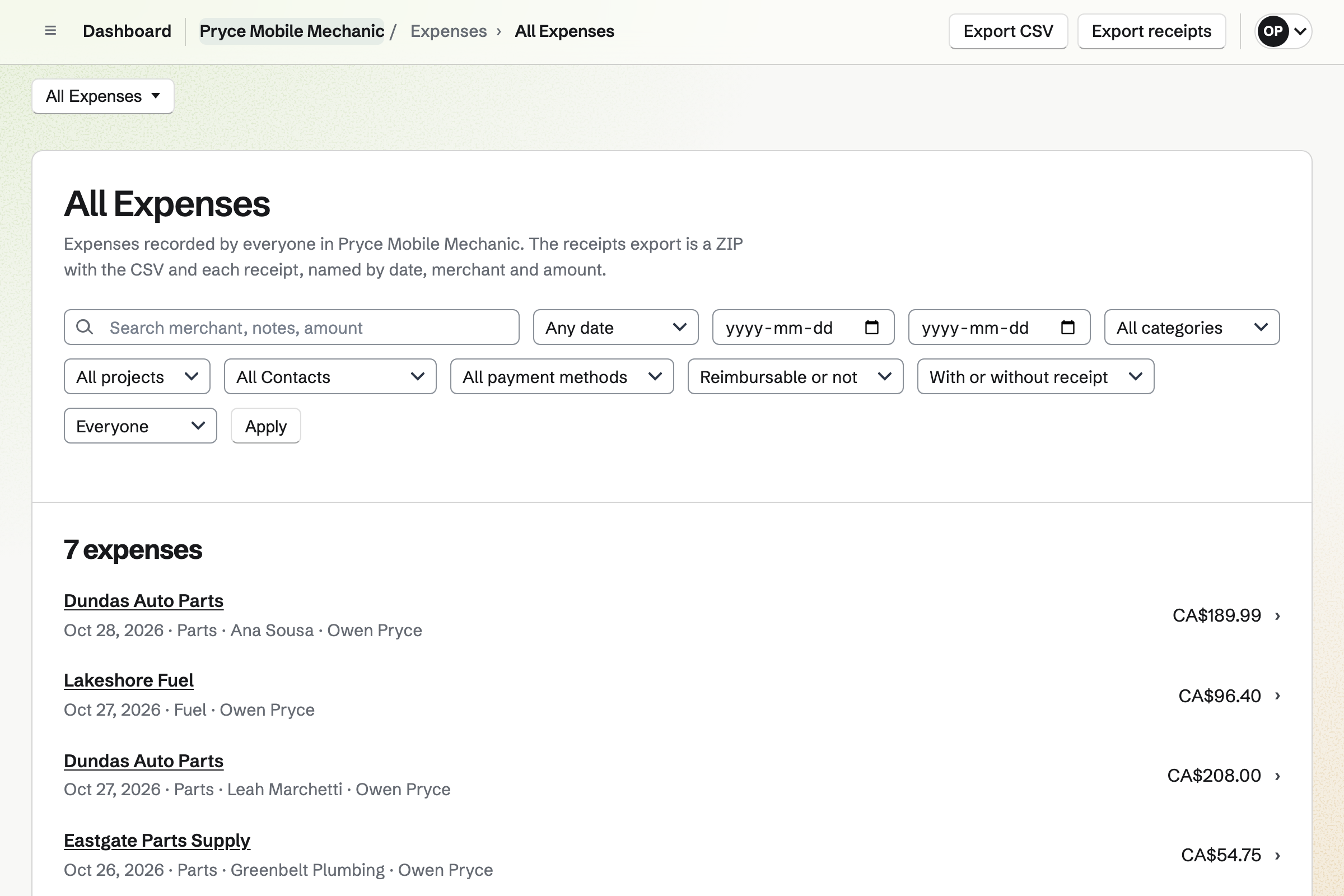
Expenses keeps every receipt from your parts supplier, photographed on your phone. You choose the customer and mark the parts reimbursable. They wait, unbilled, until you write that customer's invoice.
Fuel, tools and the van's insurance are expenses too, each with its category. A receipt can wait in Receipt Inbox until you add its details.
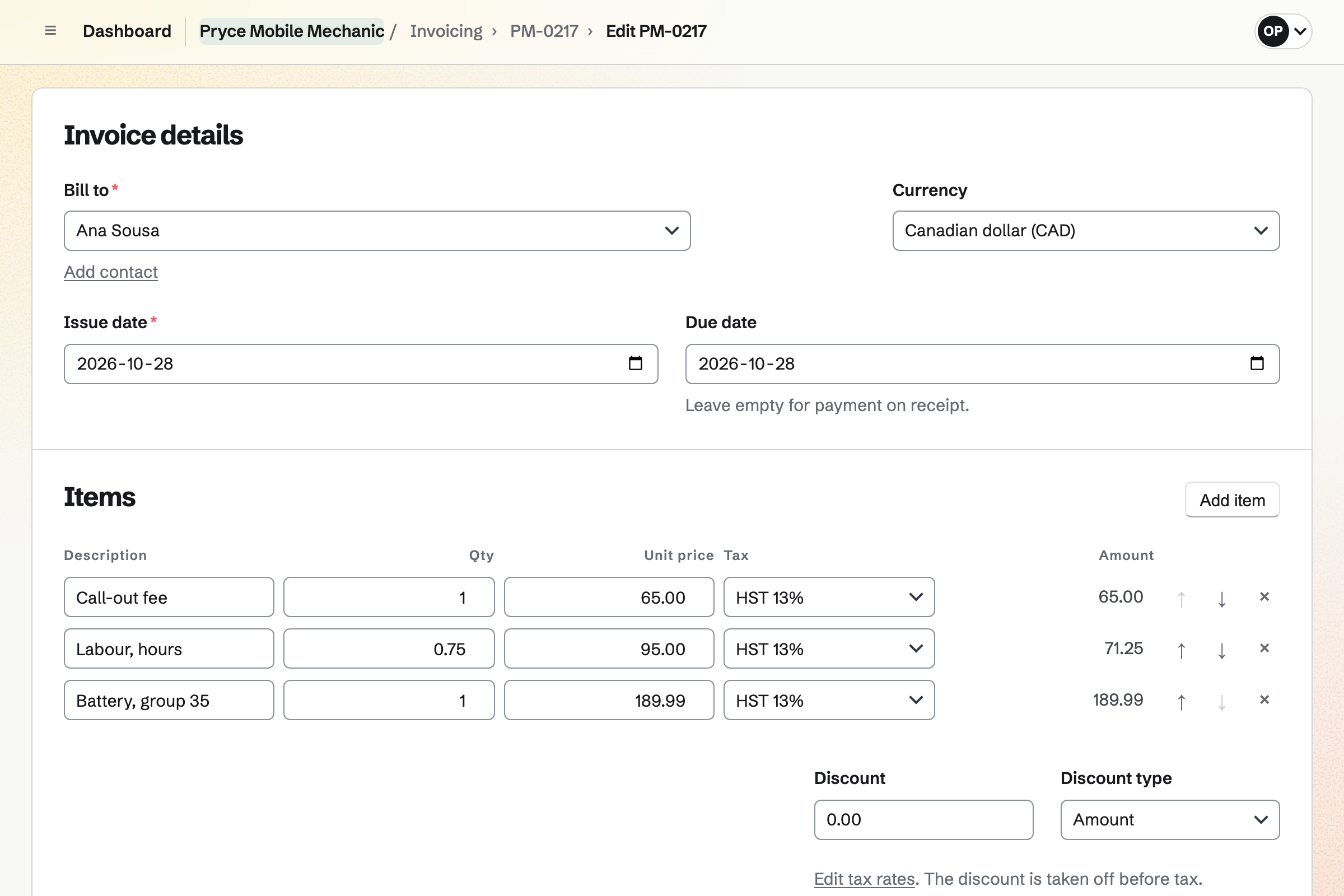
Invoicing bills the customer's contact. Add unbilled expenses puts the parts on as lines, at the amount on each receipt. The call-out fee and the labour are lines too, each with your tax rate.
Sending it emails the PDF with a Pay online button. You can also text its payment link, and the customer pays by card on the driveway. Cash is recorded by hand, and Magpie adds no fee.
A fleet or a small business can have 30-day terms on its contact. Its invoices will be due 30 days after you send them. Reminders go out until each is paid.
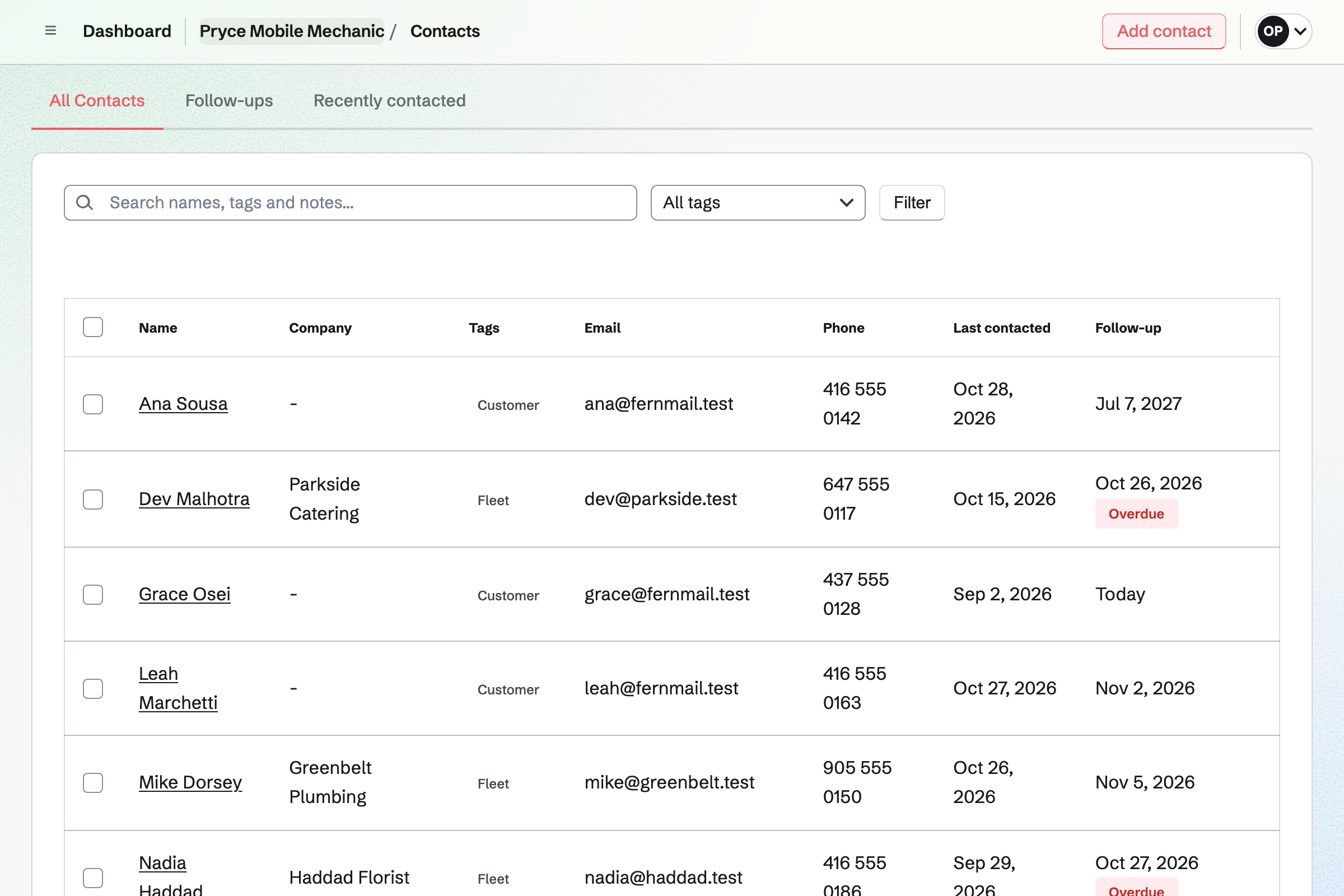
Contacts keeps each customer with their address. A pinned note holds their cars: the make, the plate and the mileage last time. Their page lists every booking, quote and invoice. Search finds a plate written in a note.
A fleet is a contact under its company name, with its vans in a pinned note. A follow-up is a To-do with a date, such as a service due in six months. Follow-ups lists every open one.
Asset Tracker keeps each piece of kit by its tag, serial number and condition. The scanner, the trolley jack and the van are three records. Photos, receipts and the warranty date are kept on each one's page.
Start maintenance records the scanner away for repair, with the date it is due back. Its history lists every repair, with what was done and when.
The parts and the hours reach the invoice without being typed again.
The customer sends the plate, the fault and a photo of the dash on your Form.
You book a diagnostic visit when they call, with the address in its notes. The booking adds them to your contacts.
You buy a battery and photograph the receipt, marked for that customer.
A timer runs while you fit it, at your labour rate.
The call-out fee, the hours and the battery are its lines. The customer pays by card from the link.
A follow-up on their contact reminds you when the car is due a service.
You choose Home services, add your services with their prices and set a buffer to drive. Help: Set up Appointments.
You add questions for the plate, the fault and a photo, then publish the Form. Help: Build, publish, and share a form.
You add them to the price list, with the parts you quote most often. Help: Proposal starters, saved sections and the price list.
You add each with their address, their cars in a note and a fleet's terms. Help: Keep a contact list.
You connect your Stripe account, so customers can pay by card. Help: Connect Stripe to receive money.
A mechanic working alone fits Pro, for your own work in Personal. The free plan creates 5 invoices and sends 5 proposals a month, with up to 100 contacts. Pro has no limit. Asset Tracker and Inventory are on every plan.
Magpie adds no fee to invoices or deposits. Stripe's processing fee is taken from each card payment. Prices are on the Pricing page.
A garage with bays books cars into the workshop and keeps parts on the shelves.
A mobile detailer books details at the customer's address and quotes coatings with a deposit.
Plumbers and electricians take job requests with photos, quote online and are paid on site.
A bike shop books services and repairs, sells bikes online and hires out a fleet.
Yes. Your booking page lists your services with their length and price. A customer picks a day and a time your hours leave free. They enter a name and an email address, without signing up first. They get a confirmation email with a link to move or cancel.
Yes. Each service has its own length and price. A diagnostic visit can take an hour, and a full service three. A service can be switched off for a while without losing its bookings.
Yes. A service's location can say that you come to the car. Your job request asks where the car will be. The address is kept on the customer's contact. A buffer after each booking keeps time free to drive to the next one.
Yes. New appointment books a service for a customer who calls. It follows the same hours and rules as the booking page. The internal notes can hold the address and the plate. The customer gets the same confirmation email.
Yes. A time is offered only when your calendar is free. An event you put in Calendar, or answered Going to, takes that time off the page. A minimum notice stops a booking for the next hour.
Yes. Your job request Form asks for the plate, the mileage and what the car is doing. A File question takes a photo of the warning light or the leak, up to 10 MB. Each request is emailed to you as it arrives.
You send a proposal with a line for each part, the labour and the call-out fee. The customer opens it from their own link. It opens in a free Magpie account made for their email address. They sign on the page with a finger or a mouse. You see when they open it.
Yes. A quote can offer 2 to 4 packages, such as pads alone or a full brake job. One can be marked Recommended. Recommended work, such as a brake fluid change, can be an optional line they add.
Yes. The quote's payment schedule can start with a deposit, invoiced when the customer accepts. They pay it by card into your own Stripe account. The balance is invoiced when you bill it.
Yes. The call-out fee is a line on the quote or the invoice, with its tax rate. On quotes, it can come from your price list. A booked service's price can include it too.
Yes. You record the parts as an expense with its receipt, marked reimbursable, for that customer. In the invoice editor, Add unbilled expenses lists it. It becomes a line at the amount recorded. It is marked billed when the invoice is issued.
Yes. On a phone, the receipt chooser offers the camera, up to 10 MB a receipt. Receipt Inbox keeps receipts you photograph first and enter later.
Yes. A timer runs on the job, linked to the customer, at your labour rate. It keeps running if you close the browser. Add unbilled time puts the hours on the invoice as a line, priced at that rate.
Yes. Each invoice has a payment link, shown on the invoice's page, so you can text it. The customer pays by card on their own phone. The payment is recorded on the invoice.
Yes. Record payment records cash, a cheque or a bank transfer on the invoice, with the date. It can be part of the balance. The invoice moves to Paid when payments reach its total.
Magpie adds no fee. Stripe's processing fee is taken from each payment. The rest goes to your own Stripe account, and Stripe pays it out to your bank.
Yes. Invoicing has named tax rates, such as HST or VAT, each with a percentage. Each line uses one of them or no tax. A combined rate such as GST + PST shows each tax on its own line.
Yes. A contact tagged Customer has its own payment terms and billing address. Its invoices will be due that many days after they are issued. Reminders go out until each one is paid, and Overdue lists the ones that are late.
Yes. Each invoice has notes, printed on its PDF. They can hold the order number and the van's plate. The fleet manager can also sign the quote first.
Yes. A customer's contact holds their address. A pinned note stays at the top with the make, the plate and the mileage. A fleet's pinned note can list every van.
Yes. The customer's page lists every booking, quote and invoice, newest first. Each invoice opens with its lines, parts and labour. Notes record the mileage and what you found, and search finds a plate written in one.
Yes. A follow-up on the contact has a date and a reason, such as a service due. It is a To-do with the usual reminders. Follow-ups lists every open one as Overdue, Today or Upcoming.
Yes. Asset Tracker keeps each tool with its tag, serial number and condition. Its receipt, manual and warranty date are on its page. Start maintenance records it away for repair, with the date it is due back.
Yes. Inventory can keep the van's stock apart from what is at home. Oil is counted in litres and filters one by one. An item below its minimum is listed to reorder. Magpie can email the order to your supplier.
Yes. A dynamic QR code opens any web address, such as your job request or booking page. You can point it somewhere else after the van is lettered. Its page counts the scans.
Yes. Accounting adds each invoice, each payment and Stripe's fee to the books. Each expense goes to the account its category chooses. Bank statements come in as CSV files to reconcile.
Create a Magpie account and build your job request.