Founders before the product (incorporating, raising, hiring)
Founders before the product send SAFEs to investors and share the deck by link. They also track the investors to follow up with.
Software startups and small product teams
You, your engineers and your designers work in one Magpie team. Contractors join as guests.
Get started free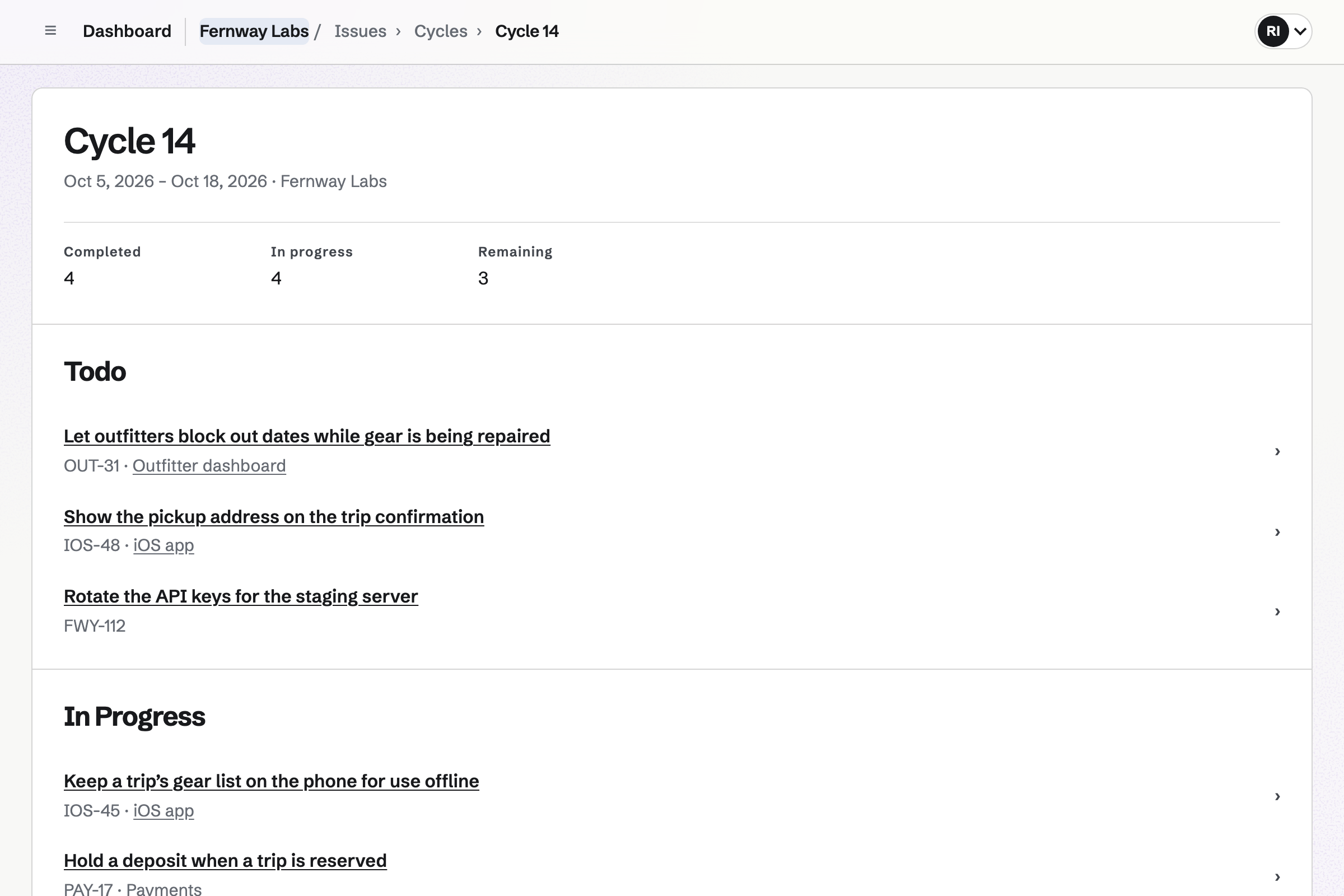
Issues tracks the product's bugs and backlog, with the statuses and custom fields you set. You plan sprints as one-week or two-week cycles, or dates you choose. A project groups its issues with milestones and a target date on the Roadmap.
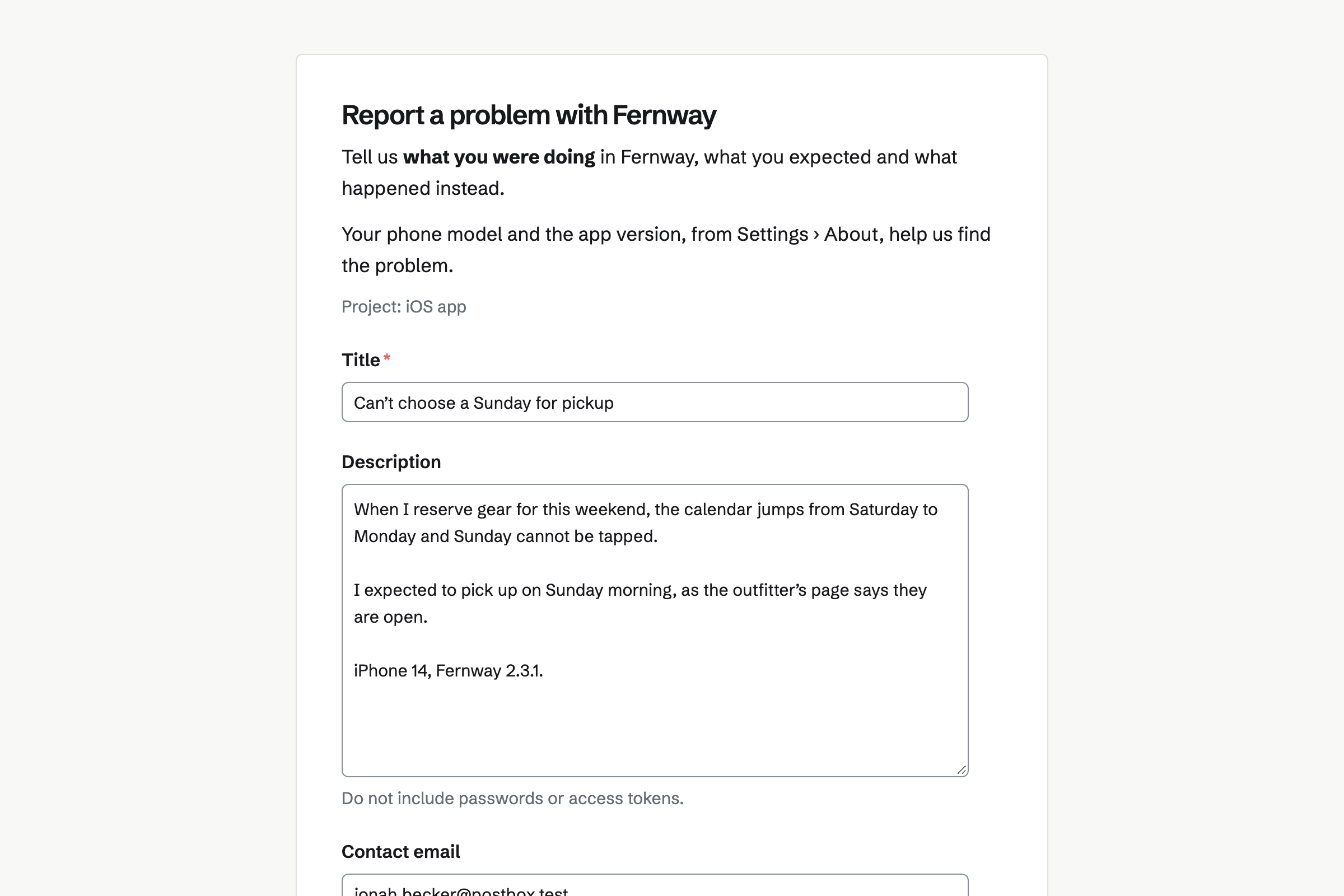
Customers can report a bug on a public form, without signing up first. Each report waits in Triage until you accept it, cancel it or mark it a duplicate.
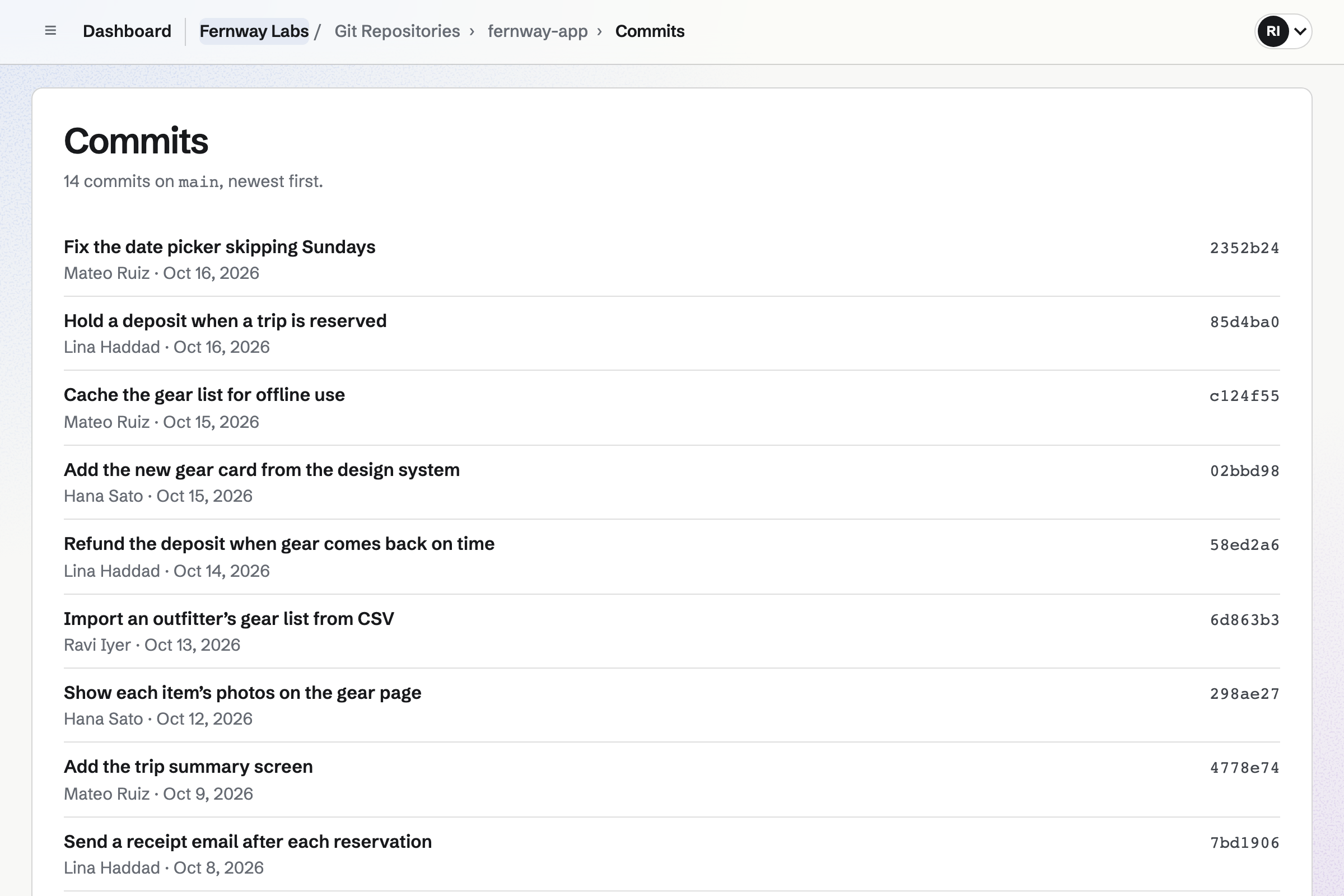
Git Repositories hosts the product's code in private repositories. Your engineers clone and push over HTTPS, with an access token as the password. Each repository's page shows the files on main, the README and the commit history.
You choose whether your engineers get write access or read-only access. A contractor can join as a guest who uses the team's repositories and nothing else.
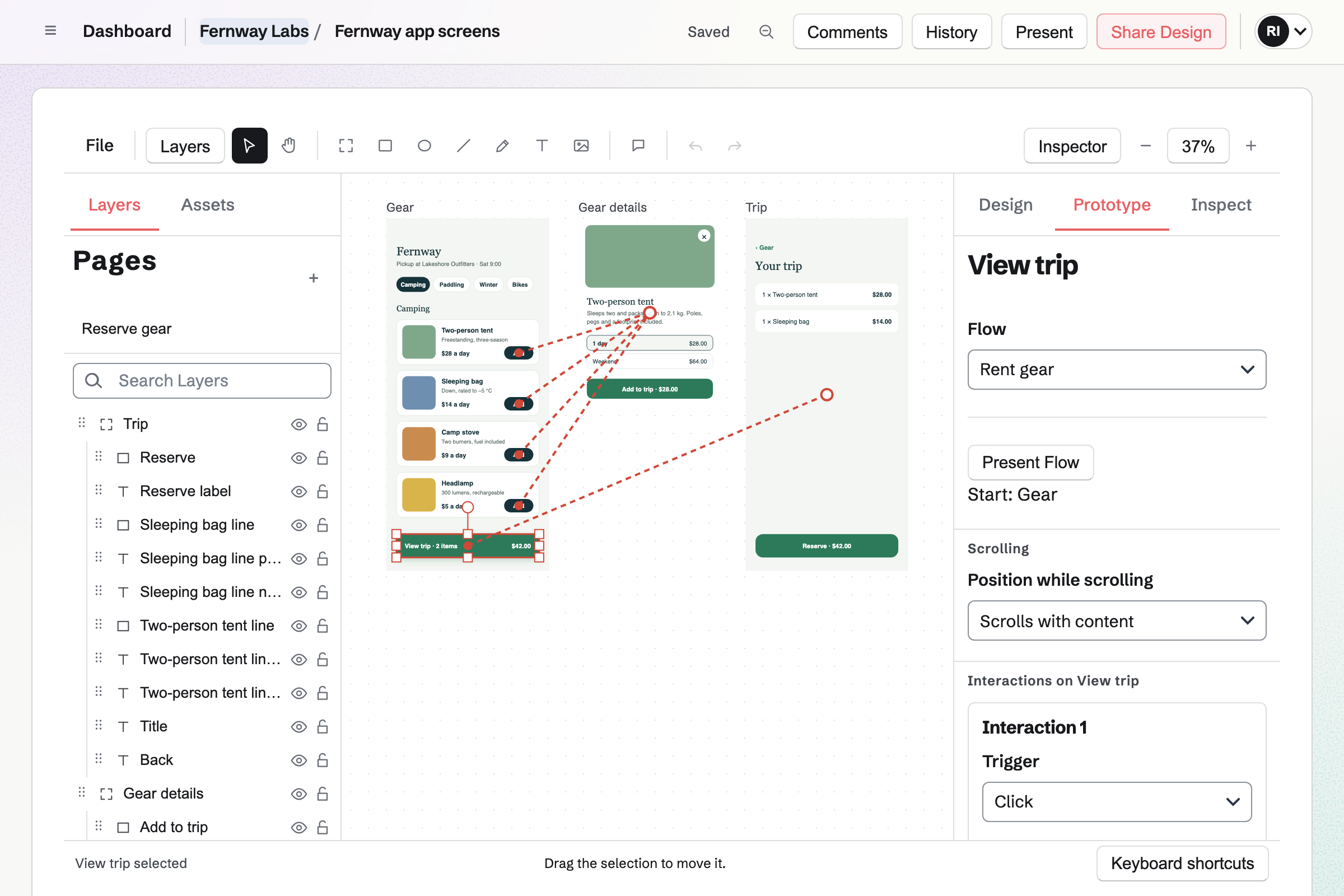
Design Canvas lays out the product's screens, with Auto Layout. Components, Variants and Variables keep buttons and fields consistent. You can publish them as a Library for the team's other Design files. Variables can have modes such as light and dark.
Your designer can link the screens into a clickable prototype. Anyone can open its link without signing in. Developers can copy a layer's CSS. A layer's handoff notes can mark it Ready for development, with an implementation path.
Design System documents your design rules for your coding assistant. You run Magpie's prompt with your assistant in the repository, then upload what it writes. Tokens, components and rules the code states are added as approved. Conventions inferred from codebase patterns wait for your review.
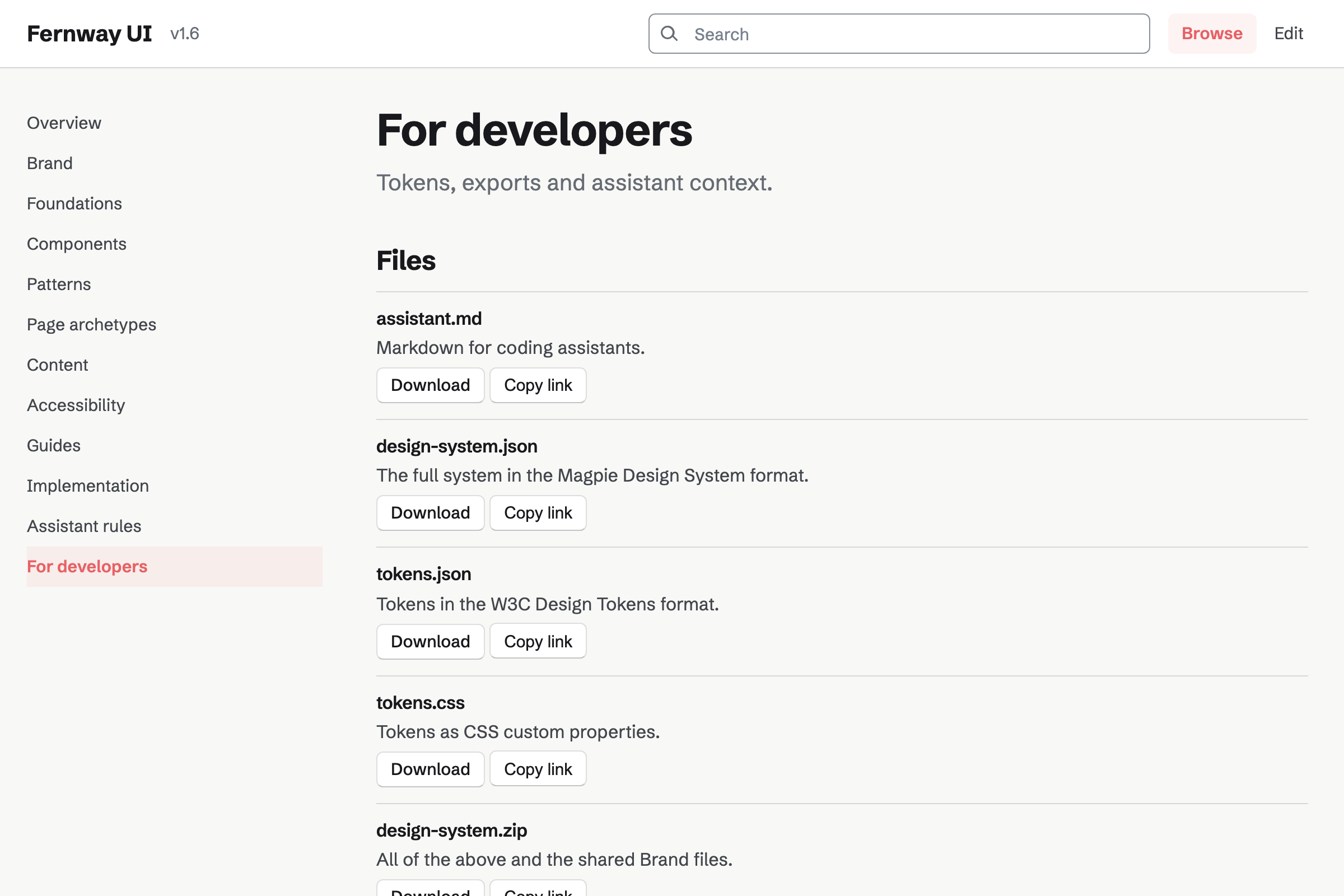
Magpie exports the system as DESIGN_SYSTEM.md, with critical rules first, tokens.json and tokens.css. It gives you a section to paste into AGENTS.md or CLAUDE.md. An unlisted or public system serves its current Markdown at a stable address.
Documents holds the product's specs and RFCs, with headings, tables and code blocks. You can import and export them as DOCX, Markdown or HTML. You can save named versions, such as Before review.
Teammates comment on selected text and suggest new wording. The text changes only when an editor accepts it. You can share one document with a customer or an advisor, who can open nothing else. A link can also let anyone read it without signing in.
Hiring handles the job posts, candidates and interviews. An engineering role will have its own page and application form on your job board. Job search engines read its details. Applicants need no account, and their resumes are stored privately for the team.
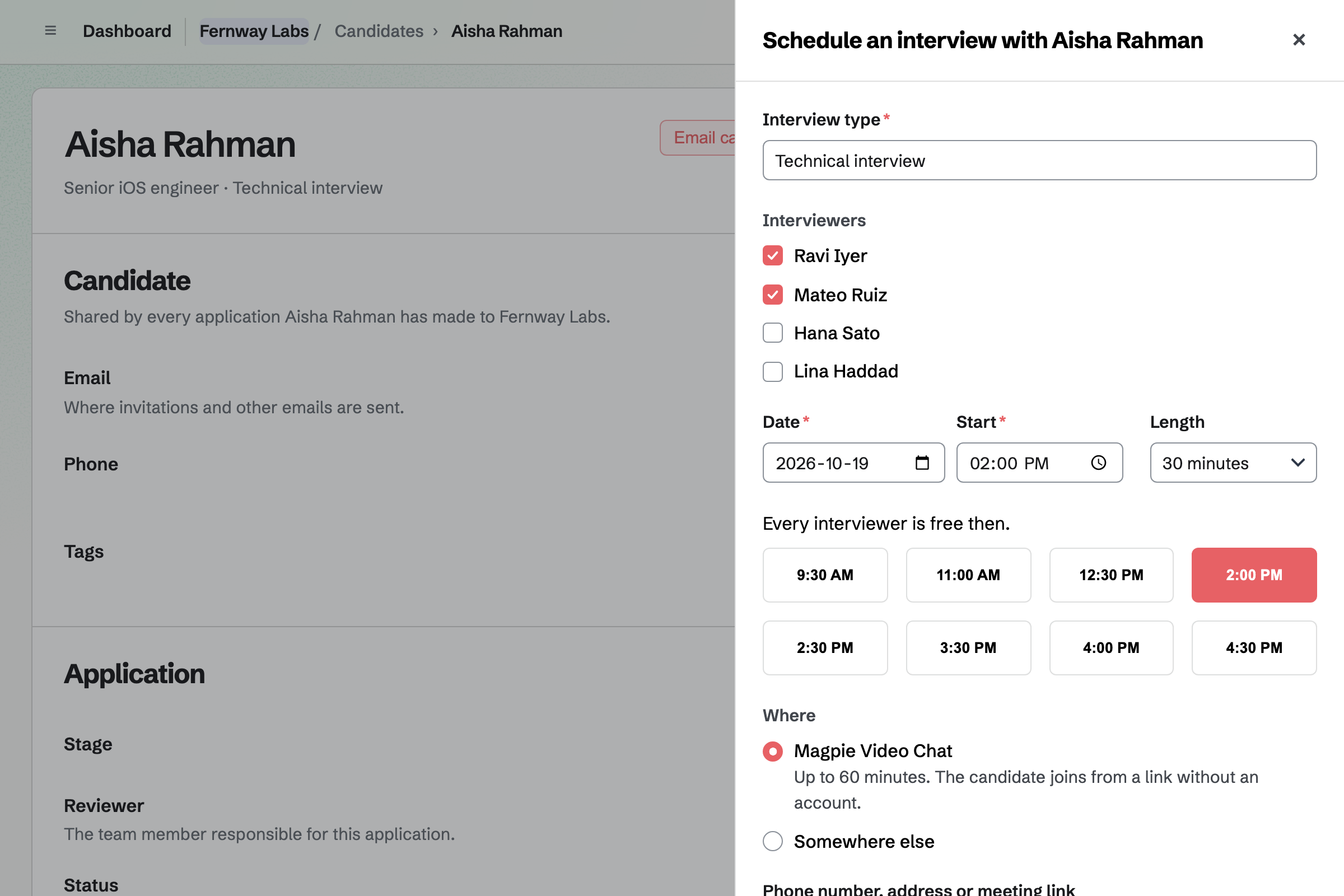
You move candidates through each role's pipeline. Magpie lists the times when every interviewer is free, from their calendars. Interviewers submit scorecards before they see each other's. A candidate gets a rejection email only when you choose to send one.
Agreements gives you standard agreements, copied word for word from their publishers. Its Library has Y Combinator's post-money SAFEs, mutual NDAs and Common Paper's cloud service agreement. You answer an agreement's questions, and its text fills in as you go.
Sending an agreement for signature makes a PDF, and E-Signatures sends each party their own link. Signers need no Magpie account. Magpie is not a law firm. A lawyer should review an agreement before anyone signs it.
The customer fills in the public form: a title, what happened and an optional contact email. They need no Magpie account, and see none of your issues.
An automation rule can make each report from the public form High priority.
You accept it, cancel it or mark it a duplicate of an issue such as MAG-123. The review is recorded on the issue.
You give it an assignee and put it in the current cycle. The cycle's page counts it as remaining until work starts.
When it moves to a completed status, it counts toward its cycle, project and milestone. The Roadmap shows the project's progress.
A webhook can send issue.created to your own tools when the report arrives. It can send issue.completed when the work is done. Each event is signed with the webhook's secret.
You create a team and invite the people building the product. Contractors join as guests. Help: Create and manage a team.
You upload GitHub issues saved with GitHub CLI, or a CSV file from another tracker. One import takes up to 200 issues. Help: Import and export issues.
You create a repository and an access token, then push your project with its commits. Help: Clone and push with a token or SSH key.
You turn on cycle planning and set the team's statuses. Help: Plan issues in cycles.
You write the first job, and publish it when you are hiring. Help: Create a job and publish its page.
A product team fits the Team plan, one price for the team. It has 25 member places, 100 guests and mailboxes at your domain. Guests take no member place. Every Team chat message is kept, and interviews can use Video Chat.
A free team has 3 member places and 10 guests. It has 5 Team chat channels, and each shows its 2,000 most recent messages.
Pro, for one person, adds API keys. It raises the longest screen recording from 3 to 30 minutes.
Founders before the product send SAFEs to investors and share the deck by link. They also track the investors to follow up with.
An agency builds for clients, with a proposal and a client portal for each one. It tracks billable hours and invoices retainers.
An indie developer sells their own software with licence keys. They publish a docs site from the repository, and have supporters and a newsletter.
A team of ten to fifteen inside a larger company shares boards, documents and spreadsheets. It has a team calendar and rooms to book.
A remote team works across time zones, in Team chat, documents and boards. It sends voice messages with Walkie Talkie.
You upload a repository's issues, saved as JSON with GitHub CLI. Titles, descriptions, labels, the first assignee and open or closed state come in. Each GitHub number is kept as the Original ID. From another tracker, you upload a CSV file and choose the column for each field. One import creates up to 200 issues, and checks every row before creating any.
Yes. You link a GitHub repository to a project. Each of the project's issues then has a Development section. It suggests a branch name made from the issue's identifier and title. It lists the pull requests and commits you add to the issue by their GitHub address.
Yes. You create a repository and push your project over HTTPS, with its commits, branches and tags. An access token is the password. Anyone who can read the repository can clone it with ordinary Git. A token follows its account, so someone who leaves the team can no longer push.
Yes. You invite them to the team as a guest with Git Repositories. They use the team's repositories with the access your members have. They see none of the team's other areas. You can also let them into one Team chat channel.
Yes, through a public form with your own instructions and an optional project for its reports. Customers give a title, what happened and an optional contact email. Only members who can edit issues see that email. Each report waits in Triage. A connection that sends many reports has to wait before it can send more.
Yes. The REST API lists, reads, creates and updates issues, and lists and adds their comments. It uses an API key, which acts as the person who made it. You can add webhooks that send signed issue, comment and project events to an HTTPS address. Each event gets up to 5 attempts, all with the same event ID.
Yes, once you turn on cycle planning. A cycle is one week, two weeks or custom dates, and cycles do not overlap. A cycle's page counts its issues as Completed, In progress and Remaining. You can carry unfinished issues over to the next cycle together. Whatever your statuses are called, their category decides what counts as completed.
Yes. Presenting a prototype makes a link to it as it is at that moment. Anyone can open the link in a browser without signing in. It shows only the screens the prototype reaches, not the file's comments or history. The link keeps showing the prototype as it was, so you present it again after changes.
You export DESIGN_SYSTEM.md at Compact, Standard or Complete detail. It puts critical rules first and names each component's source file. You paste the section the Export page gives into AGENTS.md or CLAUDE.md. An unlisted or public system can also share its For developers section. Its current Markdown is then served at its address followed by /assistant.md.
You start one of Y Combinator's post-money SAFEs, with a valuation cap, a discount or MFN. You answer its questions and send it for signature. The company's officer and the investor each sign through their own link, without signing up first. The next investor's SAFE starts with your company's answers. A lawyer should review it first.
Yes. Agreements has mutual NDAs from Common Paper, Bonterms and oneNDA, and Papertrail's short NDA. You fill in the parties and the purpose. E-Signatures will send each party a link to sign. When the last one signs, everyone will get the signed PDF and a certificate of completion.
A job page that takes applications includes the details search engines read for job search. Google for Jobs is one of them. The details are the title, description, employment type, location, remote work, salary and closing date. Sharing a job starts a Social Media post with its title and address.
Magpie Video Chat creates a call with places for 6 people. The candidate joins from the link in their invitation, without signing up first. Magpie lists the start times when every interviewer is free. The interview will be added to the team's Calendar. You can enter a phone number or another meeting link instead.
Yes. A files website can take its files from one of the team's repositories. Each push to its branch will publish it again. A repository with a content/ folder is built into pages from Markdown and Twig templates. The site gets a sitemap and a feed, and you can put it at your domain.
You share the document with them by handle, with Can review. They will join as a guest who can open that document and nothing else. They comment on selected text and suggest new wording. The text changes only when an editor accepts it. You can also turn on a link anyone can read without signing in.
Meetings gives each person a meeting page with Meeting types. It offers only the times their schedule and a connected Google Calendar leave free. Visitors see them in their own time zone. Each meeting can get a Zoom call or a Google Meet link. Slack can post new, moved and cancelled meetings to a channel.
Screen Recorder records a screen, a window or a tab, with your camera in a bubble. It can scroll a script from a document on a teleprompter. You can cut parts out, then share a page anyone with the link can watch. The page has a transcript and link buttons. Analytics counts the views and how far people watched.
Yes. Mail adds mailboxes and aliases at your domain. An alias such as support@ can deliver to the people who answer it. You add records at your current DNS provider, or move the domain's DNS to Magpie. A team mailbox opens for every member, with the same folders and read status.
Yes. You can clone any repository with its whole history. Your issues export as CSV or JSON, with comments and activity. Documents export as DOCX, Markdown or HTML, and Design files as SVG, PNG or PDF. A Design System exports as design-system.json, with tokens.json and tokens.css.
Create a Magpie account and make a team for the product.