Courses
Magpie hosts your online courses and sells them from a school of your own.
Courses is Magpie's area for building a course and teaching it. A course is modules of lessons: videos you host, text, files, quizzes, assignments you review and live sessions. You publish it on your school and run it at each student’s pace or in cohorts. You sell it through your Store.
Create account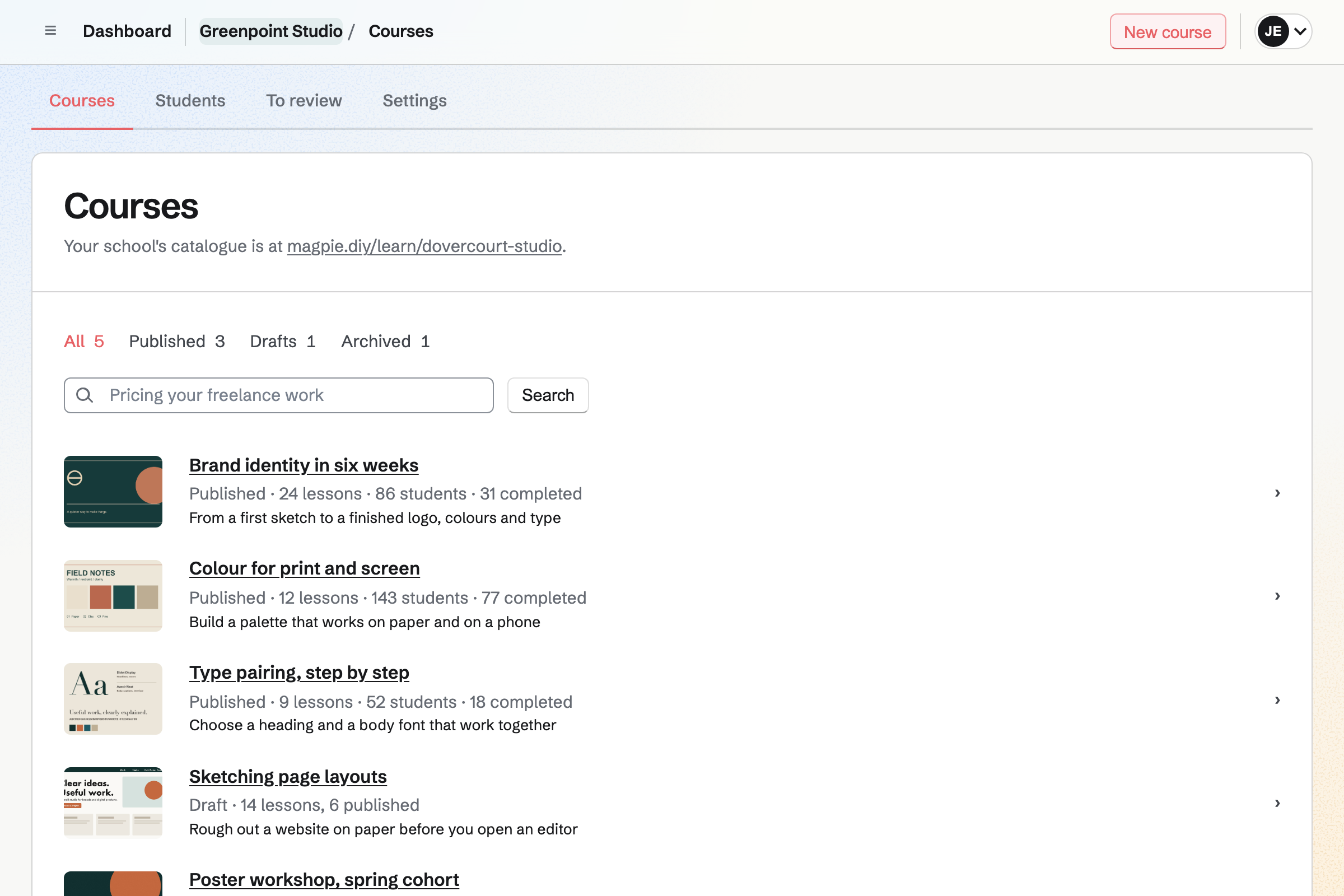
A lesson is a video you host, text and files, a quiz, an assignment or a live session.
- Video and audio
- You upload a video of up to 8 GB and 4 hours, or use a Screen Recorder recording. Magpie makes it play in any browser. Students resume where they stopped, and nobody is given a download button. Captions go in up to 10 languages, with a transcript under the video.
- Text and files
- Lesson text is written in Magpie’s Notes editor, with pictures. Up to 20 files go under a lesson, of up to 250 MB each. Only students with access can download them.
- Quizzes
- Questions with one answer, several, true or false, or a short typed answer. Each has points and an explanation. A quiz has a pass mark, a number of attempts and shuffled questions. It has a time limit if you want one.
- Assignments
- Students submit text or files by a due date. You approve each one or ask for changes with feedback, and every version is kept. The next lesson can wait until the assignment is approved.
- Live sessions
- A lesson at a set time, on Zoom, in a Magpie video call or at any address. Students get a calendar invitation and reminders. You tick who attended, and the recording becomes the lesson’s video.
- Free previews
- Any lesson can be a free preview. Anyone opens it from the course page without enrolling, video included.
Lessons open at once, by the day or on a date. Students keep access for as long as you say.
A module or a lesson opens at once or on a date. Or it opens a number of days after each student enrols. Lessons in order holds each lesson until the one before it is done. A locked lesson shows its title and when it opens.
An email tells students when lessons open, and it can carry the lesson itself. A course can be taken by email. A video lesson can complete once nearly all of it is watched. Otherwise students mark each lesson done.
Access has no end, or ends a number of days after enrolment or after the cohort. Students keep their progress, notes and certificate when it ends.
A paid course is a product in your Store, and Magpie takes 4% of the sale.
Sell this course makes a Store product from the course’s title, description and cover. It is sold with Store’s checkout, orders, discount codes and gift cards. The money goes into your own Stripe account. Magpie takes 4% of each sale, and Stripe takes its processing fee.
A course can be paid in monthly instalments, from 2 to 12 payments. Access pauses when a payment is missed and returns when it is paid. A course can also be free, need your approval, or come with a Supporters tier.
A full refund of an order ends its course access at once. Ending someone’s access yourself never refunds anything by itself.
A course runs at each student’s pace, or in cohorts that start together.
A cohort has a start date, an end date, a number of seats and an enrolment window. Up to 200 can run on one course. Each published cohort is a choice on the Store product, with its seats as the stock. When it is full, people join a waiting list.
Live sessions and assignments are dated from the cohort’s first day. Each cohort has a discussion of its own. Announcements go to one cohort or to everyone. Changing a cohort’s start moves everything with it, and the students are emailed.
Every student has a Magpie account, made for them with nothing to fill in.
A student enrols with their name and email, and signs in afterwards with an emailed link. There is no password. One account holds their courses at every school on Magpie, with Continue on each. You can add students yourself from a pasted list or a file.
A student’s page shows their progress, answers and submissions. From it you move their cohort, extend their access or end it. The report shows enrolments, quiz scores, assignments and sales, each as a CSV. It also shows where students stop watching each video.
Students talk under each lesson and on the course’s discussion. You can hold comments for approval. A certificate on completion has a code anyone can check, a PDF and an Add to LinkedIn button.
Your school is the public home of your courses, with your name, logo and colours.
The school opens when your first course is published, at an address you choose. It lists your published courses. Each course has a page with its description and what students will learn. It has a promotional video, questions and answers, and the instructors.
The school takes your logo, a colour and fonts, or a Design System’s Brand Kit. Course emails are sent as your school via Magpie. A domain you own, such as learn.example.com, can show the catalogue and course pages.
Plans
Courses is on every plan. The Free plan publishes 1 course with up to 50 students. Pro and the Team plan have no limit on either. A paid order is never refused because of the limit. Videos and files count toward your storage.
Questions
Does Magpie host my videos, or do I need another service?
Magpie hosts them. You upload a video of up to 8 GB and 4 hours, or pick a Screen Recorder recording. Magpie makes it play in any browser. Students resume where they stopped and get no download button. A video on YouTube, Vimeo, Loom or Wistia can be used too. Magpie cannot then resume it or count what was watched.
How quickly can I build a course?
New course asks for a title and makes a draft with its first module. Lessons are added in the outline and dragged into order. You can also paste a whole course as a document, with its modules, lessons, quizzes and assignments. Copy the prompt gives an assistant the format to write it from your own material. Videos and files are added afterwards.
Can I charge in instalments, or bundle courses?
Yes. A payment plan takes 2 to 12 monthly payments by card. Access pauses if a payment is missed. A self-paced course can go in a Store bundle with other products. Discount codes and gift cards work at checkout.
Can I drip lessons week by week?
Yes. A module or a lesson opens a number of days after each student enrols. In a cohort, it counts from the first day. An email at 9:00 am in the student’s own time zone says what opened. It can carry the lesson’s text.
Can I teach live?
Yes. A live session is a kind of lesson with a time and a place. The place is Zoom through your connected account, or any address. On Pro and the Team plan it can be a video call on Magpie for a small group. Students get calendar invitations and reminders. The recording you add becomes the lesson’s video for anyone who missed it.
Do students need to sign up for Magpie?
A student gets a Magpie account when they enrol. It is made from their name and email, with nothing else to fill in. They sign in with an emailed link. They are not members of your team, and the course opens nothing else of yours. One account holds their courses at every school.
Can I give certificates?
Yes. You can turn on a certificate on completion and choose its design. It is signed with a name, a title and a signature image. Each certificate has a code, a page anyone can open to check it, a PDF and Add to LinkedIn. You can issue, revoke or restore one by hand, and set how long it stays valid.
Can students talk to each other and to me?
Yes. Each lesson has comments, and the course has a discussion of posts. In a cohort course, each cohort sees only its own. You can hold comments for approval, and pin, hide or delete them. Announcements are emailed and shown until read.
Can I use my own domain?
Yes, for the catalogue and course pages. A domain you own, such as learn.example.com, shows them with your logo, colour and fonts. Lessons, sign-in and buying stay at your school’s Magpie address. A student signs in once for every school.
Publish your first course.
Create a Magpie account, open Courses and start with a title.