Guías turísticos y empresas de turismo activo
A tour company runs its own departures on a public calendar. Its guests sign waivers, and it keeps track of its boats and bikes.
Travel agents and trip designers
You plan trips in Magpie on your own, or with your fellow advisors in one team. Each client has a private portal, with a plan for every trip they take with you.
Empieza gratis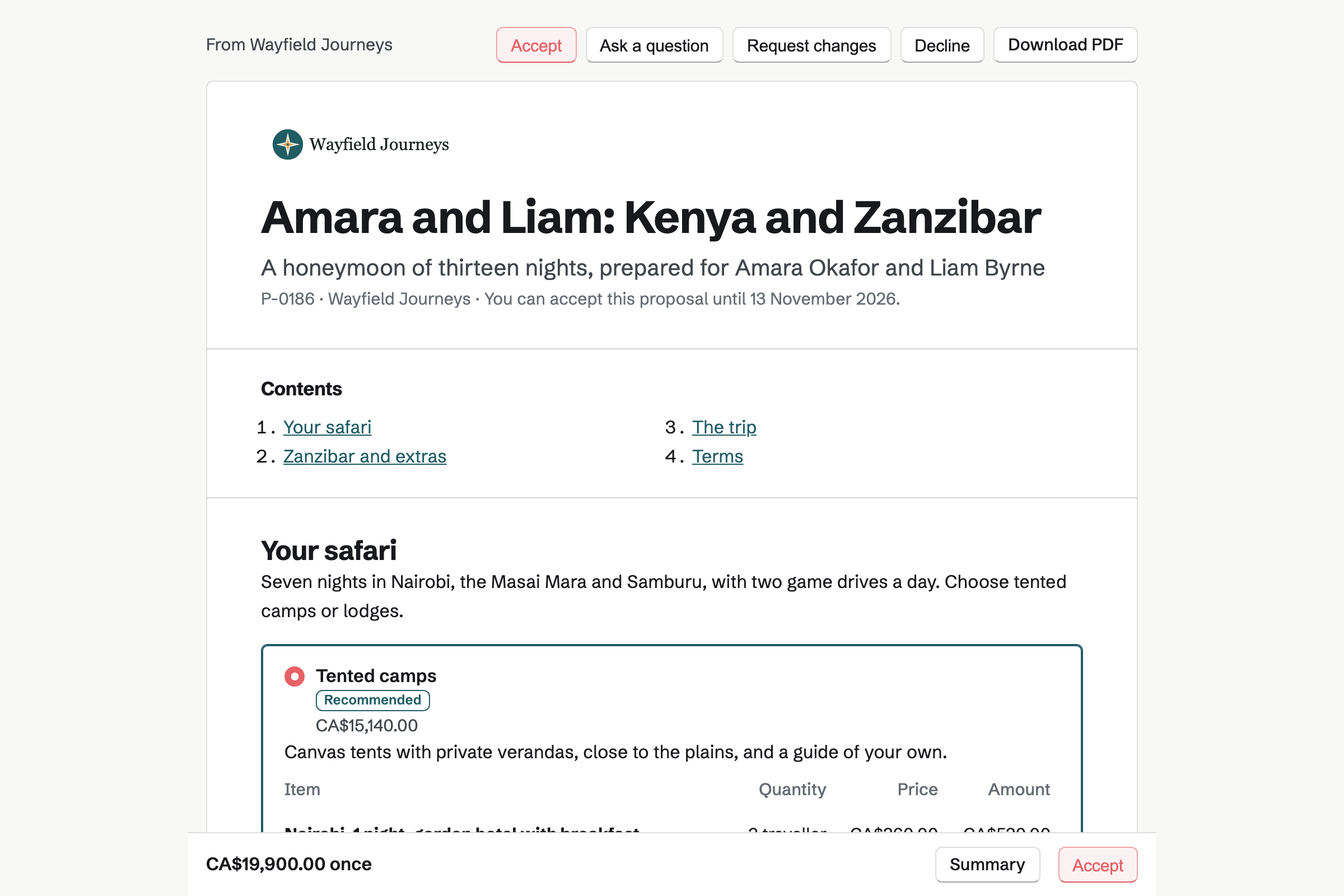
The couple's contact lists the proposal, each invoice and your calls with them as they happen.
The couple answer your enquiry Form with their dates, budget and wish list. Their answers will reach you by email.
They book a call on your meeting page, in their own time zone. With Zoom connected, the booking gets a Zoom call.
You send two versions of the safari, and a balloon flight they can add. Magpie will email you when they first open it.
Both sign on the proposal's page. Magpie will invoice the deposit, and they pay it by card on the same page.
Once the deposit is paid, Magpie can share the proposal and its invoice in their portal. You add the trip's plan, with their steps.
You write the day-by-day itinerary, and they comment on it. Its PDF goes in their portal with the e-tickets and vouchers.
Magpie will invoice the balance on its date, ten weeks before departure, and email it.
Their emails to your help address become conversations the whole team shares. Whoever takes one replies, and the others see who has it.
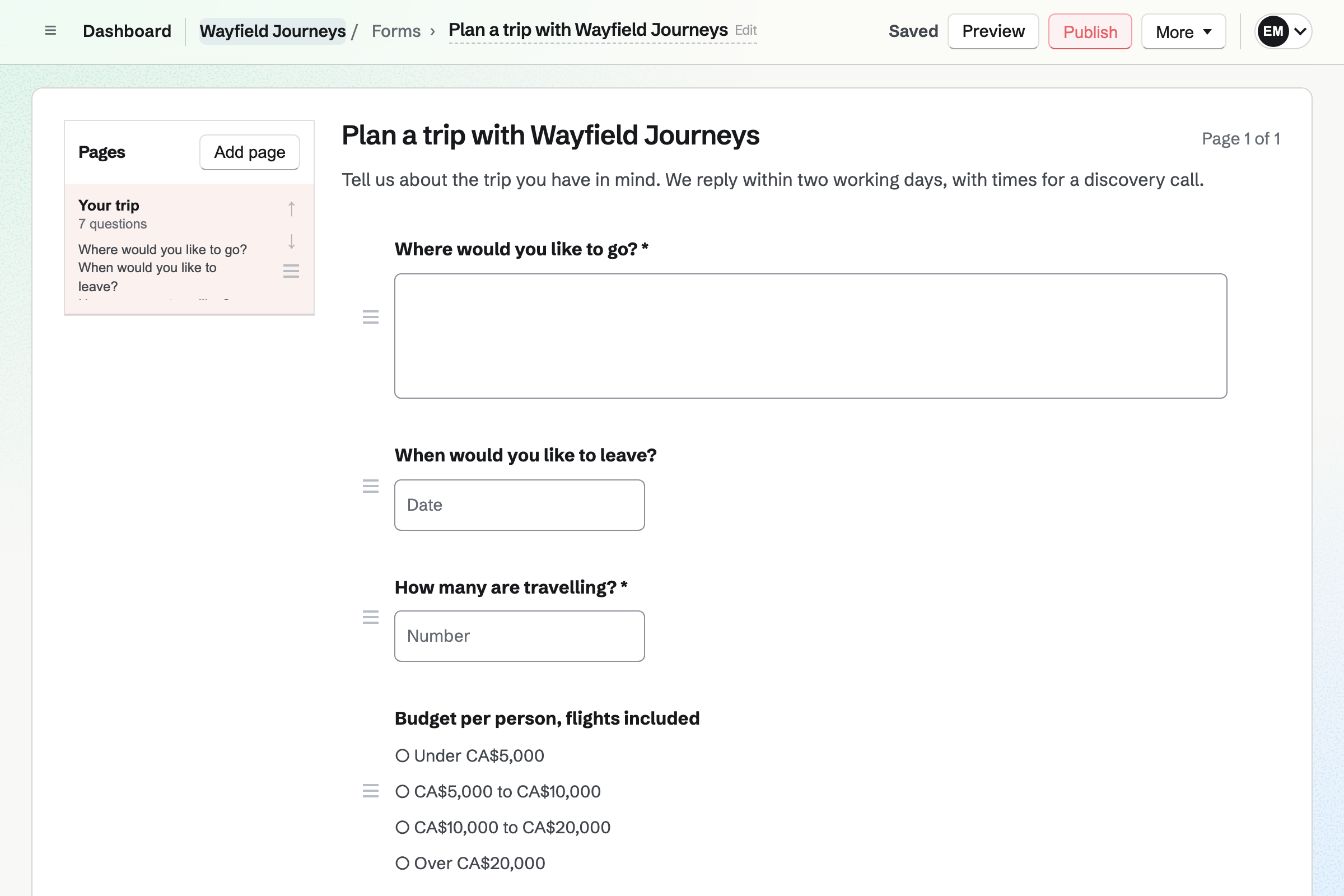
Forms builds your trip enquiry. It can ask where they want to go, when, and the budget per person. A question can appear only when an earlier answer calls for it, such as children's ages.
Clients answer from its link, without signing up first. Magpie will email you each enquiry, and the answers download as a CSV file.
Meetings gives you a meeting page, with calls such as a 30-minute discovery call. It offers only the times your weekly hours leave free. With Google Calendar connected, its busy times are kept off too.
A client planning from abroad sees each time in their own time zone. With Zoom connected, every booking gets its own Zoom call. Shared in their portal, the call has a Join meeting button.
Proposals sends each trip as a proposal, with pictures of where they will stay. A pricing section can offer 2 to 4 packages, such as tented camps or lodges. Extras, such as a balloon flight, are lines the client adds.
Each traveller signs from their own emailed link, and the deposit will be invoiced on acceptance. The balance can fall on a date you choose, such as ten weeks before departure. Magpie will invoice it on that date.
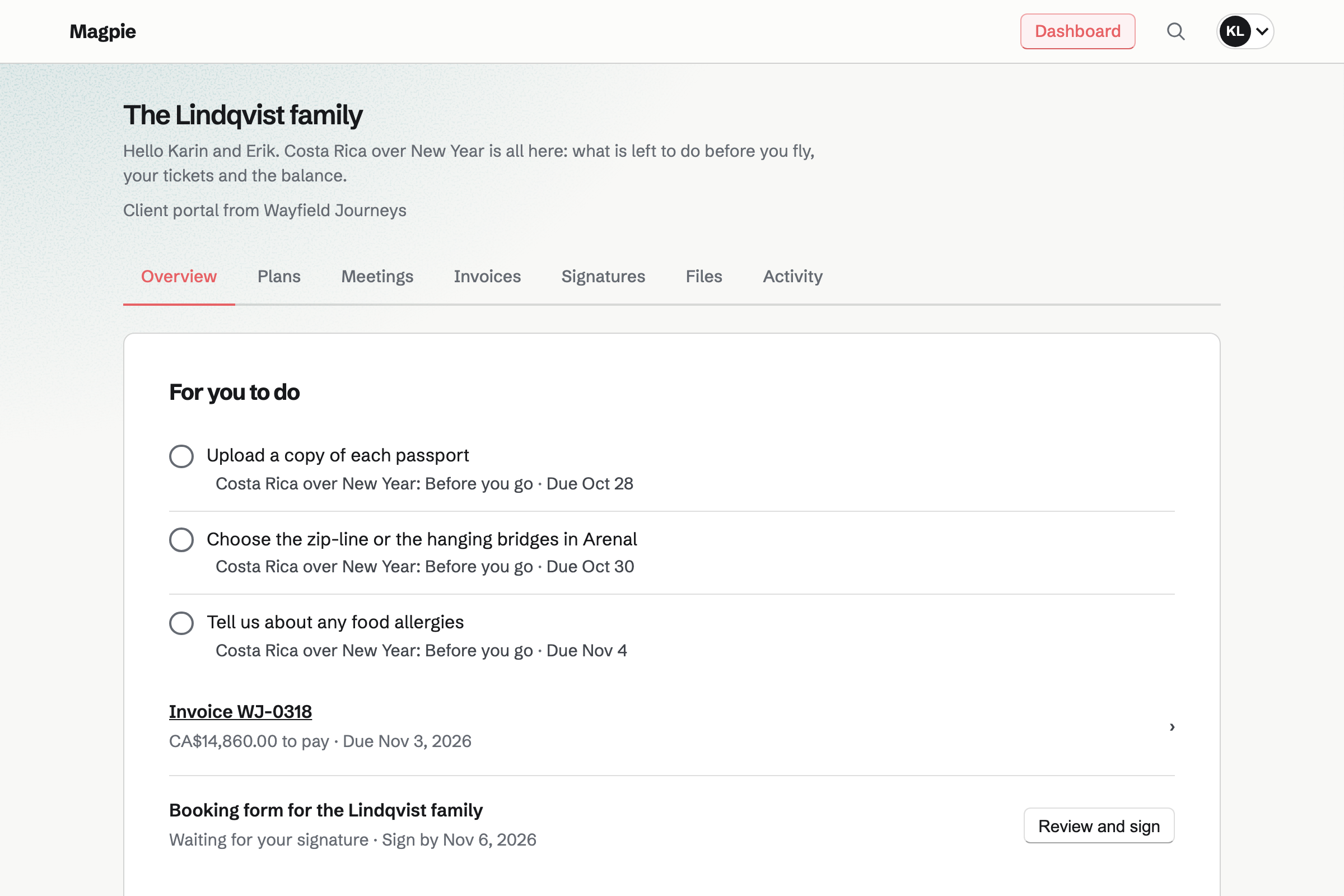
Client Portal gives each client a private page for their trips. A trip's plan has stages, such as booked, before you go and travelling. Each step is for you or for them, such as sending passport copies.
Their Overview lists their open steps first, with any invoice to pay. You share the e-tickets and vouchers in their portal, and they upload what you ask for. A starter plan copies your usual steps to each new trip.
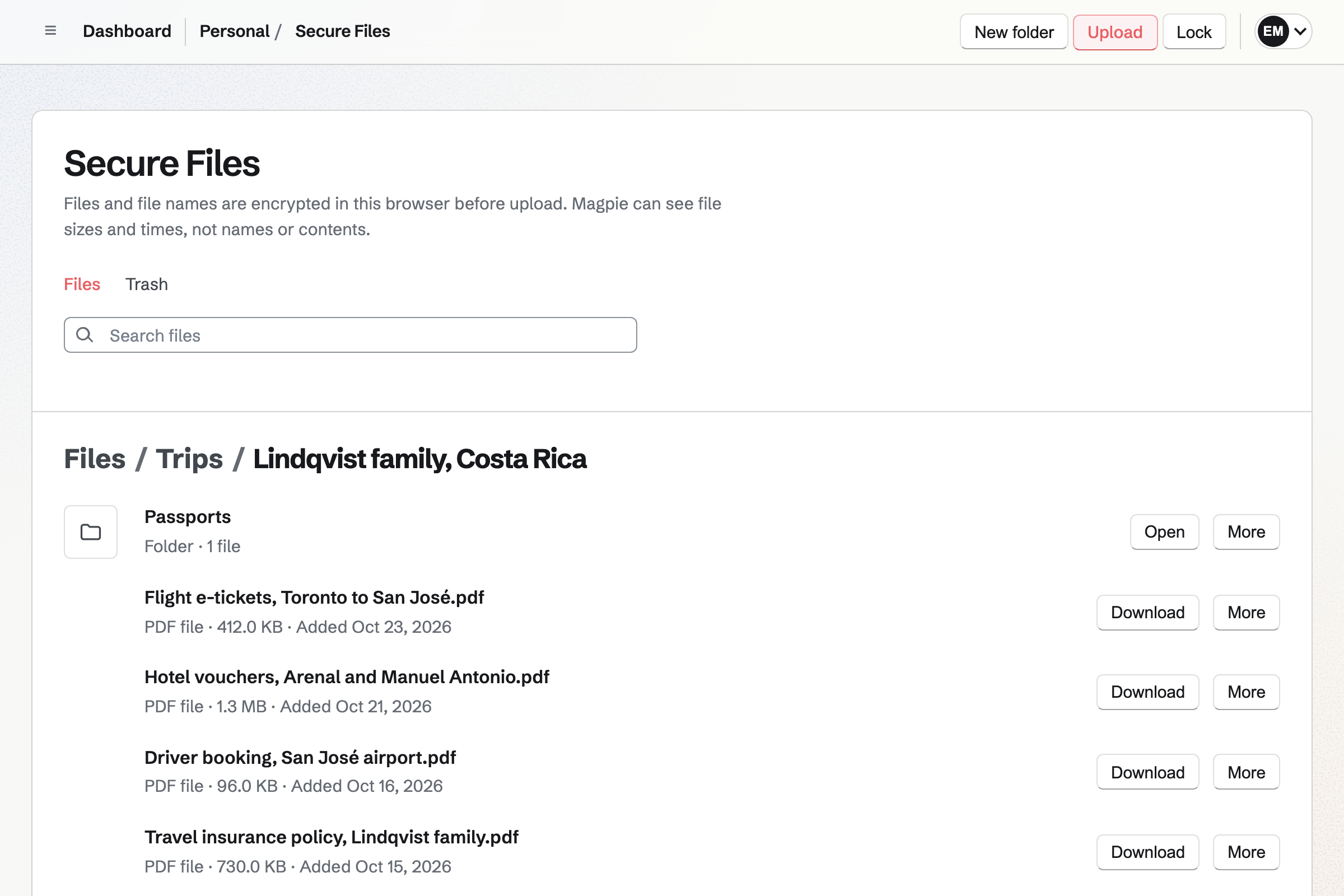
Secure Files encrypts your passport copies and tickets in your browser before upload. Magpie stores only the encrypted files and their encrypted names. The encrypted files belong to your account, not to the team.
A lodge or ground operator that needs a passport copy gets a secure link. The link can allow one download, expire in a day and need a passphrase. Revoking it stops new downloads at once.
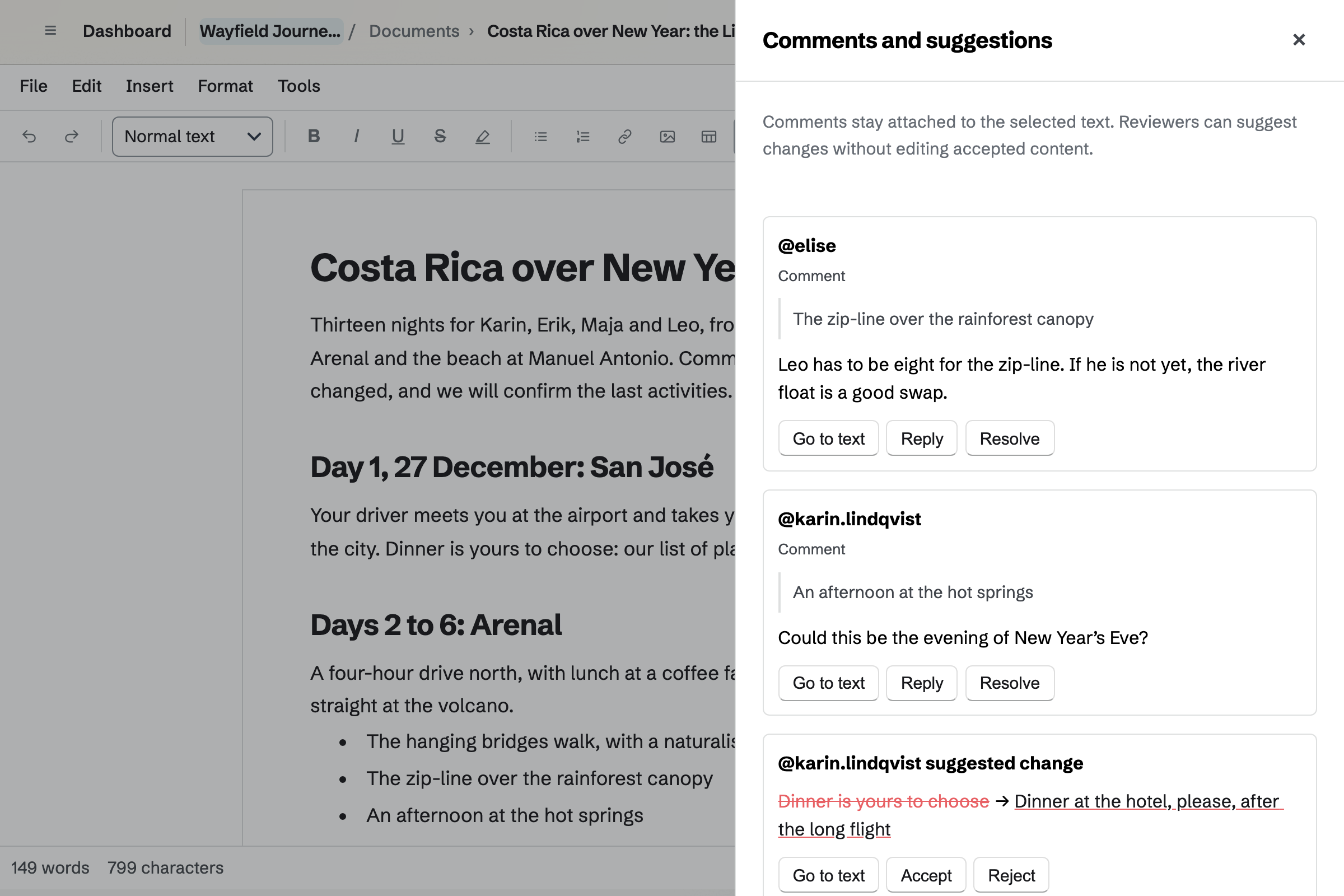
Documents holds the day-by-day itinerary, with a heading for each day, pictures and tables. Download PDF keeps them all, with headers and page numbers. The PDF goes to the travellers in their portal.
With review access, the travellers comment on a day and suggest new wording. Their wording goes in only when you accept it. A named version keeps the itinerary as it was before their review.
Invoicing issues each payment the proposal schedules, as an invoice with your details and a PDF. Travellers pay each one by card, from its email or their portal.
You can turn on reminders for the balance, which stop once it is paid. A bank transfer is recorded by hand, in part or in full.
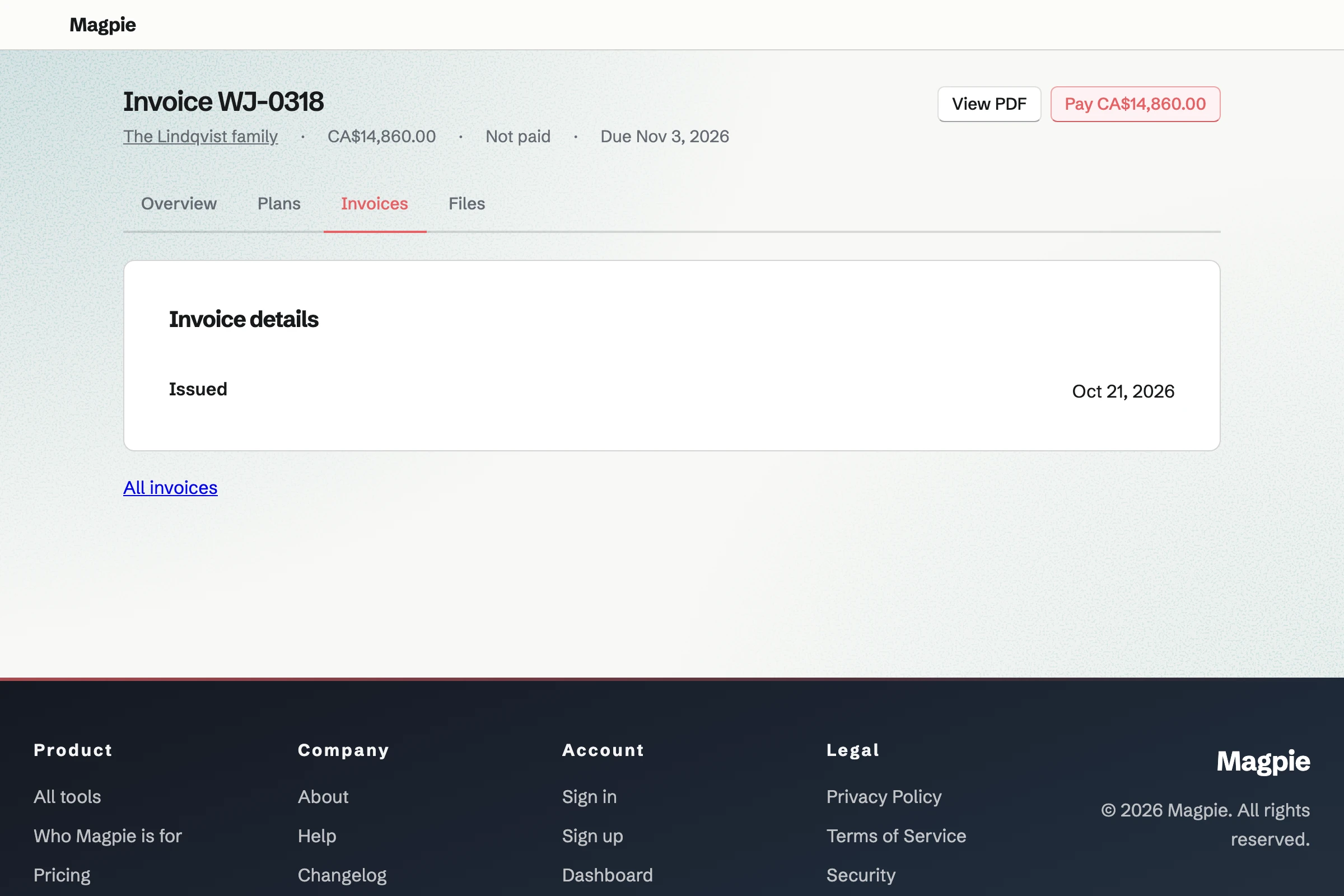
You connect your Stripe account, so clients can pay deposits and balances by card. Help: Connect Stripe to receive money.
You add your questions, then put its link on your website. Help: Build, publish, and share a form.
You set the hours you take calls, and add a 30-minute discovery call. Help: Set up and share your meeting page.
You write one trip the way you send them, with its deposit and balance. Save as starter keeps it for the next one. Help: Proposal starters, saved sections and the price list.
You list the steps every trip has, for you and the travellers, with due dates. Help: Reuse your process with starter plans.
Secure Files uses its key, so you set it up first and keep the recovery key. Help: Password Vault: passwords and private information.
An advisor working alone fits Pro, the paid plan for one person's own work. An agency fits the Team plan: 25 member places at one price, with mailboxes at your domain. Clients in their portals take no member place.
The free plan sends 5 proposals a month. The invoices they make do not count toward its 5 invoices. Travellers who comment on an itinerary join the team as guests. A paid plan has room for 100.
Passport copies and the files you share use your own storage, which Pro raises. Magpie adds no fee to a trip's deposit or balance. Stripe's processing fee comes out of each card payment.
A tour company runs its own departures on a public calendar. Its guests sign waivers, and it keeps track of its boats and bikes.
An event planner works toward one date, with a board of tasks for each wedding. Couples pay in stages before the day.
Friends planning a trip together do it themselves. They share the itinerary, the budget and a group chat.
A B&B or rental host takes stay requests on its own website. Each changeover has a checklist with photos.
Yes. Your enquiry Form asks your questions, such as where, when and the budget per person. A question can show only when an earlier answer calls for it, such as children's ages. Clients answer from its link, without signing up first. Magpie will email you each enquiry.
Yes. Your meeting page offers the calls you choose, such as a 30-minute discovery call. A client in another country picks a free time in their own time zone. Each booking can get a Zoom call, or a Google Meet link through Google Calendar.
Yes. You send an invoice for the planning fee. The client pays it by card from the email. Magpie adds no fee to it, and the money goes to your own Stripe account. You can also put the fee in your proposal, as a line of its own.
Yes. A pricing section can offer 2 to 4 packages, such as tented camps or lodges. Each has its own description and lines, and you mark one as recommended. The client chooses one before accepting, and the totals change as they choose. The totals they accept become the deposit and the balance.
Yes. Each extra is an optional line, in a pricing section of its own. The client adds or removes it on the proposal's page, and the totals change with it. You choose whether each one starts added.
Yes. A line priced per person can let the client set the quantity. You choose the fewest and the most. The totals and every payment follow the number they choose. One proposal can go to up to 20 people, and each can sign or only read it.
Yes. You add each traveller as a signer, such as both newlyweds. Each opens it from their own emailed link and signs, in any order. When the last one signs, the proposal is accepted and a deposit is invoiced. Each of them is emailed the signed PDF and a signing certificate.
Yes. The payment schedule can start with a deposit, as a percentage or an amount. Its invoice will be issued on acceptance, and paid by card on the same page. Magpie adds no fee to the deposit, and Stripe charges its processing fee. A deposit paid by bank transfer is recorded by hand.
Yes. A payment can fall on a date you choose, such as ten weeks before departure. Magpie will issue and email its invoice on that date. As the last payment, the balance takes whatever the deposit left. The client can pay it from the proposal's page.
Yes, once you turn on reminders on its invoice. They go out el día del vencimiento, luego 7 y 14 días después, unless you change the days. Each shows what is still due, with a Pay online button. Once the balance is paid in full, they stop.
Yes. Each proposal has its own currency, which you can change until it is first sent. Its deposit and balance are invoiced in the same currency. In the books, you enter what each one was worth in your own currency.
Yes. Valid until is the last day the proposal can be accepted. After it, the client's page says it has expired. It offers to ask you for an updated one. Change valid-until date gives them more time, without a new version.
They can ask about one section, such as the camp in Samburu, or request changes. Their question reaches you by email, and your answer appears on their proposal. Revise then starts the next version as a draft. Sending it tells them it was updated, with your note on what changed.
Yes. You keep any section, such as a camp's write-up with its pictures, as a saved section. Adding it copies it into the next proposal. Your price list holds the prices you use often. A whole proposal can become your own starter, with its sections, prices and payment schedule.
Yes. Each client has a private portal page for all their trips with you. It holds each trip's plan, their invoices, the files you share and their calls with you. Their Overview lists what waits for them first. They sign in with an emailed link, and their account sees nothing else of yours.
Yes. A trip's plan has stages, such as booked, before you go and travelling. Each step is for you or for them, and can have a due date. They tick their own steps in their portal. A starter plan gives each new trip your usual steps and their due dates.
They upload them in their portal, from its Overview or Files section. Each file can be up to 500 MB, and is listed with who uploaded it. Secure Files can then keep a copy, encrypted in your browser. Delete removes the portal's copy from Magpie.
Yes. Secure Files encrypts each file and its name in your browser, so Magpie cannot read them. They belong to your account, not to the team. A lodge gets a copy through a secure link. The link can allow one download and expire in a day.
Yes. Documents has headings, pictures, tables and page layout, with headers, footers and page numbers. Download PDF keeps all of them. You share the PDF in the client's portal, where they download it. A link can also let them read the itinerary online, once they sign in to Magpie.
Yes. You give each traveller review access, and they comment on a day or suggest new wording. The text changes only when you accept a suggestion. Someone outside the team joins it as a guest who can open only that document. A named version keeps the itinerary as it was before their review.
Yes. You drop them on the client's portal, up to 20 files at a time. Magpie will email the client a list of what you shared. Only the portal's clients can download them, and Stop sharing hides one again. A secure link can also send one file to someone outside the portal.
Helpdesk turns their email into a conversation on your team's shared list. You forward your help address to the inbox's Magpie address. Whoever takes the conversation replies, and the others see who has it. With a shared Mail mailbox connected, replies go from your own address.
Yes. Each lodge, airline or ground operator is a contact, tagged as you choose. Choosing the Lodge tag lists every lodge, and search reads your notes too. Calls you log are dated on the contact. A follow-up, such as chasing a confirmation, becomes a To-do on its date.
Magpie adds no fee to a deposit, a balance or a planning fee paid by invoice. Stripe keeps its processing fee from each card payment. The rest reaches your own Stripe account, and Stripe pays it out to your bank. Each payment and Stripe's fee are added to the books.
Create a Magpie account, and make a team if other advisors work with you.