
YouTubers, streamers and video creators
A video creator records with a teleprompter, and the audience supports the channel monthly.
Product review sites and channels
The site, the channel, your editor and your writers work in one Magpie team. A freelance writer opens only the draft you share with them.
Créer un compte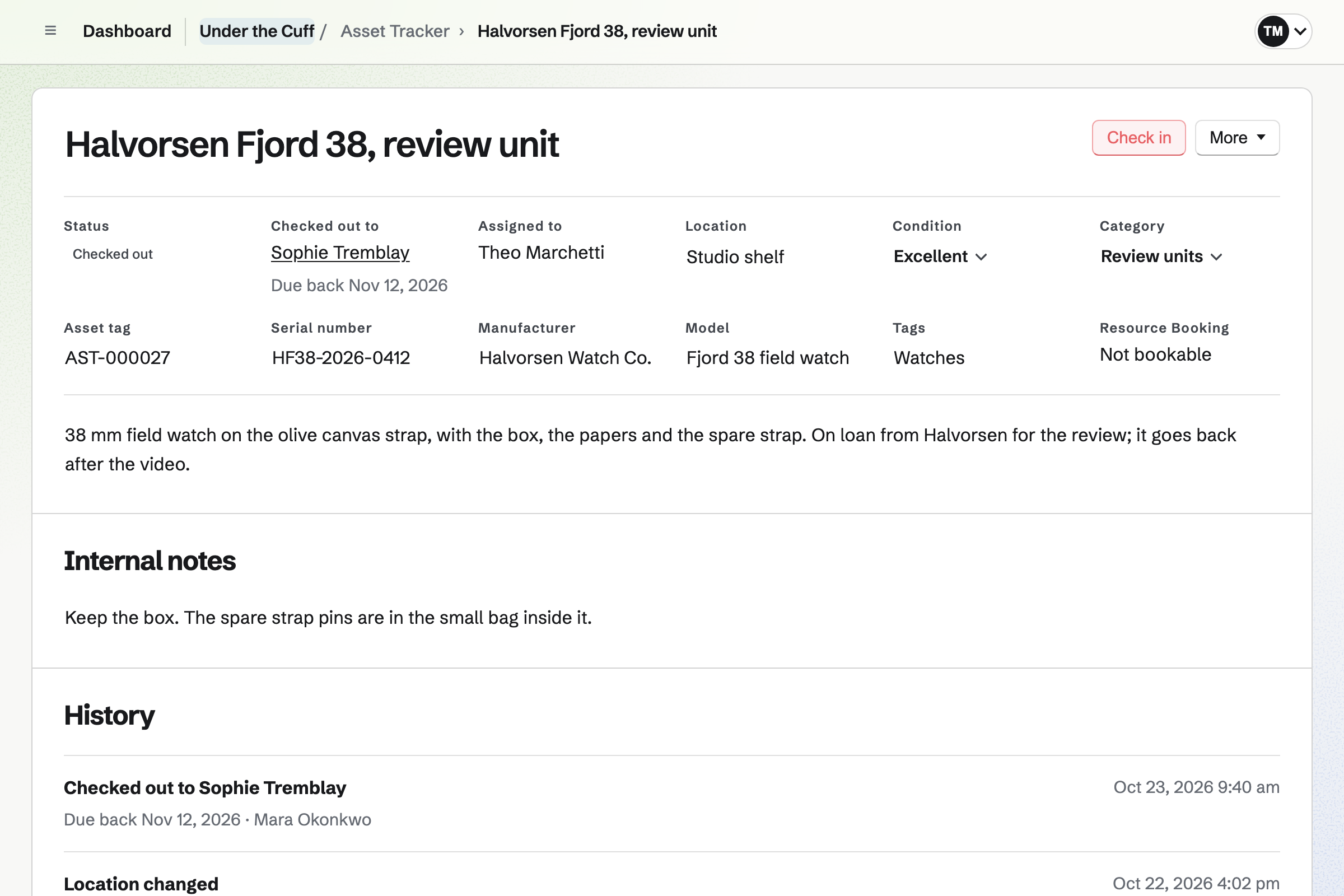
Asset Tracker records each unit the day it arrives, with its serial number and photos. You check it out to the writer reviewing it, with the day it is due back. After that day it shows as overdue.
When the review is done, you check the unit in with its condition. A unit the brand lets you keep stays available. One you send back is retired, and keeps its history. You also see what each unit cost, with its receipt.
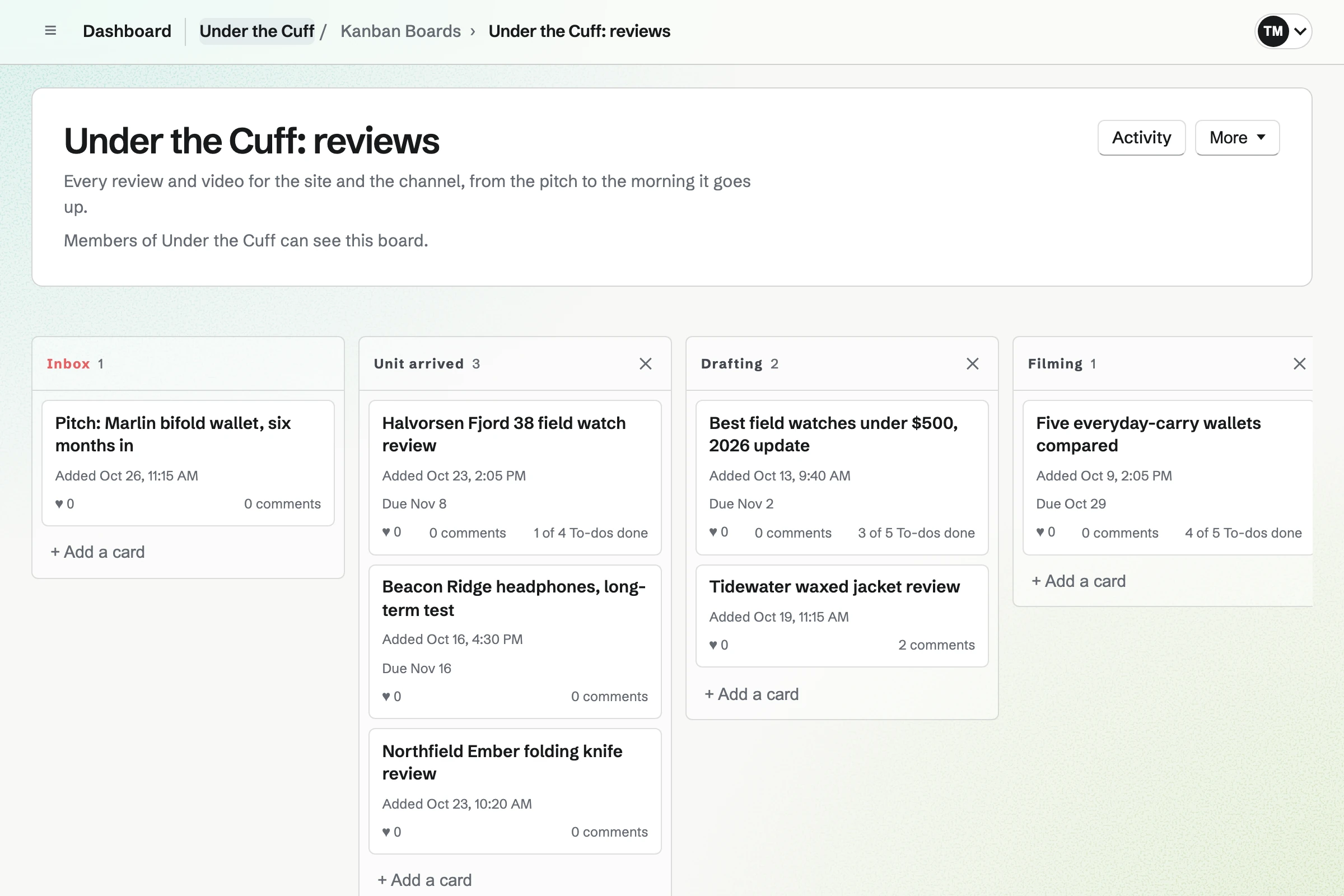
Kanban Boards gives each site and the channel a board of its own. Each review or video is a card, with its writer and its due date. The columns are your own stages: Unit arrived, Drafting, Filming, Published.
A card holds the brief, the links and the photos, and a To-do for each step. When someone else moves or comments on your card, Magpie will email you.
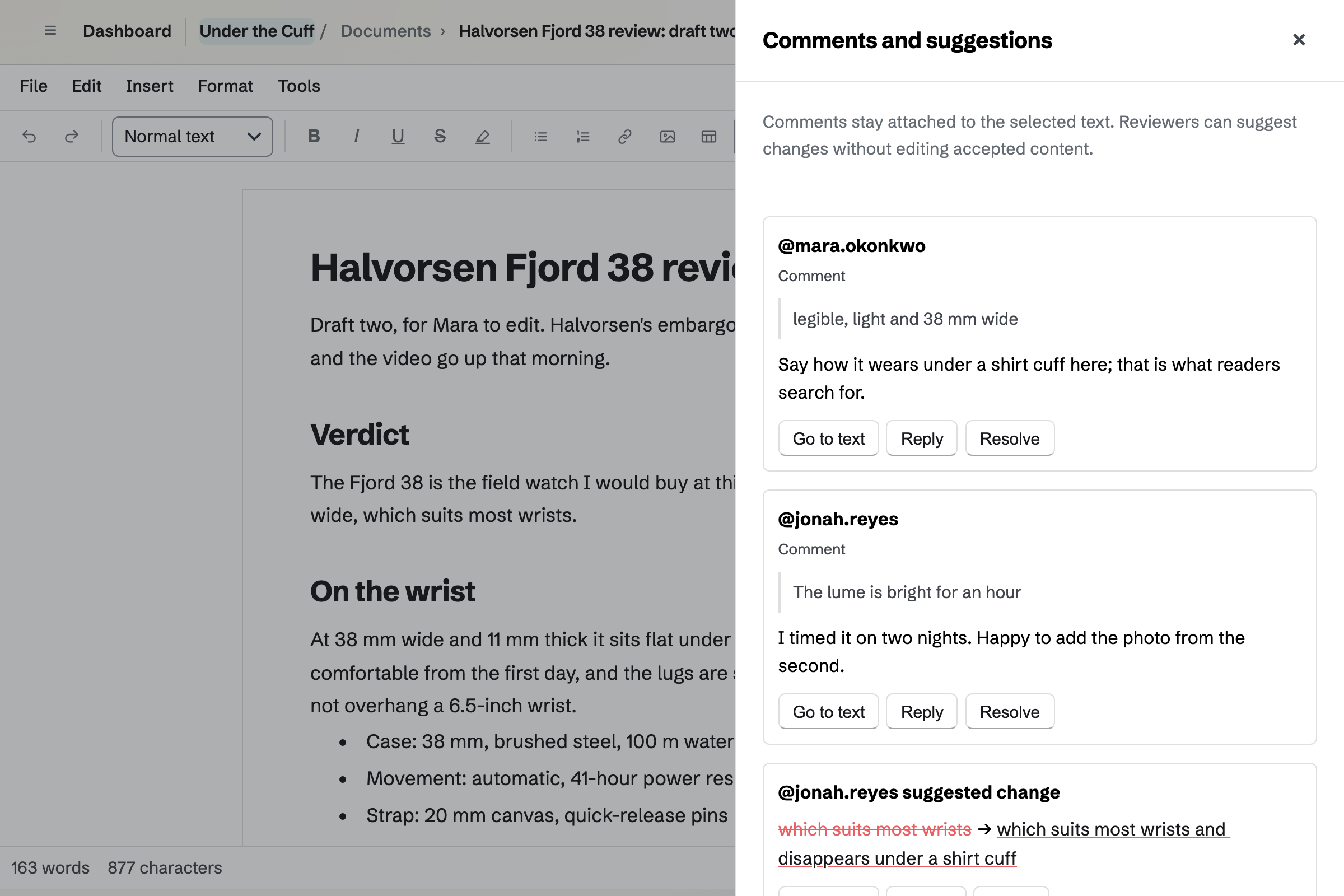
Documents is where each review is written. You comment on a line, or suggest new wording the writer can accept or reject. Named versions keep each draft, such as the one sent back to the writer.
A freelance writer joins the team as a guest, with their draft and nothing else. A draft they send as a Word file keeps its tracked changes as suggestions. A finished review exports as Markdown or HTML, ready for the site.
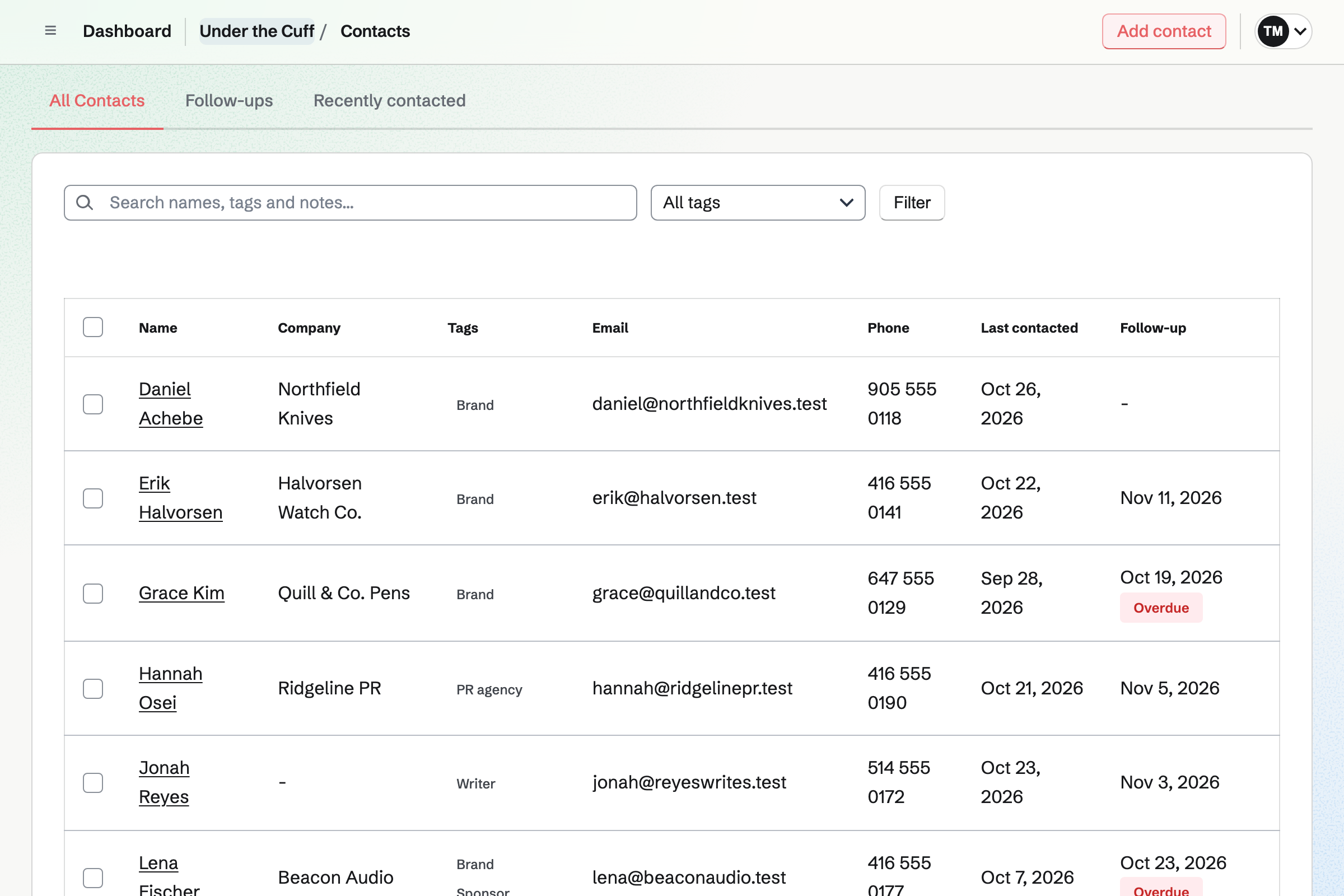
Contacts keeps each brand's people, with their email addresses and what was agreed. A call or an email logged on the contact moves Last contacted forward. The contact's page lists the proposals and invoices sent to them.
A follow-up is a To-do with a date and a reason, such as the embargo lifting. Follow-ups lists every open one as Overdue, Today or Upcoming. Search finds a note by a product's name.
Proposals prices what you offer a brand: an integration, a video, a sponsored article. A section can offer 2 to 4 packages, and a line can be optional. The sponsor opens their own link, and you see how long each section is read.
The sponsor signs on the page, and everyone gets the signed PDF. A deposit is invoiced on acceptance and paid by card into your own Stripe account. A monthly line becomes a recurring invoice.
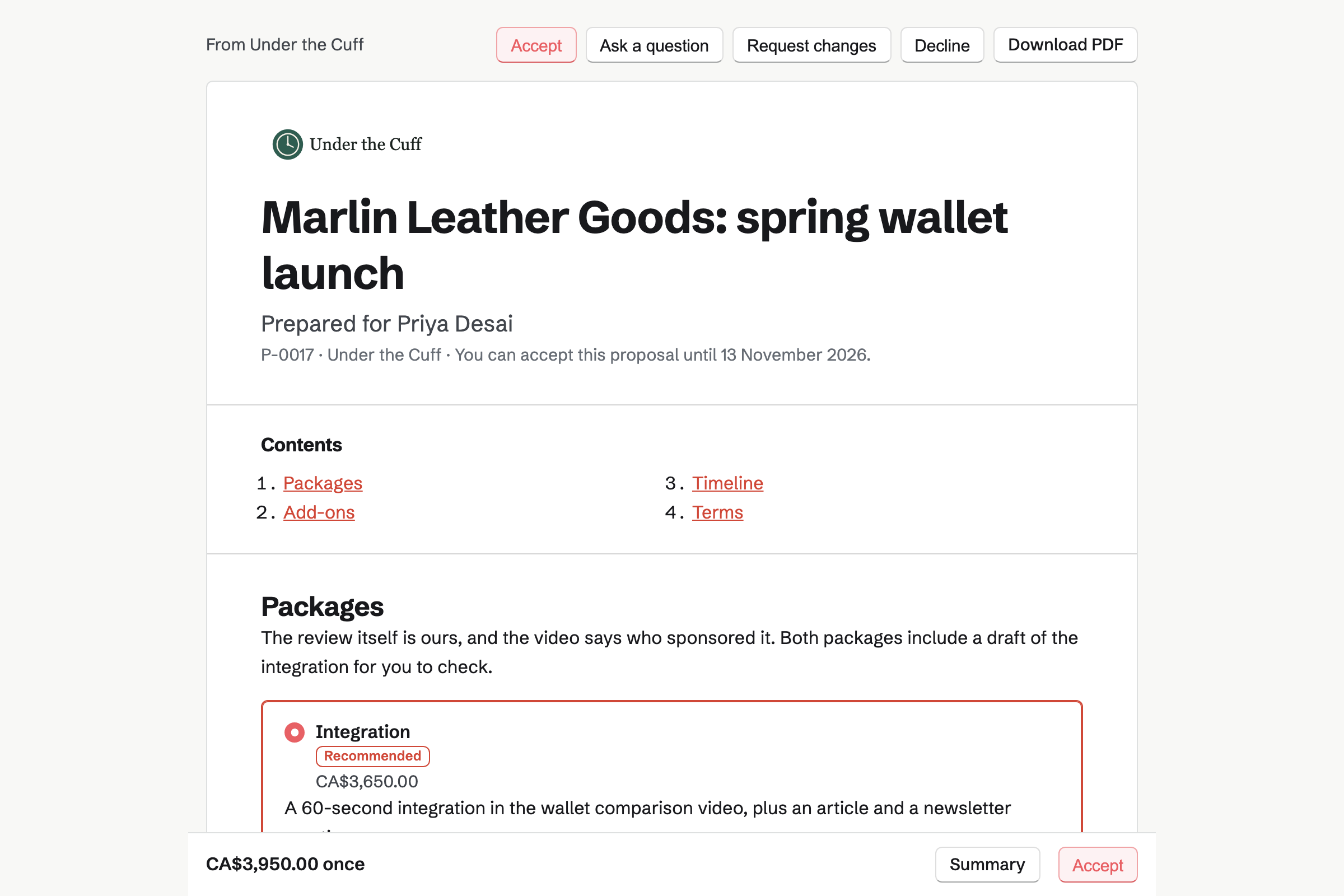
Invoicing bills a brand from its contact, with its payment terms and billing address filled in. The email carries the PDF and a Pay online button. Magpie adds no fee, and Stripe's processing fee is taken from the payment.
Reminders go out until the invoice is paid, and the list shows what is overdue. A quarterly deal repeats as a recurring invoice. Each payment is added to the books.
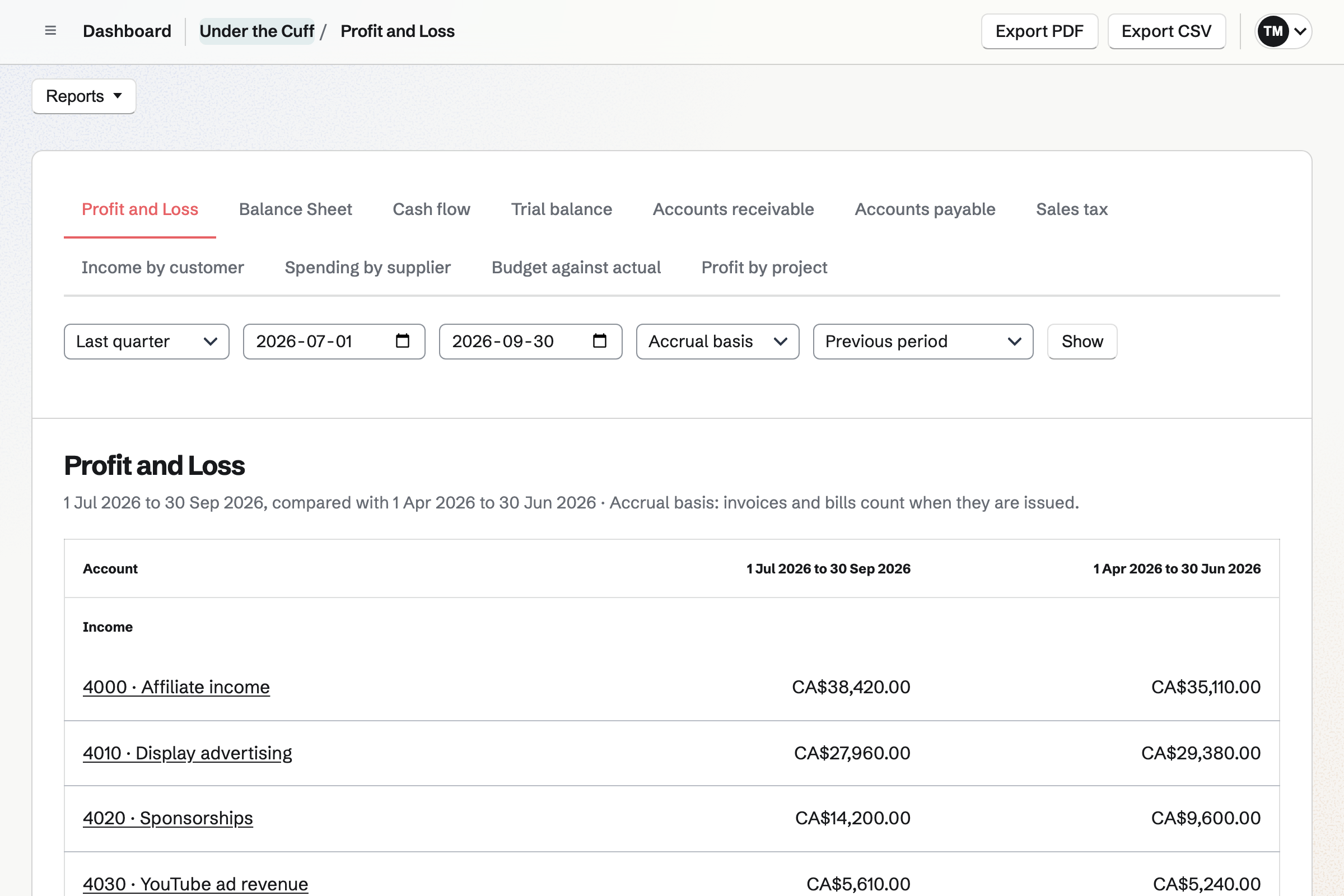
Accounting keeps double-entry books for the business. You import your bank statement as a CSV file. Each affiliate payout or ad payment goes to the income account you choose. A rule chooses the account for a payment that repeats every month.
Sponsor invoices and their payments are added for you. Profit and Loss compares this quarter with the last. Your accountant opens the books as a guest and sees nothing else of the team.
Each step starts from what the one before it made.
You add it to the register and check it out to the writer. It is due back in three weeks.
The review is a card on the board, with its writer and the embargo date.
The writer drafts in a document, and you suggest changes they accept.
You record the review, reading the script from the teleprompter, and trim the take.
The brand accepts a proposal for an integration and pays the deposit by card.
The deposit is in the books. The month's affiliate payout is matched when you import the statement.
You add each unit on hand, or import your spreadsheet as CSV. Help: Track individual assets.
You name its columns after your stages. Help: Track work with Kanban boards.
You share their draft with them, and they join as a guest. Help: Share and review a document.
You add each brand's people, or paste them as JSON. Help: Keep a contact list.
You connect your Stripe account, so sponsors can pay by card. Help: Connect Stripe to receive money.
A site with an editor and writers fits the Team plan. It has places for up to 25 members at one price. A freelance writer invited to one draft joins as a guest and takes no member place. A reviewer working alone fits Pro.
Magpie adds no fee to sponsor payments on invoices or deposits. Stripe's processing fee is taken from each card payment. Mail needs a paid plan. Prices are on the Pricing page.
A video creator records with a teleprompter, and the audience supports the channel monthly.
A blogger runs a website and a newsletter at their own domain.
A newsletter writer sends each issue to free and paying readers.
A local news site edits stories together and sends each edition to its readers.
A podcaster records remote guests and publishes the show's feed.
A social media manager runs several clients' accounts and campaigns.
A digital product seller sells guides, templates and presets from a shop of their own.
Yes. Each unit is an asset with its serial number, photos and condition. You check it out to the writer, a team member or a freelancer in Contacts. The due-back day goes on the checkout. The list has a tab for what is checked out, and one for what is overdue.
Yes. A checkout has a due-back date, and the Overdue tab lists every unit past it. You can search the register by brand, model or the person who has it. Reports counts what is out, overdue and damaged.
Yes. You record each unit's purchase date, price and supplier. The receipt is attached as a JPG, PNG or PDF of up to 10 MB. Expenses keeps smaller purchases with their receipts, by category and project.
Yes. Accounting lists the equipment the business keeps under Fixed Assets. It enters each month's depreciation, by straight line or declining balance. Choosing the item from Asset Tracker brings in its purchase date and price. Check the rules where you file.
Yes. A draft is a document the team can open. You comment on a line or suggest new wording, and the writer accepts it or not. Named versions keep each draft, and Restore puts one back.
Yes. You share the draft with them by email address, to review or to edit. They join the team as a guest who can open that document and nothing else. A guest takes no member place.
Yes. Importing a Word file brings in its formatting and comments. Its tracked changes arrive as suggestions to accept or reject. The finished review exports as DOCX, Markdown, HTML or PDF.
Yes. A document exports as HTML, Markdown, DOCX, ODT, PDF or plain text. Export clean DOCX leaves the comments and suggestions out.
Yes. Each site and the channel can have its own board, with your stages as columns. Each review is a card with its writer and due date. To-dos lists each card's To-dos under Today or Upcoming. The week's steps are in one list.
Yes. A contact holds the person, their company, several email addresses and notes. You log each call and email. A pinned note keeps what was agreed near the top. The contact's page lists every proposal and invoice sent to them.
Yes. A follow-up on the contact has a date and a reason. It is a To-do with the usual reminders. Follow-ups lists every open one as Overdue, Today or Upcoming.
Yes. A proposal carries your media kit and your packages: text, pictures and a video, then prices. The brand chooses a package, adds optional lines, signs on the page and pays the deposit. You see when it is opened and how long each section is read.
Yes. The brand opens the proposal from its email, chooses, signs and pays the deposit by card. Everyone is emailed the signed PDF and a signing certificate. The deposit is an invoice in Invoicing, paid into your own Stripe account.
Yes. A line billed monthly or quarterly in an accepted proposal becomes a recurring invoice. Each invoice is issued and emailed on its date. The sponsor can have it charged to their saved card. You can also make any invoice recurring.
Nothing. Magpie adds no fee to invoice payments or deposits. Stripe's processing fee is taken from each card payment into your own Stripe account. On the free plan, 5 invoices can be created a month, and paid plans have no limit.
Yes. Each invoice and each proposal has its own currency, chosen before it is sent. Your tax rates, business details and logo go on the PDF. The books keep one currency. An invoice in another is entered at what it was worth in it.
Yes. You add an income account for each source: each affiliate program, the ad network, sponsorships. Profit and Loss shows each one by quarter or by month. Income by customer totals what each sponsor paid.
Yes. You import a CSV statement from your bank, and each payout is listed for review. A payout already in the books, such as a Stripe payout, is matched. It is not counted twice. A rule puts a network's monthly payment in its account every time.
Yes. A writer's invoice is entered as a bill from their contact. Bills lists what is unpaid and when it is due. Spending by supplier totals what each writer was paid. Time Tracking records their hours on each site's project, with an hourly rate.
Yes. You invite your accountant by email address. They open the books in your team as a guest. They see nothing else of the team. An accountant takes no member place.
Yes. Screen Recorder's teleprompter scrolls your script from a Document, at the pace you set. It is above the camera, so your eyes stay near the lens. It can be mirrored for a teleprompter glass, or popped out beside the lens. Recordings run up to 30 minutes on a paid plan.
Yes. You split the timeline at a mistake and remove the segment. Trimming the ends works the same way. Images can be placed over the video. The download is an MP4 with the edits, ready to upload.
Yes. Newsletter gives you a sign-up page with double opt-in. You can import your list from Substack, Mailchimp or a CSV file. You write each email in Markdown, send yourself a test and schedule it. With web copies on, each email has its own page.
Yes. Social Media posts to Bluesky, Mastodon and LinkedIn at the time you choose. For Instagram and X, Magpie reminds you and opens the post filled in. A campaign holds a video's posts, from the teaser to the day it goes up.
Yes. Each site has its own board and email at its own domain. A project for each site holds writers' hours and expenses. Contacts are tagged by site. The books are the whole business's, with an income account for each site.
Yes. Mail gives the site hello@ at its own domain, in a mailbox the team can open. An assistant invited as a guest with Mail can read and answer it. They can use nothing else in the team.
Yes. Hiring gives a writer job its own page, with its description, pay and closing date. Applicants apply on the page. Each one is a card you move through your stages to hired.
Yes. Supporters gives you a public page with a free tier and monthly paid tiers. Supporters pay by card into your own Stripe account, with Magpie's 3% fee. Posts and videos can be for paying supporters only.
Create a Magpie account and make a team for the site and the channel.