Outreach
Outreach sends each person a short series of emails from your own address. It stops for anyone who replies.
A campaign is a few plain-text emails. They go one person at a time, inside the hours you choose. Replies arrive in your mailbox, and the campaign counts who replied, booked a call or unsubscribed.
Create account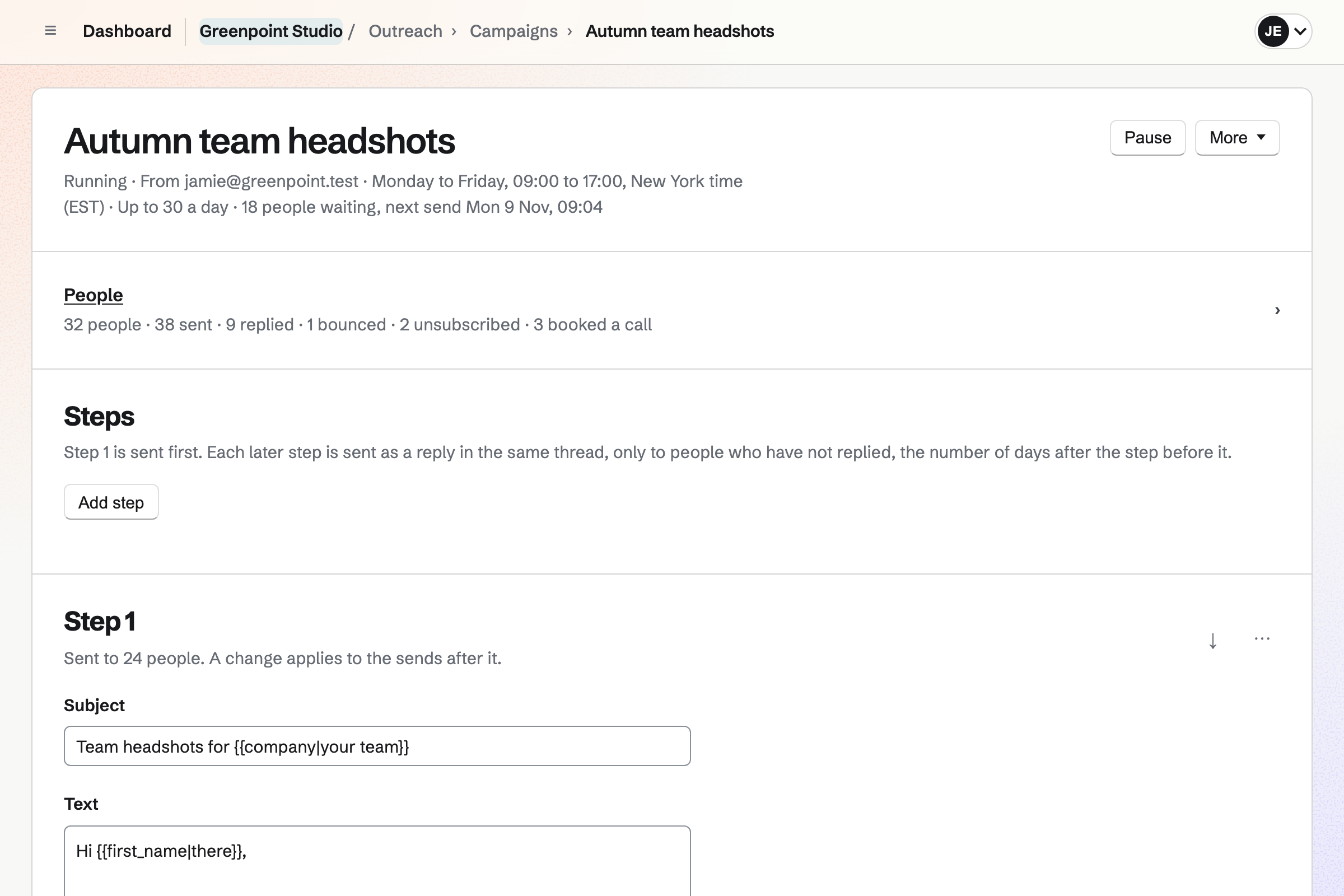
You write the steps, add the people and press Start.
Write the steps
Step 1 has a subject. Each later step goes a set number of days after the one before. It is sent as a reply in the same thread. The text is plain text. Fields fill in each person's first name, their company and a line about them.
Add the people
You can add everyone with a tag, or tick contacts one by one. A file or pasted list of addresses works too. Each address becomes a contact, or is matched to the contact that already has it. A campaign holds up to 2,000 people.
Start it
Magpie sends step 1 to everyone, one at a time, inside the send window you set. It sends up to the daily cap, spread evenly through the window. That is 30 a day unless you change it.
A reply ends the series
When someone replies, nothing more is sent to them. Their reply arrives in your mailbox like any other email, and the campaign marks them Replied.
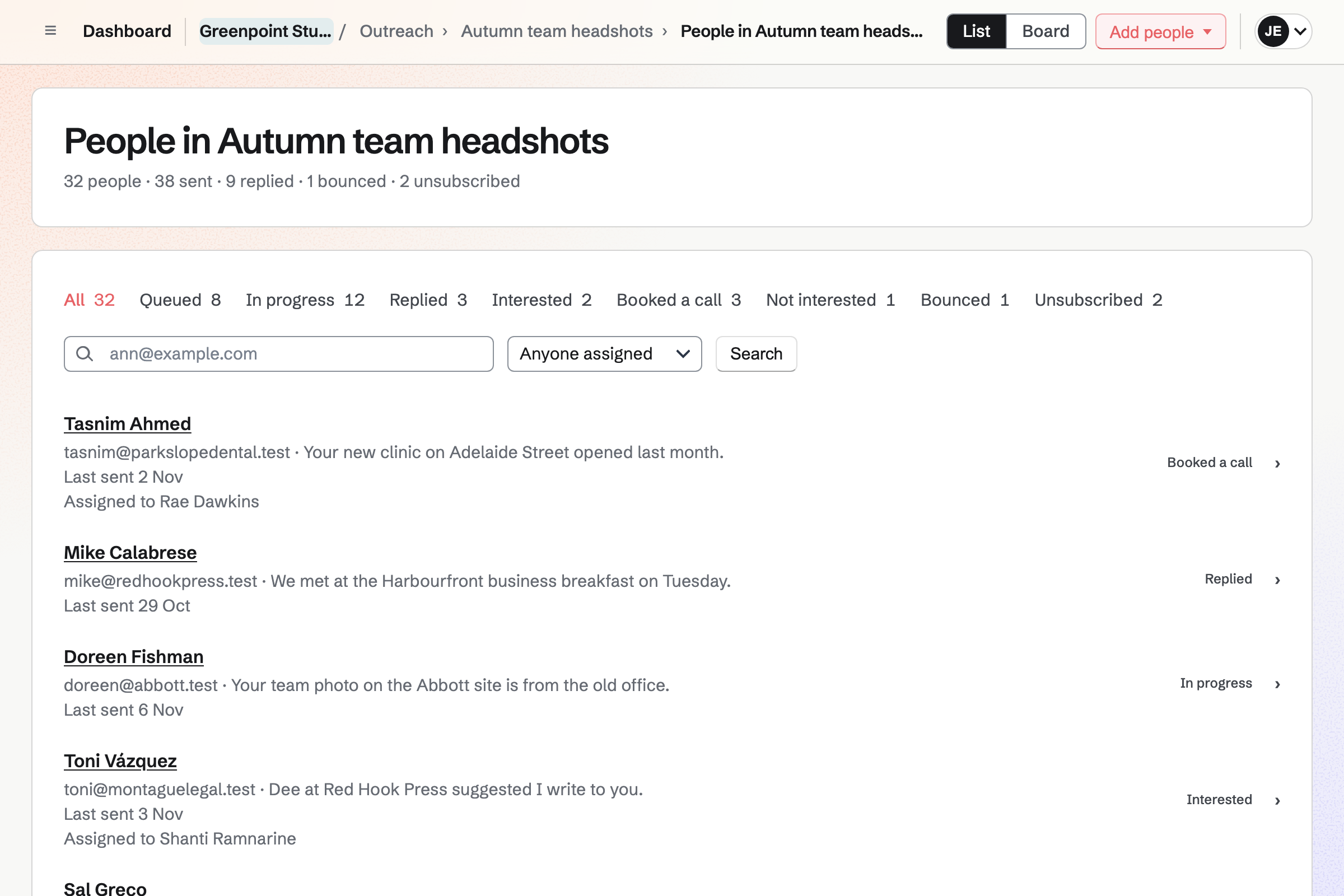
You can see where each person is, from Queued to Replied and Booked a call.
The list has a tab for each stage and a search by name or address. A board shows the same people in a column for each stage. You drag a card to move someone.
Magpie sets Queued, In progress, Replied, No reply, Bounced and Unsubscribed. You set Interested, Not interested, Booked a call, Signed up and Stopped. Each of those stops further sends. Magpie marks Booked a call itself when someone books a time on your Appointments page.
You can assign each person to a colleague, such as whoever will take the call. A person's page lists what was sent to them, their replies and the links they followed.
Every message is an ordinary email, signed by your domain and kept in Sent.
A campaign sends from one of your addresses in Mail, Magpie's email area. Replies arrive in that mailbox, where you answer them. Each message is signed by your domain and kept in Sent. Magpie never adds a tracking image or records who opens an email.
Your team's sending route is the server that carries the mail. It can be your own SMTP server, such as Amazon SES, or a server you rent. Magpie sets up a rented server as a mail relay, then destroys its own key.
Magpie paces the sends and pauses a campaign when something goes wrong.
A campaign sends only inside its send window and never more than its daily cap. Sends are spread evenly through the window, so a day's messages arrive one at a time.
When a server refuses a message, Magpie tries again after 5 minutes, then 15, then 60. After 5 failed sends in a row it pauses the campaign and emails you. A bounced address is marked Bounced and goes on the do-not-email list.
Stop all sending, on the Outreach page, holds every campaign in the team at once. Nothing leaves until you start it again, and running campaigns keep their place.
Every message ends with an unsubscribe link, and Magpie keeps the do-not-email list.
The link opens a page with one Unsubscribe button. A mail scanner that opens links therefore unsubscribes nobody. Gmail, Outlook, Yahoo and Apple Mail can show their own Unsubscribe control too. Using it unsubscribes the person at once.
Someone who unsubscribes gets nothing more from any of your campaigns. Their address goes on your do-not-email list, with bounced addresses and any you add by hand. Nobody on the list, or unsubscribed from your Newsletter, can be added to a campaign.
You can add your postal address under the unsubscribe line of every message. Some countries' laws ask for one in commercial email.
Click tracking is off unless you turn it on for a campaign. With it on, each link goes out as a Magpie address that counts the click. People then see Magpie's address instead of yours.
Plans
Outreach is on the Pro plan for Personal and on the Team plan for a team. A team can have 10 campaigns that are not archived. Each holds up to 2,000 people and 10 steps.
Everyone in the team who can open Outreach sees its campaigns, their people and the replies. Members with edit access write and start them. A campaign sends as the member who started it, so they need its mailbox in Mail.
Questions
What happens when someone replies?
Nothing more is sent to them, and the campaign marks them Replied. The reply arrives in the campaign's mailbox in Mail. A Replies page lists every reply to your campaigns, newest first, and opens each in Mail. An out-of-office is not a reply: the person's next step moves 3 days later. Anyone who never replies becomes No reply after the reply wait, 7 days unless you change it.
Which server sends the messages?
Your team's sending route carries them. It can be your own SMTP server, such as Amazon SES or Postmark. Or you rent a server, which Magpie sets up as a mail relay for your domain. Magpie's own mail server carries campaigns only for teams Magpie has allowed. It sends at most 60 messages an hour from each mailbox.
Can I bring in a list of addresses?
A CSV or TSV file, or a pasted list, adds up to 5,000 people at a time. A header row can name the columns, such as email, name, company and about. Each address becomes a contact, or is matched to the contact that already has it. Every contact in the list gets a tag. You say where the addresses came from, and Magpie keeps that with the import.
Can two campaigns email the same person?
Someone still receiving another of your campaigns is held back when you add them. The page names that campaign, and one button adds them anyway. A campaign can also name what happens next. People who reach No reply then join that second campaign as Queued.
Can I check a step before it goes out?
Preview shows a step as one person in the campaign will get it, fields filled in. Send me a test sends it to your own address. A test is not counted as a send.
Can I paste in a campaign written somewhere else?
Paste JSON makes a draft campaign from one pasted document with its name and emails. Copy the prompt gives the format to a chatbot you use. It will ask what you offer and who the people are, then write the document. Magpie checks the whole document before it saves anything, and names a mistake by its place.
Does it work with Appointments?
A field puts the address of your Appointments page in a step. Someone who books a time there with the same address becomes Booked a call. Nothing more is sent to them. A campaign's goal can be a booked call, and its counts then show how many booked.
Write your first campaign.
Create a Magpie account, open Outreach and name a campaign.