Restaurant Reservations
Your hosts run each service from one book and seat every party from the map. Diners reserve their table on your own booking page.
Restaurant Reservations is the restaurant's reservation book. It holds your tables, your services, each night's covers and every diner's visits.
Get started free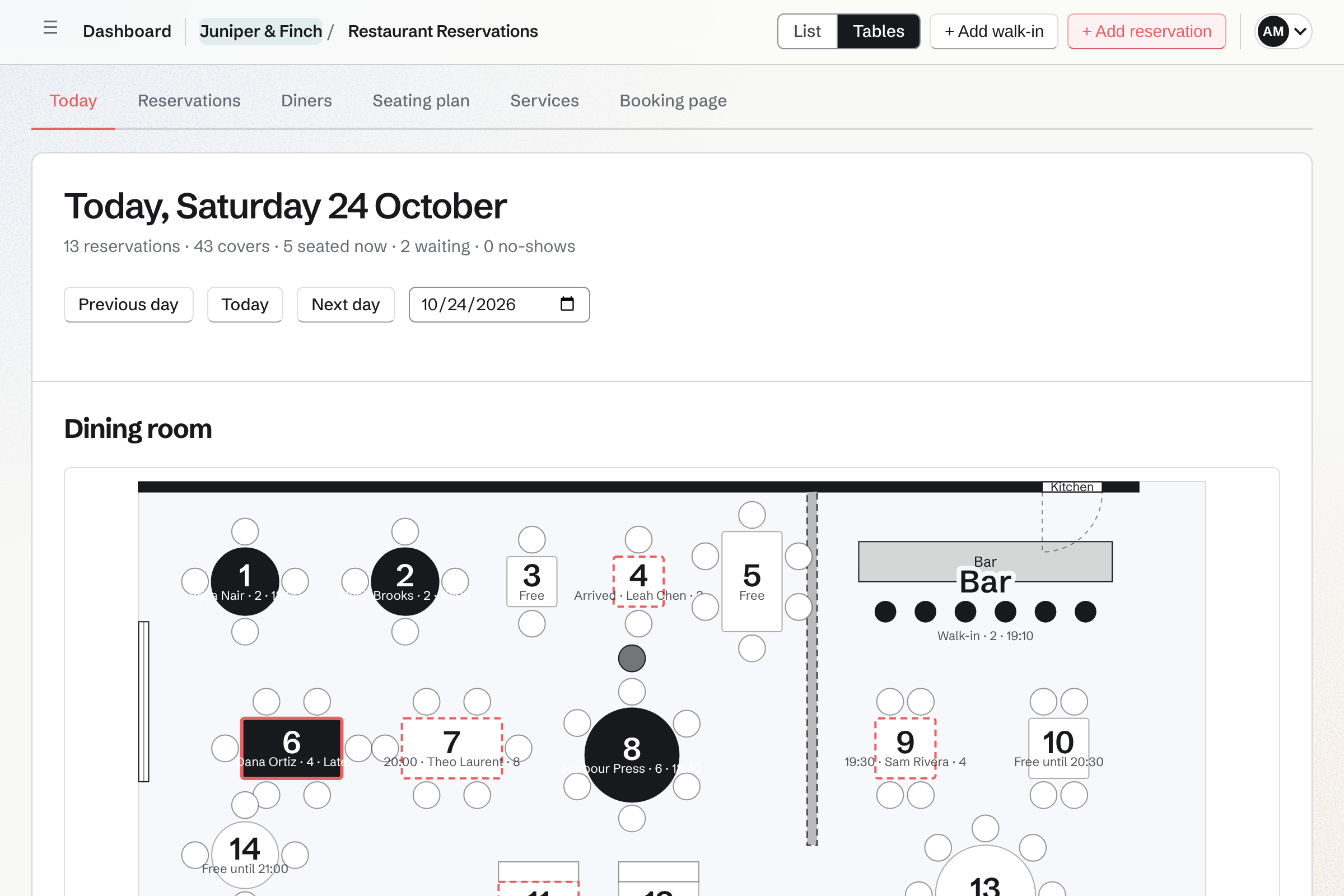
You draw each room, and Magpie finds the table that fits every party.
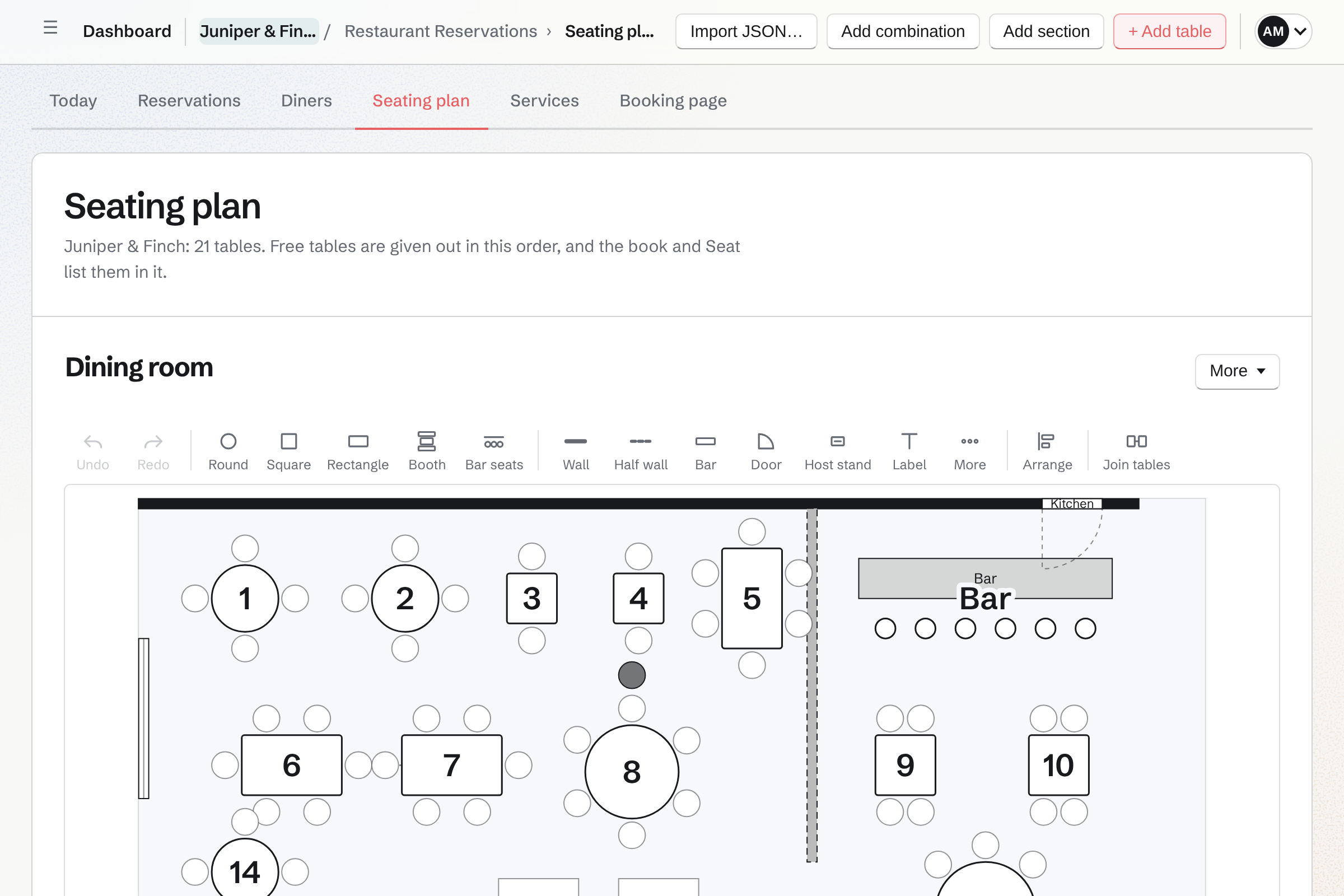
Each room is a section, such as the terrace. Each table has a shape and the smallest and largest party it seats. Two tables pushed together for a larger party are a combination.
You draw the room from above and drag each table where it stands. The walls, the bar, the doors and the host stand go on the map too. From photos of your rooms, an assistant can write the plan as JSON.
Services set your hours, your turn times and how many covers the kitchen takes.
Lunch and Dinner each have their days and their first and last seating. A restaurant, café, bar or fine dining starter adds the usual ones. You then change their days and hours.
- Turn times
- A turn time is how long a party of each size keeps its table. Magpie offers a time only when a table is free for the whole turn.
- Pacing
- Pacing caps the new covers the kitchen takes at each seating time. A cap for the whole service works the same way, even when tables are free.
- Online rules
- Each service sets which party sizes can reserve online and how far ahead. Larger parties see your phone number instead. The cancellation notice is the latest a diner can change a reservation online.
- Special days
- A special day closes the restaurant on a date, or one service. It can change a service's hours that day, or add a one-off Christmas lunch. Reservations already on that day are listed for you to move or cancel.
- Sections
- Each service seats in the sections you choose: Lunch in the dining room, Dinner everywhere.
Your hosts mark each party arrived, seat it and finish it from the book.
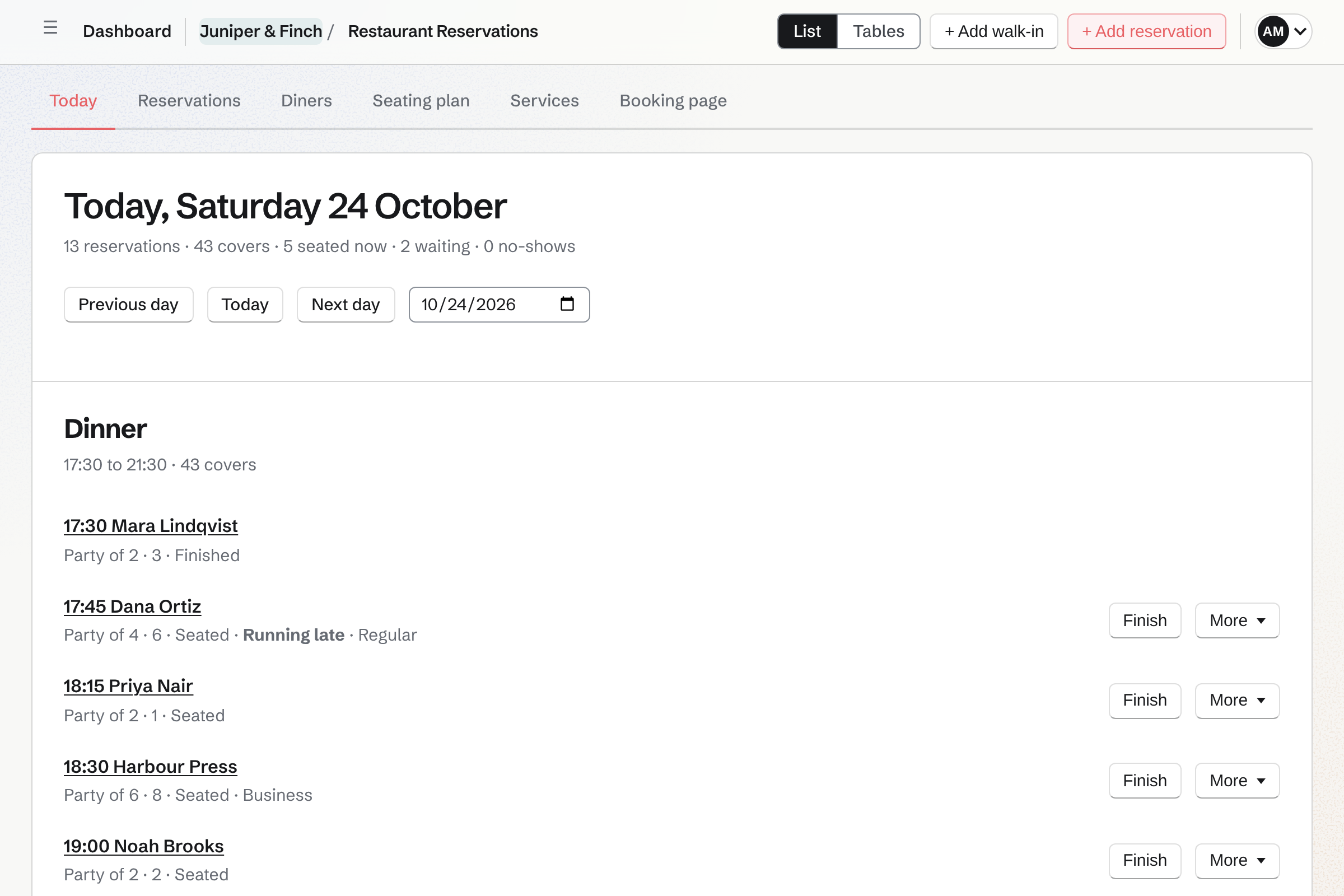
Today lists each service's reservations in time order, with the covers. A party is marked Arrived, seated at its table or another free one, and finished. A party seated or finished by mistake can be put back within minutes.
A walk-in is seated now or joins the waitlist with the wait you quoted. The book shows how long each party has waited against the quote. It refreshes itself during service, so every host sees the same book.
The Tables view draws each room, with each table free, due, seated or late. Your host presses a free table to seat a party there.
Diners reserve on your booking page, and the table is held from that moment.
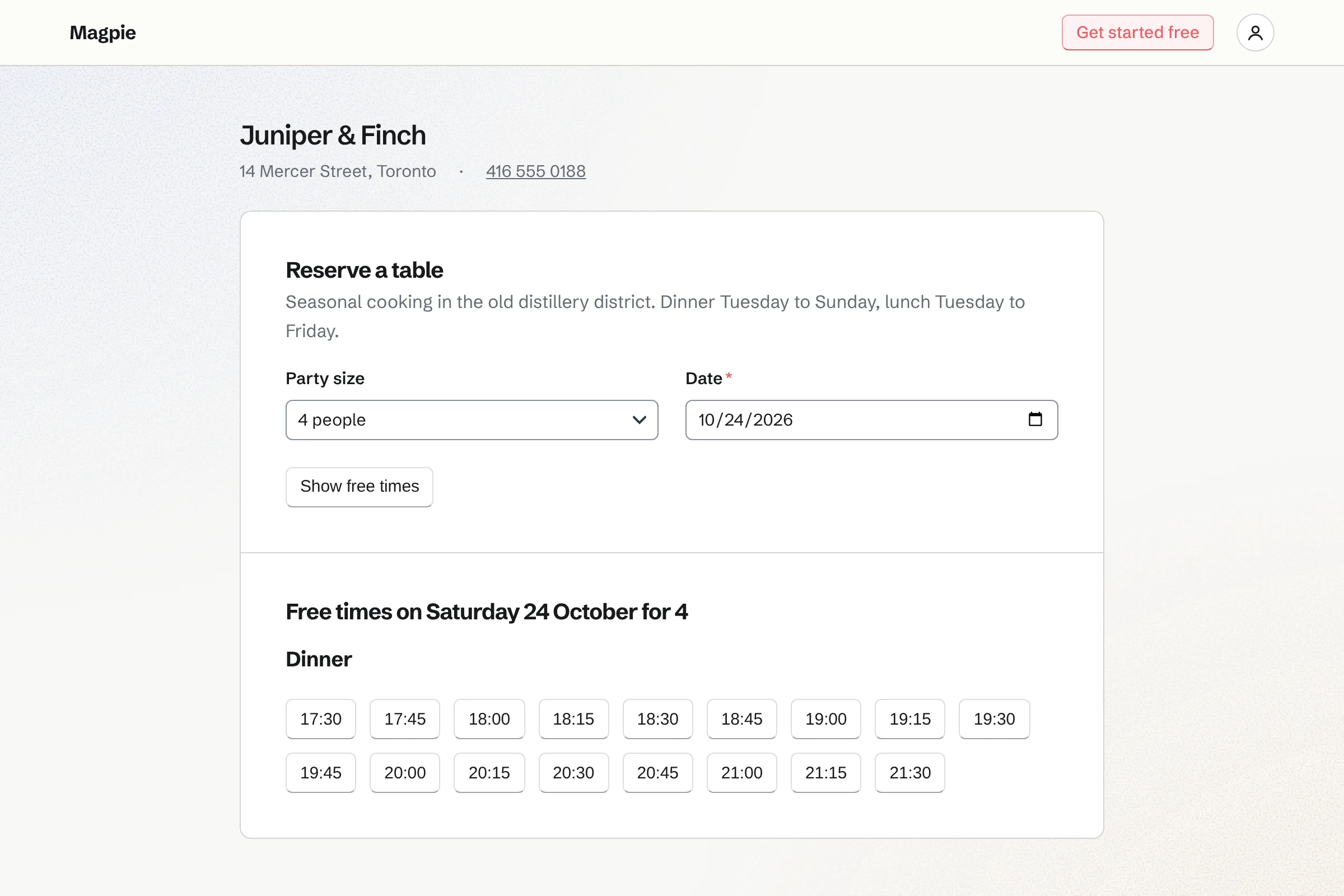
The page is at its own address and shows your name, address and phone. You publish it from the area's Booking page settings.
Party size and date
The page offers the free times of each service that day. A time that is taken shows the nearest free ones instead.
A time held while they type
The time is held for them while they give their name, phone and email. They can add an occasion and anything you should know. A table is never given to two parties.
The cancellation rule
Your cancellation rule is shown above the Reserve button, and reserving agrees to it.
Reserved
A confirmation page shows the date, the time, the party and the section. It links to the diner's own page.
The diner's page
There they confirm they are coming, change the time or the party, or cancel. Changes are open until the cancellation notice you set. They open it with their Magpie account, made for them when they reserve.
Every guest's history is kept as a diner: their visits, no-shows and cancellations.
- Reservations
- Reservations are listed as Upcoming, Past, Cancelled and No-shows. You search by name, phone, email or number, and filter by venue, service, status and date.
- A reservation's record
- A reservation's page shows its date, time, party, table and service, and the diner's request. Your team's notes stay with it, and the diner never sees them. Its history lists every change and who made it.
- Diners
- Each person has one record, matched by email or phone when they reserve again. You tag a regular, a VIP or an allergy. A note, such as a favourite table, is for your team only.
- Diners who have been before
- When you add a reservation by phone, Magpie lists the diners who match as you type.
- Contacts
- A diner with an email address can be added to Contacts. The contact's history then lists their reservations.
A restaurant group keeps each venue's book apart and its diners together.
Each restaurant is a venue with its own tables, services, reservations and booking page. Diners are the team's, so a regular at both is one record. More than one venue needs Pro or the Team plan.
Questions restaurant owners ask
How does Magpie work out which tables are free?
Each table seats a smallest and a largest party. Each service sets how long a party of each size keeps its table. A time is free when a table fits the party for the whole turn. Pacing caps the new covers at each seating time. A table is never given to two parties.
Can we take reservations by phone in the same book?
Yes. You add the party size, the date and the diner's name and phone. Magpie offers the seating times free for that party, and marks the full ones. You can still choose a full time and book anyway. Diners who have been before are listed as you type.
What happens when a party is late?
A booked party that has not arrived reads Late a short while after its time. It can then be marked a no-show, which counts on the diner's record. A seated party still at its table past its turn reads Running late. On the map its table has a red edge.
Can diners change or cancel a reservation themselves?
Yes. Their reservation's page has Confirm, Change and Cancel reservation. A change keeps the date and is checked like a new reservation. A time that is taken is refused with the nearest free ones. Changes are open until the cancellation notice you set, and cancelling until the time itself.
Do walk-ins count in the book and in a diner's history?
A walk-in is a reservation like any other, seated now or on the waitlist. With a name or a phone number it becomes a diner. Their visits and no-shows count like any other diner's. It counts in the day's covers and in pacing from the moment it is seated. Someone who leaves is taken off the waitlist.
Does every host see the same book?
Yes. The book refreshes itself during service, on every screen that has it open. A change a colleague made first is refused, and the book says what they did.
What does a diner need to reserve online?
A party size, a date and a time, then their name, email and phone. An occasion and a request are optional. They do not sign up first. A Magpie account is made for them when they reserve, and opens their reservation's page. Parties larger than you take online see your phone number instead.
Can we keep part of the restaurant off the booking page?
Yes. Each section and each table can be offered online or kept back. The bar seats can stay for walk-ins, for example. A service can be kept off the booking page too.
Open the book for your restaurant.
Create a Magpie account and add your restaurant's tables.