Software Watch
Magpie keeps a list of the software your website or server runs. It emails you when a version has a known vulnerability.
Software Watch is for websites and servers hosted outside Magpie. That might be a WordPress site at a host, your own VPS or a client's server.
Create account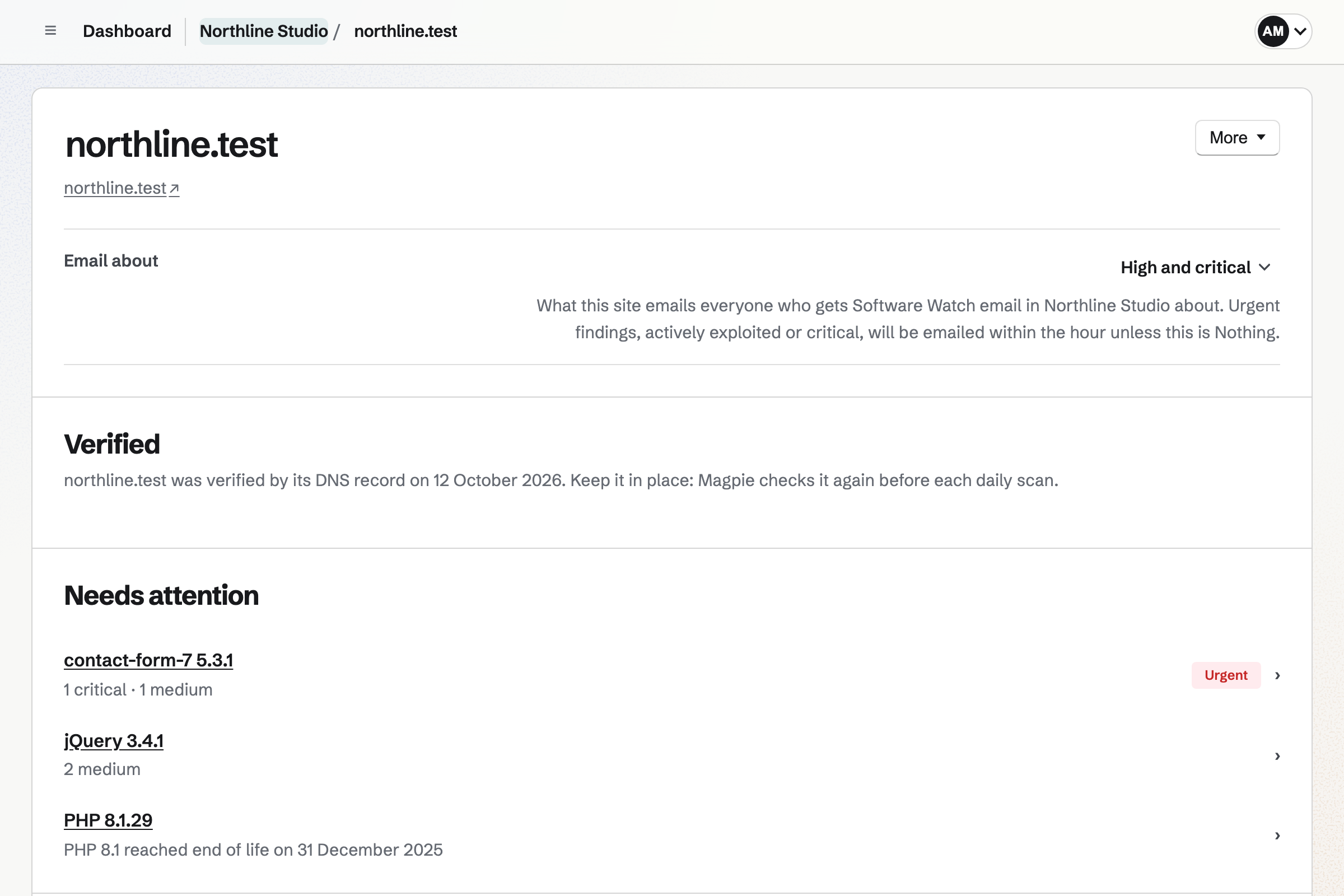
Magpie finds the software on a site in three ways.
A daily scan reads your website as a visitor's browser does. It finds the server, the content management system, plug-ins and JavaScript libraries. The scan starts once you show the site is yours. A domain your team already verified in Magpie needs nothing more.
The server check is one line you run on a Linux server. It prints every installed package at its exact version. You paste that list on the site's page. You can also add software yourself, or paste a composer.lock or package-lock.json.
Each version is checked every day against public lists of vulnerabilities.
- OSV
- The Open Source Vulnerabilities database brings together the security notices of Linux distributions. It also covers the npm and Packagist package registries.
- The National Vulnerability Database
- The US government's catalogue of published vulnerabilities covers products such as nginx, PHP and WordPress.
- CISA's Known Exploited Vulnerabilities
- The US Cybersecurity and Infrastructure Security Agency lists the vulnerabilities attackers are using now. A finding on that list is marked urgent.
- Wordfence Intelligence
- Wordfence's database covers WordPress plug-ins and themes. Each finding links to its Wordfence record.
- endoflife.date
- The site lists when each release of an operating system, language or server stops getting fixes. Magpie tells you before a release you run reaches that date.
Software no source covers yet stays on your list, marked Not checked.
It is checked once a source covers it, and we will add sources that cover more software. Each piece of software says what Magpie checks about it, and why.
The server check tells you which vulnerabilities your Linux distribution has already fixed.
Ubuntu and Debian fix nginx or PHP in their own copies without changing the version number. A scan from outside cannot see those fixes. So Magpie lists those findings under May need attention.
The server check lists the exact package your distribution installed. It runs on Ubuntu, Debian, Alpine, Rocky Linux and others. It only prints. It sends nothing, installs nothing and reads no keys or web root.
A finding stays on the site's page until the software is updated.
Magpie finds it
A finding names the vulnerability and its severity. It gives the version with the fix, once one is published. Each links to the published notice.
You hear about it
An urgent finding is emailed within the hour. The rest come in one email each morning, in your time zone, with every site grouped.
You update the software
The next scan or pasted list sees the new version, and the finding moves to Fixed. You can also mark it as updated and enter the version.
Or you mark it not affected
When a finding does not apply, you say why. The reason is kept with it for your team, until the version changes. It moves to Not affected.
Attackers are using published vulnerabilities sooner than before.
The UK's National Cyber Security Centre judged in 2025 that this takes days. It expects AI to shorten that time further. Software Watch checks each version on your sites every day.
Your team shares the sites, and each person chooses their own email.
A site belongs to Personal or a team. Everyone who can use Software Watch in the team sees its sites. Each site sets what it emails about: everything, high and above, urgent only, or nothing.
You and the team's other admins get the email unless you turn it off. Anyone else in the team can turn it on. An agency can keep each client's sites in one team.
Plans
Software Watch is on every plan. The Free plan watches 1 site, Pro watches 10 and a team on the Team plan watches 25.
Questions
Does Magpie change anything on my server?
Software Watch only reads. The scan reads what any visitor sees and never signs in or sends a form. The server check prints a list on your server, and you choose to paste it. Updating the software is up to you or whoever runs the server.
Can I watch a server that has no website?
Yes. Add it by a name, such as Office server, and run the server check on it. A server with no website is never scanned from outside.
Can it check my WordPress plug-ins?
Yes. The scan finds plug-ins and themes from the files your pages load, with their versions. Each is checked against Wordfence Intelligence's database of WordPress vulnerabilities.
Can it check the libraries my own code uses?
Yes. Paste a composer.lock or a package-lock.json on a site's software list. Each package is checked against OSV at its locked version. Pasting the file again after an update replaces what it listed.
What happens when Magpie cannot see a version?
The software is listed with what Magpie could see, and its page says so. For many products, its page shows how many vulnerabilities were published in the last year. The server check, or a version you enter, lets Magpie check it exactly.
How do I know the scan is really from Magpie?
Each request names itself as Magpie Software Watch, with a link to Help about the scan. Nothing is read from a website until you have shown that it is yours.
Add your first site.
Create a Magpie account and enter your website's address.