Company Records
Magpie keeps each company’s officers, shares, resolutions, filings and contracts. It reminds you before each date.
Company Records keeps a company’s records and the dates it has to meet. One team can keep several companies, such as a holding company and the one it owns.
Get started free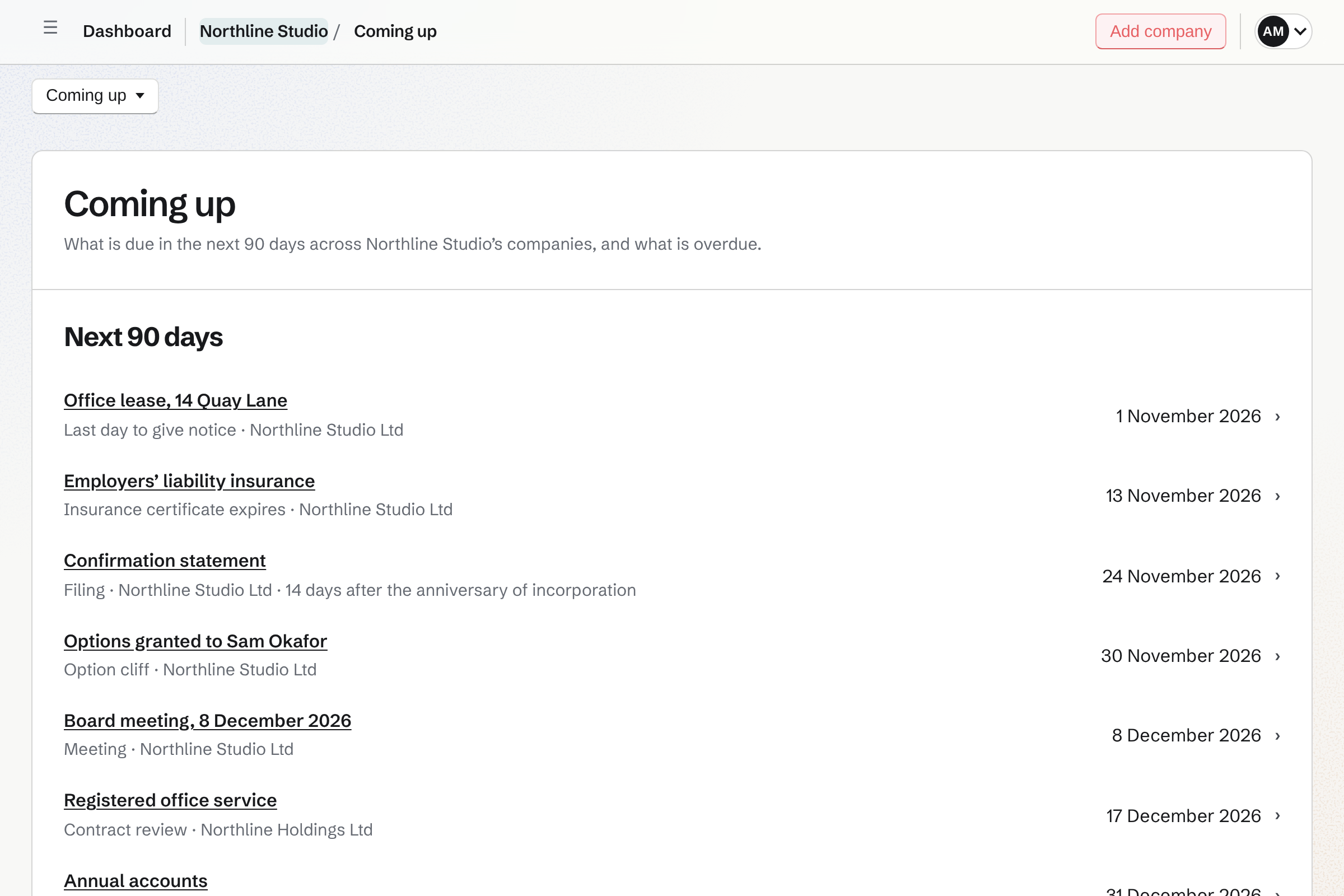
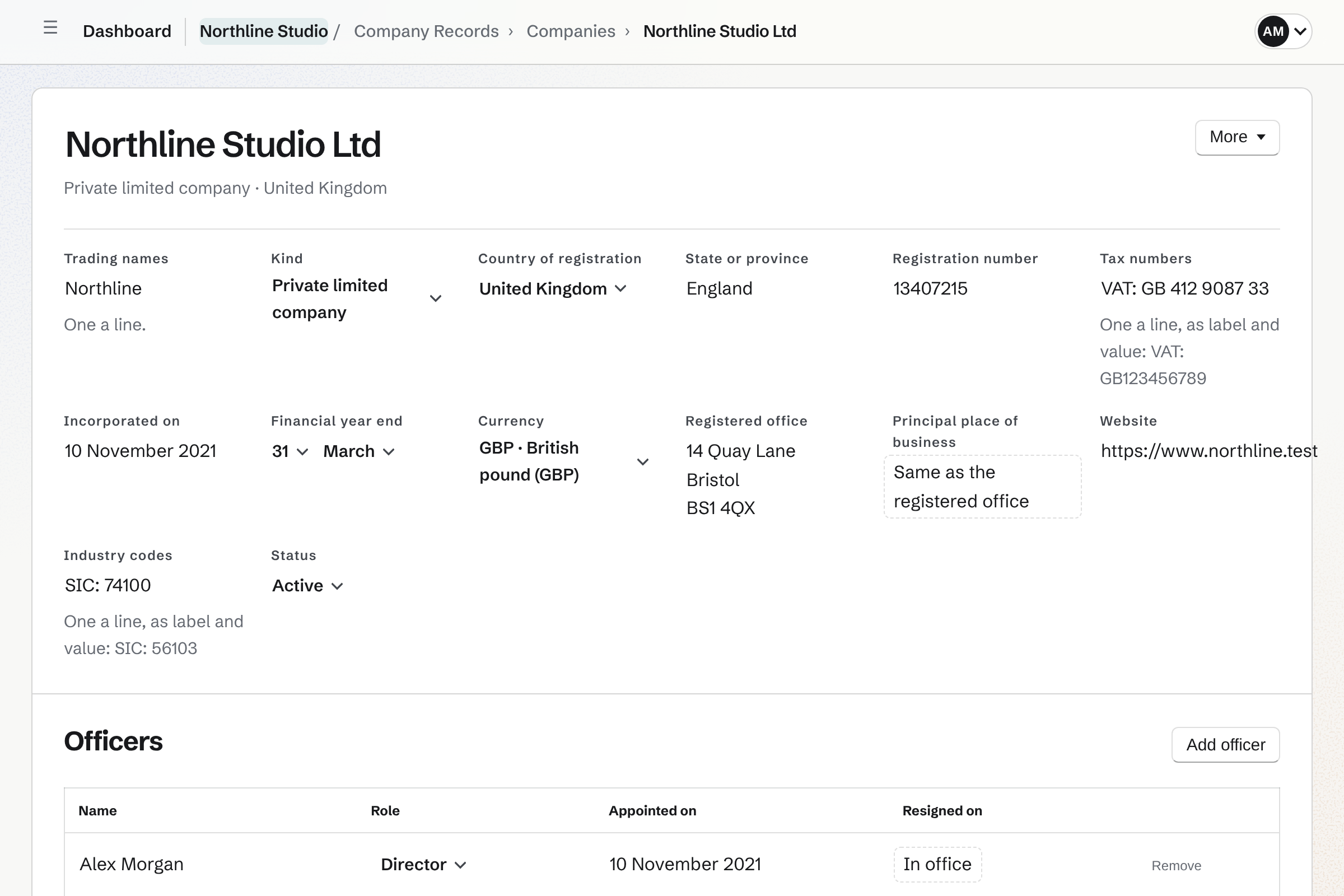
A company’s page holds its registered details and its officers.
You add a company with its legal name and fill in the rest on its page. Each detail, from the registration number to the year end, is changed where it is shown. For your first company, Magpie offers the business details already kept in Invoicing.
Officers are recorded with the day they were appointed. When one leaves, you set the day they left. They stay on the register of officers. An officer whose name is in Contacts is linked to the contact.
Coming up lists every date across your companies, and Magpie emails you before each one.
Coming up shows everything dated in the next 90 days across your companies: filings, contract dates, documents that expire, meetings and option vesting dates. What is overdue is listed first.
Reminders go by email from 09:00 in your team’s time zone. Each goes to the record’s owner, or to every admin when it has none. Emails carry titles, dates and a link, never amounts, share counts or holders’ names.
A monthly digest, once you turn it on, emails admins and keepers the next 60 days. Your team Calendar can show the filing dates, contract dates and meetings too. A calendar feed shows them in any calendar app, with titles and dates only.
Ownership records every share transaction once and shows the cap table on any date.
- Register of members
- Each change to who holds shares is recorded once, with its date: an issue, a transfer, a buy back, a cancellation, a conversion or a split. A transaction is never edited. Reverse records a correction, and the register shows both.
- Certificates and registers
- Each issue gets the next certificate number of its class. Each certificate prints as a PDF. The register of members, the register of officers, the register of transfers and the ledger print as PDFs, as of a date.
- SAFEs and notes
- A post-money SAFE, a pre-money SAFE or a convertible note is recorded with its amount, cap and discount. A SAFE signed in Agreements is offered for recording, with its terms read from the agreement.
- Option plans and grants
- A plan sets aside a pool of shares. A grant has an exercise price and a vesting schedule. Its page shows what has vested on each date. An exercise is recorded as an issue of shares.
- The cap table
- The cap table shows each holder’s shares on any date. Each holding is a percentage of the shares issued and of the fully diluted total. Post-money SAFEs count as if they converted at their caps. It downloads as CSV or PDF.
You write a resolution from a standard text, and the directors sign it in E-Signatures.
Choose what the resolution is for
Magpie has standard texts for the usual decisions: appointing a director, issuing shares, adopting an option plan, approving a SAFE or declaring a dividend. Each is for the board and, where it applies, for the members. Your own text starts a resolution written in Documents.
Answer the questions above the text
The company’s name and registration number are filled in. The text changes as you answer. A resolution can be moved into Documents to change freely.
Choose who signs and send it
The signers are chosen from the company’s officers and holders. Send for signature sends the text through E-Signatures, which emails each signer. The text cannot change while it is out for signature.
Adopted on the last signature
When everyone has signed, the resolution is adopted on the day of the last signature. The signed copy is filed with the company’s documents as a Resolution. Appointing a director or adopting an option plan also records what was decided. A resolution signed on paper is recorded as adopted with its signed copy.
Each filing and renewal has a rule for its next date, and a reminder before it.
Filings, licences, insurance and registrations are listed by due date, overdue first. Each repeats by a rule: every year on the same day, every few months, after the financial year end, after the anniversary of incorporation, or after the last one is done.
Magpie has the standard filings of a UK private limited company and sole trader, a Delaware corporation and LLC, a Canadian federal corporation and an Australian proprietary company. Each lists its rule, the authority, the usual fee and the official page it comes from.
Complete records the day it was done, the fee and the proof. Reminders go 90, 30, 14 and 7 days before a filing or tax return and 60 and 30 days before a renewal. A reminder also goes on the due date, and every week while it is overdue.
Contracts keeps each contract’s terms and the last day to give notice.
The register holds customers, suppliers, leases, employment, insurance, subscriptions and loans. Each term has its start, its end, whether it renews by itself and the notice period. The last day to give notice is the end less the notice period.
Magpie reminds you 60 and 30 days before the last day to give notice, and on the day. Give notice records the day notice was given, and the contract ends with its term.
Without notice, a contract that renews by itself renews the day after its term ends. Its owner is emailed. What your team signed in Agreements or E-Signatures is offered above the register. Add to contracts files the signed copy as the contract’s document.
Documents files each paper against the record it belongs to, and warns before it expires.
A document is filed against a company or one of its records: an officer, a resolution, a filing or a contract. The kinds start with certificate of incorporation, articles or bylaws, insurance certificate and signed contract. You can rename them and add your own.
A file can be up to 25 MB and is encrypted where it is stored. It opens only for the people who can use Company Records. A document with an expiry date is on Coming up. Admins are emailed 30 and 7 days before it expires.
Magpie keeps the dates and the records. You still file with the authority.
Company Records does not file anything with a companies registry or a tax authority. It does not pay a fee for you. You file, then mark the filing done with its proof.
The starters are standard rules and standard texts, not legal or tax advice. Your articles or bylaws say who must sign a resolution. The authority’s own page says when each filing is due.
Only your team’s admins and the keepers you name can open Company Records.
Other members of the team do not see the area. A keeper does everything an admin does. Only an admin names keepers, changes the settings or moves a company to Trash.
An outside accountant or lawyer joins as a guest, given Company Records as a whole. You can then name them a keeper. The Free plan has 10 guests; Pro and the Team plan have 100.
Plans
Company Records is on every plan. The Free plan keeps 1 company; Pro and the Team plan keep as many as you need. Files count towards your plan’s storage.
Questions
Can one team keep more than one company?
Yes. A team keeps a holding company and the companies it owns, each with its own records. Coming up lists the dates of all of them, with the company on each line. Ownership shows one company at a time, and a report can be narrowed to one. The Free plan keeps 1 company; paid plans keep as many as you need.
Can I bring in a cap table I keep in a spreadsheet or another app?
Yes. Import JSON adds a new company with everything you list: details, officers, share classes, every issue and transfer, SAFEs, option grants, contracts and filings. Copy the prompt gives an assistant the instructions to make that document from your export. Preview lists every record the import would make and every problem it found. Nothing is saved until there are no problems and you choose Import.
Can I record board meetings and their minutes?
Yes. A meeting is a board meeting, an annual general meeting or a general meeting. Its page records where it was held, who was present and the resolutions adopted. Write the minutes starts a Document with who was there and what was adopted. Close the minutes prints them and files them with the company’s documents as Minutes.
Who gets the reminders?
A filing or renewal reminds its owner, or every admin when it has none. A contract reminds its owner before its notice date, its end and its review date. A document that is about to expire reminds the admins. You can change the reminder days in the settings, or give one filing its own.
Can the dates go on my calendar?
Yes. Show dates on the team Calendar puts filing dates, contract dates and meetings on it. Change a date in Company Records and the event moves with it. A calendar feed gives any calendar app an address, with titles and dates only.
Do contracts connect to Contacts, Agreements and E-Signatures?
Yes. A contract with a contact’s name is linked to the contact, whose history lists it. Anything signed in Agreements or E-Signatures is listed above the register until a contract holds it. Add to contracts files the signed copy as the contract’s document. A contract can also name its recurring expense or invoices, and a Password Vault item.
What reports can I download?
Reports has a tab for each report, and each downloads as CSV. They cover option grants and their vesting, filings due between two dates, open contracts with their value in a year, documents expiring soon, and officers appointed or who left. The cap table on a date downloads as CSV or PDF.
How does Company Records connect to Accounting?
Share capital and SAFEs have their own kinds of account in Accounting’s chart of accounts. The money reaches the books through your bank feed. A share transaction or a SAFE can name the journal entry that recorded it.
What happens when I record something wrongly?
A share transaction is never edited. Reverse records a correction that moves the same shares back, and the register shows both. Companies, contracts, filings, draft resolutions, meetings and documents go to Trash, where they can be restored for 30 days. Share transactions, option events and adopted resolutions never go to Trash. They are corrected, cancelled or superseded instead.
Add your company.
Create a Magpie account, open Company Records and add your company’s legal name.