Squarespace compared with Magpie

Squarespace vs Magpie: an in-depth comparison

Squarespace and Magpie both give a small business a website with an online shop, and both have grown past the website. They have grown in different directions.

  1. Squarespace is a website builder with a shop, memberships, courses and email campaigns added to it. It is built for someone whose website is the main thing they sell with: a photographer, a writer, a restaurant, a creator with paying members.
  2. Magpie is one subscription for a small business's software, and its website editor is one part of that. Beside the website it includes the shop, booking pages, invoicing, a newsletter, email at your domain, and the rest of the areas a business runs on. It is built for someone whose website is one part of running the business.
Create account
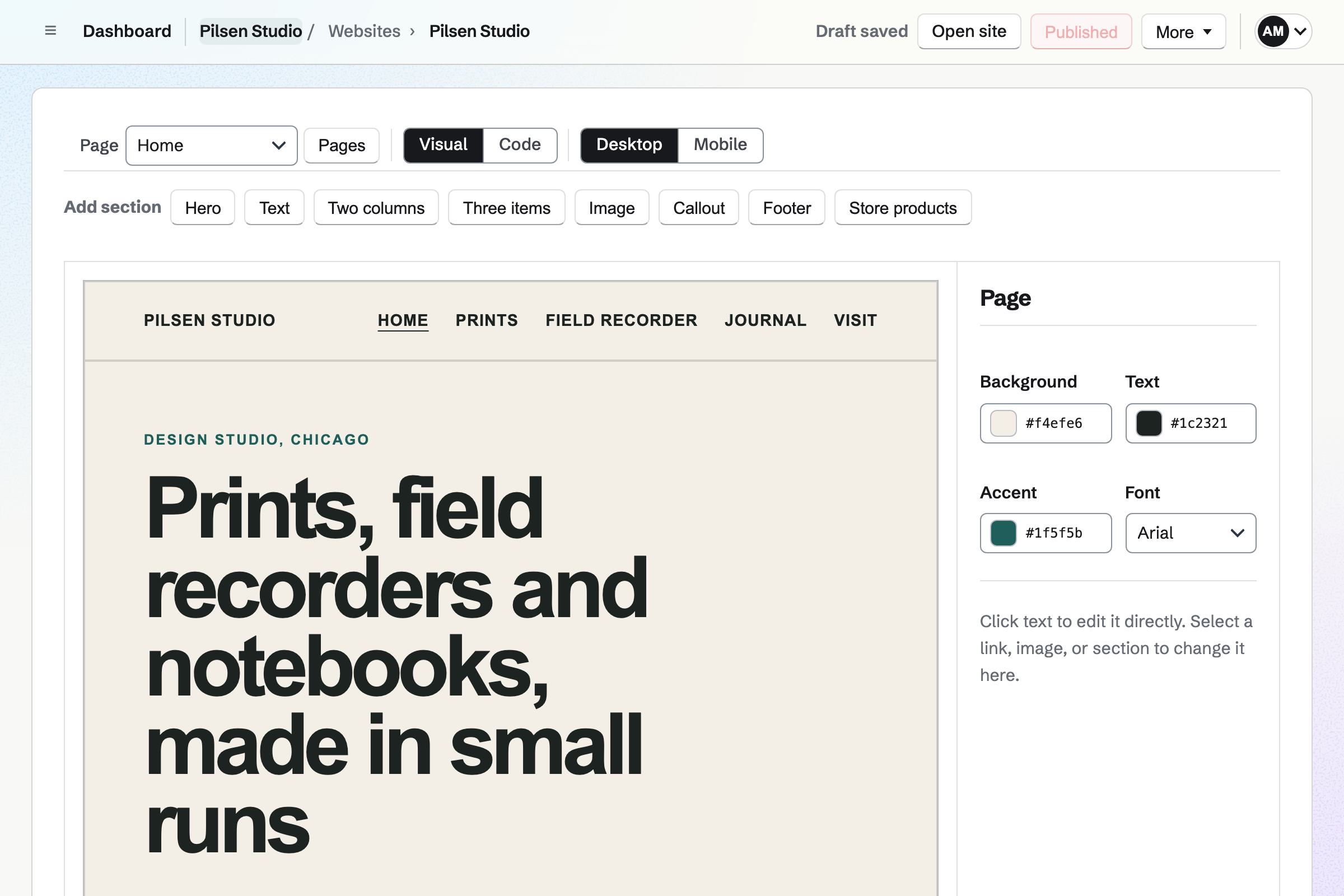
Pilsen Studio’s website in the Website Builder: its Home page in Visual mode, a hero for prints, field recorders and notebooks under the site’s header and pages, with the page’s colours and font beside it.

How is Magpie different?

1. The website comes with the rest of the business

One Magpie subscription includes the areas a small business would otherwise buy one at a time:

  • Websites, the editor this page is about, with a blog, a portfolio and a files website for anything built elsewhere
  • Store for selling online, in the website's own look
  • Meetings and Appointments for booking pages
  • Invoicing, with recurring invoices and online payment
  • Newsletter for email to subscribers, Supporters for paid posts, and Courses for lessons sold at a school of your own
  • Mail for email addresses at your domain, and DNS for the domain's records
  • Calendar, Forms, Helpdesk, Contacts, Accounting, Staff Scheduling and the other areas, in the same team

Everything is in one account with one bill. Squarespace sells booking (Acuity Scheduling), email campaigns and email inboxes (Google Workspace) as separate subscriptions.

2. The website is yours to keep and to change

Your changes stay drafts until you publish them, all pages at once. Each publish is kept, the last 50 of them, and any can be restored. You can download the whole website as files on every plan, edit each page's HTML and the shared Layout, and publish a site built from a Git repository. Squarespace publishes a page when you save it, keeps no history after that, and its export leaves out styles, video and products.

3. The Free plan publishes

Magpie's Free plan includes 1 website, published at a Magpie address or at your own domain with a certificate. A paid plan includes 20. Squarespace has a 14-day trial, and a site needs a paid plan to go public. Both plans' prices are on Magpie's pricing page and Squarespace's.

Comparing Magpie and Squarespace

Squarespace does more inside the website; Magpie does more around it. Every line in the tables below was checked against Squarespace's own pages, linked from each row, and against Magpie's code and Help.

Platform

WhatSquarespaceMagpie
Website editorBuild pages from sections and publish them Yes Yes
Online shopProducts, a cart and checkout on the site Yes Yes
BlogPosts on the site, with drafts, scheduling, categories and comments Yes No comments
Portfolio, galleries and videoProjects, picture grids, slideshows and uploaded video Yes Yes
Memberships and paid postsContent kept for people who pay Yes Supporters
CoursesLessons sold to students Yes Yes
Email newslettersEmails to a list of subscribers Separate subscription Yes
Booking pagesClients choose a time and get a confirmation Acuity, separate Yes
InvoicingInvoices paid online Yes Yes
Email at your domainInboxes at the business's own domain Google Workspace, sold through Squarespace Yes
DomainsBuy a domain in the same place Yes No
DNS hostingHost a domain's records Yes Yes
Visitor analyticsVisits, sources and pages read Yes Shop pages only
Forms on the siteContact forms and sign-ups inside a page Yes Linked pages
Drafts and version historyPublish every change at once; go back to an earlier version No Yes
Your own code and GitEdit the HTML, or publish a site from a repository CSS and HTML blocks Yes
Free plan that publishesA public website without paying No Yes
No platform fee on shop salesOnly the card fee comes off a sale Core and above No

Good to know: Where Magpie says No or Partly, the line under the row says what Magpie does instead. Each gap has an item on Magpie's roadmap, and the line changes on the day it ships.

Getting started and plans

Squarespace starts every site from a template or from Blueprint AI, and needs a paid plan to publish. Magpie starts every website from the same Starter design and publishes on the Free plan.

WhatSquarespaceMagpie
Describe my business and have a whole site made for me, with its pages, words, pictures and look Source Magpie: The assistant creates a website from the Starter design and can write the home page's sections when asked, but it changes only the home page, makes no pictures and chooses no look. A JSON document or a page of HTML written by any AI tool can be pasted in to start a page. Yes Partly
Start my site from a choice of professionally designed templates Source Magpie: Every editor website starts from the same Starter design, with a header, navigation and footer, and is changed section by section. There is no choice of designs; a pasted JSON document or page of HTML can start a website already written. Yes Partly
Build my site and publish it without paying Source Squarespace: There is no free plan. A 14-day trial builds a site that stays private or behind a password; making it public needs a paid plan, Basic or above, billed monthly or yearly. No Yes

Good to know: Magpie's Free plan includes 1 website, published at a Magpie address or at your own domain, and a paid plan includes 20. A website stays hidden until the first Publish.

Pages, sections and design

Squarespace's editor places text and pictures anywhere in a section. Magpie's editor builds a page from sections with fixed layouts, and anything beyond that is written in the page's own HTML and CSS.

WhatSquarespaceMagpie
Give my site several pages, with a menu, a header and a footer on every page Source Yes Yes
Add ready-made sections to a page, and move, copy or delete them Source Yes Yes
Place, resize and overlap text, pictures and buttons anywhere in a section by dragging them Source Magpie: Text is edited where it is on the preview, and whole sections are added or dragged into place, but each section keeps its own fixed layout. Placing parts freely within a section means writing HTML and CSS in Code. Yes Partly
Set my site's fonts and colours once for every page Source Yes Yes
Put a picture or a video behind a section Source Magpie: A section or the page takes a background colour. A picture, a gradient or a video behind it takes CSS in Code. Yes Partly
Make parts of my site move as they appear Source Magpie: Sections appear without movement. An animation has to be written in the page's CSS in Code. Yes No
Have my site work on phones without extra work, and check it at phone width Source Yes Yes
Add my own HTML, CSS and JavaScript, or another service's widget Source Yes Yes
Change a live site in a draft, and publish every change at once when it is ready Source Squarespace: Saving a page makes its changes public, and some changes, such as gallery pictures and the order of the navigation, show at once. Blog posts and portfolio projects can be kept as drafts or scheduled. Partly Yes
Go back to an earlier version of my site after saving Source Squarespace: Undo works while a page is open, but there is no revision history once it is saved. Deleted pages can be restored for 30 days. No Yes

Good to know: Code in Magpie's editor shows each page's HTML and the Layout every page shares, on every plan. Scripts and embeds run once the website is at your own domain.

Blogs, portfolios, galleries and video

Both hold a blog, a portfolio, galleries and uploaded video; Magpie added its own in November 2026. They differ on comments under a post, on what moves by itself, and on events listed inside the site.

WhatSquarespaceMagpie
Write a blog on my site, with drafts, scheduled posts, categories and comments Source Magpie: Add blog gives an editor website a Blog page that lists its posts, each at its own address. Posts are drafts until published or scheduled, have a category, a cover picture and a summary, and are in an RSS feed and the sitemap. Posts have no comments, and a website has one blog. Yes Partly
Show my projects on a portfolio page, each project with a page of its own Source Yes Yes
Show a gallery or a slideshow of my pictures Source Yes Yes
Upload my videos and play them on my site Source Yes Yes
List my upcoming events on my site, each with a page of its own Source Magpie: Calendar's public events each have a page of their own on the public calendar, and people can say whether they are coming, up to a limit set for the event. A website links to it; the list cannot sit inside the website. Yes Partly

Good to know: A Magpie blog post is a draft until it is published or scheduled, has a category, a cover picture and a summary, and is in the website's feed and sitemap. A website holds up to 5,000 posts.

Forms and sign-ups

Squarespace puts forms and sign-up blocks on any page. Magpie's Forms, Newsletter sign-up and Helpdesk contact page each have an address of their own that a website links to.

WhatSquarespaceMagpie
Put a contact form on my site and get the messages by email Source Magpie: Forms builds a contact form with its own public page and emails its creator each response, and a Helpdesk inbox has a contact page; a website links to either. Neither can sit inside the website. Yes Partly
Collect email sign-ups on my site for my mailing list Source Magpie: The Newsletter has its own sign-up page with double opt-in, which a website can link to. There is no sign-up form to put inside the website. Yes Partly
Have my site's form answers go into a Google spreadsheet or another tool as they arrive Source Magpie: Forms keeps each response in Magpie, emails the creator and exports a CSV file. Nothing sends responses to a spreadsheet or another tool as they arrive. Yes No

Good to know: A Magpie form emails you each response and exports a CSV file. Paid forms take 4%.

Online store

Both sell products with a cart and checkout. They differ on fees, subscriptions, instalments, shipping labels and selling in person.

WhatSquarespaceMagpie
Sell products on my site, with product pages, a cart and checkout Source Yes Yes
Sell downloads, such as files and digital products Source Yes Yes
Sell a product that the buyer pays for every month Source Magpie: Supporters takes monthly payments for tiers of posts. A Store product is paid for once; there are no subscription products. Yes Partly
Let buyers pay in instalments Source Magpie: A course sells in monthly payments, from 2 to 12, bought by card on their own, with access from the first payment. Any other Store product is paid at once. Yes Partly
Offer discount codes and sell gift cards Source Yes Yes
Remind buyers who left without paying Source Yes Yes
Buy and print shipping labels for my orders Source Magpie: Store sets shipping rates, local delivery and pickup, and an order is marked shipped with its tracking number. Labels are bought from the carrier elsewhere. Yes No
Sell in person, taking cards on my phone or a reader Source Magpie: On the website, New order in Store records a sale paid in cash at a market or counter, taking its items from stock, or sends the customer a payment link to pay by card on their own phone; nothing takes a card on your phone or a reader. The Magpie app's Sell screen, not yet in the App Store or Google Play, sells from the Store's stock and emails a receipt, but takes cash only for now. Yes Partly
Have a print-on-demand service make and ship my merch Source Magpie: Store sells stock the team holds and ships itself. No print-on-demand service is connected. Yes No

Good to know: Magpie takes 4% of each sale. Buyers pay through your own Stripe account, and Stripe's card fees apply too.

Memberships, courses and paid content

Squarespace keeps pages, posts, courses and videos behind a paywall on the site itself. Magpie's paid posts are in Supporters, on a page of their own, and its courses are at a school of their own.

WhatSquarespaceMagpie
Keep pages of my site for members who sign up or pay Source Magpie: Supporters has a page where people join a free or paid monthly tier and read the posts kept for them. A website itself is open to everyone; none of its pages can be kept for members. Yes Partly
Keep some of my posts for paying readers, and let others follow free Source Yes Yes
Sell an online course of lessons on my site Source Yes Yes
Sell access to a library of my videos to watch online Source Magpie: Courses sells lessons with video to watch online at your school, Store sells video files to download, and Supporters posts can hold videos. There is no library of videos sold on its own. Yes Partly

Good to know: Supporters sends each post to everyone, to the free tier or to chosen paid tiers, with pictures, video and polls, and takes 4% of payments.

Email campaigns and promotions

Squarespace sells Email Campaigns as a separate subscription. Magpie's Newsletter is included in every plan; neither sends a series of emails when someone subscribes.

WhatSquarespaceMagpie
Send email newsletters to my subscribers Source Yes Yes
Send a series of emails automatically, such as a welcome or a win-back Source Magpie: Outreach, on Pro or the Team plan, sends a series of emails to people added by hand or by tag and stops when they reply. Supporters sends each new supporter a welcome email, and Store asks buyers for a review after their order ships. Nothing starts a series when someone subscribes or buys, and each Newsletter email is sent by hand. Yes Partly
Show a sale or news in a bar across my site, or in a pop-up that collects email addresses Source Magpie: A bar or a pop-up has to be written in the Layout's HTML and scripts in Code, and a pop-up has nowhere to send the addresses it collects. Yes No

Good to know: The Newsletter gives each sent email a public web copy. Free has 250 subscribers and a paid plan 5,000.

SEO and AI visibility

Both make a sitemap. Squarespace gives every page its own search title, description and sharing picture, and checks how the business appears in AI answers.

WhatSquarespaceMagpie
Choose the title, description and picture each page shows in search results and shared links Source Magpie: Each page's title is made from its name and the website's. A description and a sharing picture take meta tags in the Layout's code, the same on every page. Yes Partly
Have a sitemap made for search engines Source Yes Yes
Send old addresses on my site to new ones, so old links keep working Source Magpie: When a page's address changes, the old address sends visitors to the new one until another page takes it. There is no list of redirects of your own. Yes Partly
Give my site its own icon in the browser tab Source Magpie: Favicon Generator makes the icon files, but an editor website has no icon setting and takes no files of its own: the icon goes in as tags in the Layout's head in Code, pointing at files kept elsewhere. A files website takes the files themselves. Yes Partly
See how my business shows up in answers from ChatGPT and other AI tools Source Magpie: Nothing in Magpie checks how a website appears in AI answers. Yes No

Good to know: A published Magpie website answers /sitemap.xml with its published pages, and a robots.txt that names it.

Analytics

Squarespace counts every visit to the site. Magpie counts visits and sales on the shop's pages through Store, and nothing on the other pages.

WhatSquarespaceMagpie
See how many people visit my site, where they come from and what they read Source Magpie: When a website shows the team's Store, Store reports count views of its Shop, product and collection pages each day and say where buyers came from. The website's other pages count nothing; a tracking snippet pasted into the Layout's head in Code runs once the website is at the team's own domain. Yes Partly
See my sales, best products and how many visits turn into orders Source Yes Yes

Good to know: Store reports show sales, Stripe fees, margins, stock, buyers, visits and conversion for any dates, export each table as CSV, and can send a weekly summary.

Domains, hosting and email

Both show a website at your own domain with a certificate. Squarespace sells domains; Magpie hosts a domain's DNS and serves websites made elsewhere.

WhatSquarespaceMagpie
Show my site at my own domain, with a secure address Source Yes Yes
Buy my domain in the same place as my site Source Magpie: Magpie hosts a domain's DNS and adds a website's records itself, but the domain is bought and renewed at a registrar elsewhere. Yes No
Have email addresses at my site's domain Source Yes Yes
Host a site I made elsewhere, from its files or a Git repository Source Squarespace: Version 7.1 sites are built in the editor. The Developer Platform, which edits template code from a Git repository, works only on older version 7.0 sites. No Yes

Good to know: When Magpie hosts your domain's DNS, it adds the website's records itself. The certificate is automatic either way.

Scheduling and invoicing

Squarespace sells Acuity Scheduling as a separate subscription and includes invoicing. Magpie includes booking pages and Invoicing in every plan.

WhatSquarespaceMagpie
Let clients book appointments from my site Source Magpie: Meetings and Appointments give booking pages with confirmation emails, included in Magpie's plans, but neither takes payment online. A website links to them; the booking cannot sit inside the website. Yes Partly
Send invoices to clients and take payment online Source Yes Yes

Good to know: Invoicing sends invoices, recurring invoices and reminders, and takes payment through your Stripe account with no Magpie fee.

Contributors, apps and site management

Both let other people edit the site. They differ on phone editing, copying a site, handing it to a client, languages, passwords and export.

WhatSquarespaceMagpie
Let other people edit my site with me Source Yes Yes
Build and change my site from my phone Source Squarespace: The Squarespace app edits existing text, pictures and headers, adds blog posts, and handles orders and analytics, but it cannot add sections or add and rearrange blocks. Partly Yes
Copy my site to start a new one from it Source Magpie: A section can be duplicated, but a whole website cannot be copied. Downloading its files and uploading them gives a files website without the editor. Yes No
Hand a finished site over to a client's own account Source Magpie: A website stays in the team it was made in. The client can join that team, or the website can be downloaded as files and uploaded to a files website in theirs, which loses the editor. Yes No
Offer my site in several languages, with a switch for visitors Source Magpie: A website is in the language it was written in. A second language means separate pages written and linked by hand. Yes No
Keep my site, or some pages, for people who have the password Source Magpie: A published website is open to everyone. Turning off Published takes it offline for every visitor. Yes No
Download my site's content to keep or to move elsewhere Source Squarespace: A published site exports a WordPress-format file with its layout pages, one blog, and text and image blocks, but not styles, video, products or drafts. A trial site cannot export. Partly Yes
Bring my existing site over from WordPress or another builder Source Magpie: A site exported as files can be uploaded as a files website, and a page of HTML or JSON can be pasted into an editor page. Nothing brings over another builder's pages and posts into the editor. Yes Partly

Good to know: Download as files gives a ZIP of every page as visitors see it. History keeps the last 50 published versions, each one restorable.

Price comparison

How Squarespace charges

Squarespace charges by plan, Basic, Core, Plus or Advanced, billed monthly or yearly, with no free plan. The plan sets what the site can do: Core and above add discounts, shipping labels, code injection and advanced analytics. On top of the plan, Basic takes 2% of shop sales, and paid content and memberships pay 7% on Basic, 5% on Core and 1% on Plus. Booking, email campaigns and inboxes are separate subscriptions. Prices are on Squarespace's pricing page, in your currency.

How Magpie charges

Magpie charges by plan too, Free or a paid plan, for everything in the account: the website, the shop, bookings, invoicing and the rest. The plan sets how many websites, subscribers and team members you have, not which areas you can use. Magpie takes 4% of Store sales, 4% of Supporters payments and 4% of paid forms. Prices are on Magpie's pricing page.

On top of the planSquarespaceMagpie
Fee on shop sales2% on Basic; none on Core and above4%
Fee on paid content and memberships7% on Basic, 5% on Core, 1% on Plus, none on Advanced4% on Supporters
Card feesCharged by the payment providerStripe's fees, through your own Stripe account
Booking pagesAcuity Scheduling, a separate subscriptionIncluded
Email newslettersEmail Campaigns, a separate subscription priced by emails sentIncluded: 250 subscribers on Free, 5,000 on a paid plan
Email at your domainGoogle Workspace; one inbox free for the first year on Core and aboveIncluded on a paid plan
Your domainSold by Squarespace; first year free with a yearly planBought from a registrar elsewhere
WebsitesOne site per plan1 on Free, 20 on a paid plan
People who can edit2 on Basic; no limit on Core and above3 in a free team, 25 on the Team plan

When to choose Magpie or Squarespace

  • Want the website, the shop, bookings, invoices, a newsletter and email at your domain in one subscription, and a Free plan that publishes? Go with Magpie.
  • Want a designed template you can drag things anywhere on, with comments under your posts and members-only pages on the same site? Squarespace is the right choice.

Recommendations by kind of business

For a photographer, an artist or a designer
Squarespace. Both show projects on a portfolio page, pictures in a gallery that opens full size, and video. Squarespace's templates, and an editor that places a picture anywhere on the page, still make the better-looking portfolio sooner. Magpie starts from one Starter design, and another look takes CSS.
For a shop
Magpie. Discount codes, gift cards, downloads with licence keys, checkout reminders and sales reports on every plan, for 4% of each sale. Squarespace takes 2% on Basic and sells subscription products and shipping labels, which Magpie does not.
For a writer with paying readers
Squarespace. Member pages, paywalled posts and a video library are on the site itself. Magpie's paid posts are in Supporters, on a page of their own.
For a teacher selling a course
Either. Both sell a course of lessons with video, track each student's progress and email them on completion. Squarespace's courses are pages of the site; Magpie's are at a school of their own, with quizzes, assignments, live sessions, certificates and monthly payments. Choose by whether the course should be part of the website or a school beside it.
For a service business: a consultant, a tradesperson, a salon, a clinic
Magpie. Booking pages, invoices paid online, a contact form, a newsletter and email at your domain are included. On Squarespace, booking and email campaigns are separate subscriptions.
For a developer, or a site built elsewhere
Magpie. A files website serves uploaded files or builds from a Git repository on each push, with versions. Squarespace's editor is the only way to build a version 7.1 site.
For a restaurant or a café
Either. Squarespace's templates and menus make the better-looking site sooner. Magpie adds Restaurant Reservations, the rota and the stock count in the same team. Choose by whether you want the website alone or the rest of the business with it.

Frequently asked questions

What is the difference between Magpie and Squarespace?

Squarespace is a website builder that has added a shop, memberships, courses and email campaigns, each priced by plan or as a separate subscription. Magpie is one subscription for a small business's software, and the website editor is one of its areas beside the shop, bookings, invoicing, a newsletter and mail. Squarespace does more inside a website; Magpie does more around it.

Does Magpie replace Squarespace?

Yes, for a business whose website is pages and a shop. Magpie builds the pages from sections, sells through Store, publishes on the Free plan, and adds the booking, invoicing and email the business was buying elsewhere.

Consider keeping Squarespace if readers comment under your posts, if you keep pages or posts for paying members, or if you want a designed template rather than one Starter design. Squarespace does each of these better than Magpie does today.

How much does Squarespace cost?

Squarespace has four plans: Basic, Core, Plus and Advanced, billed monthly or yearly, and a 14-day trial. Basic takes 2% of shop sales; paid content and memberships pay 7% on Basic, 5% on Core and 1% on Plus. Acuity Scheduling, Email Campaigns and Google Workspace inboxes are separate subscriptions. The prices are on Squarespace's pricing page.

How much does Magpie cost?

Magpie has a Free plan and paid plans, each covering every area. Free includes 1 website, 250 newsletter subscribers and a team of 3; a paid plan includes 20 websites, 5,000 subscribers and, on the Team plan, 25 people. Magpie takes 4% of Store sales and 4% of Supporters payments. The prices are on Magpie's pricing page.

Does Magpie have a blog?

Yes, since November 2026. Add blog gives an editor website a Blog page that lists its posts, each at an address of its own. A post is a draft until you publish or schedule it, has a category, a cover picture and a summary, holds pictures and video, and is in the website's feed and sitemap. Posts have no comments, and a post is not sent to your Newsletter subscribers by itself; both are on Magpie's roadmap. Squarespace's blog has comments.

Does Magpie have memberships or paid content?

Yes, in Supporters: people join a free or paid monthly tier and read the posts kept for them, with pictures, video and polls. It is a page of its own, not pages of the website, and Magpie takes 4%. Squarespace keeps pages and posts of the site itself behind a paywall.

Does Magpie sell courses?

Yes. Courses sells a course of modules and lessons at your school, a public page at Magpie's address or your own domain. Lessons hold video, text and files, with quizzes, assignments and live sessions; students' progress is tracked, and finishers can get a certificate. A course sells at a price, in monthly payments, or with a Supporters tier. Squarespace's courses are pages of the site itself.

Does Squarespace take a share of sales?

Yes on Basic, 2% of shop sales, and none on Core and above. Paid content and memberships pay 7%, 5% or 1% below Advanced. Card fees come on top. Magpie takes 4% of Store sales; buyers pay through your own Stripe account, and Stripe's card fees come on top.

Does Squarespace have booking?

Yes, through Acuity Scheduling, a separate subscription, which puts a booking calendar inside the site with reminders, intake forms and payment. Magpie's Meetings and Appointments are included and send confirmation emails, but the booking page is a page of its own that the website links to, and neither takes payment when someone books.

Does Squarespace keep a history of my site?

No. Saving a page makes its changes public, undo works while the page is open, and deleted pages can be restored for 30 days. Magpie keeps your changes as drafts until you publish, keeps the last 50 published versions, and restores any of them.

Can I see how many people visit my Magpie website?

Only on the shop's pages: Store reports count views of the Shop, product and collection pages and say where buyers came from. The other pages count nothing unless you paste a tracking snippet into the Layout's head in Code, which runs once the website is at your own domain. Squarespace counts every visit on every plan.

Which is better for a shop, Magpie or Squarespace?

Magpie for most shops: discounts, gift cards, store credit, downloads with licence keys, checkout reminders and sales reports on every plan, for 4% of each sale. Squarespace if you need subscription products, instalments on products other than a course, shipping labels bought in the shop, print-on-demand through Printful, or card payments on your phone in the United States.

Can I use Magpie and Squarespace together?

Yes. A Squarespace site can link to a Magpie booking page, a Magpie form, the Newsletter's sign-up page or an invoice, and Magpie's Mail can give you email at the domain the site uses. Many businesses would start that way and move the website later, or not at all.

Can I move my site from Squarespace to Magpie?

Partly. Squarespace exports your pages, one blog, and their text and pictures as a WordPress file, which Magpie cannot read into its editor. You make each page again in the editor or paste in its HTML, and paste each post into a new post; scheduling it for its original date publishes it at once with that date. Your domain stays where it is registered and points at Magpie with two DNS records; Magpie gets the certificate.

Can I keep my Squarespace domain?

Yes. A domain registered with Squarespace stays registered there. You add a TXT record and an ALIAS or CNAME record, and the website shows at the domain with a certificate Magpie gets for it.

Can other people edit a Magpie website with me?

Yes. Everyone in your Magpie team can edit its websites on every plan, up to 3 people in a free team and 25 on the Team plan, and you can limit someone to the areas they need. Squarespace's Basic plan allows two contributors, Core and above have no limit.

Can I edit a Magpie website on my phone?

Yes. The editor works in a phone's browser: you can add, move and style sections, change text, links and pictures, and publish. Squarespace's app edits existing text and pictures and adds blog posts, but cannot add sections.

Can I use my own code?

Yes, on every plan. Code shows each page's HTML and the Layout every page shares; scripts and embeds run once the website is at your own domain. A files website serves uploaded files as they are or builds from a Git repository. Squarespace has a CSS editor and code blocks on every plan, and JavaScript and code injection on Core and above.

What is included in Magpie's Free plan?

1 website, published at a Magpie address or at your own domain, with 50 pages, drafts and 50 kept versions. The shop, booking pages, Invoicing, the Newsletter with 250 subscribers, Forms and a team of 3. A paid plan adds email at your domain and raises the limits.
If a line on this page is wrong, tell us and we will correct it.

Squarespace changes, and so does Magpie. If a line is out of date about either product, email support@magpie.diy with the page that shows it. We check the line against that page, change it, and give it the new date. That goes for Squarespace's own team as much as for anyone who uses it.

Make a website on Magpie's Free plan.

Create a Magpie account, then make your first website.

Create account