Podcast
Publish episodes to a public podcast page and to an RSS feed that podcast apps subscribe to.
Each podcast in Magpie has its own title, artwork, episodes, public page and RSS feed. Episodes are MP3 files you upload or record in Magpie, and Magpie stores the audio that listeners play. To list the podcast in Apple Podcasts, Spotify or another podcast app, submit its feed address to that app.
Get started free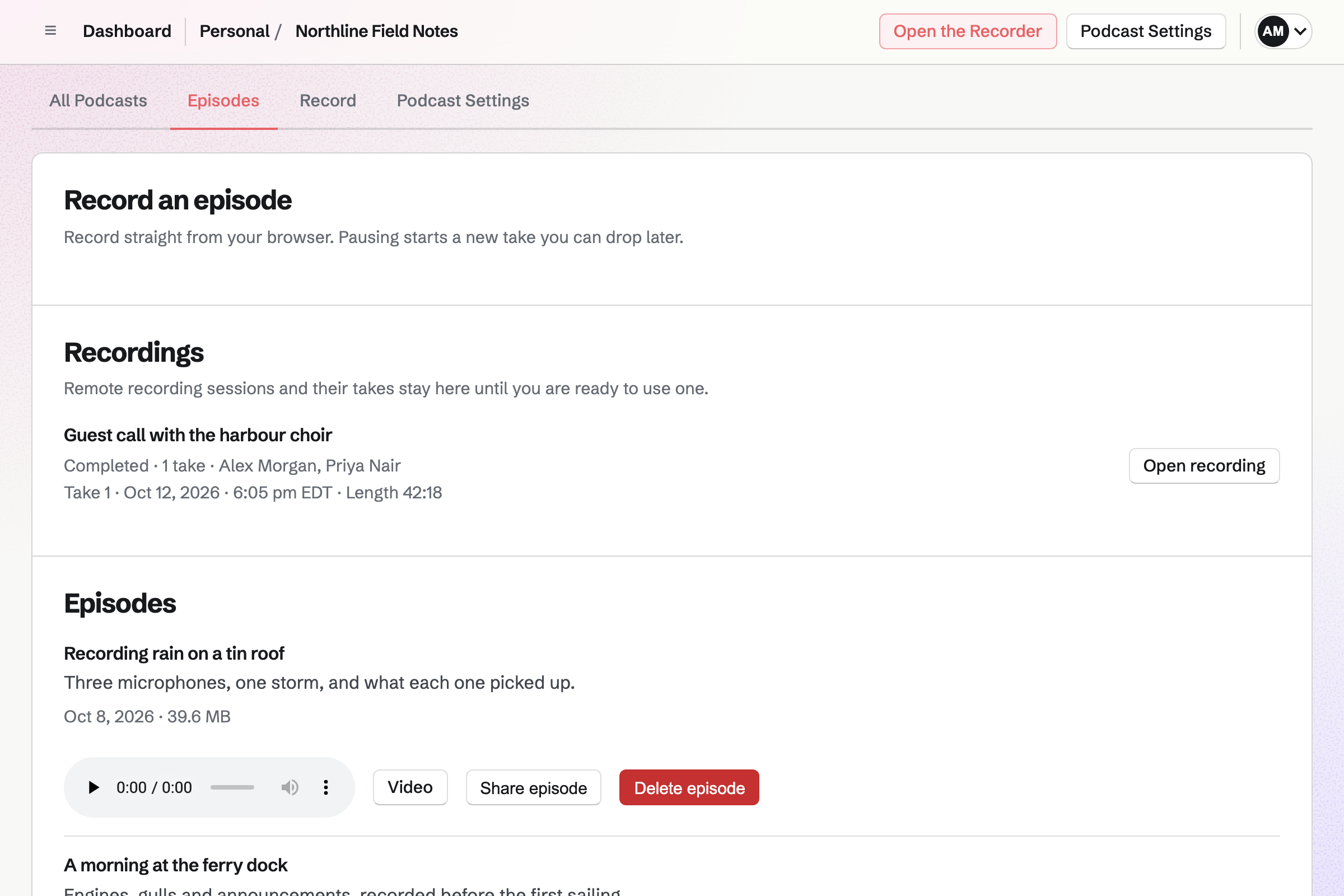
A podcast and its details
Your first podcast is made, named after you, the first time you open Podcast, and Start another podcast adds one with a title of its own. Podcast Settings shows each detail as saved text; click a value to change it.
- Title and author
- Shown on the public page and in podcast apps. Renaming the podcast does not change its addresses.
- Description
- The podcast's summary on its public page and in the feed.
- Category
- Chosen from a list such as Business, Comedy, Education and Technology.
- Explicit content
- No, Clean (edited for explicit content) or Yes. The feed gives the value for the podcast and for each episode.
- Artwork
- A square JPG or PNG at least 1,400 pixels on each side, chosen from Your images or uploaded there. Until you choose one, the artwork is a design made from the podcast's title, and Use title artwork goes back to it.
Publishing episodes
Uploaded and recorded episodes are listed together under Episodes, newest first, each with a player, its date and its file size.
Upload an episode
Enter a title and description and choose an MP3 file of up to 500 MB. The episode will be published when the upload finishes.
Record an episode
The Recorder records you alone or with guests, and publishing joins the takes into one MP3.
Share episode
Starts a Social Media post that announces the new episode by its title and links to the podcast's public page.
Video
Makes an MP4 to download of a published episode's audio over the podcast artwork, with images you place and time.
Delete episode
Deletes the episode's audio and removes it from the public page and the feed. It cannot be undone, and a listener's saved download may become unavailable.
The RSS feed
Turning the podcast on in Podcast Settings publishes its public page and its RSS feed, and the settings page then shows both addresses for copying. A new podcast is off, and nothing is published while it is off.
- The feed address
- An address on magpie.diy with your handle and a name made from the podcast's title when it was created. Renaming the podcast keeps it. Changing your handle after people subscribe leaves their apps checking the old address.
- The podcast in the feed
- Its title, description, author, category, explicit content value, artwork and a link to the public page.
- Each episode in the feed
- Its title, description, publication date, and the MP3 file with its size.
- The audio
- Magpie stores each episode's MP3, and podcast apps download it from the address the feed gives.
Listing the podcast in Apple Podcasts and Spotify
Podcast apps subscribe to the feed, not to the public page. To list the podcast in Apple Podcasts, Spotify or another podcast app, submit the RSS feed address to it. Episodes you publish afterwards will be added to the same feed.
Apple Podcasts requires a category, the explicit content value and artwork, and Podcast Settings marks each of them. The artwork made from the title is square and as large as chosen artwork must be, so a podcast has artwork from the start.
The public podcast page
Each podcast's page is at your own address, made from your handle, followed by /podcast and the podcast's name. Anyone can open it while the podcast is on; while it is off, the page is a preview that only you can open.
- What it shows
- The artwork, title, author, description, category and number of episodes, then each episode with its date, description and a player.
- Links
- To the RSS feed, your calendar and, when it is published, your meeting page.
- Several podcasts
- With more than one podcast on, your address followed by /podcast lists them all.
- Link previews
- A link to the page shared in a post or a message shows the podcast's artwork and description.
- Feed readers
- The page names its feed, so RSS Reader and other feed readers can follow the page's address.
Plans and file storage
Podcast is on every plan. A podcast belongs to the person who made it, and its limits follow that person's own plan in every team they work in.
The free plan includes a set number of podcasts and of episodes in each. Pro includes more podcasts and as many episodes as fit in its file storage; the Pricing page lists the numbers. Episode audio and episode videos count toward your file storage, which your images, screen recordings and Store downloads share.
Publish your first episode.
Create a Magpie account, open Podcast, upload an MP3 or record an episode, then turn the podcast on in Podcast Settings.