Flashcards
Study shows the cards that are due and schedules each one again from how well you knew it.
Study is spaced repetition with FSRS (Free Spaced Repetition Scheduler), an open scheduling method. A session shows what is due and the day's new cards, and your rating of each card decides when it comes back.
Get started free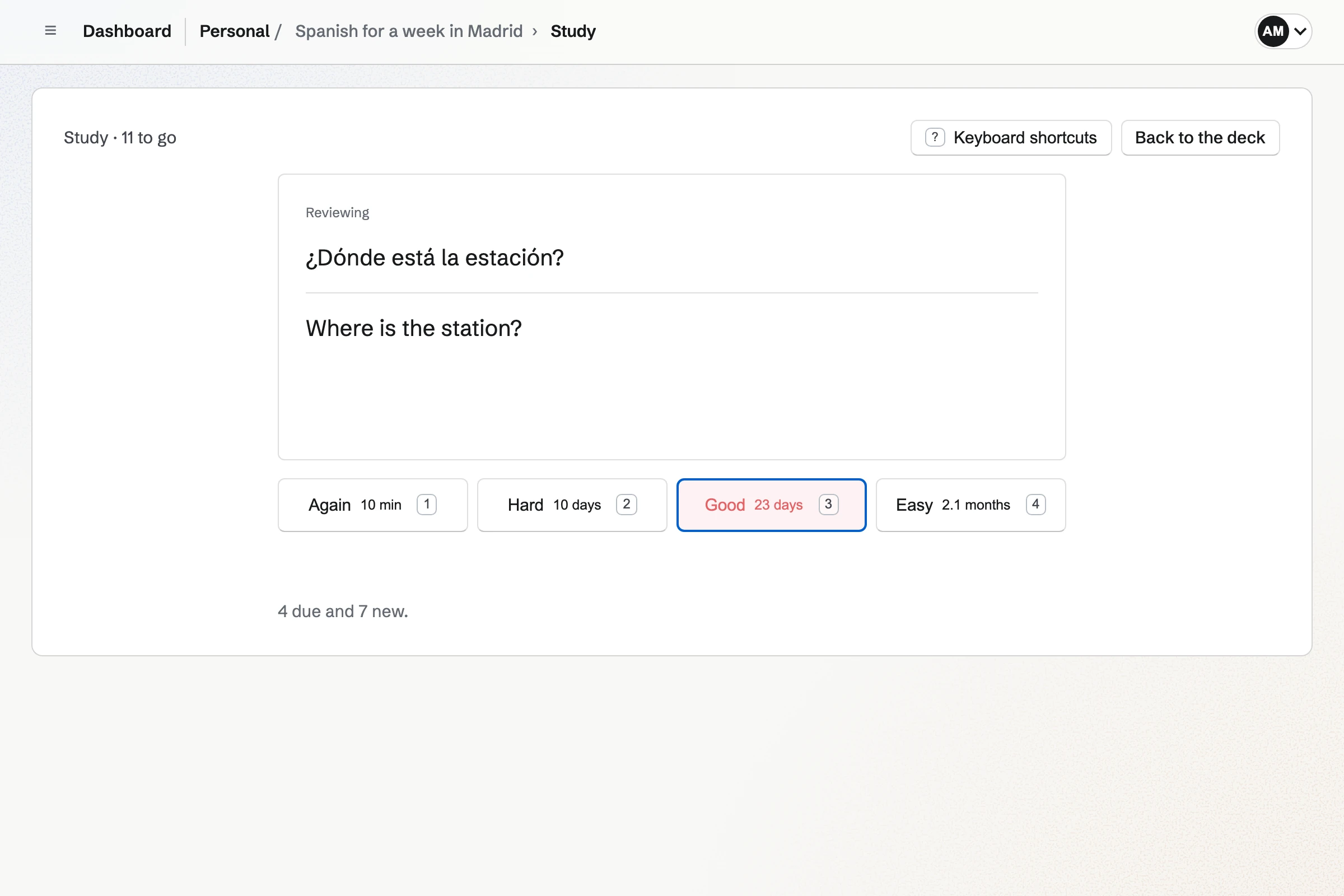
A Study session
Study opens a session of the cards due now, in this order.
Cards being learned
Cards in their learning steps, new or missed, come first, the earliest due first.
Reviews
Cards whose interval has run out come next, up to the deck's Daily limit.
New cards
Then come cards you have not studied yet, in the deck's order, up to its New cards per day.
Answer and rate
Choose Show answer, then Again, Hard, Good or Easy; each button shows when that rating will bring the card back. A card due again within the session, such as one rated Again, returns a few cards later.
The end of a session
When nothing more is due, the session says when the next card is due and offers the cards you missed again, without changing their schedule.
Touch or keyboard
Every control is a button, so a session works by touch in a phone's browser. With a keyboard, Space shows the answer and 1 to 4 rate the card.
How each rating schedules a card
Magpie uses FSRS version 5 with its published default parameters. For each card and person it keeps a stability (how long the memory is expected to last) and a difficulty, and a card in review is due when its predicted chance of recall falls to the default FSRS target.
- A new card
- Again brings it back in one minute, and Hard and Good in ten minutes. Easy moves it straight to an interval in days.
- Learning steps
- Good at the last learning step, or Easy at any step, moves a card on to days. Again starts the steps again, and Hard repeats the current one.
- A card in review
- Hard, Good and Easy set an interval in days from the card's stability, its difficulty and the time since you last saw it: Hard the shortest, Easy the longest. A card you keep knowing comes back later each time.
- A missed card
- Again on a card in review lowers its stability and brings it back in ten minutes to relearn. Good or Easy then returns it to an interval in days.
- Difficulty
- Again and Hard raise a card's difficulty, and Easy lowers it. The harder the card, the more slowly its intervals grow.
- Mastered
- A card shows as Mastered once its next interval is at least 21 days.
Study settings
A deck's Study settings apply to everyone who studies it, and members who can edit the deck change them. Each day starts at midnight in your own time zone.
- New cards per day
- Study adds this many cards you have not studied each day, after what is due.
- Daily limit
- Study shows at most this many reviews in a day, counting the answers already given in Study that day. Cards in their learning steps and the day's new cards are shown whatever the limit.
- Study both directions
- A card marked Also ask back to front is asked both ways, with a separate schedule for each direction.
- Reset my study progress
- This makes every card in the deck new for you again, and Reset my progress does the same for one card. Nobody else's progress changes.
Typed answers and multiple choice
When a card requires a typed answer, the answer is checked before the answer side is shown, ignoring case, punctuation and extra spaces and counting a one or two letter slip in a longer answer as correct. A fill-in-the-blank card with several blanks takes the answers in order, separated by commas.
A multiple-choice card is answered by choosing, and the correct choice is marked. In Study you still rate each card yourself after seeing the result. In Practice the result counts the card as known or missed, and after a wrong typed answer, I knew this counts it as known.
Progress and today's counts
Each card is New, Learning, Reviewing or Mastered for you, and a deck's page counts its cards in each state and those due today. Due today lists the decks in Personal or the selected team with cards due; after your first answer of the day it also shows your answers today, how many were correct, and the cards due tomorrow.
Progress is kept per person: on a team's deck or one shared by link, everyone who studies it has their own schedule and history. On a shared deck, Study asks a visitor without an account to sign in or create one.
Practice: Flip through, Quiz and Cram
Practice goes through a deck without changing your schedule.
- Flip through
- Flip through shows each card once for you to mark I knew this or I missed this. Missed cards come round again until each has been known once.
- Quiz
- Quiz asks the number of questions you choose, as multiple choice, written answers or both, and scores them at the end.
- Cram
- Cram shows every card, whatever its schedule.
- Practice one tag
- Flip through only the cards with one tag.
- Your place is kept
- Flip through, Quiz and Cram keep your place in your browser for 30 days, so a pass continues after you leave or reload.
Study your first deck.
Create a Magpie account, make a deck or import one, and choose Study.