Daily Operations
Turn opening, closing and recurring checks into routines, and work through their checklists at each location.
A routine is a procedure, such as Opening, a cleaning round or a delivery check. Each time it is due at a location, it creates a checklist for that business day. Shift leads confirm opening and closing, and the logbook passes notes to the next shift.
Get started free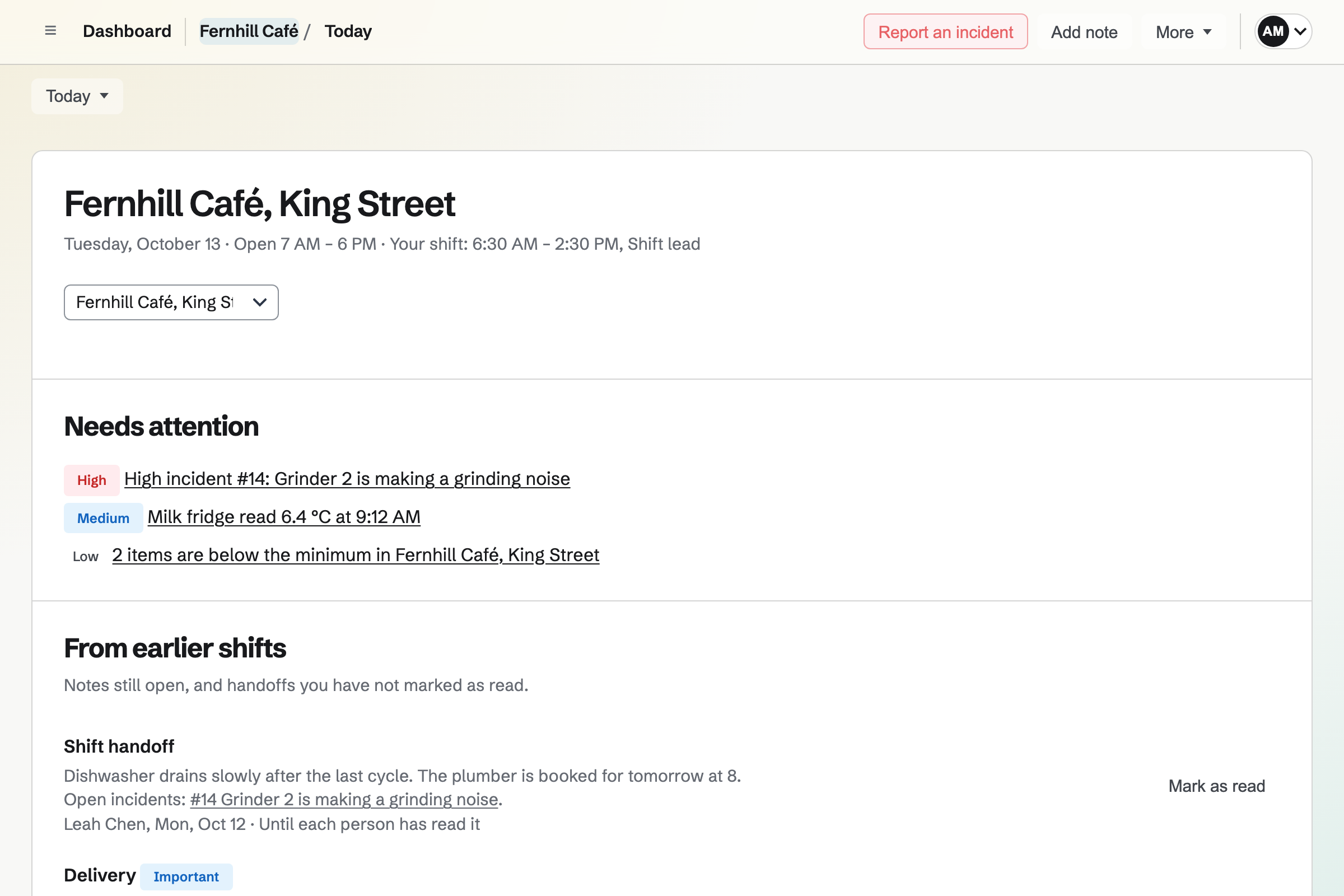
Steps a routine can ask for
Managers and team admins write each routine's steps, up to 100 in one routine.
- Answers
- Tick when done, Yes or no, Pass or fail, Choose one, a written answer or an acknowledgement.
- Numbers and temperatures
- A number with an optional lowest and highest accepted value, or a temperature taken at one of the location's temperature points.
- Photos
- A photo step, or a photo asked for with any step, always or only when its check fails.
- When a check fails
- A step can be critical, ask for a note, list what to do now and report an incident at the severity you choose.
- Steps that depend on an answer
- A step can be asked only after another step has a given answer.
Schedules, opening hours and closed days
A routine's schedule sets how often it happens: every day, on chosen weekdays, every few days, once a month, or only when someone starts it. A routine runs at one location or at every location.
- Times from the location's hours
- A checklist opens and is due at times before or after the location's opening time, its closing time or a time of day. Each location has its own time zone and hours for each day of the week.
- Late and missed
- A checklist completed after its due time is marked late. One nobody has started by the Missed after time is marked missed, and can still be completed.
- Closed days
- A manager marks a day closed, such as a public holiday. Nothing is scheduled that day, and the day's checklists that nobody had started are cancelled.
- After midnight
- A business day starts at 4:00 AM unless a team admin changes it, so a closing after midnight is recorded on the night the location opened.
- Who does it
- A routine is done by anyone on shift, the first person to take it, or one person. A shift lead can give any checklist to someone.
Publishing a new version
Changes to a routine's steps are a draft until a manager chooses Publish version. Checklists nobody has started will then use the new version. Started and completed checklists keep the version they began with, so a completed checklist shows what was asked at the time.
Today at a location
Today shows the selected location's business day. Shift leads and managers see Needs attention first: high and critical incidents, failed checks, readings out of range and temperature limits nobody has confirmed.
Everyone then sees notes from earlier shifts, Your work (the checklists and corrective actions given to them), and the location's checklists under Overdue, Do now, Coming up, Waiting to be checked, and Completed or skipped.
Completing, checking, skipping and reopening
Answer each step
Each answer is saved as it is given. Changing an answer keeps the earlier one in the checklist's history.
Complete
Complete is refused while a required step has no answer, or a note or photo it asks for is missing.
Checked by someone else
A routine can need checking: its completed checklist waits for a shift lead or manager other than the person who completed it, and shift leads and managers will be told.
Skip
A shift lead can skip a checklist with a reason. A checklist with a critical step can be skipped only by a manager.
Reopen
A manager can reopen a finished checklist, with a reason, to change its answers. The first completion and every earlier answer stay in the record.
Confirming opening and closing
A routine can be required to open or to close, and Opening and Closing on Today count how many of those checklists are finished. A shift lead confirms with Confirm ready to open and Complete closing.
With a required checklist unfinished, the button is Confirm with unfinished work, which asks why. The reason will be kept with the confirmation and sent to the location's managers and team admins. A critical incident that is not resolved stops opening until a manager resolves it or lowers its severity. Confirming marks no checklist as done.
The logbook and shift handover
The logbook keeps notes across shifts at a location, such as a new delivery time, and searches them by text, subject and dates. Everyone who works at the location can write in it, and auditors can read it.
- How long a note is shown
- A note is shown on Today for its day only, until each person has marked it read (for up to 14 days), until it is resolved, or, as a standing instruction from a shift lead or manager, until it is stopped.
- End shift and hand over
- End shift and hand over will save your notes in the logbook with the location's unfinished checklists and open incidents as they were, and show them on each person's Today until they mark them read. Nothing is marked done.
Write your first routine.
Create a Magpie account, open Daily Operations and choose the kind of business. The starter routines you keep become routines you can edit.