Anwälte und kleine Kanzleien
A law practice drafts documents with its clients and sends agreements to sign. It bills the hours on each matter.
Private investigators
You can work on your own in Personal, or with other investigators in a team. Each investigator keeps their own footage, encrypted in the browser.
Kostenlos starten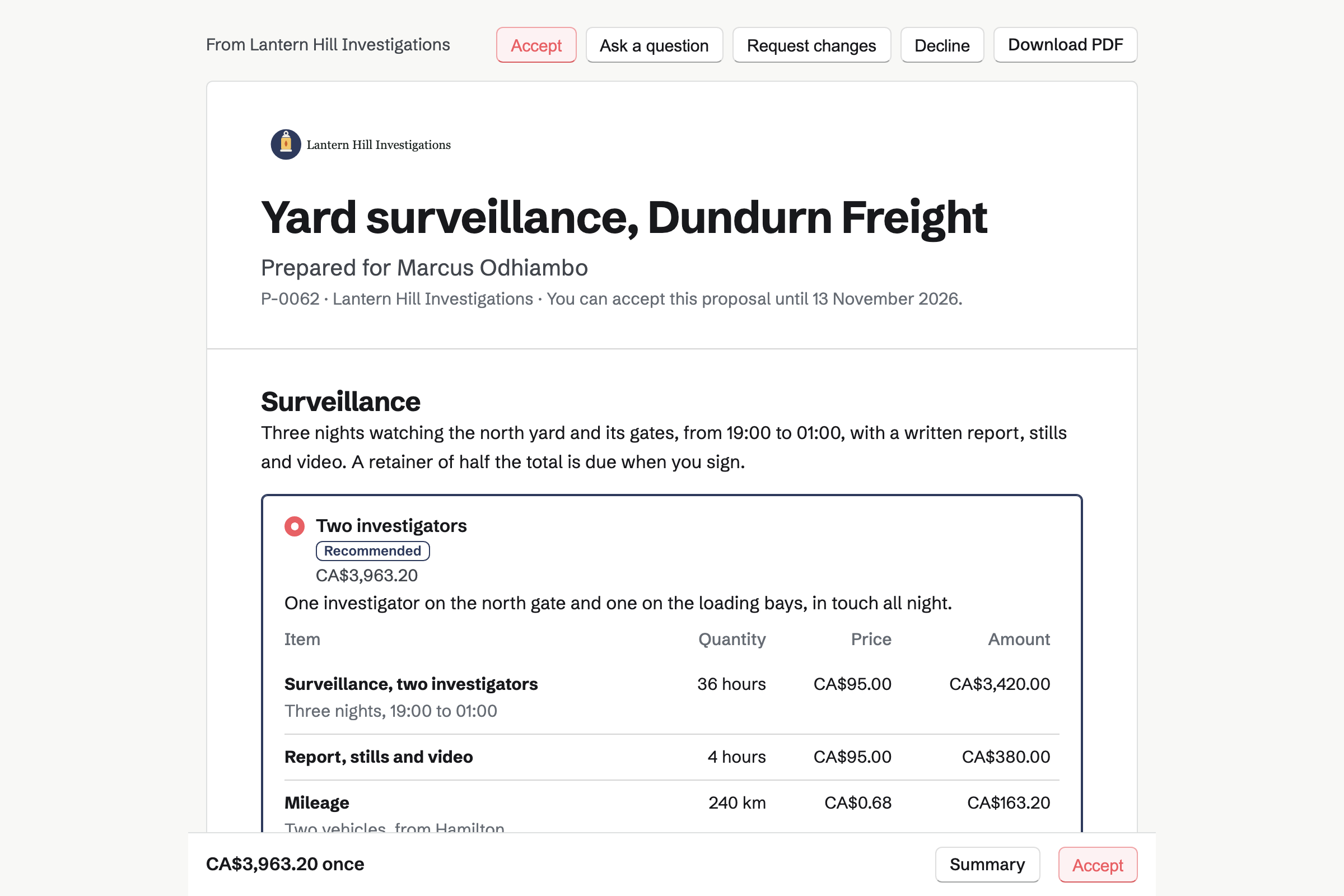
Magpie can make the case's project from the estimate. Your hours and costs are recorded against it.
The client signs it online, and the retainer will be invoiced from it. They can pay it by card.
Magpie can make the case's project, with the estimated hours as its budget.
You run a timer on the case each day. You record parking and tolls against it, with their receipts.
You type the log as you go. Your stills and video will be encrypted in your browser before upload.
You write it from the log, with the stills, and download it as a PDF.
PDF Editor removes what you mark, and the redacted report will be stored encrypted.
The report and the footage each go by a secure link. You will see when each one is downloaded.
You bill the rest of the estimate. Add unbilled expenses will put the parking and tolls on an invoice.
Proposals turns a case into an estimate the client signs online. Surveillance is priced by the hour, and mileage by the kilometre or mile. A second package can offer one investigator instead of two.
The retainer is the estimate's deposit. Its invoice will be issued when the client signs, and they can pay it by card. You can see each time the estimate is opened.
E-Signatures sends your own PDFs to be signed, such as your terms of engagement. Your letter can be a starter, with the client's fields and yours already placed.
In the order listed, the client will be emailed first, then you. Reminders can go out every 3 or 7 days until they sign. The certificate records each signer's email, time, IP address and browser.
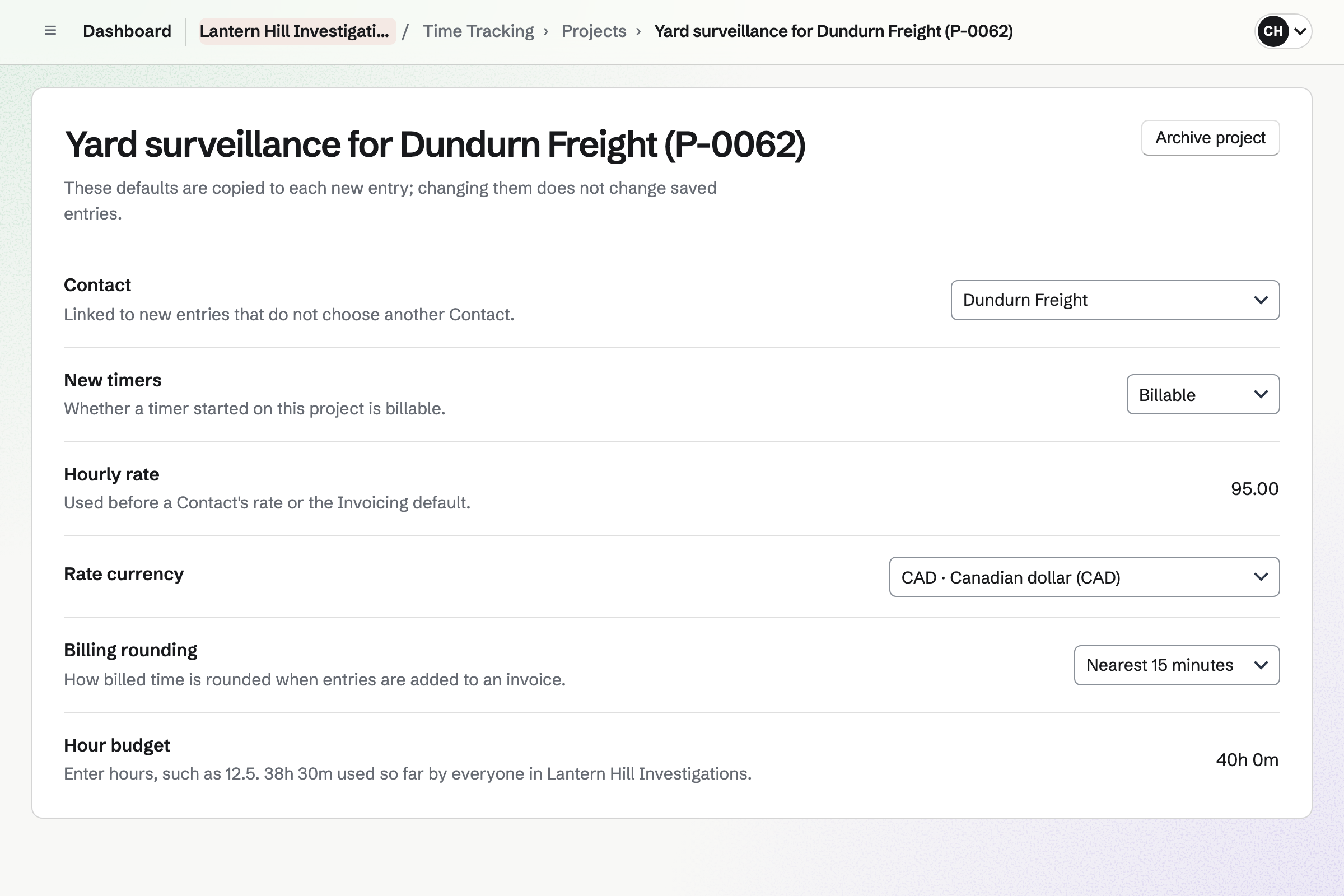
Time Tracking records your hours on each case, with a timer or added afterwards. Once the estimate is accepted, Magpie can make the case's project. Its budget will be the estimated hours.
The timer is saved in Magpie, so it will keep running when you close the browser. Billed time can round to the nearest 6 or 15 minutes. Reports total the hours on each case.
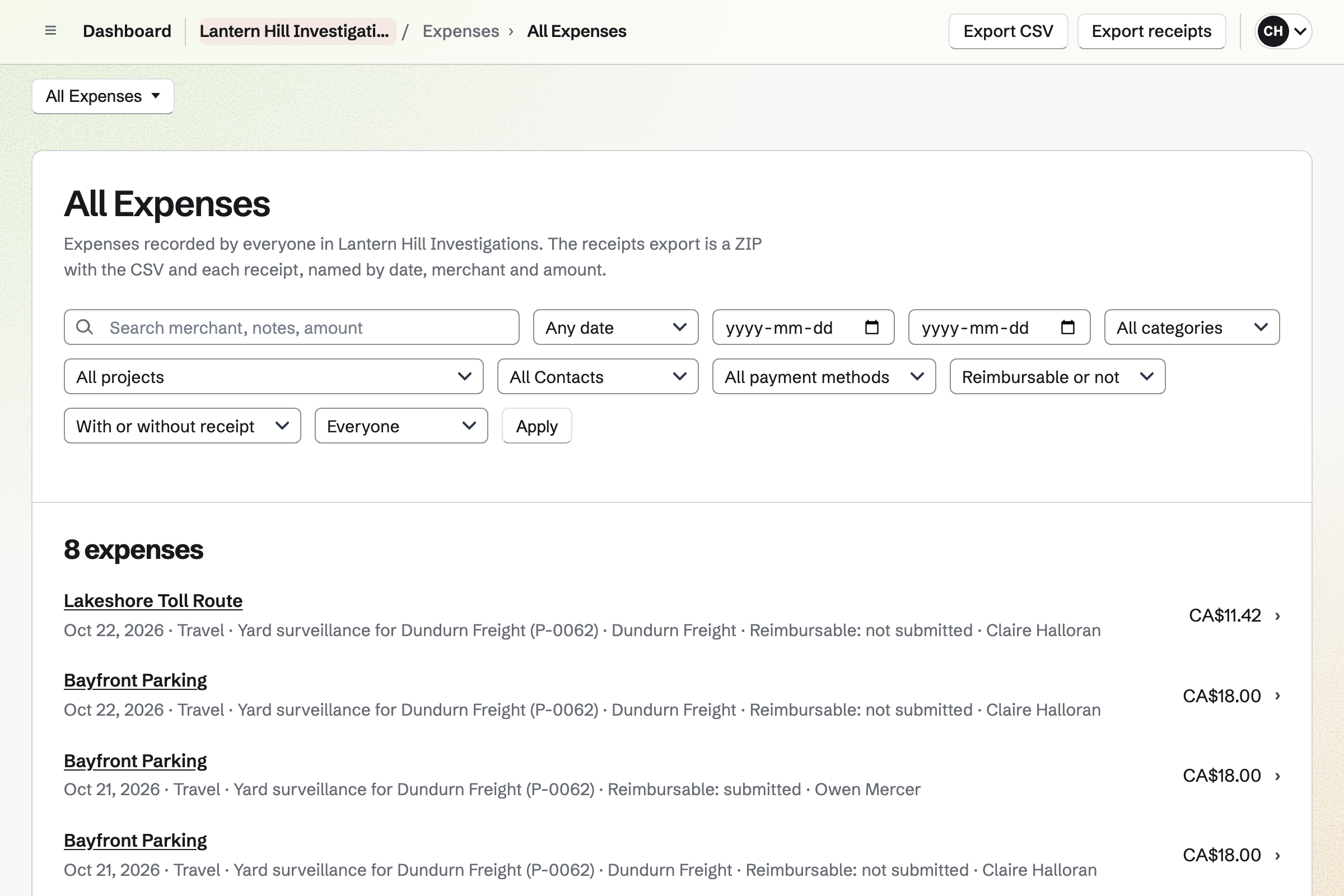
Expenses records each cost with its receipt, such as parking or a records search fee. On a phone, you can photograph the receipt as you add it.
You link the cost to the case and the client, and mark it reimbursable. Add unbilled expenses will then put it on their invoice. Each expense keeps a history of changes to its amount and receipt.
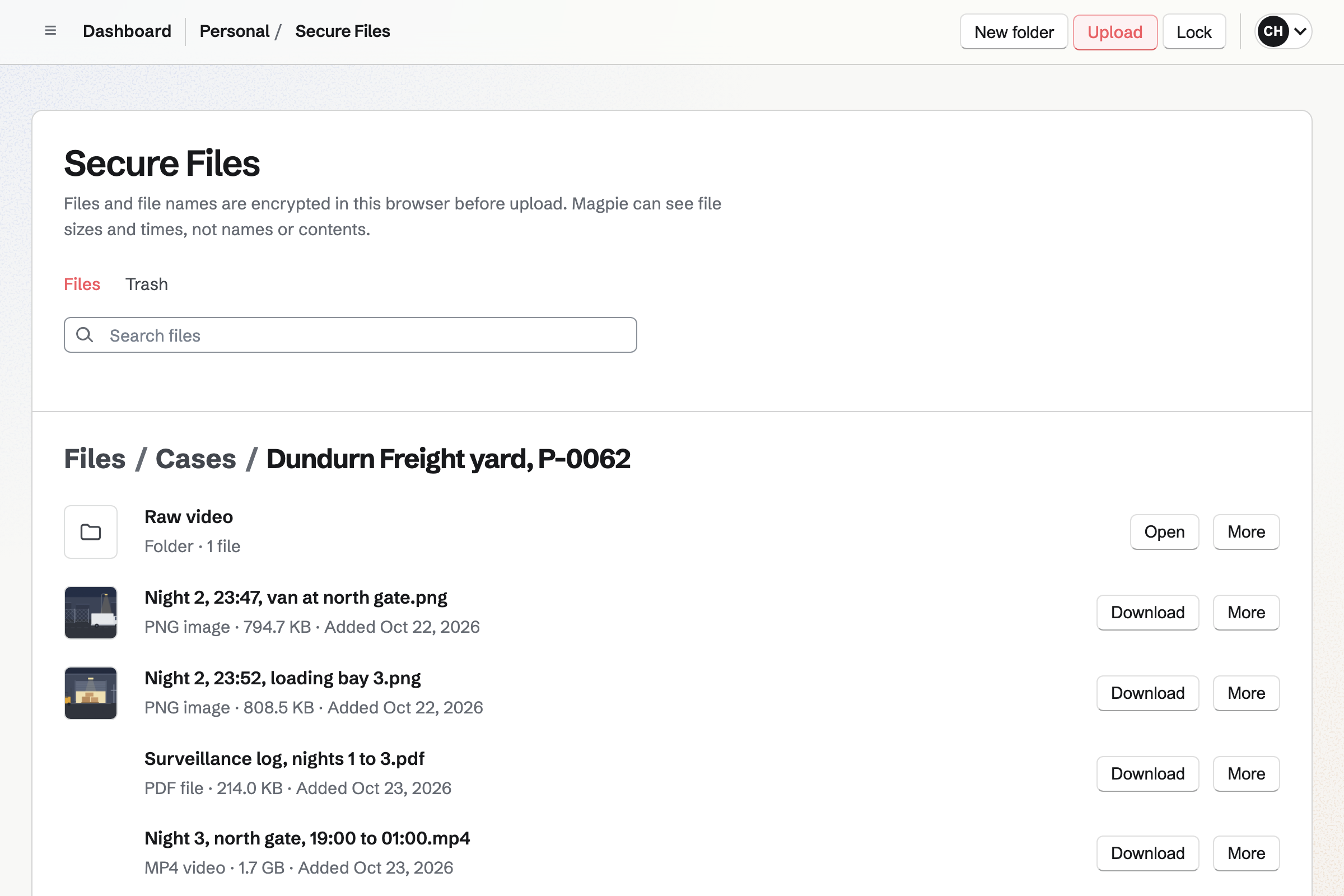
Secure Files encrypts each still, video and file name in your browser before upload. Magpie stores only the encrypted data, and cannot open it. Each file can be up to 2 GB.
Each secure link sends one file and expires within 30 days. It can allow a single download and ask for a passphrase. Its list shows when the link was opened and when the file was downloaded.
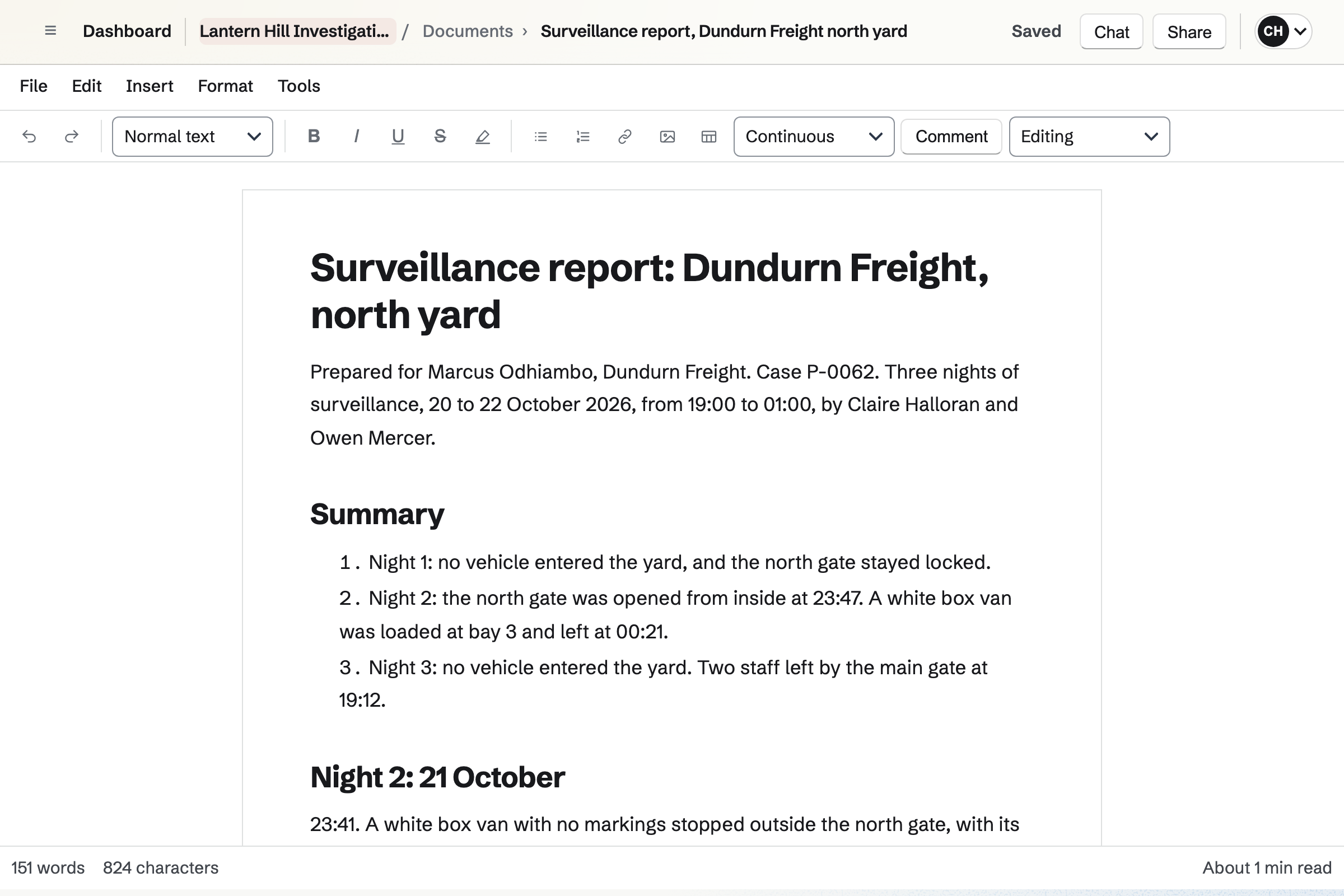
Documents is Magpie's word processor. Each report can start as a copy of your last one. Stills from Your images go in with captions. Pages have headers, footers and page numbers.
Download PDF makes the file you redact and send. A report in your team opens for its members. One in Personal opens only for you, until you share it.
PDF Editor redacts what you mark, such as a third party's name or a vehicle's plate. Find and redact finds every match of a word, an email address or a phone number.
Each redacted page will become an image, with the marked areas painted black. The file will be checked before it is exported. Everything runs in your browser, and the result can be saved to Secure Files.
You choose a vault password and keep the recovery key. Secure Files opens with the same password. Help: Password Vault: passwords and private information.
You connect your Stripe account, so clients can pay a retainer by card. Help: Connect Stripe to receive money.
You write an estimate with your hourly and mileage rates and a retainer. Then you save it as a starter. Help: Proposal starters, saved sections and the price list.
You upload the letter and add a role for the client and one for you. Then you place each role's fields. Help: Signing starters.
On your own, Pro covers your cases in Personal. An agency fits the Team plan: one price for up to 25 members.
Secure Files keeps each investigator's files in their own account. Footage counts toward their own storage: 1 GB on the free plan, 20 GB with Pro.
On the free plan, you can send 5 estimates and create 5 invoices a month. Magpie adds no fee to card payments, and Stripe's processing fee is taken from each.
A law practice drafts documents with its clients and sends agreements to sign. It bills the hours on each matter.
A consultant books discovery calls and quotes each engagement at a day rate. Clients follow an action plan in their portal.
A home inspector takes inspection bookings online and has the agreement signed before arriving. The report covers each house, with photos.
Yes. Each recipient opens the estimate from their own link, chooses a package and signs. The retainer is the estimate's deposit, so its invoice will be issued when they sign. They pay it by card, into your own Stripe account. Everyone will be emailed the signed PDF and a signing certificate.
Yes. A pricing section can offer 2 to 4 packages, each with its own lines. One can be Two investigators and another One investigator. You mark one as recommended, and the client chooses before signing. The totals, and a retainer set as a percentage, follow their choice.
Mileage is a line of its own, on the estimate or the invoice. The distance is the quantity, and the unit price is your rate per kilometre or mile. On an estimate, the line's unit can say km or miles. Parking and tolls are recorded as expenses and billed at what you paid.
Yes. Its activity lists each opening: by whom, when, and on a phone, tablet or computer. Reading time shows how long they spent on each section. You will be emailed when it is first opened, signed or declined.
Yes. You upload the letter as a PDF, or start from your starter of it. Each signer gets their own link by email, and can be asked for an access code. When everyone has signed, each will get a link to the signed PDF and the certificate.
Yes. Each case is a Time Tracking project, with its client, hourly rate and hour budget. You run a timer on the case, or add the time afterwards, such as 3h 30m. One timer runs at a time, and it keeps running if you close the browser.
Yes. A case's project can round billed time to the nearest 5, 6, 10 or 15 minutes. Or it can bill the exact time. Each entry keeps the time you recorded. The invoice editor shows recorded and billed time where they differ.
The case's project shows the hours used against the estimated hours. Extra hours go on an invoice of their own. Add unbilled time lists the hours you recorded for the client. You tick the ones to bill, and each will become a line at its hourly rate.
Yes. You record each cost as an expense, with its receipt. You link it to the client and mark it reimbursable. Add unbilled expenses will put it on their invoice as a line, at the amount recorded. Issuing the invoice will mark the expense billed, so it is not offered again.
Yes. All Expenses filters by project, so it can list one case's costs. Export receipts will then download a ZIP of them, with a CSV file and the receipts. Each receipt is named by date, merchant and amount.
Secure Files keeps them encrypted, in folders such as one for each case. Each file can be up to 2 GB, and stills up to 10 MB show a preview in the list. The files are stored in your own account, so each investigator has their own.
You, with your Password Vault password. Your browser encrypts each file, its name and its folder's name before upload. Magpie stores only the encrypted data. It sees file sizes, dates and link use, not the contents. Anyone else gets a file only through a secure link you send.
You make a secure link for the file. It expires after 1 hour, 1 day, 7 days or 30 days. It can allow one download, and ask for a passphrase you send another way. The client's browser decrypts the file, and can play a video on the page. Revoke stops the link at once, even during a download.
Yes. Each link lists when its page was opened and when the file was downloaded. The list also counts the downloads. In the file list, the file shows Link downloaded with the date. A download means the whole encrypted file was sent to them.
The recovery key you saved at setup lets you choose a new Password Vault password. Secure Files then opens with the new one. Magpie keeps neither the password nor the recovery key. Your files open only with one of them.
Yes. Image adds stills from Your images, or uploads new ones, each with a caption. A still can be centred, or placed left or right with the text beside it. Download PDF keeps each picture's size and place, with the headers and page numbers.
Yes. Redact marks text or an area of a page by hand. Find and redact finds every match of a word or phrase, such as a plate number. Each marked page is exported as an image with those areas painted black. The file is checked first, and nothing is exported if text remains on a redacted page.
Yes. Export PDF can protect the file with an AES-256 password. It can also remove the PDF's document properties, such as its author. The new file is made in your browser, and the original is not changed.
Yes. You type each time beside what you saw, and the note is saved as you go. A note in Personal opens only for you. One in a team opens for its members who use Notes. Export as Markdown downloads the log as a file.
Yes. Their Client Portal can hold a plan for each case, from instructions to report. They see which steps are done, and tick the ones that are theirs. Invoices, signature requests and files you share are in the portal too. They can upload files of their own.
Yes. Walkie Talkie is push to talk: you hold Talk and speak. With Live on, the other investigator hears you as you speak. Every message is also kept as a recording, to play later if missed.
Yes. In a team, you both record your hours on the case's project. Reports total them by person. A report written in the team opens for both of you. Each of you keeps your own footage, encrypted, and sends it by secure link.
Yes. Invoices and the retainer can be paid by card, into your own Stripe account. Magpie adds no fee, and Stripe's processing fee is taken from each payment. Reminders can go out until an invoice is paid. A cheque or bank transfer is recorded by hand, in full or in part.
Create a Magpie account and send your first estimate.