Tutors and music teachers
A tutor books each lesson online, bills each family monthly and shares practice decks.
Music teachers
Your lessons, families and fees are in your own Magpie account. Each family gets a private page for its students' practice.
Créer un compte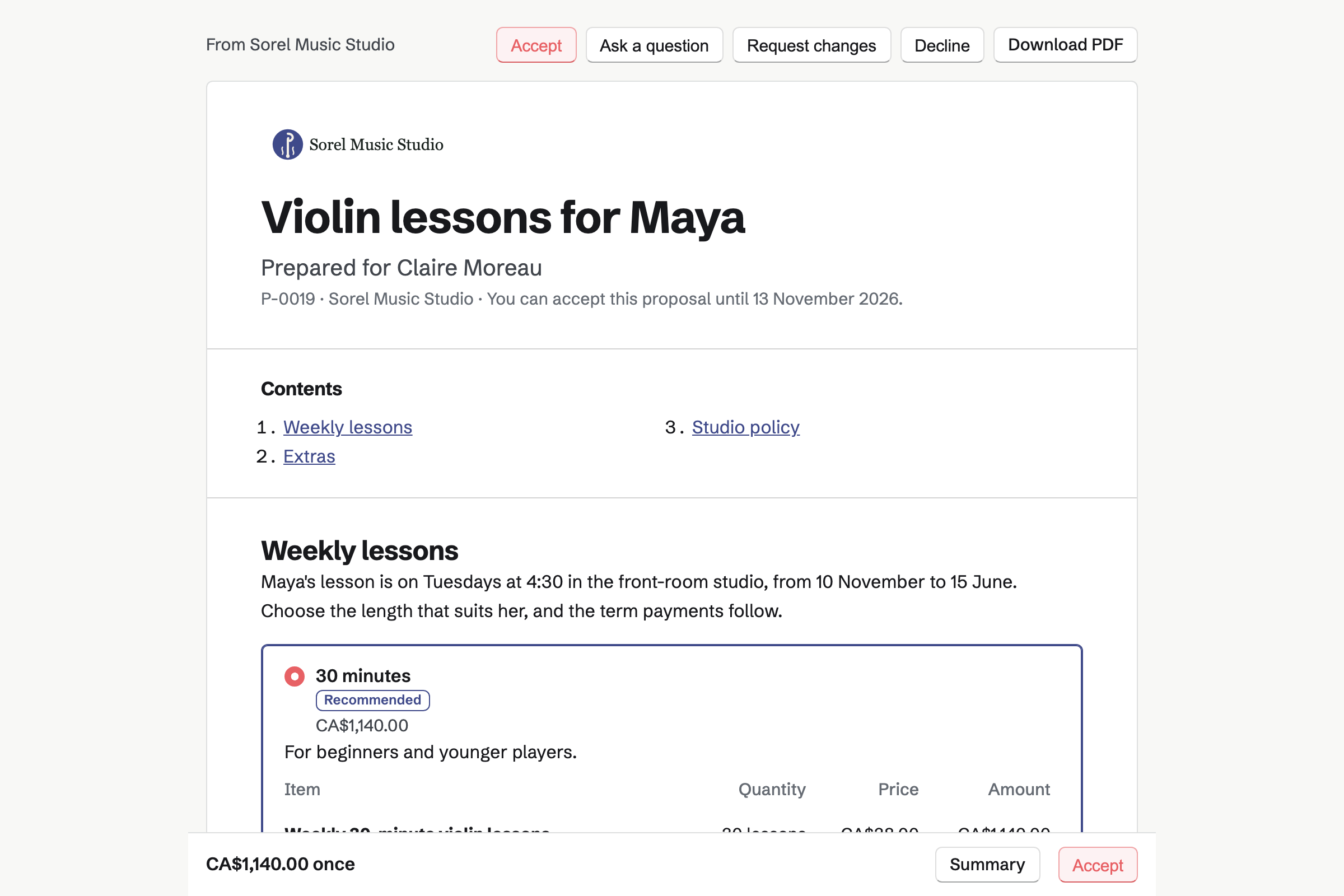
Proposals sets out a family's year of lessons on one page. The parent chooses a 30, 45 or 60-minute lesson, and the total follows. Your studio policy is a section of its own, with your rules on notice and make-ups.
The parent signs on the page, and both of you are emailed the signed PDF. Each term's payment is invoiced on the date you set. Accepting it can also make the family's private page.
Invoicing issues each term's invoice on its date, and emails it with a Pay online button. A family that pays by the month gets a monthly invoice instead. The parent can have it charged to their card each month.
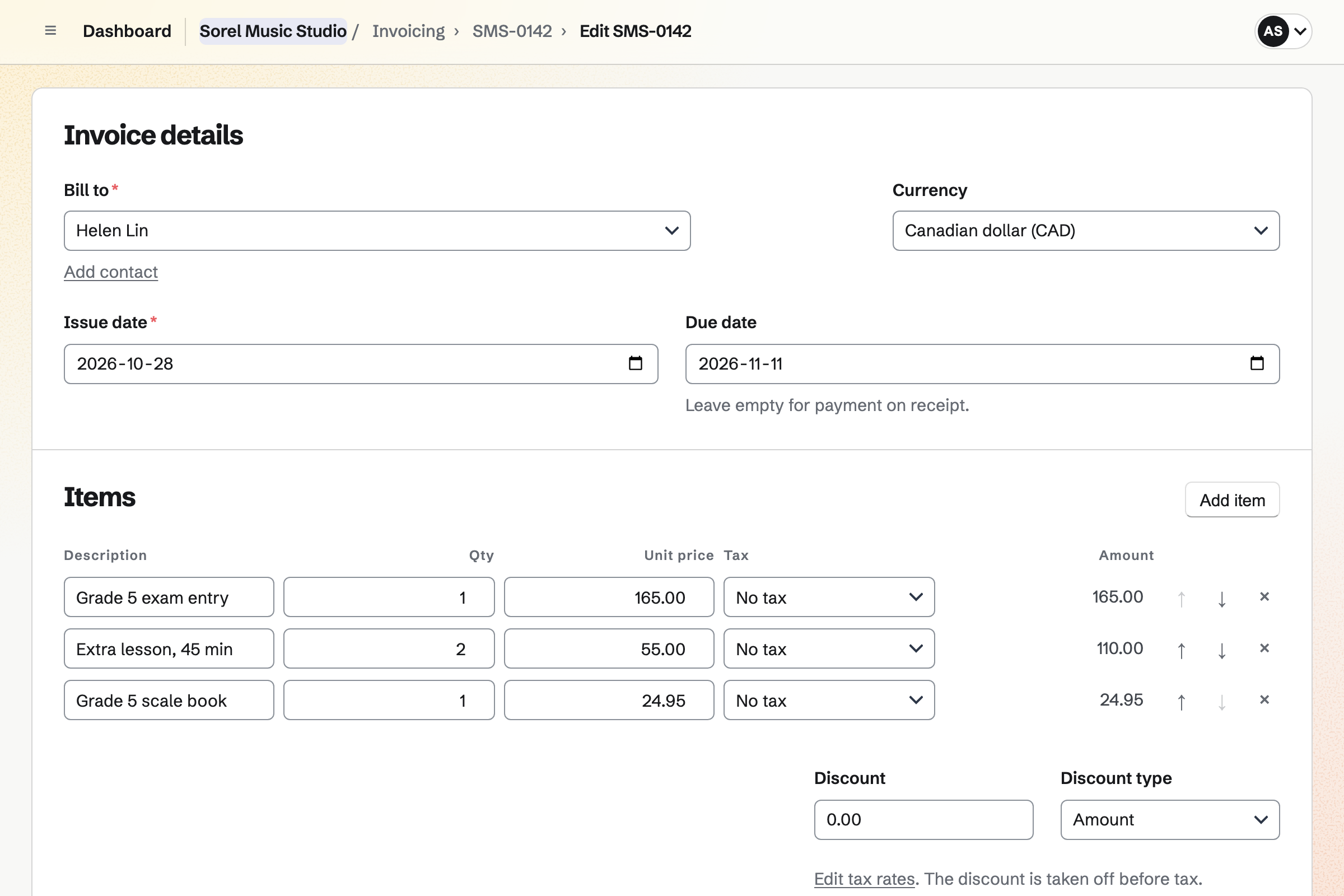
An exam entry fee or an extra lesson is billed on an invoice of its own. Reminders go out until it is paid. Card payments reach your own Stripe account, with no Magpie fee.
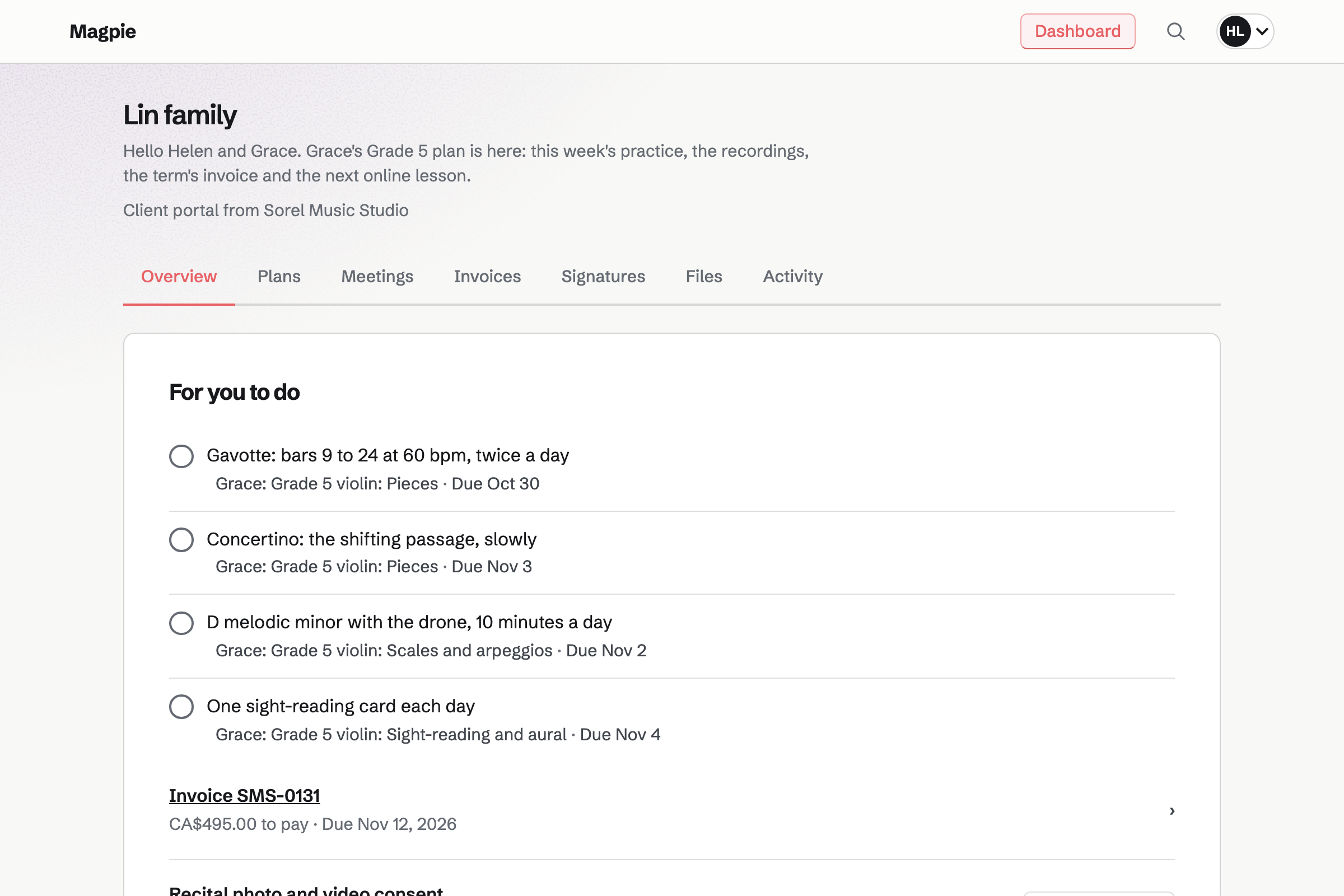
Client Portal gives each family a private page they sign in to. A student's plan has a stage for each piece. A step can be bars 9 to 24 at 60 bpm. The student or the parent ticks their steps between lessons.
A goal can be a scale at 100 bpm, or the exam itself. You share a recording of a passage, and the student can upload theirs. The family pays the invoices you share on the same page.
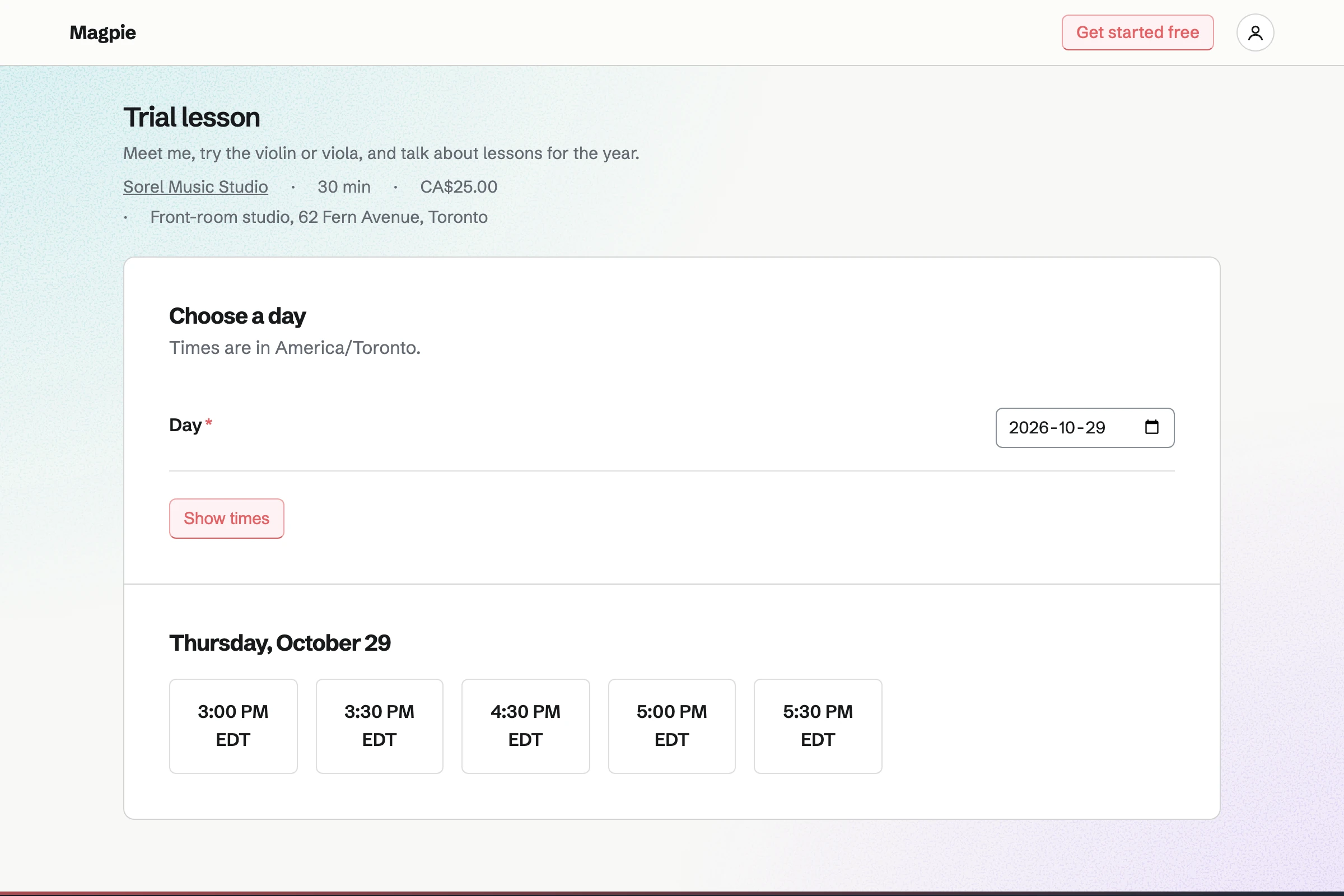
Appointments gives you a booking page for trial and make-up lessons. Its hours are the times you keep free for them, such as Friday 3 to 6. A lesson can be at your studio or at the student's home.
Cancelling and moving each have their own notice, such as 24 hours. Until then, the parent changes the lesson from their confirmation email. After it, the page asks them to contact you. A buffer keeps time to drive between homes.
Meetings gives you a meeting page for online lessons, such as a 30-minute violin lesson. Families choose a time, shown in their own time zone. With Zoom connected, each lesson gets a call, with the link in the confirmation.
You can share an online lesson on the family's private page. Join meeting is beside it until the lesson ends. A parent with a US or Canadian number can ask for a text reminder.
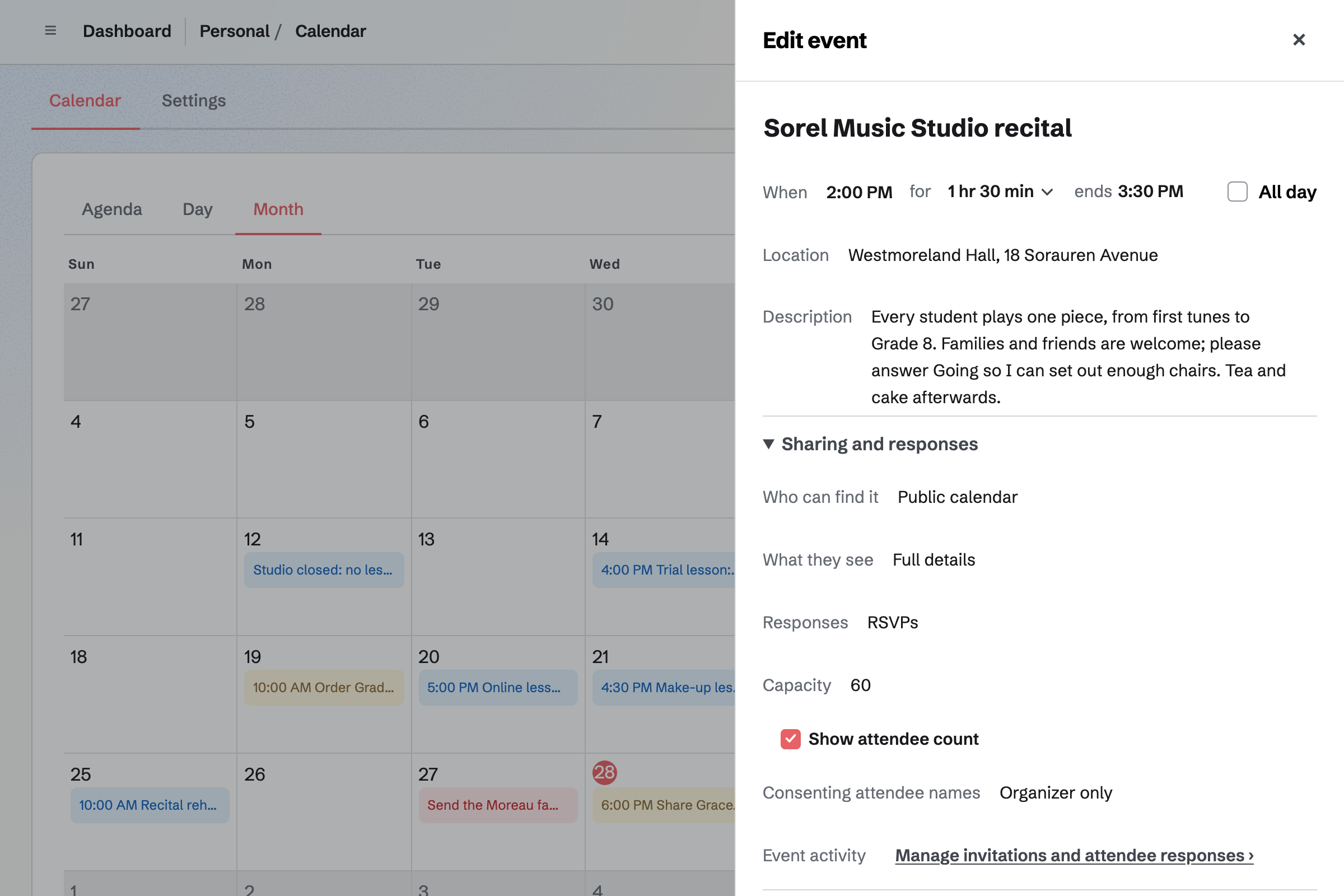
Calendar holds the recital as an event, with the hall and a note for families. Set to your public calendar, it is listed there for anyone to open. Families answer Going, and RSVPs stop at the seats you set.
Exam days go on your calendar as private events. Your booking page and meeting page will not offer a time that overlaps one.
The parent types their name and email once, when they book the trial.
A parent books a 30-minute trial lesson on your booking page. Magpie adds them as a contact.
You send the family a proposal. The parent chooses 30 minutes a week and signs your studio policy.
Accepting it makes the family's private page, with the proposal on it.
You share the student's plan from your beginners' starter. Each week's steps go on it.
Each term's invoice is emailed on its date, and the parent pays it by card.
A lesson cancelled in time is made up in a slot the parent books.
The family answers Going to the recital on your public calendar.
You add your lesson lengths as packages and the term dates as payments. Your policy goes in the terms. Help: Proposal starters, saved sections and the price list.
You connect your Stripe account, so parents can pay by card. Help: Connect Stripe to receive money.
You build each level or exam once, with its pieces, scales and goals. Help: Reuse your process with starter plans.
You choose Tutor or music teacher, and add a trial and a make-up lesson. You set the hours you keep free for them. Help: Set up Appointments.
You connect Zoom, so each online lesson gets a call of its own. Help: Connect Zoom.
A teacher working alone fits Pro, for your own work in Personal. The free plan includes 5 proposals and 5 invoices a month, and 100 contacts. Pro has no limit on any of them.
Parents get free Magpie accounts when you send a proposal or invite them to their page. Those accounts see only what you share. Recordings on families' pages use your file storage: 1 GB free, or 20 GB with Pro.
Magpie adds no fee to invoices or proposal payments. Stripe's processing fee is taken from each card payment. Prices are on the Pricing page.
A tutor books each lesson online, bills each family monthly and shares practice decks.
A music or dance school has several teachers on one booking page, and bills tuition monthly.
A tutoring centre books lessons with each teacher and room, and invoices families monthly.
A music shop sells instruments and strings, and books lessons and repairs.
A musician or band sells merch and downloads, and puts gigs on a public calendar.
A choir or community band puts rehearsals and concerts on a calendar, with RSVPs.
A swim school enrols swimmers for the term on a paid form, and shows their skills.
Yes. You send each family a proposal for the year. The parent chooses a lesson length, reads your studio policy and signs on the page. Both of you are emailed the signed PDF and a signing certificate.
Yes. The proposal's payment schedule splits the year into dated payments, such as one a term. Each payment is invoiced and emailed on its date, with a Pay online button. The parent pays by card into your own Stripe account.
Yes. A line billed monthly becomes a recurring invoice when the parent accepts. You set how many invoices there are, such as ten. The parent can choose to have each one charged to their card automatically.
Yes. Your studio policy is a Terms section of the proposal, and accepting the proposal signs it. You can keep the policy as a saved section, to add to each proposal. The signed PDF records what the parent agreed to.
Yes. A proposal's discount is a fixed amount or a percentage of its one-time lines. Each child's lessons can be a line, so one proposal covers the family. An invoice takes a discount the same way, before tax.
Yes. An invoice can have a line for each, such as the exam fee and two lessons. The email has a Pay online button. Reminders go out until it is paid.
You record the payment on the invoice, with its method, its date and a reference. It can be in full or in part. A part payment leaves the invoice Partly paid, with the balance still due.
Magpie adds no fee to invoices or proposal payments. Stripe's processing fee is taken from each card payment. The rest goes to your own Stripe account, and Stripe pays it out to your bank.
Yes. Each family has a private page with each student's practice plan. The plan lists the pieces and scales, with this week's steps. Parents get an email when you share a plan. They sign in with a free Magpie account made from your invitation.
Yes. A step can be for the student, such as playing the scale every day. They tick it on their family's page between lessons. Each tick is listed under Client activity, with when it was made.
Yes. A goal can be a number with a unit, such as 100 bpm, starting from 60. You or the student record the tempo, and a bar shows how far it has come. Every value is listed with who recorded it and when.
Yes. The exam can be a goal with a target date, such as Grade 5 in June. Its pieces, scales, sight-reading and aural tests can be stages of the plan. You mark the goal achieved when they pass.
Yes. You keep each level or exam as a starter plan, with its stages, steps and goals. A student's plan starts as a copy of it. Changing the starter later leaves earlier plans as they are.
Yes. You share files on the family's page, such as a recording of a passage. Audio, video and PDF files can be shared, up to 500 MB each. Only the family can download them.
Yes. They upload it on their family's page, from the Overview or Files. It is listed with who uploaded it, and you see it in the page's activity.
Yes. You invite each of them by email, and each gets a free Magpie account. Everyone invited sees the whole page. For a different view, you make someone a page of their own.
Yes. Your booking page lists the trial lesson with its length, price and place. A parent picks a free time and enters their name and email address. They book without signing up first, and get a confirmation email.
Yes. A make-up lesson can be a service on your booking page. Its hours are the times you keep free, such as Friday 3 to 6. Parents choose one of those times. The lesson is added to your calendar, and they get a confirmation.
Yes. Cancelling and moving each have their own notice, such as 24 hours. Until then, the parent uses the link in their confirmation. After it, the page asks them to contact you. A minimum notice also stops bookings made too close to the start.
Yes. A lesson's location can say that you come to the student. A buffer before or after it keeps time free to drive. The location is shown when the parent chooses the lesson, and in their confirmation.
Yes. Families book an online lesson on your meeting page, in their own time zone. With Zoom connected, each lesson gets a Zoom call, with the join link in the confirmation. With Google Calendar connected instead, it gets a Google Meet link.
Yes. You share the lesson on the family's private page. Join meeting is beside it until the lesson ends. The next lesson is on the Overview.
Yes, for lessons booked on your meeting page. You turn on text reminders and choose how long before the lesson they go. A parent with a US or Canadian number can ask for one when they book.
Yes. The recital is a Calendar event with RSVPs and a capacity, such as 60 seats. Families answer Going on its page, signed in to Magpie. Once 60 are going, the page says it is full. You see every answer, with each email address.
Yes. An event set to Public calendar is listed on your public calendar, for anyone to open. Its page shows the date, the time, the hall and how many are going. You can also send its link to families.
Yes. E-Signatures sends a PDF for each parent to sign, such as photo and video consent. You can share it on the family's page, where they choose Review and sign. The signed PDF is kept with a certificate of completion.
Yes. You add the exam day to your calendar as an event. Your booking page and your meeting page will not offer a time that overlaps it.
Yes. A follow-up on the family's contact has a date and a reason, such as exam entries. It is a To-do with the usual reminders. Contacts lists every open follow-up as Overdue, Today or Upcoming.
On the family's contact, in a pinned note that stays near the top. The contact also lists their bookings, proposals and invoices. Families do not see your notes.
Yes. A Form asks the student's age, instrument, level and past exams. Parents answer from its link without signing up first. Each answer is emailed to you and kept in one list.
Yes. A Flashcards deck, such as key signatures or note names, is shared by link. A card can show an image, such as a bar of music. Each student signs in to study, and a new student gets a free account.
Yes. Newsletter gives you a sign-up page, and each subscriber confirms by email. You write the email, send yourself a test and schedule it.
Yes. You photograph each receipt on your phone, up to 10 MB each. Categories total what each month cost, and the totals export as CSV.
Create a Magpie account and write your studio's proposal starter.