People leaving Big Tech
Magpie sends and receives your email at your own domain. It encrypts your passwords and files in your browser.
Your email, passwords, calendar and files are in one Magpie account of your own. You can export your documents, notes and bookmarks again as files.
Get started free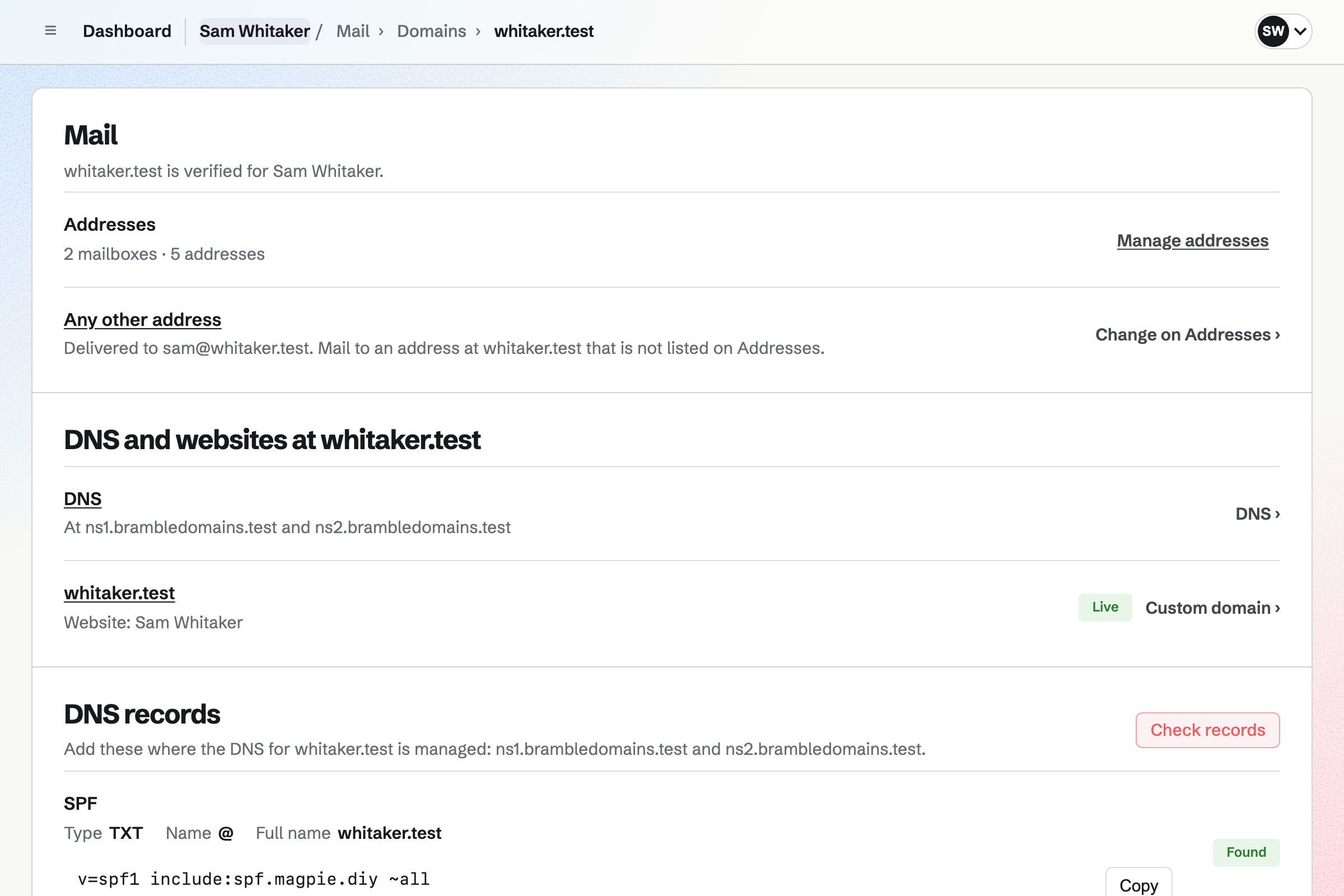
This combination of seven Magpie areas fits someone leaving Big Tech.
- Mail sends and receives your email at your own domain, such as you@yourname.com.
- Password Vault
- Password Vault imports your saved passwords and encrypts each one in your browser.
- Calendar
- Calendar holds your events, and shows your Google events beside them while you move.
- Documents
- Documents imports your Word files, and exports each document as DOCX or PDF.
- Notes
- Notes saves each note as Markdown, and exports every note as a ZIP file.
- Secure Files
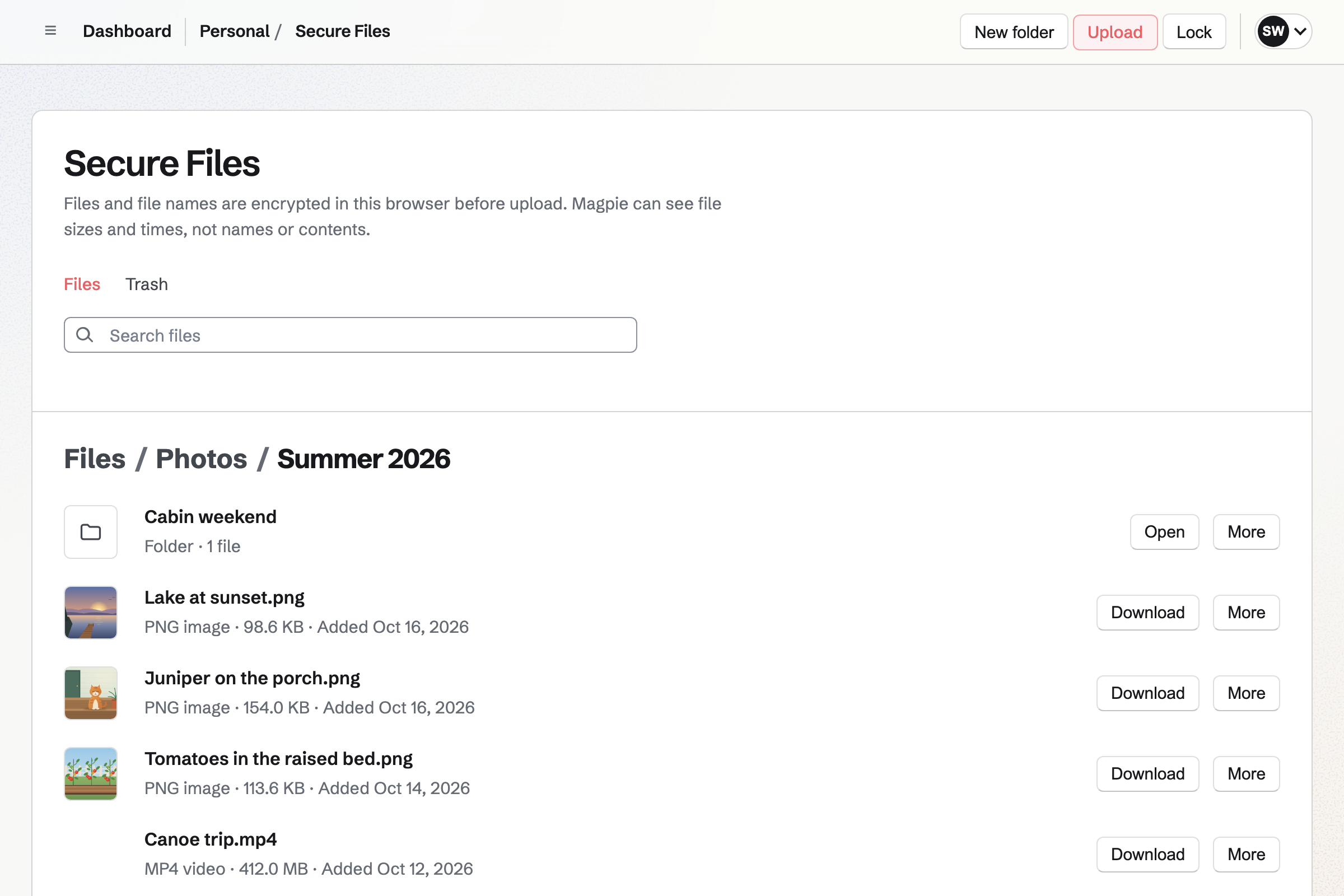
- Secure Files encrypts your files in your browser before Magpie stores them.
- Bookmarks
- Bookmarks imports your browser's bookmarks, and keeps the text of articles you save.
Mail gives you email at a domain you own.
Mail sends and receives your email at your own domain, such as you@yourname.com. You can add its records at your DNS provider, or move the DNS to Magpie. Magpie will copy the existing records for you to check, then add the mail records itself.
Your addresses can be ready before the domain's MX record changes. Until it does, mail keeps arriving at your old provider, and messages already there stay there. You read and write mail in the browser.
Your passwords and two-factor codes are encrypted in your browser.
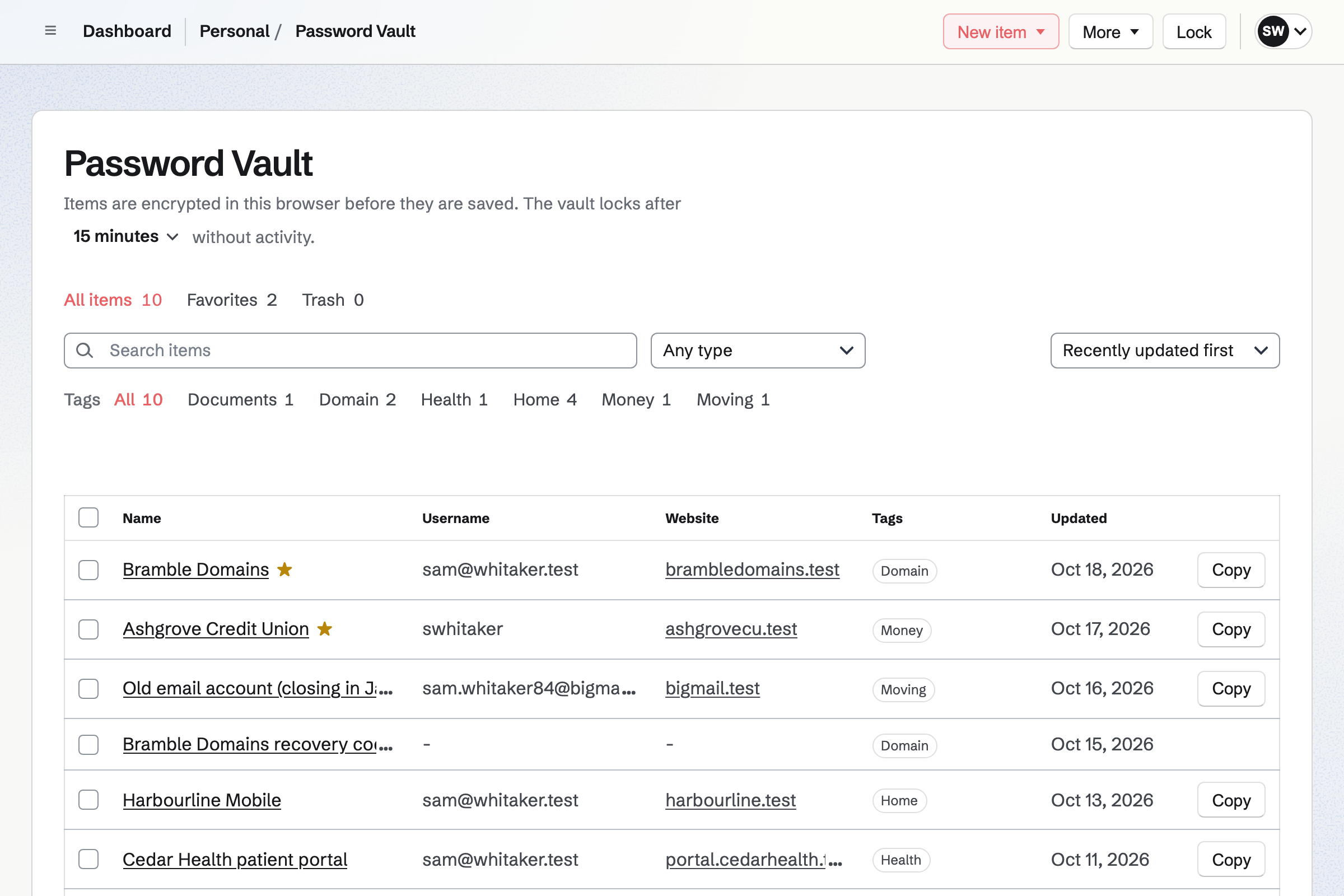
Password Vault imports the passwords you have now from a CSV file. It reads the export of Google or Chrome Password Manager, Bitwarden or 1Password. You will see every row, with possible duplicates marked, before anything is saved.
Each record is encrypted in your browser, with a vault password separate from your Magpie password. Magpie keeps no copy of it, or of the recovery key you get at setup. A login can also show the two-factor code a website asks for.
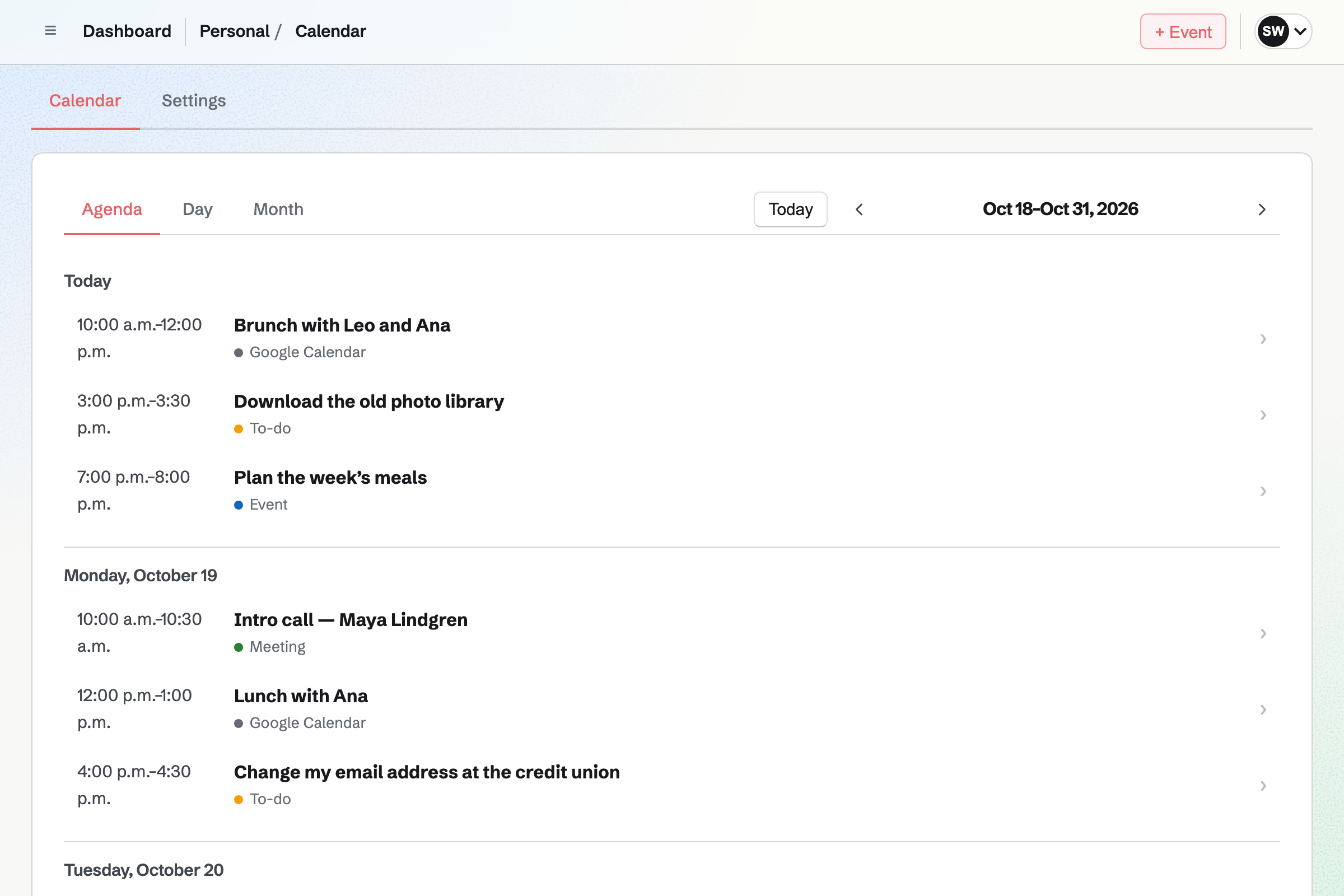
Your Google Calendar events appear beside your own while you move.
Calendar shows your events, dated To-dos and booked meetings by agenda, day or month. An event can be private, open to anyone with its link, or on your public calendar. It can take RSVPs up to a capacity.
You can also connect Google Calendar. Your Google events will appear on your calendar, read-only and seen only by you. The Magpie events you choose will be added to your Google calendar. Magpie shows the Google events and does not copy them.
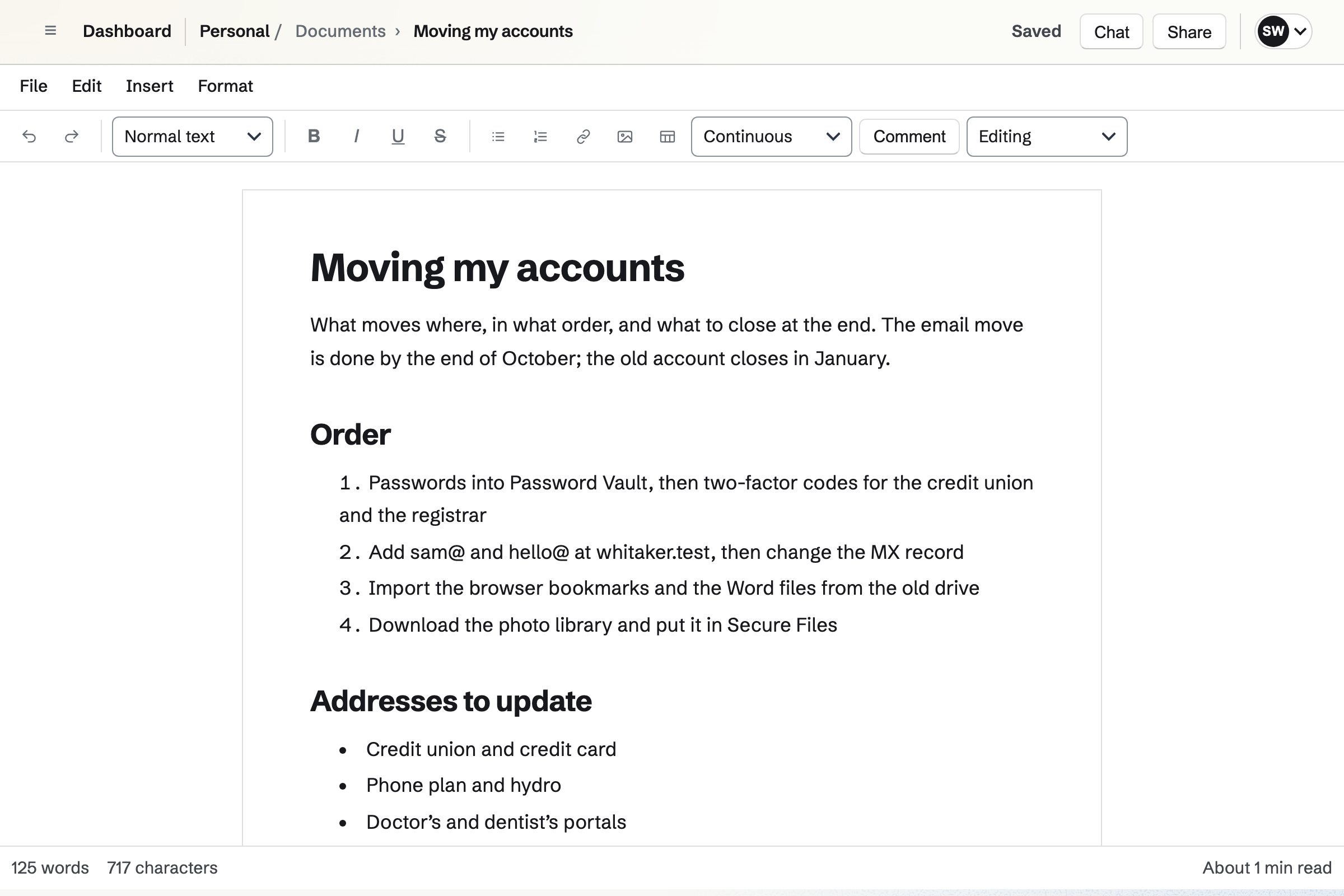
Your Word files become documents you can export as Word files again.
Documents imports a Word file with its headings, tables, comments and tracked changes. It imports .odt, Markdown, HTML and text files too, up to 25 MB each. You add a Word file's pictures again from your images.
You can export a document as DOCX, ODT, Markdown, HTML, plain text or PDF. You can give one person view, review or edit access. A link can also let anyone read it without signing in.
Your notes are saved as Markdown, and export as Markdown files.
Notes stores each note as Markdown. You can write Markdown or use the Formatted view. A note is saved as you type, and its first line is its title. Search looks through the text of every note.
Each note downloads as a Markdown or text file. You can also download every note at once, as a ZIP of Markdown files. A checklist line can become a To-do, with its own date and reminder.
Your files are encrypted in your browser, and the links you send expire.
Secure Files keeps your files in folders, and shows previews of images. Your browser encrypts each file, its name and your folder names with your vault's key. Magpie stores only the encrypted data. A file can be up to 2 GB.
You can send a file to anyone by a link, with an optional passphrase. The link expires after an hour, a day, 7 days or 30 days. The decryption secret is after the # in the link, which browsers do not send to Magpie.
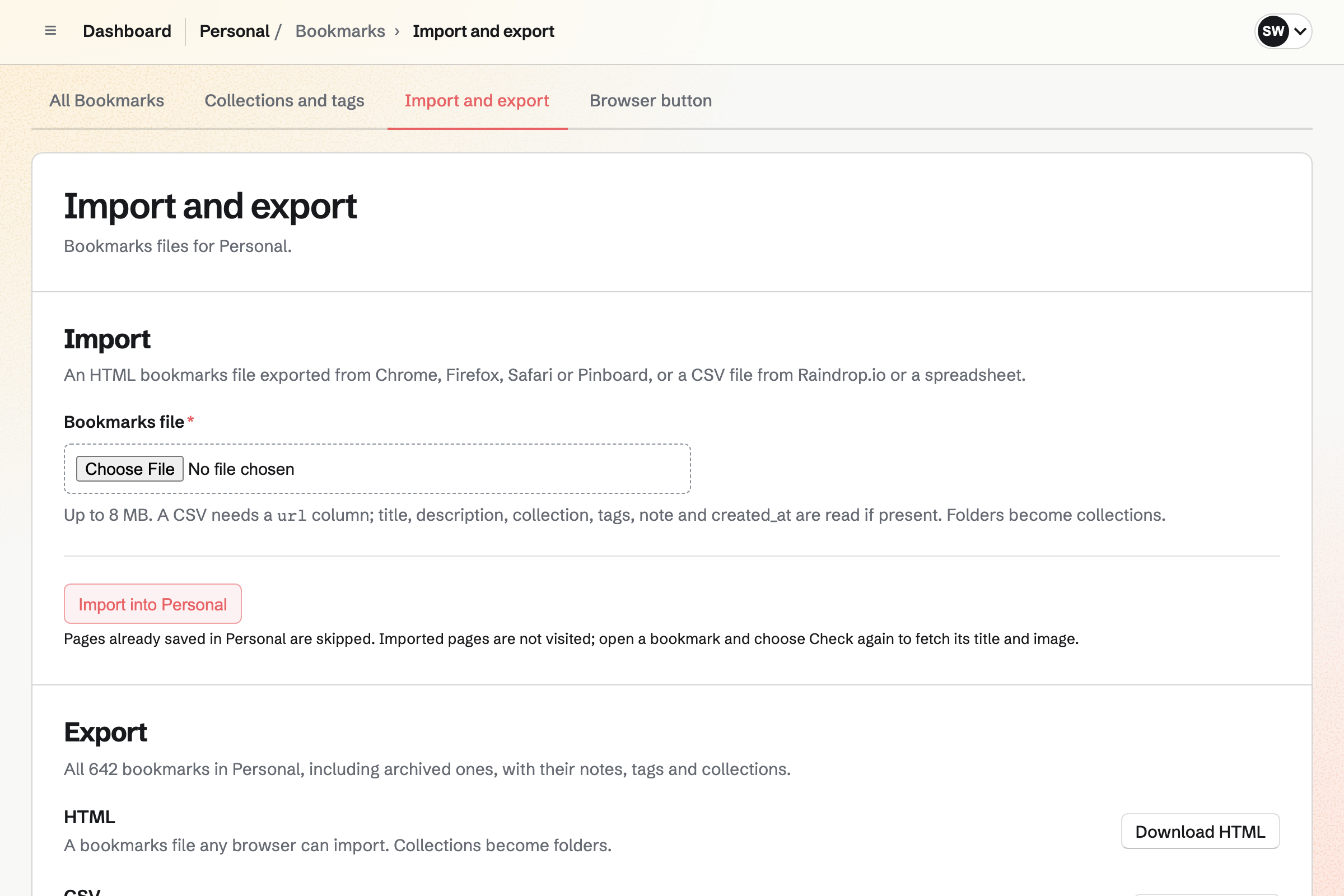
Your bookmarks come in from your browser and export again as files.
Bookmarks imports the bookmarks file that Chrome, Firefox or Safari exports. It imports Pinboard's export and a Raindrop.io CSV too. Each folder becomes a collection. You can export every bookmark again as HTML, CSV or JSON.
Magpie keeps the text of an article you save, for Reader view. You can highlight passages and add a note to each. The link, your note and the highlights can go to a new note.
Ten more areas cover your contacts, spreadsheets, slides, feeds, PDFs and a website.
- Contacts
- Contacts keeps the people you write to, with several email addresses and phone numbers each. Mail suggests them as you type. From a message, you can add its sender to your contacts.
- Spreadsheets
- Spreadsheets gives you sheets with formulas, filters and several tabs. A CSV file imports as a new spreadsheet. Each sheet exports as CSV.
- Presentations
- Presentations makes slides with pictures and speaker notes, to present full screen. You can share a deck by a link that needs no account. It exports as a PDF.
- RSS Reader
- RSS Reader follows blogs' RSS and Atom feeds and Bluesky accounts in one timeline. You can filter it to what is unread.
- PDF Editor
- PDF Editor merges, splits, fills in and redacts PDFs in your browser. Magpie receives a PDF only when you store it encrypted or send it to sign.
- Meetings
- Meetings gives you a page where people book a time when your calendar is free. They book without signing up first.
- Video Chat
- Video Chat gives you a timed video call in the browser with one other Magpie user. They join with a four-letter code.
- To-dos
- To-dos reads the date from a To-do's title, such as Call dentist Friday at 3pm. It reads a repeat the same way. Magpie can email you a reminder before it is due.
- Websites
- Websites puts a website at the same domain as your email. You can build it in the editor, or from files you already have.
- Data Removal
- Data Removal asks data brokers to remove your personal information, and tracks each request. It covers one person.
An email with a PDF moves from your inbox to your encrypted files.
One message goes through four areas.
It arrives at your address
The message arrives at your own domain. If Magpie hosts the domain's DNS, it keeps the mail records there for you.
The sender becomes a contact
You can add the sender to your contacts from the message. Mail will suggest them the next time you write.
You fill in the PDF
PDF Editor opens the attachment in your browser. You can fill in its form fields or type text onto it.
The finished PDF is encrypted
You save the finished PDF to your encrypted files. Your browser encrypts it before Magpie stores it.
The reply goes out later
You can schedule your reply for the time you choose. Magpie will send it from your own address.
Moving takes four steps, starting with your passwords.
Set up Password Vault
You choose a vault password and save the recovery key. Then you import the CSV your password manager exports. Help: Password Vault: passwords and private information.
Connect your domain
You add the domain to Mail. Then you add either the records Magpie lists or its two nameservers. Help: Connect your own domain to Mail.
Add your addresses, then move the mail
You add each address you use as a mailbox or an alias. Once the domain's MX record changes, new mail will arrive in Magpie. Help: Add mailboxes, aliases and a catch-all.
Bring in bookmarks and documents
You import your browser's bookmarks file, and your Word files as documents. Help: Import, export and share Bookmarks.
Plans
Mail needs Pro, the paid plan for your own work. Each mailbox has 5 GB. Pro includes Data Removal for one person. It raises your file storage, which Secure Files uses, from 1 GB to 20 GB.
Pro raises other limits too. You can keep 1,000 notes instead of 200, and 5,000 calendar events instead of 100. You can follow 100 feeds instead of 10. Contacts have no limit, where the free plan has 100.
DNS hosting and Secure Files are on every plan.
Questions people moving off Big Tech ask
Can I move my email address at my own domain to Magpie?
Yes. You add the domain to Mail, then a mailbox or alias for each address it uses. Email keeps arriving at your current provider until the domain's MX record changes. Once it points to Magpie, new mail will arrive in Magpie. Messages at the old provider stay where they are.
Will my website keep working if I move my domain's DNS?
Yes. Magpie first copies the domain's existing records, for you to check and confirm. It then hosts every record, including the website's and every subdomain's. The mail records are added to them, and the domain's other records stay as they were.
Can a sender see when I open their email?
Images from other sites are hidden in a message until you choose Show images. Loading them would let the sender see when you opened it. You can choose to always show images from one sender at a time.
Can I use a different address for each website I sign up to?
Yes. Email to any address you have not listed can go to a mailbox you choose. So any name at your domain works. If one address starts getting spam, you can add it and have its mail refused.
Who can read my saved passwords?
Only someone with your vault password or your recovery key can read them. Each record is encrypted in your browser before it is saved. Magpie stores the encrypted result. It can see that a record exists, its size and when it changed. It cannot see its title, type, tags or values.
What if I forget my vault password?
Your recovery key lets you choose a new vault password, and nothing in your records changes. You get the key when you set up the vault. Magpie keeps no copy of it or of your vault password. Resetting your Magpie password does not open the vault.
Can I bring my passwords from Chrome, Google or 1Password?
Yes. Password Vault reads the CSV file that Google or Chrome Password Manager, Bitwarden or 1Password exports. A generic CSV file works too. It reads the file in your browser. You will see every row before anything is saved.
Can I bring my Google Docs and Word files?
Yes. Documents imports .docx, .odt, Markdown, HTML and text files of up to 25 MB. Their headings, lists, tables, links, page settings, comments and tracked changes come in with them. A Google Doc comes in once you download it as a Word file.
Can I keep using Google Calendar while I move?
Yes. Once you connect Google Calendar, your Google events will show on your calendar in Magpie. They are read-only, and only you can see them. The Magpie calendars you choose will be added to your Google calendar within about a minute. You can disconnect when you are ready, and the events already in Google stay there.
What can I export, and in which formats?
Your notes export as a ZIP of Markdown files. A document exports as DOCX, ODT, Markdown, HTML or PDF. Your bookmarks export as HTML, CSV or JSON. Your vault downloads as an encrypted backup, and your DNS as the zone file. Each sheet exports as CSV, each deck as PDF and each email as an .eml file.
Where can I keep my photos?
Secure Files keeps any file, photos included, in folders you make. Each file is encrypted in your browser. It shows previews of PNG, JPEG, GIF, WebP and AVIF images up to 10 MB. Your photos count toward your file storage.
Can I send a large file to someone who does not use Magpie?
Yes. A secure link sends one file to anyone, without them signing up first. The link expires after the time you choose. You can allow one download or many, and add a passphrase. Revoking the link stops new downloads.
Can I share a document with someone who does not use Magpie?
Yes. You can turn on a document's link. Anyone with it can read the document without signing in. A PDF or DOCX download gives them the document as a file.
Can I keep my two-factor codes with my passwords?
Yes. A login can store the QR code or setup key a website gives for two-factor sign-in. Your browser generates the current code, and the vault shows it. Setup keys in Bitwarden, 1Password and generic exports are imported with their logins.
Can people book time with me without signing up first?
Yes. Meetings gives you a page where people book a time when your calendar is free. They choose a meeting length, a day and a time, shown in their own time zone. They enter their name and email address, without signing up first. They will get a confirmation with a calendar file.
Can I read blogs and Bluesky accounts in one place?
Yes. RSS Reader follows RSS and Atom feeds and Bluesky accounts in one timeline. It finds a site's feed from the site's address. You can filter the timeline to what is unread. An entry you save as a bookmark keeps its text after it leaves the feed.
Can Magpie get my details off data broker sites?
Yes. Data Removal finds personal information that data brokers hold about you. It asks them to remove it, and tracks what needs your attention. It covers one person.
Start with your passwords and your domain.
Create a Magpie account for your email, passwords and files.