Store
Give approved business customers their own prices and minimums, and let them pay by invoice.
A wholesale customer is a Store customer you approved, who signs in to Magpie to shop. While signed in, they see the prices and minimum quantities of their price list on product pages, in the cart and at checkout, and pay at checkout or by an invoice from Invoicing. Everyone else sees your Store prices.
Get started free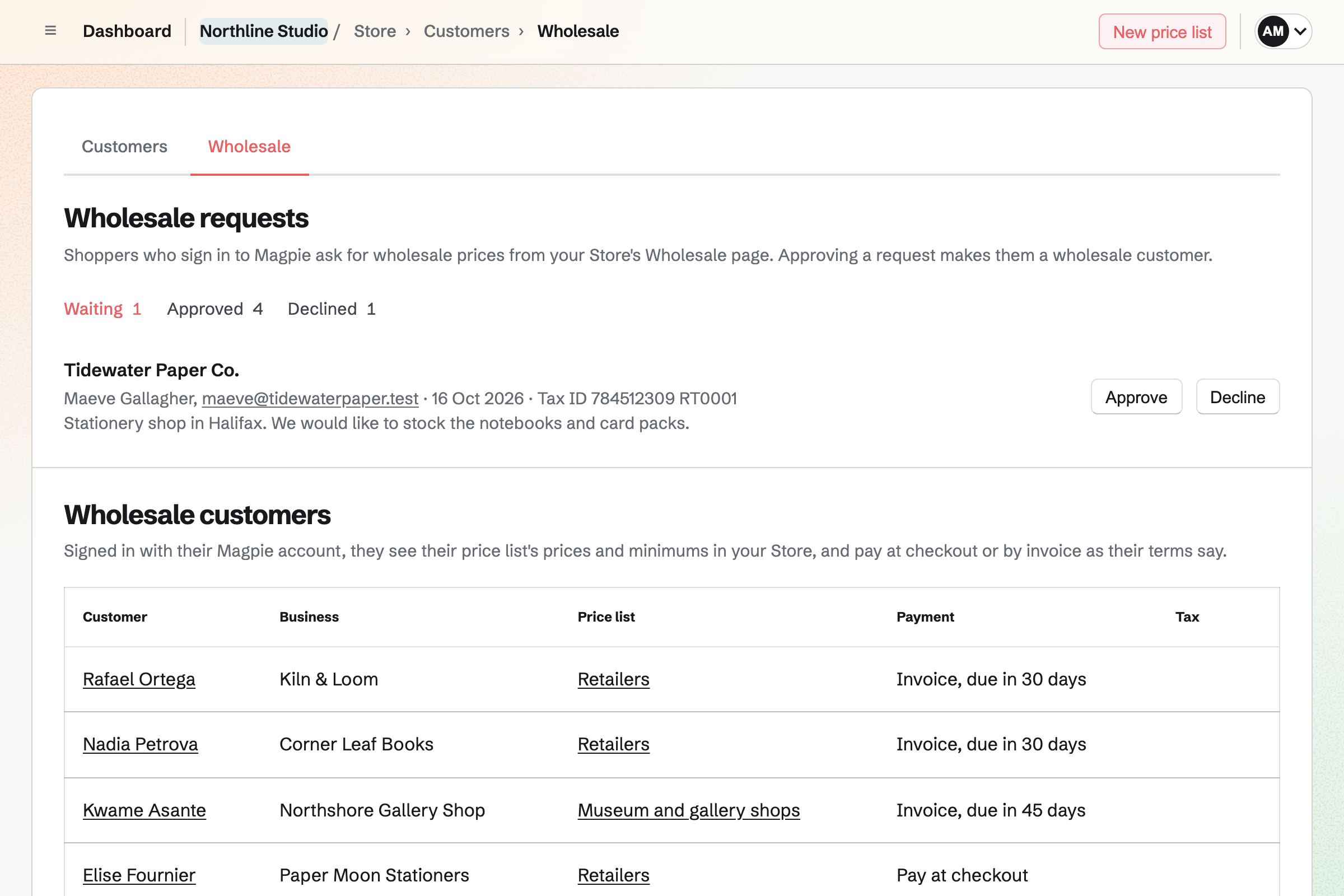
Wholesale requests and approval
Wholesale prices are shown to the Magpie account the customer signs in with, on your Store's Magpie address. Someone who types the same email address at checkout without signing in, or shops on your Store's custom domain, sees your Store prices.
A shopper asks
With Wholesale requests on in Store settings, your Store's footer links to a Wholesale page. A shopper signed in to Magpie gives their business name, an optional tax ID and a message, and your team's admins and owner are emailed.
You approve or decline
Approve makes the shopper a wholesale customer and opens their customer page so you can set their terms. Decline emails them, and they can ask again.
Without a request
Make wholesale customer, on a customer's page, works for any customer linked to a Magpie account: one who paid for an order while signed in, or sent a request.
Price lists
A price list gives chosen products and options their own wholesale price and minimum quantity, and can take a percentage off the Store price of everything else. Each wholesale customer has one price list, and one list can be given to many customers.
- Wholesale price
- Add products by name, option or SKU. An added one takes the list's percentage until you enter its own price.
- Minimum
- A minimum is the least a customer can order of a product, from 1 to 100. The cart shows it, and checkout will not go ahead with fewer.
- Everything else
- Everything else is the percentage off for products without a price of their own. Left empty, they keep your Store prices.
- Discounts and orders
- Discount codes apply after the wholesale price. Pay-what-you-want products and gift cards keep their own prices, and orders keep the prices they were placed at.
A customer's terms
The Wholesale band on a customer's page holds their business name, tax ID, price list, payment terms and tax exemption. Each saves when you change it.
- Payment
- A customer pays at checkout on Stripe's page, or by an invoice due on receipt or 7, 14, 30, 45, 60 or 90 days after it is sent.
- Tax exempt
- With Stripe Tax on, a tax-exempt customer is charged no tax at checkout. Their exemption certificate, a JPG, PNG, WebP or PDF up to 10 MB, is kept on their page for people who manage customers. Checking the exemption is yours to do.
- Stop wholesale prices
- Stop wholesale prices returns the customer to your Store prices and keeps their terms for if you make them a wholesale customer again.
Pay by invoice
A customer whose terms are an invoice sees Pay by invoice at checkout. There is no Stripe page: they type the address to ship to, or choose a saved one, and place the order.
The order is reserved
Its items are held as for a card payment, and the order shows Processing with payment Invoice. You will be told about it as for a paid order.
The invoice is sent
An invoice for the order's items, shipping and any discount is made in your team's Invoicing area, due by the customer's terms, and emailed to them with a link to pay online when your Invoicing settings offer card payments. The customer is added to Contacts with their business name.
You can ship first
You can ship the order before the invoice is paid. Its items leave stock with the first shipment.
The invoice is paid
When it is paid in full, online or by a payment you record in Invoicing, the order will be marked paid and the customer will get the usual order confirmation. Refunds are recorded on the invoice.
Or the order is canceled
Cancel order, before the order ships and while the invoice has no payments, voids the invoice and returns the items to stock.
Invoices, tax and Accounting
Invoices for these orders do not count toward your plan's monthly invoice limit. An invoice paid online is paid into your team's Stripe account with no Magpie fee; Stripe's processing fee applies.
Stripe Tax is not applied to an invoice, so while Stripe Tax is on, Pay by invoice is offered only to customers marked tax exempt. With tax off, the invoice has no tax, as the order would have at checkout.
In Accounting, the invoice and its payments record the sale, and the order records its cost of goods.
Who can manage wholesale customers and price lists
Team admins can do everything in Wholesale. Answering requests and changing a customer's terms needs the Manage customers permission, and price lists set product prices, so adding and changing them needs Manage products.
Approve your first wholesale customer.
Create a Magpie account and set up a Store, then turn on Wholesale requests in Store settings.