Plumbers, electricians and tradespeople
A plumber or electrician quotes each job, then bills it on site with a payment link.
Cleaning companies
The company, its team leads and its cleaners work in one Magpie team.
Get started free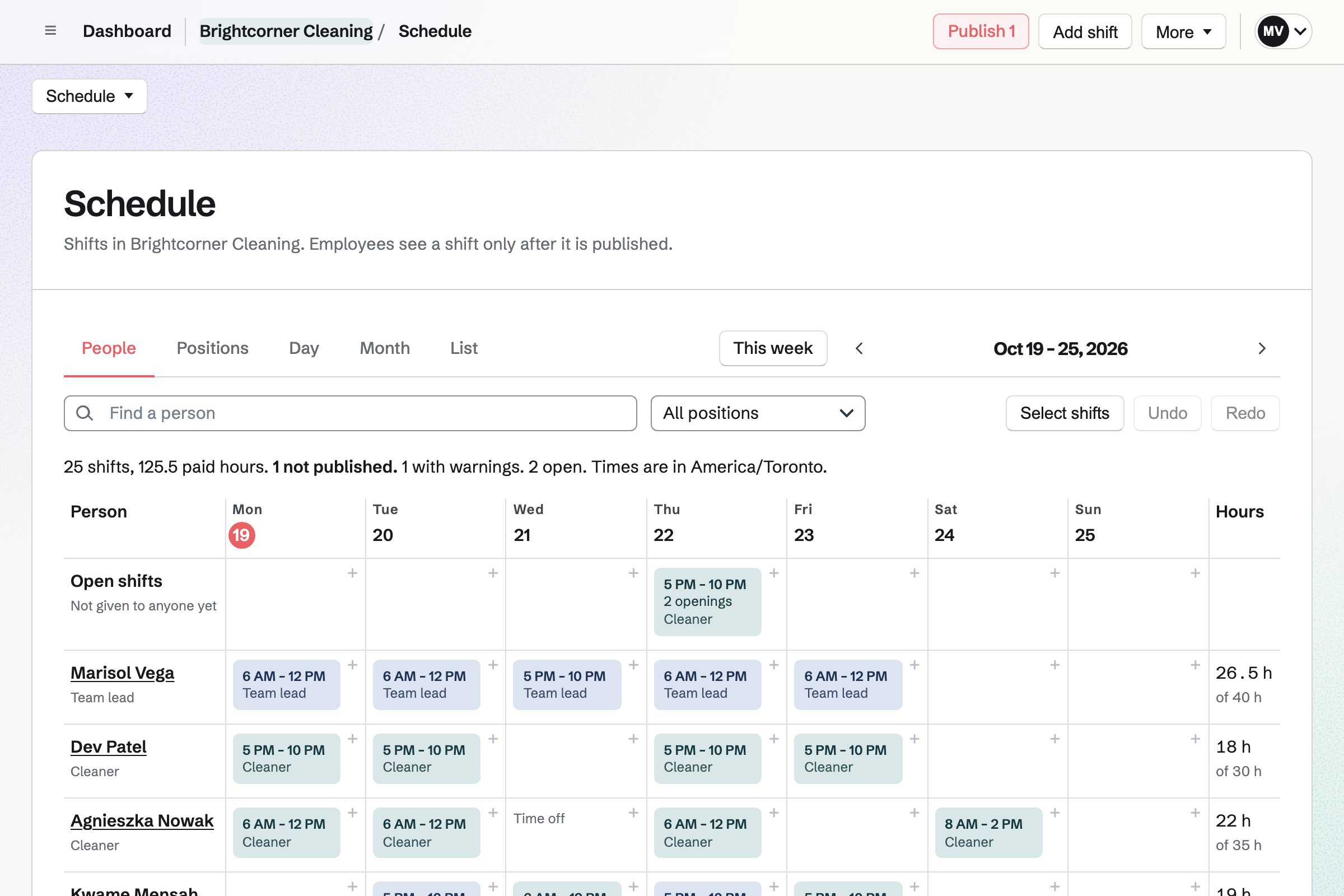
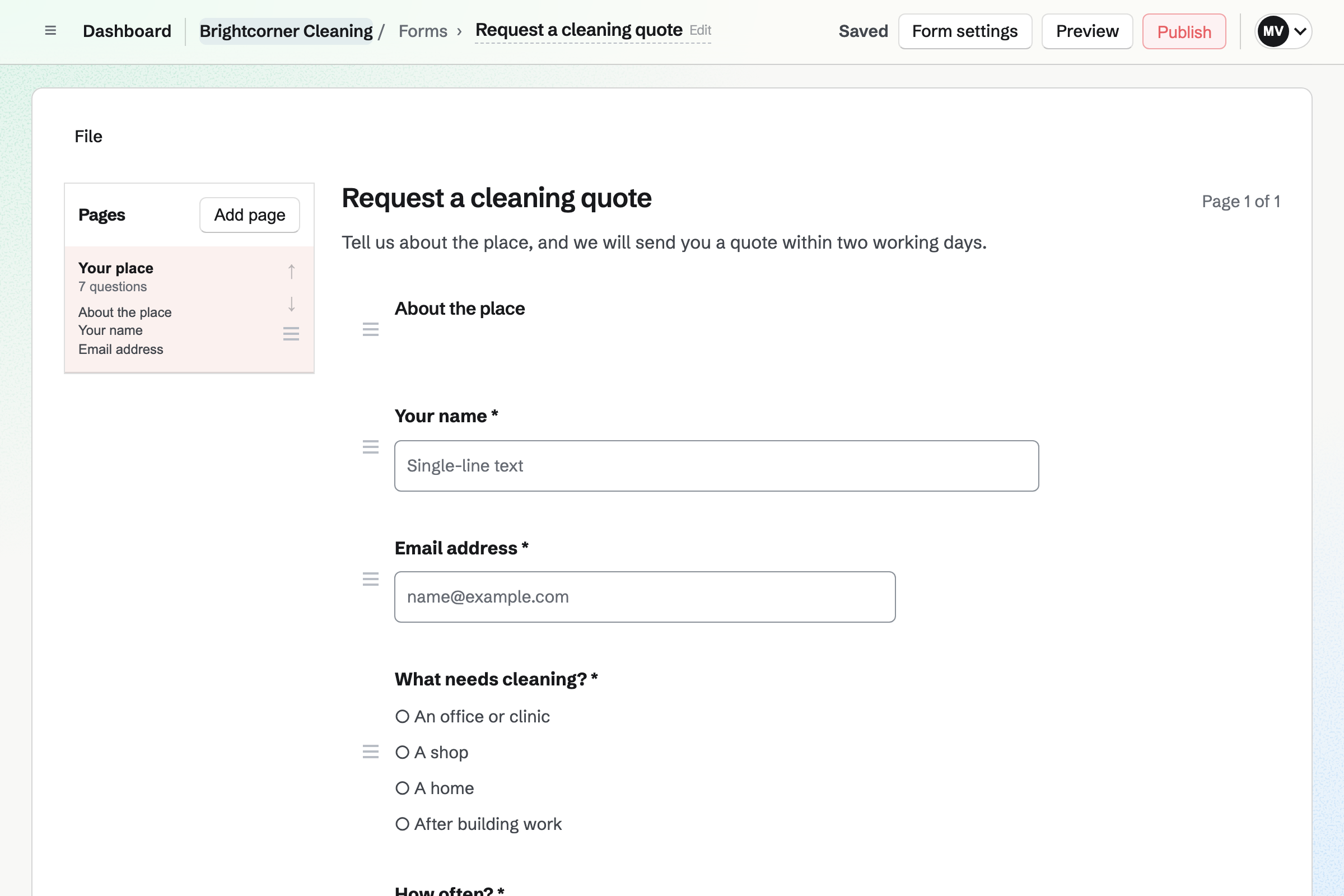
Forms gives you a quote request Form with your own questions. It can ask for the number of bedrooms and bathrooms, and the days that suit. A question can appear only after an earlier answer.
Magpie will email you each request. You can mark each one reviewed, and download them all as a CSV file.
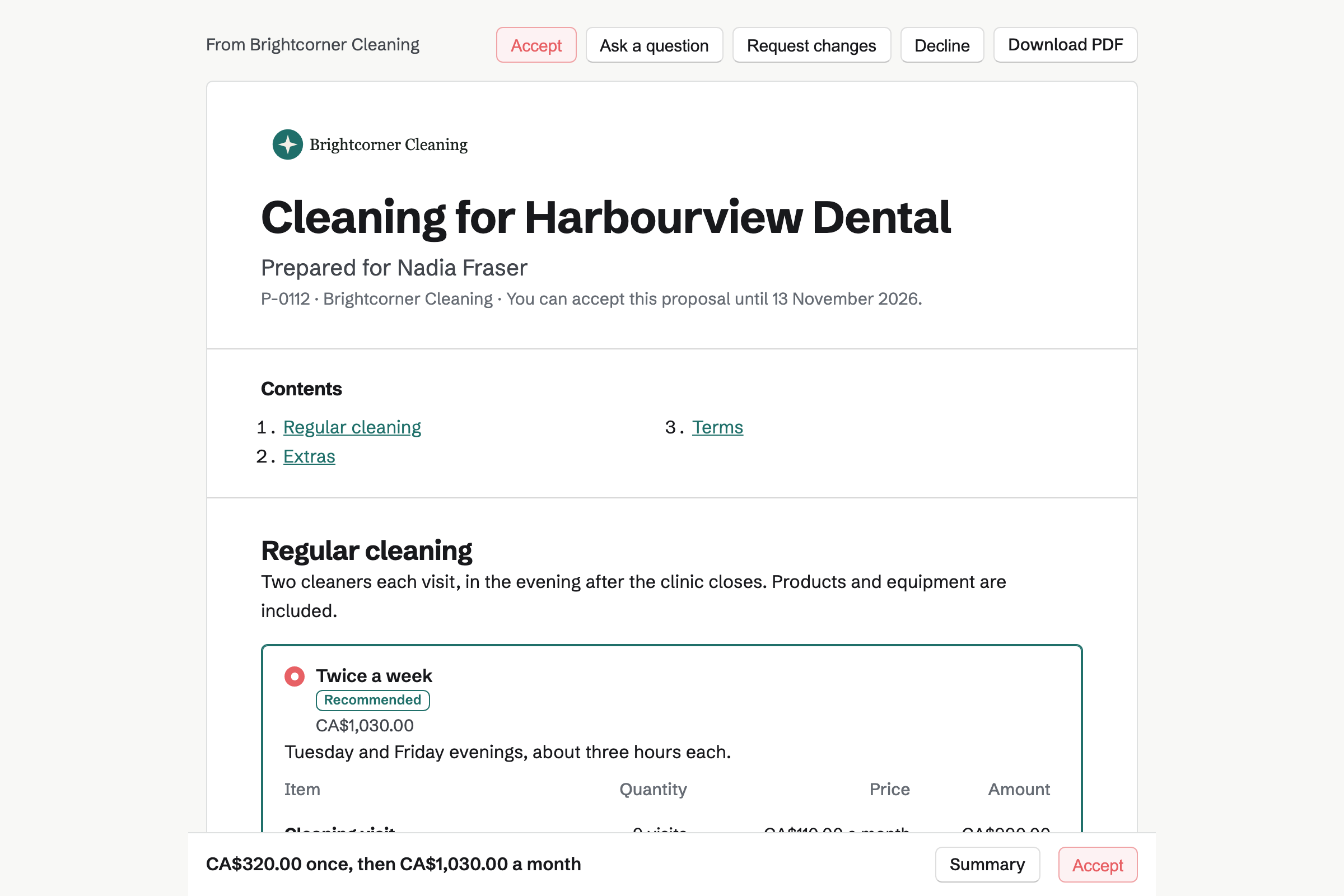
Proposals turns your prices into a quote the client signs online. Magpie's cleaning starter prices each visit and the products by the month. The client sets how many visits, and can add a first deep clean.
The starter asks the client to leave a card on file when they sign. Magpie will then start the monthly invoices, and charge that card for each one.
Staff Scheduling starts a cleaning company with Cleaner and Team lead positions. It adds morning and evening shifts. Each client's site can be a location, with its address. A shift can repeat every week, for a regular clean.
Shifts stay drafts until you publish the week. Each cleaner will then see their own shifts, with the address and your instructions. They can swap a shift, or ask for time off.
Daily Operations gives a cleaning business its checklists, ready to use. The site visit checklist covers kitchens, restrooms, floors and bins. It asks about damage, then for a photo of the finished site.
Damage reported on site opens an incident for you to resolve. A supervisor can spot-check the work and mark it pass or fail. A weekly equipment check covers the vacuums, floor machines and supplies.
Invoicing turns the accepted proposal's monthly lines into a recurring invoice. Each one is issued on its date and charged to the card on file. You can change the lines, pause it or end it.
A move-out or other one-off clean is an ordinary invoice with a Pay online button. Card payments go to your own Stripe account, with no Magpie fee.
Contacts gives each client a page of their own. A pinned note keeps the access details every cleaner needs, such as where the keys are. Its activity lists the proposals and invoices.
A follow-up reminds you to call on a date, such as before a contract ends.
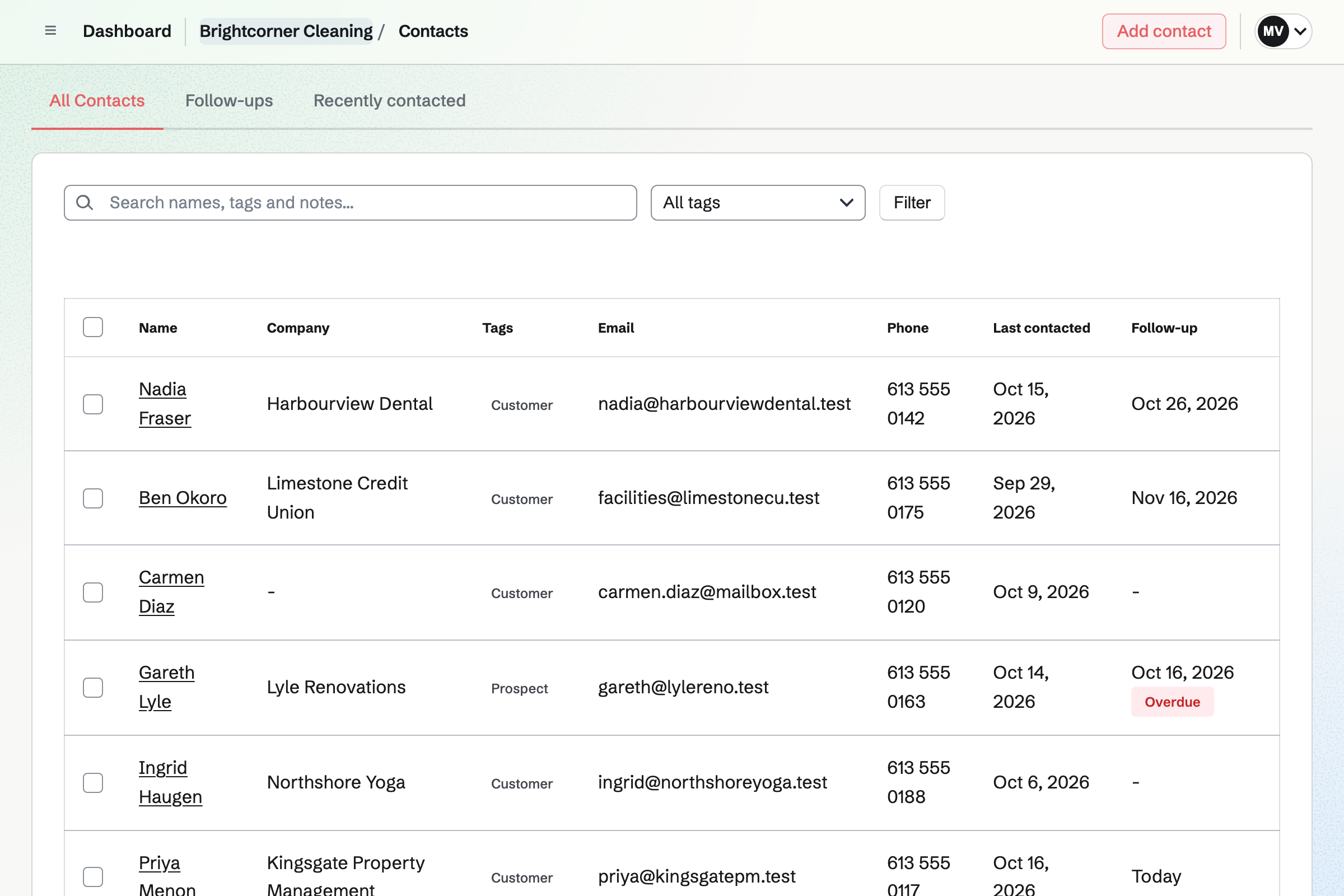
The client's contact page lists the proposal and every invoice.
The facilities manager answers your quote request Form. Magpie will email you the answers.
You send the cleaning proposal, priced by the visit. The client sets the visits a month, signs and saves a card.
Magpie starts the recurring invoices when they sign, each charged to their card.
You add the site as a location, and an after-hours shift that repeats every Tuesday.
The cleaner starts the site visit checklist on arrival, and ends with a photo.
Damage found on site opens an incident for you to resolve.
You create a team and invite your team leads. Help: Create and manage a team.
You choose Cleaning or maintenance, add your cleaners and plan a first week. Help: Plan and publish a staff schedule.
You choose Cleaning business, and keep or change its routines. Help: Run each day's opening, closing and checks.
You connect your Stripe account, so clients can pay by card. Help: Connect Stripe to receive money.
You open the cleaning starter, set your prices and save it as your own. Help: Proposal starters, saved sections and the price list.
A cleaning company with staff fits the Team plan, one price for up to 25 members. It has no limit on proposals, invoices or contacts.
A cleaner who is only on the rota needs no member place. A free team has up to 3 members and can send 5 proposals a month.
Magpie adds no fee to invoice payments. Stripe's processing fee is taken from each.
A plumber or electrician quotes each job, then bills it on site with a payment link.
A landscaper sends crews to regular rounds, and keeps track of mowers and trucks.
A moving company quotes each move, plans the crew and checks the vans.
A guesthouse or rental host runs a turnover checklist between guests.
Yes. Each published shift shows its times, its position and the site's address, with your instructions. Cleaners see their next shift and the coming three weeks. They can add their shifts to Google Calendar, Apple Calendar or Outlook.
Yes. A shift can repeat every week, every two weeks, every weekday or monthly. Magpie adds the repeats as drafts, 12 weeks ahead, and you publish them with the week.
Yes. A cleaner can swap a shift with a coworker, or ask for cover. They ask for time off by the day or part of a day, and you decide. Approved time off stops new shifts in that time.
Yes. You set pay rates by person, position or location. The week shows its estimated pay before you publish. Rates are hidden from everyone until you give someone Sees pay rates. Magpie does not run payroll.
Yes. Rules cover rest between shifts, hours a day and a week, and days in a row. Each rule can block the shift, warn or just show. You set the limits that apply to your business.
Reading the site instructions, then kitchens and break rooms, restrooms and restocking, floors and bins. It asks about any damage, then for a photo of the finished site. You can change the steps, up to 100 of them.
Answering yes to the damage question opens an incident. You can add corrective actions with due dates, and resolve it when it is dealt with. Incident reports show how long each took to resolve.
Yes. The supervisor inspection marks restrooms, floors and bins as pass or fail. It ends with notes for the cleaner. A failed check can ask for a note or a photo.
Yes. Reports show checklists done on time, late, missed or skipped, and every failed check. You can download them as a CSV file, for up to 366 days at a time.
Yes. The cleaning starter prices each visit and the products by the month. The client can change the number of visits, within the limits you set. Extras such as a first deep clean or inside windows are optional lines they add.
Yes, when they sign a proposal that asks for it. They save a card when they sign. Each monthly invoice is then charged to that card. Magpie emails them each invoice.
Yes. Appointments gives you a booking page, starting with a two-hour standard clean. The customer chooses a free time. Their confirmation has a link to reschedule or cancel. Each booking goes on your calendar and adds them as a contact.
In a pinned note on the client's contact page, which stays near the top. A shift's instructions can also tell the cleaner what they need for that visit.
Yes. Walkie Talkie sends voice messages, held to talk, to one person or a group. A Dispatch channel lets people wait their turn to speak. Recordings carry on if the signal drops, and send when it returns.
Yes. Hiring gives each job its own page on your job board, with an application form. You move applicants through the stages, with notes. Hiring someone adds them to the rota.
Create a Magpie account and make a team for the company.