Plumbers, electricians and tradespeople
A plumber or electrician quotes each job and bills it with a card payment link.
Landscapers and lawn care
The business, its crew leads and its crews work in one Magpie team.
Get started free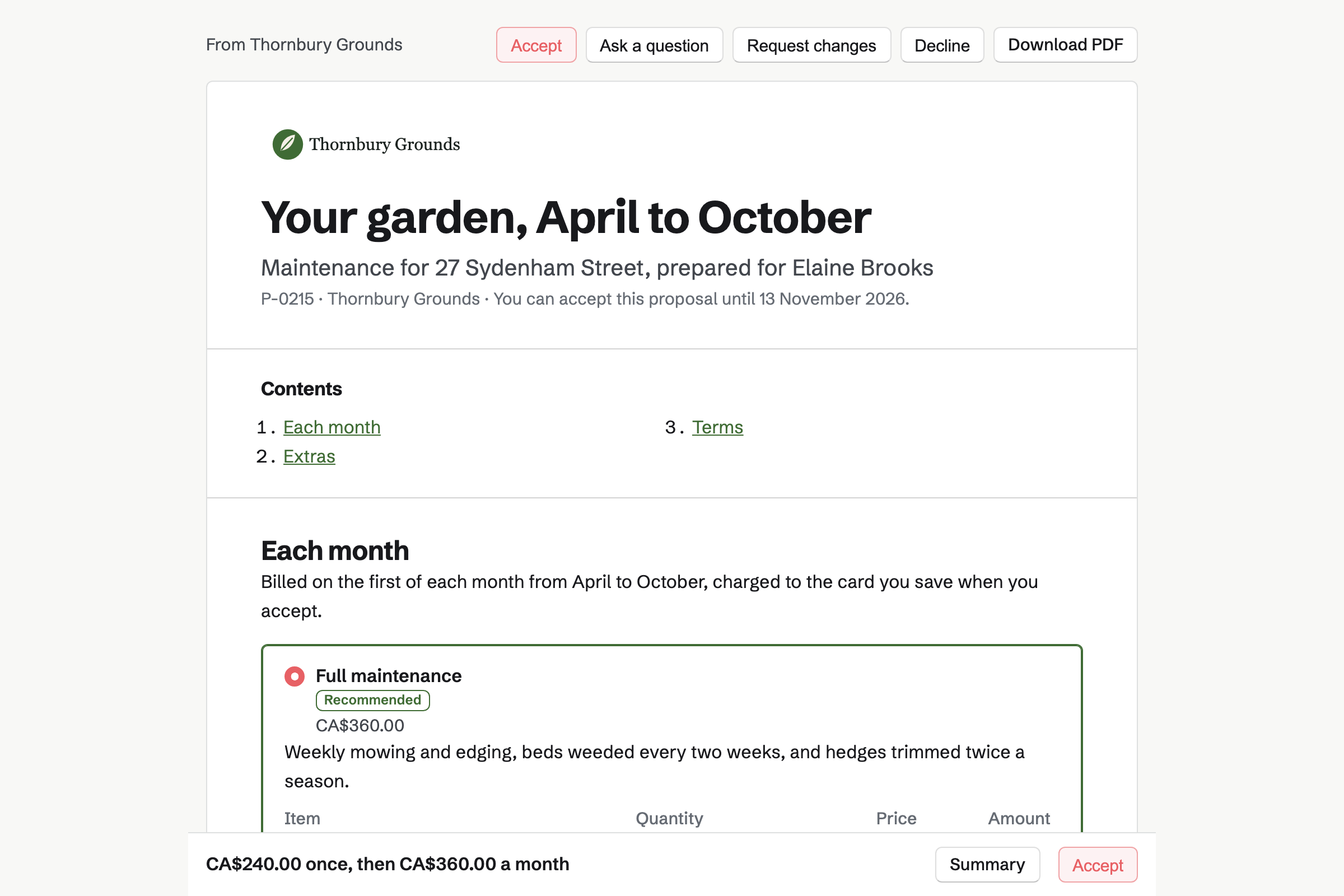
Proposals turns your prices into a quote the client signs online. You can offer two or three packages, such as weekly mowing or full garden maintenance. Extras such as a spring or fall clean-up are optional lines.
Lines can be billed every month. When the client accepts, Magpie will start the monthly invoices. The proposal can ask the client to save a card for them.
Invoicing issues each client's invoice on its date, with the same lines every month. A schedule can stop after a set number of invoices, such as seven for the season.
A client who saved a card is charged when each invoice is issued. Others pay by card from the email. A one-off install, such as a new patio, is an ordinary invoice.
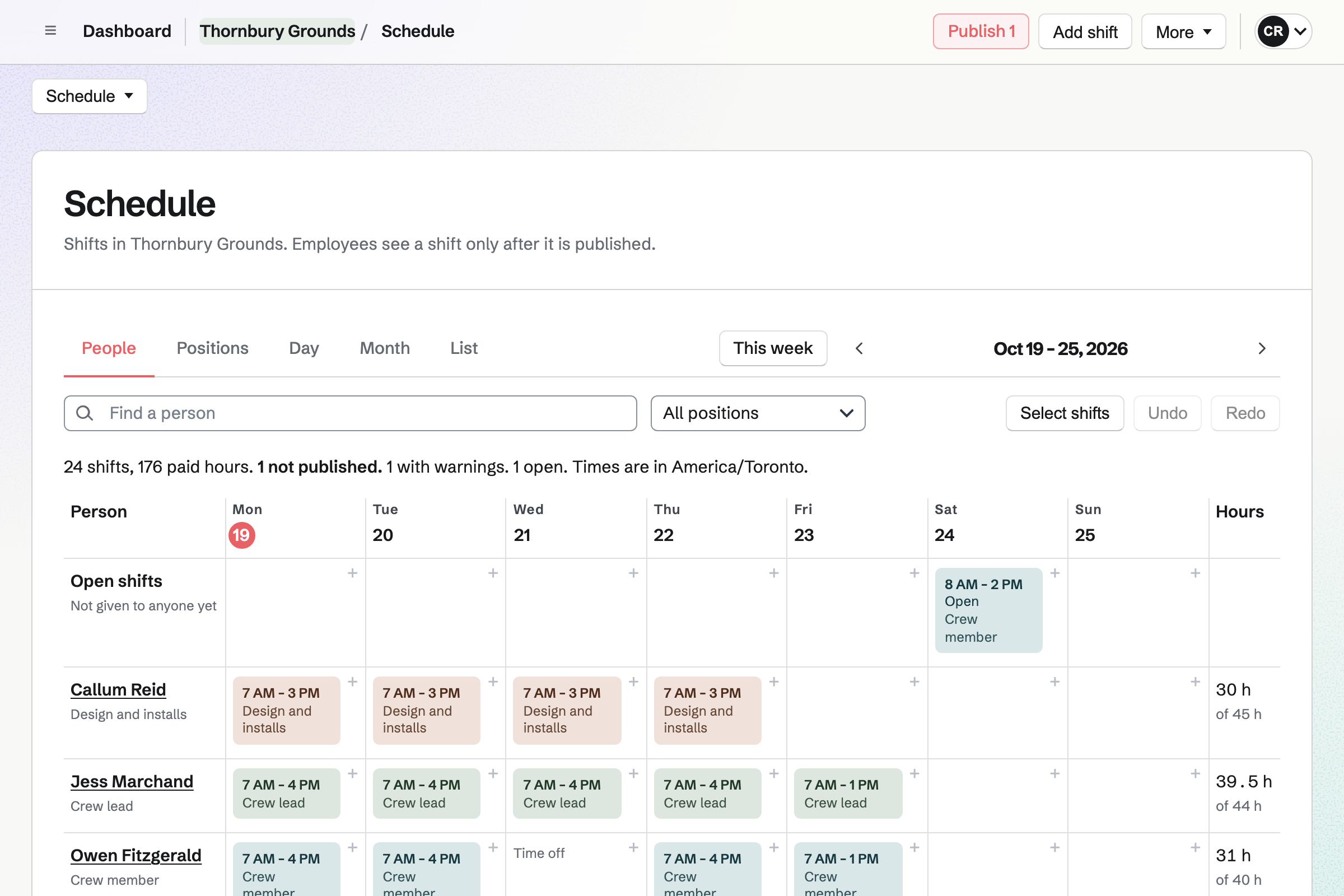
Staff Scheduling gives you positions, such as crew lead, and a location for each round. A shift can repeat every week, for the Tuesday round.
Shifts stay drafts until you publish the week. Each crew member will then see their own shifts, with the address and your instructions. They can swap a shift or ask for time off.
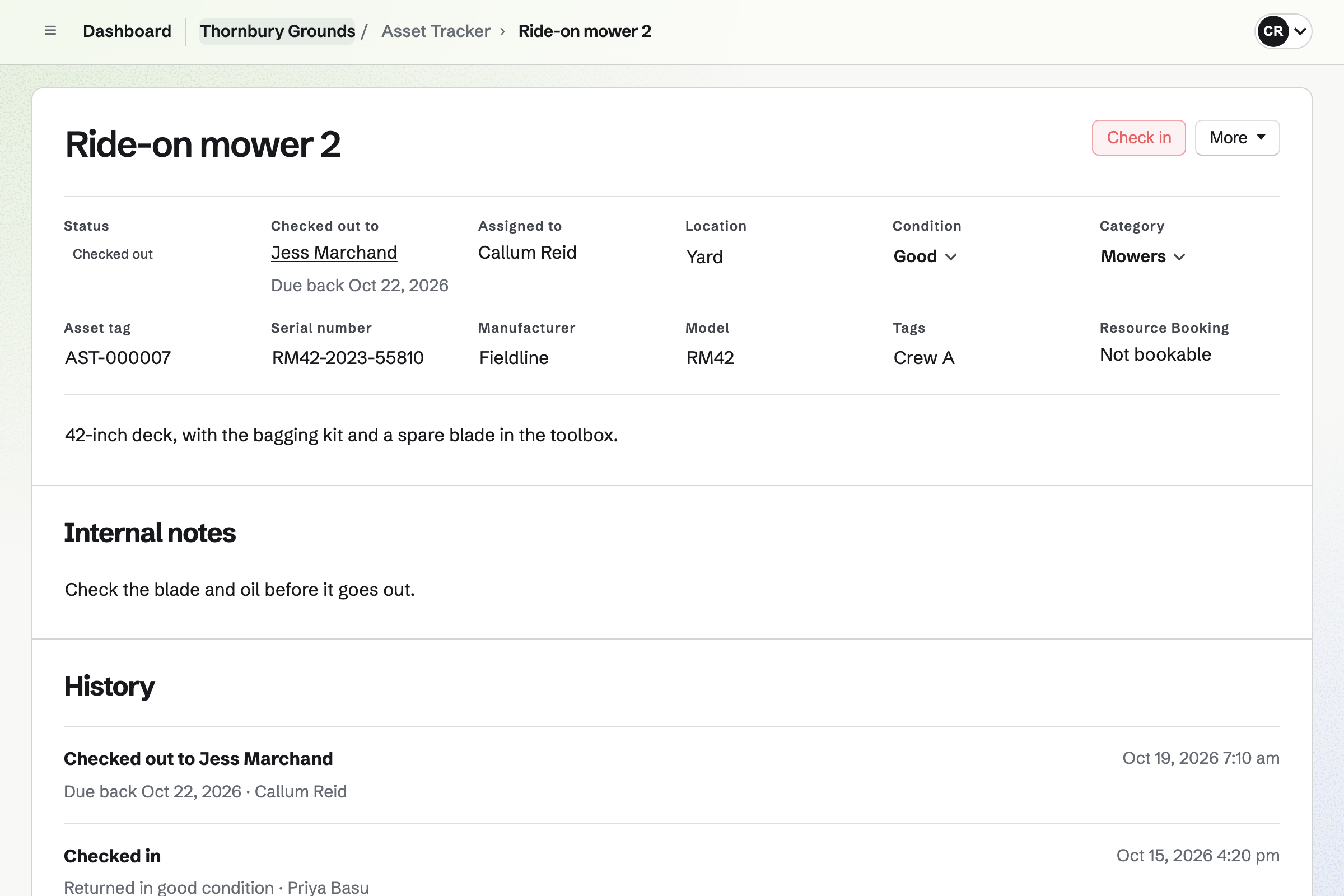
Asset Tracker keeps your mowers, trucks and trailers, each with its tag and condition. You check one out to a crew lead with a date it is due back.
Checking it in records its condition. A mower in for small-engine repair is marked as in maintenance, with the reason.
Daily Operations runs your checklists on a schedule, such as blades and oil every Monday. A step can be pass or fail, and ask for a photo when something fails.
A failed check opens an incident. From it, the machine can be taken out of service. Asset Tracker then shows it in maintenance.
Contacts gives each client a page of their own. A pinned note keeps what every crew needs, such as the gate code.
Its activity lists the proposals you sent and every invoice. A follow-up reminds you to call before next season, or to offer a fall clean-up.
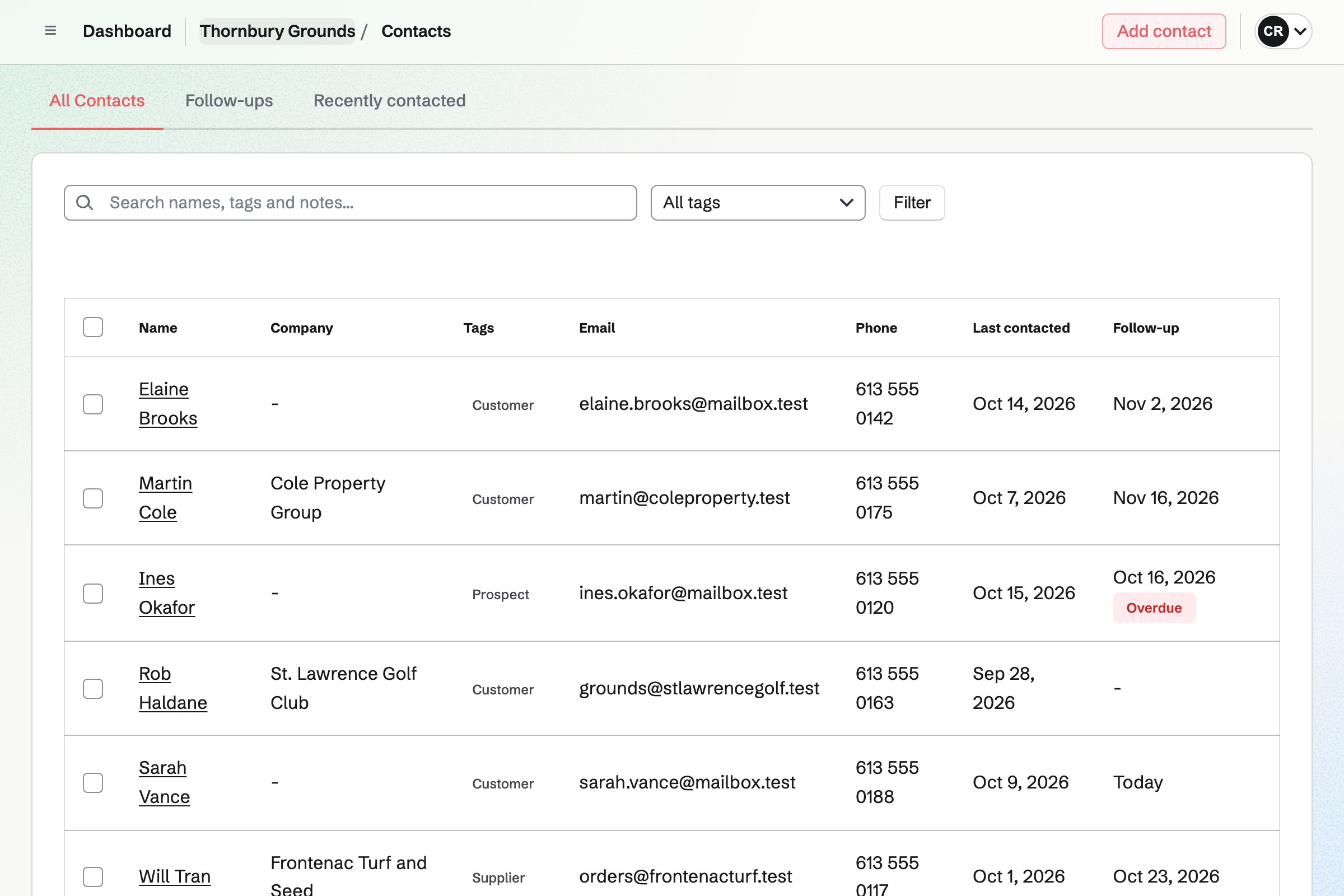
The client's contact page lists the proposal and every invoice.
You send the season's proposal, with weekly mowing or full maintenance to choose.
The client chooses, signs and saves a card. Magpie starts the monthly invoices.
You add the property to the crew's Tuesday round, a shift that repeats every week.
The crew lead checks out the ride-on mower for the day.
The equipment check flags a worn blade, and the mower goes into maintenance.
The month's invoice is issued and charged to the client's card.
You create a team and invite your crew leads. Help: Create and manage a team.
You connect your Stripe account, so clients can pay by card. Help: Connect Stripe to receive money.
You set your packages and monthly prices, then save it as a starter. Help: Proposal starters, saved sections and the price list.
You add each mower, truck and trailer, or import them all from a CSV file. Help: Track individual assets.
You add your crews and their repeating rounds, then publish the week. Help: Plan and publish a staff schedule.
A landscaping company with crews fits the Team plan, one price for up to 25 members. It has no limit on proposals, invoices or contacts.
A crew member who is only on the rota needs no member place. A free team has up to 3 members and can send 5 proposals a month.
Magpie adds no fee to invoice payments. Stripe's processing fee is taken from each.
A plumber or electrician quotes each job and bills it with a card payment link.
A cleaning company runs a checklist with a photo at every client's site.
A farm sells its produce online for pickup and local delivery, and at markets.
Yes. You send a proposal with your packages, such as weekly mowing or full maintenance. The client chooses one, adds any extras and signs with a drawn or typed signature. Magpie will email them and you the signed PDF and a signing certificate.
Yes. Lines billed monthly in an accepted proposal start a recurring invoice. You can also make any invoice recurring, and stop it after a number of invoices. You can change the lines, pause it or end it.
Yes, when they accept a proposal that asks for it. They save a card when they sign, and each monthly invoice is charged to it. If a charge is declined, Magpie emails them a link to pay and you a notice.
Yes. A proposal can price the labour and the materials. It can take a deposit at acceptance. Magpie's short Quote starter is there for smaller jobs.
Yes. Each round is a shift for its crew, at its location, with your instructions. A shift can repeat every week or every two weeks. Magpie adds the repeats as drafts. You publish the week when it is ready.
Yes. A person can swap a shift with a coworker, or ask for cover. They ask for time off by the day or part of a day, and you decide.
Yes. A person on the rota can be marked as seasonal, casual, a contractor or an employee. You can import up to 1,000 people at once from a CSV file.
Yes. Each machine is checked out to a person, with a date it is due back. Checked out lists what is out, and Overdue lists what was not returned. Each machine's history shows every checkout and its condition.
Yes. Each machine can hold photos and receipts of up to 10 MB. Its purchase and warranty details are seen only by admins. A report lists warranties ending soon.
Yes. A checklist can run on a set day and time every week, such as Monday. Each step can be pass or fail, with a photo when it fails. A checklist can be linked to the machines it looks after.
The failed check opens an incident. The machine can be taken out of service from it. Asset Tracker then shows it in maintenance. A shift lead puts it back in service once it is fixed.
Yes. You write them in a note on the client's page and pin it. A shift's instructions can also tell the crew what they need at each stop.
Yes. Walkie Talkie sends voice messages, held to talk, to one person, a group or a channel. A recording carries on if the signal drops, and sends when it returns.
Yes. You photograph each receipt on your phone, and link it to a client or a job. Plants or mulch you buy for a client can go on their next invoice as lines.
Create a Magpie account and make a team for the business.