Plumbers, electricians and tradespeople
A plumber or electrician quotes smaller jobs and bills them with a card payment link.
Builders and renovators
The builder, the site supervisors and the office work in one Magpie team. Each client sees only their own job.
Get started free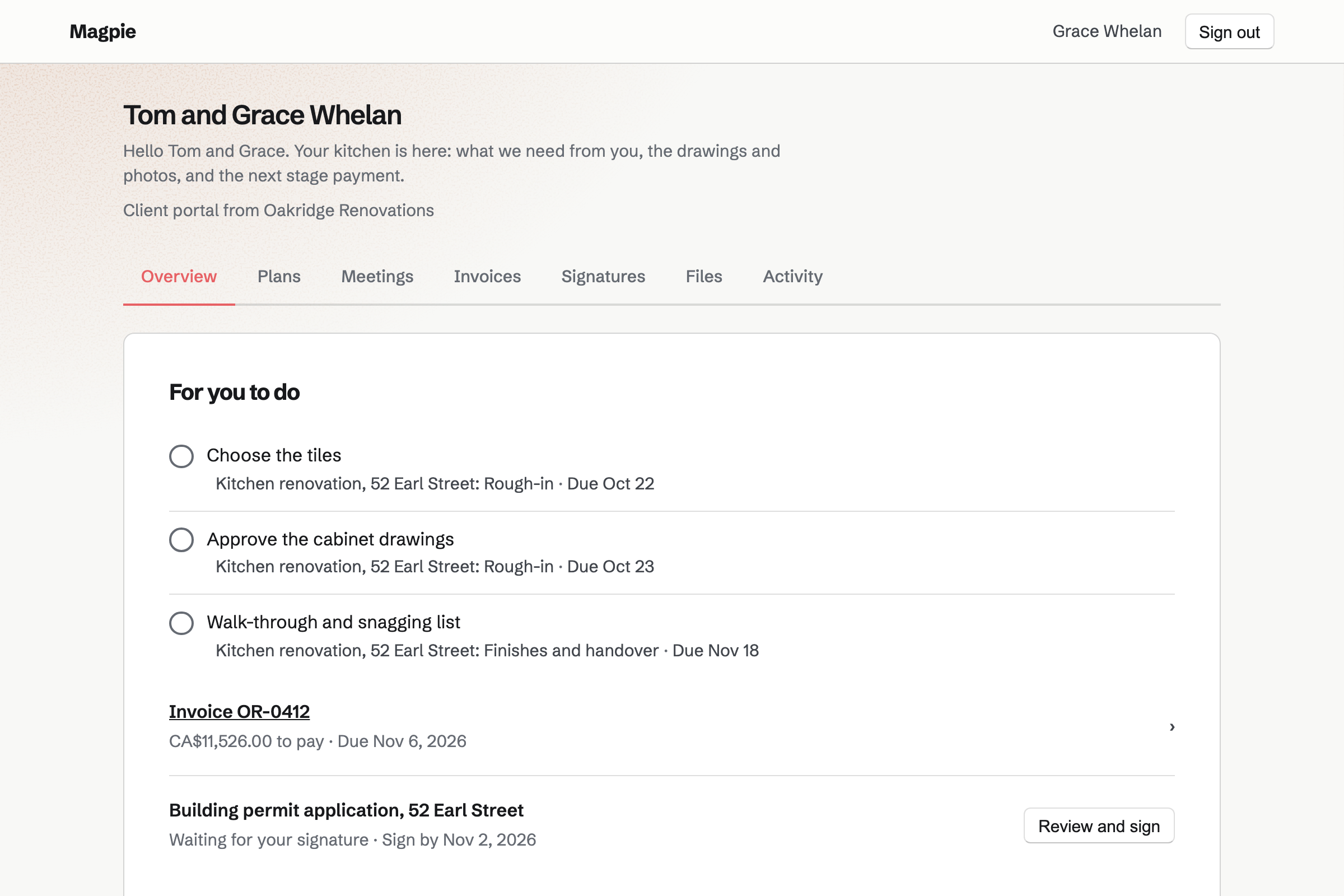
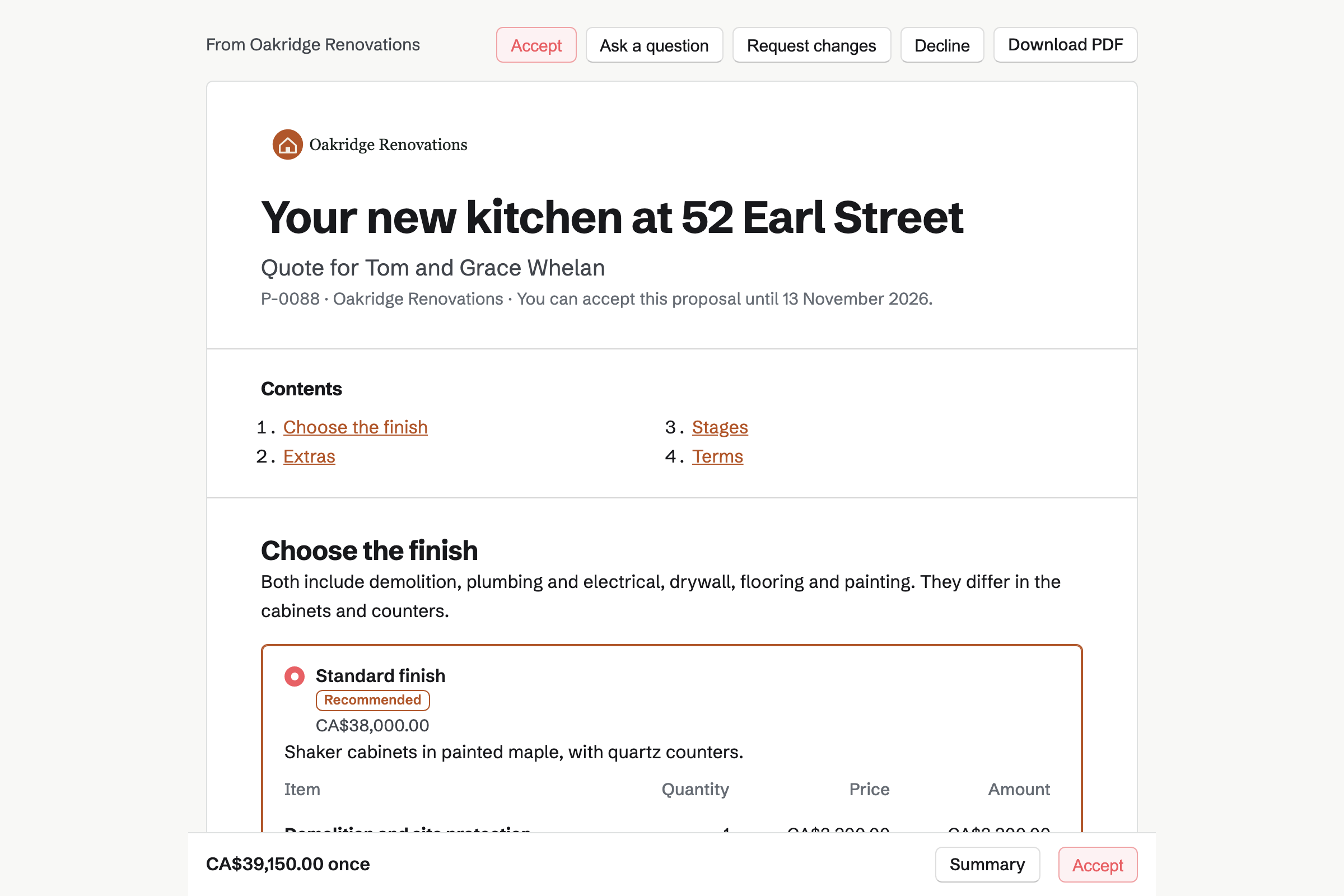
Proposals turns your prices for labour and materials into a quote the client signs online. You can offer two finishes as packages, such as standard or premium cabinets. A timeline shows each stage, from demolition and rough-in to handover.
The payment schedule holds the deposit, the stage payments and the final payment. The deposit's invoice will be issued at signing. The work can start once it is paid.
Invoicing turns each payment in the quote into an invoice. You select Bill this milestone when a stage is done, such as rough-in. The final payment takes whatever is left of the accepted total.
Clients pay by card from the email or their portal, into your own Stripe account. Reminders go out until each invoice is paid. Extra work agreed on site is its own invoice.
Client Portal gives each client a private page of their own. A plan lists the stages, with steps for you and for them, such as choosing tiles. When the work starts, the quote and its invoices can be shared there.
You share drawings and progress photos as files. The client's Overview lists their open steps, the invoices to pay and the documents to sign.
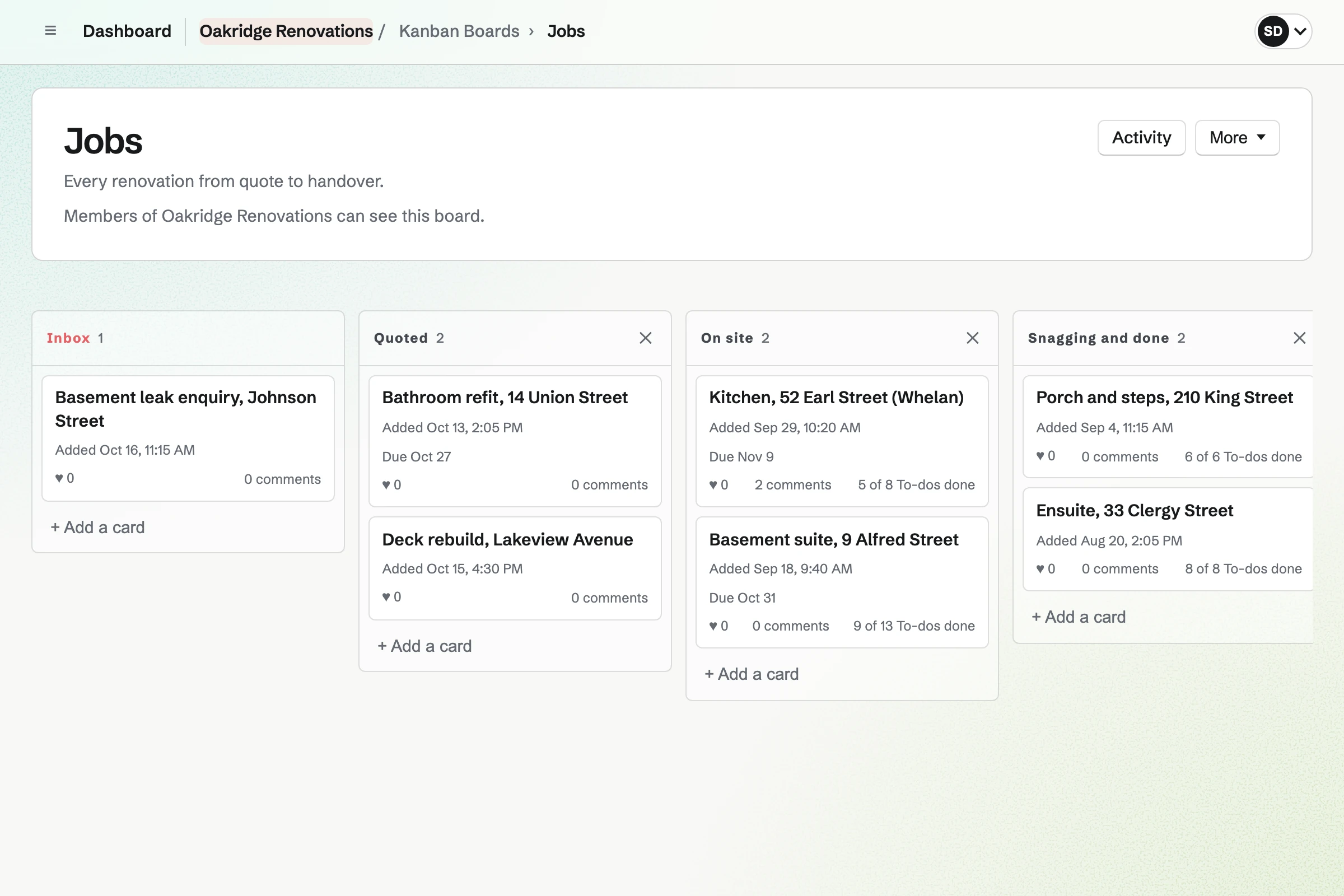
Kanban Boards gives you a column for each stage, such as booked or on site. Each card has its site supervisor, a due date, notes and photos.
A card can hold To-dos, such as ordering the windows. Those To-dos have reminders and appear on the calendar.
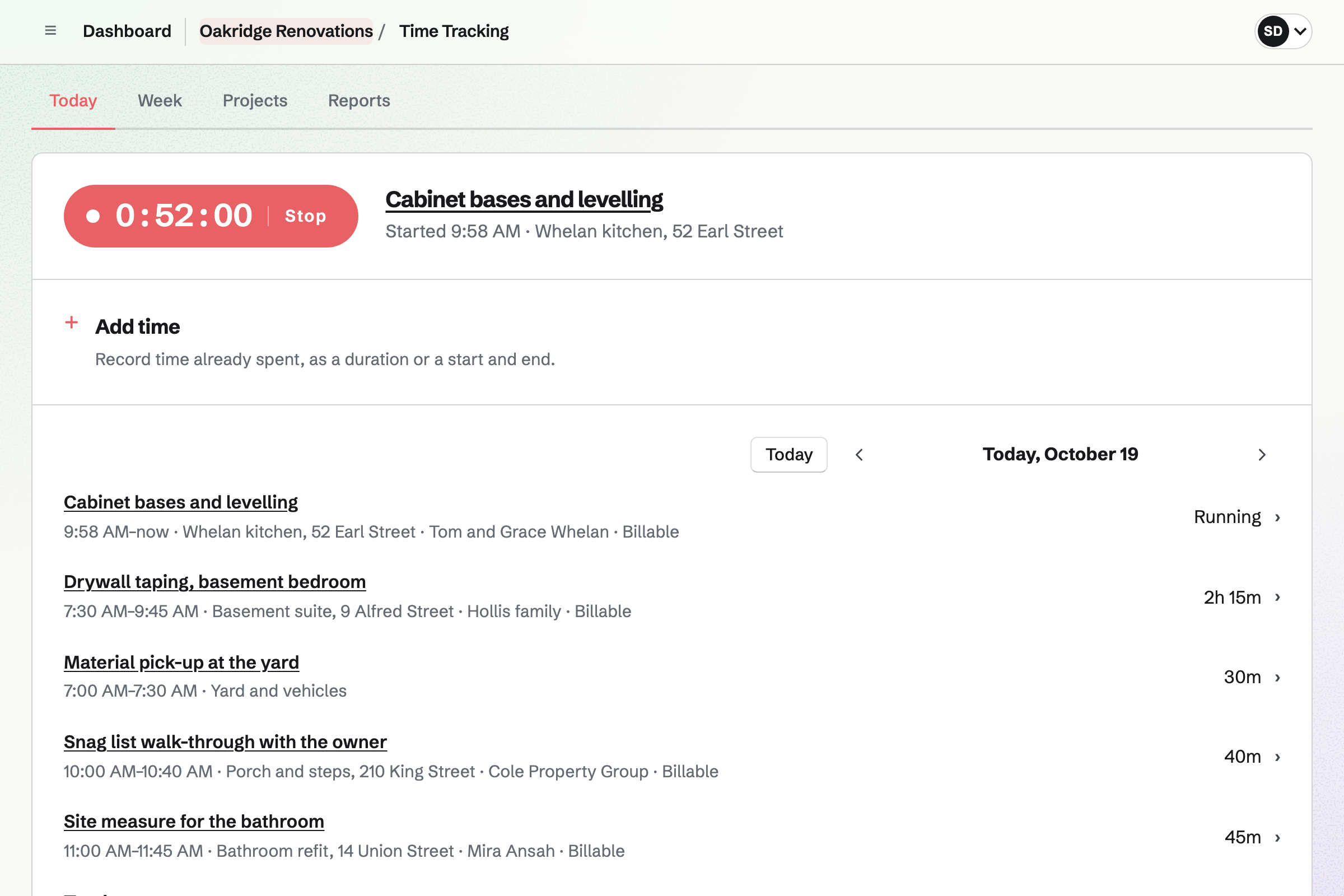
Time Tracking gives each job a project, with a rate and a budget of hours. When a quote is accepted, Magpie can make the project for you.
Your crew start a timer on the job, or add the hours afterwards. Expenses keeps each receipt for materials with the same job, so its costs stay together.
E-Signatures sends your renovation contract, or any PDF you use, to each person who signs. They sign in any order, or one after another. You place their signature, initials and date fields.
Unsigned signers get a reminder every 3 or 7 days. When everyone has signed, Magpie will email them the signed PDF and a certificate of completion.
The client's contact page lists the quote and every invoice.
You send the quote with two finishes. The client chooses, signs and pays the deposit.
Magpie makes the job's project and shares the quote in the client's portal.
You move the job's card to booked, with its site supervisor and start date.
The crew track their hours on the job, and photograph receipts for materials.
When rough-in is done, you tick it in the portal plan and bill its payment. The client pays from their portal.
After the walk-through, you bill the final payment, which takes whatever is left.
You create a team and invite your site supervisors and office. Help: Create and manage a team.
You connect your Stripe account, so clients can pay by card. Help: Connect Stripe to receive money.
You set out your stages and payment schedule, then save it as a starter. Help: Proposal starters, saved sections and the price list.
You list a job's stages and the client's steps, then save it as a starter plan. Help: Reuse your process with starter plans.
You name the columns for your stages and add your current jobs. Help: Track work with Kanban boards.
A building firm with a crew fits the Team plan, one price for up to 25 members. It has no limit on quotes, invoices, contacts or boards.
A free team has up to 3 members and 1 Kanban board. It can send 5 quotes and create 5 invoices a month. The invoices a quote makes do not count.
Magpie adds no fee to deposits or invoice payments. Stripe's processing fee is taken from each.
A plumber or electrician quotes smaller jobs and bills them with a card payment link.
An architect or interior designer quotes design stages and shares mood boards and drawings.
A landlord bills rent every month and takes maintenance requests from tenants.
A workshop quotes each order, buys materials and runs jobs through its machines.
Yes. The first payment in the quote can be a deposit, as a percentage or an amount. Its invoice will be issued when the client signs. They can pay it by card straight away. The work can be set to start once it is paid.
Yes. A quote holds up to 10 payments, from the deposit to the final payment. Bill this milestone issues a stage's invoice when you choose, such as after rough-in. The final payment takes whatever is left of the accepted total.
Yes. A quote can offer 2 to 4 packages, such as standard or premium finishes, with one marked Recommended. Optional lines let them add extras. The totals change with each choice.
Yes. Activity lists each time they open it, and how long they spent on each section. Magpie will email you when it is first opened, signed or accepted.
They can ask a question or request changes from their page. You revise the quote and send the new version with a note on what changed. Earlier versions stay readable.
You send it to the client as its own invoice, for the labour and materials. The client's contact lists it beside the quote's invoices. It can be shared in their portal too.
They see the job's plan, with the steps that are theirs, and the files you share. Their Overview lists their open steps, the invoices to pay and the documents to sign. Your team's notes and boards stay private.
Yes. You share files in their portal, up to 20 at a time and up to 500 MB each. The client can upload theirs, such as tile choices. Each upload is listed with who shared it.
Yes. Each job is a project with a rate and a budget of hours. It shows how much is used. A timer runs on the job, or time is added afterwards. Reports total the hours by project, and export as CSV.
Yes. You photograph each receipt on your phone and link it to the job. Supplier bills in Accounting can name the project too. Profit by project totals each job's costs from them.
Yes. Inventory keeps each supplier's items, packs and prices. You email an order from Magpie, then receive the delivery in full or in part. Differences such as short deliveries are kept with the order.
Yes. Asset Tracker checks out each tool or trailer to a person, with a due date. Overdue lists anything not returned, and check-in records its condition.
Yes. You upload your subcontract as a PDF, up to 25 MB, and place each signer's fields. Each signer gets their own link by email. When everyone has signed, Magpie will email them the signed PDF and a certificate.
Yes. A checklist can be started by hand on arrival, with pass or fail steps and photos. A failed check can ask for a note or a photo. It opens an incident for you to resolve.
Yes. Each job has its own card, project, portal and invoices. The jobs board shows them all together, and each client sees only their own portal.
Create a Magpie account and make a team for the business.