Tutors and music teachers
A tutor or music teacher teaches at a desk or online. Their learners study decks for exams rather than a theory test.
Driving instructors
You can teach on your own. A driving school's instructors can work in one Magpie team.
Get started free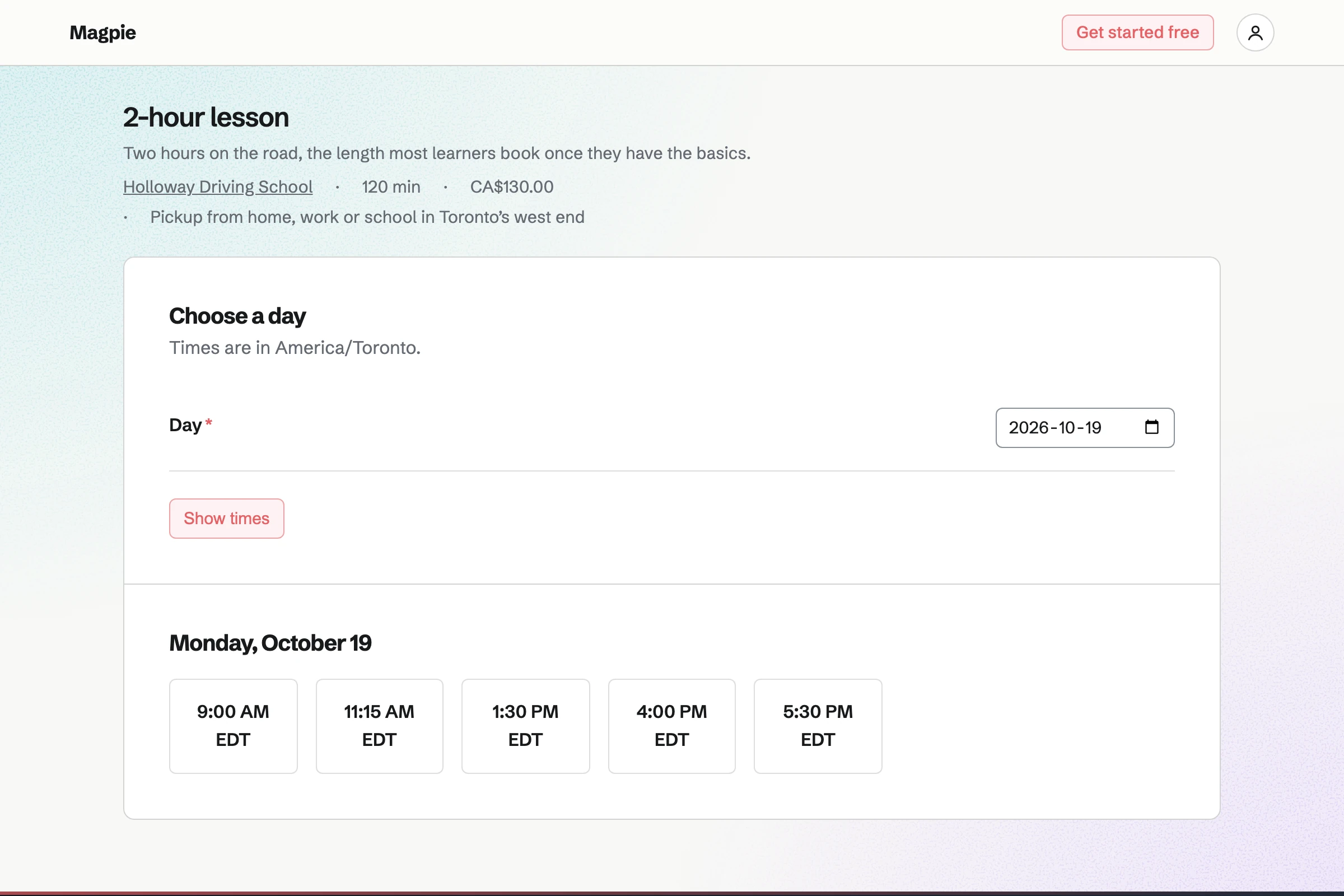
Appointments gives you a booking page that lists your lessons. Each lesson has its own length and price, such as a 2-hour lesson. Learners choose a lesson and a free time, then enter their name and email address.
Magpie will email each learner a confirmation with a link. From it they can move or cancel the lesson, until the notice you set. You can add a lesson agreed by phone, and the learner gets the same email.
Calendar holds your week. Each booking adds an event named after the lesson and the learner. Moving or cancelling the lesson moves or removes the event.
You can add your own events, such as a learner's driving test or a day off. The booking page will not offer a time that overlaps one. With Google Calendar connected, your lessons will be copied to it within about a minute.
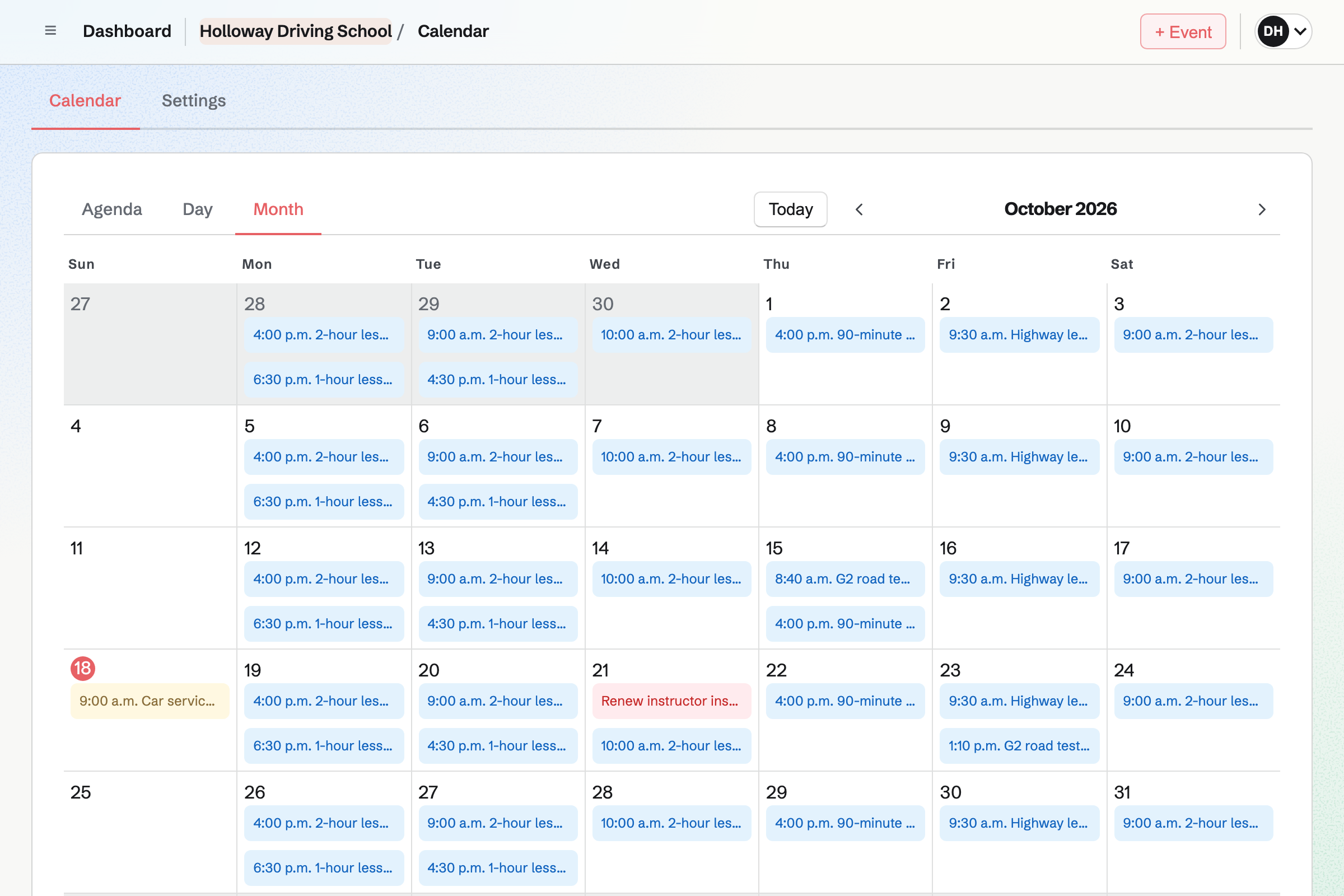
Contacts is your list of learners. A first booking adds the learner by their email address. Their page lists every lesson, and whether it was completed, cancelled or a no-show.
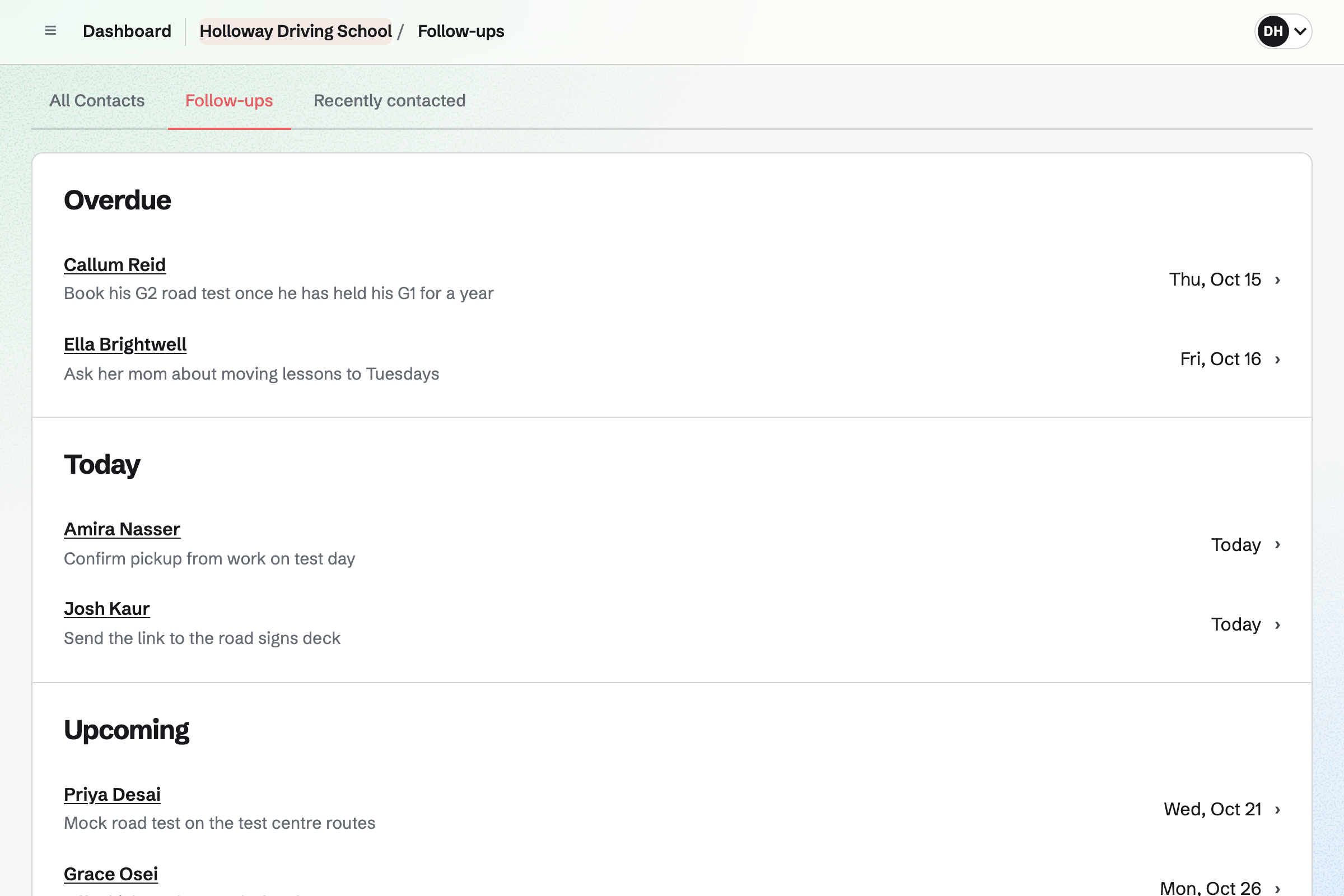
After a lesson you can note what you covered, such as roundabouts. A pinned note keeps the pickup address or the test date at the top. A follow-up, such as booking the test, becomes a To-do with a reminder.
Flashcards lets you make decks of basic, fill-in-the-blank and multiple-choice cards. A card can show a picture of a road sign above its question.
Anyone with the deck's link can flip through it or take a quiz. They need not sign up first. A learner who signs in studies it with spaced repetition. Their schedule and progress are their own.
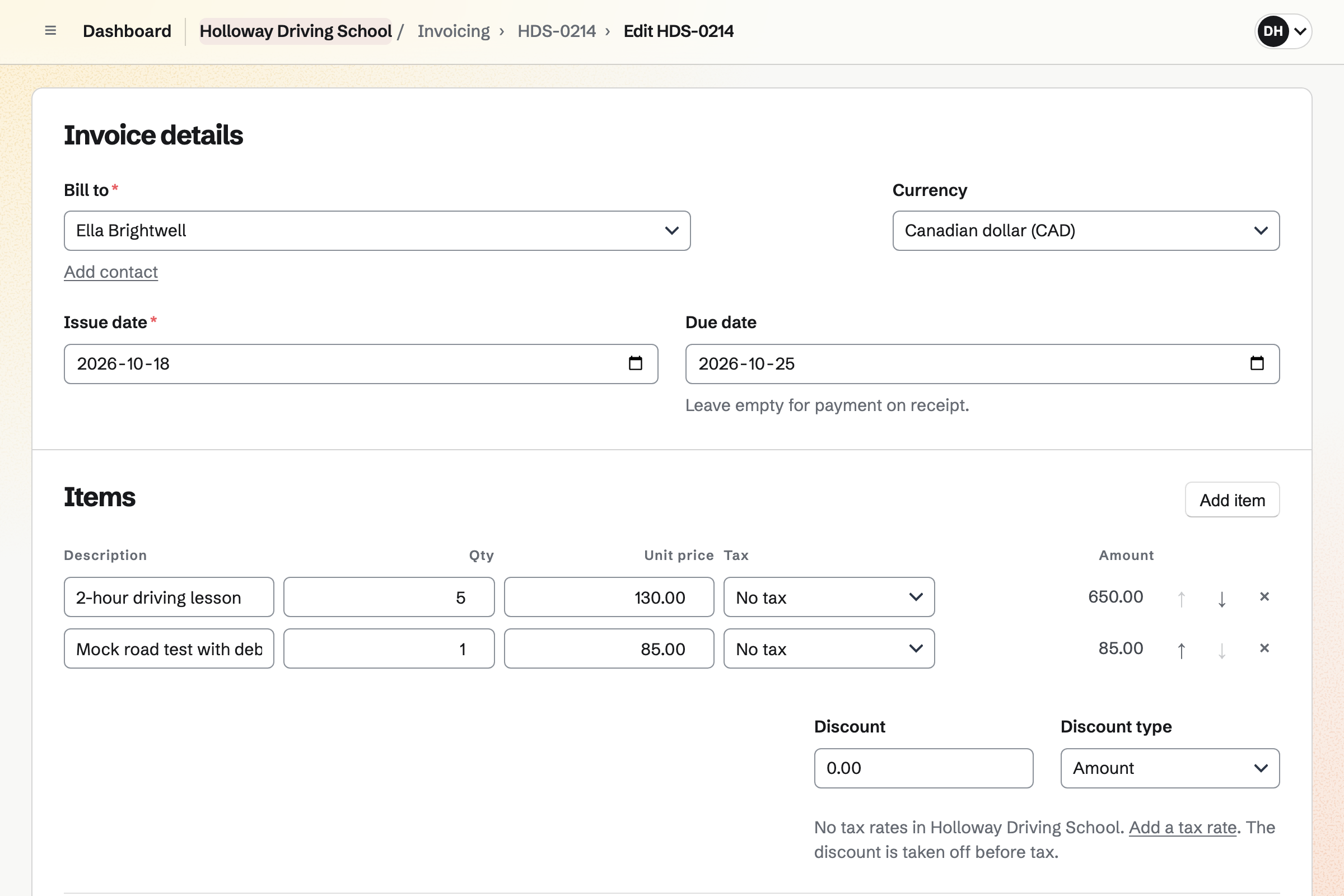
Invoicing bills a learner for a block of lessons, or for the month. The email carries the invoice as a PDF, with Pay online. Learners pay by card into your own Stripe account.
A recurring invoice will go out every month on the date you choose. Cash or a bank transfer is recorded against the invoice. Reminders will go to the learner until the invoice is paid.
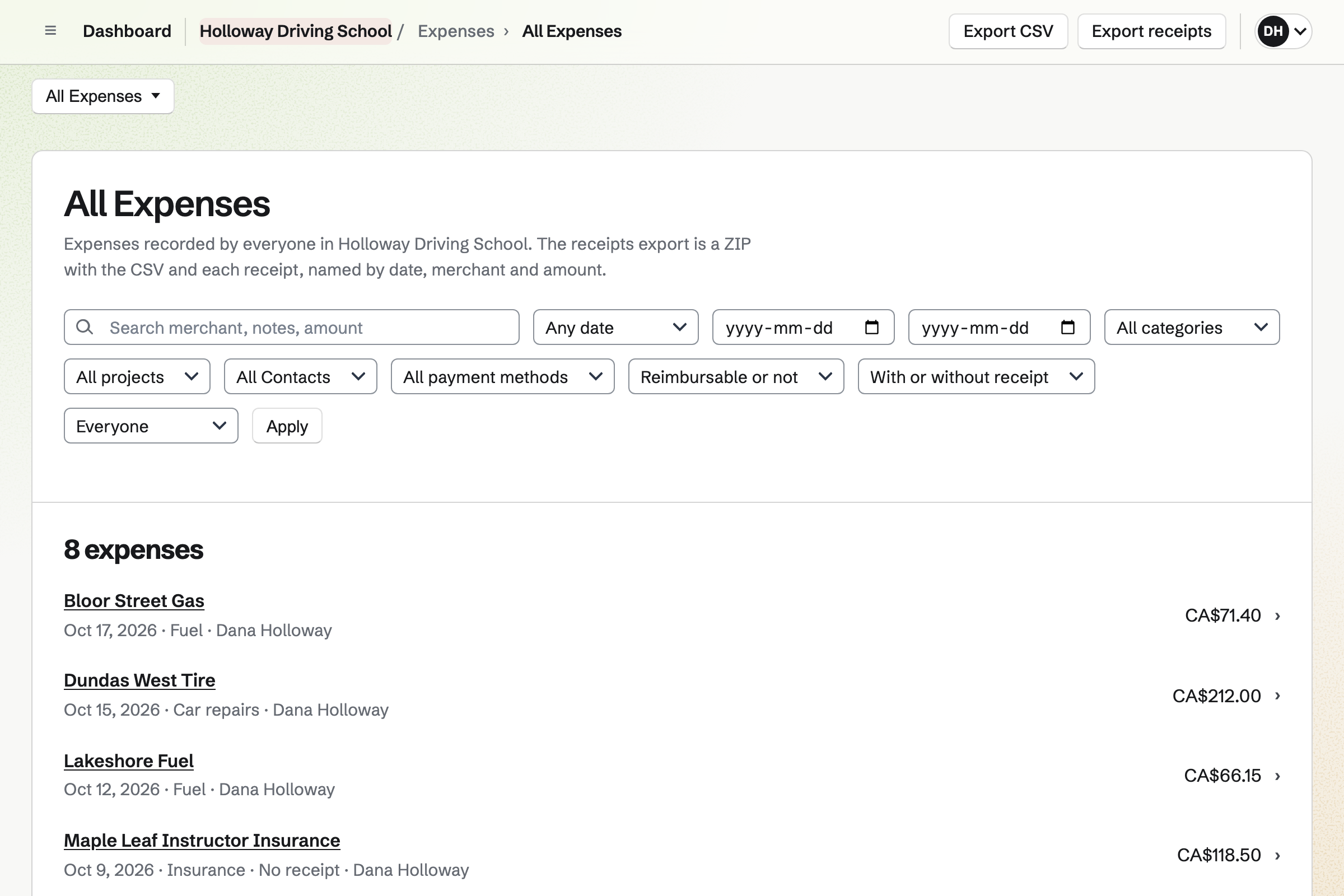
Expenses keeps the costs of teaching from your car. You enter the amount and the date, with the merchant and a category. On a phone, the receipt can be a photo taken there and then.
You can add your own categories, such as Fuel and Car repairs. Monthly insurance can be a recurring expense, drafted each month for you to confirm. Reports total each category, and export as a CSV file.
They choose a 2-hour lesson and a free time on your booking page. Magpie emails them a confirmation.
The booking adds the lesson to your Calendar. That time is no longer offered to anyone else.
Their email address finds their contact, or adds one. The lesson is listed beside your notes.
You mark it Completed or No-show, and note what you covered.
You invoice the learner for their lessons. A card payment is recorded on the invoice by itself.
Each payment, and each receipt for fuel, will be added to the books.
You choose a business type and your time zone. Then you add your lessons, their prices and your teaching hours. Help: Set up Appointments.
You add each learner as a contact, with the pickup address pinned. Help: Keep notes and follow-ups on a contact.
You connect your Stripe account, so learners can pay invoices by card. Help: Connect Stripe to receive money.
You type the cards or import a list, then share the deck's link. Help: Study with Flashcards.
Working alone, you use Personal, and Pro is its paid plan. The Free plan keeps 100 contacts and makes 5 invoices a month; Pro has no limit. Each lesson adds one of the 100 Calendar events the Free plan holds.
A driving school is a team. Each instructor who takes bookings takes a member place. A free team has 3, counting you; the Team plan has 25. Magpie adds no fee to invoice payments; Stripe's processing fee is taken from each one.
A tutor or music teacher teaches at a desk or online. Their learners study decks for exams rather than a theory test.
A garage books services and repairs for each car. It keeps parts in stock and bills each job.
Learners open your booking page and choose a lesson, a day and a free time. They enter their name and email address, and a phone number if they like. Magpie checks the time again as they book. It then emails them a confirmation with the lesson, the time and the place.
The confirmation email links to a page for that one lesson. From it the learner can pick another free time with you, or cancel. Both work until the notice you set, such as 24 hours before. After that, the page asks them to contact you. Magpie emails them the new time or the cancellation.
Minimum notice sets how soon before its start a lesson can still be booked. Maximum range sets how far ahead learners can book, such as six weeks. Start times sets how often a lesson can start, such as every 30 minutes. Lessons you add yourself follow the same rules.
Each lesson is a service with its own length, price, description and place. You might offer a 1-hour lesson, a 2-hour lesson and a mock test. The booking page shows the price and the length before a learner chooses a time. Switching a lesson off hides it, and keeps the ones already booked.
New appointment books it for them. You choose the lesson, the date and a start time. Then you enter their name and email address. You can add internal notes the learner never sees. The learner gets the same confirmation email, with the link to change it.
Your weekly hours have one range for each day, or Closed. For anything inside those hours, such as a learner's test, you add a Calendar event. The booking page will not offer a lesson that overlaps it. Lessons already booked stay where they are.
A pinned note on the learner's contact stays near the top of their page. It can hold the pickup address, a school or work address, and the test date. A lesson's internal notes can say where that one lesson starts.
After each lesson you can write a dated note on the learner's contact. Each note shows when it was written, and notes take simple formatting. The contact also lists every lesson, with whether it was completed, cancelled or a no-show. Search finds a word in any note.
A follow-up on the learner's contact has a date and a reason, such as Book test. It becomes a To-do with the usual reminders. Contacts lists every open follow-up as Overdue, Today or Upcoming.
You make a deck of questions, such as road signs, stopping distances and rules at junctions. A card can show a picture above its question, and a question can have several choices. You share the deck's link. Anyone with it can flip through or take a quiz. A learner who signs in studies it with spaced repetition.
You can paste the list, or import a CSV or TSV file from a spreadsheet. Up to 2,000 cards come in at a time. The preview shows every card, and marks likely duplicates, before anything is saved.
You send the learner an invoice for the block, such as ten 1-hour lessons. With Stripe connected, the email has Pay online, and they pay by card. The money goes to your own Stripe account, and the payment is recorded on the invoice. Magpie takes no fee; Stripe's processing fee applies.
Record payment records it on the invoice, with the date, the method and a reference. A part payment leaves the invoice Partly paid, with the balance shown. Reminders go to the learner on the due date, then 7 and 14 days after, and stop once the invoice is paid.
Make recurring sends the same invoice every month, from the date you choose. Magpie will issue and email each one with its PDF. You can change the lines before a month with more lessons. Pause stops the invoices until you resume them.
Each expense takes a receipt as a photo, an image or a PDF of up to 10 MB. On a phone, the file chooser offers the camera. Receipts can wait in an inbox until you type their amounts. A receipt never has a public link.
Reports total your expenses for any dates, such as this year. They show totals by category, so fuel, insurance and repairs each have their own. Export CSV downloads every expense for a spreadsheet or your accountant. Each expense is also added to the books.
You can connect Google Calendar. Your lessons will then be copied to it within about a minute. Moving a lesson in Magpie moves its Google copy. Your Google events appear on your Personal Calendar, seen only by you.
A driving school works as one team. Each instructor takes bookings within their own weekly hours. A learner chooses an instructor, or Anyone available. Each lesson goes on that instructor's Calendar. The school's learners and invoices belong to the team.
Resource Booking holds the car, and you make it the lesson's required resource. A lesson time is offered only while the car is free. Each booking reserves the car, and moving or cancelling the lesson moves or frees it.
The booking page has its own address, which you can copy and share. Share booking page starts a Social Media post with it. A Link-In-Bio List or a QR code on a card can lead to it too.
Create a Magpie account for your driving lessons.