Driving instructors
A driving instructor teaches in the car rather than at a desk. Learners practise theory from decks shared by link. The instructor records the car's expenses.
Tutors and music teachers
Your lessons, notes and invoices are in your own Magpie account. Students and parents book and pay without signing up first.
Get started free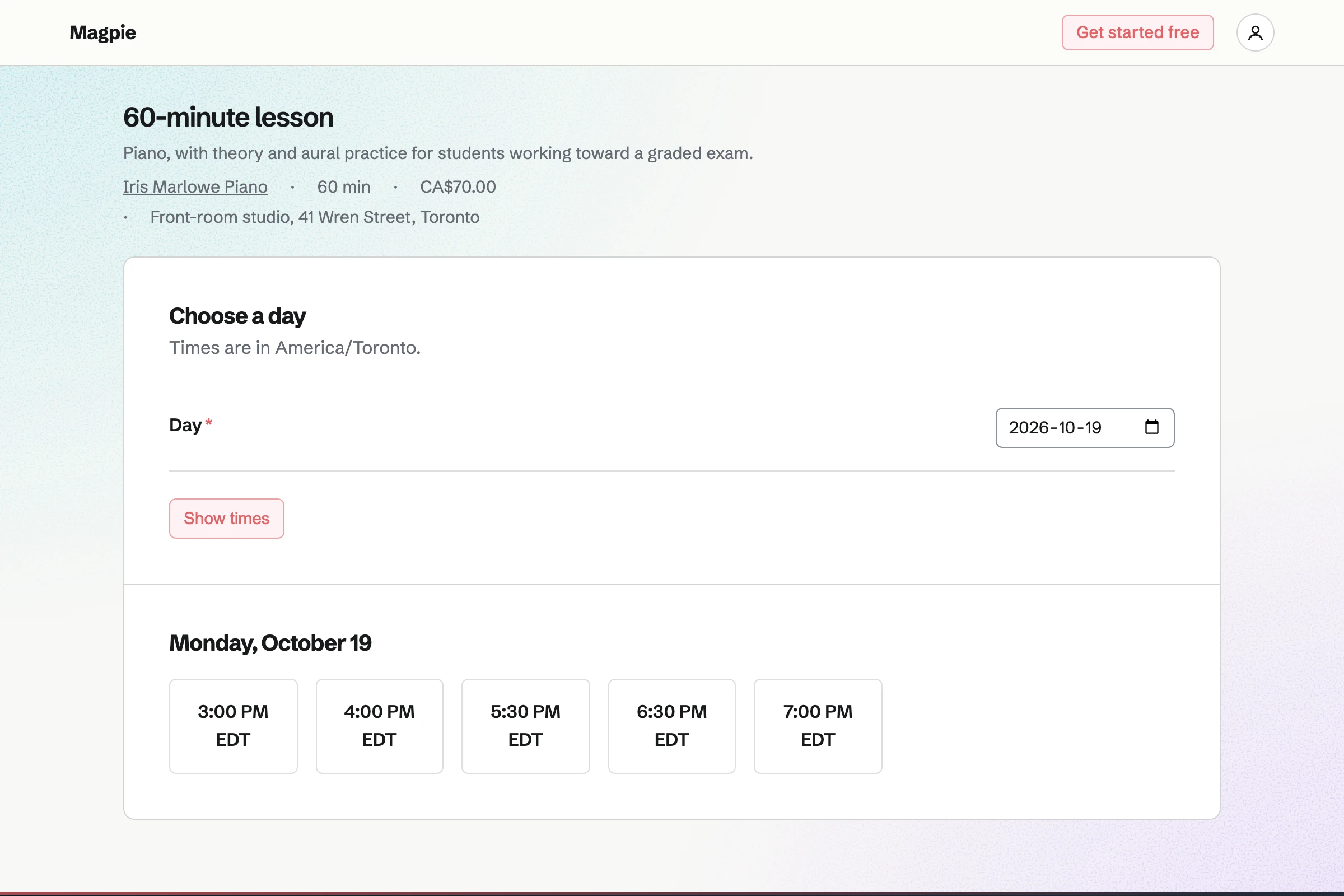
Appointments and Meetings both let students book a free time without signing up first. Appointments shows each lesson's price, and students move their own lessons. Meetings adds a video call to each lesson, and students email you to change one.
Appointments gives your lessons a booking page of their own. A tutor starts with a 30-minute and a 60-minute lesson. You give each one a price and a place, such as your studio. You set your teaching hours, such as 3:30pm to 8pm.
Students or parents choose a lesson, a day and a free time. Magpie offers a time only when your other lessons and your own events leave it free. Their confirmation email lets them move or cancel the lesson, until the notice you set.
Meetings gives you a meeting page at your own handle. It can offer a 45-minute online lesson, or a first call with a new family. You set the weekly hours you take them. Students see the times in their own time zone.
With Zoom connected, each booking gets a Zoom call, with the link in the confirmation. With Google Calendar connected instead, the lesson gets a Google Meet link. Busy times in your Google calendar cannot be booked.
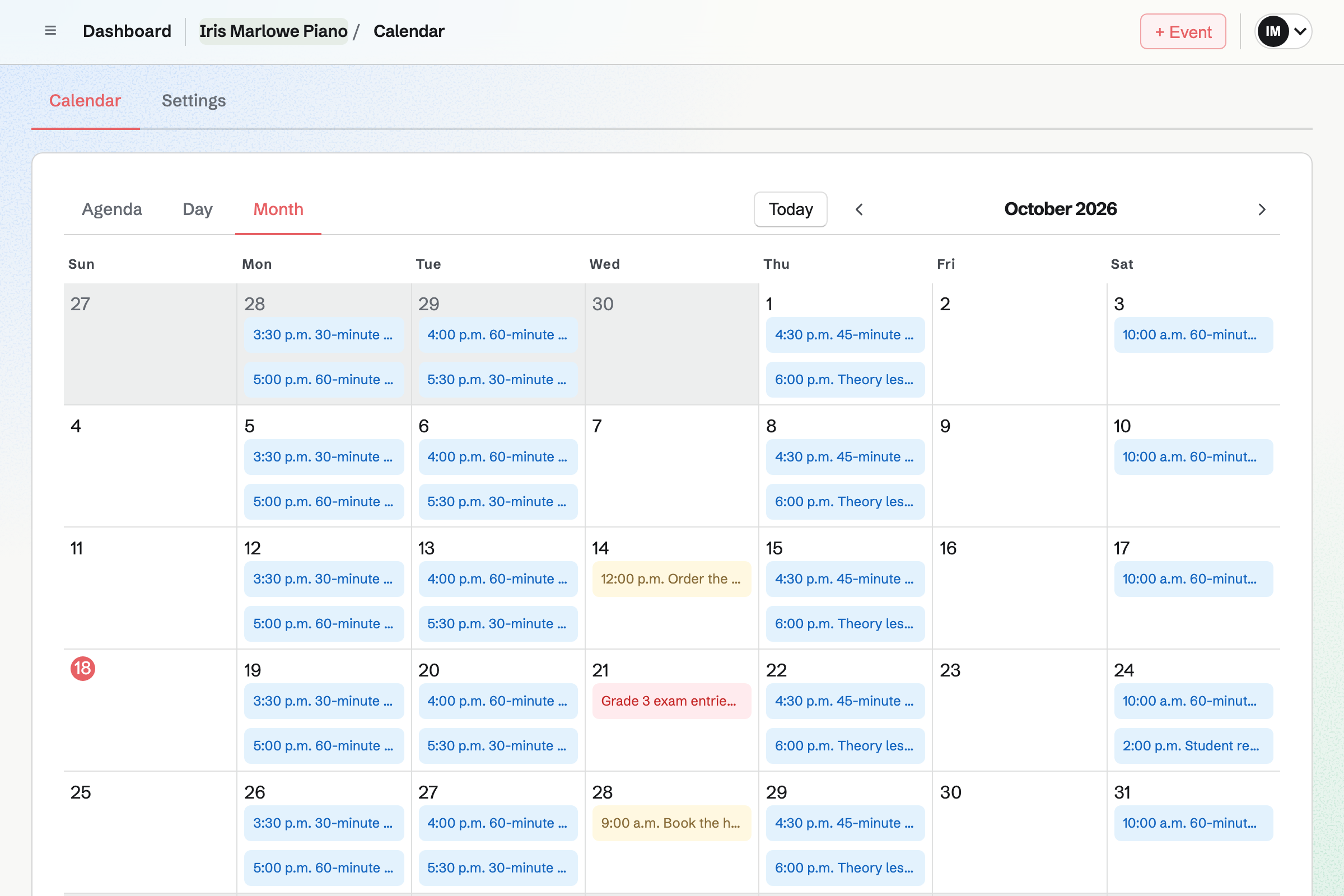
Calendar adds each booked lesson to your week, named after the lesson and the student. You can add your own events, such as a recital or the school run. The booking page will not offer a lesson time that overlaps one.
With Google Calendar connected, your lessons will be added to it within about a minute. Changing one in Magpie will change its Google copy. Your Google events will appear on your calendar, and only you will see them.
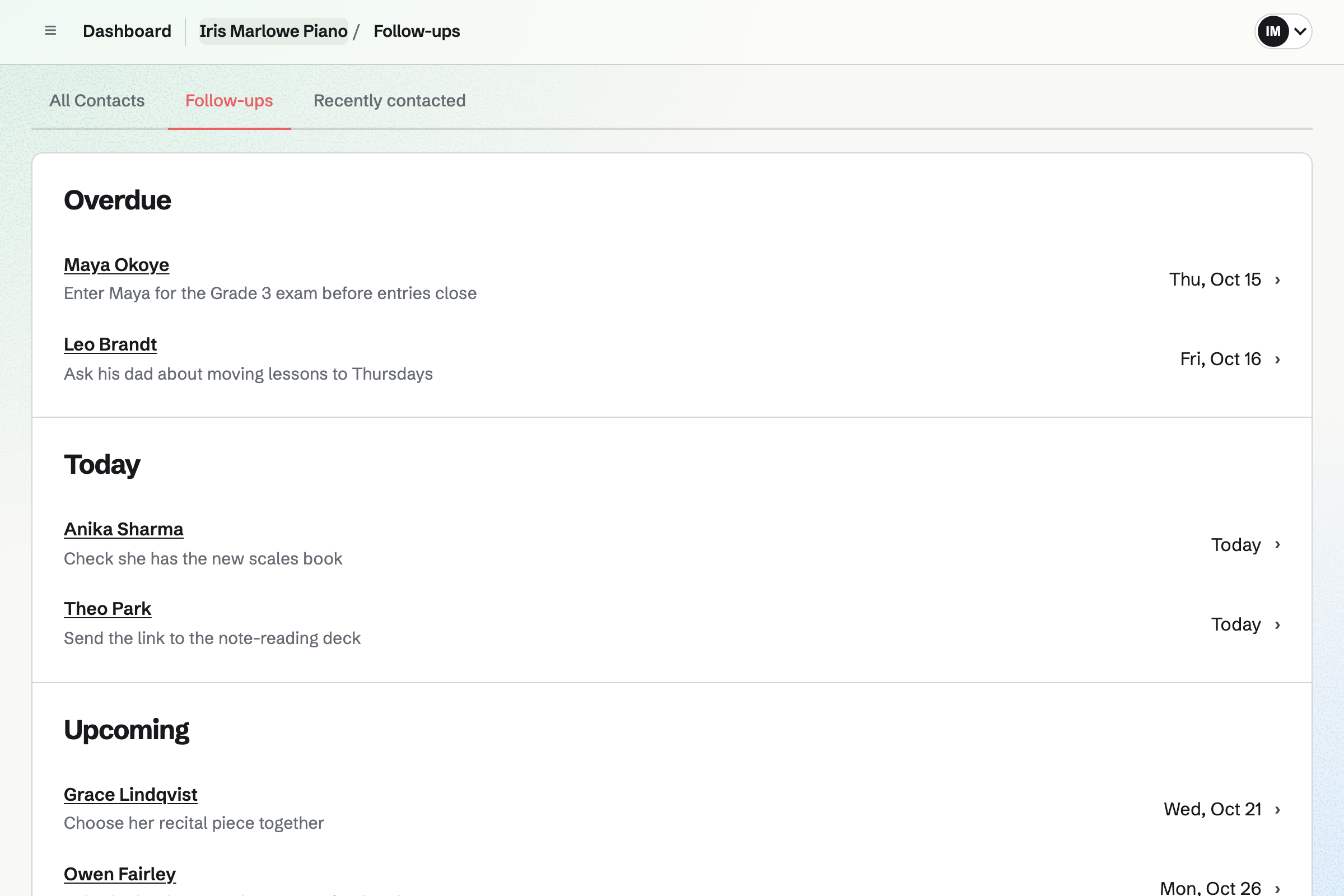
Contacts keeps one contact for each student. It can hold a parent's email address too. A booking made with either address will be added to it. The contact lists every lesson, and whether it was completed, cancelled or a no-show.
After each lesson you can write a dated note, such as the pieces practised. You can pin what stays true, such as an exam date. A follow-up with a date and a reason becomes a To-do.
Flashcards lets you make a deck for a student or a level. A card can show an image above its question, such as a bar of music. A vocabulary list saved from a spreadsheet imports as one card a row.
Anyone with a deck's link can flip through, quiz or cram without signing up first. A student who signs in studies it with spaced repetition, on their own schedule. Changing a card keeps their study history on it.
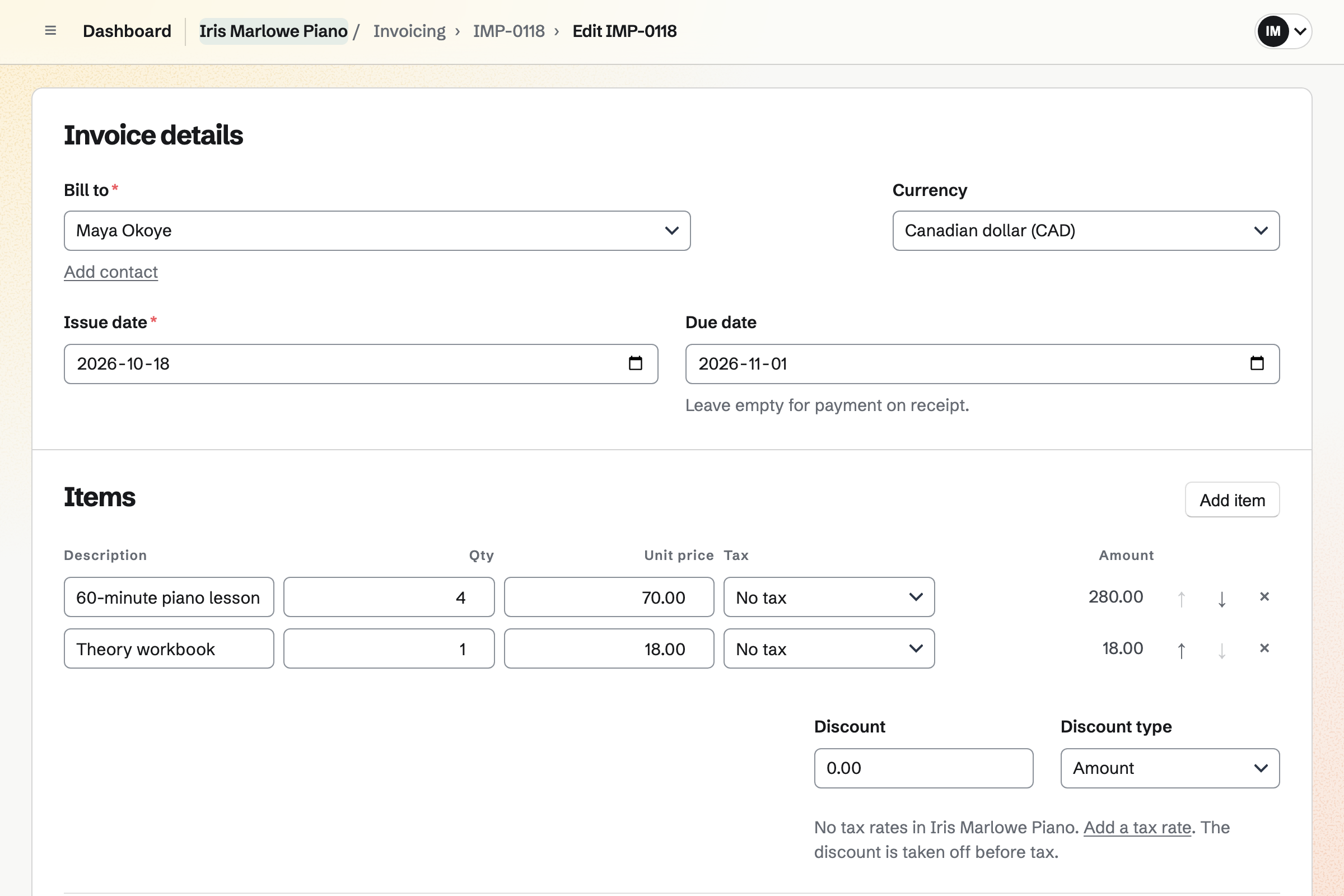
Invoicing bills each family for the month's lessons, such as four 60-minute lessons. Each invoice is emailed as a PDF, with your own message. Parents pay by card without signing up first, into your own Stripe account.
A recurring invoice will go out every month from the date you choose. For a month with more or fewer lessons, you can change its lines. The family will be emailed the new amount before the next invoice.
Their lessons, your notes and their invoices are all on one contact.
They choose a 60-minute lesson and a free time on your booking page. Magpie will email them a confirmation. You can also add a lesson they asked for by phone.
The lesson will appear on your calendar. Its time will no longer be offered on your meeting page either.
Their email address finds the student's contact, or adds one. The lesson will be listed beside your notes.
You mark it Completed or No-show, and write a dated note. Then you send the link to the week's practice deck.
The recurring invoice will be emailed, and the family can pay it online. You can change its lines first for a month with more or fewer lessons.
A card payment will be recorded on the invoice by itself. You can record a transfer or cash yourself. Each payment will be added to the books.
You choose Tutor or music teacher and your time zone. Then you set each lesson's price and place, your hours and the notice a cancellation needs. You preview the booking page and publish it. Help: Set up Appointments.
You add each student as a contact, with the parent's email address. Their bookings and invoices will then be on one contact. Help: Keep a contact list.
You connect Stripe and send each family an invoice. Then you make each one recurring. Help: Recurring invoices.
You connect your Google calendar, and your Google events will appear beside your lessons. Help: Connect Google Calendar.
You type the cards or import a list. Then you set the deck to Unlisted and send its link. Help: Study with Flashcards.
A teacher working alone can use Magpie without a team. Appointments, Calendar and Flashcards are on every plan. Magpie adds no fee to invoice payments, and Stripe's processing fee is taken from each one.
The Free plan has room for 100 contacts, one for each student who books. Each lesson adds one of its 100 Calendar events. It allows 5 invoices a month and 2 Meeting types.
Pro, the plan for your own work, has no limit on contacts, invoices or Meeting types. It holds 5,000 Calendar events. Each student you share a document with counts as a guest. The Free plan allows 10, and Pro allows 100.
A driving instructor teaches in the car rather than at a desk. Learners practise theory from decks shared by link. The instructor records the car's expenses.
Yes. Parents open your booking page and choose a lesson, a day and a free time. They enter their name and email address, and a phone number if they like. Magpie checks the time again as they book. The confirmation email gives the time and the place, with a link to change it.
Yes. Their confirmation email links to that one lesson, with no password. From it they can choose another free time, or cancel. Both work until the notice you set, such as 24 hours. Magpie will email them the new time or the cancellation.
Yes. You set how soon before its start a lesson can still be booked. You also set how far ahead, such as eight weeks. Start times are offered as often as you choose, such as every 30 minutes. Every booking follows these rules, including a lesson you add yourself.
Yes. Each lesson has its own length, price, description and place. You type the length as you would say it, such as 45 min. The booking page shows the price and length before the student chooses a time. You can stop offering a lesson and keep the ones already booked.
Each day has one range of teaching hours, or is closed. Inside those hours, you can add an event to your calendar, such as the school run. The booking page will not offer a time that overlaps it. That includes events you answered Going to.
Yes. You choose the lesson, the date and a start time, then enter their name and email. You can add notes the parent never sees. The time has to be one your booking page would offer. The parent will get the same confirmation email, with the link to change it.
Yes. With Zoom connected, each lesson booked on your meeting page gets a Zoom call. The join link is in the student's confirmation email. With Google Calendar connected instead, the lesson gets a Google Meet link. Busy times in your Google calendar cannot be booked.
Yes, for lessons booked on your meeting page. You turn on text reminders and choose how long before the lesson they go. The booking form will then offer Text me a reminder. A student with a US or Canadian number can tick it. They will get one text naming you and the time, and can reply STOP.
Each student has a contact, where you write a dated note after each lesson. Each note shows when it was written, and takes Markdown. A pinned note, such as the exam they are working toward, stays near the top. Notes on a lesson itself are for you, and the student never sees them.
Yes. A contact holds several email addresses and phone numbers, each with a label. The parent's and the student's can be on one contact, named after the student. A booking made with either address will be added to it. Invoices go to the primary address, and you can add the others when you send one.
Yes. The student's contact lists each lesson, and whether it was completed, cancelled or a no-show. Your notes and their invoices are beside them. Your list of past lessons also shows each one, with how you marked it.
You send a family their first invoice, with a line for the month's lessons. Then you make it recurring, every month from the date you pick. On each date, Magpie will issue the invoice and email it with its PDF. You can change what later invoices hold, or move the next date. Pausing stops the invoices until you resume.
Yes. With your Stripe account connected, each invoice email has Pay online. The parent sees the total, what has been paid and the balance. They pay by card without signing up first, and the payment is recorded on the invoice. Magpie adds no fee, and Stripe's processing fee is taken from the payment.
You record it on the invoice, with its method, the date it arrived and a reference. It can be in full or in part. A part payment shows the invoice as Partly paid, with the balance still due. Payment reminders will go to the family on the due date, then 7 and 14 days after, or on the days you choose. They stop when the invoice is paid in full.
Yes. You make a deck, set its sharing to Unlisted and send the link. Anyone with it can flip through, quiz or cram without signing up first. Their place is kept in their browser. A student who signs in studies it with spaced repetition, on their own schedule.
Yes. You paste the list, or upload a CSV or TSV file saved from a spreadsheet. Each import takes up to 2 MB and 2,000 cards. The preview lists every card and marks possible duplicates before anything is saved. A deck also exports as CSV, TSV, Markdown or Magpie JSON.
Yes. You share a Document with the student, and they will be invited to edit it. Once they accept, they can open that document and nothing else of yours. Your suggested wording changes the text only when someone who can edit accepts it. You can comment on any sentence you select.
Yes. A Form can ask their age, level and goals, from its link or a QR code. Students or parents answer without signing up first, and you get an email for each response. A File question takes one PDF, image or text file of up to 10 MB. It could hold a report from a previous teacher.
Yes, once you connect Google Calendar. Your lessons and events will be added to your primary Google calendar within about a minute. Changing or deleting one in Magpie will change its Google copy. Your Google events will appear on your calendar, and only you will see them.
Yes. You set a follow-up on the student's contact, such as entering them for an exam. It has a date and a reason, and becomes a To-do with the usual reminders. Contacts lists every open follow-up as Overdue, Today, Upcoming or No date.
Create a Magpie account for your lessons.