Massage therapists, estheticians and small spas
A massage therapist or spa books treatments into a treatment room. Secure Files keeps their intake forms encrypted.
Hair salons and barbershops
The salon, its stylists and the front desk work in one Magpie team.
Get started free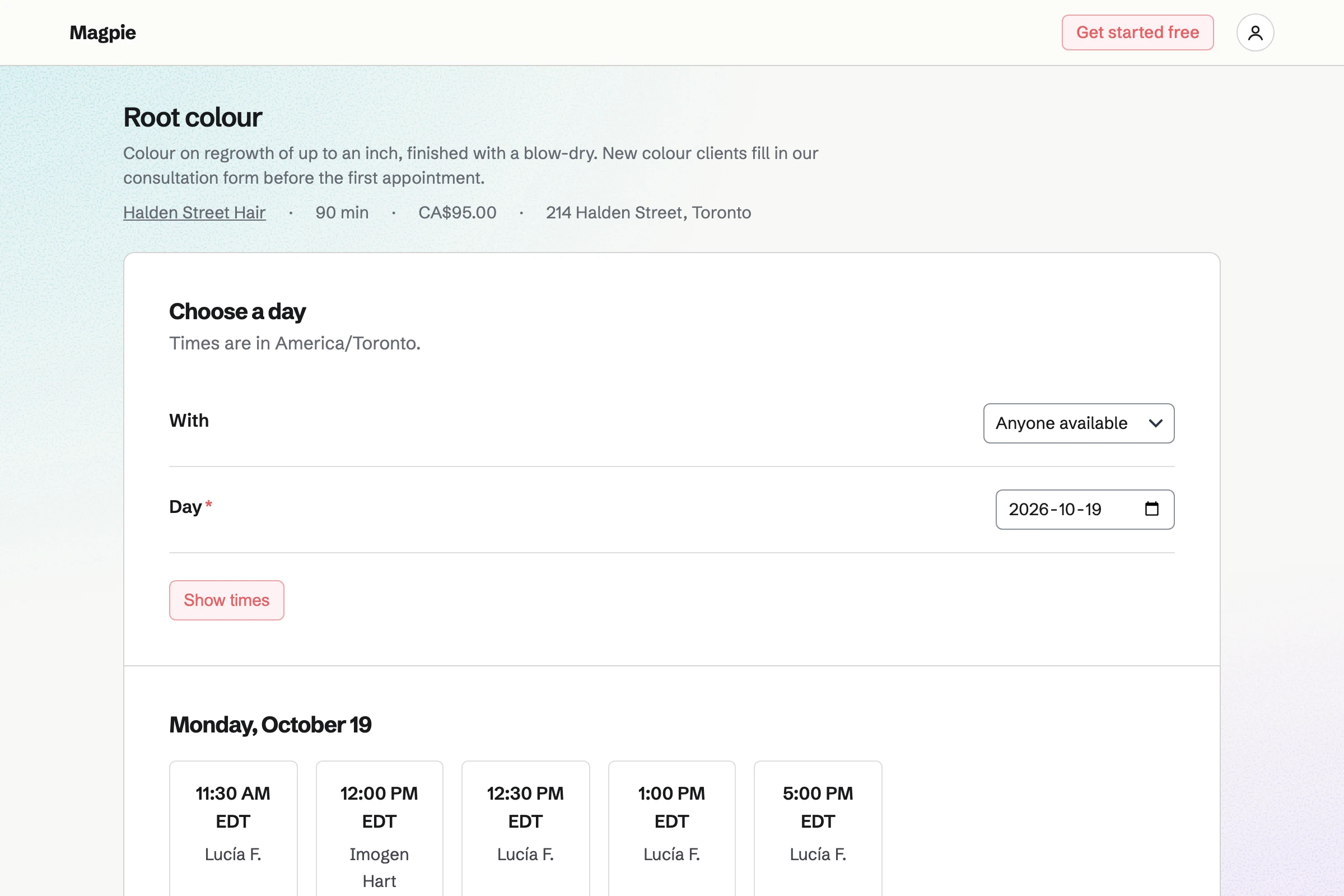
Appointments gives the salon a booking page, with services ready to use. A salon starts with Haircut, Haircut + Beard and Beard Trim. You add your own, such as a root colour, with its length, price and stylists. You give each stylist their weekly hours.
Clients choose a service, a stylist and a free time, without signing up first. A time is offered only when the stylist's hours, calendar and bookings leave it free. Their confirmation email lets them move or cancel, up to the notice you set.
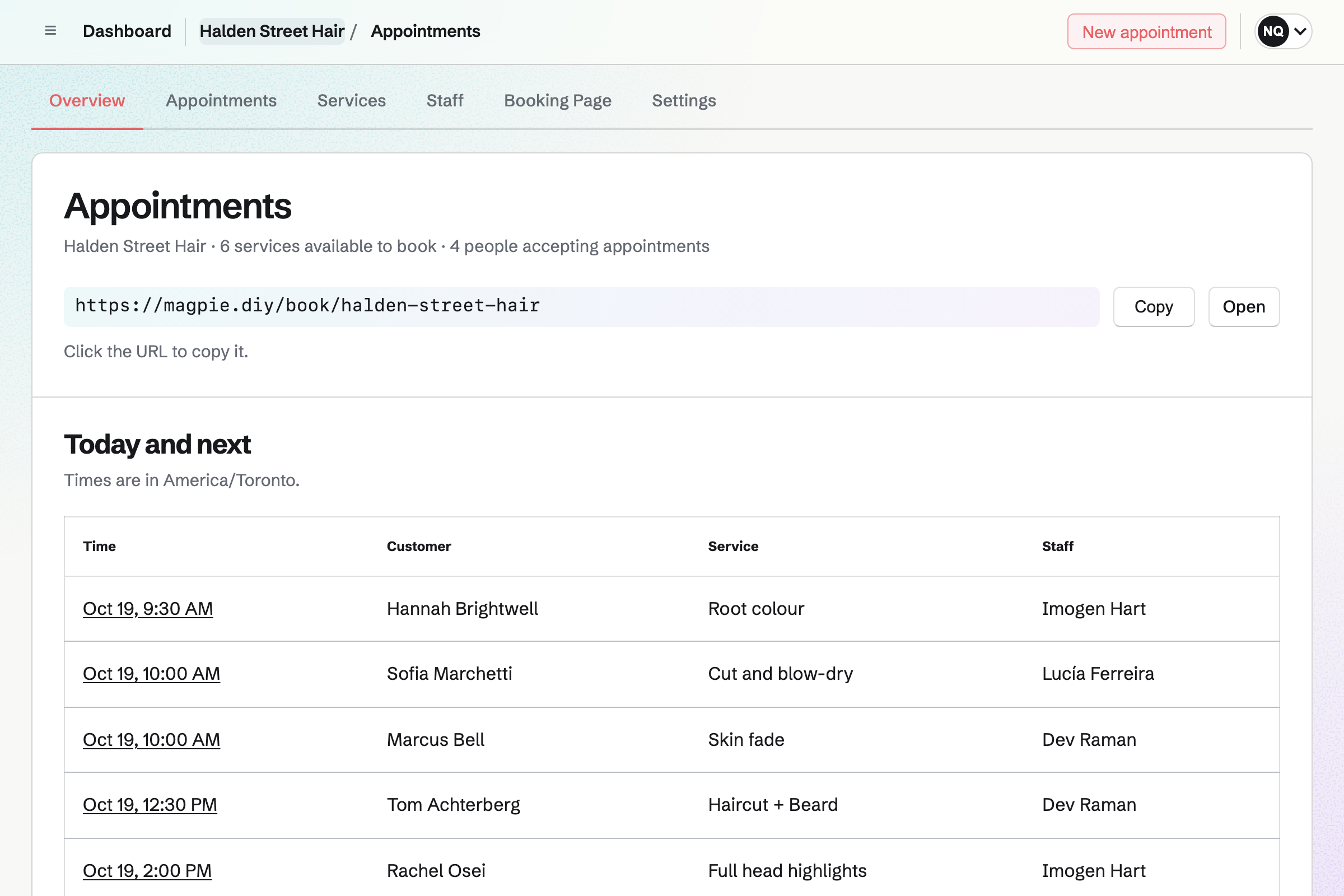
Contacts keeps your client list. Each booking links the client to their contact by email address, or adds one. Their contact lists every appointment, including cancellations and no-shows.
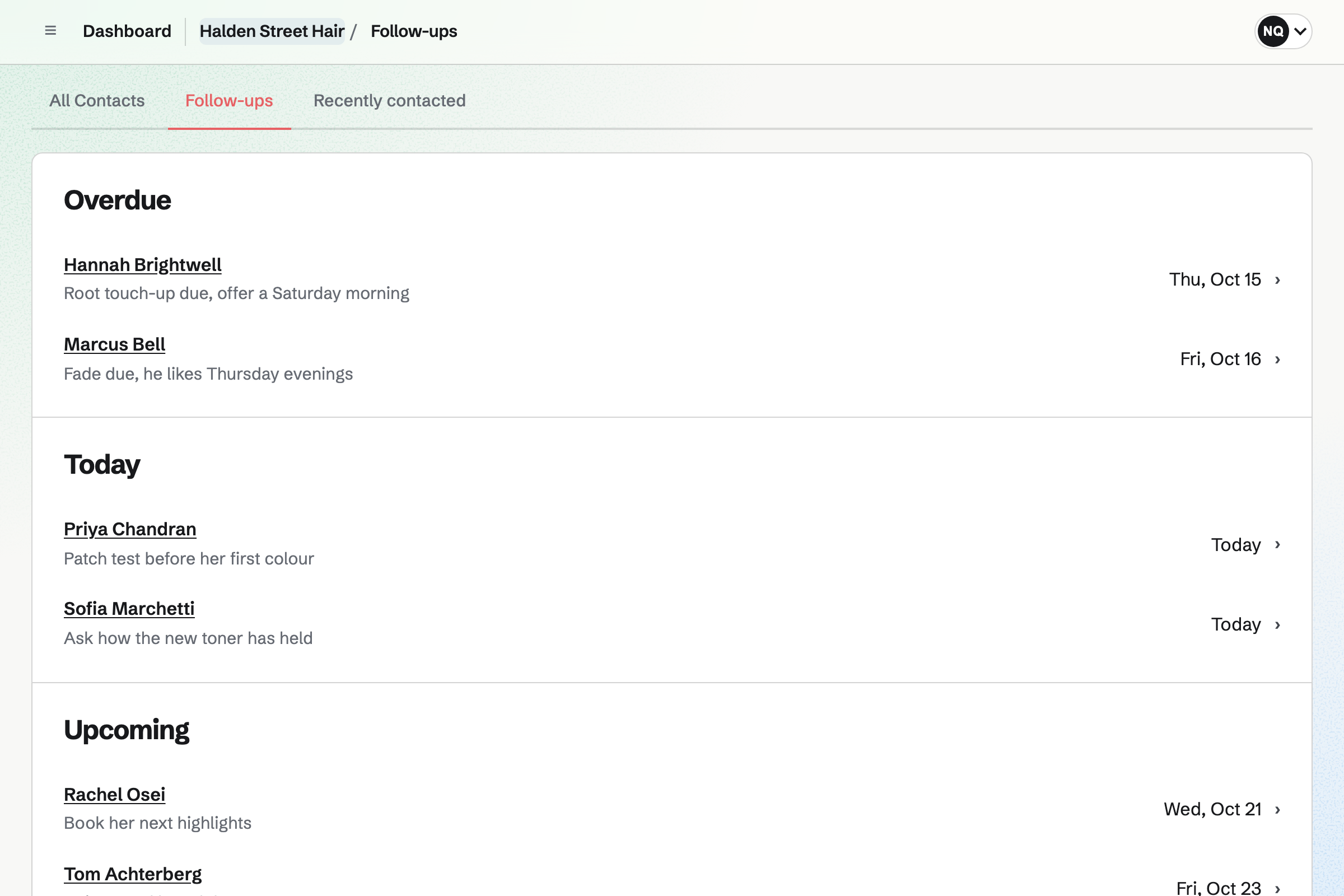
You can pin a note with the colour formula, or the clipper guard for a fade. You add a dated note after each visit, and search finds every note. A follow-up for a root touch-up in six weeks will become a To-do with a reminder.
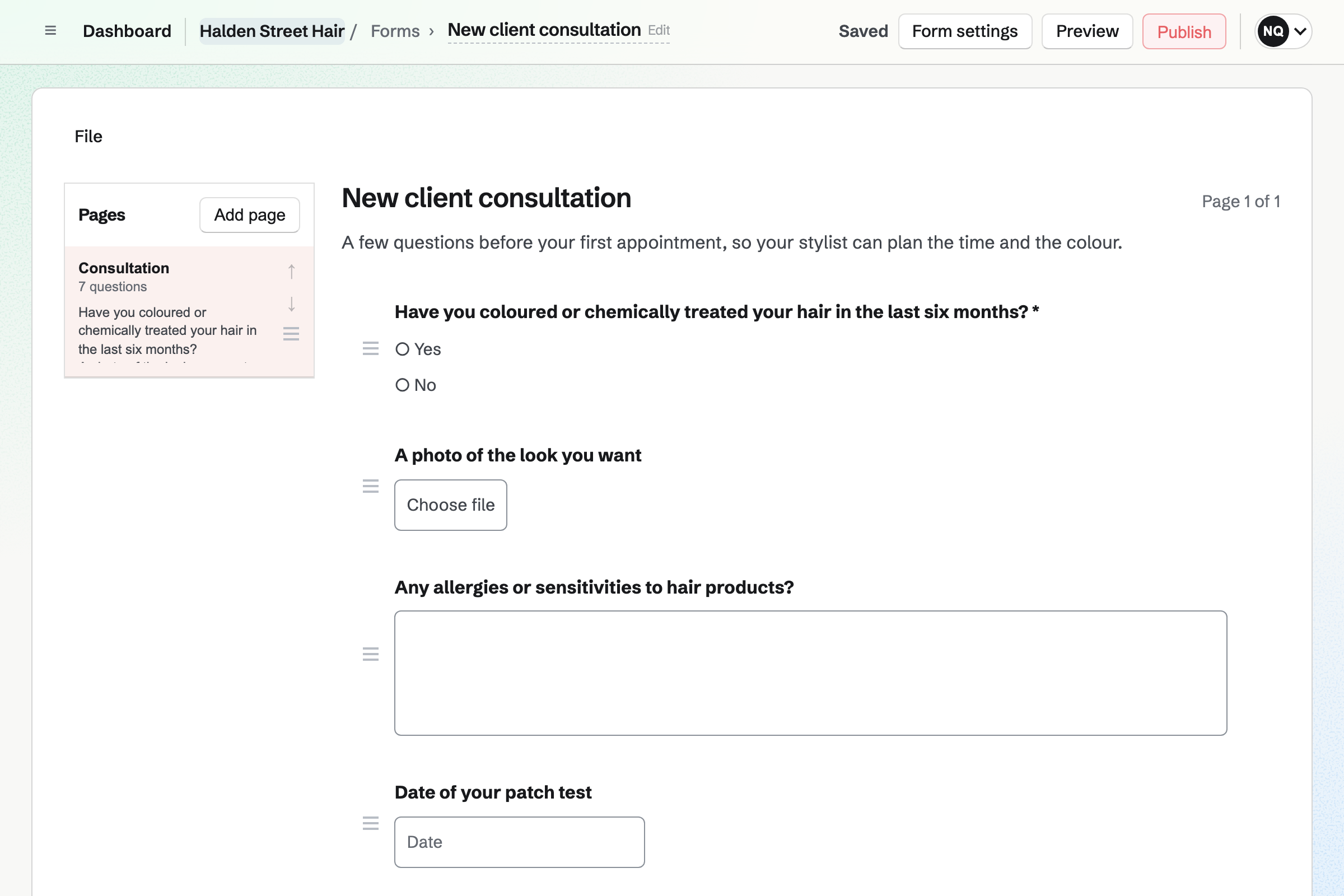
Forms gives the salon a consultation Form with the questions you ask at the chair. Its questions can cover recent colour, allergies and a photo of the look they want. A patch test question can appear only when the colour answer calls for it.
You can send the link to new clients, or show a QR code at the desk. Clients answer without signing up first. You will get an email for each response. Only the people who can see the responses see the photos.
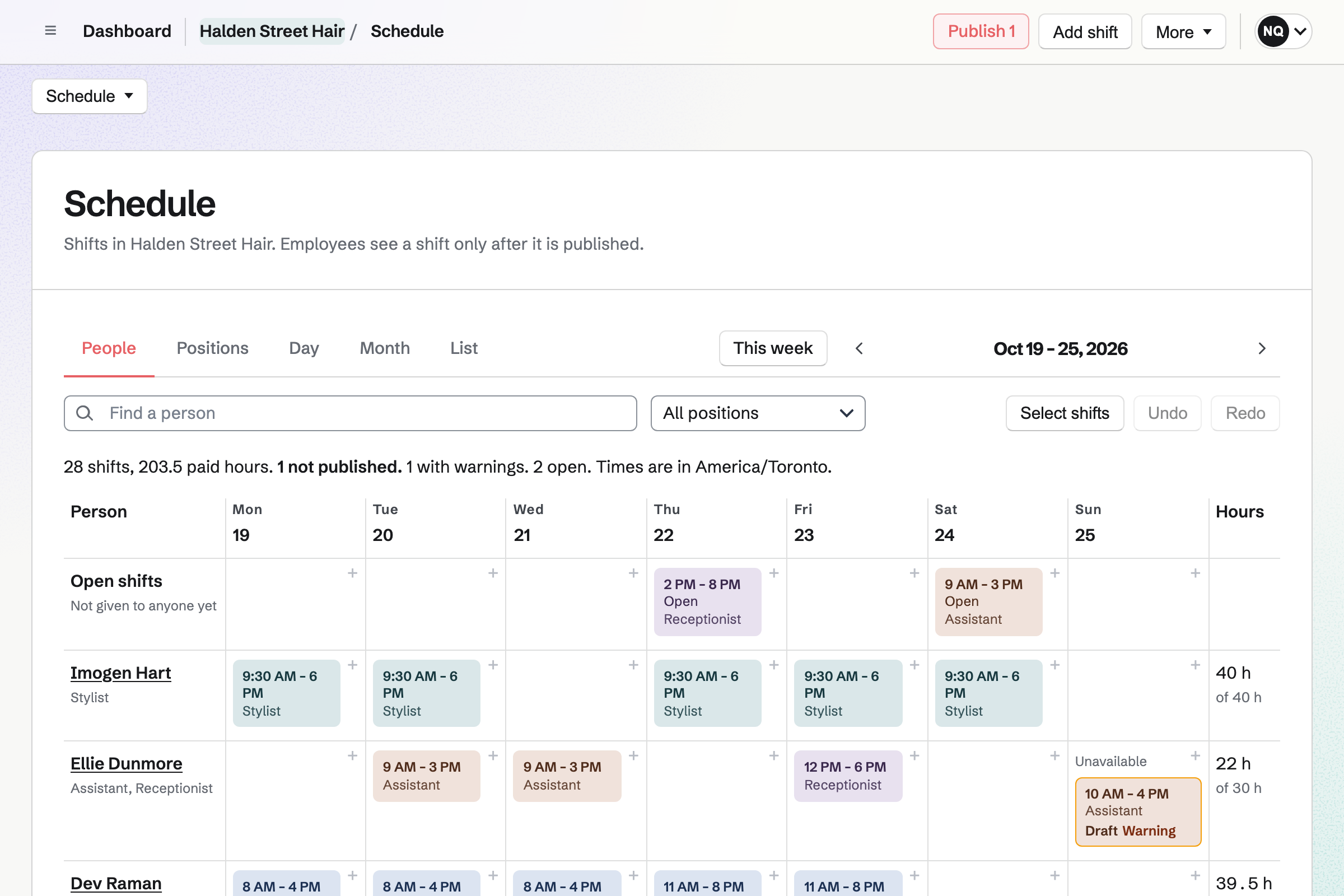
Staff Scheduling gives the salon its rota, with positions and shifts ready to use. You add your own positions, such as Stylist, Barber and Assistant. Magpie checks every shift against time off, availability and your limits on rest and hours.
Shifts are drafts until you publish the week. Then the people you invite will see their own. They can swap with a coworker, ask for cover or ask for time off. Each stylist's booking hours are set separately from the rota.
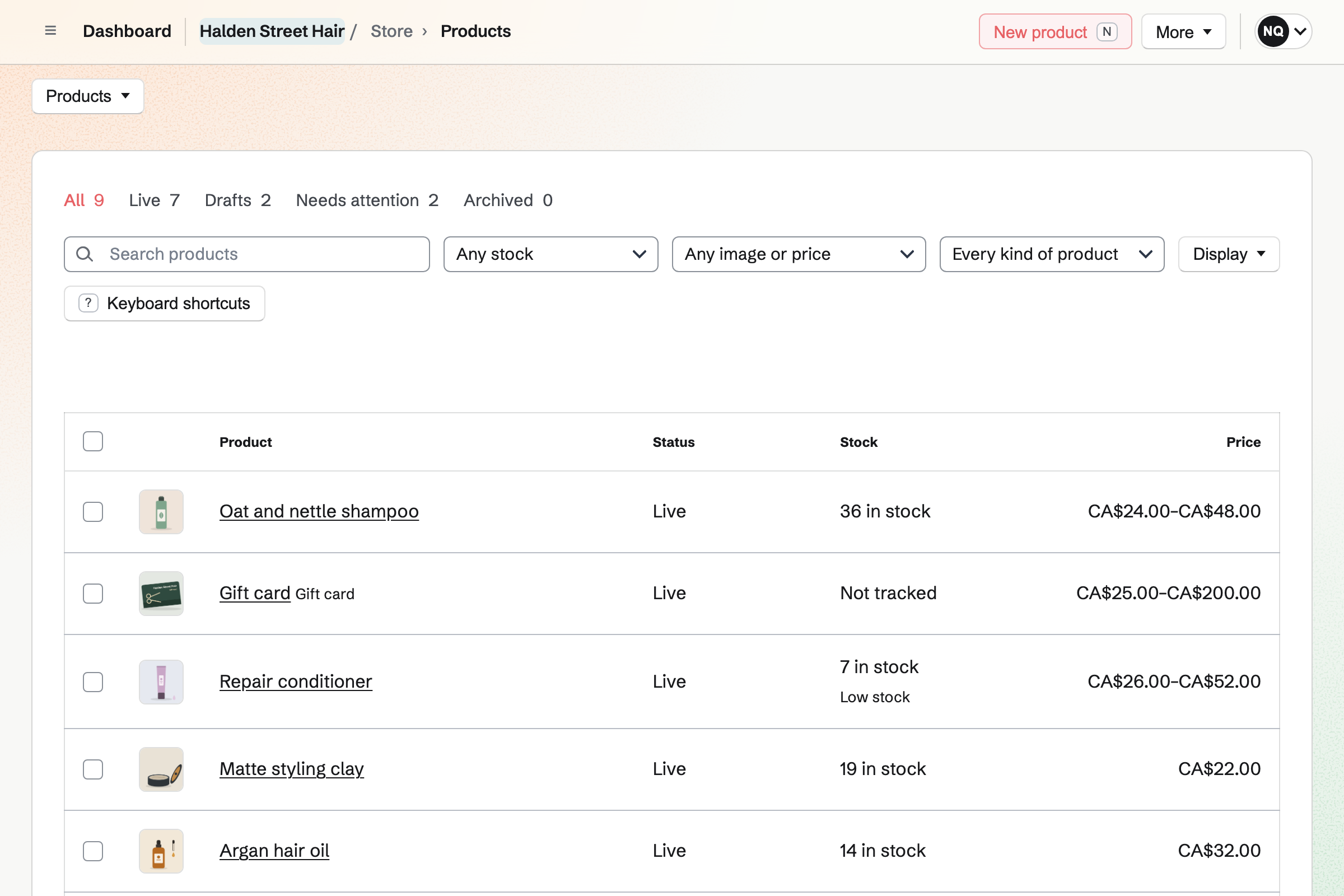
Store gives the salon an online shop for the products on your shelves. A shampoo's 250 ml and 1 litre bottles each have their own price and stock. Clients pay on Stripe's checkout page, into your own Stripe account.
A desk sale, paid in cash or on your card terminal, takes from the same stock. A gift card is emailed on the date the buyer chooses, and it never expires.
The client types their name and email address once, when they book.
They choose a root colour, a stylist and a time on your booking page. You can also add a phone booking yourself. Magpie will email them a confirmation.
An event named after the service and the client will be added to the stylist's calendar. That time will no longer be offered for that stylist.
The booking links the client to their contact by email address, or adds one. The visit is listed below the colour formula you pinned.
You mark it Completed or No-show, and add a dated note with what you used. You can set a follow-up for the next visit.
You invoice the client's contact for the service and send it. They can pay by card from the email. You record a payment in cash or on your own card terminal.
The invoice will be added to the books as Services income. Each payment goes to Cash, Stripe balance or Undeposited funds, by how it was paid.
You create a team and invite each stylist who will take appointments. Help: Create and manage a team.
You choose Salon or barber, add your services and give each stylist weekly hours. Then you preview the booking page and publish it. Help: Set up Appointments.
You build the consultation Form and publish it. Help: Build, publish, and share a form.
You add the desk and floor staff to the rota by name. Then you publish a first week. Help: Plan and publish a staff schedule.
You connect Stripe, then add your products and a gift card to the shop. Help: Connect Stripe to receive money.
Appointments, Contacts, Forms, Staff Scheduling and Store are on every plan. Magpie adds no fee to shop sales or invoice payments. Stripe's processing fee is taken from each card payment.
Each stylist who takes appointments uses one member place. A receptionist or assistant who is only on the rota uses none. A free team has 3 member places, counting you. The Team plan has 25.
A free team keeps up to 100 contacts, one for each client who books. It creates up to 5 invoices a month. The Team plan and Pro have no limit on either. Pro is for a stylist working alone, without a team.
A massage therapist or spa books treatments into a treatment room. Secure Files keeps their intake forms encrypted.
A tattoo studio holds a consultation before a longer session. Clients sign a consent form online, and the studio sells flash and prints in its shop.
A groomer books grooms for dogs instead of cuts for people. A pet shop sells pet food online and in the shop.
Yes. Clients choose a service, a stylist or Anyone available, and a free time. They enter their name and email address, and a phone number if they like. Magpie checks the time again as they book. It will email a confirmation with the service, the stylist, the time and the place.
Yes. When more than one stylist does a service, the client picks one by name. Anyone available shows each start time once. That time goes to the first stylist who is free. A client who moves their appointment keeps the same stylist.
Yes. Each stylist has one range of hours a day, such as 10am to 7pm. A day can also be Closed. A stylist is offered only for the services you choose them on. A colourist can then take only colour services, and a barber only fades and beard trims.
Yes. You type a service's length as you would say it, such as 2 hours. Its price is shown on the booking page. Time can be kept free before and after it, such as for cleaning down a station. A time is offered only when it all fits inside the stylist's hours.
Yes. The confirmation email links to a page for that booking, with no password. On it, the client picks another time with the same stylist, or cancels. After the notice you set, the page asks them to contact you instead. Magpie will email them the new time or the cancellation.
Yes. New appointment books a service for a client who calls or walks in. You choose the service, stylist, date and start time, and add their name and email. The time has to be one the booking page would offer. The client will get the same confirmation email.
You can pin a note to the client's contact with the formula, developer and processing time. It is shown near the top of the contact. After each colour, a dated note records what you used, and search finds every note. Internal notes on an appointment are seen by your team, never by the client.
Yes. The client's contact lists each appointment, beside your notes and their invoices. Each shows whether it was cancelled, completed or a no-show. The Past list of appointments shows every earlier one, with the client, service and stylist.
Each booking adds an event to the stylist's calendar, named after the service and the client. The list of appointments shows Today, Upcoming, Past and Cancelled. Each row has the time, client, service and stylist. The overview shows today's appointments, or the next ones when there are none today.
An event on the stylist's calendar for the time away keeps it off the booking page. Booked appointments stay, and you can move each to another free time with the same stylist. Magpie will email the client the new time.
You invoice the client's contact for the service and send it. With Stripe connected and card payments on, the email has a Pay online button. The client pays by card without signing up first, into your Stripe account. Magpie takes no fee. You can also record a payment in cash or on your own card terminal.
Yes, with a Form that asks your consultation questions, such as recent colour and allergies. One question can take a photo of the look they want, up to 10 MB. Clients answer from its link or a QR code, without signing up first. You will get an email for each response. Only people who can see the responses see the photos.
Yes. You set a follow-up on the client's contact, with a date and a reason. The reason can be Root touch-up due. It becomes a To-do with the usual reminders. Follow-ups lists every open one as Overdue, Today, Upcoming or No date.
Yes. A service can require one resource, such as a pedicure chair or the lash room. A time is offered only when that resource is open and free. Each booking reserves it, with the time kept around the appointment. Moving the appointment moves the reservation, and cancelling frees it.
Yes. With Track stock on, each size of a product has its own stock count. A shampoo can come as a 250 ml and a 1 litre bottle. A sale you record at the desk takes from it, as an online order does. Online sales stop when none is left.
Yes. Clients pay on Stripe's checkout page, into your own Stripe account. They can choose to collect their order at the salon. When you mark it ready for pickup, Magpie will email them.
Yes. A gift card has fixed amounts and, if you choose, a custom range. The buyer can have it emailed to someone on a date they choose, or keep it. Its holder spends it on products and shipping in your online shop. A bought card never expires and has no fee.
Yes. You write the post with your photos and choose its time. When the time comes, Magpie will email you a reminder to post to Instagram. On a phone, Magpie copies the text and opens the share sheet with every photo. Posts to Bluesky, Mastodon and LinkedIn will be published at the time you choose.
Your booking page has its own address, which you copy from the overview. Share booking page starts a social post with it. A Link-In-Bio List and a button on your website can link to it. A QR code of the address can go on the mirror or a business card.
Yes. You write the job with its description, salary range, location and closing date. You choose the questions on its application form and publish it to your job board. Applicants apply without signing up first, and you move them through the job's stages. When you hire someone, Magpie will add them to the rota.
Create a Magpie account and make a team for the salon.