Florists and flower shops
A florist quotes wedding flowers with a deposit, and sells bouquets online for local delivery.
Wedding and event planners
The planners, coordinators and assistants work in one Magpie team. Each couple or company has a portal of their own.
Get started free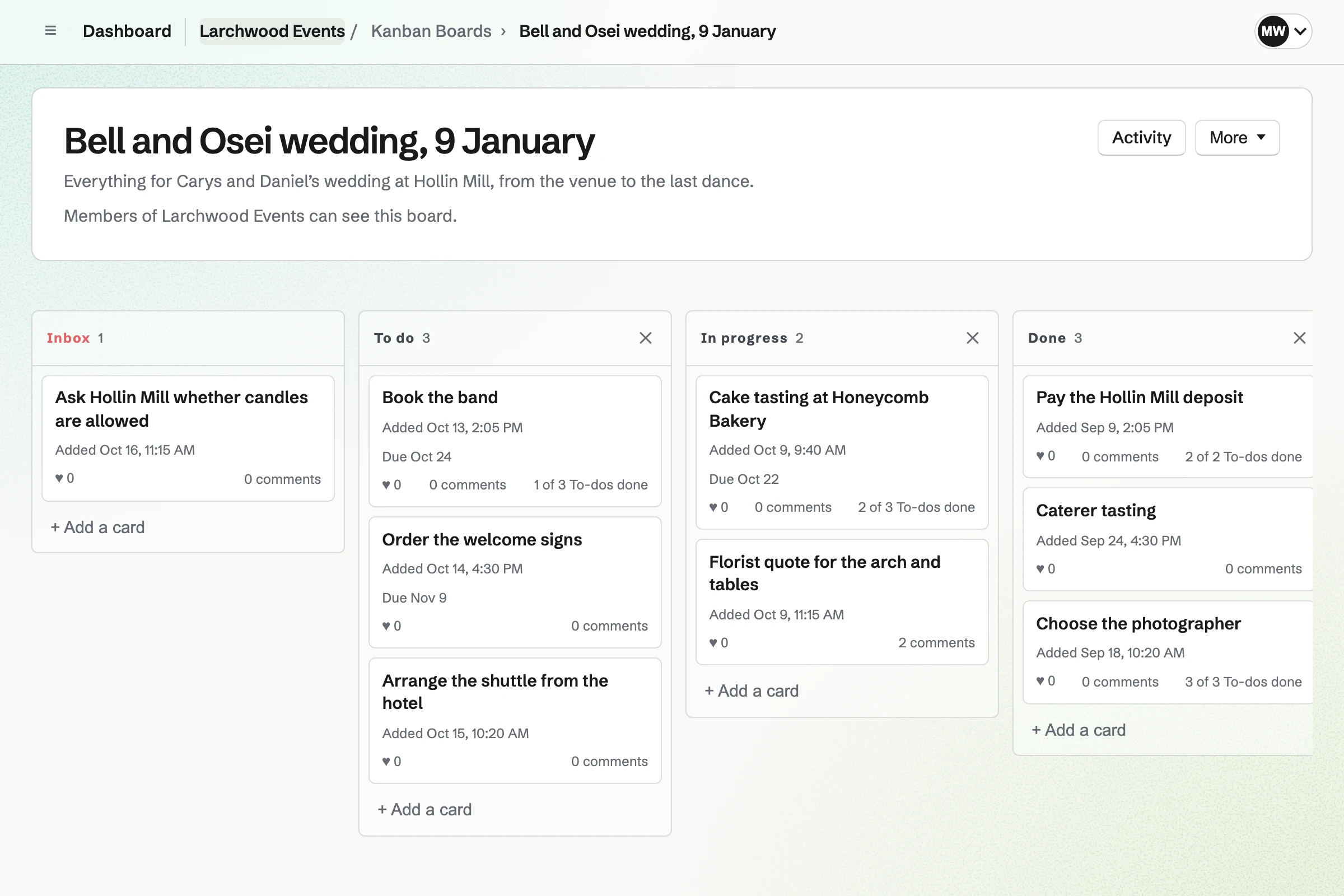
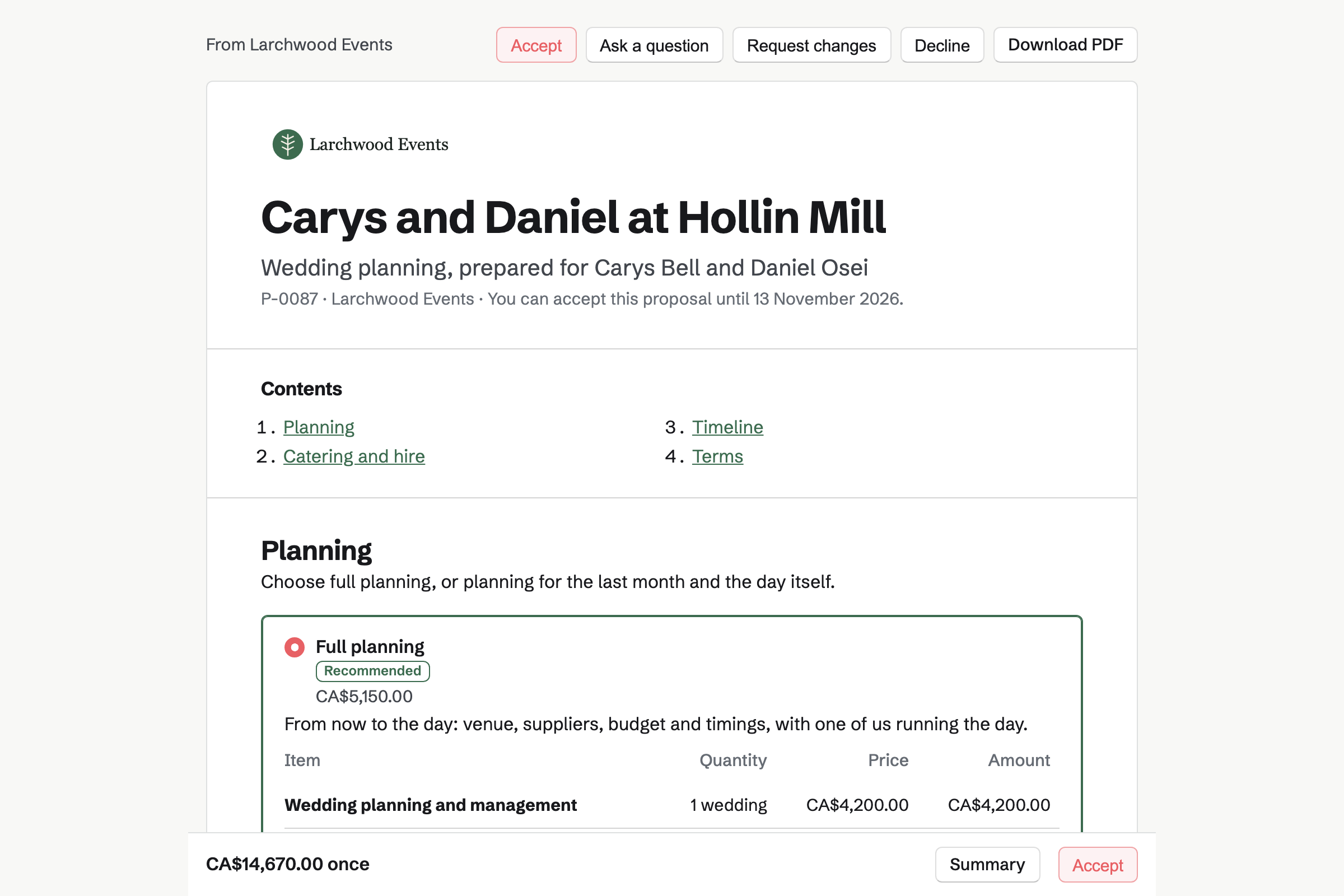
Proposals turns your services into a quote the client reads and signs online. Magpie's event planning starter has a planning fee and coordination on the day. Catering is priced per guest, and the client sets the number.
The client chooses the extras you made optional, such as flowers. They sign with a drawn or typed signature. The starter takes 30% at signing and 40% a month before. The rest is due on the day.
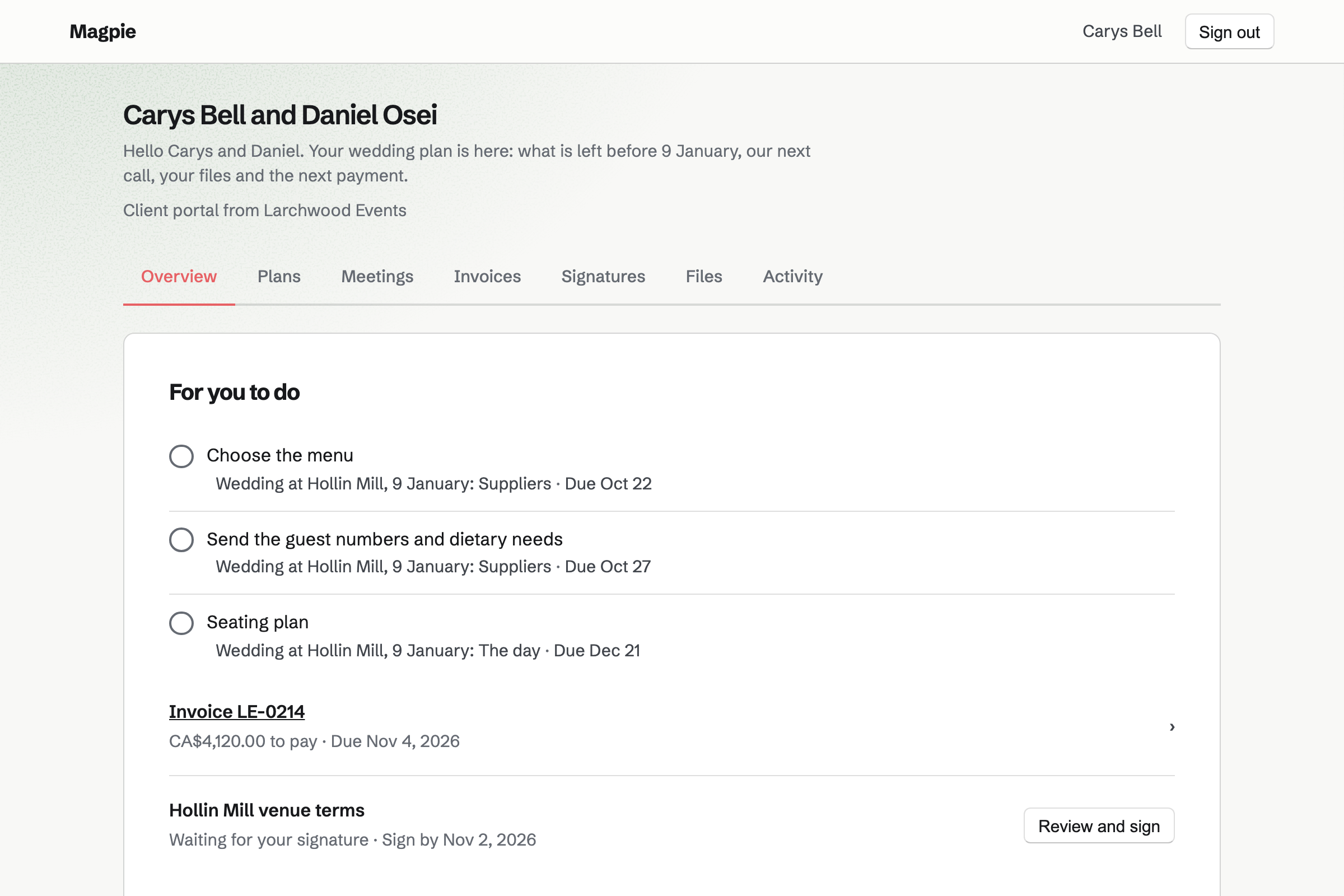
Client Portal gives each client a private page of their own. A plan lists the stages up to the day, with steps for you and for them. They tick theirs, such as choosing the menu or sending the guest numbers.
Their Overview lists their open steps, the invoices to pay and the documents to sign. You can share files there too, such as the venue's floor plan.
Kanban Boards gives each event a board of cards, such as booking the band. A card has an assignee, a due date and notes. Cards move across columns as the work is done.
A card can hold To-dos, such as each supplier to call. Those To-dos have reminders and appear on the calendar on their dates.
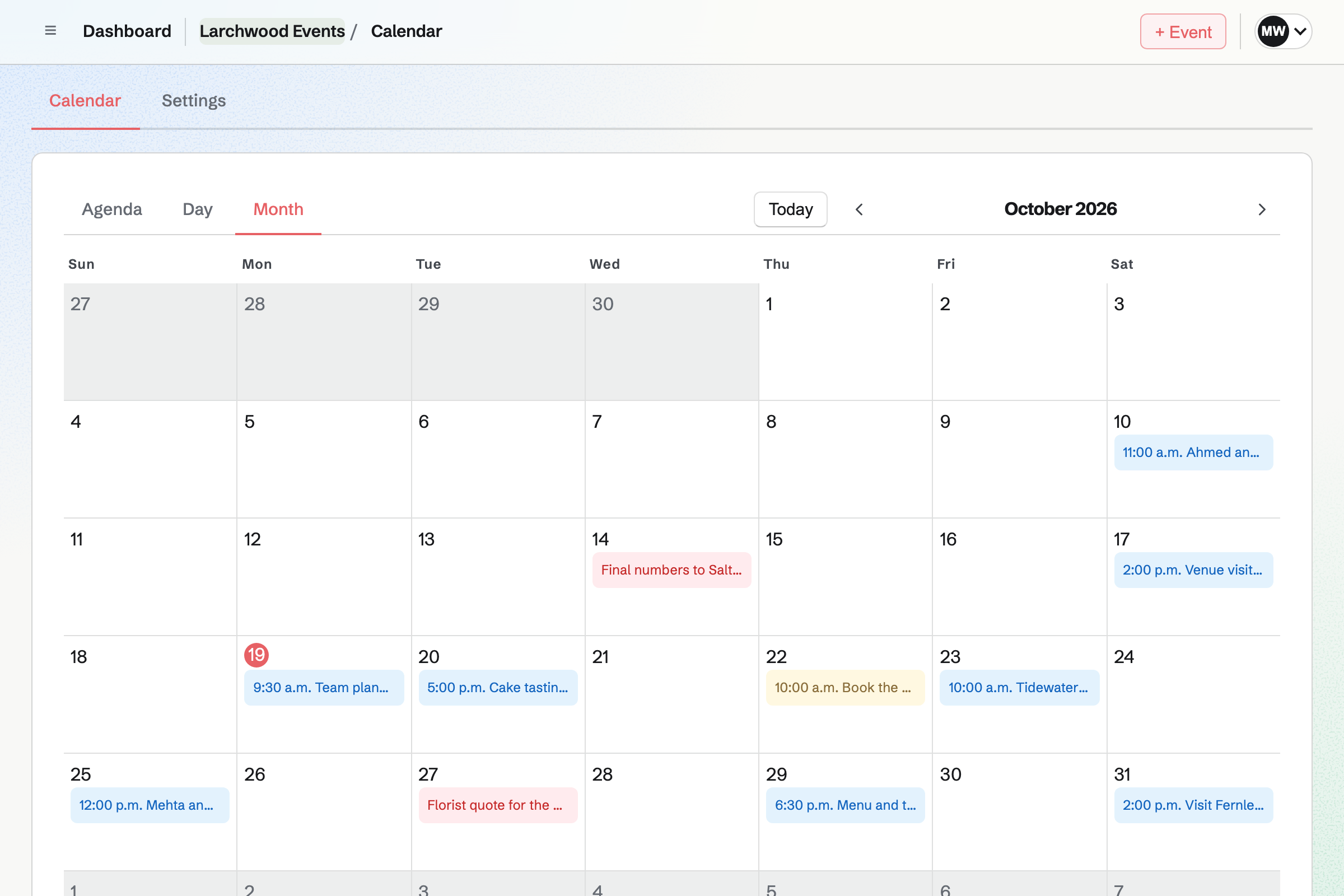
Calendar gives the team one calendar of its events and To-dos. You add tastings, venue visits and the events themselves, each with a place and a time. Deadlines from To-dos appear on their dates.
Each person can connect Google Calendar. The team's events will then be copied to their own Google calendar.
Invoicing turns each payment in the proposal into an invoice, emailed on its date. Clients pay by card from the email or their portal. Reminders go out until each one is paid.
The final payment takes whatever is left of the accepted total. Supplier costs you paid can be added to an invoice as lines. Each payment will be added to the books.
Contacts gives each person and business a page, with tags such as Venue or Florist. A client's page lists the proposals you sent, when each was opened, and their invoices.
You can log calls and notes. A follow-up, such as asking a caterer for final numbers, has a date. It will become a To-do on that date.
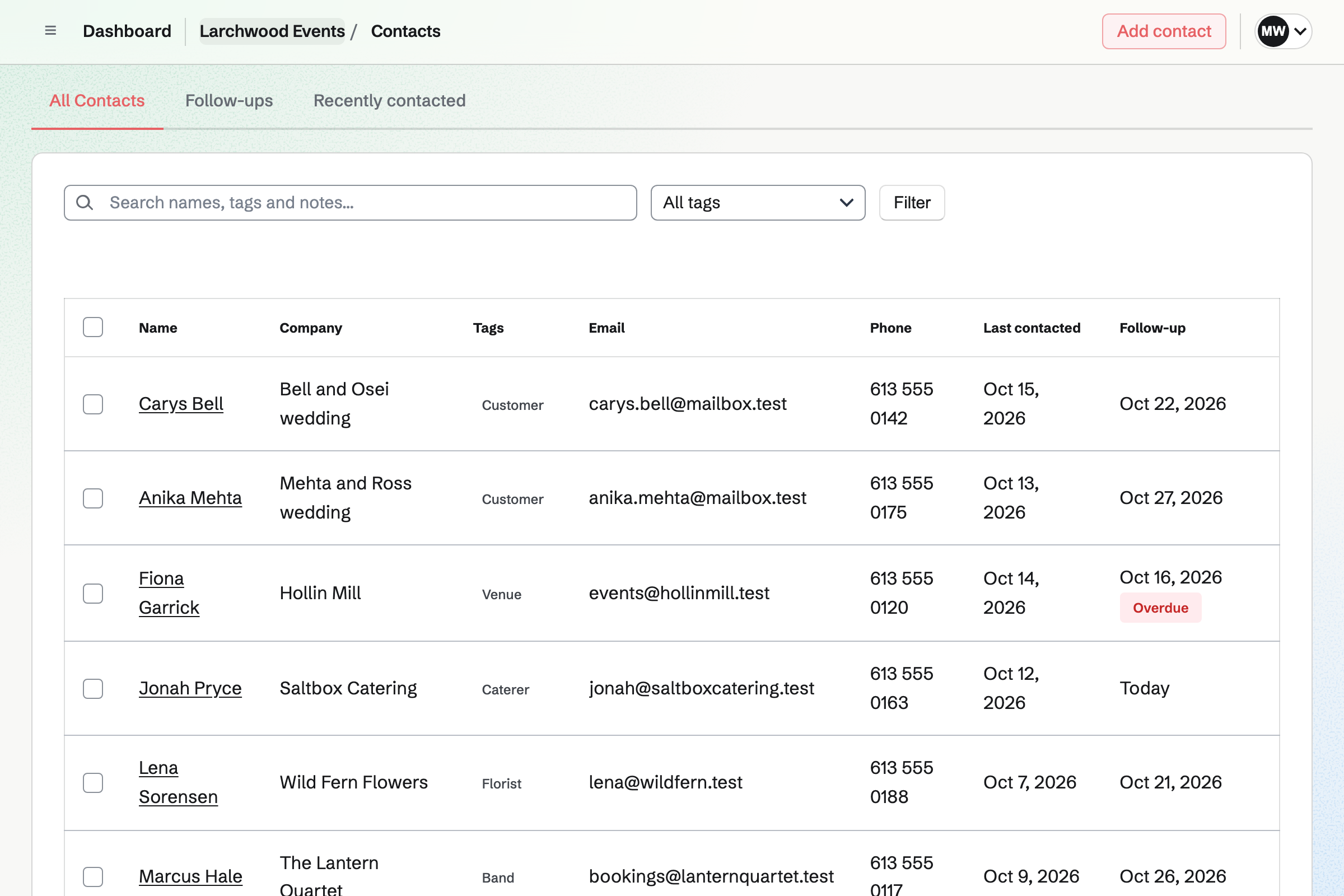
The couple's contact lists the proposal and every invoice as they happen.
The couple answers your enquiry Form with the date, the venue and the guests. Magpie will email you their answers.
You start it from your own starter, with your fee and the price per guest. Magpie will email you when the couple first opens it.
The couple sets the guest count and signs. Magpie will email everyone the signed PDF and issue the deposit's invoice.
When the work starts, Magpie can share the proposal and its invoices in the couple's portal. It invites them first if they have no portal yet.
You share the couple's plan in their portal. Your team works through the event's board, card by card.
Each payment will be invoiced on its date, with reminders until it is paid. The last one takes whatever is left.
Every payment will be added to the books, with Stripe's fee.
You create a team and invite the people who plan with you. Help: Create and manage a team.
You connect your Stripe account, so clients can pay deposits and invoices by card. Help: Connect Stripe to receive money.
You open the event planning starter and set your own fees and terms. Then you save it as your starter. Help: Proposal starters, saved sections and the price list.
You write the stages and steps you follow for every wedding, with due dates. Then you save it as a starter plan. Help: Reuse your process with starter plans.
The Form asks for the date, the venue and the guests. Then you share its address. Help: Build, publish, and share a form.
A planning business with staff fits the Team plan, one price for up to 25 members. It has no limit on proposals, invoices, contacts or boards. A planner working alone can use Pro, which removes the same limits.
A free team has up to 3 members and 1 Kanban board. Each month it can send 5 proposals and create 5 invoices. The invoices a proposal makes do not count.
Magpie adds no fee to deposits or invoice payments. Stripe's processing fee is taken from each. Prices are on the Pricing page.
A florist quotes wedding flowers with a deposit, and sells bouquets online for local delivery.
A caterer quotes menus per guest, then plans the kitchen's prep from recipes for each event.
A photographer books sessions online and delivers each couple's photos in their portal.
Yes. A line priced per guest can let the client change the quantity. You set the fewest and the most. The event planning starter lets them choose from 20 to 300 guests. The totals they sign are the ones their invoices use.
Yes. A proposal's schedule holds up to 10 payments. It can have a deposit at signing, payments on dates and a final payment. The final payment takes whatever is left. The invoices then add up exactly to the accepted total.
Yes. Each person who signs opens the proposal from their own emailed link. They sign with a drawn or typed signature, on a phone or a computer. The proposal is accepted once everyone has signed. Magpie will email everyone the signed PDF and a signing certificate.
Yes. Activity lists each time a recipient opens it, and how long each spent on each section. Magpie will email you when it is first opened, signed or accepted. The client's page tells them that you can see this.
Yes. They can ask about the whole proposal or one section, or request changes. You are emailed, and your reply shows on their page. You can then revise it and send the new version with a note on what changed.
Yes. You save a plan as a starter plan, with its stages and steps. A new plan from it sets each due date that many days from today. Changing the starter does not change plans already made from it.
They see the plan, with the stages and the steps that are theirs. Their Overview lists their open steps, the invoices to pay and the documents to sign. They also see the files and meetings you share. Your team's notes and boards stay private.
Yes. Clients upload files on their portal's Overview or Files section. Their files are listed beside yours, with who uploaded each. Each file can be up to 500 MB.
Yes. Each card on the event's board has an assignee and a due date. A card can hold To-dos, such as each supplier to call, with a progress line. Those To-dos have reminders and appear on the calendar on their dates.
Yes. Each event can have its own board, up to 500 cards each. The team calendar shows every event and deadline together. Each client has their own portal and plan.
Yes. A To-do can remind you at its time, before it, or a day before its deadline. Reminders are emailed to the person it is assigned to. A To-do can also repeat, such as a weekly call with a venue.
Yes, for each person who connects it. Magpie will copy the team's events into their own Google calendar. Their Google events also show on their own calendar in Magpie.
Yes, in a spreadsheet, with formulas such as SUMIF and filters. Currency cells use the team's currency. You can share one spreadsheet with a client as a viewer or an editor. Spreadsheets import and export CSV files.
Yes. An Idea Board holds pictures, links and notes on one canvas. Pasted screenshots become pictures, and pasted web addresses become links. You can export the board as a PNG or a PDF. All its pictures download as one ZIP file.
Yes. An enquiry Form can ask for the date, the venue, the guests and the budget. A question can appear only after an earlier answer. Magpie will email you each response. You can download every answer as a CSV file.
Yes. E-Signatures sends any PDF up to 25 MB to each person who signs. They can sign in any order or a set order. You place their signature, date and name fields. When everyone has signed, Magpie will email them the signed PDF and a certificate.
Yes. You record the expense with its receipt, mark it reimbursable and choose the client. Add unbilled expenses then puts it on their next invoice as a line. It is marked billed when the invoice is issued.
Magpie adds no fee to deposits or invoice payments. Stripe's processing fee is taken from each card payment. The rest goes to your own Stripe account. Each payment and its fee are added to the books.
Yes. Each venue and supplier is a contact, with tags such as Venue or Caterer. You can filter the list by a tag and search names and notes. Each contact keeps your calls, notes and follow-ups.
Create a Magpie account and make a team for the business.