Yoga, pilates, dance and martial arts studios
A yoga, pilates, dance or martial arts studio has a timetable of classes with teachers. Its private sessions are booked as appointments.
Gyms, climbing gyms and boxing clubs
The gym, its coaches and its front desk staff work in one Magpie team. Members book classes and pay dues without joining it.
Get started free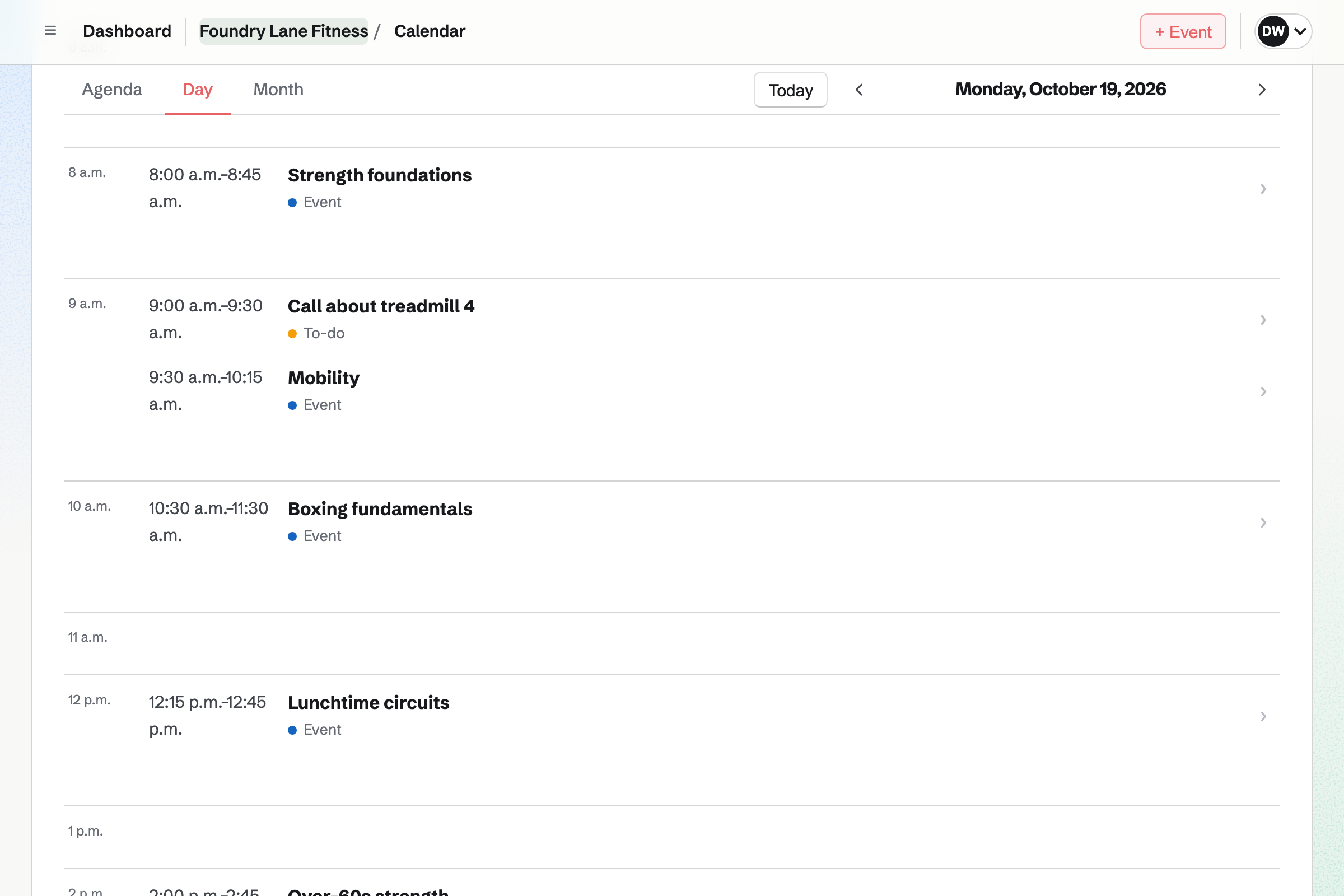
Calendar holds the gym's class timetable. Each class is an event with its time and room, such as Spin in Studio 1. Each date is its own event. You can list them on your public calendar, or share one by its link only.
You set a place limit for each class, such as 16 bikes. Members sign in to Magpie and answer Going on the class's page. At 16, the page will say the class is full. A member who cancels frees their place.
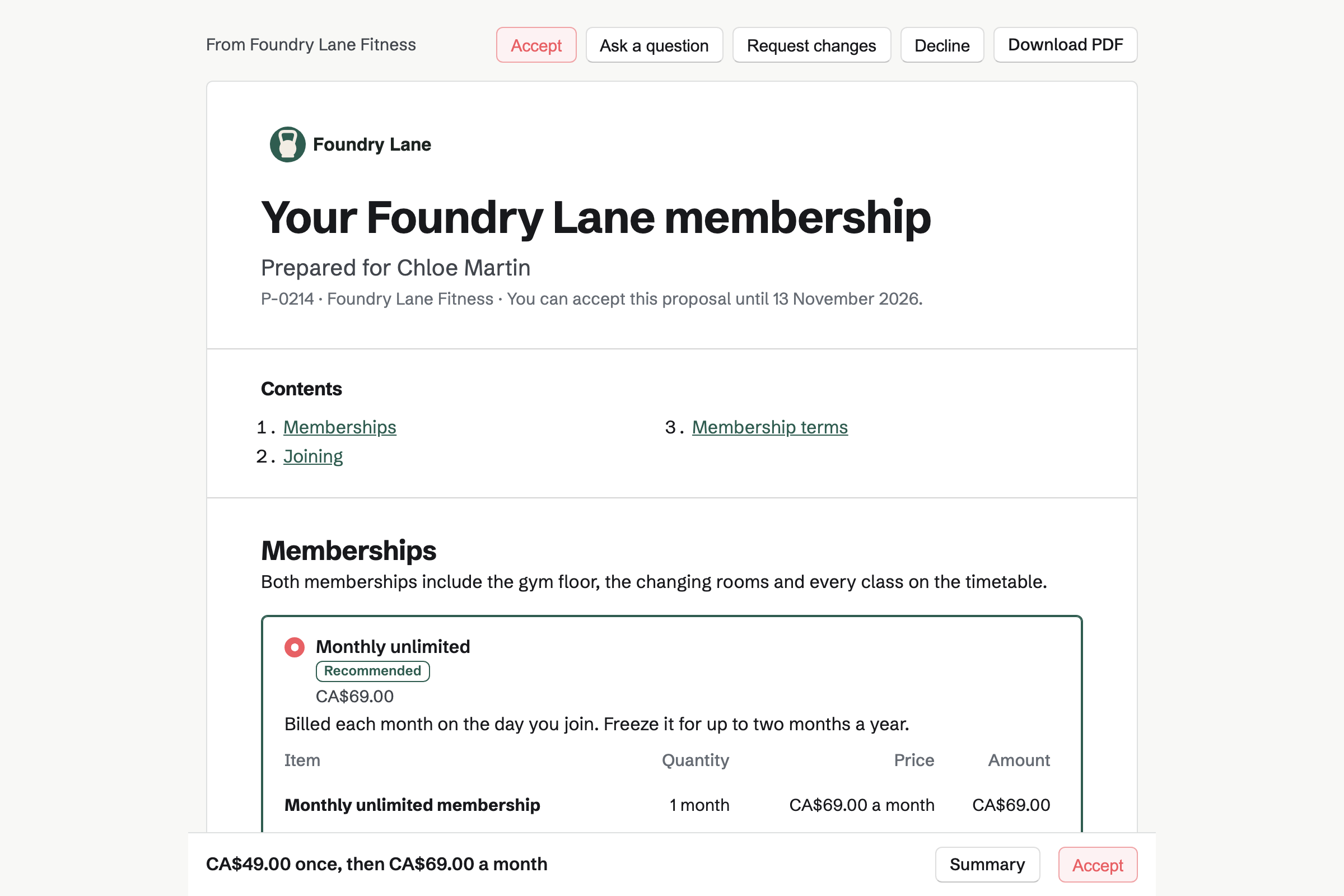
Proposals sends each new member your membership to sign. You write it once as a starter, with Monthly and Annual packages and the joining fee. Each new member gets their own link. They open it without signing up first, choose a package and sign.
Accepting the membership will issue the joining fee's invoice. They pay it by card into your Stripe account. When the starter requires automatic payment, they save a card as they accept. Magpie will email the signed PDF and a signing certificate to you both.
Invoicing charges each member's dues to their saved card, on the same day each month. The member will be emailed the paid invoice. If a card is declined, Magpie will email them links to pay and to update it. You will be emailed too.
When a member freezes their membership, you can pause their invoices. Dates that pass during the pause are not invoiced. If you change the price, Magpie will email them before the next invoice. When they leave, you can stop their dues for good.
E-Signatures keeps your waiver as a starter, with its signature and date fields in place. You email it to each new member or drop-in visitor. They sign from the link without signing up first. Reminders will go every 3 or 7 days until they do.
Magpie will then email you both the signed PDF and a certificate of completion. The certificate shows the signing time and their IP address. Every waiver is listed as Waiting or Completed. You can find one by name or email address.
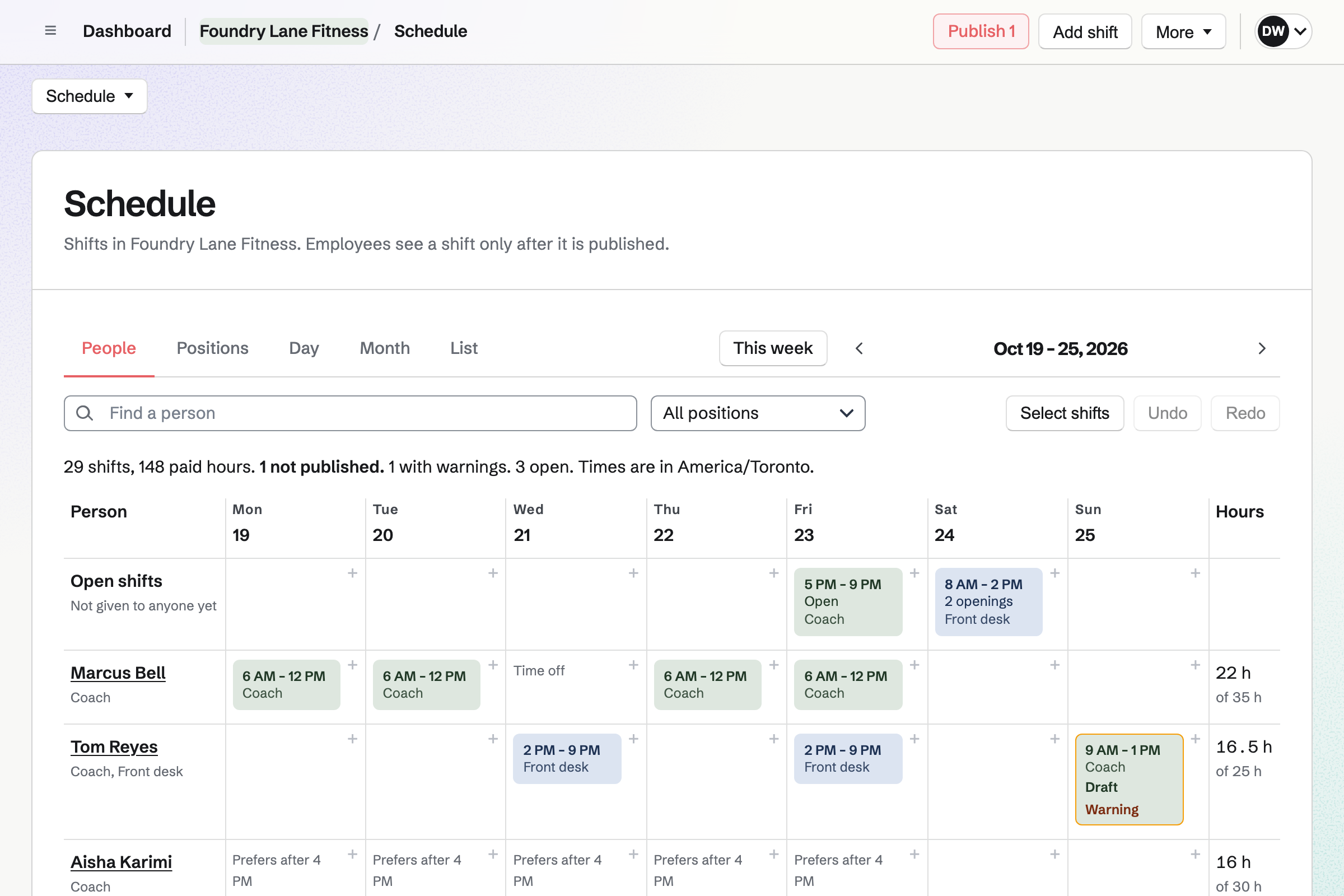
Staff Scheduling plans the rota, with positions you add such as Coach and Front desk. The Coach position can require a first aid certificate. You record when each coach's certificate expires. A shift after that date will be blocked, or warned about, as you choose.
Shifts stay drafts until you publish the week. Then each person will see their own shifts. They can swap shifts, ask for cover or time off, or take an open shift.
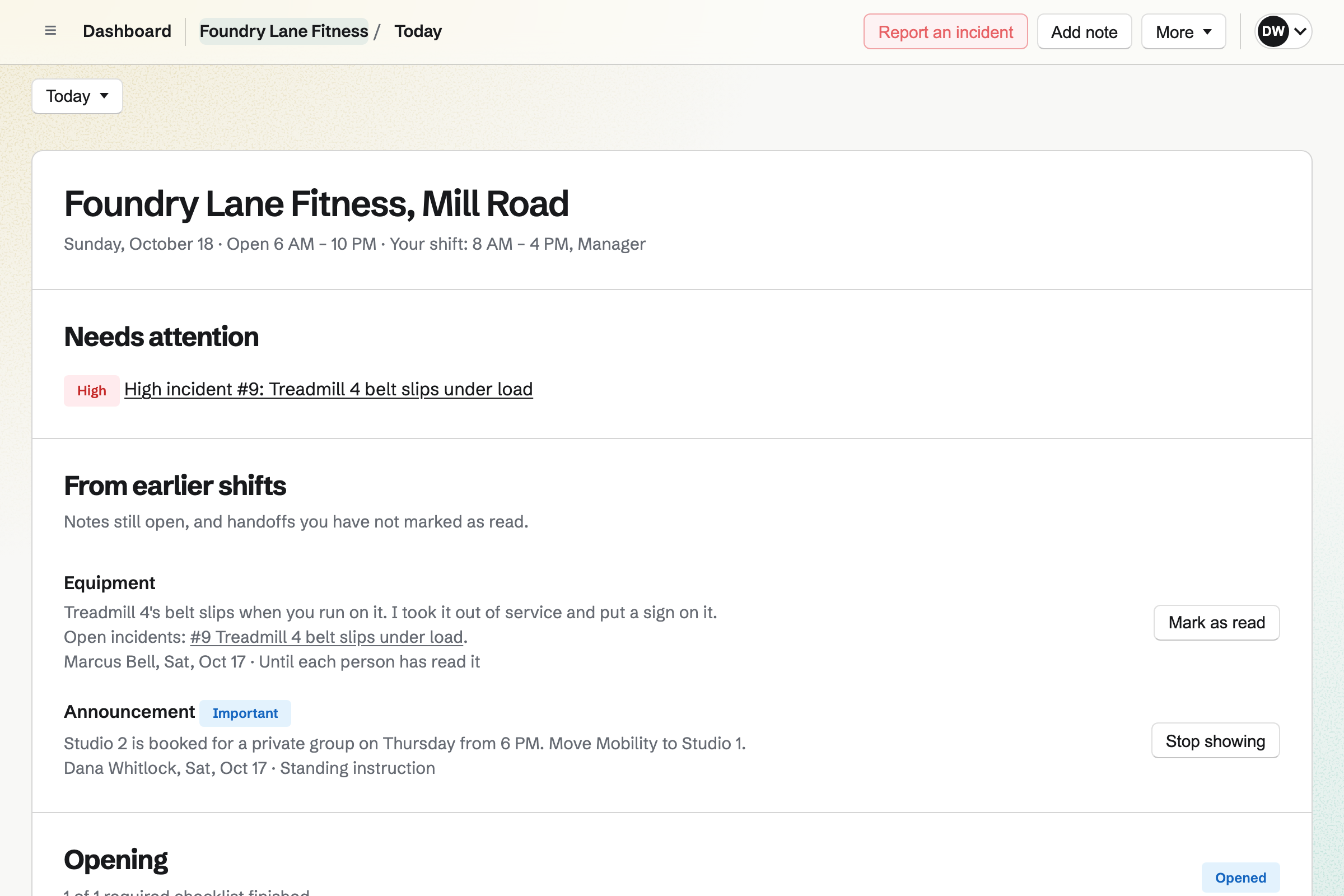
Daily Operations gives the gym Opening and Closing routines. You add your own, such as a weekly check of the cable machines. A step can be pass or fail. A failed step can ask for a photo and report an incident.
Anyone on shift can report a slipping treadmill belt, with a photo. High and Critical incidents will reach shift leads and managers by email and on their phones. The report can also take the machine out of service.
Asset Tracker records each treadmill, bike and rack, with its tag, serial number and condition. You can attach the receipt and the manual. You also record the price and when the warranty ends. A report shows how many warranties end soon.
You note why a machine is out and when it should be back. When it returns, you note what was done. Its history lists every repair and loan, with who did it and when. One list shows every machine in maintenance.
A new member answers the joining Form from a QR code at the desk. It takes an emergency contact and the answers to your health questions. You will get an email for each response.
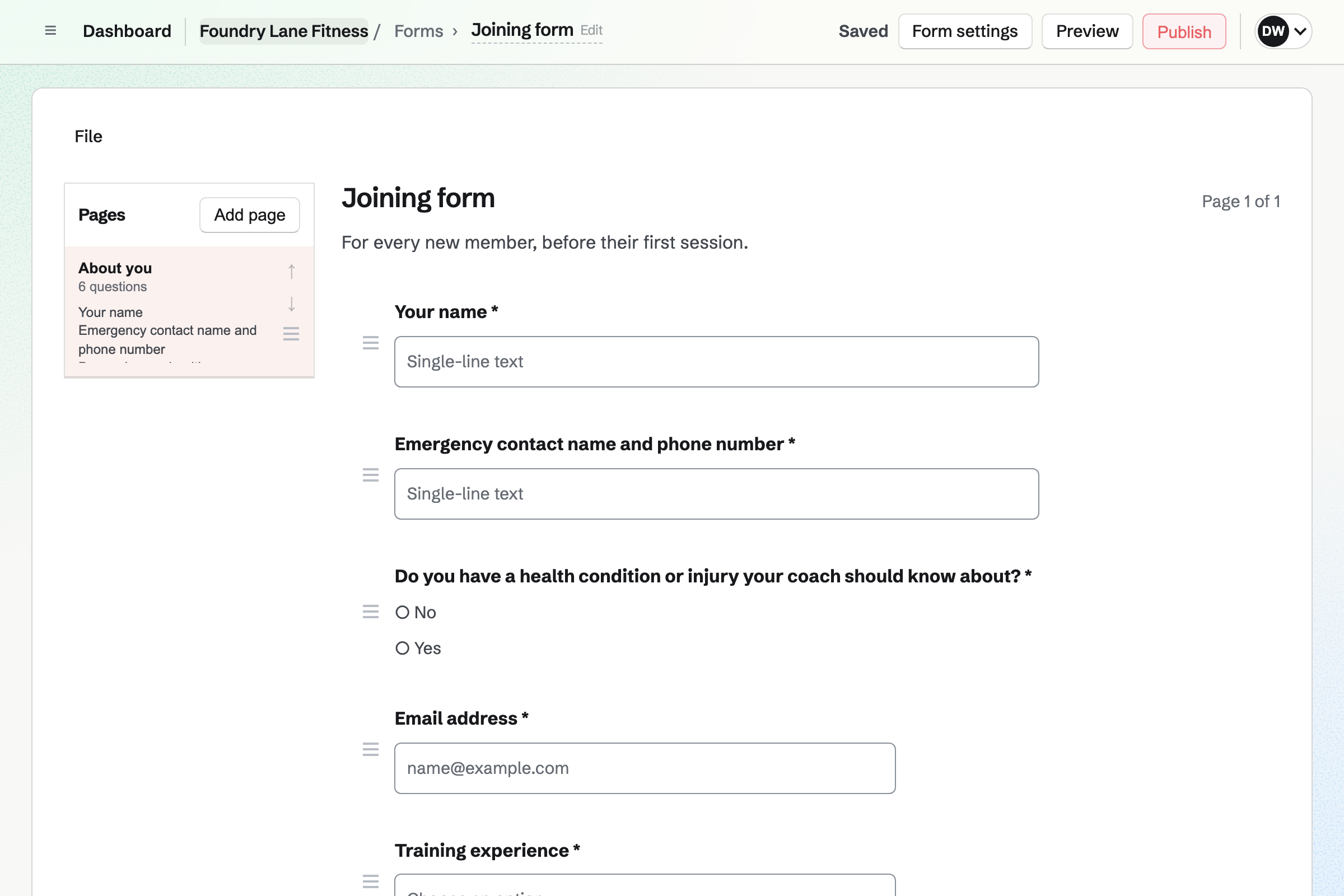
You send them the waiver from its starter. Once they have signed, you can link it to their contact. Their contact page lists every document they signed.
You send them the membership from its starter. They choose Monthly or Annual and sign. They pay the joining fee by card and save the card for their dues.
Each month's invoice will be charged to the saved card on its date. The member will be emailed the paid invoice.
They sign in to Magpie and book each class they want, until it is full.
Each invoice and card payment will be added to the books, without being typed again.
You create a team and invite whoever runs the gym with you. Help: Create and manage a team.
You connect the gym's own Stripe account for card payments. Help: Connect Stripe to receive money.
You write the membership as a Proposal starter, with your packages and the joining fee. Your waiver PDF becomes a signing starter. Help: Proposal starters, saved sections and the price list; Signing starters.
You add each class to the gym's calendar, with RSVPs and a place limit. Help: Create public and private calendar events.
You publish a first week of shifts. Then you choose Other business for the daily checks and add your own routines. Help: Plan and publish a staff schedule; Run each day's opening, closing and checks.
A gym with staff is a team. The Team plan has 25 member places at one price, and a free team has 3, counting you. A coach who signs in takes one. Members who book classes or pay dues take none.
Each class on each date is one Calendar event. A team keeps up to 5,000 events on the Team plan, or 100 on the free plan. The free plan also sends up to 5 new Proposals a month.
Magpie adds no fee to invoice payments or to sales in your online shop. A paid Form has a Magpie fee of 1%. Stripe's processing fee applies to each card payment.
A yoga, pilates, dance or martial arts studio has a timetable of classes with teachers. Its private sessions are booked as appointments.
A personal trainer has their own clients rather than a gym of members. Client Portal gives each client their plan.
Yes. You turn on RSVPs for the class and set its place limit. Members open the class from your public calendar or its link, and answer Going. They sign in first, or create a Magpie account on the class's page. Once the class is full, its page will say so.
Yes. The class's event lists everyone who answered, with their email address. Each member chooses whether others may see their name. You choose who sees those names. It can be only you, the people going, or everyone who can open the class.
Yes. They open the class's page and change their answer to Not going. Their place is freed. Once the class is below its limit, the next member can answer Going.
Each class on each date is its own Calendar event. You select an empty time in Day or Month view, or choose + Event. You give it a title, start time, length and location. Day view shows each day's classes in order. You can drag a class to a new time.
Yes. You send each new member the membership Proposal from its starter. They open their link without signing up first, choose a package and sign. They pay the joining fee into your Stripe account and save a card for the dues. Magpie will email you both the signed PDF and a signing certificate.
Yes. A monthly line in an accepted membership becomes a recurring invoice. You can require automatic payment, or let the member choose it. Each month, Magpie will charge their saved card and email them the paid invoice. In the month before their card expires, they will get a link to update it.
Yes. The membership can have Monthly and Annual packages, with lines billed monthly or yearly. The member chooses one as they accept. An annual member will be invoiced once a year. A monthly member will be invoiced on the same day each month.
Magpie will email the member the invoice, with a Pay link. The email also has a link to update their card. You will be emailed too. The schedule shows Payment problem until one of its invoices is paid. Next month's invoice is still issued and charged.
Yes. Pausing the member's recurring invoice stops their invoices until you resume it. The dates that pass while it is paused are not invoiced. When a member leaves, you can end the schedule for good. It is then listed under Ended.
Yes. You can change what a member's future invoices hold. When the amount changes, the member will be emailed the new amount before the next invoice. Invoices already issued keep their amounts.
You make a Form that requires payment, at the day pass's price. Visitors open it from its link or a QR code, without signing up first. They pay by card on Stripe's page, into the gym's Stripe account. Each response shows Paid, with the amount and the payer's email address.
Yes. You send each member or visitor your waiver from a signing starter. They sign from the email link without signing up first. The completed waiver and a certificate of completion will be emailed to you both. The certificate records each signer's name, email address, signing time and IP address.
They are kept in the responses to your joining Form. Only people who can see the Form can read them. A File question can take a doctor's note as a PDF or photo, up to 10 MB. Only those people can download it. You can download every response as one CSV file.
Yes. A coach who joins the team sees their published shifts, with times, position and location. When you publish, they will get one notification listing what changed. A calendar address adds their shifts to Google Calendar, Apple Calendar or Outlook.
Yes. You add First aid as a qualification the Coach position requires. You record when each coach's certificate expires on their profile. A certificate that expires before a shift ends counts as missing. Magpie will then block the shift or warn you, as you choose.
They report an incident in Daily Operations, with what happened, its severity and a photo. From the Equipment page, the report also asks which machine. Taking it out of service marks the machine as in maintenance in Asset Tracker. High and Critical incidents will reach shift leads and managers by email and on their phones.
Yes. Reports count your checklists and incidents by business day, over up to 366 days. You can download them as CSV files. Each completed checklist keeps the version of the routine it was done with. A changed answer keeps the earlier one in its history.
Yes. You add a Personal training service to Appointments, with the trainers who offer it. Members choose a trainer, or Anyone available, and a free time. They book without signing up first. They will be emailed a confirmation with a link to move or cancel it.
Yes, when the trainer added the class to the Calendar or answered Going to it. The booking page offers a time only when it does not overlap such an event. A trainer who adds their own classes is not offered for personal training while they run.
Yes. Store sells shirts, gloves and water bottles online, with options such as size. It sells gift cards too. Buyers pay on Stripe's checkout page, into the gym's Stripe account, and Magpie adds no fee. A gift card is emailed on the date the buyer picks, and never expires once bought.
Yes. You write the job in Hiring, with its description, salary, location and closing date. You choose its application questions and publish it to your job board. Applicants apply without signing up first. You rate them on scorecards, and can add the one you hire to the rota.
Yes. Each gym is a location for the rota and the daily checks. Each has its own address, time zone, hours and routines. A shift lead's role can cover every gym or only some. Each class event has its own location.
Create a Magpie account and make a team for the gym.