Caring for a family member
Caring for a parent shares the appointments, the visits and the care notes among the family.
Settling an estate
The estate gets a Magpie team of its own, for you and the family. Your copies of the will and the deeds are encrypted, and only you can open them.
Get started free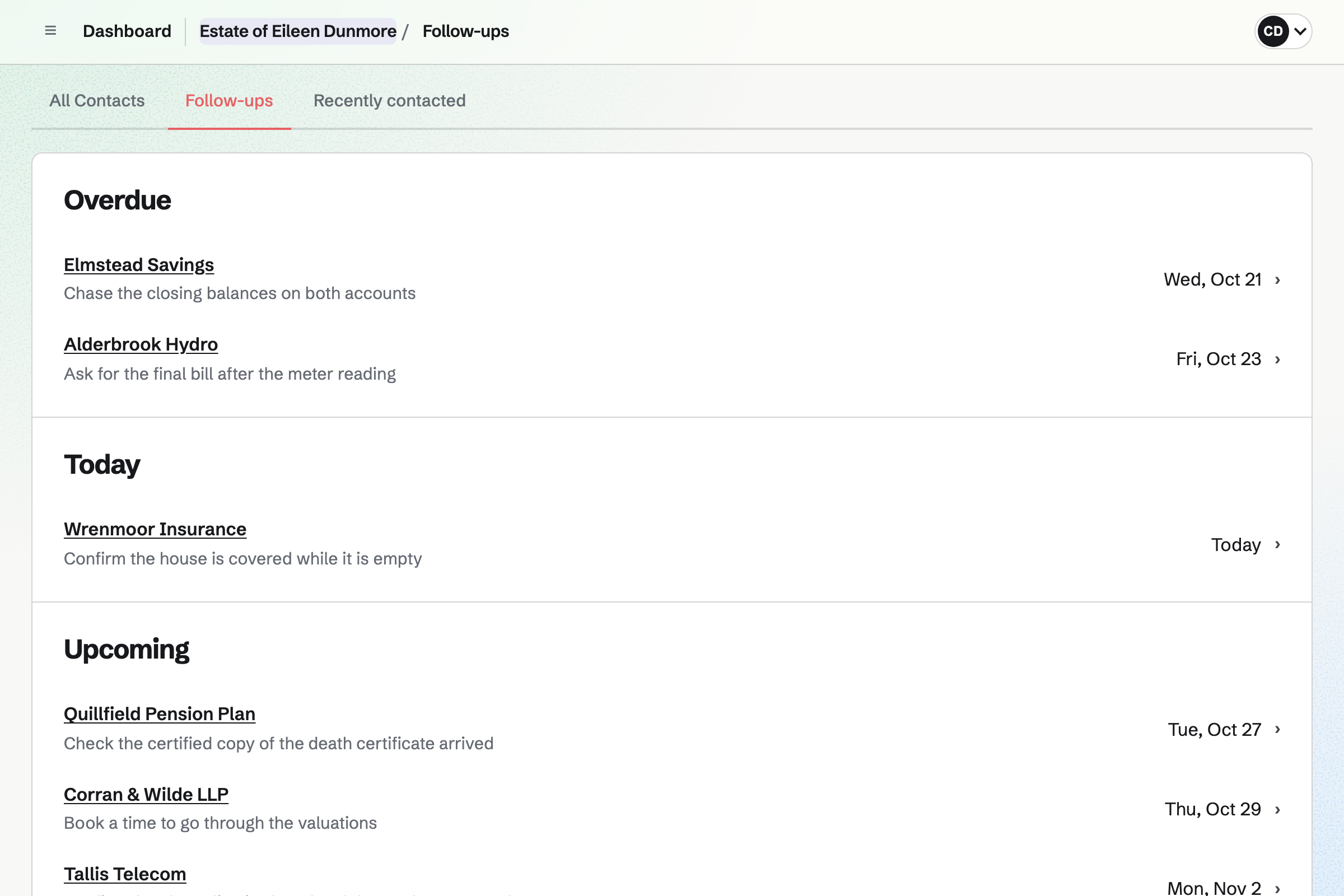
Every pension, card and utility goes the same way.
You phone the bank's bereavement team, and log the call on the bank's contact. You pin a note with their reference number.
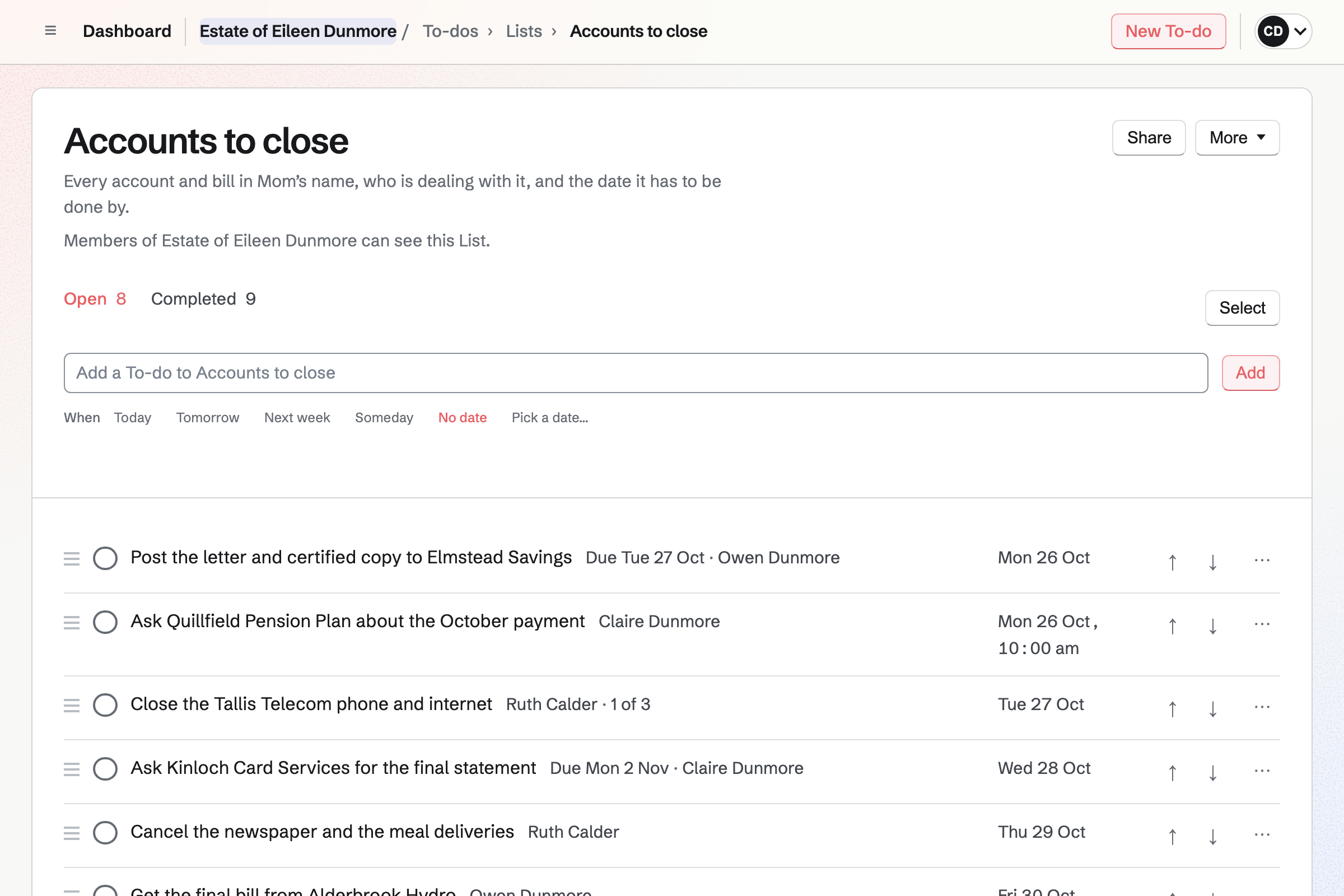
Writing to the bank is a To-do given to your brother, with a deadline. Its reminder will be emailed the day before.
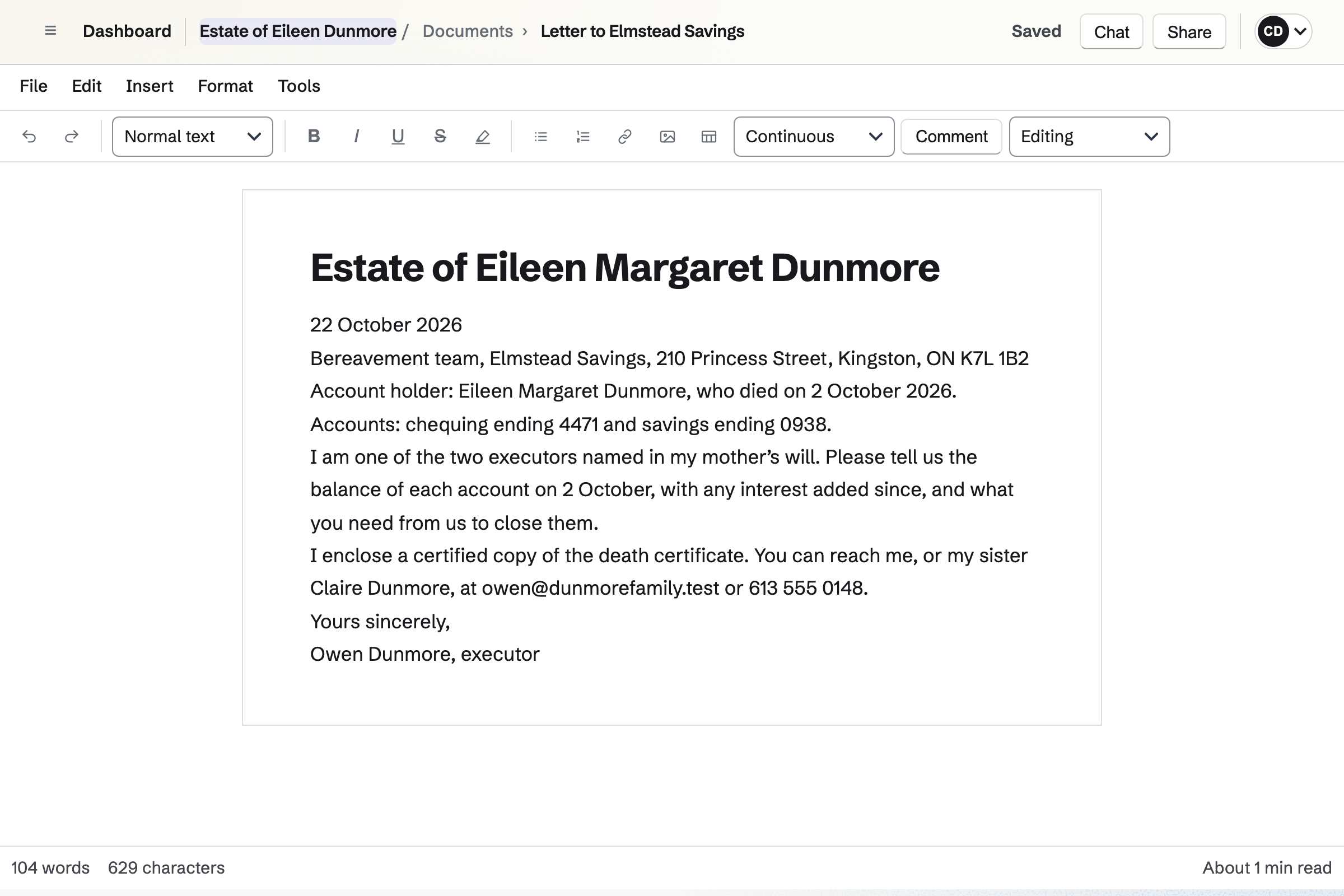
Your brother writes it from the Business letter starter, and prints it to sign. It goes out with a certified copy of the death certificate.
A follow-up on the bank's contact is dated three weeks later. That day, it will appear in your To-dos for Today.
The bank's reply gives the closing balance, which goes on the estate's spreadsheet. A formula adds it to what the estate holds.
The postage and the certified copies are your brother's expenses, marked reimbursable. You mark them reimbursed once the estate account has paid your brother back.
Contacts keeps each organization you deal with, from the bank to the funeral director. You log each call or email on its contact, with what was said. A pinned note keeps their reference number near the top.
A follow-up gives each one a date to chase. Follow-ups lists them all, the overdue ones first. Everyone in the estate's team sees the same contacts.
To-dos holds the estate's jobs in Lists, such as one for the accounts to close. Each job is given to one person, with a deadline if it has one. A reminder can be emailed the day before.
Team To-dos shows every open job with who has it. Jobs with a date appear on the estate's calendar too.
Documents holds the estate's letters, open to everyone in its team. The Business letter starter has the date, the recipient and the body in place. Duplicate copies a finished letter for the next one.
Each letter prints, or downloads as a PDF, ready to sign. A lawyer you share a draft with can suggest changes. They apply only when you accept them.
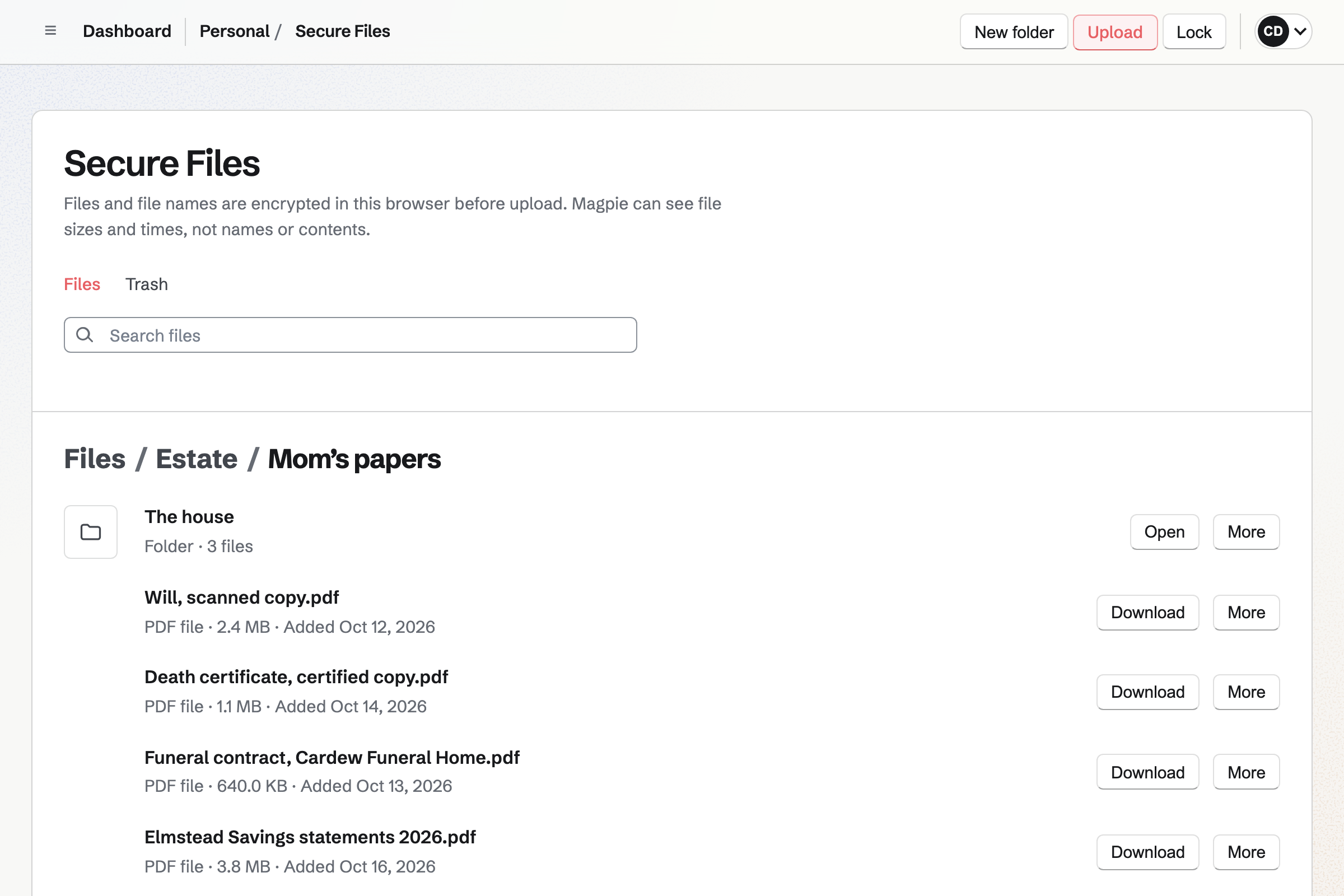
Secure Files keeps your scans in folders, such as one for the house with the deed. Each file and its name are encrypted in your browser. Magpie cannot read them.
The files belong to your account, so each executor keeps a set. You can send one scan to the lawyer by a secure link. It expires after 1 hour, 1 day, 7 days or 30 days, as you choose.
Spreadsheets keeps the estate's figures on separate sheets, such as one for its debts. Formulas total each sheet as balances and valuations come in. A sheet for the house contents can record each valuation and what each piece sold for.
You can give a beneficiary or the lawyer Viewer access to this spreadsheet alone. What has to be valued, and as of which date, varies from place to place. Check the rules where the estate is settled.
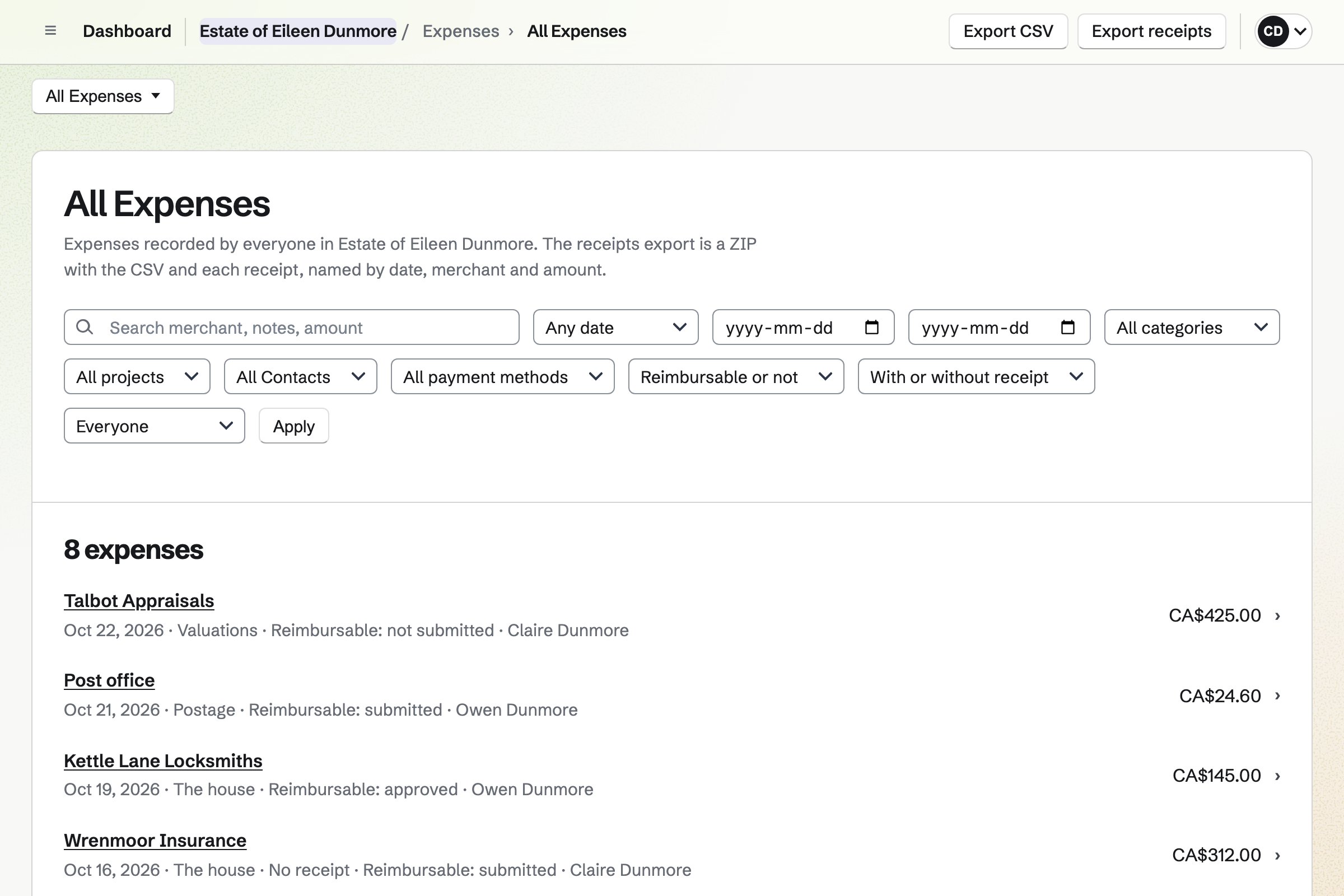
Expenses records what each of you paid personally, such as a locksmith at the house. A photo or PDF of the receipt goes with it. You see everyone's costs, and the others see their own.
Each person's costs go on an expense report for you to approve. When the estate account pays them back, you mark it reimbursed, with the date. Magpie records the payment and does not send money.
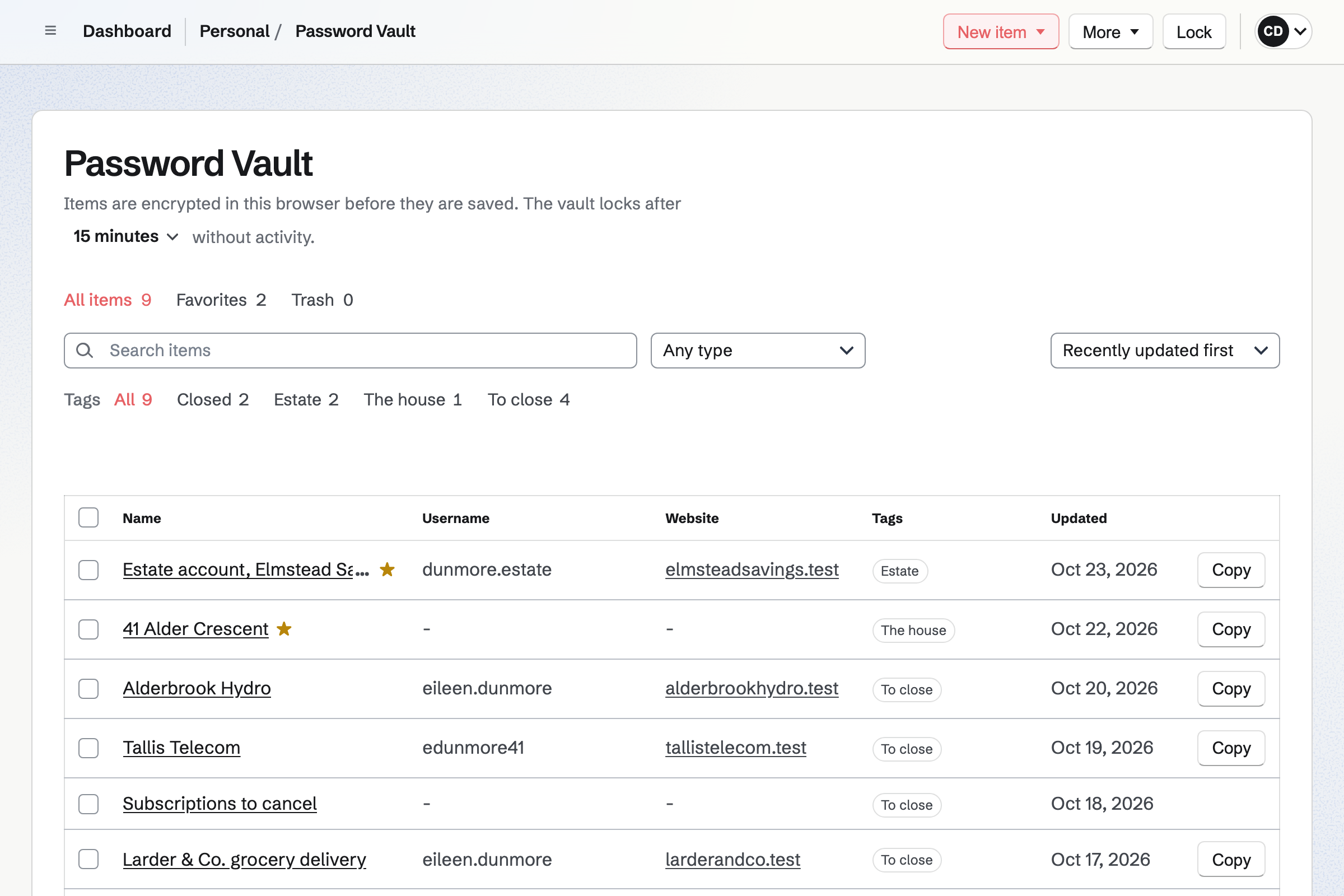
Password Vault keeps logins, account numbers and notes, encrypted in your browser. It opens with a vault password that Magpie never has. Each executor has a vault of their own.
Tags sort the items, such as To close and Closed. A custom item can hold the house's alarm code and the key safe's number.
You make a team for the estate and invite the other executors. Help: Create and manage a team.
You add each bank, pension and utility as a contact when you first get in touch. Help: Keep notes and follow-ups on a contact.
The estate's first List takes the jobs, each given to one of you. Help: Use To-dos.
Secure Files uses Password Vault's encryption, so each of you sets up a vault first. Help: Password Vault: passwords and private information.
A free team has 3 member places, counting you, and keeps up to 100 contacts. A larger family needs the Team plan, with 25 places at one price.
A lawyer or beneficiary given one record is a guest, and takes no place. Your scans use your own storage, 1 GB on the free plan or 20 GB with Pro.
Caring for a parent shares the appointments, the visits and the care notes among the family.
A household shares one family calendar, its lists and a family chat.
Moving house puts the removal firm, the utilities and the new lease on one shared checklist.
A lawyer handling estates for clients records the hours on each matter and bills them.
Yes. Each job on the estate's List is a To-do given to one of you. It can have a deadline, and a reminder emailed the day before. Team To-dos shows every open job and who has it.
Yes. A reminder will be emailed to whoever has the To-do, at their own local time. A reminder on a deadline will arrive at 9:00 am where they are.
Yes. Each bank, pension, insurer and utility is a contact in the estate's team. You log each call or email on it, with what was said. The contacts list shows when you last spoke to each, and the next follow-up.
On the bank's contact, in a note you pin. A pinned note is shown near the top of the contact's page. Everyone in the estate's team sees the same note.
Yes. A follow-up gives the bank's contact a date and a reason, such as the balances. It is a To-do on that date, and can have an email reminder. Follow-ups lists every open one as Overdue, Today or Upcoming.
Yes. The Business letter starter gives each letter its date, recipient and body. Duplicate copies a finished letter for the next bank or pension, and you change the details. Each one prints, or downloads as a PDF to sign. Word files import, and letters export to Word.
Yes. You share the document with the lawyer as Can review. They can comment and suggest changes, which apply only when you accept them. They join as a guest who opens only that document. Someone without a Magpie account gets a free one when they accept.
Secure Files keeps your scans, each encrypted in your browser before it is stored. Magpie cannot unlock them without your vault password. The files belong to your own account, so each executor keeps a set. A secure link sends one to the lawyer, and can need a passphrase.
Yes. One sheet can list the accounts, the house and the car, and another the debts. Formulas total each sheet as balances and valuations come in. The Currency format uses the team's currency. Check the rules where the estate is settled for what to value, and when.
Yes. You share the spreadsheet with each of them as Viewer. Someone outside the estate's team joins as a guest who opens that spreadsheet and nothing else. A guest takes no place on the plan. They can sort and filter it for themselves without changing what you see.
Yes. A sheet can list each piece with its valuation. A dropdown beside it can hold each of your names. Another column can record what a piece sold for. A filter view can show only your own pieces, without changing what the others see.
Yes. Each of you records what you paid, with the receipt, and marks it reimbursable. An expense report gathers them for you to approve. When the estate account pays someone back, you mark the report reimbursed with the date. Magpie records the payment and does not send money.
You see every cost recorded in the estate's team, with who paid it. The other executors each see their own, unless you make them admins too. Receipts open only for people who can see the expense.
Yes. Each expense keeps the currency it was paid in. Totals keep each currency separate, as it was paid. An expense report holds one currency, so costs in two currencies go on two reports.
Yes. Export receipts downloads a ZIP with every receipt, named by date, merchant and amount. It comes with a CSV list of the expenses, with who paid and the reimbursement details. Each sheet of the spreadsheet exports as CSV too.
Yes. Password Vault keeps them encrypted in your browser, with a vault password Magpie never has. Tags such as To close and Closed sort them. Only you can open your vault. A recovery key lets you choose a new vault password if you forget it.
In your vault, as a custom item with its own fields, such as Alarm code. A field can stay hidden until you choose Reveal. Clicking a value copies it. Like the rest of your vault, it is encrypted in your browser.
Yes. PDF Editor opens the form in your browser, and you type into its fields. A form without fields takes typed text anywhere on the page. The finished PDF downloads, or is saved encrypted with your other scans.
Yes. The estate's team has a calendar that everyone in it sees. The funeral, the lawyer's appointments and the house clearance go on as events. Jobs show on the day they are planned, and deadlines on the day they fall.
Yes. Notes keeps them in the estate's team, open to the family, and saves as you type. A checklist line can become a To-do. Search finds any word in them, such as a bank's name.
Yes. Team chat gives the estate's team channels, such as one for the house sale. You can reply in a thread, react and add pictures. Two of you can also start a short video call.
Yes. You share each record with them on its own: a List, a letter or the spreadsheet. They join the estate's team as a guest, and see only what you shared. A guest takes no place on the plan.
It is kept until you decide. Archiving the estate's team takes it out of use, and keeps its work. Restore brings it back with the same people and records. Sheets export as CSV, letters as PDF or Word, and expenses with their receipts.
Create a Magpie account and make a team for the estate.