Accountants and bookkeepers
An accounting practice collects each client's statements every month and works in their books.
Lawyers and small law practices
The lawyers and staff of a practice work in one Magpie team. Each client has a private portal for their documents and invoices.
Get started free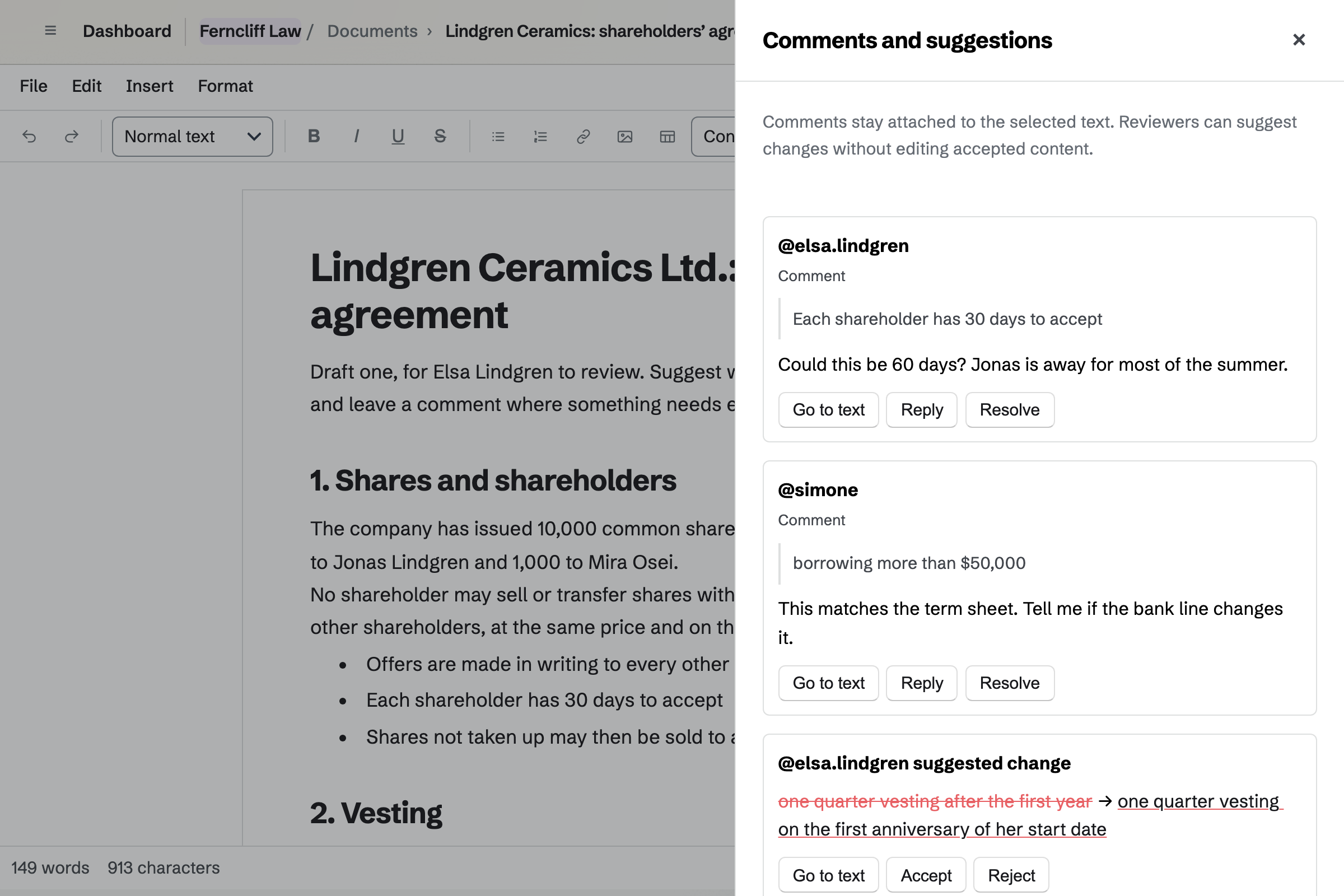
Documents is Magpie's editor for formatted text. A client you invite to review can comment and suggest changes, and opens only that document. You accept or reject each suggestion.
You can name versions and restore an earlier one. Word files import with their comments and tracked changes. You export to Word with the suggestions or as a clean copy, or to PDF.
Agreements holds a library of published standard agreements. Their publishers include Bonterms, Common Paper and Y Combinator. It has NDAs, services and software agreements, data protection addenda and SAFEs.
You answer each party's questions, and the text fills in as you type. Sending it creates a signing request with each party's fields in place. A copy can go to Documents for you to edit.
E-Signatures sends a PDF to each signatory, in any order or one after another. A signer can need an access code that you give them separately. Reminders go out every 3 or 7 days.
The signed PDF keeps the original file unchanged, with the values added after it. The certificate records each signer's email, time, IP address and browser.
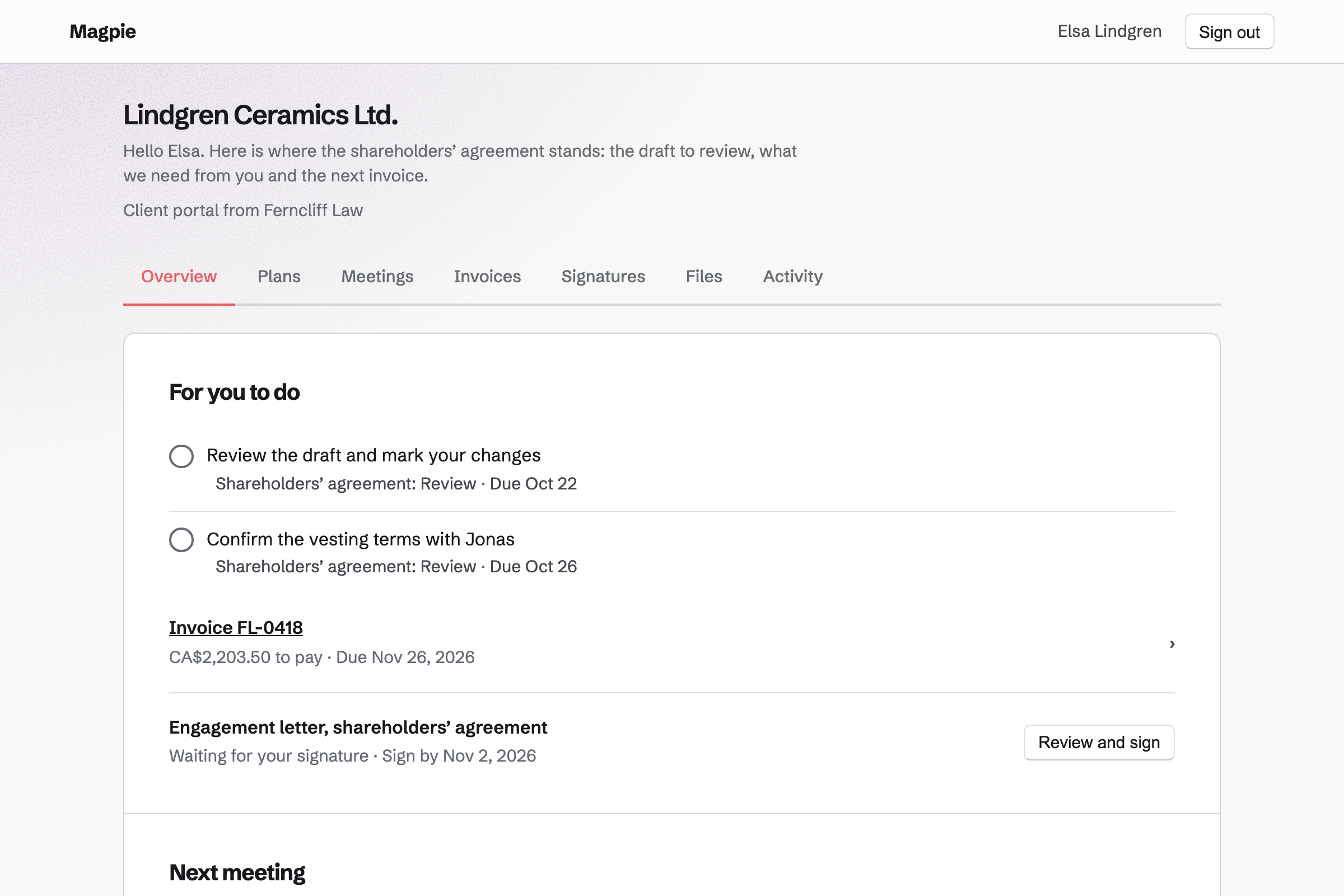
Client Portal gives each client a page of their own. You share files there, up to 500 MB each, and clients upload theirs. Notes on their contact are never shown.
A plan lists the steps of the matter, for you and for them. Their Overview lists their open steps, the invoices to pay and the documents to sign.
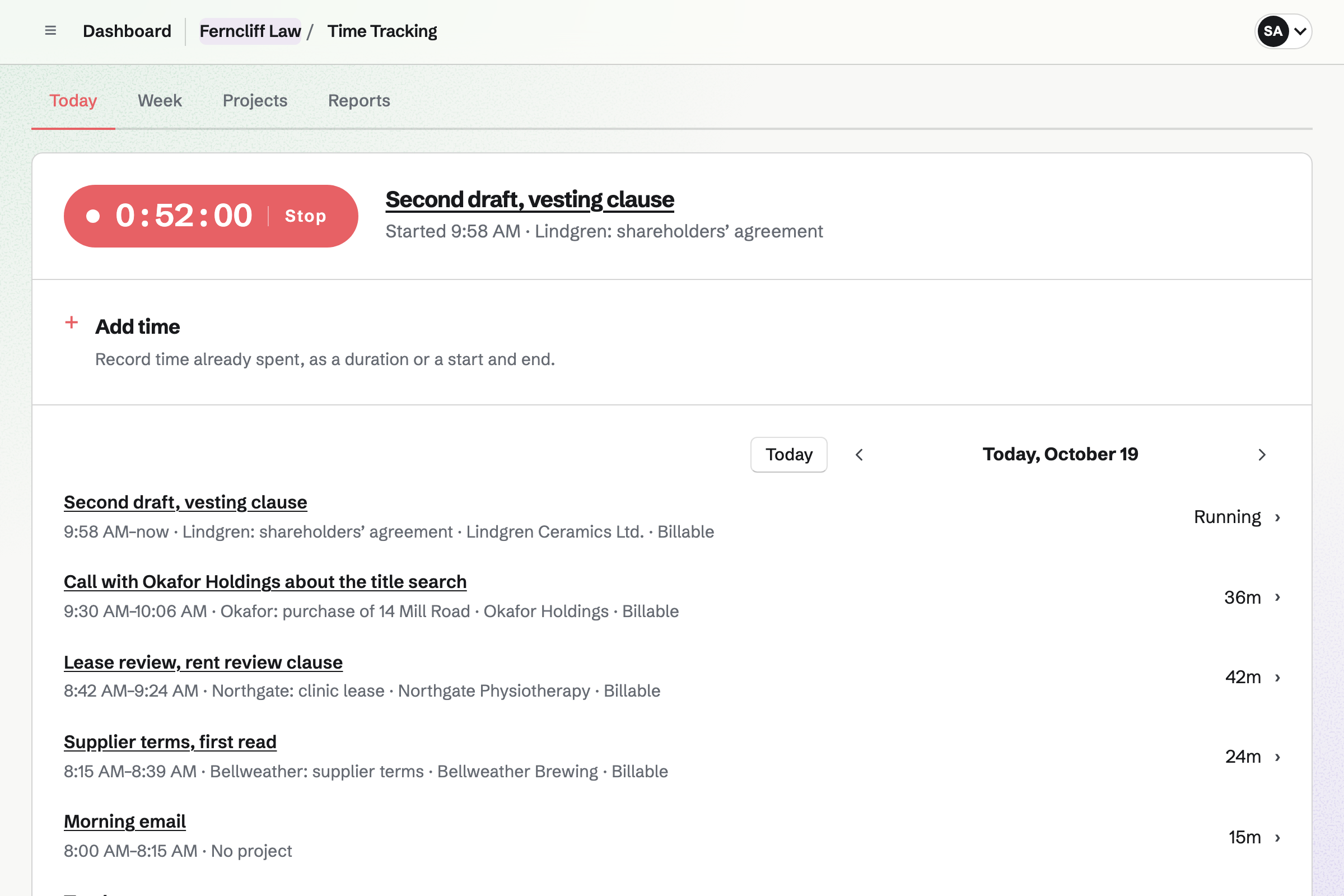
Time Tracking gives each matter a project, with its client, hourly rate and budget. You start a timer from the client's contact, a calendar event or a To-do. It keeps running if the browser closes.
Rounding can be exact, or to 5, 6, 10 or 15 minutes. Reports total the billable hours by client, and export as CSV.
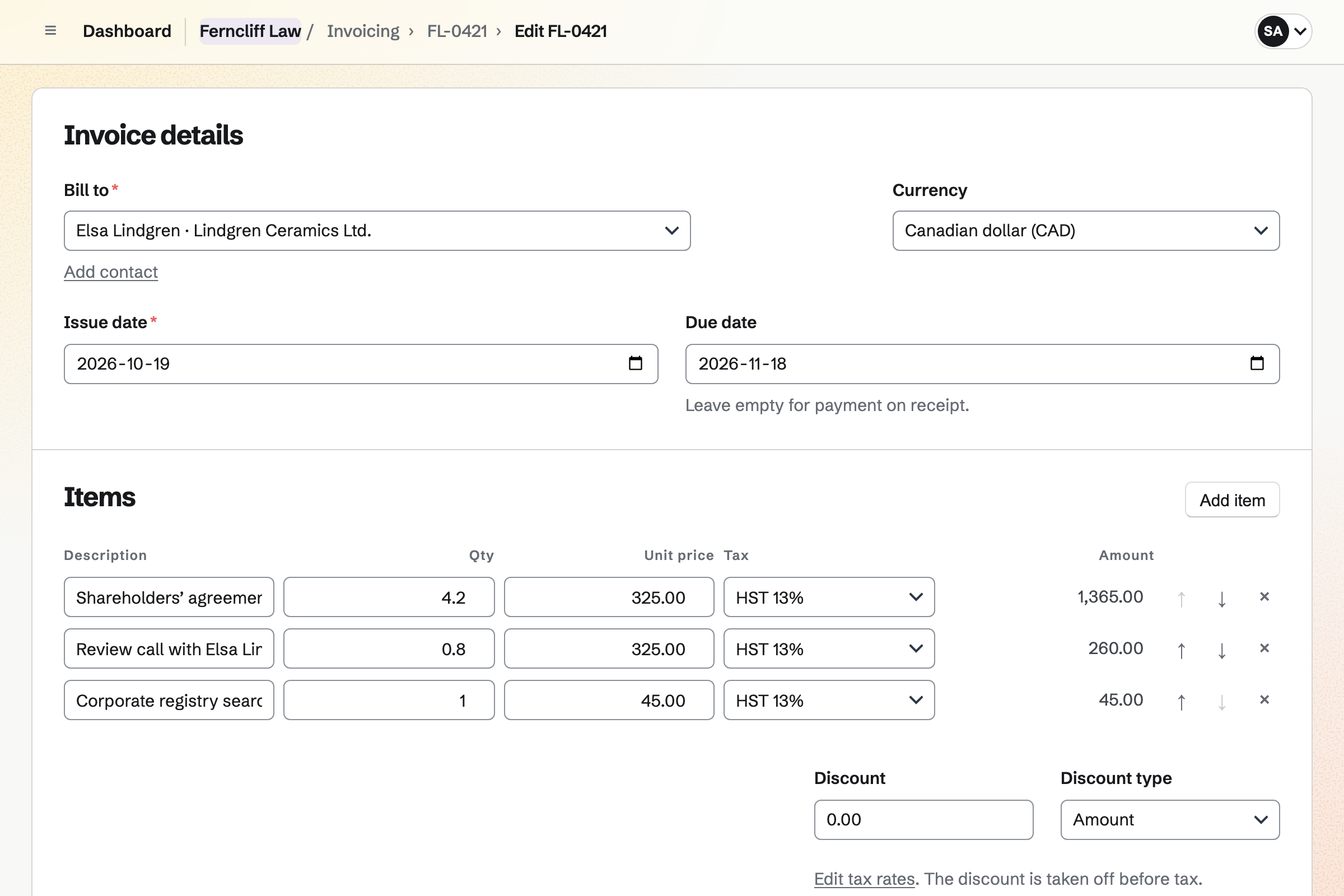
Invoicing adds a client's unbilled hours to their invoice, one line each at the matter's rate. Hours on an issued invoice are locked. Disbursements can go on it too.
Clients pay by card from the email or their portal, into your own Stripe account. Reminders go out until each invoice is paid. A payment by bank transfer or cheque is recorded by hand.
Each step is kept on the client's contact page.
You send your letter as a PDF to sign. The client signs from their own link.
You open the client's portal and share the plan of the matter.
You invite the client to review the draft. They mark it up, and you accept or reject each change.
The final version goes to every party for signature, in the order you set.
Your time on the matter is recorded against its project, at its rate.
Add unbilled time puts the hours on the invoice. The client pays it by card from their portal.
You create a team and invite your lawyers and staff. Help: Create and manage a team.
You add the practice's name, address, tax number and logo for invoices. Help: Send and configure invoices.
You connect your Stripe account, so clients can pay by card. Help: Connect Stripe to receive money.
You upload the letter and place each signer's fields. Then you save it as a starter. Help: Signing starters.
You give each matter its client, hourly rate and rounding. Help: Time Tracking projects, rates and tags.
A practice with staff fits the Team plan, one price for up to 25 members. It has no limit on invoices or contacts. A lawyer working alone can use Pro, which removes the same limits.
Mail at your own domain needs Pro or the Team plan. On the free plan, you can create 5 invoices a month and keep 100 contacts.
Magpie adds no fee to invoice payments. Stripe's processing fee is taken from each. Prices are on the Pricing page.
An accounting practice collects each client's statements every month and works in their books.
A consultant quotes each engagement with a proposal and shares an action plan.
A founder fills in SAFEs and NDAs, sends the deck and keeps track of investors.
Yes. You share the document with the client as Can review. They can comment and suggest changes, and they open only that document. You accept or reject each suggestion. Comments and @mentions work for your team too.
Yes. A .docx file of up to 25 MB imports with its comments. Its tracked changes become suggestions. Pictures inside the file are not imported. You can export to Word with the suggestions, or a clean copy without them.
Yes. You can name a version, such as the draft sent to the other side. Any earlier version can be opened. Restoring an earlier version adds it as a new change, so nothing is lost.
NDAs from Bonterms, Common Paper, oneNDA and Papertrail, and services, software and cloud agreements. There are data protection addenda, business associate agreements and partnership agreements. Y Combinator's SAFEs and the Series Seed documents are there too. Each text is copied word for word from its publisher.
Yes, in a copy. Make a copy in Documents opens the filled-in agreement as an ordinary document you can edit. The library's own text stays as its publisher wrote it.
Yes. In the order listed emails the first signer. Each next signer is emailed once the one before signs. Each signer can need an access code that you give them another way. A request can expire, and you can extend it.
Each signer's name, email address, signing time, IP address and browser, and how they were verified. It holds the consent they accepted and the activity list. It also holds a SHA-256 fingerprint of the original and signed files. Times are in UTC.
Yes. Marked areas are painted out, and each redacted page is replaced by an image. The file is checked before export, and refused if any text remains under a mark. Find and redact finds words, email addresses, phone numbers and web addresses.
Yes. PDF Editor adds a prefix and a number to every page, such as ABC000001. The numbering continues across files. Everything runs in your browser, so the files are not uploaded.
Yes. Compare PDFs shows the words added and removed between two files. PDF Editor can also merge and split files and make a scanned PDF searchable.
Yes, through their portal. Clients upload files on its Overview or Files section, up to 20 at once. Only your team and the client's portal can see them. Each upload is listed with who sent it.
Secure Files encrypts each file and its name in your browser before it is stored. Magpie cannot unlock them without your password. A file of up to 2 GB can go by a link that expires. The link can need a passphrase.
Yes. A matter's project can round each entry to 6 minutes. You can also round to 5, 10 or 15 minutes, or bill the exact time. The rate comes from the project, the client or your default.
Yes. A project has an hour budget, and it shows how much is used. Reports total the hours and billable amounts by client or project, and export as CSV.
Yes. You add an entry as a duration, such as 1h 30m or 1:30. One timer runs at a time across Magpie. It keeps running if you close the browser.
Yes. Each invoice has a Pay online button in its email and in the client's portal. The payment goes to your own Stripe account, and Magpie adds no fee. You can also record a bank transfer or cheque by hand.
Yes. You connect the domain to Mail and add a mailbox for each lawyer. Each has 5 GB of storage. A mailbox can be shared with the team or private to one person. An admin cannot read a private one.
Yes. A client's contact page holds your notes and logged calls. It also lists the documents they signed, the agreements you started and their invoices. Notes are never shown in their portal.
Create a Magpie account and make a team for the practice.