Farms and market growers
A farm grows food for weekly boxes and market stalls. It takes sign-ups for its boxes through Forms.
Plant nurseries and garden centres
The nursery and its staff, seasonal staff too, work in one Magpie team.
Get started free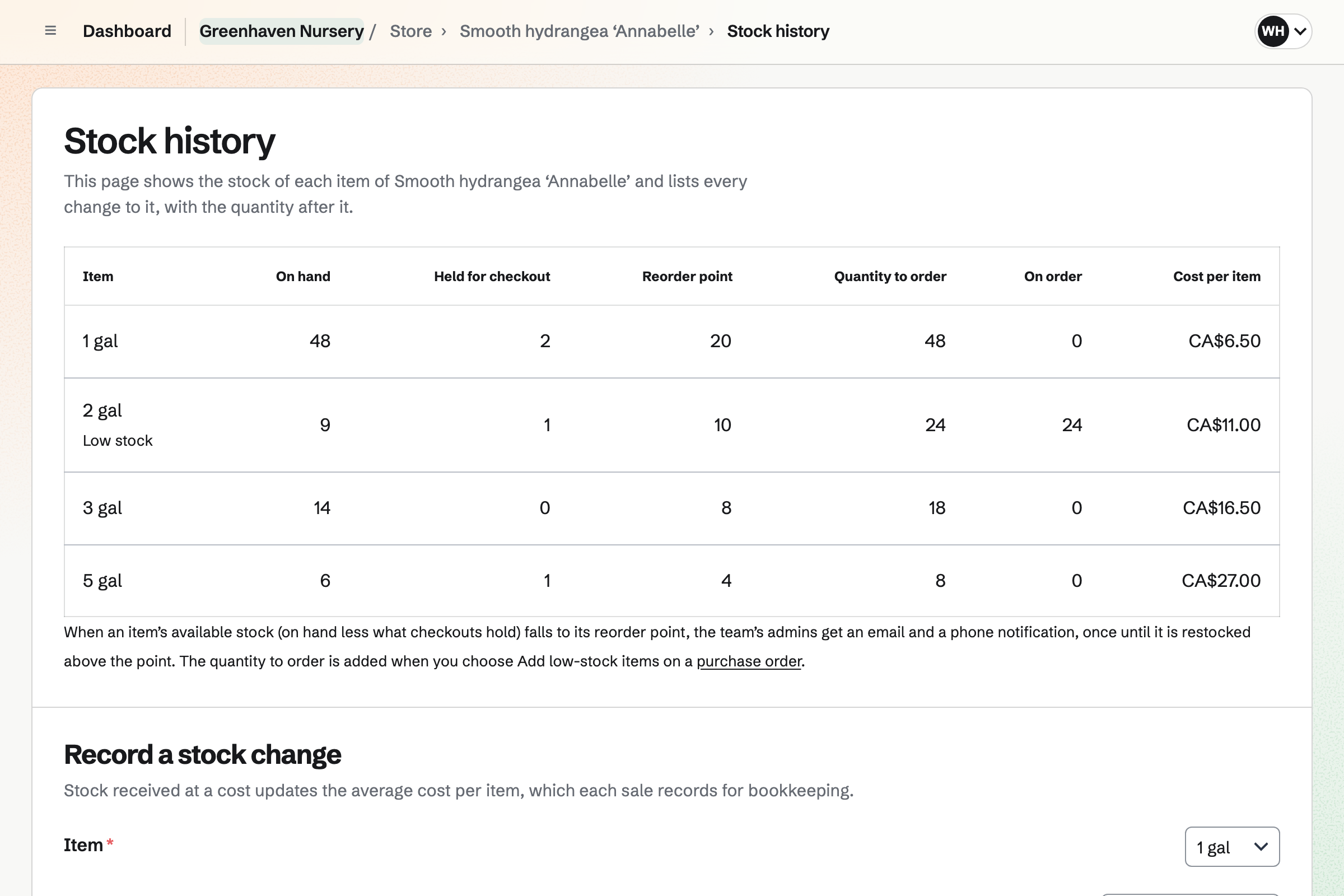
Store gives the nursery an online shop for its plants. You can sell each plant in several pot sizes. Each size has its own price and stock. Each plant's page can show care instructions and specifications such as Position: full sun.
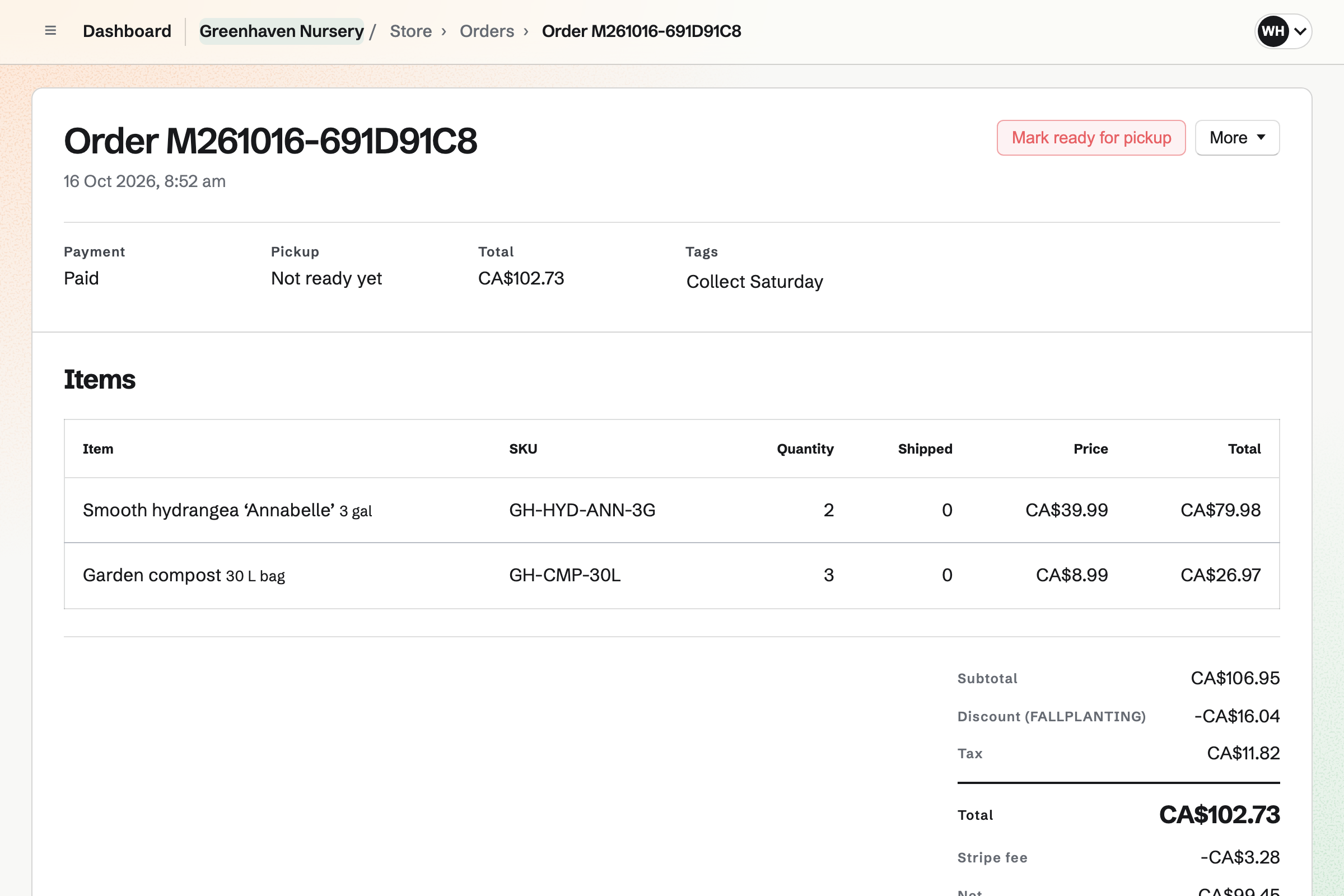
You deliver on the days you choose, to the postal codes you list. Buyers pick one of the next 14 delivery days at checkout. A buyer can also collect from the nursery. Trees can be offered for delivery or pickup only.
Inventory counts your plants by the tray and your compost by the bag. From what is running low, you draft one order for each grower. Receiving it will add the plants to stock at the price charged.
You link each pot size in your online shop to its item. Till and online sales then come out of the same stock. Plants you throw away are recorded as waste, with a reason such as Damaged.
Staff Scheduling gives the nursery its rota. The Shop starter adds Cashier and Stock positions, and Opening and Closing shifts. You can add your own, such as Watering. A seasonal worker needs only a name to go on the rota.
Once you publish the week, each person you invite sees their shifts. They can swap shifts, ask for cover or ask for time off. You can make the spring weekends a blackout period. Time off asked for then will be marked for you to decide.
Newsletter gives the nursery a signup page, where people subscribe and confirm by email. Buyers can also join at checkout, once their order is paid. You can bring your list from Mailchimp, Substack or a CSV file.
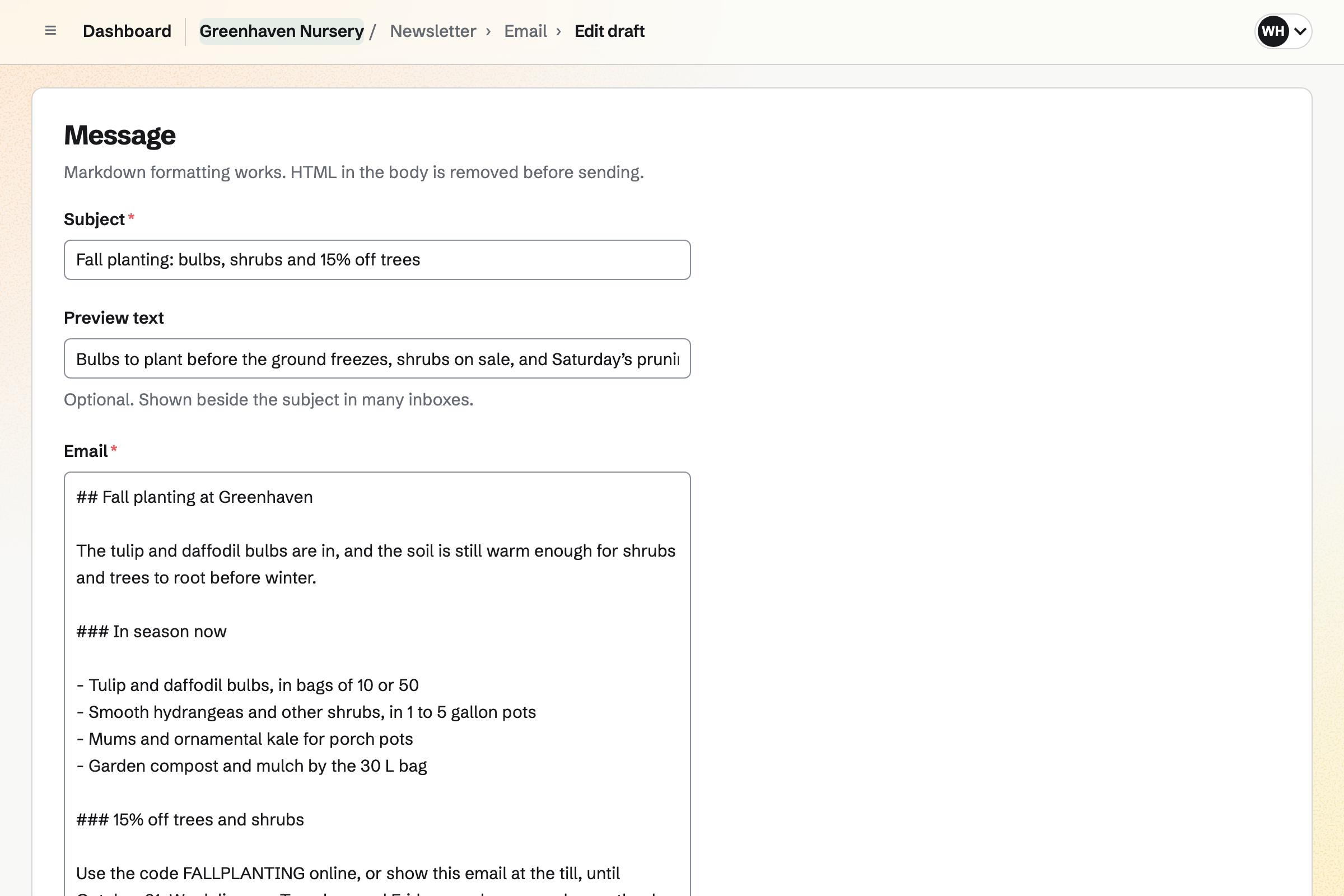
You write each email in Markdown and send yourself a test. Then you send it now, or schedule it for Friday morning. With web copies on, each sent email is listed on the signup page. You can share it in a social post.
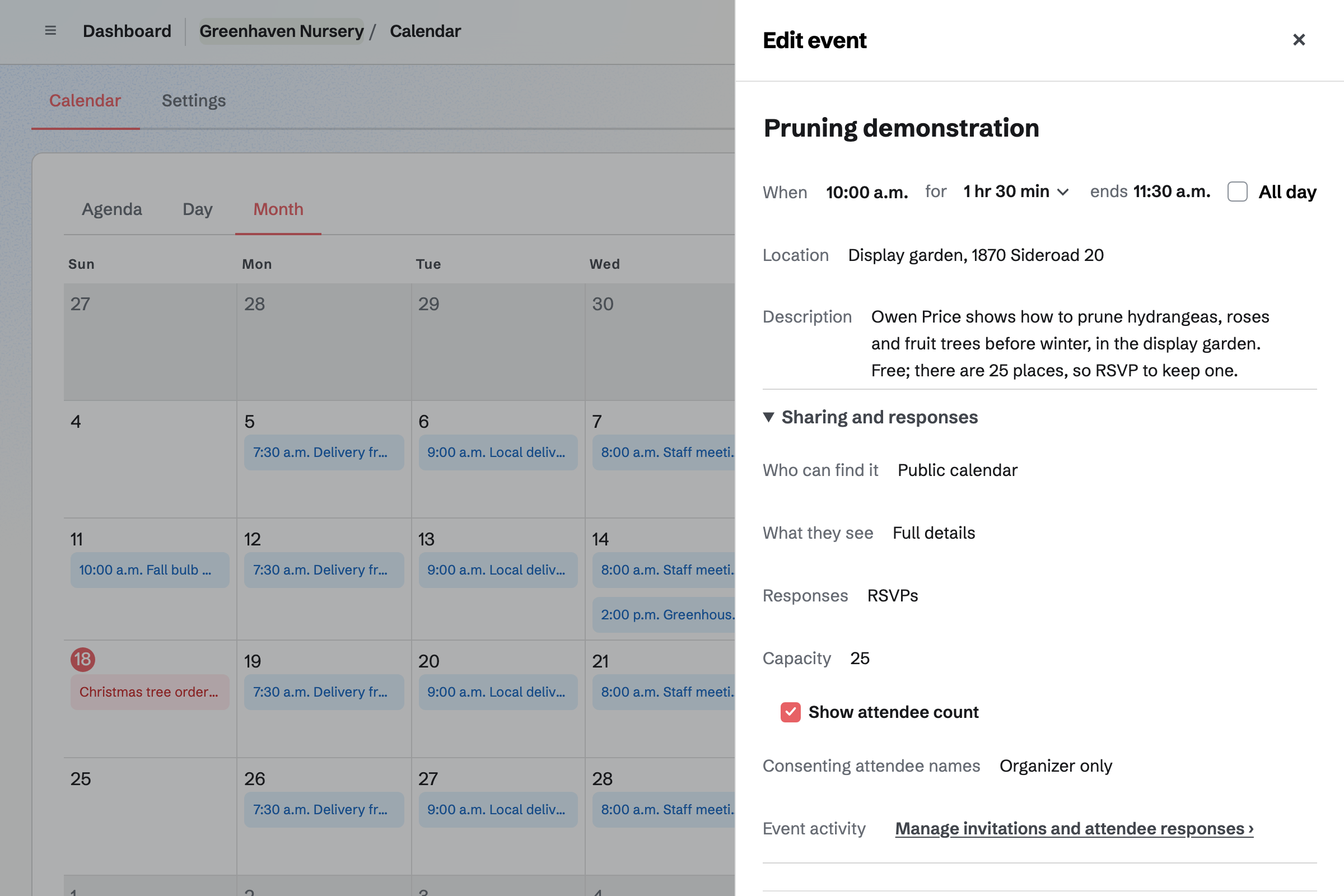
Calendar lists the nursery's workshops on a public calendar. You can turn on RSVPs for a pruning demonstration and set its number of places. Once that many people answer Going, its page will say it is full.
You can start a social post from a workshop, with its date and address. For a paid workshop, a Form charges each person a fixed amount by card. People pay without signing up first, into your Stripe account.
With each pot size linked to its item in stock, a plant is counted once.
You receive the grower's order. What arrived will be added to the yard's stock at the price charged. Refused trays will be listed under Differences.
Each linked pot size's stock will be set to what the yard can sell. The till and the online shop then offer the new plants.
An online order will take the plant out of stock. So will a sale you record at the till.
You record them as waste, with a reason such as Damaged. The online shop will show the lower stock.
Plants below their minimum are listed as running low. From that list you start the next order to each grower.
Each paid order will be added to the books, with Stripe's fee. It is split into sales, shipping and sales tax.
You create a team and invite the people who run the nursery with you. Help: Create and manage a team.
You name the online shop and connect Stripe. Then you add local pickup, and the postal codes and days you deliver. Help: Collections and shipping.
You add each plant to the shop with its pot sizes. You add it to stock with your grower's packs and a minimum. Then you link each size to its item. Help: Sell Inventory stock in Store.
You start the rota from the Shop starter and add each person by name. Then you publish the week. Help: Plan and publish a staff schedule.
You start the newsletter and import your list. Then you choose it as the list buyers can join at checkout. Help: Start and configure a newsletter.
Store, Inventory, Staff Scheduling and Newsletter are on every plan, the Free plan included. Each plan has its own limit on subscribers and on emails sent each month.
A free team has 3 member places, counting you. The Team plan has 25, at one price for the whole team. Staff on the rota take no place until they accept an invitation.
Magpie adds no fee to your shop's sales. Stripe's processing fee is taken from each card payment. On a paid Form for a workshop, Magpie's fee is 1% of each payment.
A farm grows food for weekly boxes and market stalls. It takes sign-ups for its boxes through Forms.
A florist sells cut flowers rather than plants. Wedding and event enquiries become proposals with a deposit.
A boutique sells clothing, gifts and homewares in sizes and colours, bought in from suppliers.
A bookshop sells books, records and games. People RSVP to its readings and launches on a public calendar.
Yes. You add local delivery with the postal codes and days you deliver. You set a cutoff time, and orders after it count from the next day. At checkout, the buyer picks one of the next 14 delivery days. A postal code you do not deliver to is refused before they pay.
Yes. You add local pickup to the shop. A buyer who chooses it gives no address. When you mark the order ready, Magpie will email them the nursery's address and times.
Yes. Trees and large pots go on a shipping profile with only pickup and local delivery. A cart with one of them is never offered postage. Your other plants can still be posted on their own. If every profile has the same pickup method, a mixed cart can still be collected.
Yes. You add an option such as Pot size, with a choice for each size. Each size is an item of its own, with its price, stock, SKU, weight and barcode. Shoppers can filter your shop by the option. A second option, such as Colour, makes an item for each combination.
Yes. Each pot size that tracks stock has one stock number. A sale you record at the till takes from it, as an online order does. Checkout holds what a buyer is buying while they pay. Both kinds of sale are also recorded on the linked Inventory item.
You record it as a new order, with the plants and how the customer paid. They can pay cash, on your own card terminal, by bank transfer or by cheque. The order is created paid, and the plants come out of stock. Magpie can email the customer a confirmation. Accounting records the money in Undeposited funds until you record the deposit.
Yes. You turn on Sell when out of stock for a pot size. You can also give it an Expected to ship date. Customers can then order and pay while you have none. Their orders are marked Pre-order and listed together.
Yes. You give a draft product a date and time to go live. It will go live then, with the same checks as publishing it by hand. A product with no photo or no price stays a draft, and its row says why. A collection, such as Spring bulbs, can go live on a date too.
Yes. You write them in the product's description. Specifications add name and value pairs to the page, such as Position: partial shade. Shoppers can filter by tags such as evergreen or pet safe. A collection can list every plant with a tag, such as houseplant.
Yes. You record them as waste, with a reason such as Damaged or Spoiled. They come out of stock, and the item's history lists them as Wasted. The linked pot size then shows the lower stock. The online shop offers only what is left.
Yes. Each grower is a supplier with its own plants, packs and prices. From what is running low, you draft one order for each grower. Magpie will email it, or you mark it sent by phone. Receiving it adds what arrived to stock, and refused trays are kept under Differences.
Yes. Each place has its own pool of stock, such as the growing yard and the shop. You can move plants from one pool to another. Each pot size you sell online is linked to the item in one pool. The online shop sells what that pool holds.
Yes. Your newsletter has a public signup page. A QR code by the till can open it. People enter their email address and confirm from the email Magpie sends. Buyers who tick the box at checkout are added once their order is paid.
Yes. You can import a Mailchimp or Substack export, a CSV file or pasted addresses. Each file can be up to 5 MB. You record where the list came from and how its people agreed. Anyone who had unsubscribed or bounced is left out.
You turn on RSVPs for the workshop's event and set a capacity. People answer Going or Not going while signed in to Magpie. Someone new can sign up from the event's page. Once the capacity is reached, the page will say the event is full. You can also show how many people are going.
You make a Form for the workshop and set its price. Each person answers its questions, such as which date they will come. Then they pay by card into your Stripe account, without signing up first. You close the Form when the places are gone. Magpie's fee on a paid Form is 1% of each payment.
Yes. You add each person by name and mark them as seasonal. They need no Magpie account to be given shifts. To see their own shifts or swap them, they accept an invitation to the team. That takes one of the team's member places.
Yes. A gift card can have fixed amounts and, if you choose, a custom range. The buyer can have it emailed to someone on a date they choose, or keep it. Its holder spends it on plants and delivery in your online shop. A bought card never expires, and has no fee.
Yes. You turn on temperature checks in Daily Operations, and add each greenhouse as a temperature point. Each has a target range and critical limits. Staff type readings on their own or as a step in a routine. A reading outside the target will open an incident with what to do next.
Create a Magpie account and make a team for the nursery.