Etsy and handmade sellers
A handmade seller sells personalised pieces and patterns to download, beside an Etsy shop. They take custom order requests too.
Online stores and direct-to-consumer brands
The brand and the people who run it work in one Magpie team. Buyers pay into your own Stripe account.
Get started free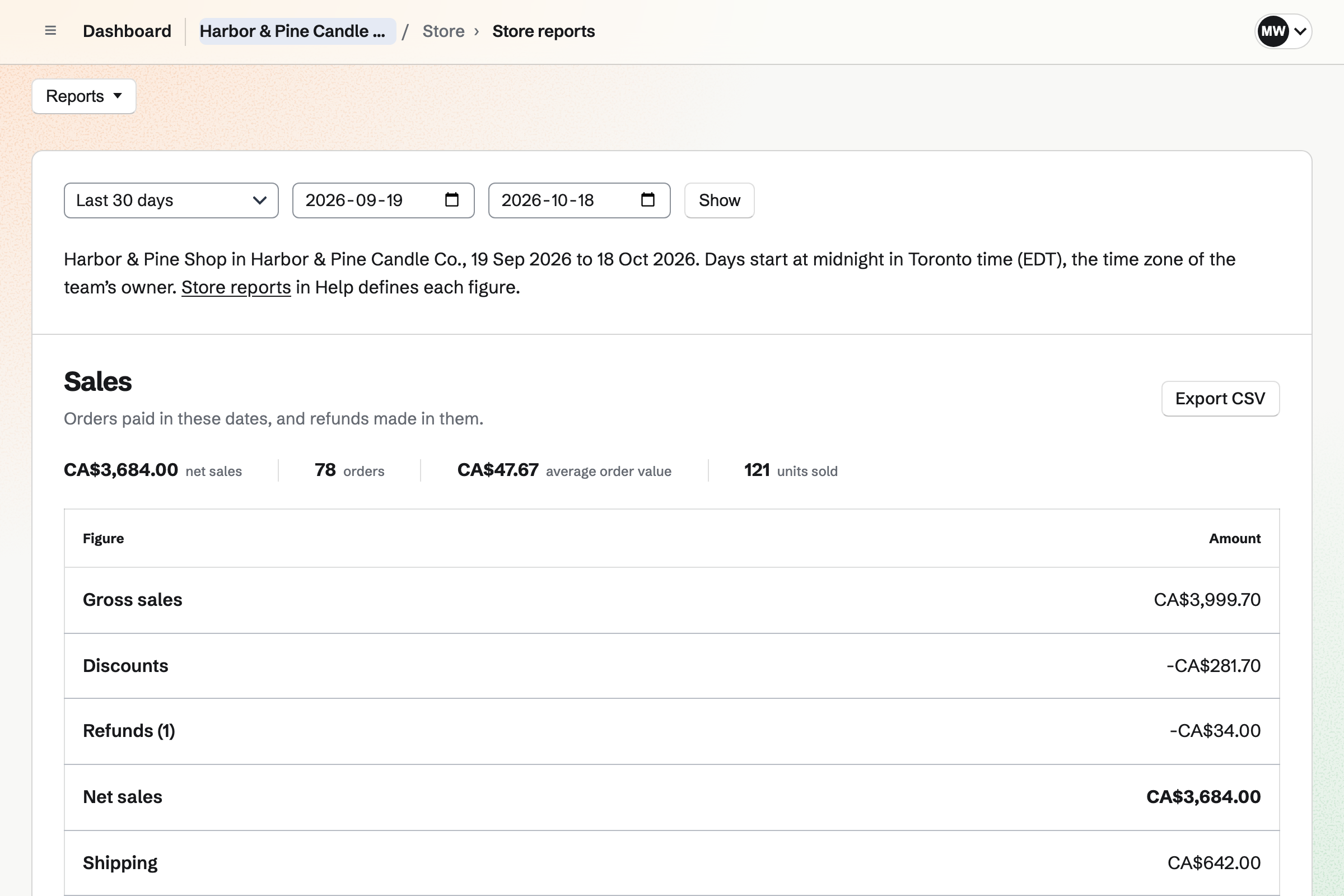
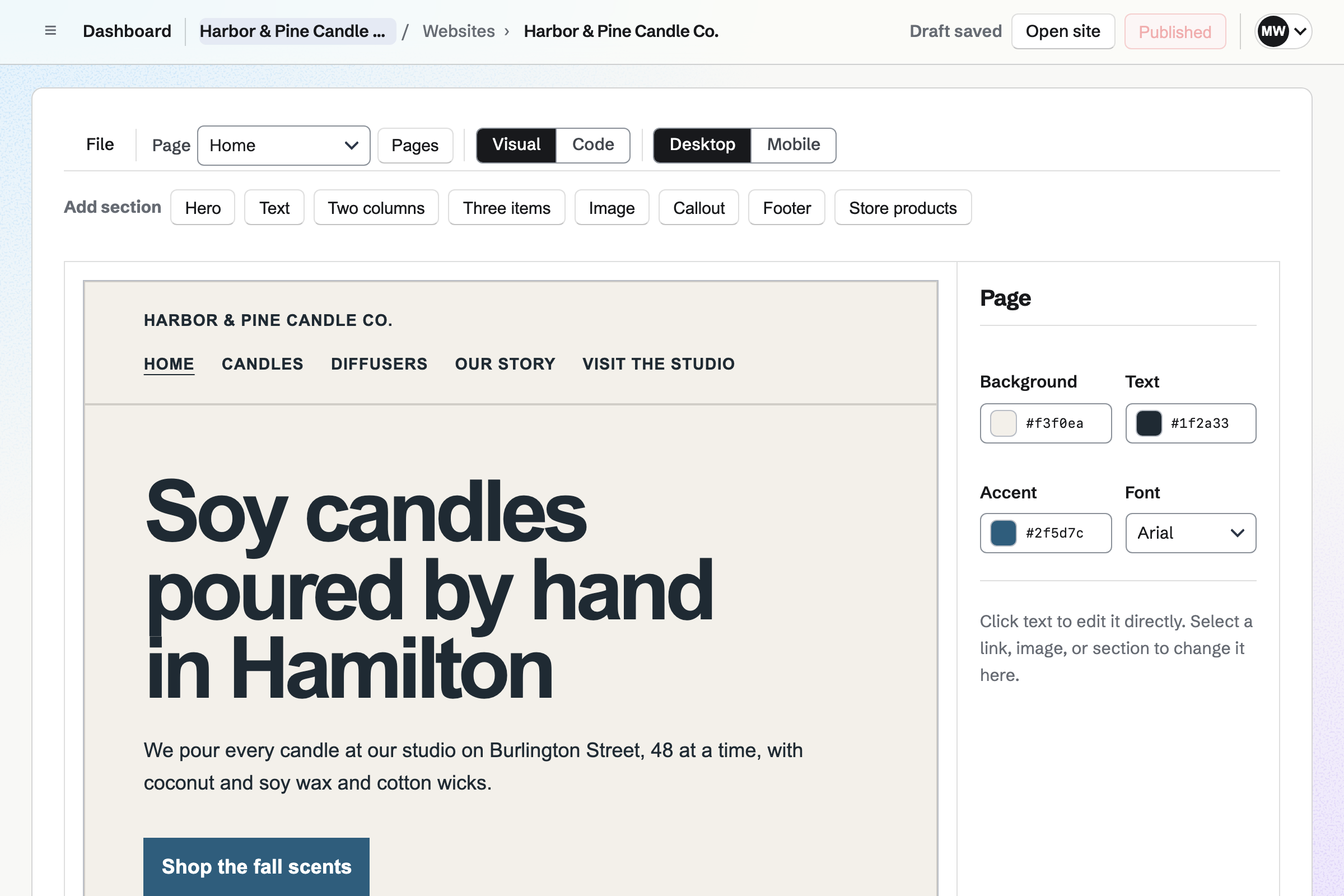
Store gives the brand an online shop, with sizes and colours for each product. Each variant has its own price, cost, SKU and stock. You can change the prices, tags and stock of many products at once.
Buyers pay on Stripe's checkout page without signing up first. They can use your discount codes. The money goes to your own Stripe account. Heavy products can have shipping rates of their own.
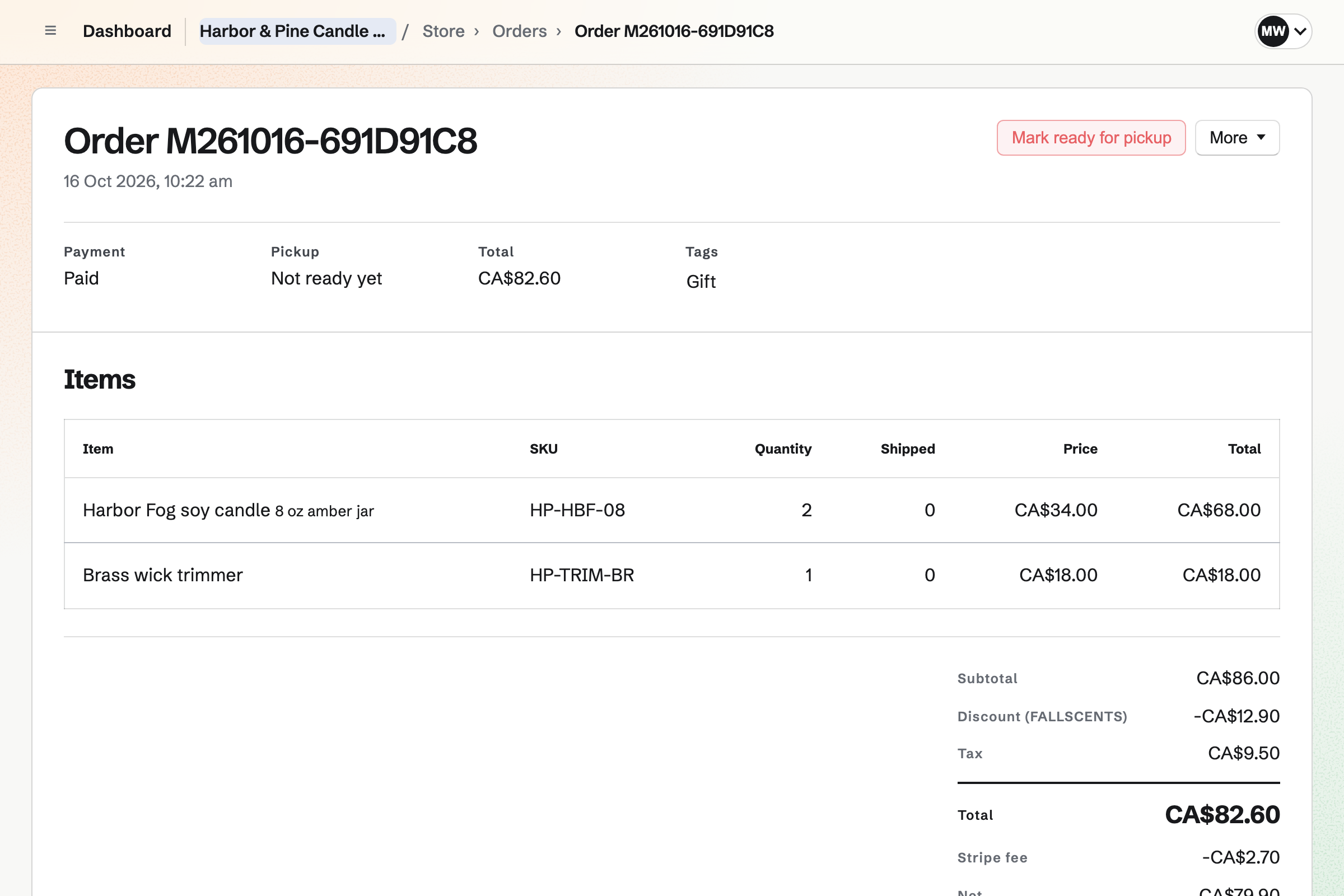
DNS lets Magpie host your domain's records. You can copy in the domain's current records and check them. The domain's page then shows the two nameservers to set where the domain is registered.
Your shop can be at shop.example.com and your website at example.com. Each will add the records it needs, and so will your email. The domain's page shows which addresses are live, and any problem found.
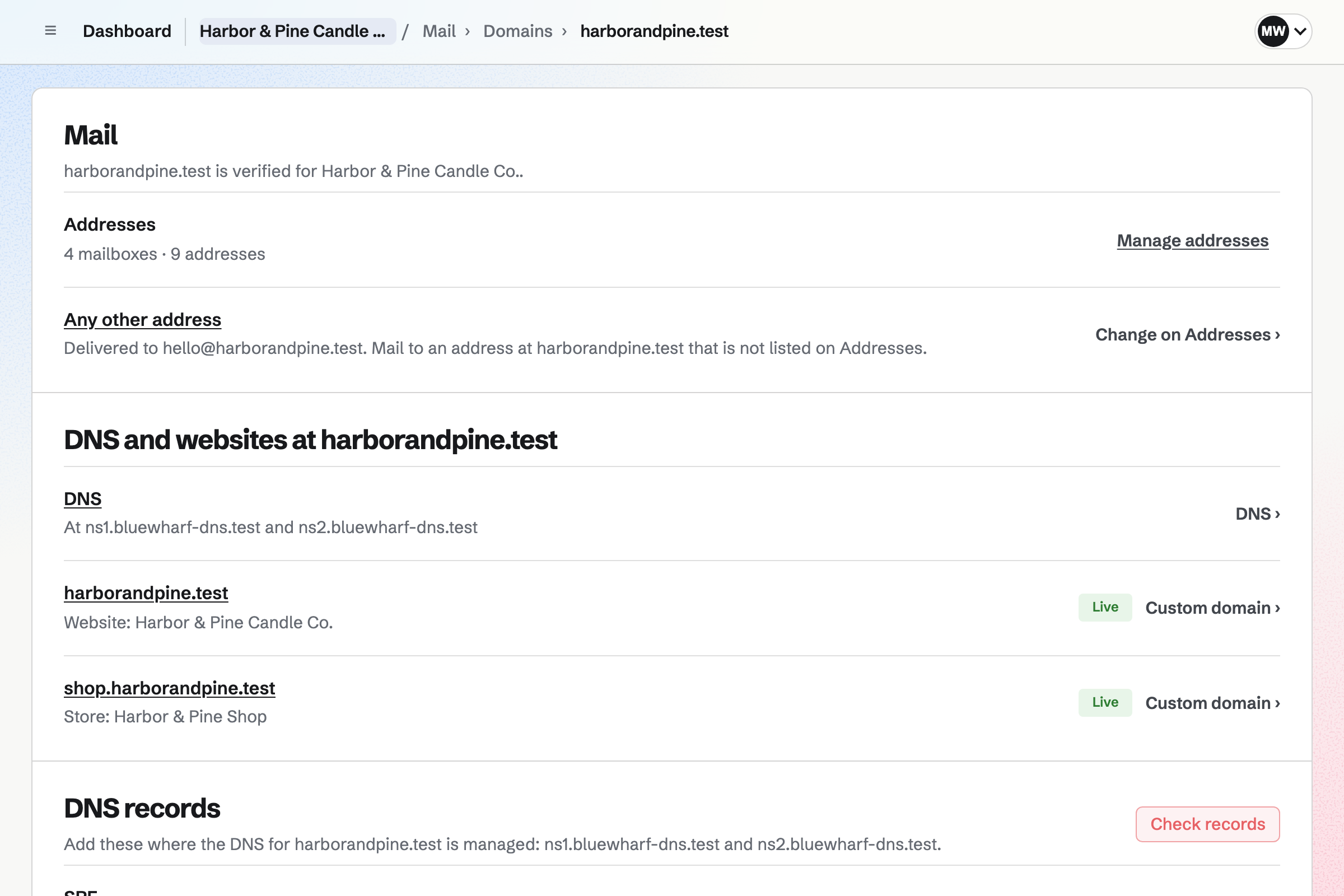
Websites gives the brand a site built from sections. Every page shares one header, footer and navigation. You can change the text visually, or edit the HTML. Publishing puts every page online at once, and each version is kept.
One section lists your published products with their images and current prices. Each links to its page in your shop. If you already have a website, Magpie can host its files instead.
Newsletter gives the brand an email list for news and offers. Checkout can show an unticked box asking for them. A buyer who ticks it will join your list once the order is paid.
You can send yourself a test, then send each email now or schedule it. You can import a list from Mailchimp, Substack or a CSV file. The import keeps a record of how each person agreed.
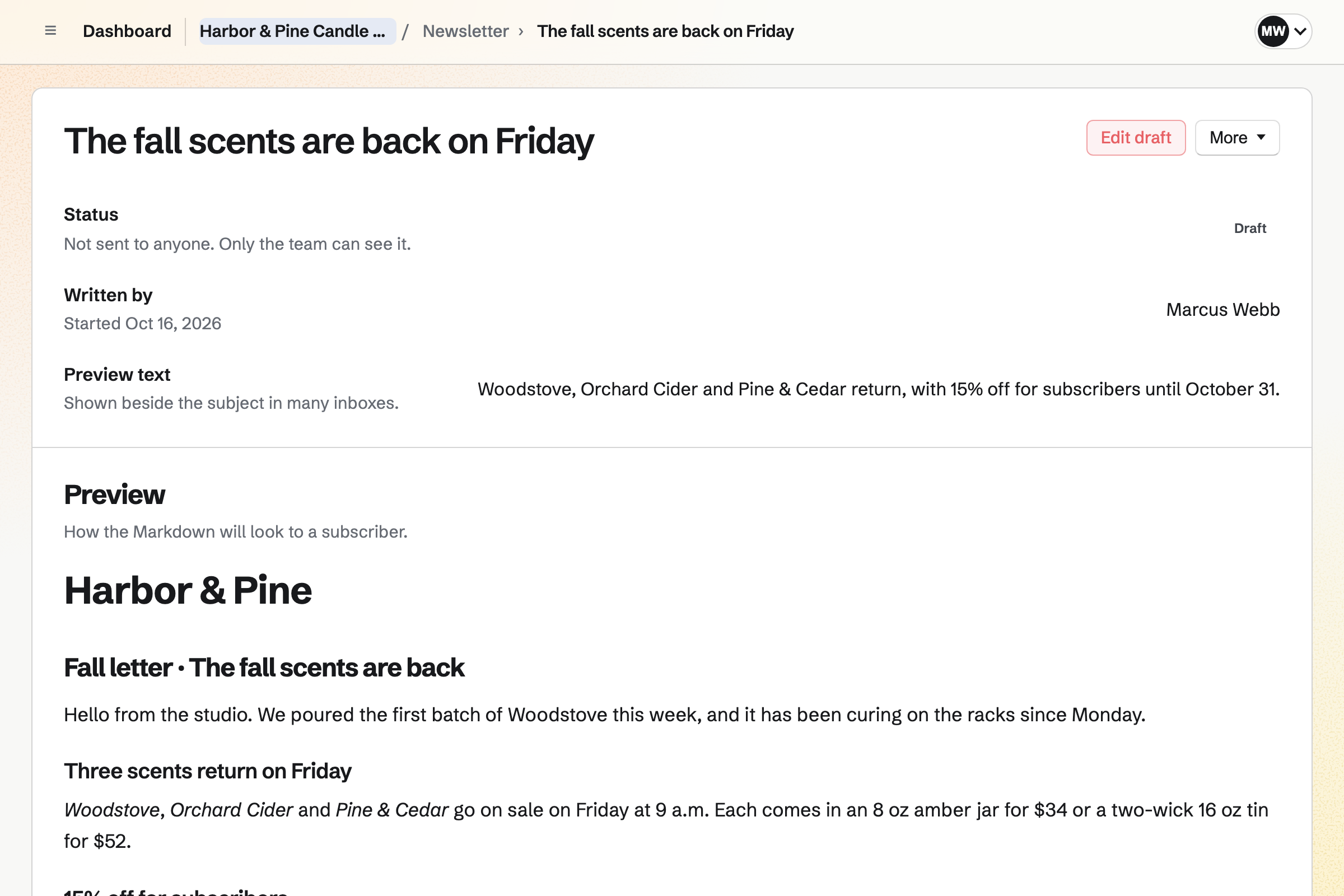
Social Media groups a launch's posts into one campaign, and schedules the finished drafts. Posts to Bluesky, Mastodon and LinkedIn will be published at their time. For X and Instagram, Magpie will email you a reminder to post by hand.
Each link is tagged with the platform and the campaign's name. Your shop keeps the tags of the link a buyer followed. Its reports list sales by source, and each order shows where it came from.
When its available stock falls to the point you set, you will get an email. The Low stock filter will list it too.
Magpie can add every low variant to a new purchase order. It skips any already covered by stock on order. Each line uses the quantity to order you set.
You email it to the supplier with your message, or download it as a PDF.
You enter what arrived and the supplier's invoice number. Stock will go up, and the average cost will move toward the order's cost.
When your books use the shop's currency, the received order can become the supplier's bill. It covers what arrived, on the Inventory account.
Each unit's cost will move from the Inventory account to Cost of goods sold. Your shop's reports show each product's margin.
You give the shop the brand's name and a contact email. Help: Set up and publish a Store.
You connect the brand's Stripe account. Help: Connect Stripe to receive money.
You import the catalog as a CSV file and add the images. Then you make the products live. Help: Import and export products as CSV.
You add shipping zones and their methods. Products that ship differently get a profile of their own. Help: Collections and shipping.
Magpie lists the records to add, or adds them when it hosts the domain's DNS. Help: Show your Store at your own domain.
Publishing will put the shop online at your domain and at its Magpie address.
A brand run by a team fits the Team plan, one price for the whole team. It has up to 25 members, mailboxes at your domain and 20 websites. Your newsletters get higher limits too.
A free team has up to 3 members and 1 website, without Mail. API keys for your shop need Pro on the account that creates them.
Magpie adds no fee to your shop's sales. Stripe's processing fee is taken from each payment.
A handmade seller sells personalised pieces and patterns to download, beside an Etsy shop. They take custom order requests too.
A small food or drink brand makes in batches from recipes. It sells online and wholesale to shops.
A maker selling to shops and stockists uses wholesale price lists and minimum quantities. Those buyers pay by invoice.
A vintage seller sells one-of-a-kind second-hand pieces in their own shop. They also sell on Poshmark, Depop, eBay or Vinted.
Yes. Your shop always has a Magpie address, and can also be at a domain you own. That can be shop.example.com, or example.com with www too. Magpie lists the records to add, or adds them when it hosts the domain's DNS. It will then get a security certificate, and email at the domain will keep working.
Yes. The website can be at example.com and the shop at shop.example.com. Each is connected to the domain separately. When Magpie hosts the domain's DNS, each will add its own records. A section of the website can list your published products, each linking to the shop.
Magpie adds no fee to your sales. Stripe's processing fee is taken from each payment. Each order shows its fee and the net amount. Your Stripe account is the seller, and its business name is on the checkout page. It is responsible for refunds, disputes, tax and customer support.
You import a CSV file of up to 5,000 rows. The import reads its own column names, such as Handle, Title, SKU, Price and Stock. Rows with the same Handle become one product's options. The import lists every product and change before anything is made. Products arrive as drafts, so you add their images and then make them live together.
You can have Stripe Tax calculate each checkout's tax, in your own Stripe account. It covers the places where that account has a tax registration. Prices can include tax or have it added, and buyers can enter a VAT number. Each order's tax is recorded in your books under Sales tax payable. Registering, filing and paying the tax stay with you.
You can offer a percentage or an amount off, free shipping, or buy X get Y. It can apply to the whole order, chosen products or chosen collections. Buyers type it as a code, or it applies automatically. It can have start and end times, a minimum and limits on uses. It can be limited to a customer segment, such as buyers who spent over an amount.
The products their checkout held go back into stock when it expires. If the buyer ticked the box for emails, Magpie can send them one reminder. It will go out 1, 3 or 6 hours or a day later, as you choose. It lists the products, with a link that puts them back in their cart. It can also show a discount code you pick.
Magpie can email each order's buyer to ask for a review. It goes 3, 7, 14 or 30 days after the whole order shipped, as you choose. Only buyers can review, and each review shows a star rating and a verified buyer mark. You publish or hide each one, and can reply in public. The average rating is shown beside the product's name and given to search engines.
Yes, for a variant whose stock is counted. When it sells out, its product page will ask for an email address. One email will be sent when it can be bought again. You see how many people are waiting for each sold-out variant. Their addresses are not shown, and are used for that one email only.
Customers ask for a return from their order page, with a reason and a note. The window is 14, 30, 60 or 90 days after the last shipment, as you choose. You approve or decline each request with a message. Then you record what arrived and how much goes back into stock. You refund the customer, send a replacement as a new order, or close the return.
You put them in a shipping profile with methods of their own, such as freight. A cart with products from several profiles gets combined methods, such as Standard + Freight. Each costs the sum of their prices. Each method can show a delivery estimate from your handling time and its transit time. Buyers see it at checkout, and as dates on the order and its emails.
Your shop records the UTM campaign tags on the first page a buyer opens. Without tags, it records the website that linked to it. The tags are copied to the order, and reports group sales by source and medium. Social Media campaigns add the tags to their links for you. You add them to the links in your newsletters yourself.
Your shop has a feed address for Google Merchant Center, and one for a Meta catalog. Facebook and Instagram shopping use the Meta catalog. Each time a feed is fetched, it reads prices, stock and links from your shop. It lists each variant for sale on a published product with an image. Your shop also has a sitemap for search engines.
You can add stock locations, and each product shows what each one holds. A paid order takes its products from the default location. A shipment can name the location it leaves from. A transfer moves stock between locations, and it cannot be sold while in transit. Buyers can buy a product while any location has it.
A program with an API key can read orders, add shipments with tracking and record refunds. It can also set stock and change prices. Signed webhooks notify an address you choose when an order is paid, shipped or refunded. They also notify it when a variant reaches its reorder point. Each is retried when the answer is not a success.
Yes. You can add mailboxes and aliases at your domain. An alias such as support@ can deliver to everyone who answers it. Each of them can send from it too. A team mailbox opens for every member, with the same folders, stars and read status.
Yes. Customers will get a private link to their order by email. A customer who is signed in to Magpie sees their orders in one list. They can reuse saved addresses. Their wishlist has a read-only link to share.
Yes. Your shop lists everyone who has paid for an order. Each shows their orders, spending after refunds and whether they agreed to marketing email. You can filter them by spending, orders, a product bought or days since the last order. You can save a filter as a segment, and export the list as CSV.
Yes. If you turn it on, you will get an email each Monday after 07:00. It compares the past week's net sales, orders, refunds, views and conversion with the week before. It also lists the best-selling products. Your reports cover any dates you choose, and each table downloads as a CSV file.
You can download their details, saved addresses, orders and gift cards from their page. Erasing their data will replace their name, email, phone, tax IDs and addresses on their orders. It will also delete their saved addresses, notes and tags. Amounts will be kept, so orders and the books still add up. Their records in your Stripe account will not change.
Yes. Products export as a CSV file, with a row for each variant. It uses the columns the import reads, and includes drafts and archived products. Orders, customers, every report table and your newsletter subscribers export as CSV files too. Your domain's records download as a standard zone file.
Create a Magpie account and give your shop your brand's name.