Bike shops and repair workshops
A bike shop books services and repairs, sells bikes online and rents out a hire fleet.
Tailors, cobblers and repair shops
A shop and its staff work in one Magpie team. Each customer's visits and invoices are on their own page.
Get started free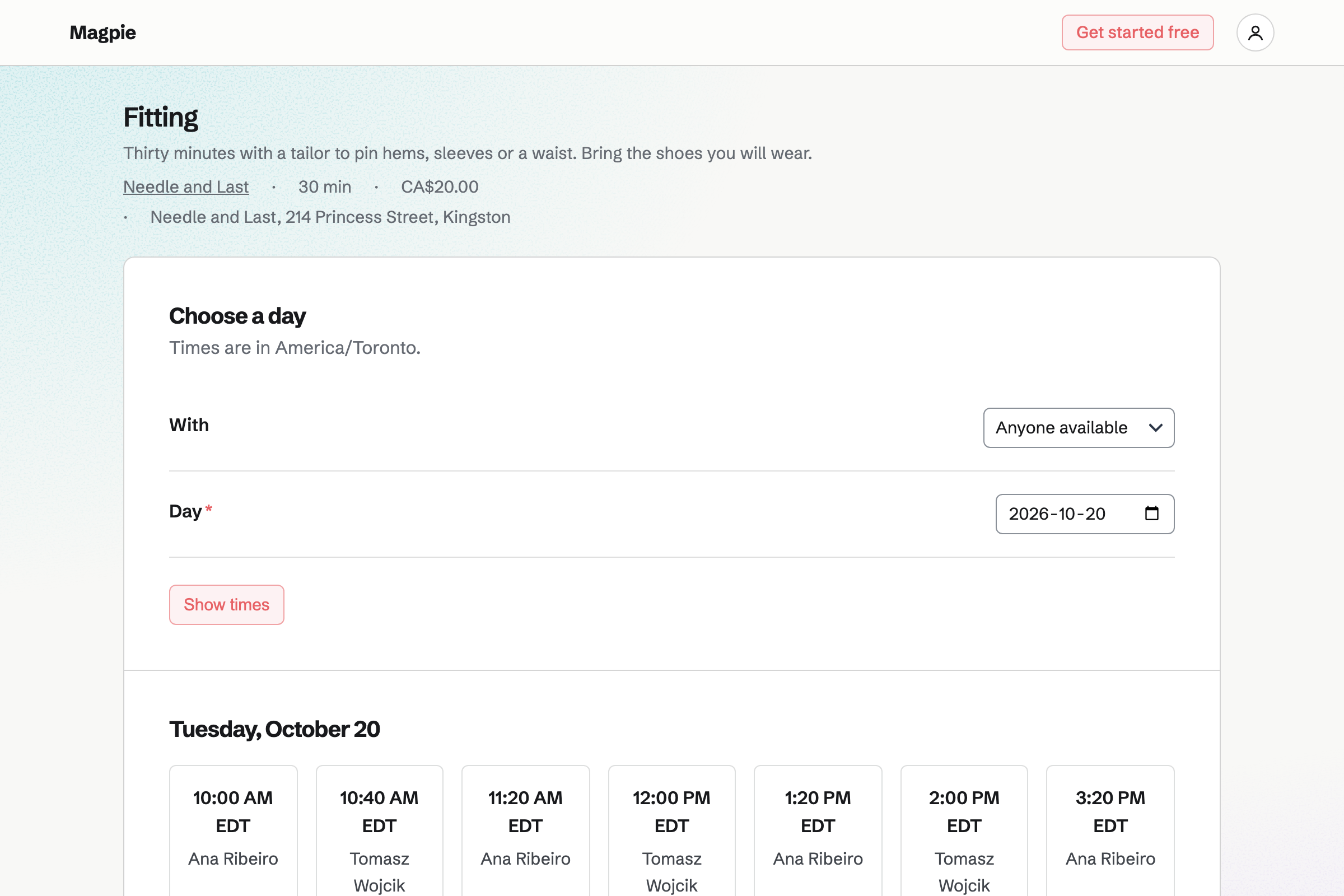
Appointments gives the shop a booking page. Each service has its length, its price and the people who do it. A suit fitting might take 30 minutes with the tailor. A booking can need the fitting room too.
Customers choose a service, a person or anyone available, and a free time. Magpie will email them a confirmation with a link to reschedule or cancel. You add bookings taken by phone yourself.
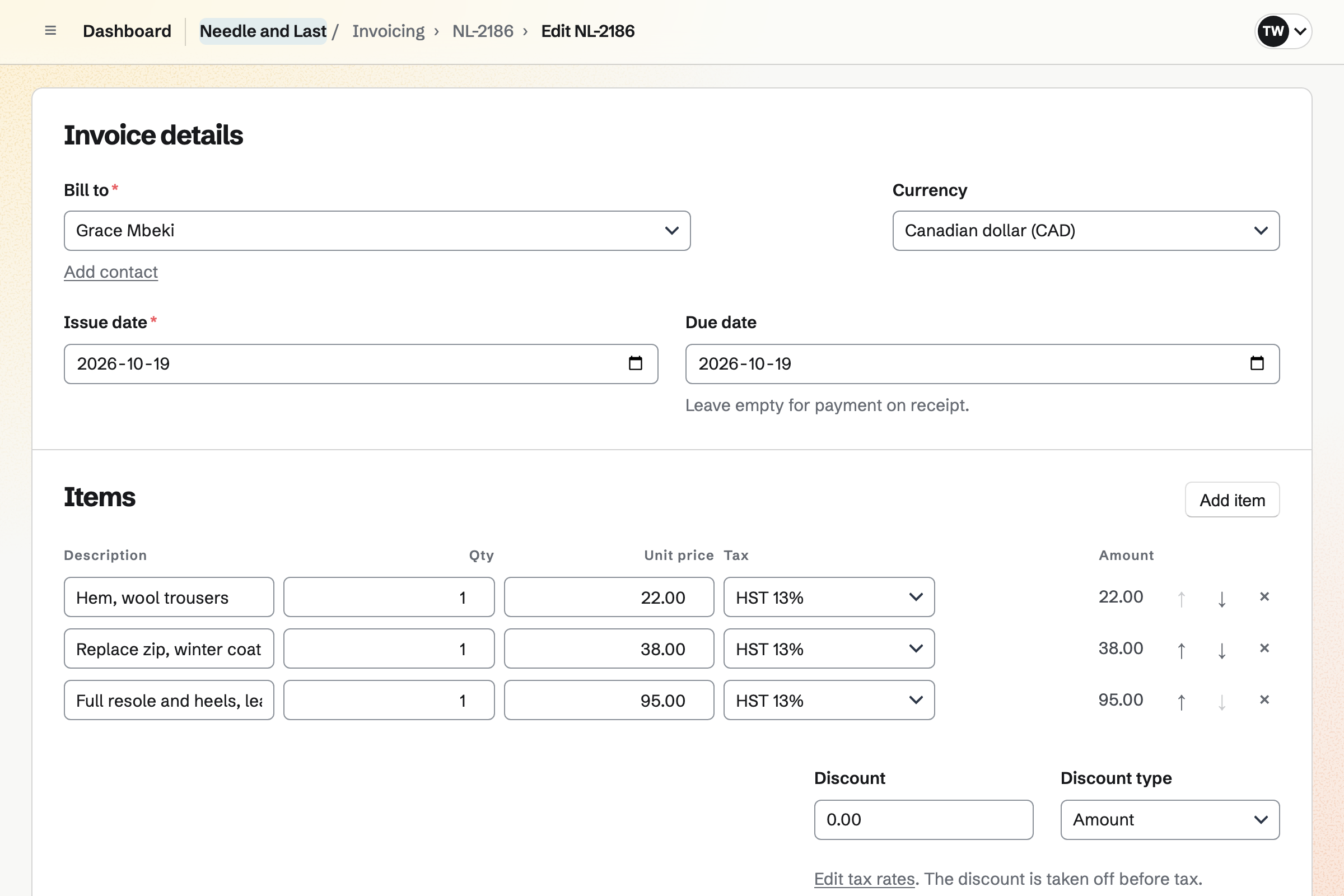
Invoicing bills each repair, with a line for each job and each part. A hem and a new zip are two lines. Sending it emails the PDF with a Pay online button. Your message can say the work is ready to collect.
A card payment goes to your own Stripe account, with no Magpie fee. Cash on collection is recorded by hand, in full or in part.
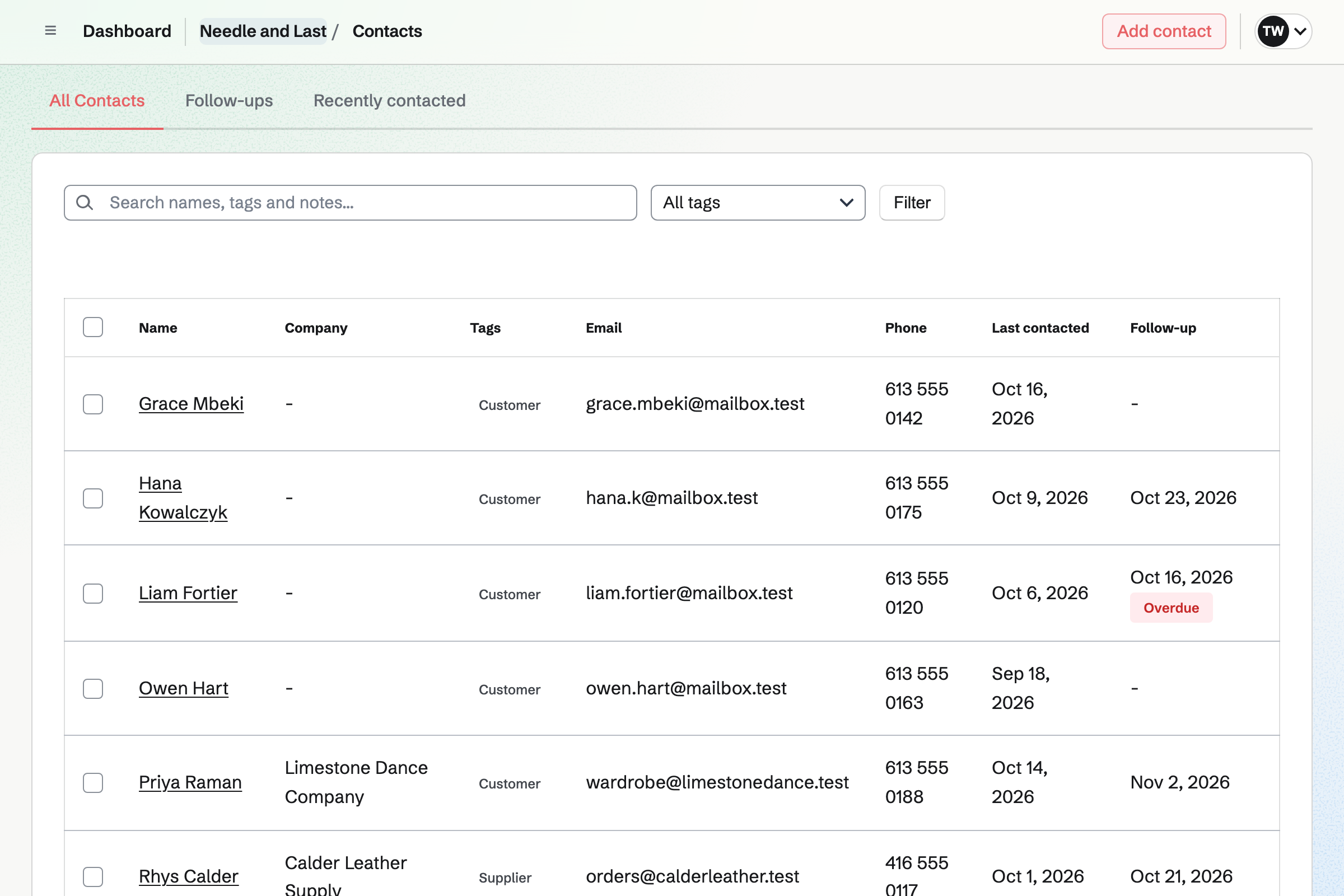
Contacts gives each customer a page of their own. A booking links it to them, or adds them if they are new. Its activity lists their appointments and invoices, newest first.
A pinned note keeps what you need each visit, such as an inseam or ring size. A follow-up reminds you to call on a date.
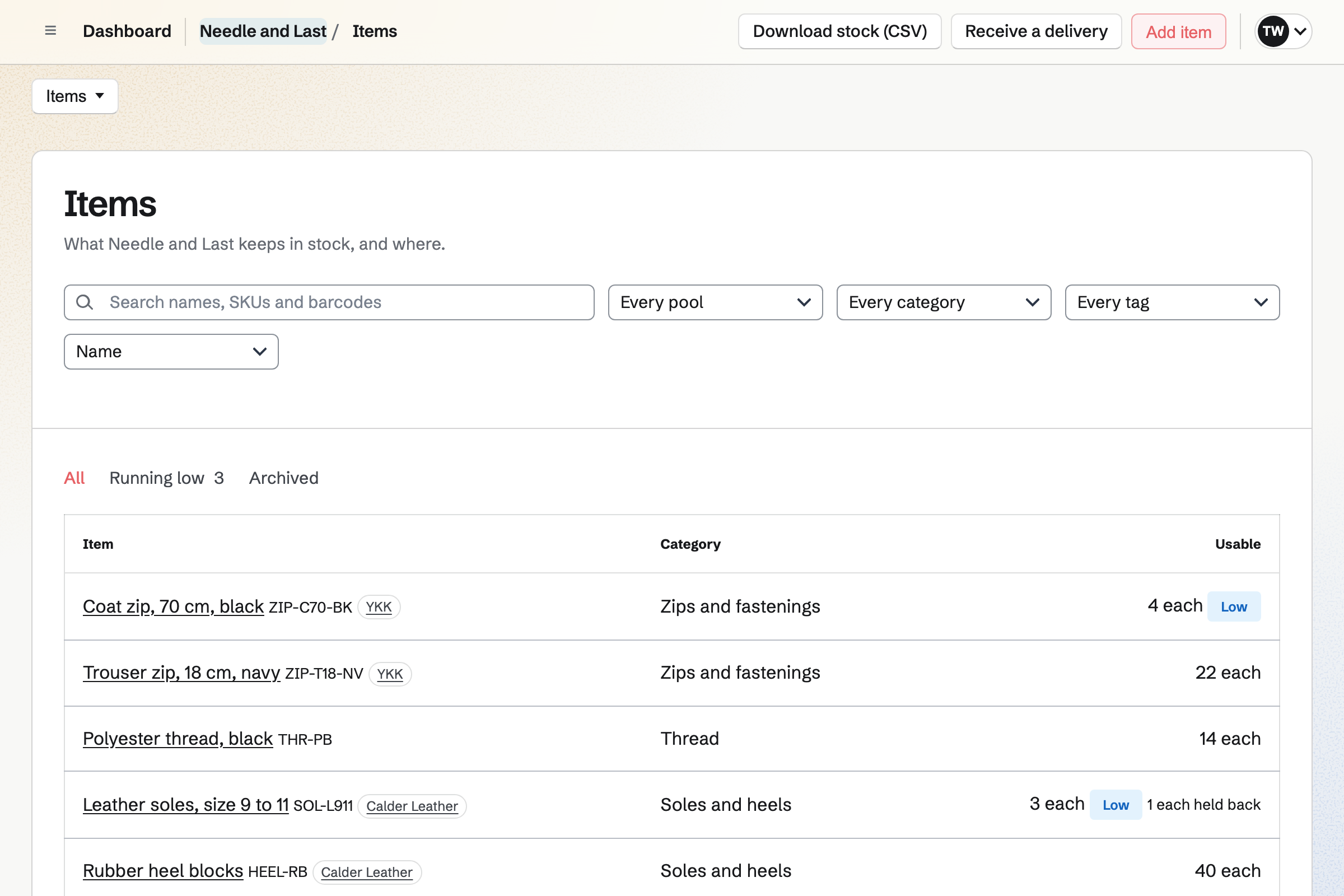
Inventory keeps each part, such as heel tips or batteries, with its unit, supplier and minimum. A part below its minimum is marked low. From the list of what is low, you start an order for each supplier.
Receiving a delivery adds it to stock at the price charged. When you fit a part, you take it out with a reason. A count corrects stock to what is on the shelf.
Store gives the shop an online shop for gift cards, shoe polish and screen protectors. Buyers pay on Stripe's checkout page, into your own Stripe account.
A gift card is emailed on the date the buyer chooses, and it never expires. A buyer can collect an order at the shop. When you mark it ready, Magpie will email them.
Nothing is typed twice.
The customer books a fitting on your booking page. It goes on the tailor's calendar, and the customer gets a contact.
You pin a note with their measurements to their contact page.
The zip and the lining come out of stock, with the job as the reason.
You send the invoice, with a message that the alterations are ready. The customer can pay by card from the email.
If they pay in cash when they collect, you record it on the invoice. You mark the appointment completed.
Each invoice and payment will be added to the books.
You create a team and invite the people who work there. Help: Create and manage a team.
You add each service with its length and price, and set your weekly hours. Help: Set up Appointments.
You add the shop's name, address, tax number and logo for invoices. Help: Send and configure invoices.
You connect your Stripe account, so customers can pay by card. Help: Connect Stripe to receive money.
You add each part with its supplier and minimum, then what is on the shelf. Help: Keep track of stock.
A shop with staff fits the Team plan, one price for up to 25 members. It has no limit on invoices or contacts. Someone working alone can use Pro, which removes the same limits.
Bookings are unlimited on every plan. A free team has up to 3 members, 100 contacts and 5 invoices a month.
Magpie adds no fee to invoice payments or online sales. Stripe's processing fee is taken from each. Prices are on the Pricing page.
A bike shop books services and repairs, sells bikes online and rents out a hire fleet.
A garage keeps each car's visits, sends estimates to approve and orders parts for each job.
A boutique sells clothes in the shop and online from one stock, with a rota.
Yes. Your booking page lists your services, each with its length and price. A customer chooses a service, a person or anyone available, and a free time. Magpie will email them a confirmation with a link to reschedule or cancel.
Yes. You add the booking yourself, with the service, the time and the customer's details. It goes on the same calendar as online bookings, so the time is not offered twice.
Yes. A service can need one room or bench. A time is offered only when the person and the room are both free. The booking reserves the room.
Yes. Each service can keep time free before and after it, such as 10 minutes. That time is not offered to the next customer.
Yes. You write them in a note on the customer's contact page and pin it. The pinned note stays near the top of the page, under Keeping in touch. Search covers your notes too.
Yes. Their contact page lists their appointments, cancelled and completed ones included. It lists their invoices, sent, paid or voided, and your notes and calls. The newest is first.
Yes. Each invoice email has a Pay online button. The customer pays by card into your own Stripe account. The payment is recorded on the invoice. Magpie adds no fee; Stripe's processing fee applies.
Yes. You record the payment on the invoice, with its date and method. A deposit at drop-off leaves the invoice partly paid until the rest comes in.
Yes. Each line uses one of your named tax rates, such as VAT or HST. Combined rates, such as GST and PST, are shown as separate lines. Magpie works out the tax you set up; registering and filing stay with you.
Yes. Sending an invoice lets you write your own message in the email. It can say the shoes are ready to collect. Reminders go out until it is paid.
Yes. Each part has its unit, its supplier and a minimum. You add a delivery to stock and take out what you fit, each with a reason. A part below its minimum is marked low.
Yes. Each supplier has the parts it sells, at its prices and in its packs. From what is running low, you start an order for each supplier. You email it from Magpie, then receive the delivery into stock.
Yes. Inventory keeps each part's average cost and the value of what is on the shelf. You can download the stock as a CSV file.
Yes. A gift card can have fixed amounts and a custom amount. The buyer can have it emailed to someone on a date they choose. A bought card never expires. You can also give one away, or issue store credit.
Yes. You add local pickup to the online shop. Buyers who choose it see the shop's address instead of a shipping form. When you mark the order ready, Magpie will email them.
Yes. You build the website from sections and write your services, prices and hours. A section can link to your booking page. The website can be at a Magpie address or at your own domain.
Yes. Each person has their own weekly hours and their own services. A customer can choose who, or anyone available. Each booking goes on that person's calendar.
Create a Magpie account and make a team for the shop.