
Astrologers and tarot readers
A tarot reader or astrologer working alone books readings by video, with no shop.
Oddities, curiosities and mystical shops
The shop, its readers and its counter staff work in one Magpie team.
Create account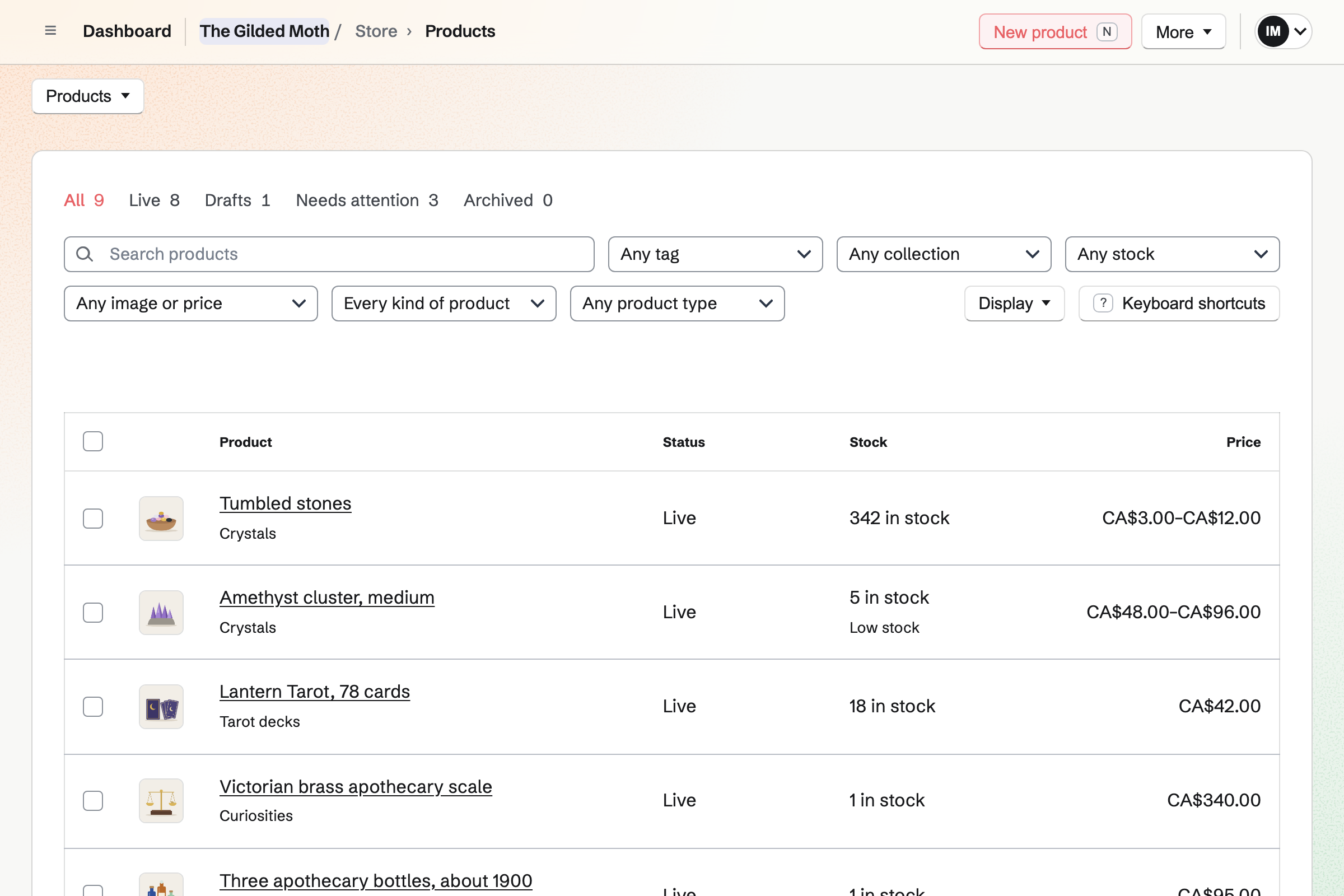
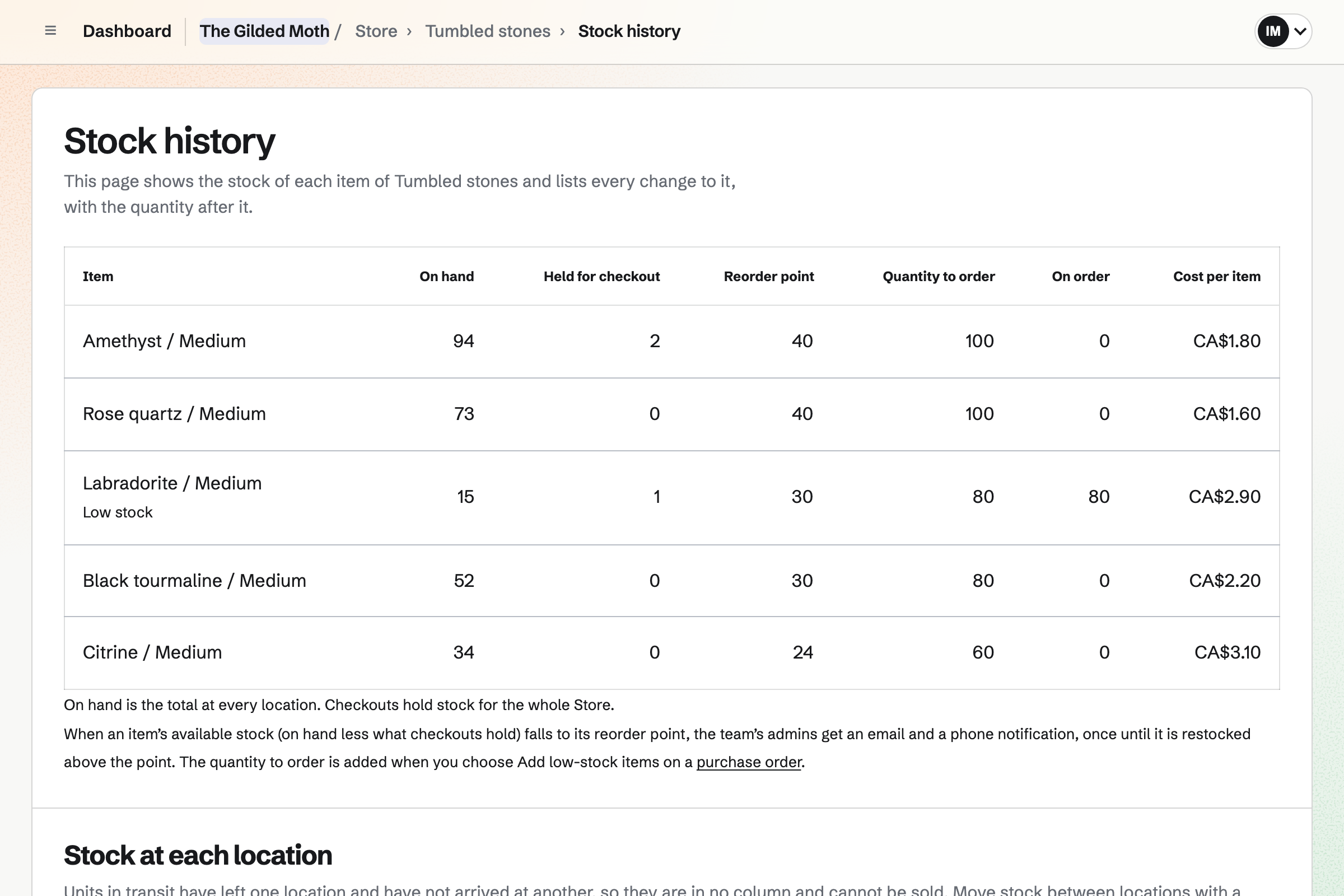
Store is the shop's online shop. Tumbled stones can be one product, with Stone and Size as its options. Each stone in each size has its own price and stock. Candles and dried herbs sell by size the same way.
A sale at the counter is recorded as an order, and takes from the same stock. When a stone falls to its reorder point, you will get an email.
A one-of-a-kind piece is a product with a stock of one and its own photos. Specifications describe it, such as Era: Victorian or Material: brass. Once it sells, online or at the counter, its page shows Sold out.
A collection can gather every curiosity by a rule. A new piece joins it as you add it. A live piece's page can start a social media post with its photos.
Appointments gives the shop a booking page for its readings. A 30-minute tarot reading and a birth chart reading each have a length and price. Customers choose the reading, then a reader by name or Anyone available.
They book without signing up first, with a name and an email address. The confirmation email lets them move or cancel until the notice you set. The booking page shows each price, and the customer pays at the shop.
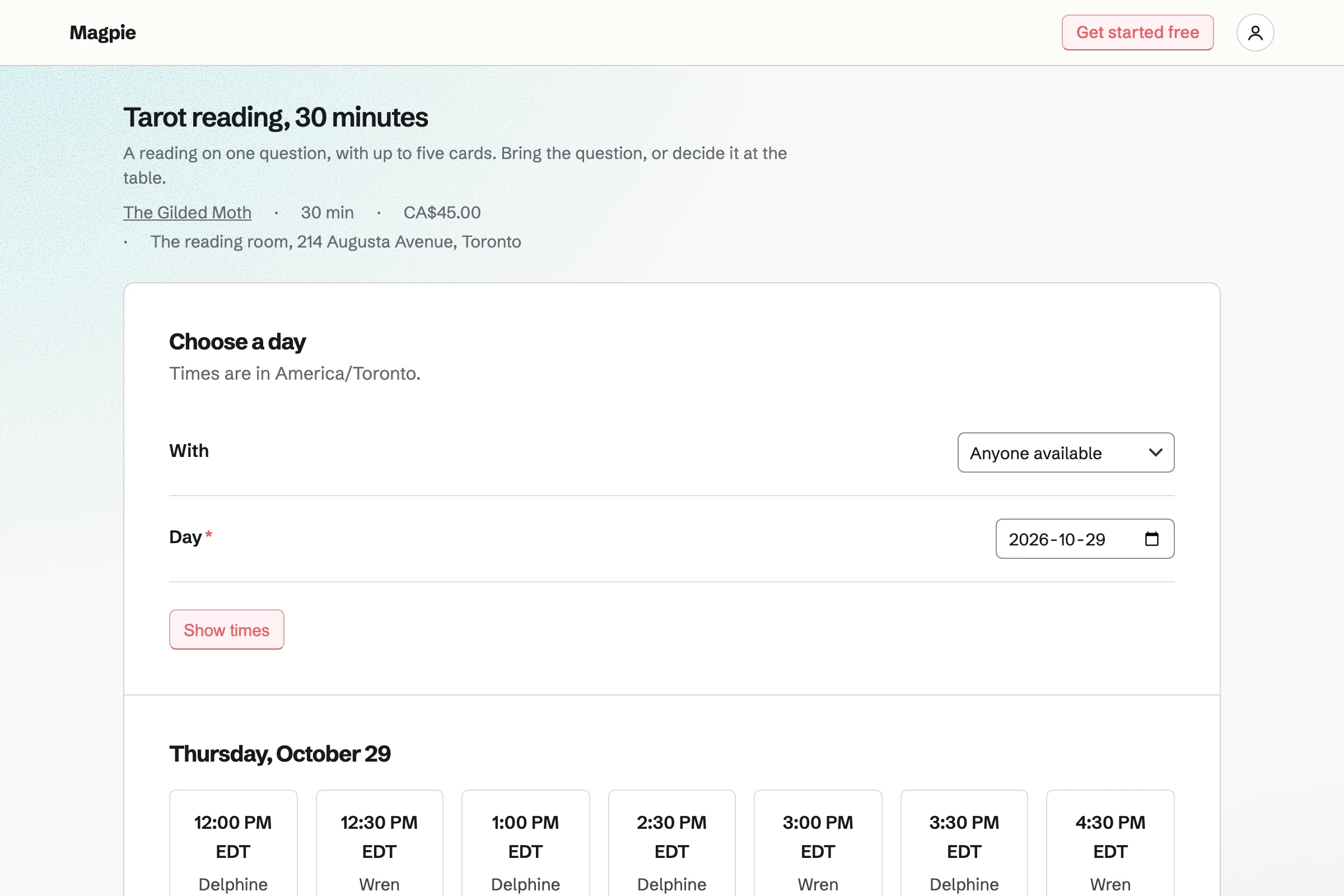
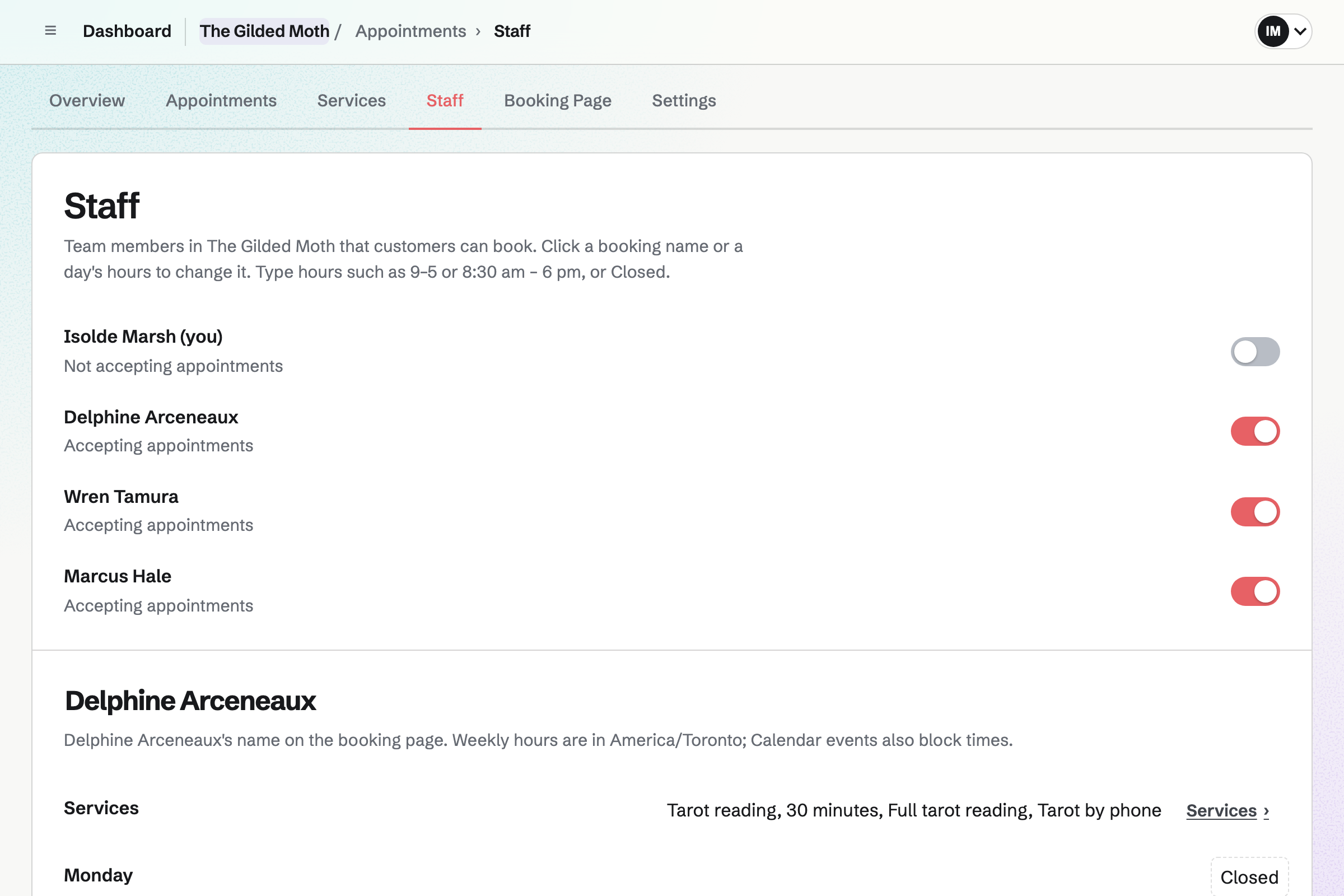
Each reader has their own weekly hours, such as Thursday evenings and weekends. Each reading names the readers who offer it. A time is offered only when that reader's hours and calendar leave it free.
A reading can need the reading room. Magpie offers a time only while the room is free, and each booking reserves it. Each reading also goes on its reader's calendar, named after the customer.
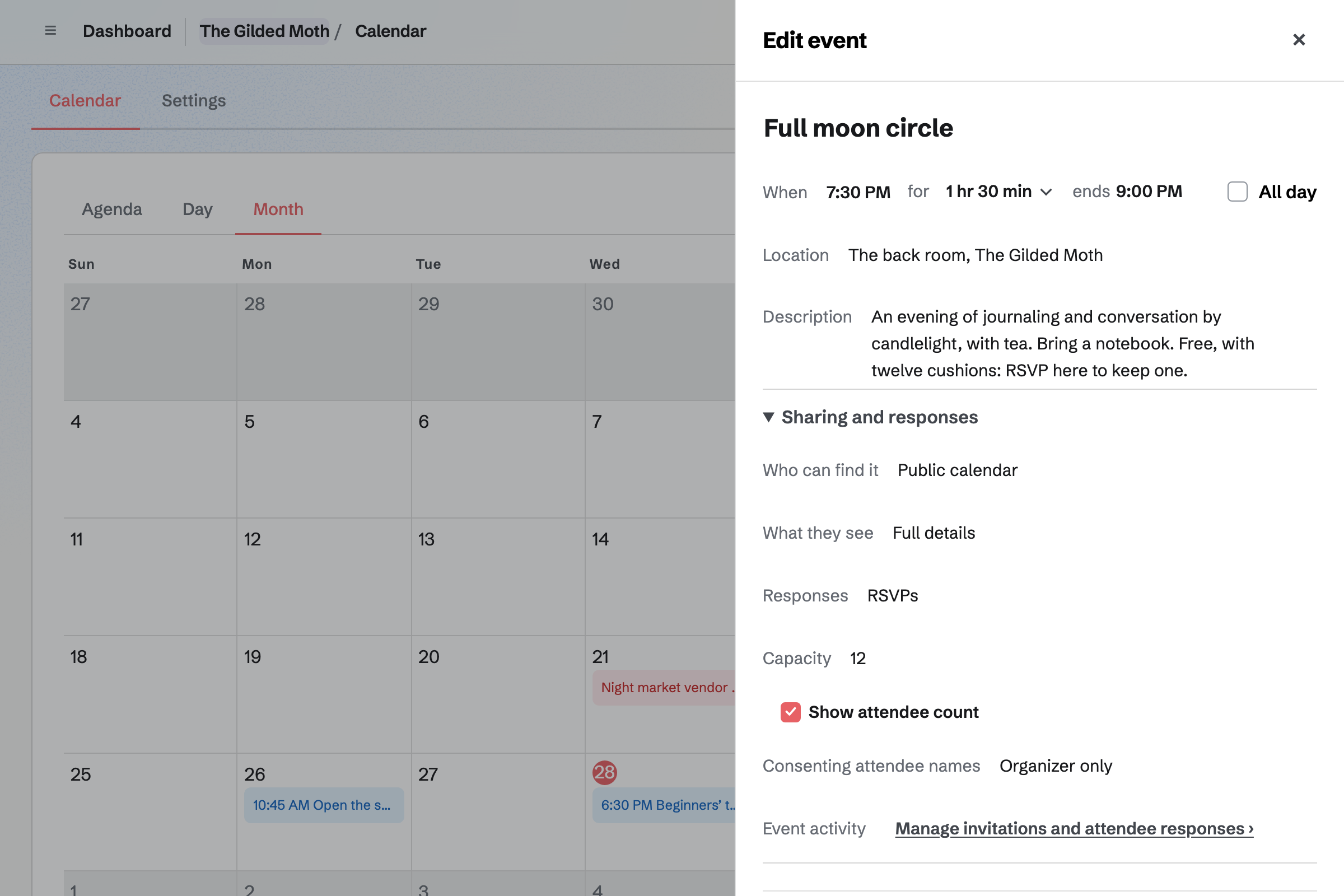
Calendar gives the shop a public calendar of its evenings. You turn on RSVPs and set a capacity, such as twelve cushions in the back room. The event's page says when it is full.
People RSVP while signed in to Magpie, and can change their answer. Each date is its own event, such as each month's full moon circle. Sharing an event starts a social media post about it.
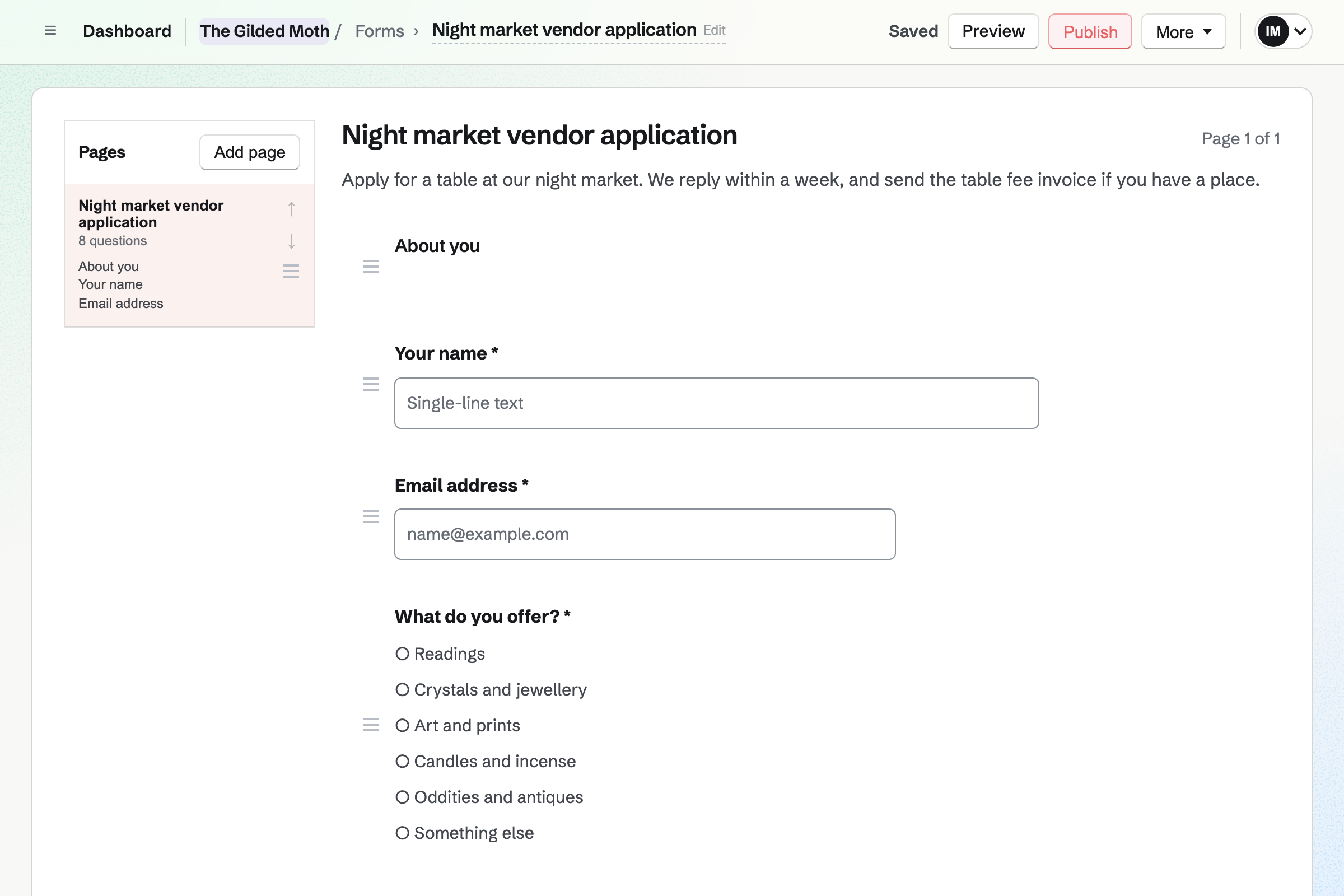
Forms builds the fair's vendor application. It asks what each vendor offers and the table they need. A File question takes a photo of their table. Each application is emailed to you and kept in one list.
You mark each one Reviewed or Archived, and close the Form when the tables are gone. A paid Form takes a tarot class's fee by card. Each response shows Paid.
Newsletter gives the shop a sign-up page, and each subscriber confirms by email. Checkout can ask online buyers to subscribe too. You write each issue, send yourself a test and schedule it.
One issue can carry the new decks, the next full moon circle and the fair's date. Its web copy can start a social media post.
A customer buys a tarot deck online, and ticks the box to hear the shop's news.
They become a subscriber when the order is paid. The month's email lists the beginners' tarot class.
They sign up on the class's Form and pay the fee by card.
They book a reading with the reader who taught the class. The reading room is reserved for it.
The booking adds them to your contacts, with each reading they book.
The deck's sale and the class fee are in the books.
You create a team and invite your readers and counter staff. Help: Create and manage a team.
You choose who takes readings, set each reader's hours and add each reading with its price. Help: Add staff and set appointment hours.
You add the reading room with its hours, and choose it on each reading. Help: Add resources and set their hours and rules.
You add crystals, decks and candles with their options. Each oddity has a stock of one. Help: Create products, options, and inventory.
You connect your Stripe account, so customers and vendors can pay by card. Help: Connect Stripe to receive money.
A shop with readers fits the Team plan, one price for up to 25 members. Each reader who takes bookings joins the team. A free team has 3 member places, counting you.
The Team plan has room for 5,000 calendar events, and a free team for 100. It has higher newsletter limits too.
Magpie adds no fee to your shop's sales or to invoices. On a paid Form for a class, Magpie's fee is 1% of each payment. Stripe's processing fee is taken from each card payment. Prices are on the Pricing page.
A tarot reader or astrologer working alone books readings by video, with no shop.
A thrift or vintage shop sells second-hand pieces, each one once, with no readers or classes.
A gift or home goods shop sells new stock in sizes and colours, with no readings.
A bookshop sells books online and at the counter, and fills author events and launches.
A jeweller sells one-off pieces, and takes custom commissions and repairs at the bench.
A maker sells their own work from a studio shop and online, and runs workshops.
A massage or wellness practice books treatments by therapist and room.
A tattoo studio books each artist by name, and takes a deposit for a session.
A yoga or dance studio fills a weekly timetable of classes.
A market organizer takes stall applications and pitch fees for a market that runs all season.
Yes. Customers choose the reading, then a reader by name or Anyone available. The booking page offers only the times that reader is free. Anyone available gives the time to the first free reader who offers that reading.
Yes. Each reader has their own weekly hours, such as 4 to 9 on Thursdays. A day can be Closed. An event on a reader's calendar takes that time off the booking page.
Yes. Each reading is a service with its own length, price and description. Each service names the readers who offer it. A reader who only does birth charts is offered only for those.
Yes. The reading room is a resource with its own open hours. A reading that needs it is offered only while the room is free. Each booking reserves it. Moving or cancelling the reading moves or frees the room.
Yes. They give a name and an email address, and a phone number if they like. They get a confirmation email with the reading, the reader, the time and the place.
Yes. The confirmation email links to a page for that reading. They can choose another free time with the same reader, or cancel. Once the notice you set has begun, the page asks them to contact the shop instead.
Yes. You can book a reading for someone at the counter or on the phone. The time is checked like one from the booking page. The customer gets the same confirmation email.
Yes. A phone reading is its own service, and its location can say By phone. The booking page asks for a phone number, which the customer can leave. The reading is on the reader's calendar like any other.
Each booking adds an event to the reader's calendar, named after the reading and the customer. The Appointments list shows today's and upcoming readings, with each one's reader. Notes on a booking are for the shop, and the customer never sees them.
Yes. A product such as Tumbled stones has options, such as Stone and Size. Each combination has its own price, stock, SKU and barcode. Shoppers can filter the shop by an option, such as the stone.
Yes. Each piece is a product with a stock of one and its own photos. Specifications describe it, such as Era: Victorian or Material: brass. Once it sells, its page shows Sold out.
A sale at the counter is recorded as an order and takes the piece from stock. Your online shop then shows it as Sold out. A checkout already in progress holds the piece while it finishes.
You start a new order, pick the items and record how the customer paid. The order is created paid, and the items leave stock.
Each item can have a reorder point. When it falls to its point, you will get an email. The Stock page lists every low item, furthest below its point first.
Yes. A purchase order goes to the supplier by email or as a PDF. Add low-stock items puts everything that is low on it. Receiving the delivery adds the stock at its cost.
Yes. Each location holds its own stock, and a product's stock page shows what each one has. A transfer moves stones from the back room to the shop floor. A buyer can buy an item while any location has it.
Yes. An item set to sell when out of stock takes orders before the deck arrives. Payment is taken when the customer orders. An expected ship date is shown on the product page and in their order emails.
Yes. When an item with counted stock sells out, its page asks for an email address. Magpie sends one email when it can be bought again. You see how many people are waiting.
Yes. You add local pickup with the shop's address and pickup times. When you mark an order ready, Magpie emails the customer the address and times.
Yes. A gift card sells fixed amounts and, if you choose, a custom amount. The buyer can have it emailed to someone on a date they pick. The holder spends it in your online shop.
Yes. You put the circle on the shop's public calendar and turn on RSVPs. A capacity stops RSVPs when the room is full, and the event's page says so. People RSVP while signed in to Magpie, and can change their answer.
Yes. A paid Form charges one fee by card on Stripe's page. Each person answers its questions and pays, and the response shows Paid. You close the Form when the seats are gone. Magpie's fee on a paid Form is 1% of each payment.
Yes. The fair is a public event with its own page, its date, its place and About. It is listed on your public calendar. Sharing it starts a social media post that names it.
Yes. A Form asks what each vendor offers and the table they need. A File question takes a photo of their table, up to 10 MB. Each application is emailed to you. You mark it Reviewed or Archived, and close the Form when the tables are gone.
Yes. An invoice bills each vendor for their table, emailed with a Pay online button. They pay by card into the shop's Stripe account, and Magpie adds no fee. Reminders can go out until it is paid. Cash taken on the night is recorded on the invoice by hand.
Yes. Newsletter gives the shop a sign-up page, and each subscriber confirms by email. Checkout can ask online buyers to subscribe too. You write each issue, send yourself a test and schedule it.
Yes. A live piece's page can start a social media post with its photos. Posts go to Bluesky, Mastodon and LinkedIn at the time you choose. For Instagram, Magpie reminds you and opens the post filled in.
Yes. Staff Scheduling plans the week's counter shifts, and each person sees their own. You type each shift's times as you would say them, or copy last week.
Yes. A CSV file adds products as drafts, one row for each variant. The import lists every change before anything changes. The whole shop exports as a CSV file too.
Magpie adds no fee to your shop's sales or to invoices. Stripe's processing fee is taken from each card payment. The rest goes to the shop's own Stripe account.
Create a Magpie account and make a team for the shop.