
Tailors, cobblers and repair shops
A tailor or cobbler books fittings online, and counts the zips and soles they fit.
Laundries and dry cleaners
The shop, its counter staff, pressers and driver work in one Magpie team. Each customer's orders and invoices are on their own page.
Create account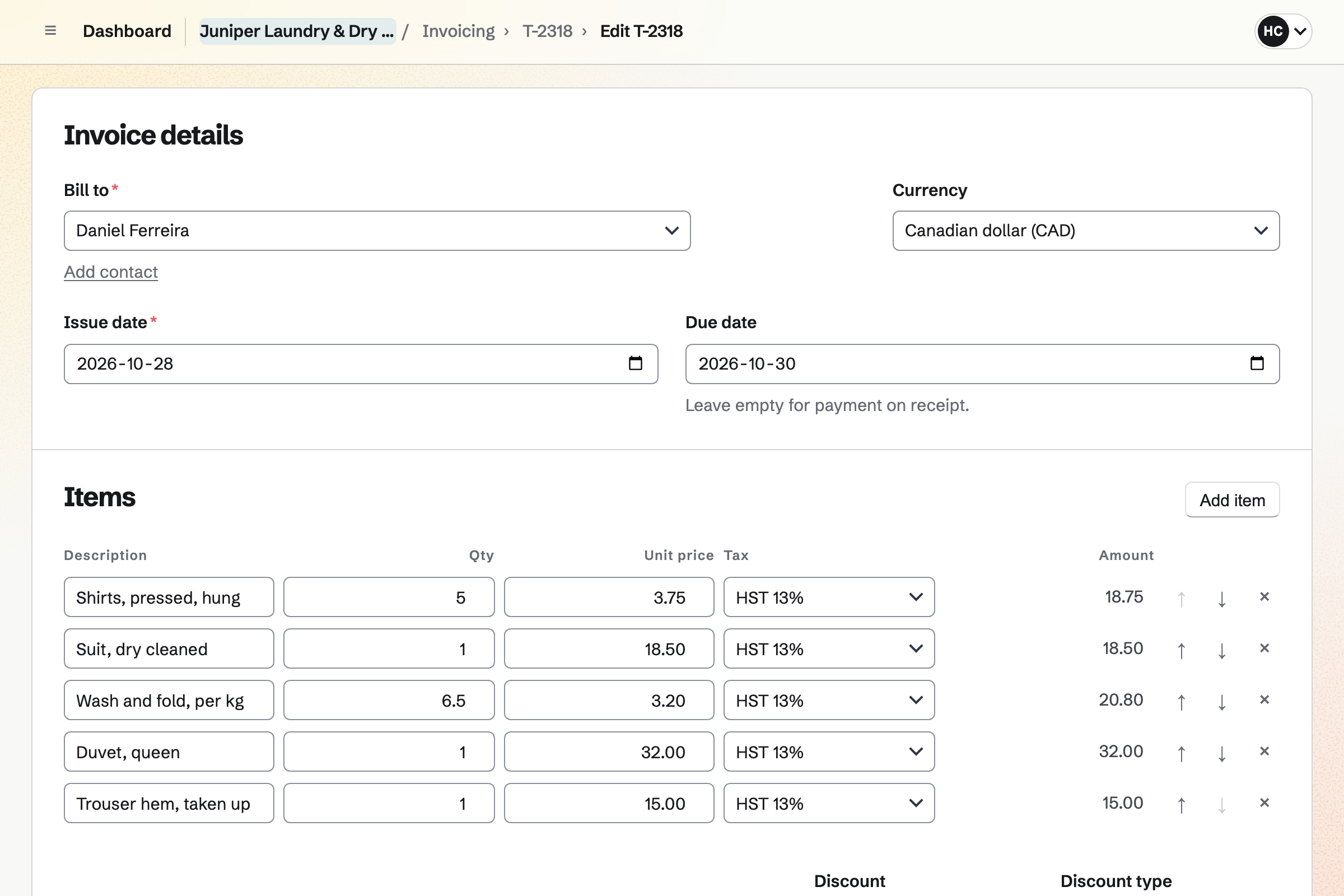
Invoicing bills each order taken in at the counter. Five shirts and a two-piece suit are two lines. Wash and fold is a line in kilos, such as 6.5 kg. Each ticket's number can start with a prefix, such as T-.
The due date can be the day the order is ready. You can email the ticket at the counter. You send it again with a message when the order is ready. The customer pays by card from the email, or in cash at collection.
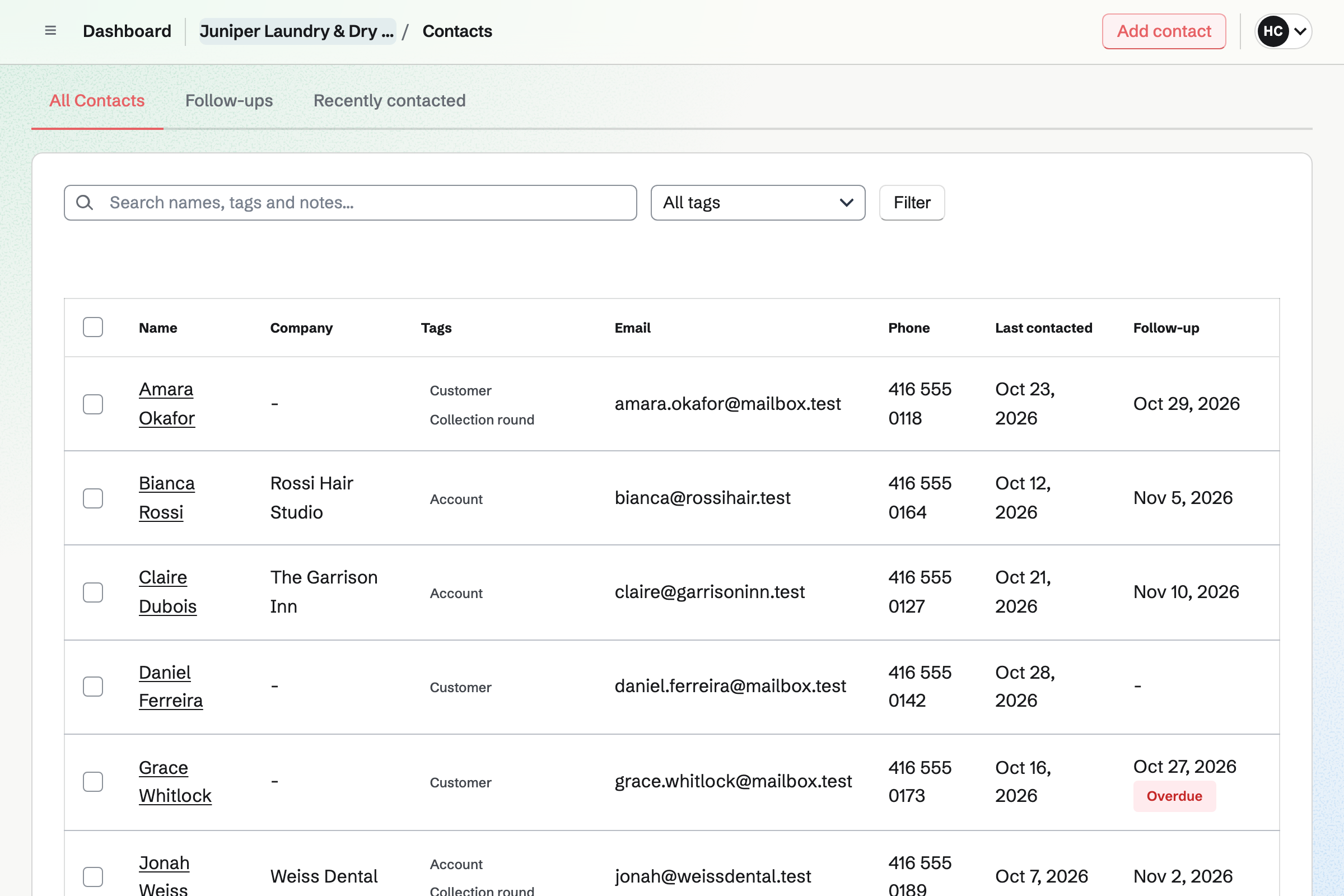
Contacts keeps each customer with their phone number and address. A pinned note keeps what the counter needs: light starch, shirts on hangers, no fragrance. Their page lists every invoice, newest first.
A restaurant or a hotel has its own payment terms, such as 30 days. Every invoice to it is due on them. A tag such as Account or Collection round filters the list.
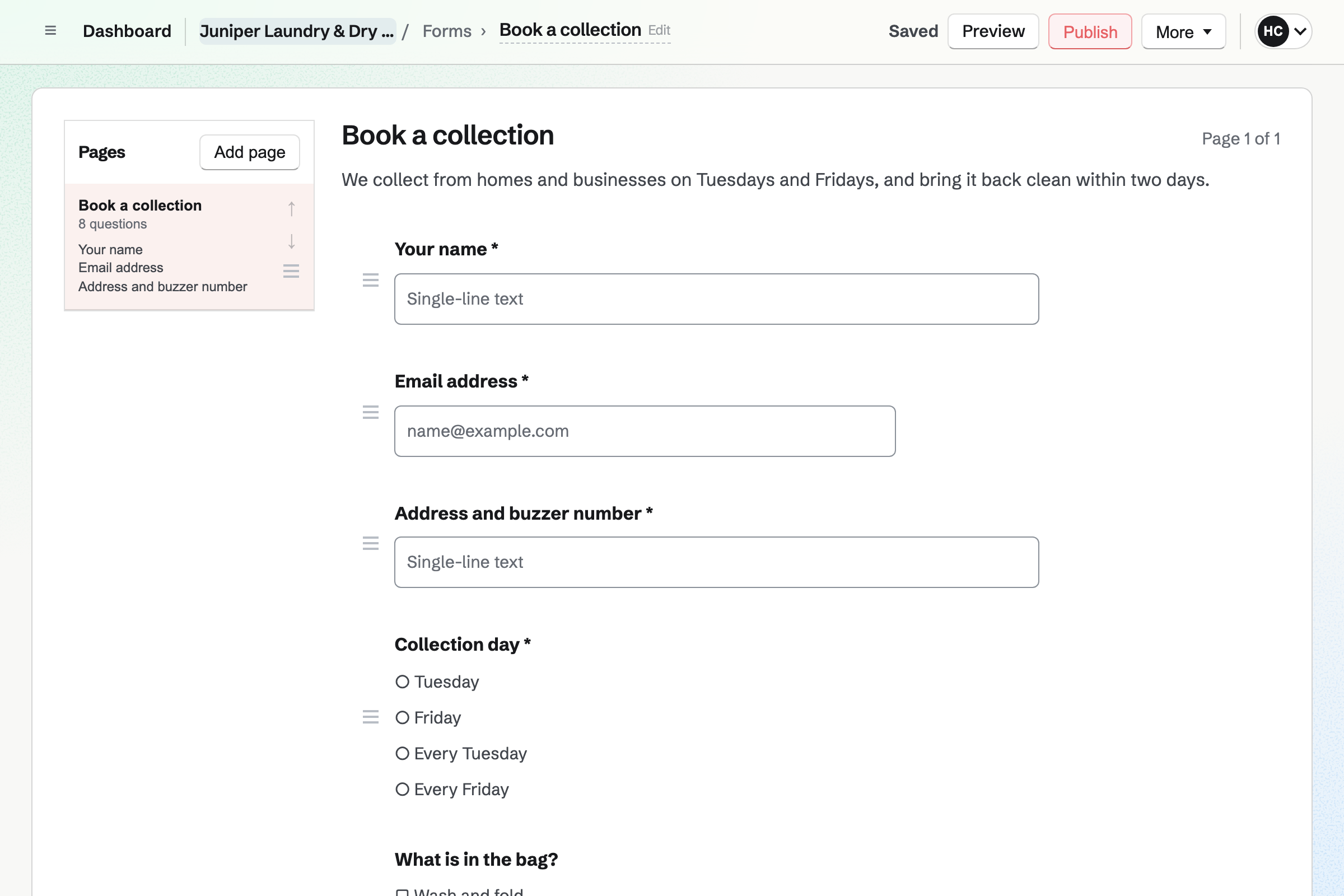
Forms builds your collection request. It asks for the address, the buzzer, the day and what is in the bag. Customers send it without signing up first.
Each request is emailed to you, and the responses are kept in one list. A File question takes a photo of a stain or a care label.
To-dos keeps the round. Each regular stop is a To-do that repeats every week. You type it as you say it: 14 Elm Avenue, collect, every Tuesday. You assign the round to your driver.
The driver's Today lists the stops due, and they drag them into the order they drive. Ticking one off schedules next week's. A stop that was missed says Overdue and stays on Today.
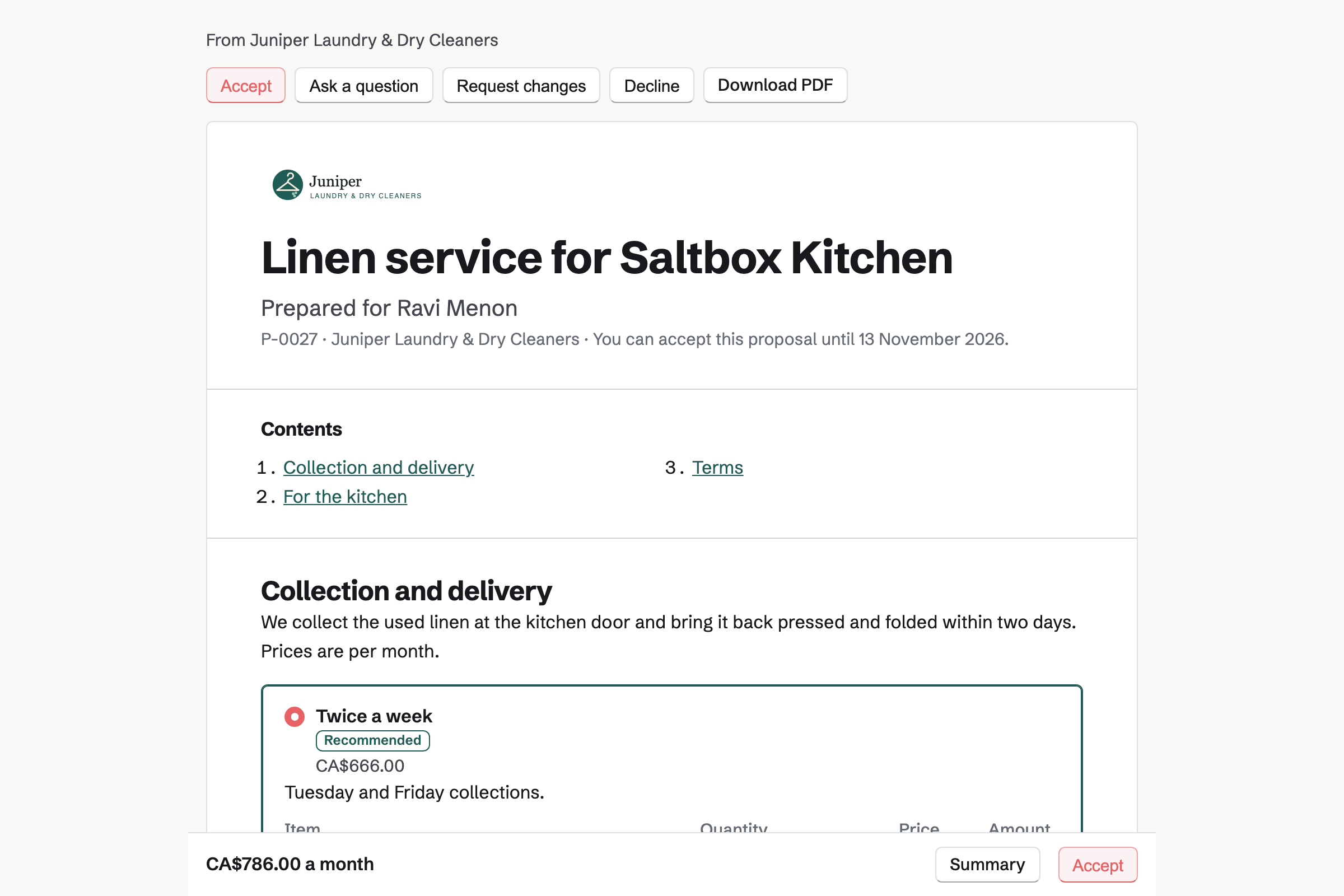
Proposals sets out your linen service as packages, such as weekly or twice-weekly collection. Each line is billed monthly. The manager chooses, signs on the page and can save a card for the monthly invoices.
When it is accepted, Magpie starts a recurring invoice for the monthly lines. Each invoice is issued on its date. It is charged to the saved card, or paid from its email. You see when the proposal is opened.
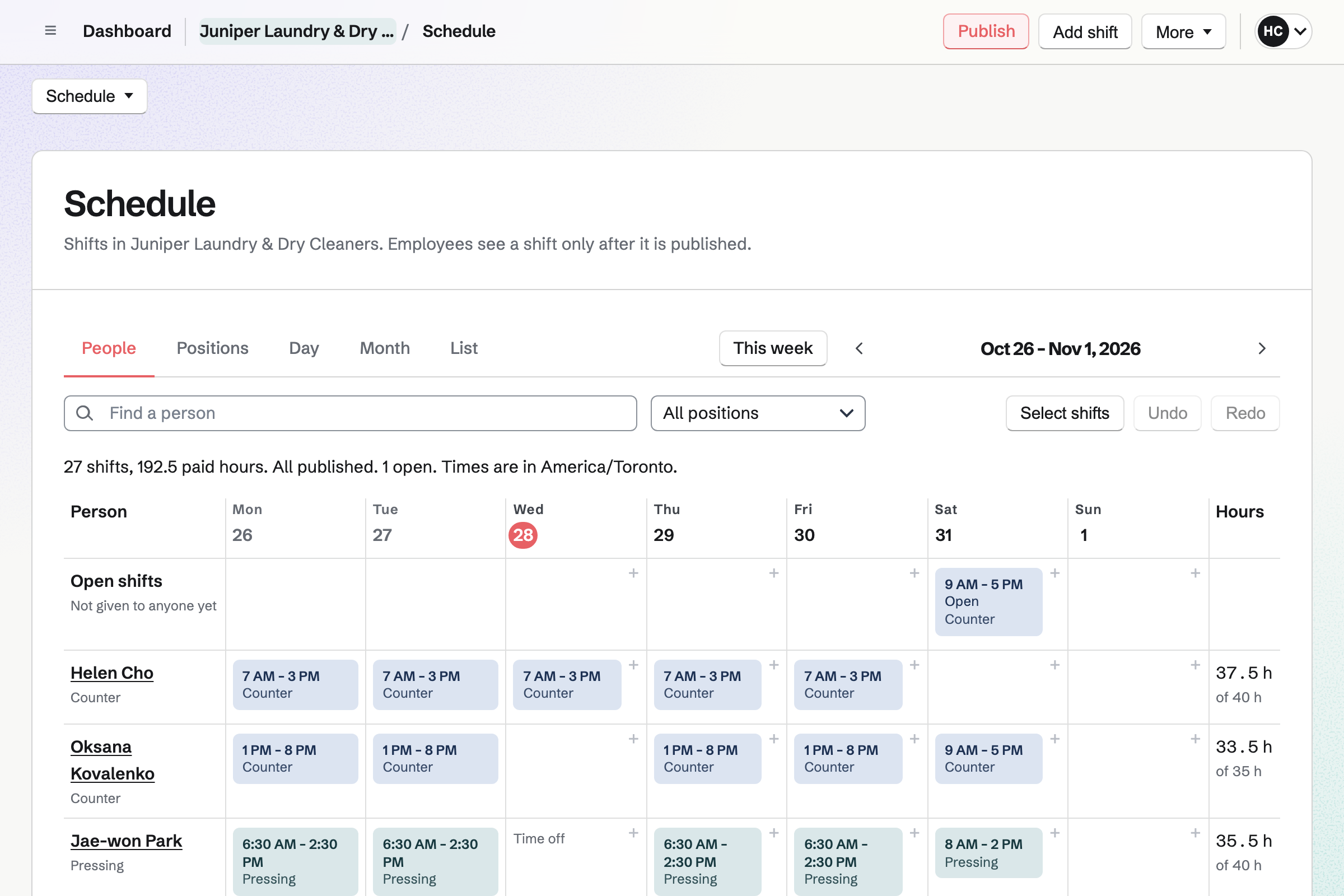
Staff Scheduling plans the week by the positions you name, such as Counter, Pressing and Driver. You type a shift's times as you say them, such as 7-3, or copy last week. Publishing the week shows each person their own shifts.
A presser can offer a coworker a swap, or ask for time off. You choose whether a swap needs your approval.
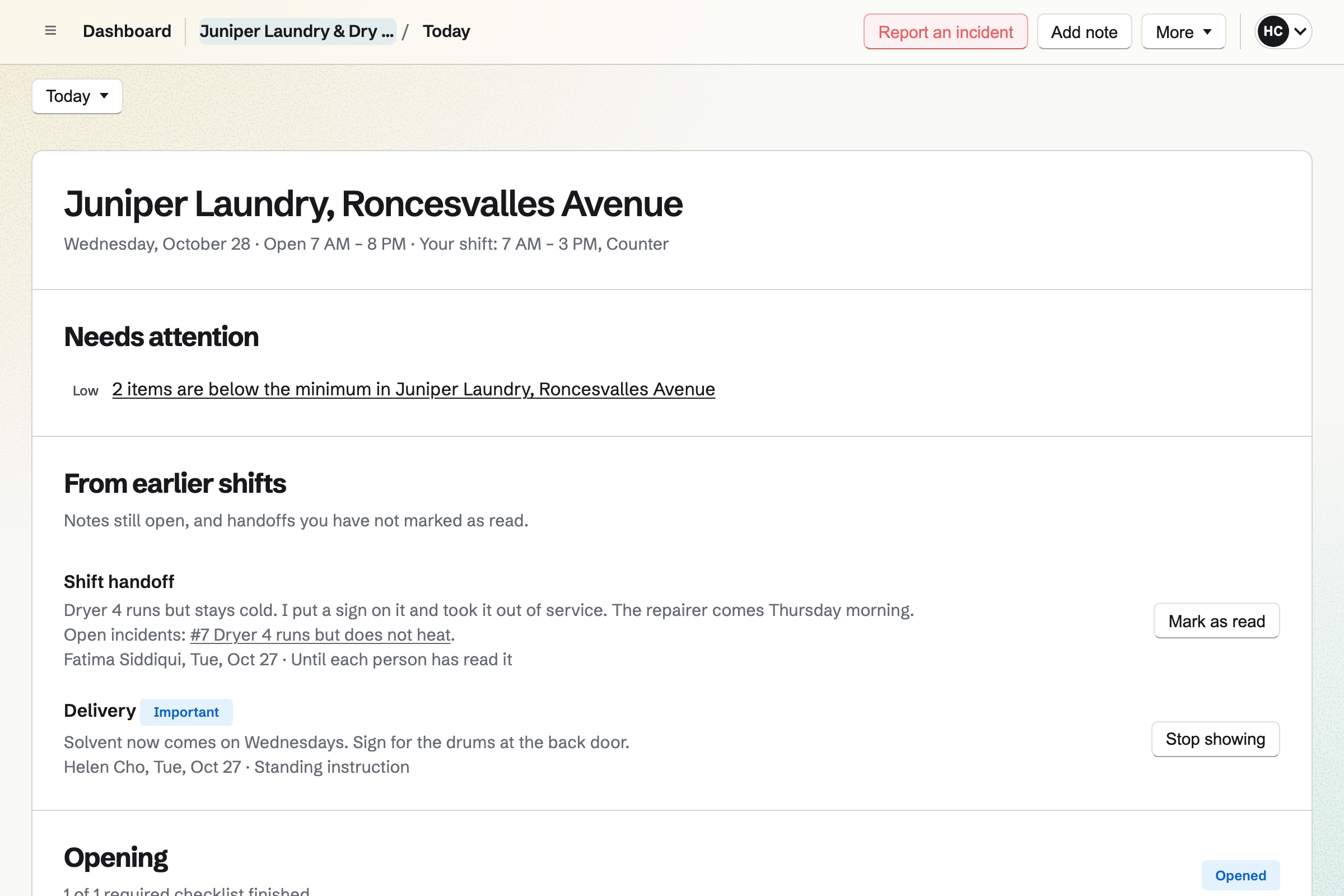
Daily Operations holds the shop's routines, timed from your opening hours. It starts with Opening and Closing, and you can add steps. A step can be cleaning the lint screens or checking the boiler. It can ask for a photo or a number.
When a machine fails, staff report an incident and can take it out of service. A note for the next shift stays on Today until it is read.
Asset Tracker keeps each machine with its tag, serial number, model and condition. The manual and the purchase receipt are attached to it. Its warranty's end date is on its page.
Start maintenance records a dryer in for repair, with the date it is expected back. A routine can be linked to the machine it looks after. Reports count the machines in maintenance.
Each step starts from what the one before it made.
The restaurant's manager asks for a collection on your Form, with the days that suit.
They choose twice-weekly collection, sign on the page and save a card.
Tuesday and Friday go on the driver's round, each repeating every week.
Magpie issues each month's invoice from the proposal and charges the saved card.
Chef whites outside the service go on an ordinary invoice, due on the restaurant's terms.
Each invoice and payment is added to the books.
You create a team and invite the people who work there. Help: Create and manage a team.
You add the shop's details, a prefix for the numbers and your tax rate. Help: Send and configure invoices.
You connect your Stripe account, so customers can pay by card. Help: Connect Stripe to receive money.
You add Counter, Pressing and Driver as positions, then the week's shifts. Help: Plan and publish a staff schedule.
You set the shop's hours and its opening and closing checks. Help: Run each day's opening, closing and checks.
A laundry with staff fits the Team plan, one price for up to 25 members. It has no limit on invoices or contacts. A free team creates 5 invoices a month, so a busy counter needs the Team plan.
Someone who is only on the rota takes no member place. Magpie adds no fee to invoice payments. Stripe's processing fee is taken from each card payment.
A tailor or cobbler books fittings online, and counts the zips and soles they fit.
A cleaning company sends cleaners to each client's site, with a checklist for every visit.
A window cleaner keeps a round of houses, each due again every four or eight weeks.
A corner shop sells at the counter, checks its chillers and orders from its wholesalers.
Yes. Each line on an invoice has a quantity and a price. Five shirts at your shirt price is one line. Wash and fold is a line in kilos, such as 6.5 at your kilo price. Quantities can have up to four decimal places.
Yes. Every invoice has its own number. Invoicing settings set a prefix and the next number, so a ticket reads T-2318. The number is fixed when the invoice is issued. You can search for an invoice by its number or the customer's name.
Yes. Sending an invoice lets you write your own message. It can say that the shirts are ready to collect. An issued invoice can be sent again with a new message. The email carries the PDF and a Pay online button.
Yes. The invoice email has a Pay online button. The customer pays by card on their own phone, into your own Stripe account. The payment is recorded on the invoice, and Magpie emails them a receipt.
Yes. Record payment takes the amount, the date and the method, such as Cash. A part payment at drop-off leaves the invoice partly paid. The rest is recorded when the customer collects.
Yes. Duplicate makes a new draft from any invoice, with the same customer and lines. It takes a new number and today's dates. You change the quantities and issue it.
Yes. An invoice emailed from Magpie gets payment reminders on your team's schedule until it is paid. Each reminder shows the amount due and the Pay online button. You can turn reminders off for one invoice.
Yes. A note on the customer's contact can be pinned near the top of their page. It can say light starch, shirts on hangers or no fragrance. Search covers your notes too.
Yes. Their contact page lists their invoices, sent, paid or voided, with what is still owed. Your notes and calls are there too, newest first.
Yes. A customer's contact can have its own payment terms, such as 30 days. Every invoice to it is due on them. You can bill the month's deliveries on one invoice, with a line for each. Reminders go out until it is paid.
Yes. A proposal sets out the service as packages, such as weekly or twice-weekly collection. Its lines are billed monthly. The manager chooses, signs on the page and can save a card for the monthly invoices.
Yes. The monthly lines of an accepted proposal start a recurring invoice. Magpie issues it on its date and emails it. With a saved card, the card is charged as it is issued. You can pause the schedule, change its lines or end it.
Yes. Your collection Form asks for the address, the day and what is in the bag. Anyone with its link can send it without signing in. Each request is emailed to you and kept in a list.
Yes. Each regular stop is a To-do that repeats on its day, such as every Tuesday. You assign it to the driver. Their Today lists the day's stops, and they drag them into the order they drive.
Yes. Staff Scheduling plans the week with the positions you name, such as Counter, Pressing and Driver. You type times as you say them, such as 7-3, or copy last week. Publishing shows each person their own shifts.
Yes. Someone proposes swapping a shift with a coworker, who accepts or declines. You choose whether a swap then needs your approval. Requests for time off come to you to approve or decline.
Yes. Daily Operations gives each day its Opening and Closing checklists, timed from your hours. A step is ticked, passed or failed, or answered with a number or a photo. A checklist not done in time shows as overdue.
Yes. A routine can run every day, on chosen weekdays or once a month. Its steps can be cleaning each dryer's lint screen or checking that every washer drains. A step that fails can report an incident.
Yes. They report an incident and say which machine it is. Ticking Take it out of service shows the machine in maintenance in Asset Tracker. A shift lead puts it back when it is fixed.
Yes. Asset Tracker keeps each washer, dryer and press with its serial number, model and condition. Start maintenance records it in for repair, with the date it is expected back. End maintenance takes a note of what was done. Its receipt, manual and warranty date are on its page.
Yes. Inventory keeps each supply in its unit, such as litres, or one by one. Each has a minimum, and one below it is listed as running low. An order to the supplier starts from that list, and the delivery is received into stock.
Yes. A Kanban board keeps each longer job as a card. Its columns are yours to name, such as Taken in and Ready. A card holds photos, a due date and the person working on it. Comments record what the customer asked for.
Yes. Invoicing has named tax rates, such as HST or VAT, each with a percentage. Each line uses one of them or no tax. A combined rate such as GST + PST shows each tax on its own line.
Yes. Daily Operations and Staff Scheduling each have locations, with their own hours. Someone with a shift at a location opens its checklists first. Invoices, customers and the round are shared by the whole team.
Yes. Websites builds a site from sections, where you write your prices and hours. A section can link to your collection Form. The site can be at a Magpie address or at your own domain.
Yes. A QR code can open your published collection Form. A dynamic code can point somewhere else later, and counts its scans. Another code can join the laundromat's wifi.
Yes. Accounting adds each invoice when it is issued, and each payment on the day it arrives. Bank statements come in as CSV files. Each payment can be matched to its bank line.
Magpie adds no fee. Stripe's processing fee is taken from each card payment. The rest goes to your own Stripe account, and Stripe pays it out to your bank.
Create a Magpie account and make a team for the shop.