BambooHR compared with Magpie

BambooHR vs Magpie: an in-depth comparison

BambooHR and Magpie both help a business hire people, plan their time and pay them. They start from different places.

  1. BambooHR is an HR system built around a file for each employee. Hiring, onboarding, time off, performance reviews and an AI assistant are in the same account. It is built for a business with HR to run. Payroll and benefits administration are add-ons for employers in the United States.
  2. Magpie is one subscription for a small business's software. Its staff areas are Staff, Staff Scheduling, Hiring, Time Tracking and Payroll, beside Accounting, Invoicing, E-Signatures and the rest. It is built for someone whose staff are one part of running the business.
Create account
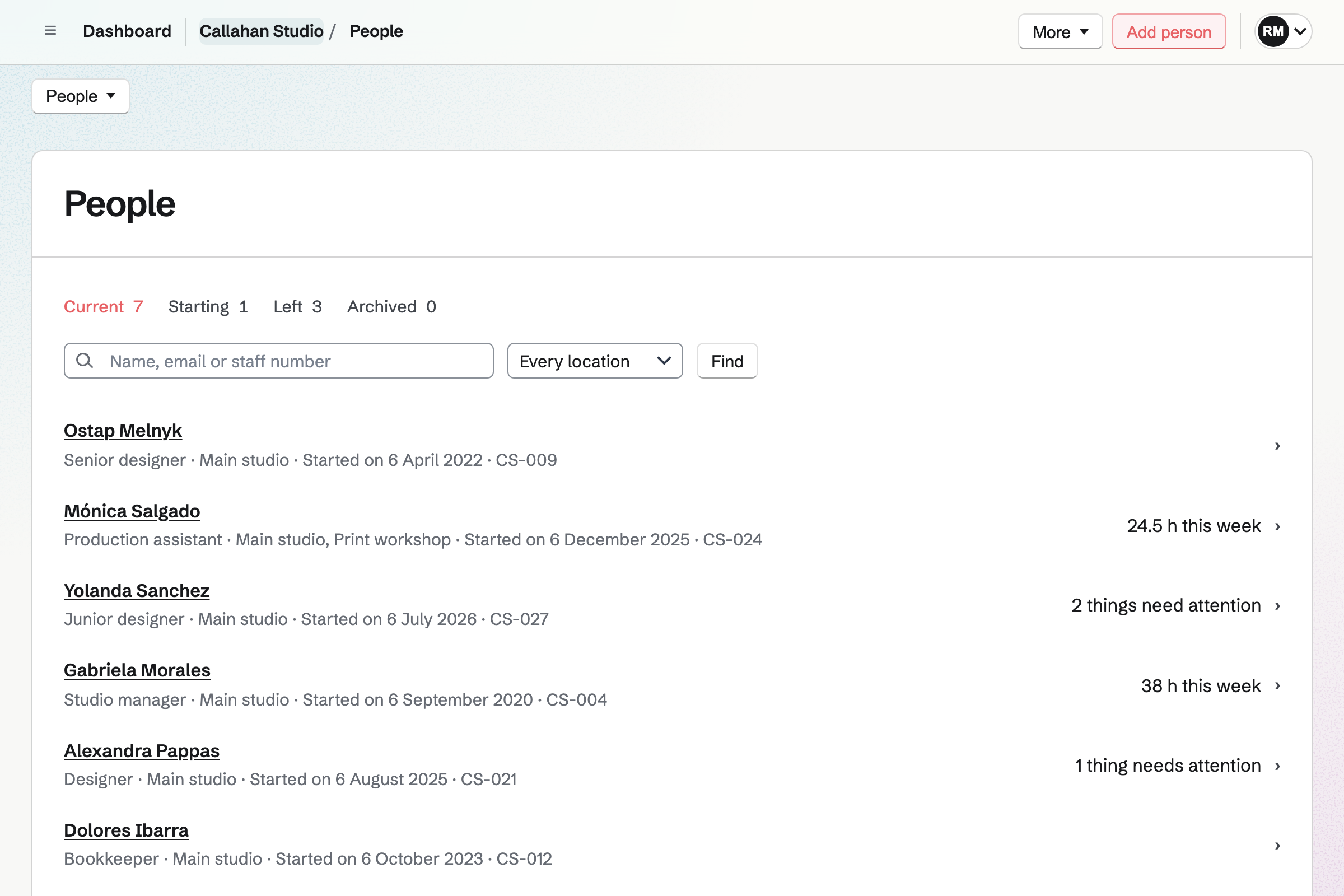
People in Staff for a fictional studio: the Current, Starting, Left and Archived tabs, a search by name, email or staff number, and each person with their job, location, start date and staff number, some with things that need attention or their rota hours this week.

How is Magpie different?

1. Staff files, the rota and payroll come with the rest of the business

One Magpie subscription includes the areas a small business would otherwise buy one at a time:

  • Staff for each person's file, documents, time-off balances, checklists and policies
  • Staff Scheduling for the rota, open shifts, swaps and availability
  • Hiring for a job board, candidates, interviews and scorecards
  • Time Tracking for hours, by project and client
  • Payroll for pay runs and payslips, with each pay run in Accounting
  • E-Signatures for offer letters and anything else to sign
  • Daily Operations for announcements each person marks as read, and Team chat for channels
  • Invoicing, Store, Websites, Mail and the other areas, in the same team

Everything is in one account with one bill. BambooHR covers HR, and sells payroll, time tracking, benefits administration and global employment as add-ons.

2. The rota knows what each shift needs

A position can need a qualification, such as Food safety. A shift for someone without it breaks a rule the team sets to warn or to block. So does a shift that ends after their certificate expires. Publishing shows the estimated pay to the people allowed to see pay rates. Scheduled and worked can compare each shift with the hours tracked against it.

3. The staff areas work on the Free plan

Staff, Staff Scheduling, Hiring and Time Tracking are on every plan. A Staff file needs no Magpie account. On the Free plan a pay run pays 2 employees. Paid plans pay everyone, with no price for each employee.

Comparing Magpie and BambooHR

BambooHR does more inside HR; Magpie does more around it. Every line in the tables below was checked against BambooHR's own pages, linked from each row, and against Magpie's code and Help.

Platform

WhatBambooHRMagpie
Employee recordsA file for each person, with their details, job and pay Yes Yes
Employee self-serviceStaff keep their own details and see their own information Yes Yes
HR reportsHeadcount, starters, leavers and time off Yes Yes
Custom reports and dashboardsReports and charts you build from staff data Yes No
Phone appTime off, approvals, pay stubs and signing on a phone Yes Phone browser
HiringA careers page and applicant tracking Yes Yes
Onboarding and offboardingChecklists and paperwork for people starting and leaving Yes Yes
E-signaturesDocuments signed online, with the signed copy kept Yes Yes
Time-off requestsStaff ask, a manager approves Yes Yes
Time-off balancesAllowances, accrual and the rules for each kind of leave Yes Yes
Time clockClock in and out on a phone, a tablet or a time clock Time Tracking add-on Partly
Shift schedulingPlan shifts and publish them to staff Time Tracking add-on Yes
PayrollPay runs and pay stubs Add-on, United States Yes
Payroll taxes worked out and filedWithholding, tax payments and year-end forms Payroll add-on No
Benefits administrationEnrolment and deductions for benefits Add-on, United States No
Employing people abroadHire in another country without a company there Add-on, through Remote No
Staff surveysSatisfaction surveys and the themes in the answers Yes Partly
Company newsAnnouncements to everyone or a group Pro and Elite Partly
Recognition and rewardsPublic thanks with points for gift cards Pro and Elite No
Performance reviews and goalsReview cycles, goals and one-to-ones Yes No
Compensation planningPay reviews, pay bands and salary benchmarks Elite No
Employment law helpAnswers to HR law questions and alerts when it changes Yes No
Compliance trainingReady-made courses assigned to staff Yes Your own courses
AI assistantAnswers about policies and staff records Yes Partly
IntegrationsReady-made connections and an API Yes Partly
Independent security auditA SOC 2 report Yes No
Books, invoices and sellingAccounting, invoicing and a shop in the same account No Yes
Free planUse it without paying No Yes

Good to know: Where Magpie says No or Partly, the line under the row says what Magpie does instead. Each gap has an item on Magpie's roadmap, and the line changes on the day it ships.

HR data and reporting

Both keep a file for each person, with their details, job, pay and documents. Each person keeps their own details up to date. BambooHR adds custom fields, an org chart and access levels for each part of a file. It does these better than we do today.

WhatBambooHRMagpie
Keep a file for each employee with their details, job history and pay Source Yes Yes
Keep my own details on each employee, such as a laptop or a uniform size Source Magpie: A Staff file has a fixed set of details and Notes for managers. Nothing can be added to them. Yes No
Keep each employee's documents on their file Source Yes Yes
Let employees keep their own details up to date and see their own information Source Yes Yes
See who reports to whom in an org chart Source Magpie: Each person's file in Staff names their manager, but Magpie draws no org chart and lists no one's reports. Yes Partly
Look up anyone in the company and how to reach them Source Magpie: A team's Members page lists each member's name and email address. Staff's People list, with phone numbers and positions, is for the team's admins and managers, and nothing shows birthdays. Yes Partly
See who changed what on an employee's file Source Yes Yes
Choose who can see and change each part of an employee's file Source Magpie: Staff names managers for some locations or all, each with or without Can see pay, and each person reads only My file. Staff Scheduling gives a manager, schedule editor or schedule viewer role. There is no finer choice, field by field. Yes Partly
Have a pay rise, a promotion or a change of job approved before it takes effect Source Magpie: A pay rate or a job change is saved as soon as a manager makes it. Only time off, shift changes and availability wait for a manager. Yes No
See reports on headcount, starters and leavers, and time off Source Yes Yes
Build my own reports and charts from staff data Source Magpie: Magpie's staff reports are fixed. Each downloads as a CSV to work on in a spreadsheet. Yes No
Compare my staff turnover and satisfaction with similar companies Source Magpie: Magpie holds no data from other companies to compare with. Yes No
Use it on a phone: ask for time off, approve requests, read pay stubs and sign documents Source Magpie: In a phone's browser, people see their shifts in Staff Scheduling, ask for time off on My file, managers approve requests, documents are signed in E-Signatures with a finger, and employees read their payslips from Payroll. The Magpie app does these too, but it is not yet in the App Store or Google Play, and Payroll makes no tax forms. Yes Partly

Good to know: History on a Staff file lists every change, pay and address included, with who made it. Pay shows only to team admins and to managers given Can see pay.

Hiring and onboarding

Both publish jobs on a careers page and track candidates through stages. BambooHR also posts to job boards, lets candidates choose an interview time, and sends offer letters and new-hire packets.

WhatBambooHRMagpie
Post jobs on a careers page and keep track of applicants Source Yes Yes
Post a job to Indeed, LinkedIn and other job boards in one step Source Magpie: A job page carries the details search engines read for job search, such as Google for Jobs, and Share job starts a Social Media post. Nothing posts to job boards. Yes No
Let candidates choose their own interview time Source Magpie: Hiring lists the times when every interviewer is free, then emails the candidate an invitation and adds the interview to Calendar. The candidate cannot choose the time. Yes Partly
Email candidates automatically at each stage of hiring Source Magpie: An applicant is sent a confirmation email automatically when they apply, unless a team turns it off. Email candidate starts from one of three starters or a blank message and is sent by hand, and a rejection emails the candidate only when ticked. Nothing is sent when a candidate moves stage. Yes Partly
Send an offer letter made from the candidate's details for them to sign Source Magpie: E-Signatures sends an offer letter, as a PDF or from a starter with its fields placed, for the candidate to sign. Hiring has no offer step: nothing fills the letter from the candidate's details or shows it on their application. Yes Partly
Review applicants and contact candidates from a phone Source Yes Yes
See where candidates come from and where they drop out Source Magpie: Hiring records each candidate's source and its overview counts candidates and hires, but it has no reports. Yes No
Run a background check on a candidate Source Magpie: Hiring has no background checks; a team orders one from a separate service. Yes No
Turn a hired candidate into an employee without typing their details again Source Yes Yes
Have new hires sign their tax and work-eligibility forms and give their details before day one Source Magpie: Staff sends a document to sign from a person's file and files the signed copy there, and the person gives their own details and emergency contacts on My file. Neither has ready-made tax or work-eligibility forms. Yes Partly
Give each new hire a checklist of tasks for them and their manager Source Yes Yes
Work through a checklist when someone leaves Source Yes Yes
Have employees sign documents and keep the signed copy on their file Source Yes Yes

Good to know: A hired candidate's page in Hiring has Add to Staff and Add to Payroll. Add to Staff starts the person's file with their details and their application's files.

Time off, time and attendance

Both take time-off requests for a manager to approve. Both keep each person's balance, with the rules for each kind of leave. Magpie's Staff Scheduling does more with the rota itself.

WhatBambooHRMagpie
Let staff ask for time off and approve it Source Yes Yes
Keep each person's time-off balance, with the rules for each kind of leave Source Yes Yes
See who is off today and in the coming weeks Source Magpie: Staff's Time off page shows who is off each day of a month, and Staff Scheduling's Month view counts the people off each day, both for managers. Each person sees their own time off on their Calendar, but staff cannot see their coworkers' time off. Yes Partly
Clock in and out on a phone, a computer, a shared tablet or a time clock Source Magpie: From two hours before a published shift, a person can start Time Tracking from it, and Staff Scheduling's Scheduled and worked report compares that time with the shift. There is no kiosk, no time clock and no break recording. Yes Partly
Know where each person was, and see their photo, when they clocked in Source Magpie: A Time Tracking entry records its start and stop times only, with no place or photo. Yes No
Approve each person's timesheet before they are paid Source Magpie: Time Tracking entries are not approved: each person changes their own, and only invoiced time is locked. Yes No
Have overtime worked out from the hours people work Source Magpie: Payroll works out overtime pay from tracked hours by the daily and weekly limits a team sets, and Staff Scheduling warns about or blocks a shift past its own limits and reports hours over them. Neither knows any state's rules. Yes Partly
Track hours against projects Source Yes Yes
Plan shifts and share the schedule with staff Source Yes Yes
Offer open shifts for staff to pick up, and let them swap shifts Source BambooHR: The scheduling page does not mention open shifts or swaps. Not stated Yes
See the labour cost of the schedule while I plan it Source BambooHR: Labour cost projections are listed as coming soon. No Yes
Compare the planned shifts with the hours people actually worked Source BambooHR: Comparing planned shifts with actual hours is listed as coming soon. No Yes
Stop a shift going to someone without the licence or certificate it needs Source BambooHR: Scheduling by skills, licences and certifications is listed as coming soon. No Yes

Good to know: A Magpie shift can be posted for Nobody yet and offered to the people who could work it. Staff can propose a swap or ask for cover.

Payroll, benefits and global employment

Both run pay runs and give each employee a pay stub online. BambooHR's Payroll add-on also files the taxes, pays by direct deposit and takes benefit deductions. It does these better than we do today.

WhatBambooHRMagpie
Pay employees on a schedule, and let them read their pay stubs online Source Yes Yes
Have payroll taxes worked out, paid and filed, with year-end forms for employees Source Magpie: In Payroll, the tax to withhold is entered by hand for each employee. It files nothing and makes no tax forms. Yes No
Pay employees by direct deposit, with their bank details kept by them Source Magpie: In Payroll, the team pays employees from its own bank and then marks the pay run paid. Magpie moves no money and keeps no bank details. Yes No
Let employees get part of their earned pay before payday Source Magpie: Magpie moves no money, so employees are paid when the team pays them. Yes No
Keep track of each person's benefits and let them enrol online Source Magpie: Magpie keeps no record of benefits and arranges none. In Payroll, a deduction and the team's contribution are standing lines entered by hand. Yes No
Hire and pay someone in another country without setting up a company there Source Magpie: Magpie employs no one for a team. Payroll pays the team's own employees, wherever they work, in its currency. Yes No

Good to know: Payroll pays in the team's currency, wherever the employees work. Approving a pay run adds it to the team's books in Accounting.

Employee experience

BambooHR runs satisfaction surveys, company news and recognition with points. Magpie has announcements in Daily Operations and forms in Forms, but no recognition.

WhatBambooHRMagpie
Ask staff how satisfied they are, and see the themes in their answers Source Magpie: A form in Forms can be shared with staff as a link, and its Summary counts the answers to each question. It is not anonymous: the account of anyone signed in is kept with their answers, and the assistant names who sent each response. Nothing sends it to staff, works out a score or sums up the themes in written answers. Yes Partly
Post company news to all staff or one group, and see who has read it Source Magpie: A Daily Operations announcement stays on each person's Today until they mark it read, with a count of who has. Team chat channels reach a group, with no read count, and no post can be scheduled. Yes Partly
Thank a colleague for good work in front of everyone, and reward them with points for gift cards Source Magpie: A thank-you can be posted in Team chat, but Magpie has no recognition feed, values or points. Yes No

Good to know: A Daily Operations announcement can stay on each person's Today until they mark it read, for up to 14 days.

Performance management

BambooHR runs review cycles, goals and one-to-ones. Magpie has no performance reviews.

WhatBambooHRMagpie
Run performance reviews with a self-review, the manager's review and peer feedback Source Magpie: Magpie has no performance reviews. Staff keeps Notes on each file that only managers read. Yes No
Set goals for each person and team, and follow their progress Source Magpie: Magpie keeps no goals for people. Yes No
Hold regular one-to-ones with each person, with the notes kept Source Magpie: A one-to-one can be put in Calendar, but nothing keeps an agenda or notes for each manager and person. Yes No

Good to know: Staff keeps Notes on each person's file. Only the team's admins and managers read them, never the person.

Compensation

BambooHR's Elite plan plans pay rises within budgets and pay bands, with salary benchmarks. Magpie sets pay rates by hand on each Staff file.

WhatBambooHRMagpie
Plan pay rises in a review, within a budget and a pay range for each job, and have them approved Source Magpie: Pay rates are set by hand on each person's Staff file, from a date. Magpie has no pay review, budget or pay ranges. Yes No
Compare what I pay with the market for each job Source Magpie: Magpie has no market pay data. Hiring shows the salary range the team sets for a job. Yes No

Good to know: A Hiring job can show the salary range the team sets for it. Staff Scheduling reports labour cost for any period.

Compliance

Both publish a handbook and ask staff to acknowledge it. BambooHR also answers employment law questions and assigns ready-made training. Magpie gives no legal advice and has no ready-made training.

WhatBambooHRMagpie
Ask about employment law, and be told when it changes Source Magpie: Magpie gives no HR or legal advice; its Help explains how each area works. Yes No
Publish the staff handbook and see who has acknowledged it Source Yes Yes
Assign required training, such as harassment prevention, and see who has finished it Source Magpie: Magpie has no ready-made training courses. Courses teaches courses you write yourself, with quizzes and each student's completion, and staff can be added as students, but nothing assigns training by role or by a deadline. Yes No

Good to know: Staff publishes each policy as a version, and everyone it applies to is asked to acknowledge it. Courses teaches courses you write, with quizzes and each student's progress.

AI, integrations and security

BambooHR has an AI assistant for staff questions, more than 150 integrations, single sign-on and a SOC 2 audit. Magpie's assistant reads Documents and Notes, but not its staff areas.

WhatBambooHRMagpie
Let staff ask an AI assistant about policies, benefits and their own records Source Magpie: The assistant on Dashboard searches and reads Documents and Notes, so staff can ask it about a handbook or policy kept there, if they can open it. It reads nothing from Staff, Staff Scheduling, Hiring or Payroll, because those areas limit who sees what in ways its reader does not check, so it cannot answer about pay, time off or a person's own file. Yes Partly
Connect it to the payroll, learning and other tools I already use Source Magpie: An API key, on Pro, reaches Hiring and Staff Scheduling, and each person's own Staff file, through the routes in Magpie's OpenAPI file, and can be limited to some areas and one team. Each person's shifts can be subscribed to from Google Calendar, Apple Calendar or Outlook. There are no ready-made connections to payroll, learning or other HR tools, and no webhooks for these areas. Yes Partly
Sign in through the company's Google, Microsoft or other identity provider Source Magpie: People sign in with a password and two-factor code, a passkey, or a Google, Apple, LinkedIn or GitHub account. There is no Microsoft or SAML sign-in. Yes Partly
See an independent security audit before trusting it with staff records Source Magpie: Magpie has no SOC 2 report or ISO 27001 certificate. Staff keeps documents encrypted. Yes No

Good to know: People sign in to Magpie with a password and a two-factor code, or with a passkey. Google, Apple, LinkedIn and GitHub accounts work too.

Price comparison

How BambooHR charges

BambooHR charges by plan, Core, Pro or Elite, with a price for each employee each month. A company of 25 or fewer pays a flat monthly price instead. Pro and Elite add more open jobs, training courses, company news and recognition. Elite adds compensation planning, benchmarks and dashboards. Payroll, Time Tracking, Benefits Administration and Global Employment are add-ons. Prices are on BambooHR's pricing page.

How Magpie charges

Magpie charges by plan too, Free or a paid plan, for everything in the account. The plan sets limits, not which areas you can use. On the Free plan a pay run pays 2 employees; paid plans pay everyone. Prices are on Magpie's pricing page.

On top of the planBambooHRMagpie
Price for each employeeEach month, or a flat price for 25 or fewerNone
PayrollPayroll add-on, for employees in the United StatesIncluded: 2 employees a pay run on Free, everyone on a paid plan
Payroll taxes filedPayroll add-onNot offered; you enter what to withhold
Time tracking and schedulingTime Tracking add-onIncluded
HiringEvery plan: 5 open jobs on Core, 25 on Pro, 50 on EliteIncluded
Benefits administrationBenefits Administration add-on, for employees in the United StatesNot offered
Employing people abroadGlobal Employment add-on, run by RemoteNot offered
Compliance training1 course on Core, 15 on Pro, more than 300 on EliteCourses you write, included
Compensation planning and benchmarksEliteNot offered
Background checksThrough partners such as Checkr, the first three freeNot offered
Bookkeeping and invoicingNot offeredAccounting and Invoicing, included
People in the teamPriced by the number of employees3 in a free team, 25 on the Team plan; employees read payslips without joining

When to choose Magpie or BambooHR

  • Want staff files, the rota, hiring, time tracking and payroll beside your books and invoices, in any currency, with a Free plan? Go with Magpie.
  • Want performance reviews, custom fields, an org chart, benefits and an AI assistant your staff can ask? BambooHR is the right choice.

Recommendations by kind of business

For a company with an HR person or team
BambooHR. Review cycles, goals, custom fields, an org chart and compensation planning are in one place, with an assistant that answers from HR data. Magpie keeps files, balances, checklists and policies, but has no performance reviews or custom fields.
For an employer in the United States that wants benefits and taxes handled
BambooHR. The Payroll add-on files payroll taxes and pays by direct deposit. Benefits Administration runs enrolment and passes deductions to payroll. Magpie does neither.
For a café, a shop or a restaurant with a rota
Magpie. Staff Scheduling plans shifts, offers open ones, handles swaps and checks each shift's qualifications on every plan. A pay run reads the hours, and Daily Operations and Restaurant Reservations are in the same team.
For a small business hiring its first few people
Magpie. Hiring, E-Signatures, Staff and Payroll take a person from application to first payslip. Every pay run is in Accounting, beside the invoices.
For a team that hires a lot
Either. BambooHR posts to job boards, lets candidates pick an interview time and sends offer letters from templates. Magpie's Hiring sets no limit on open jobs and finds times when every interviewer is free. Choose by how many jobs are open at once and how much you post elsewhere.

Frequently asked questions

What is the difference between BambooHR and Magpie?

BambooHR is an HR system built around a file for each employee. Hiring, onboarding, time off, reviews and an AI assistant are beside it. Payroll and benefits are add-ons for the United States. Magpie is one subscription for a small business's software. Its staff areas are Staff, Staff Scheduling, Hiring, Time Tracking and Payroll, beside the books and the rest. BambooHR does more inside HR; Magpie does more around it.

Does Magpie replace BambooHR?

Yes, for a small business that wants staff files, the rota and pay runs beside its books. Staff keeps each person's file, documents, time-off balances, checklists and policies. Staff Scheduling, Hiring, Time Tracking and Payroll cover the rota, hiring, hours and pay runs.

No, for a company whose HR runs on reviews, benefits and payroll taxes. Consider keeping BambooHR if you need performance reviews, custom fields, an org chart, benefits administration or payroll taxes filed. BambooHR does each of these better than Magpie does today.

How much does BambooHR cost?

BambooHR has three plans, Core, Pro and Elite, priced for each employee each month. A company of 25 or fewer pays a flat monthly price. Payroll, Time Tracking, Benefits Administration and Global Employment are add-ons. The prices are on BambooHR's pricing page.

How much does Magpie cost?

Magpie has a Free plan and paid plans, each covering every area. On the Free plan a pay run pays 2 employees. Paid plans pay everyone, with no price for each employee. A free team has 3 members and the Team plan 25. The prices are on Magpie's pricing page.

Does Magpie keep employee files?

Yes. Staff keeps a file for each person, with their details, employment, pay, emergency contacts, documents, qualifications and time off. History lists every change, with who made it. Each person keeps their own details up to date on My file. BambooHR's file also takes custom fields, which Magpie's does not.

Does Magpie track time-off balances?

Yes. Staff keeps each person's balance for each time-off policy, with accrual, pro rata allowances, carryover and holidays. A request that would take a balance too low is refused. BambooHR keeps balances for any number of leave policies on every plan.

Does Magpie have onboarding checklists?

Yes. Staff starts an Onboarding checklist when someone is added with a start date, and a Leaving checklist when their end date is set. Items go to the person or their manager, with due dates and reminders. Magpie has no ready-made tax or work-eligibility forms, which BambooHR's new-hire packets include.

Does Magpie have performance reviews?

No. Magpie has no review cycles, goals or one-to-ones. Performance reviews are on Magpie's roadmap. BambooHR runs reviews with self, manager and peer feedback, and 360 reviews on Pro and Elite.

Does Magpie have an org chart?

No. Each Staff file names the person's manager, but Magpie draws no chart and lists no one's reports. BambooHR's org chart can be searched, filtered and downloaded.

Does Magpie have applicant tracking?

Yes. Hiring publishes each job on the team's job board and its own page, and takes applications through a form. Candidates move through stages with notes, tags, scorecards and interviews. A hired candidate goes into Staff or Payroll in one step. BambooHR's hiring also sends offer letters and limits open jobs by plan.

Can Magpie post jobs to Indeed and LinkedIn?

No. A Magpie job page carries the details job search engines read, such as Google for Jobs. Share job starts a Social Media post with the job's address. BambooHR sends jobs to Indeed, ZipRecruiter, LinkedIn and other boards.

Does Magpie run payroll?

Yes. Payroll works out pay runs from salaries and tracked hours, with overtime, and gives each employee a payslip. It pays in the team's currency. It does not work out or file tax, and it does not pay by direct deposit. You pay from your bank and mark the pay run paid. BambooHR's Payroll add-on does both, for employees in the United States.

Does BambooHR have shift scheduling?

Yes, in the Time Tracking add-on. It plans one-time and repeating shifts by team or location, around availability and time off. Its page lists labour cost, planned against worked hours and scheduling by qualification as coming soon. Magpie's Staff Scheduling has all three on every plan.

Does Magpie have a time clock?

Partly. A person starts Time Tracking from their published shift, from two hours before it, in a phone's browser too. Scheduled and worked compares that time with the shift. There is no kiosk, no time clock, no break recording and no location on clock-in. BambooHR's Time Tracking add-on has all of these.

Does Magpie have employee surveys?

Partly. A form in Forms can be shared with staff as a link, and its Summary counts the answers to each question. It is not anonymous for people signed in, and it works out no score. BambooHR runs eNPS and wellbeing surveys, with AI summaries of the themes.

Does Magpie have an AI assistant for HR questions?

Partly. The assistant on Dashboard reads Documents and Notes. People can ask it about a handbook kept in either, if they can open it. It reads nothing from Staff, Staff Scheduling, Hiring or Payroll, so it cannot answer about pay or time off. Ask BambooHR answers from HR data and chosen documents, with a source for each answer.

Does Magpie offer benefits administration?

No. Magpie keeps no record of benefits and arranges none. A deduction and the team's contribution can be standing lines on an employee in Payroll. BambooHR tracks benefits on every plan, and its Benefits Administration add-on runs enrolment.

Does Magpie have compliance training?

No ready-made courses. Courses teaches courses you write, with quizzes and each student's completion, and staff can be students. Nothing assigns training by role or deadline. BambooHR assigns EasyLlama courses, from 1 on Core to more than 300 on Elite.

Does Magpie have a SOC 2 report?

No. Magpie has no SOC 2 report or ISO 27001 certificate. BambooHR is independently audited against SOC 2 Type II.

Does Magpie have a phone app?

Not in the App Store or Google Play yet. In a phone's browser, staff see their shifts, ask for time off, sign documents and read their payslips. Managers approve requests in the browser too. BambooHR's iOS and Android app does these, with clock-in and reviews.

Can I use BambooHR and Magpie together?

Yes. BambooHR can keep the employee files, balances and reviews while Magpie runs the rota, hiring, hours and the books. Staff Scheduling's reports download as CSV files. An API key on a paid plan reaches Hiring and Staff Scheduling. Magpie sends nothing to BambooHR by itself.

How do I move from BambooHR to Magpie?

Staff's Import people reads a JSON document of people. It takes their details, employment, pay, emergency contacts, qualifications and opening time-off balances. Copy the prompt copies instructions for an AI chat, which turns BambooHR's export into that document. Payroll's Import employees reads each employee's pay and year-to-date totals. Keep BambooHR's records for anything Magpie has no place for, such as custom fields and reviews.

What is included in Magpie's Free plan?

Staff, Staff Scheduling, Hiring, Time Tracking, E-Signatures and Payroll for 2 employees a pay run. Accounting, Invoicing and the other areas are in the same plan. A free team has 3 members, and a Staff file needs no Magpie account. A paid plan pays every employee and raises the other limits.
If a line on this page is wrong, tell us and we will correct it.

BambooHR changes, and so does Magpie. If a line is out of date about either product, email support@magpie.diy with the page that shows it. We check the line against that page, change it, and give it the new date. That goes for BambooHR's own team as much as for anyone who uses it.

Plan the rota and pay your staff beside the rest of the business.

Create a Magpie account, then set up Staff Scheduling in your team.

Create account