Obsidian compared with Magpie

Obsidian vs Magpie: an in-depth comparison

Obsidian and Magpie both keep notes as Markdown. Obsidian links them on your own devices. Magpie puts a team's notes beside the rest of its work.

  1. Obsidian is a notes app for computers and phones that keeps every note as a Markdown file on your own device. It is built for someone who links notes into a personal knowledge base and shapes the app with plugins.
  2. Magpie is one subscription for a small business's software, and Notes is one part of it. Beside Notes it includes To-dos, Documents, Idea Boards, invoicing, booking pages and more. It is built for a team whose notes are one part of running the business.
Create account
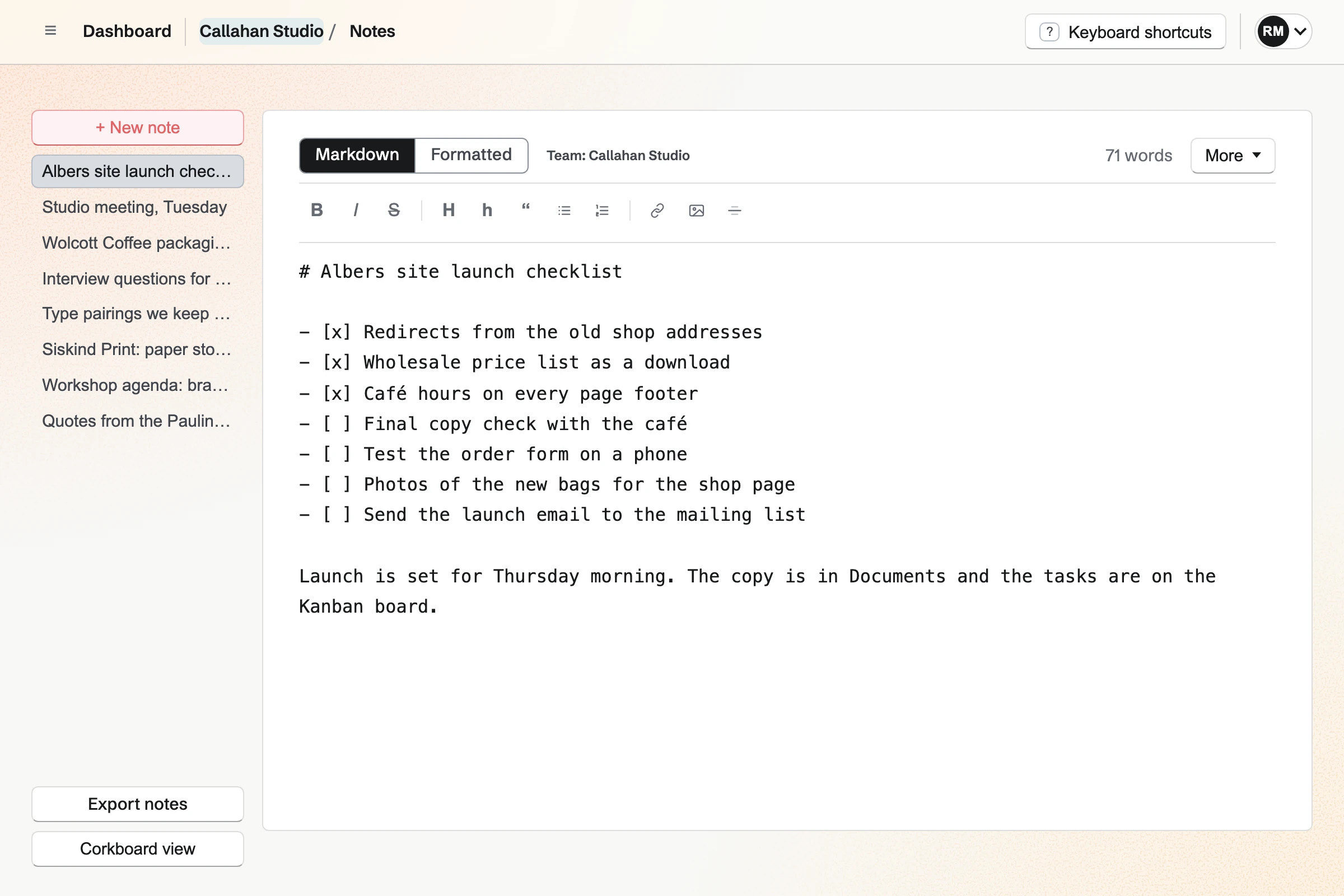
Callahan Studio’s Notes, with the team’s notes listed and the Albers site launch checklist open in the Markdown editor.

How is Magpie different?

1. Notes come with the rest of the business

One Magpie subscription includes the areas a small business would otherwise buy one at a time:

  • Notes for Markdown notes, and Documents for writing that is printed, shared or signed
  • To-dos, Kanban Boards and Calendar for the work the notes turn into
  • Idea Boards for notes, pictures and links laid out on a board
  • Bookmarks for saved pages, with a reader and highlights
  • Invoicing, Meetings, Appointments, Mail, Websites and the other areas, in the same team

Everything is in one account with one bill.

2. A team shares its notes in the browser

A Note made in a team belongs to the team. Its members open and change it in a browser, on a computer, a phone or a tablet. There is nothing to install and nothing to sync. Search (Cmd or Ctrl K) finds Notes in Personal and every team, and labels each with its team.

3. A note turns into work

Convert to To-do makes a To-do from a Note, for today or another day. A checklist line in a Note becomes a To-do with one button, and the line is ticked. The assistant searches, writes and changes Notes. Connected apps give Claude, ChatGPT or Cursor the same reach through MCP.

Comparing Magpie and Obsidian

Obsidian does more inside a set of notes; Magpie does more around them. Every line below was checked against Obsidian's own pages, linked from each row. It was checked against Magpie's code and Help too.

Platform

WhatObsidianMagpie
Markdown notesNotes written in Markdown, shown formatted Yes Yes
Links between notesLink a note by its title, see its backlinks Yes No
Graph viewA map of notes and the links between them Yes No
Folders and tagsNotes kept in folders and marked with tags Yes No
Properties and table viewsFields on notes, shown as a table to sort and filter Bases No
Daily notes and templatesToday's note, and notes started from your own outline Yes No
CanvasNotes, pictures and links laid out on a board Yes Idea Boards
Web clipperSave a web page from the browser Yes Bookmarks
Import from other notes appsNotes brought in from Evernote, Notion and others Yes No
Apps for computers and phonesNotes in an app on each device Yes In the browser
Works offlineWrite and read with no connection Yes No
Works in a web browserNotes on any computer with nothing to install No Yes
Notes on every deviceThe same notes on each computer and phone Sync, separate subscription Yes
Version historyEarlier versions of a note, restored With Sync In Documents
End-to-end encryptionNotes the company storing them cannot read Yes No
Notes shared with a teamSeveral people read and change the same notes Shared vaults in Sync Yes
Publish notes as a websiteChosen notes on a site at your own domain Publish, separate subscription Files website from Git
Plugins and themesAdd-ons and looks made by other people Yes No
To-dos from notesA checklist line becomes a to-do with a date Community plugins Yes
An assistant for your notesAI finds, writes and changes notes Web Clipper's Interpreter Yes
Invoicing, booking pages and emailThe rest of a business's software No Yes

Good to know: Where Magpie says No or Partly, the line under the row says what Magpie does instead. Each gap has an item on Magpie's roadmap, and the line changes on the day it ships.

Writing and formatting

Both write Markdown and show it formatted as you type. Obsidian also sets maths, draws Mermaid diagrams, colours code and boxes callouts. They do these better than we do today.

WhatObsidianMagpie
Write a note in Markdown and see the formatting as I type Source Yes Yes
Keep a checklist in a note and tick items off Source Magpie: A checklist is written in Markdown (- [ ]) and shown with its boxes, but a box cannot be ticked by clicking it: it is ticked by changing its Markdown, or by turning the line into a To-do, which ticks it. The toolbar has no checklist button. Yes Partly
Add a table to a note, and add rows and columns without typing Markdown Source Magpie: A table typed in Markdown is shown as a table and kept when the Formatted view is edited, but no button inserts one or adds a row or a column. Yes Partly
Add footnotes to a note Source Magpie: Notes has no footnotes. A Document has footnotes and endnotes, numbered in order. Yes Partly
See code in a note coloured by its language Source Magpie: A code block in a Note is kept and shown in a fixed-width font, without colours. A Document's code block is coloured by its language. Yes Partly
Write a maths formula in a note and see it set as mathematics Source Magpie: A formula in a Note stays as the characters typed. A Document's Equation keeps the LaTeX but shows it as code, not as mathematics. Yes No
Turn diagram code in a note into a drawing Source Magpie: Mermaid code in a Note stays a code block. Yes No
Box a tip or a warning in a note, folded or open Source Magpie: A Note has quotes but no callout box, and nothing in a Note folds. Yes No
See a long note's headings and jump to one Source Magpie: Notes has no outline of a Note's headings. A Document can have a table of contents built from its headings. Yes Partly
See how long a note is Source Yes Yes
Put pictures in a note among the text Source Yes Yes
Put a PDF, a sound or another file in a note Source Magpie: A Note holds text and pictures only. Yes No

Good to know: A Note is written in the Markdown view or the Formatted view, and both change the same text. A pasted picture or screenshot is uploaded to Your images and added to the Note.

Folders, tags, properties and Bases

Obsidian keeps notes in folders and marks them with nested tags. Bases shows notes by their properties as a table. Magpie's Notes keeps one list for Personal and one for each team.

WhatObsidianMagpie
Keep notes in folders, with folders inside folders Source Magpie: Notes has no folders: the list shows every Note in Personal or the team, the most recently changed first, and Corkboard view shows them as cards. Yes No
Organize notes with tags, including tags nested inside tags Source Magpie: Notes has no tags. Yes No
Give notes fields, such as a status or a date, and see them as a table I can sort and filter Source Magpie: A Note has only its text, with no fields to sort or filter by. Yes No
Keep the notes I use most where one click opens them Source Magpie: Notes lists the most recently changed Note first, and Dashboard shows the latest Notes; nothing keeps a chosen Note at the top. Yes No

Good to know: The Notes list shows the most recently changed Note first. Corkboard view shows the same Notes as cards.

Search and moving around

Both find a note by any word in it and open it from the keyboard. Obsidian's search narrows by folder, tag or task, and it saves layouts of notes open side by side.

WhatObsidianMagpie
Find a note by any word in it Source Yes Yes
Narrow a search to a folder, a tag, open tasks or one section of a note Source Magpie: Search matches words in a Note's title and text; it cannot narrow to a tag, a checklist or a pattern. Yes No
Open any note or run a command by typing a few letters Source Yes Yes
Open several notes side by side and switch between saved layouts Source Magpie: Notes shows one Note at a time beside the list; another Note opens in its own browser tab, at its own address. Yes No

Good to know: Cmd or Ctrl K finds Notes in Personal and every team, with pages, settings and Help, as you type.

Daily notes, Templates, Canvas and other core plugins

Obsidian's core plugins add daily notes, templates, an audio recorder, slides and Canvas. Magpie does some of this in other areas: Idea Boards, Presentations and To-dos.

WhatObsidianMagpie
Open today's note with one click, made from my own outline Source Magpie: New note starts an empty Note; nothing makes or finds a Note for the day. To-dos has Today for the day's To-dos. Yes No
Start a note from a template of my own, with today's date filled in Source Magpie: A Note starts empty, and Notes has no starters. Copy text copies a whole Note to paste into a new one. Yes No
Turn a checklist line in a note into a to-do with a date Source Obsidian: Search finds open and ticked tasks in every note with task-todo: and task-done:. A task in core Obsidian has no date or reminder; community plugins such as Tasks add them. Partly Yes
Record a lecture or a meeting straight into a note Source Magpie: A Note cannot hold a recording. Meeting Notes records and transcribes meetings, but it is built and not yet open to members. Yes No
Present a note as slides Source Magpie: A Note cannot be shown as slides. Presentations makes a deck of its own, slide by slide. Yes No
Lay notes, pictures and web pages out on an open board, with lines between them Source Magpie: Idea Boards lay out notes, To-do lists, links, pictures, comments and columns on a board with no edges, joined by arrows. A Note from Notes cannot be put on a board: a board's notes are its own. Yes Partly

Good to know: Convert to To-do makes a To-do from a Note for any day, and the To-do links back to the Note. Copy text copies a whole Note to paste into a new one.

Web Clipper, importing and exporting

Obsidian's Web Clipper saves a page as a note. Its Importer brings in notes from Evernote, Notion, Apple Notes and others. Magpie saves pages to Bookmarks and has no import.

WhatObsidianMagpie
Save a web page, or the part I chose, into my notes from the browser Source Magpie: Bookmarks' browser button saves the page you are on to Bookmarks, with the text you selected as the bookmark's note, and an article keeps its text for Reader. The bookmark's Send to a new note then makes a Note with its link, that note and its highlights, but not the page itself. Yes Partly
Bring my notes over from another app Source Magpie: Notes has no import. A Note is written or pasted in, or made by the assistant, the API or a bookmark's Send to a new note. Documents imports one .md, .html or .txt file at a time as a Document, not as a Note. Yes No
Download a note as a PDF Source Magpie: A Note downloads as Markdown or a .txt file, and Export notes downloads them all as a .zip of Markdown, but not as a PDF. A Document downloads as a PDF. Yes Partly

Good to know: A bookmark's Send to a new note makes a Note with the page's link, your note and your highlights. A Note downloads as Markdown or a .txt file.

Files on your own devices

Obsidian keeps notes as files on your device, in apps for computers and phones that work offline. Magpie's Notes works in a browser and needs a connection.

WhatObsidianMagpie
Keep my notes as plain Markdown files on my own computer Source Magpie: Notes are kept in Magpie. Export notes downloads every Note in Personal or the team as a .zip of Markdown files, and each Note downloads as Markdown, but nothing keeps a copy on your computer by itself. Yes Partly
Write and read notes with no connection Source Magpie: Notes needs a connection. A failed save keeps the text in the editor. Yes No
Keep notes in an app on my computer Source Magpie: Magpie is used in a browser on a computer. Yes No
Use my notes on my phone and tablet Source Yes Yes
Open my notes in a web browser on any computer, with nothing to install Source Obsidian: Obsidian is an app to download on each computer and phone; it has no version that runs in a browser. Only Web Clipper works in one. No Yes

Good to know: Export notes downloads every Note in Personal or the team as a .zip of Markdown files. If a save fails, the text stays in the editor.

Sync

Obsidian's Sync is a separate subscription, encrypted end to end, with version history. Magpie keeps Notes in the account, so every device shows the same Notes on every plan.

WhatObsidianMagpie
Have my notes on every device, kept up to date Source Yes Yes
Keep my notes the same on every device without paying Source Obsidian: Without paid Sync, a vault can be kept in step through iCloud, OneDrive, Git or Syncthing, each with limits the Help lists, such as iCloud on Windows and Git needing each change pushed by hand. Partly Yes
See earlier versions of a note and bring one back Source Magpie: A Note keeps only its latest text. A Document keeps the versions you save by name, and Restore brings any of them back. Yes Partly
Bring back a note I deleted Source Yes Yes
Keep my notes where the company storing them cannot read them Source Magpie: Magpie stores Notes as they are written. Only Password Vault and Secure Files are encrypted on your device before they reach Magpie. Yes No
Share notes with my team, who read and change them Source Obsidian: A shared vault in Sync takes up to 20 people, each with a Sync plan of their own and the same rights as the owner; changes arrive as each person syncs, not as they type. Partly Yes

Good to know: Move to Trash has Undo, and Trash restores a Note within 30 days. A Note made in a team opens for every member of the team.

Publish

Obsidian's Publish puts chosen notes on a site, with the graph, search and passwords. Magpie cannot publish a Note, but Websites builds a site from Markdown in a Git repository.

WhatObsidianMagpie
Publish the notes I choose as a website, such as a wiki or a knowledge base, at my own address Source Magpie: A Note cannot be published. Websites builds a files website from Markdown pages pushed to a Git repository, at the Magpie address or a custom domain, so notes kept as Markdown in a repository can become a site. Yes Partly
Let only the people I choose read my published notes Source Magpie: A published website is open to anyone who has its address; nothing limits who can read it. Yes No

Good to know: A files website builds each push of its repository into pages, at the Magpie address or your own domain. Each Markdown file in its content folder is a page.

Plugins, themes and automation

Obsidian has thousands of community plugins and themes, and a command line tool. Magpie's Notes takes no plugins, but it has a REST API and the assistant.

WhatObsidianMagpie
Add tools other people made, such as a calendar or a kanban board Source Magpie: Notes takes no plugins. Calendar, Kanban Boards and To-dos are areas of Magpie. Yes No
Choose the look of my notes: a theme, the fonts, their size and the line width Source Magpie: Notes uses Magpie's own type. Appearance chooses only Light, Dark or System. Yes No
Work with my notes from my own scripts Source Yes Yes
Have AI find, write and change my notes Source Obsidian: Obsidian's core plugins include no assistant. Web Clipper's Interpreter sends a page to a language model you connect, with your own key for most providers, to sum it up or change it before saving. Partly Yes

Good to know: The REST API lists, searches, creates, changes and deletes Notes, on Pro. Connected apps reach Notes through MCP from any computer.

Pricing

Obsidian's app is free with no limit on notes, and Sync and Publish are paid. Magpie's Notes is on every plan, with a limit on how many Notes each plan holds.

WhatObsidianMagpie
Keep as many notes as I like without paying Source Magpie: Personal and each team hold 200 Notes on the free plan and 1,000 with Pro or the Team plan. Yes Partly
Pay less as a student or for a non-profit Source Magpie: Magpie has no student or non-profit price. Yes No

Good to know: Personal and each team hold 200 Notes on the Free plan and 1,000 with Pro or the Team plan.

Price comparison

How Obsidian charges

Obsidian's app is free for personal and work use, with no limit on notes, on every computer and phone. What costs money is optional: Sync, Standard or Plus, keeps notes the same on every device; Publish puts notes on a website, priced per site. Students, faculty and non-profits get 40% off Sync and Publish. Prices are on Obsidian's pricing page.

How Magpie charges

Magpie charges by plan, Free or a paid plan, for everything in the account. Notes is on every plan, and the same Notes open on every device with nothing more to buy. The plan sets how many Notes, team members and websites you have. API access needs Pro. Prices are on Magpie's pricing page.

On top of the planObsidianMagpie
The notes appFree, with no limit on notes200 Notes on Free, 1,000 on Pro or the Team plan
Notes on every deviceSync, a separate subscription; free ways through iCloud, Git or SyncthingIncluded on every plan
Version historyWith Sync: a month on Standard, a year on PlusNot in Notes; a Document keeps the versions you save
Sharing with a teamA shared vault of up to 20 people, each with a Sync plan3 people in a free team, 25 on the Team plan
Publishing notes as a websitePublish, a separate subscription per siteA files website built from Markdown in a Git repository
Working with notes from your own codeCommand line tool, with the app runningREST API on Pro
Student and non-profit price40% off Sync and PublishNone

When to choose Magpie or Obsidian

  • Want your team's notes in a browser, beside To-dos, documents, invoices and bookings, with nothing to install or sync? Go with Magpie.
  • Want linked notes on your own devices, offline, with a graph, folders, tags and thousands of plugins? Obsidian is the right choice.

Recommendations by kind of business

For a writer or a researcher with a web of linked notes
Obsidian. Links by title, backlinks, the graph, footnotes and maths are in the free app. Magpie's Notes cannot link one Note to another yet.
For someone who wants notes on their own computer, offline
Obsidian. Every note is a Markdown file on your device, and the app works with no connection. Magpie keeps Notes in the account and needs a connection.
For a small team that shares its notes
Magpie. Every Note made in a team is open to its members in the browser, with no sync plan per person. Obsidian's shared vaults need a Sync plan for each person.
For a business whose notes turn into work
Magpie. A Note or a checklist line becomes a To-do, and the assistant reads and writes Notes. The same team has Documents, Invoicing and booking pages.
For a student
Either. Obsidian's app is free with no limit on notes, and Sync and Publish are 40% off for students. Magpie's Free plan holds 200 Notes and opens them in any browser. Choose by whether you want notes on your own devices or in the browser everywhere.

Frequently asked questions

What is the difference between Obsidian and Magpie?

Obsidian is a notes app that keeps Markdown notes as files on your own devices. It links them, draws them as a graph and takes community plugins. Magpie is one subscription for a small business's software. Its Notes is one area beside To-dos, Documents, invoicing and booking pages, in the browser. Obsidian does more inside a set of notes; Magpie does more around them.

Does Magpie replace Obsidian?

Yes, for a team that keeps short Markdown notes and turns them into work. Magpie shares each team's Notes in the browser, makes To-dos from them, and lets the assistant read and write them.

Consider keeping Obsidian if you link notes to each other, use the graph, or sort notes into folders and tags. Keep it too if you need notes offline, as files on your own device, or with plugins. Obsidian does each of these better than Magpie does today.

How much does Obsidian cost?

The app is free for personal and work use, with no limit on notes. Sync, in Standard and Plus plans, and Publish, priced per site, are optional subscriptions. Students, faculty and non-profits get 40% off them. The prices are on Obsidian's pricing page.

How much does Magpie cost?

Magpie has a Free plan and paid plans, each covering every area. Notes holds 200 Notes in Personal and in each team on Free, and 1,000 with Pro or the Team plan. The same Notes open on every device on every plan. The prices are on Magpie's pricing page.

Does Magpie have links between notes and backlinks?

No. A Note's Link drawer takes a web or email address. Nothing finds a Note by its title to link it. Nothing lists the Notes that point to a Note either. Both are on Magpie's roadmap. In Obsidian, typing [[ links a note, and Backlinks lists the notes that link to it.

Does Magpie have a graph view?

No. Notes cannot link to each other yet, so there is nothing to draw a map from. Idea Boards lays out notes, pictures and links on a board with arrows between them, drawn by hand. Obsidian's Graph view draws every note and link by itself.

Does Magpie have folders or tags for notes?

No. Notes shows one list for Personal and one for each team, the most recently changed first. Corkboard view shows them as cards. Folders and tags are on Magpie's roadmap. Obsidian keeps notes in folders and subfolders, with tags that nest.

Does Magpie work offline?

No. Notes needs a connection, and a save that fails keeps the text in the editor. Offline editing is on Magpie's roadmap. Obsidian keeps notes on the device, so it works with no connection.

Is there a Magpie app for computers or phones?

No app for computers: Magpie is used in a browser. Notes works in a phone's or tablet's browser, where you list, search, write and change Notes. The Magpie app does the same, but it is not yet in the App Store or Google Play. Obsidian has apps for Windows, Mac, Linux, iPhone, iPad and Android.

Does Obsidian work in a web browser?

No. Obsidian is an app downloaded on each computer and phone, and only Web Clipper runs in a browser. Magpie's Notes works in any browser once you sign in, with nothing to install.

Can I keep my Magpie notes as Markdown files on my computer?

Partly. Export notes downloads every Note in Personal or the team as a .zip of Markdown files. Each Note downloads as Markdown too. Nothing keeps a copy on your computer by itself. In Obsidian the notes are Markdown files on your computer from the start.

Does Magpie have plugins or themes?

No. Notes takes no plugins and uses Magpie's own type, with Light, Dark or System in Appearance. Calendar, Kanban Boards and To-dos are areas of Magpie instead. Obsidian has thousands of community plugins and themes.

Does Magpie have daily notes or templates?

No. New note starts an empty Note, and Notes has no starters. Copy text copies a whole Note to paste into a new one, and To-dos has Today for the day's To-dos. Obsidian's Daily notes opens today's note from your template.

Can Magpie keep earlier versions of a note?

No, not in Notes: a Note keeps its latest text, and Trash restores a deleted Note within 30 days. A Document keeps the versions you save by name, and Restore brings any of them back. Obsidian's Sync keeps every version of a note for a month on Standard and a year on Plus.

Are Magpie notes end-to-end encrypted?

No. Magpie stores Notes as they are written. Only Password Vault and Secure Files are encrypted on your device before they reach Magpie. Obsidian's Sync encrypts a vault end to end with AES-256.

Can my team share notes in Obsidian?

Yes, through a shared vault in Sync, of up to 20 people. Each person needs a Sync plan of their own, and changes arrive as each person syncs. In Magpie, every Note made in a team is open to its members in the browser, on every plan.

Does Obsidian have an AI assistant?

Not in its core plugins. Web Clipper's Interpreter sends a page to a language model you connect, to sum it up before saving. Magpie's assistant searches, writes and changes Notes, and Connected apps give Claude, ChatGPT or Cursor the same reach through MCP.

Can I publish my notes as a website with Magpie?

Partly. A Note cannot be published. Websites builds a files website from Markdown pages in a Git repository, at the Magpie address or your own domain. Obsidian's Publish puts the notes you choose on a site, with the graph, search and passwords.

Does Magpie have a canvas like Obsidian's?

Yes, in Idea Boards. A board with no edges holds notes, To-do lists, links, pictures and columns, joined by arrows. A Note from Notes cannot be put on a board, because a board's notes are its own. Obsidian's Canvas places your vault's own notes on the board.

Can I save web pages into Magpie?

Yes, to Bookmarks. Its browser button saves the page you are on, with the text you selected. An article keeps its text for Reader. Send to a new note makes a Note with the link, your note and your highlights, not the page itself. Obsidian's Web Clipper saves the page itself as a note.

Can I use Obsidian and Magpie together?

Yes. Obsidian can keep your own linked notes while Magpie holds the team's Notes, To-dos and Documents. A note's Markdown copies from one into the other. Markdown pages kept in a Git repository can also become a Magpie files website.

How do I move my notes from Obsidian to Magpie?

Notes has no import, so each note moves by hand. Copy a note's Markdown in Obsidian and paste it into a new Note, and its title is its first line. Links written with [[ stay as the characters typed, and pictures are added again from Your images. Moving notes in from other apps is on Magpie's roadmap.

What is included in Magpie's Free plan?

Notes with 200 Notes, Documents, Spreadsheets, Idea Boards, Bookmarks, To-dos, Kanban Boards, Calendar, booking pages, Invoicing and most other areas. It has a team of 3, 10 guests, 5 GB of storage and 1 website. The REST API needs Pro, and email at your domain needs Pro or the Team plan.
If a line on this page is wrong, tell us and we will correct it.

Obsidian changes, and so does Magpie. If a line is out of date about either product, email support@magpie.diy with the page that shows it. We check the line against that page, change it, and give it the new date. That goes for Obsidian's own team as much as for anyone who uses it.

Keep your team's notes beside the rest of its work.

Create a Magpie account, then write your first Note.

Create account