What is the difference between Raindrop.io and Magpie?
Raindrop.io is a bookmark manager with apps on every device, an extension, file uploads and a web archive. Magpie is one subscription for a small business's software. Its Bookmarks is one area beside RSS Reader, Notes, To-dos and the rest. Raindrop.io does more inside the library; Magpie does more around it.
Does Magpie replace Raindrop.io?
Yes, for someone who saves articles to read and keeps them in collections with tags. Magpie saves links with a browser button, keeps article text for Reader view, and keeps highlights with notes. It reads Raindrop.io's CSV export.
Consider keeping Raindrop.io if you save from an extension or a phone's share sheet, or nest collections. Keep it too if you keep PDFs with your links or set reminders. The same goes for search inside saved pages and a full copy of each page. Raindrop.io does each of these better than Magpie does today.
How much does Raindrop.io cost?
Raindrop.io has a Free plan and a Pro plan, billed monthly or yearly. Its help centre says yearly billing is about 20% cheaper. Pro adds full-text search, the web archive, reminders, daily backups and the Stella assistant. The prices are on Raindrop.io's pricing page.
How much does Magpie cost?
Magpie has a Free plan and paid plans, each covering every area. Bookmarks has no limit on how many links you save on either. A paid plan raises limits such as connected apps and adds the REST API. The Team plan has 25 people. The prices are on Magpie's pricing page.
Does Magpie have a browser extension for bookmarks?
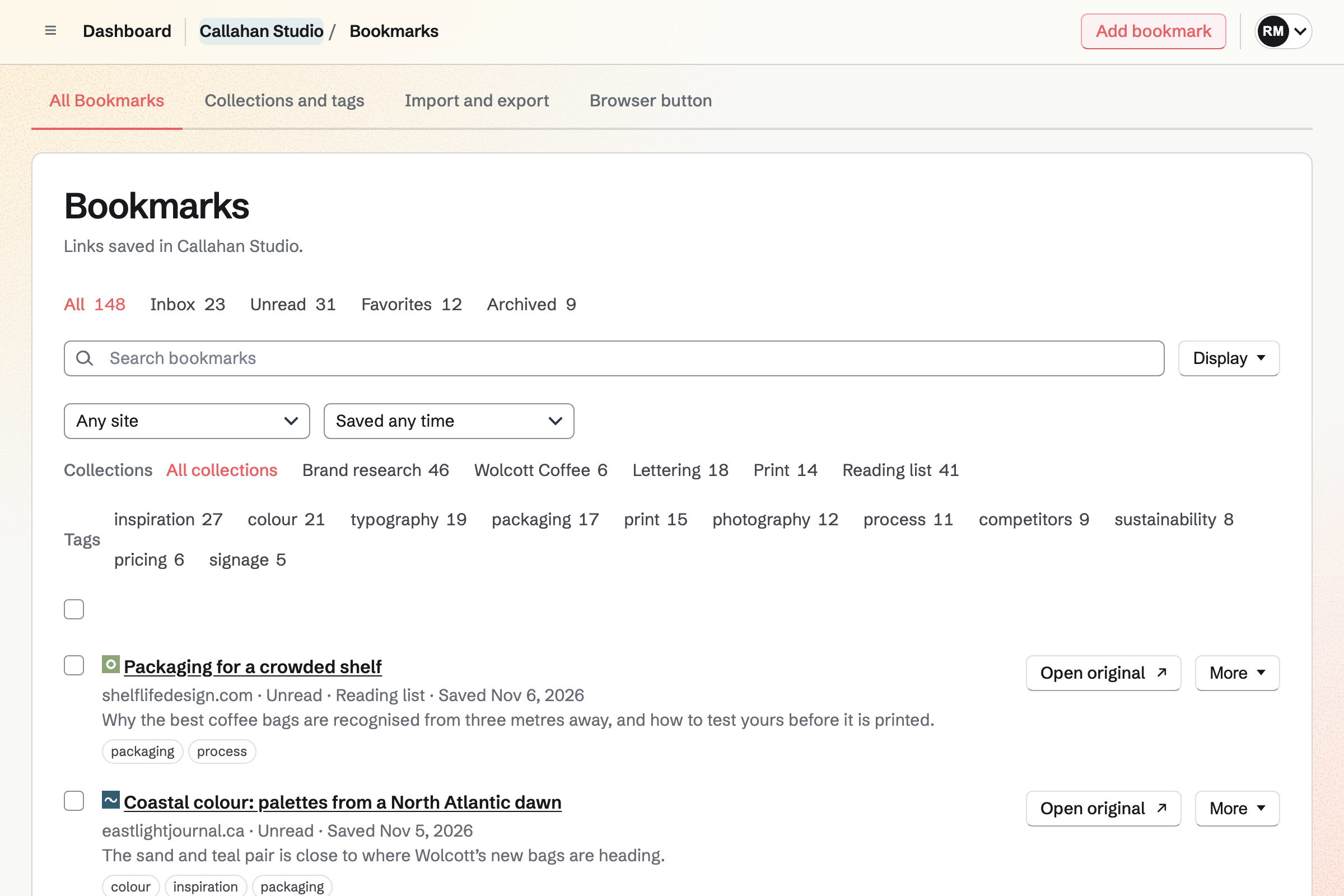
No. Magpie's browser button, dragged to the bookmarks bar, opens a small window with the page's address, title and selected text. It says if the page is already saved, and saves it with a collection, tags and a note. There is no keyboard shortcut, right-click saving or sidebar. A Bookmarks extension is on Magpie's roadmap.
Does Magpie have nested collections?
No. Magpie's collections are one flat list, and a folder inside a folder imports as one collection named after the inner folder. Nested collections are on Magpie's roadmap. In Raindrop.io, a collection dragged onto another becomes its child.
Can Magpie remind me about a bookmark?
No. Bookmarks has no reminders; the Unread tab keeps what you have not read yet. Reminders are on Magpie's roadmap. Raindrop.io's Pro plan sends a reminder for a date and time, as a phone notification or by email.
Can Magpie search the text inside saved pages?
No. Magpie's search looks in titles, addresses, sites, descriptions, notes, tags and collection names. It does not read a saved article's text or your highlights. Full-text search is on Magpie's roadmap. Raindrop.io's Pro search reads saved pages, PDFs, books and YouTube transcripts.
Does Magpie keep a copy of a page if the site removes it?
Partly. Magpie keeps a saved article's text for Reader view, with the page's icon and preview image. Pictures and layout are not kept, and a page that is not an article keeps no copy. Raindrop.io's Pro plan keeps a full copy of each page's text, pictures and layout.
Can I keep PDFs and files in Magpie Bookmarks?
No. A Magpie bookmark is a web address, and files are kept in Secure Files, encrypted, apart from Bookmarks. Files beside links are on Magpie's roadmap. Raindrop.io uploads PDFs, pictures and documents into collections.
Does Magpie have a phone app for bookmarks?
Bookmarks works in a phone's browser, with its views, search, Reader view, highlights, import and export. The Magpie app has the same bookmarks and saves from the share sheet. It is not yet in the App Store or Google Play. Raindrop.io has apps for iPhone, Android, Mac and Windows.
Does Raindrop.io have a read-later list?
No. A Raindrop.io bookmark has no read or unread state. You add a note, tags, a collection, a reminder or a favorite mark. Magpie marks each new bookmark unread and lists what is left in the Unread tab. At the end of an article, it opens the next one.
Does Raindrop.io have an RSS reader?
No. Articles come into Raindrop.io from a feed reader's own share option or through an IFTTT applet. Magpie's RSS Reader is in the same account as Bookmarks. Follow site in RSS Reader subscribes to a bookmark's site, and an entry saved to Bookmarks keeps its text.
Can I share one collection with chosen people in Magpie?
Partly. Bookmarks saved in a team are shared with everyone in it, and a team can give a guest the Bookmarks area. One collection cannot be shared with chosen people to add to. An Unlisted link lets anyone signed in to Magpie read it. Raindrop.io shares one collection with any number of people, free.
Can I publish a collection as a web page?
Yes, in both. A Public Magpie collection is a page anyone can read, with an RSS feed, and search engines may list it. It shows each bookmark's title, site and description. Raindrop.io also has a profile page of all your public collections, and a widget that embeds one in another website. Magpie has neither.
Does Magpie find duplicates and broken links?
Partly. Saving a page already saved says when you saved it, ignoring tracking parameters, and an import skips addresses already saved. A bookmark's page says whether the page could be reached when last checked. There is no list of duplicates or broken links. Raindrop.io's Pro plan has both.
Can an AI app use my Magpie bookmarks?
Partly. Connected apps lets Claude, ChatGPT and Cursor find bookmarks and save new ones through MCP. They cannot edit, tag, file or highlight them. The assistant on Dashboard does the same. Raindrop.io's MCP server and its Stella assistant also tidy tags and collections.
Can I use Raindrop.io and Magpie together?
Yes. A Raindrop.io collection's RSS feed can be followed in Magpie's RSS Reader, and its entries saved to Bookmarks. A public Magpie collection has an RSS feed too. Magpie reads Raindrop.io's CSV export, and Magpie's HTML export is a browser bookmarks file, which Raindrop.io imports.
How do I move from Raindrop.io to Magpie?
Export your bookmarks from Raindrop.io as CSV. In Magpie, open Import and export under Bookmarks, choose the file and select Import. Folders become collections, and excerpts and dates come with them. Highlights and uploaded files are not brought in.
Does Magpie have a desktop app?
No. Magpie is used in a browser on a computer. A desktop app is on Magpie's roadmap. Raindrop.io has apps for macOS 12 or later and Windows 10 or later.
What is included in Magpie's Free plan?
Bookmarks with no limit on links, Reader view, highlights with notes, public collections, and import and export. RSS Reader with 10 feeds, Notes, To-dos and the other areas, and a team of 3. Connected apps links 2 AI apps.