Acuity Scheduling compared with Magpie

Acuity Scheduling vs Magpie: an in-depth comparison

Acuity Scheduling and Magpie both give a business a page where customers book a service. Both book a member of staff for it. They are built around different things.

  1. Acuity Scheduling is an appointment scheduling service: a booking page, and the forms, reminders, payments and packages around each appointment. It is built for a business whose appointments are the work: a salon, a studio, a clinic, a tutor with a weekly timetable.
  2. Magpie is one subscription for a small business's software, and Appointments is one part of it. Beside the booking page it includes Contacts, Invoicing, Accounting, a website, email at your domain and more. It is built for a business whose bookings are one part of running it.
Create account
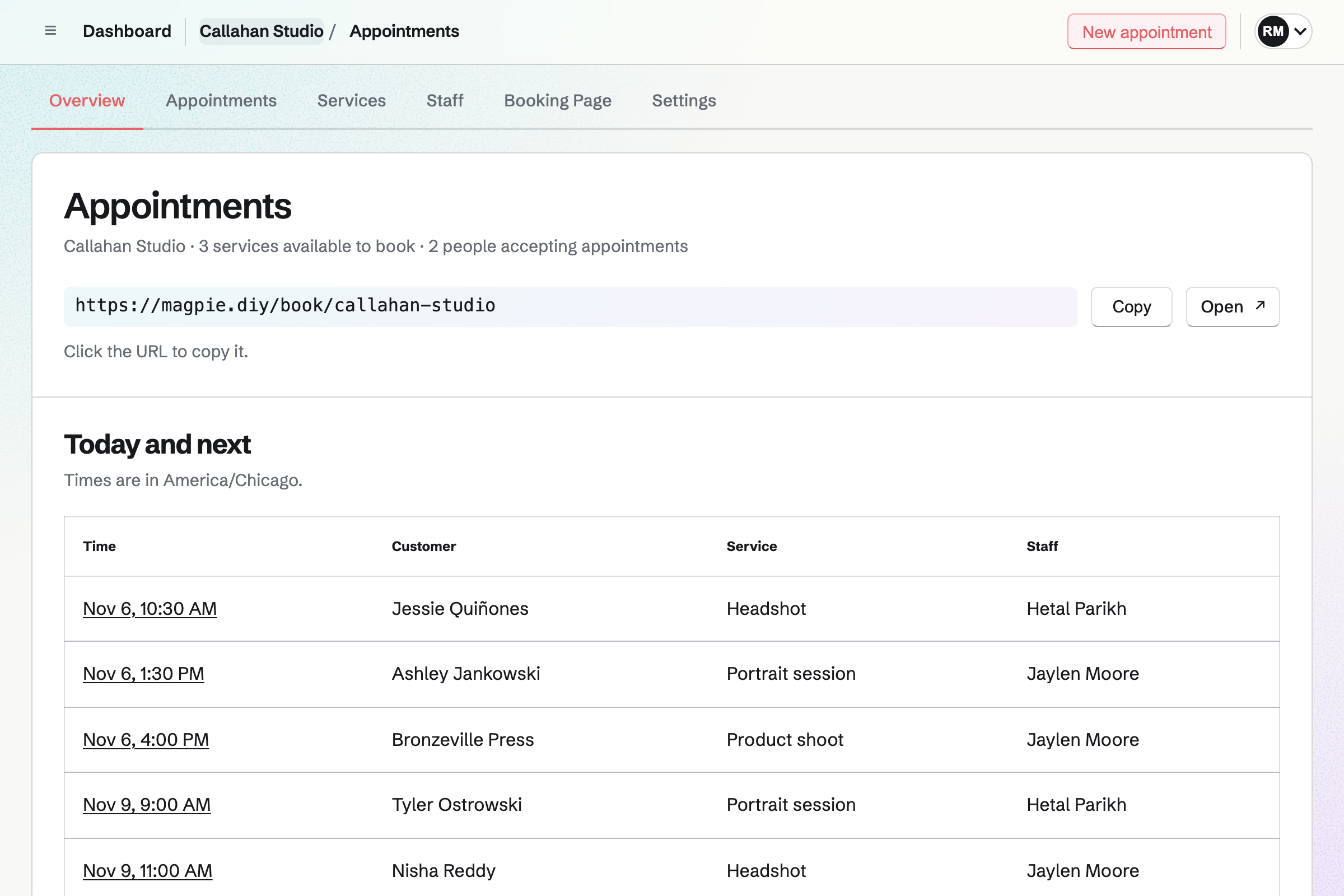
Appointments overview for a fictional studio with its booking address and today’s and upcoming appointments by staff member.

How is Magpie different?

1. Booking comes with the rest of the business

One Magpie subscription includes the areas a small business would otherwise buy one at a time:

  • Appointments for services, staff and rooms, and Meetings for a meeting page of your own
  • Contacts, where each customer's page lists their appointments beside your notes
  • Invoicing, with online payment through your Stripe account, and Accounting for the books
  • Websites for the business's site, and Mail for email at your domain
  • Outreach, Coaching, Calendar, Forms, Store and the other areas, in the same team

Everything is in one account with one bill. Acuity connects to the software that does the rest, such as Squarespace for the website, QuickBooks for the books and Mailchimp for email.

2. A team pays one price

The Team plan is one price for up to 25 people. Each person can accept appointments, and adding someone does not change the bill. Acuity's plans set the number of calendars: one on Starter, six on Standard and 36 on Premium.

3. The Free plan takes bookings

Appointments and its booking page are on Magpie's Free plan, with no limit on services. Each new customer is added to Contacts, and Free holds 100 contacts. Past that, a customer who is not a contact yet cannot book on Free. Acuity has a 7-day trial and no free plan.

Comparing Magpie and Acuity Scheduling

Acuity does more around each appointment; Magpie does more around the business. Every line in the tables below was checked against Acuity's own pages, linked from each row, and against Magpie's code and Help.

Platform

WhatAcuity SchedulingMagpie
Booking pageCustomers choose a service, a person and a time Yes Yes
Embed on your websiteThe booking page inside your own site Yes No
Your own brandingYour logo and colours on the booking page Yes Partly
Intake formsYour own questions when someone books Yes No
Email remindersSent before each appointment Yes Yes
Text remindersSent to the customer's phone Standard and Premium No
Customers reschedule or cancelFrom their confirmation, up to a cut-off Yes Yes
WaitlistCustomers hear when a time opens Standard and Premium No
Repeat bookingsThe same time every week, booked at once Yes No
Payment or a deposit at bookingCharged as the time is chosen Yes Yes
Packages and membershipsPaid up front, spent on bookings Standard and Premium Coaching programs
Gift certificatesBought for someone to spend on a booking Standard and Premium Store only
CouponsA discount code for a service Yes No
Cards taken in personA card reader or a phone Yes No
Invoices paid onlineCharge for work by invoice Yes Yes
Rooms and equipmentReserved with each booking Yes Yes
Group classesSeveral people book places in one class Yes Partly
Several locationsEach with its own staff and time zone Yes Partly
Your other calendars checkedBusy times in Google or Outlook kept free Yes Magpie's Calendar only
Video call linksA call added to each online appointment Yes No
Phone appAppointments managed on a phone Yes In the browser
ReportsAppointments, no-shows and revenue Yes No
Zapier, webhooks and an APIBookings sent to other software Yes API on Pro
HIPAA agreementA business associate agreement for health details Premium No
A website, the books and email campaignsThe rest of the business in one account Through other software Yes
Free planTake bookings without paying 7-day trial Yes

Good to know: Where Magpie says No or Partly, the line under the row says what Magpie does instead. Each gap has an item on Magpie's roadmap, and the line changes on the day it ships.

Online booking

Both give customers a page to choose a service, a person and a time, without an account. Acuity adds an embed in your own website, your logo and colours, times in the customer's zone, repeat bookings and Reserve with Google.

WhatAcuity SchedulingMagpie
Let customers book a service online from a page of your own Source Yes Yes
Offer each service with its own length, price and description Source Yes Yes
Book an appointment for a customer yourself, for a phone call or a walk-in Source Yes Yes
Share the booking page by a link or a QR code, or link to one service Source Yes Yes
Show the booking page inside your own website Source Magpie: Magpie's pages refuse to open inside another site's frame, so a website links to the booking page instead. Yes No
Show the booking page under your own brand: logo, colours and wording Source Magpie: The page carries the business's name and description, and the emails are sent in its name. There is no logo, colour or wording to set, and Magpie's name stays in the top bar and footer. Yes Partly
Show times in the customer's own time zone Source Magpie: Times are shown in the booking page's time zone, which the page names. A customer in another zone works out the time themselves; Meetings converts it, Appointments does not. Yes Partly
Show the booking page and its emails in the customer's language Source Acuity Scheduling: Its help centre describes one scheduler language chosen from twelve, but that page refused to load and no other page of Acuity's says. Not stated Yes
Let a customer book the same time every week in one go Source Magpie: Each booking is one appointment. A weekly client books, or is booked, one time after another. Yes No
Let people book from Google Search and Maps Source Magpie: The booking page has its own address only; nothing connects it to Google's booking button. Yes No
Let customers book by chatting with an assistant on the booking page Source Magpie: Customers book by choosing from the page. Magpie's assistant works for members, and finds appointments for them, not for customers. Yes No
Build the business's website in the same place as its bookings Source Acuity Scheduling: The booking website builder page points to Squarespace, a separate product, for the website, and adds the scheduler to it. Partly Yes

Good to know: The booking page, the page where a customer manages an appointment, and their emails can be in English, French, Spanish or German. Websites builds the business's site in the same account.

Client management and reminders

Both keep a record of each customer, with appointments and private notes. Both let customers reschedule or cancel up to a cut-off. Both email a reminder before each appointment. Acuity adds intake forms, text reminders, emails in your own words and a waitlist. They do it better than we do today.

WhatAcuity SchedulingMagpie
Ask your own questions when someone books, with a different form for each service Source Magpie: The booking form asks for a name, an email address and an optional phone number. No other question can be added, and a Form is not linked to a booking. Yes No
Ask customers to agree to your cancellation policy when they book Source Magpie: Nothing is shown for the customer to agree to. The Cancellation and Rescheduling settings close their own links some time before the start. Yes No
Keep a record of each customer, with their appointments and your notes Source Yes Yes
Keep notes on an appointment that the customer never sees Source Yes Yes
Bring your client list over from another tool Source Magpie: Contacts are added from a JSON document. Outreach's From a file or list reads a CSV or TSV file into a campaign and makes each address a contact, with its name and company, on Pro or the Team plan; no other column, such as a phone number, comes in, and a vCard file is not read. Yes Partly
Send the customer a confirmation they can add to their calendar Source Magpie: The customer gets a confirmation email with the service, staff member, time and location, and a button to view, reschedule or cancel. It carries no calendar file or Add to calendar link. Yes Partly
Remind customers by email before the appointment Source Yes Yes
Remind customers by text message Source Magpie: Appointments sends no text messages. Meetings' text reminders reach US and Canadian numbers only, and only for meetings. Yes No
Write your own confirmation, reminder and follow-up emails Source Magpie: Magpie writes the confirmation, reminder, change and cancellation emails, whose wording cannot be changed, and sends nothing after an appointment. Yes No
Let customers reschedule or cancel themselves, up to a cut-off Source Yes Yes
Let customers join a waitlist and hear when a time opens Source Magpie: A full day shows no times, and nothing lets a customer wait for one. Yes No
Mark who did not turn up Source Yes Yes

Good to know: Each booking links the customer to the contact with the same email address, or adds one. The contact's page lists their appointments beside your notes, calls and follow-ups.

Client loyalty

Acuity sells packages, memberships, gift certificates and coupons that are spent on bookings, and suggests add-ons as people book. Appointments takes payment for one booking at a time, and has none of these.

WhatAcuity SchedulingMagpie
Sell a bundle of sessions that the client books over time Source Magpie: Appointments takes a service's price or a deposit for one booking at a time. Nothing sells a number of sessions to book later. Yes No
Sell a monthly membership that includes appointments Source Magpie: Supporters sells support for posts, monthly or yearly, which has nothing to do with bookings. Appointments takes payment for one booking at a time. Yes No
Sell gift certificates that are spent on a booking Source Magpie: A Store sells gift cards with a balance, but the code is spent only in the Store's checkout, not on an appointment. Yes Partly
Give customers a discount code for a service Source Magpie: Store discount codes work on Store orders only. A booking that takes payment charges the service's price or deposit, with no code to enter. Yes No
Offer extras during booking that add to the time and price Source Magpie: A customer books one service at its own length and price; an extra is a separate service. Yes No

Good to know: Coaching sells a program of sessions at a price, in instalments or monthly. The client pays the first invoice, then books each session in their portal.

Payments, invoicing and point of sale

Both take full payment or a deposit when someone books. Acuity takes it through Stripe, Square, PayPal or Venmo, and Magpie through your own Stripe account. Acuity also charges no-show fees and takes cards in person.

WhatAcuity SchedulingMagpie
Take full payment or a deposit when someone books Source Yes Yes
Keep a card on file and charge a no-show or late cancellation fee Source Magpie: A paid service takes its price or a deposit when someone books, but no card is kept to charge later. Cancelling a paid appointment keeps the payment unless you refund it. Yes No
Take a card payment in person, on a phone or a card reader Source Magpie: Nothing on the website takes a card in person; Appointments takes cards only when customers book online. The Store's Sell screen in the Magpie app, which is not yet in the App Store or Google Play, takes cash for Store items; taking cards there with Tap to Pay is built but waits for an app update. Yes No
Send an invoice for an appointment, paid online, with reminders Source Magpie: Invoicing emails invoices that customers pay by card through the team's Stripe account, with payment reminders, and a contact's page starts one. Nothing fills one in from an appointment's service and price. Yes Partly
Keep the business's books in the same place as its sales Source Acuity Scheduling: Bookkeeping happens in QuickBooks or FreshBooks, which connect as accounting integrations.Magpie: Accounting keeps the books, and adds invoices and their payments, Store sales, Form payments, supporter payments and Stripe fees from the other areas by itself. Payments taken when customers book an appointment are not added yet. Partly Partly

Good to know: Invoicing emails invoices that customers pay by card through your own Stripe account, with reminders. Accounting adds invoices, their payments and Stripe fees to the books by itself.

Availability, classes and resources

Both set each person's weekly hours, buffers, notice and how far ahead people book. Acuity adds hours for each service, blocked dates, daily limits, classes and several locations.

WhatAcuity SchedulingMagpie
Set each staff member's weekly hours and the services they provide Source Yes Yes
Use different hours for different services Source Magpie: A staff member's hours apply to every service they provide. Yes No
Block time off, keep a holiday free, or change hours for one date Source Magpie: A Calendar event the staff member created or is going to blocks its time, so an all-day event keeps a day free. Hours cannot be changed for a single date. Yes Partly
Leave time free before and after each appointment Source Yes Yes
Cap how many appointments are booked in a day or a week Source Magpie: Every free time stays open, however many appointments the day already has. Yes No
Stop last-minute bookings, set how far ahead people book, and how often times start Source Yes Yes
Run a class where several people book places, up to a capacity Source Magpie: Appointments books one customer for each time. A Calendar event takes RSVPs up to a capacity, but people sign in to answer and pay nothing, and Webinars is closed to members. Courses sells a course taught in cohorts with a number of seats and live sessions, which suits a course of lessons more than a class on a timetable. Yes Partly
Reserve a room or equipment with each booking Source Yes Yes
Take bookings at several locations, each with its own staff and time zone Source Magpie: A service names a location, shown to the customer. One booking page has one time zone and one set of staff, so a second location needs a team of its own. Yes Partly

Good to know: A service can require a resource from Resource Booking, such as a treatment room. A time is offered only when it is free, and it is reserved with the appointment.

Calendars, staff and the app

Acuity syncs Google, Outlook, iCloud and Office 365 calendars both ways, and has an app for iOS and Android. Magpie puts each appointment on the staff member's Magpie Calendar and works in a phone's browser.

WhatAcuity SchedulingMagpie
Keep times that are busy in your Google or other calendar from being booked Source Magpie: Magpie Calendar events and other appointments block a staff member's time. Busy times in a connected Google Calendar are checked for Meetings but not for Appointments. Yes Partly
Put each appointment on the staff member's own calendar Source Yes Yes
Connect an Outlook or Microsoft 365 calendar Source Magpie: Google Calendar is the only calendar Magpie connects to. Yes No
See the day's appointments on a calendar and drag one to a new time Source Magpie: Appointments appear on the team's Calendar in Agenda, Day and Month views. Dragging an appointment's event, like any change to it, is refused; Reschedule on the appointment moves it. Yes Partly
Let customers book whoever is free Source Yes Yes
Give each staff member a booking link of their own Source Magpie: Customers choose the staff member after the service, and the address then opens that person's times for that service, so it can be shared. No link of a person's own lists all their services. Yes Partly
Choose what each staff member can see and change Source Magpie: Team members with edit access change Appointments and members with view access only see it, and a member can be limited to some areas. Everyone with access sees every appointment and customer. Yes Partly
Tell staff by email when they are booked, with a daily list of appointments Source Magpie: On the website, a booking adds an event to the staff member's Calendar, and Overview and the Today list show the day's appointments, but no email goes to staff and no daily list is sent. The Magpie app tells the staff member on their phone when a customer books, moves or cancels, but it is not yet in the App Store or Google Play. Yes No
Manage appointments from a phone Source Yes Yes

Good to know: Anyone available shows each start time once and gives the booking to the first eligible person who is free. A team member can be limited to the areas they need.

Integrations, reports and plan extras

Acuity connects video calls, Zapier, webhooks, analytics, accounting and email marketing, and reports on appointments and revenue. Magpie has an API on Pro, and keeps the books and sends campaigns itself.

WhatAcuity SchedulingMagpie
Give an online appointment a video call link automatically Source Magpie: A service's Location is text you type, such as a meeting link you reuse. Meetings creates Zoom and Google Meet links; Appointments does not. Yes No
See reports on appointments and revenue Source Magpie: Appointments lists Today, Upcoming, Past and Cancelled bookings; there are no reports or exports. Yes No
Track where bookings come from with Google Analytics or conversion tracking Source Magpie: The booking page has no tracking settings. Yes No
Connect bookings to other apps through Zapier, webhooks or an API Source Magpie: On Pro, the REST API lists, books, reschedules and cancels appointments, but no webhook reports an appointment and there is no Zapier app. Yes Partly
Keep clients' health details under a HIPAA agreement Source Magpie: Magpie offers no business associate agreement. Yes No
Take bookings without paying for a plan Source Acuity Scheduling: There is no free plan: a 7-day trial, then the paid Starter plan or a higher one.Magpie: Appointments and its booking page are on the Free plan with no limit on services. Each new customer is added to Contacts, though, and once Personal or a team on Free has 100 contacts, a customer who is not one already cannot book. Each booking also adds a Calendar event, and bookings carry on past Free's 100 Calendar events. No Partly
Email your customers a series of messages Source Acuity Scheduling: Mailchimp, ActiveCampaign, Constant Contact, Squarespace Email Campaigns and other email tools connect. Partly Yes

Good to know: Outreach sends a campaign from your own Mail address to the contacts with a tag. It needs Pro or the Team plan. Customers who book are contacts already.

Price comparison

How Acuity Scheduling charges

Acuity charges by plan: Starter, Standard or Premium, with a 7-day trial and no free plan. Every plan has unlimited services and appointments, and takes payment at booking. The plan sets how many calendars you have, and Standard adds text reminders, packages, memberships, gift certificates and a waitlist. Premium adds 36 calendars, the Booking Assistant, custom CSS and a HIPAA agreement. Prices are on Acuity's pricing page.

How Magpie charges

Magpie charges by plan too, Free or a paid plan, for everything in the account: booking pages, invoicing, contacts and the rest. The plan sets limits, such as how many contacts you keep, not which areas you can use. The Team plan is one price for up to 25 people. Invoicing takes payment through your own Stripe account with no Magpie fee. Payment taken when someone books an appointment has a Magpie fee of 4%. Prices are on Magpie's pricing page.

On top of the planAcuity SchedulingMagpie
Free planNone; a 7-day trialAppointments with no limit on services, and 100 contacts
Staff1 calendar on Starter, 6 on Standard, 36 on Premium3 in a free team, 25 on the Team plan
Payment at bookingStripe, Square, PayPal or Venmo, on every planYour own Stripe account, on every plan, with a Magpie fee of 4%
Card feesCharged by the payment providerStripe's fees, through your own Stripe account
Text remindersStandard and PremiumNot available
Packages, memberships and gift certificatesStandard and PremiumNot in Appointments; Coaching sells programs
No Powered by Acuity footerPremiumMagpie's name stays on the page
HIPAA agreementPremiumNot available
A website, the books and email at your domainSeparate products, such as Squarespace and QuickBooksIncluded; email needs a paid plan

When to choose Magpie or Acuity Scheduling

  • Want booking beside a website, invoices, contacts, the books and email, with staff and rooms booked together, and a Free plan? Go with Magpie.
  • Want intake forms, text reminders, no-show fees, packages and gift certificates, and a scheduler inside your own website? Acuity Scheduling is the right choice.

Recommendations by kind of business

For a salon or a spa that charges no-show fees
Acuity Scheduling. Acuity keeps a card to charge a no-show fee, and sends text reminders as well as email. Magpie takes a deposit at booking, but keeps no card and sends no text.
For a clinic or a therapist
Acuity Scheduling. Intake forms ask your own questions for each service, and Premium signs a HIPAA business associate agreement. Magpie has neither.
For a studio running classes
Acuity Scheduling. Classes have a capacity and sell in packages and memberships. Appointments books one customer for each time.
For a consultant or a tradesperson who invoices after the work
Magpie. Appointments, Invoicing, Contacts and Accounting are in one subscription, with a website and email at your domain. Each customer who books becomes a contact you can invoice from.
For a business with treatment rooms
Either. Both reserve a room or equipment with each booking and offer a time only when it is free. Choose by whether you need intake forms and text reminders, or the rest of the business beside it.
For a coach selling sessions
Either. Acuity sells a package that is paid up front and spent on bookings. Magpie's Coaching sells a program by invoice, with goals, notes and sessions in a client portal. Choose by whether you sell sessions or a program around them.
For a business starting out
Magpie. Appointments is on the Free plan, with a website, Invoicing and Contacts beside it. Acuity has a 7-day trial, then a paid plan.

Frequently asked questions

What is the difference between Acuity Scheduling and Magpie?

Acuity Scheduling is an appointment scheduling service, built around the booking page and what happens around each appointment. Magpie is one subscription for a small business's software. Its Appointments area is beside Invoicing, Contacts, Accounting, a website and email. Acuity does more around each appointment; Magpie does more around the business.

Does Magpie replace Acuity Scheduling?

Yes, for a business that wants a booking page for its services, staff and rooms. Magpie puts it beside the invoices, contacts and books. Customers book without an account and can reschedule or cancel from their confirmation.

Consider keeping Acuity if you ask intake questions, send text reminders, or charge no-show fees. Keep it too if you sell packages, memberships or gift certificates, or embed the scheduler in your website. Acuity does each of these better than Magpie does today.

How much does Acuity Scheduling cost?

Acuity has three plans, Starter, Standard and Premium, and a 7-day trial; there is no free plan. Starter has one calendar, Standard six and Premium 36. Text reminders, packages and gift certificates need Standard; a HIPAA agreement needs Premium. The prices are on Acuity's pricing page.

How much does Magpie cost?

Magpie has a Free plan and paid plans, each covering every area. Appointments is on Free with no limit on services. Free holds 100 contacts and a team of 3. The Team plan is one price for up to 25 people. The prices are on Magpie's pricing page.

Does Magpie send appointment reminders?

Yes, by email. Appointments emails each customer a reminder 1 day before, or 1 hour, 2 hours or 2 days before, as you choose in Settings. It links to a page where the customer cancels or chooses another time. Its wording is fixed, and Appointments sends no text reminder. Acuity sends up to three email reminders on every plan, and text reminders on Standard and Premium.

Can I add intake forms to Magpie bookings?

No. The booking form asks for a name, an email address and an optional phone number. No other question can be added, and a Form is not linked to a booking. Booking questions are on Magpie's roadmap. Acuity's intake forms, on every plan, can differ for each service and take file uploads.

Can Magpie take a deposit or payment when someone books?

Yes. A service takes its full price or a deposit by card on Stripe's page, and the appointment is booked once Stripe confirms. The money goes to your team's Stripe account, and Magpie's fee is 4% of each payment. No card is kept for a no-show fee. Acuity takes a deposit or full payment through Stripe, Square, PayPal or Venmo, on every plan, and charges no-show fees.

Does Magpie sell packages, memberships or gift certificates for appointments?

No. Appointments takes payment for one booking at a time, and sells nothing to spend on later bookings. Coaching sells a program of sessions by invoice, which the client books in their portal. A Store sells gift cards, spent only at the Store's checkout. Acuity sells packages, memberships and gift certificates on Standard and Premium.

Does Magpie check my Google Calendar or Outlook for Appointments?

No. A staff member's Magpie Calendar events and other appointments block their time. Busy times in a connected Google Calendar are checked for Meetings, not for Appointments. Outlook does not connect. Acuity syncs Google, Outlook, iCloud and Office 365 calendars both ways.

Can I embed a Magpie booking page on my website?

No. Magpie's pages do not open inside another site's frame, so a website links to the booking page instead. Embedding is on Magpie's roadmap. Acuity embeds in Squarespace, WordPress, Wix, Shopify and other site builders, as a page, a button or a bar.

Does Magpie show times in the customer's time zone?

Partly. The booking page shows times in its own time zone and names it. A customer in another zone works out the time themselves. Acuity converts times to the client's time zone on every plan.

Can Magpie run group classes?

Partly. Appointments books one customer for each time. A Calendar event takes RSVPs up to a capacity, from people who sign in, and takes no payment. Courses sells a course in cohorts with seats and live sessions. Acuity runs one-time and recurring classes with a capacity, sold in packages or memberships.

Can customers reschedule or cancel a Magpie appointment themselves?

Yes. The confirmation links to a page where the customer chooses another time with the same person, or cancels. The link works until the notice you set in Settings; after that, the page says to contact you. Acuity does the same from its confirmation email.

Can Magpie book a room with an appointment?

Yes. A service can require a resource from Resource Booking, such as a treatment room. A time is offered only when the room is free, and it is reserved with the appointment. Acuity reserves rooms and equipment the same way.

Does Magpie add Zoom or Google Meet links to appointments?

No. A service's location is text you type, such as a call link you reuse. Meetings creates Zoom and Google Meet links; Appointments does not. Acuity adds Zoom, Google Meet and GoToMeeting calls on every plan.

Does Magpie have reports on appointments?

No. Appointments lists today's, upcoming, past and cancelled bookings, and you mark each past one Completed or No-show. There are no reports or exports. Reports are on Magpie's roadmap. Acuity reports on appointments, no-shows and revenue.

Does Magpie have a phone app for appointments?

Appointments works in a phone's browser. You add, reschedule and cancel bookings there, and change services, staff and hours. The Magpie app is not yet in the App Store or Google Play. Acuity's app for iOS and Android books appointments, blocks time and takes payments.

Does Magpie offer a HIPAA business associate agreement?

No. Magpie signs no business associate agreement, so it is not set up for health details under HIPAA. Acuity signs one on Premium.

Does Acuity Scheduling have a website or accounting?

Not of its own. Acuity points to Squarespace for the website and connects QuickBooks or FreshBooks for the books. It does send invoices. Magpie includes Websites, Accounting and Invoicing in the same subscription as Appointments.

Can I use Acuity Scheduling and Magpie together?

Yes. Acuity can keep taking bookings while Magpie runs your website, invoices, books and email at your domain. A Magpie website links to your Acuity scheduler. Bookings made in Acuity do not appear in Magpie's Contacts by themselves.

How do I move from Acuity Scheduling to Magpie?

Open Appointments and choose a business type, such as Salon or barber, for suggested services. Change each service's length, price and buffers, switch on your staff and set their hours. Bring your client list in as a JSON document in Contacts. Magpie does not read Acuity's appointments. Add upcoming ones with New appointment, or keep Acuity until they are past.

What is included in Magpie's Free plan?

Appointments with no limit on services, Meetings, Calendar, Contacts, Invoicing, a website, Forms and a team of 3. Free holds 100 contacts; past that, a new customer cannot book. A paid plan raises the limits and adds email at your domain.
If a line on this page is wrong, tell us and we will correct it.

Acuity Scheduling changes, and so does Magpie. If a line is out of date about either product, email support@magpie.diy with the page that shows it. We check the line against that page, change it, and give it the new date. That goes for Acuity's own team as much as for anyone who uses it.

Make a booking page on Magpie's Free plan.

Create a Magpie account, then open Appointments and add your first service.

Create account