What is the difference between SimplyBook.me and Magpie?
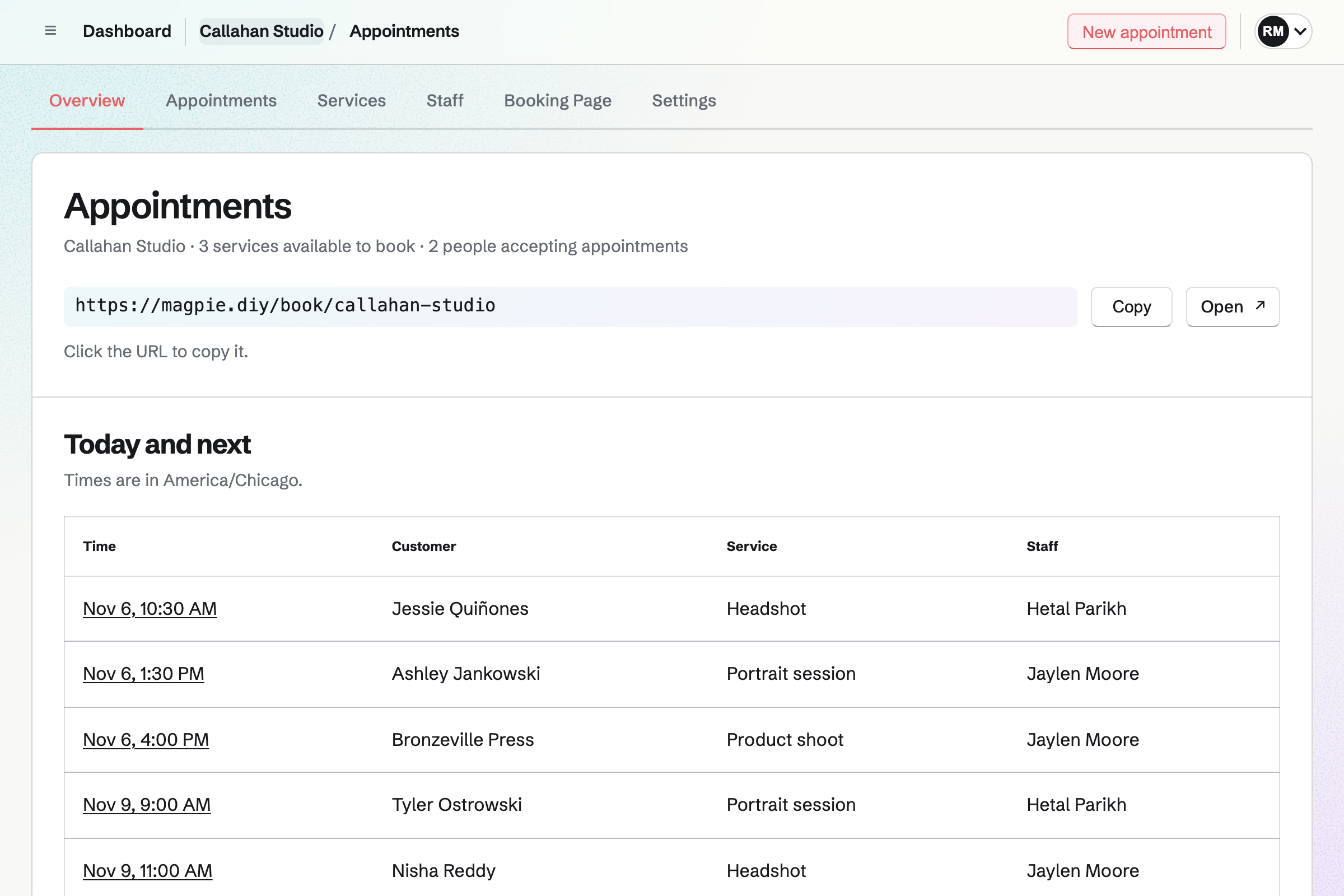
SimplyBook.me is an online booking system, built around the booking website and what happens around each booking. Magpie is one subscription for a small business's software. Its Appointments area is beside Invoicing, Contacts, Accounting, a website and email. SimplyBook.me does more around each booking; Magpie does more around the business.
Does Magpie replace SimplyBook.me?
Yes, for a business that wants a booking page for its services and staff. Magpie puts it beside the invoices, contacts and books. Customers book without an account and can reschedule or cancel from their confirmation.
Consider keeping SimplyBook.me if you send text or WhatsApp reminders, or ask intake questions. Keep it too if you run classes, sell packages or gift cards, or take bookings from Google. SimplyBook.me does each of these better than Magpie does today.
How much does SimplyBook.me cost?
SimplyBook.me has a Free plan and Basic, Standard and Premium plans, with Enterprise above them. Free takes 50 bookings a month with one provider; Premium takes 2,000 with 30 providers. Payments start on Basic, HIPAA on Standard. Text messages and the AI assistant use credits. The prices are on SimplyBook.me's pricing page.
How much does Magpie cost?
Magpie has a Free plan and paid plans, each covering every area. Appointments is on Free with no limit on bookings or services. Free holds 100 contacts and a team of 3. The Team plan is one price for up to 25 people. The prices are on Magpie's pricing page.
Does Magpie send appointment reminders?
Yes, by email. Appointments emails each customer a reminder 1 day before, or 1 hour, 2 hours or 2 days before, as you choose in Settings. It links to a page where the customer cancels or chooses another time. Its wording is fixed, and Appointments sends no text reminder. SimplyBook.me sends up to three reminders, by email, text or WhatsApp, in your own words.
Can I add intake forms to Magpie bookings?
No. The booking form asks for a name, an email address and an optional phone number. No other question can be added, and a Form is not linked to a booking. Booking questions are on Magpie's roadmap. SimplyBook.me's intake forms differ for each service and take file uploads.
Can Magpie take a deposit or payment when someone books?
Yes. A service takes its full price or a deposit by card on Stripe's page, and the appointment is booked once Stripe confirms. The money goes to your team's Stripe account, and Magpie's fee is 4% of each payment. No card is kept for a no-show fee. SimplyBook.me takes payment or a deposit at booking on Basic and above.
Does Magpie sell packages, memberships or gift cards for appointments?
No. Appointments takes payment for one booking at a time, and sells nothing to spend on later bookings. It has no discount codes either. A Store sells gift cards, spent only at the Store's checkout. SimplyBook.me sells packages, memberships, gift cards and coupons on its booking website.
Can Magpie run classes?
Partly. Appointments books one customer for each time. A Calendar event takes RSVPs up to a capacity, from people who sign in, and takes no payment. Courses sells a course in cohorts with seats and live sessions. SimplyBook.me runs classes with a timetable and a number of places, sold singly or as a series.
Can a client book several services or add-ons in one Magpie booking?
No. Each booking is one service with one staff member, at that service's length and price. Two services are two bookings, and an extra has to be a service of its own. SimplyBook.me books several services in one checkout. Its add-ons add to the price and can add time.
Does Magpie have a waiting list or booking approval?
No. A full day shows no times, and nothing lets a customer wait for one. A booking is confirmed as soon as it is made; one you do not want is cancelled from its record. SimplyBook.me has a waiting list, and can hold each booking until you accept it.
Can people book my Magpie appointments from Google, Facebook or Instagram?
No. The booking page's address can go in a profile's link. Share booking page starts a Social Media draft with it. Nothing adds a Book button on Google, Facebook or Instagram. SimplyBook.me connects all three, Google in six countries, and lists the business in its booking.page directory.
Can I embed a Magpie booking page on my website?
No. Magpie's pages do not open inside another site's frame, and Magpie gives no button code. A website links to the booking page instead. Embedding is on Magpie's roadmap. SimplyBook.me gives widget code for a booking page or a button. It has guides for WordPress, Squarespace and other builders.
Can I put my own logo and domain on a Magpie booking page?
No. The page shows the business's name and description, and the emails are sent in its name. There is no logo or colour to set, and the page is at Magpie's address. SimplyBook.me sets design on every plan, and your own domain is an add-on bought once.
Does Magpie show times in the client's time zone and language?
Partly. The booking page shows times in its own time zone and names it. The page and its emails can be in English, French, Spanish or German. SimplyBook.me shows the client's own time zone and offers more than 20 languages on every plan.
Does Magpie collect client reviews or have an AI booking assistant?
No. Nothing asks a customer for a review after an appointment. Customers book by choosing from the page. Magpie's assistant works for members, not for customers. SimplyBook.me collects and shows reviews on every plan. Its AI Voice Booking takes requests on the booking site, WhatsApp and Messenger.
Does Magpie check my Google Calendar or Outlook for appointments?
No. A staff member's Magpie Calendar events and other appointments block their time. Busy times in a connected Google Calendar are checked for Meetings, not for Appointments. Outlook does not connect. SimplyBook.me syncs Google and Outlook calendars both ways.
Does Magpie have reports on appointments?
No. Appointments lists today's, upcoming, past and cancelled bookings, and you mark each past one Completed or No-show. There are no reports or exports. Reports are on Magpie's roadmap. SimplyBook.me reports on bookings, clients and payments, and downloads them as Excel or CSV.
Does Magpie have a phone app for appointments?
Appointments works in a phone's browser. You add, reschedule and cancel bookings there, and change services, staff and hours. The Magpie app is not yet in the App Store or Google Play. SimplyBook.me has an admin app for iPhone and Android on every plan. Its client app is on Basic and above.
Does Magpie offer HIPAA?
No. Magpie signs no business associate agreement, so it is not set up for health details under HIPAA. SimplyBook.me has a HIPAA mode on Standard and Premium.
Does SimplyBook.me have a website or accounting?
Partly. Its booking website takes extra pages, a news section and a photo gallery. It is not a website builder. On Premium it sends sales to QuickBooks, Xero or FreshBooks. Magpie includes Websites, Accounting and Invoicing in the same subscription as Appointments.
Can I use SimplyBook.me and Magpie together?
Yes. SimplyBook.me can keep taking bookings and payments while Magpie runs your website, invoices, books and email at your domain. A Magpie website links to your SimplyBook.me booking website. Bookings made in SimplyBook.me do not appear in Magpie's Contacts by themselves.
How do I move from SimplyBook.me to Magpie?
Open Appointments and choose a business type, such as Salon or barber, for suggested services. Change each service's length, price and buffers, switch on your staff and set their hours. Bring your client list in as a JSON document in Contacts. Magpie does not read SimplyBook.me's bookings. Add upcoming ones with New appointment, or keep SimplyBook.me until they are past.
What is included in Magpie's Free plan?
Appointments with no limit on bookings or services, Meetings, Calendar, Contacts, Invoicing, a website, Forms and a team of 3. Free holds 100 contacts; past that, a new customer cannot book. A paid plan raises the limits and adds email at your domain.