Later compared with Magpie

Later vs Magpie: an in-depth comparison

Later and Magpie both schedule a post to several social accounts and show it on a calendar. Both make a link-in-bio page. They are built around different things.

  1. Later is a social media tool built around a visual calendar for Instagram, TikTok and six other networks. It adds Link in Bio, analytics, an inbox and AI captions. It is built for a creator, a brand or an agency on those networks.
  2. Magpie is one subscription for a small business's software, and Social Media is one part of it. Beside it are Store, booking pages, Invoicing, a Newsletter and a website. It is built for someone whose social posts are one part of running the business.
Create account
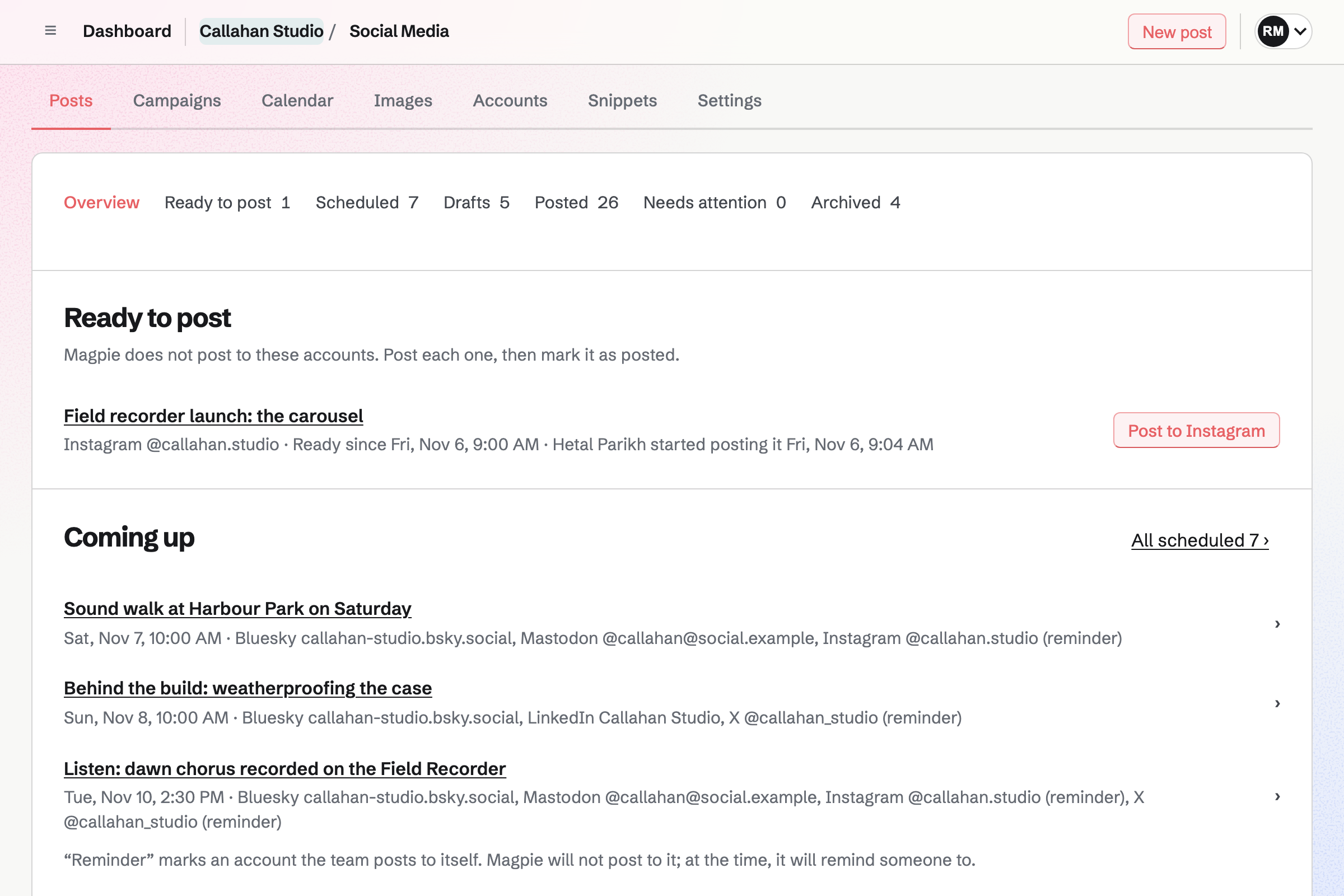
Social Media overview for a fictional studio: an Instagram post ready to post by hand, posts coming up for Bluesky, Mastodon, LinkedIn and X, drafts and a launch campaign.

How is Magpie different?

1. Social posts come with the rest of the business

One Magpie subscription includes the areas a small business would otherwise buy one at a time:

  • Social Media for scheduled posts, campaigns, posting times and pictures in each network's shape
  • Link-In-Bio List for the page your profiles link to, with views and clicks
  • Store for selling online, and Meetings and Appointments for booking pages
  • Newsletter for email to subscribers, and Podcast for episodes
  • Invoicing, Websites, Mail, Helpdesk, Design Canvas and the other areas, in the same team

Everything is in one account with one bill.

2. A post starts from what you published

A Store product, a Newsletter email and a Podcast episode each have a button that starts a draft. So do public Calendar events, open Hiring jobs and the Appointments booking page. The draft has the name and the public address, and a product's pictures. Scheduled posts can show in Calendar beside the team's events.

3. Accounts, posts and teammates do not change the price

Social Media has no limit on accounts or scheduled posts on any plan. A free team has up to 3 people. The Team plan is one price for up to 25.

Comparing Magpie and Later

Later does more with each network; Magpie does more around the posts. Every line in the tables below was checked against Later's own pages, linked from each row, and against Magpie's code and Help.

Platform

WhatLaterMagpie
Scheduled postsWrite once, send to several accounts, now or at a set time Yes Yes
Posting timesRegular times that posts fill in turn Yes Yes
InstagramPosts published by themselves Yes Reminders to post by hand
TikTok, Facebook, Threads, Pinterest, YouTube Shorts and SnapchatPosts published to these networks Yes No
LinkedInPersonal profiles and company pages Yes Personal profiles
XPosts to X No Reminders to post by hand
Bluesky and MastodonPosts published to these networks by themselves No Yes
Content calendarScheduled posts on a calendar, moved by dragging Yes Month and list
Instagram grid previewComing posts shown as the profile's grid Yes No
Best times to postTimes suggested from past posts and followers Yes No
Video, Reels and StoriesVideos scheduled like pictures Yes No
AI captions and ideasCaptions and post ideas written for you AI credits on every plan No
Media libraryPictures and videos the team shares Yes Partly
Pictures in each network's shapeCropped and designed without another app Partly Yes
Customers' posts collectedInstagram posts that tag you, saved to repost Yes No
Analytics and reportsReach, engagement and follower growth for each post Yes No
Competitors and brand mentionsYour results beside competitors', and what people say about you Scale No
Social inboxComments and direct messages answered in one place Growth and Scale No
Approvals and client reviewPosts approved before they go out Growth and Scale Partly
Delete a published post from the networksWithout opening each network No Yes
Link-in-bio pageA page of links for your profiles Yes Yes
Phone appPlan and publish from iPhone or Android Yes No
Posts beside meetings and eventsScheduled posts in the same calendar as the team's events No Yes
Shop, bookings and a newsletterThe things a post links to, in the same account No Yes
Free planSchedule posts without paying 14-day trial Yes

Good to know: Where Magpie says No or Partly, the line under the row says what Magpie does instead. Each gap has an item on Magpie's roadmap, and the line changes on the day it ships.

Social platforms

Later publishes to Instagram, TikTok, Facebook, Threads, Pinterest, LinkedIn, YouTube Shorts and Snapchat. Magpie publishes to Bluesky, Mastodon and LinkedIn profiles. It reminds the team to post to X and Instagram.

WhatLaterMagpie
Connect the social accounts I post to Source Yes Yes
Have posts published to Instagram, carousels, Reels and Stories included Source Magpie: Magpie does not publish to Instagram. It prepares the caption and up to 20 pictures in Instagram's shapes, a story shape among them, reminds the team at the post's time, and shares them to Instagram from the phone's share sheet; the person then selects Mark as posted. Any Instagram account works, personal ones included, but there is no video, so no Reels. Yes Partly
Have videos published to TikTok Source Magpie: TikTok cannot be added, and Social Media takes no video. Help says posting needs a TikTok app that TikTok has audited. Yes No
Have posts published to a Facebook Page Source Magpie: Facebook cannot be added in Social Media: Help says publishing to a Page needs a Meta app approved through Meta's App Review. Pictures can be downloaded from Images in each shape, to post there by hand. Yes No
Post to my business's LinkedIn page as well as my own profile Source Magpie: Magpie publishes to a LinkedIn personal profile, with a link card or up to 20 pictures. Company pages cannot be connected, and LinkedIn's access has to be renewed about every two months. Yes Partly
Have posts published to Threads Source Magpie: Threads cannot be added in Social Media: Help says publishing needs a Meta app approved through Meta's App Review. Yes No
Have Pins published to Pinterest Source Magpie: Pinterest cannot be added: Help says creating Pins needs a Pinterest app approved by Pinterest. Yes No
Schedule YouTube Shorts Source Magpie: YouTube cannot be added: Help says its API uploads videos only, and Social Media takes no video. Yes No
Post Spotlight videos and Stories to Snapchat Source Magpie: Social Media has no Snapchat account, and nothing in Magpie posts to Snapchat. Yes No
Post to X Source Later: Later ended support for X on 28 August 2025: X accounts can no longer be connected, and posts to X no longer go out.Magpie: Magpie does not post to X itself, because the X API charges for every post. It counts characters as X does, reminds the team at the post's time, and opens X's compose window with the text, or shares the text and pictures from a phone; the person then selects Mark as posted. No Partly
Have posts published to Bluesky and Mastodon Source Later: Bluesky and Mastodon are on the help centre's list of platforms Later does not support. No Yes
Get a reminder to finish a post myself where it cannot be published by itself Source Yes Yes

Good to know: For X and Instagram, the post moves to Ready to post and Magpie emails a reminder. The posting page shares the text and pictures from a phone. Mark as posted records who posted it.

Social media scheduling

Both write a post once for several accounts, keep posting times and save hashtags to reuse. Later adds the Instagram grid, best times to post, a first comment, tags and video.

WhatLaterMagpie
Write a post once and send it to several accounts, with different text for each Source Yes Yes
See scheduled posts on a calendar and drag them to a new time Source Magpie: Calendar in Social Media shows scheduled and published posts by month or as a list, in your time zone, and each opens its post. There is no week view, a post cannot be started from a day, and its time is changed on the post rather than by dragging. Yes Partly
Set regular posting times and fill them with posts Source Yes Yes
See how my scheduled posts will look on my Instagram grid Source Magpie: Each Instagram post shows its own preview in the account's picture shape; there is no grid of past and coming posts. Yes No
Be told the best times to post Source Magpie: Posting times are the ones a team admin sets. Magpie suggests none, as it collects no figures from the networks. Yes No
Save hashtags and phrases to reuse in posts Source Yes Yes
Be suggested hashtags for a post Source Magpie: Hashtags are typed, or added from a snippet; Magpie suggests none. Bluesky receives them as tags. Yes No
Add a first comment, such as hashtags, as the post goes out Source Magpie: Magpie publishes the post on its own; a comment is added on the network afterwards. Yes No
Tag people and a place in a post Source Magpie: Magpie adds no people or place tags to a post. Instagram posts are finished in Instagram's app, where tags can be added by hand. Yes No
Tag my shop's products in a post so followers can buy them Source Magpie: Promote on Social Media on a Store product starts a draft with its name, address and pictures, but nothing tags the product in an Instagram post. Yes No
Describe each picture for people who use screen readers Source Yes Yes
Schedule videos, Reels and Stories Source Magpie: Social Media posts take text, a link and pictures only. Instagram's story shape prepares a picture for a story posted by hand. Yes No
Group posts into campaigns or themes Source Yes Yes
Delete a published post from the networks without opening each one Source Later: A published post cannot be deleted from Later; it is deleted on the network itself. No Yes
Start a post from a product, newsletter, episode or event I published Source Later: Later has no shop, newsletter, podcast or events of its own to start a post from; its plans cover scheduling, analytics, the inbox and Link in Bio. No Yes

Good to know: A campaign groups posts with dates. Schedule campaign puts its finished drafts into the next posting times. The campaign adds tracking to its links, so your web analytics show which posts sent visitors.

Media library and collecting content

Later keeps the team's pictures and videos in one library with unlimited storage. They come in from Canva, Dropbox and customers' Instagram posts. Magpie takes pictures, not video, and prepares each in every network's shape.

WhatLaterMagpie
Keep the pictures for our posts in one library the team shares Source Magpie: Pictures live in Your images, which belongs to each person and is organised with tags. Social Media's Images lists the pictures used in the team's posts and the ones you added, plus the brand pictures in the team's Design Systems, so a teammate's upload reaches the team only once a post uses it. Video is not taken. Yes Partly
Store as many pictures and videos as I like Source Magpie: Pictures in Your images count toward your Personal storage, whichever team uses them: 5 GB on Free and 100 GB on Pro, shared with your other Personal files. Social Media takes no video. Yes Partly
Bring in pictures from Canva, Dropbox or a web page Source Magpie: Pictures come from Your images, an upload from the computer or phone, the team's Design Systems, or a design saved from Design Canvas. There is no connection to Canva or Dropbox, and no way to bring in a picture from a web address. Yes Partly
Find photos customers post about me and repost them with credit Source Magpie: Social Media publishes posts but reads nothing from the networks, so posts that tag or mention the account are found in the network's own app. Yes No
Make a post's picture in each network's shape without another app Source Later: Later crops pictures and adds filters and text as a post is scheduled, and trims videos. Designs are made elsewhere, such as in Canva, and exported to Later's library. Partly Yes

Good to know: Open in Design Canvas starts a design in a network's size with the picture in it. The design is saved back to Your images.

AI social media tools

Later's Caption Writer writes captions in the tone of past posts. Ideas suggests what to post. Each uses AI credits from the plan. Magpie has no AI writing, and Later does it better than we do today.

WhatLaterMagpie
Have AI write a post's caption in my brand's voice Source Magpie: Social Media has no writing help, and the assistant on Dashboard can search Social Media posts but not write them. Yes No
Get ideas for what to post Source Magpie: Snippets hold text a team wrote itself; Social Media suggests no ideas for what to post. Yes No

Good to know: Snippets keep text the team wrote, such as a set of hashtags. Insert snippet adds one at the cursor in any post.

Analytics

Later shows reach, engagement and follower growth for five networks, with reports to share. Scale adds paid Meta ads beside ordinary posts. Magpie collects no figures from the networks.

WhatLaterMagpie
See how each post and account did: reach, likes, comments and new followers Source Magpie: Each published account links to the post on the network; Magpie collects no reach, likes or follower figures. Yes No
Download a report of results to send to a client Source Magpie: Social Media has no figures to export; Publish log lists each attempt to publish. Yes No
See how my paid Facebook and Instagram ads did beside my ordinary posts Source Magpie: Magpie runs no ads and reads no ad results; Social Media publishes ordinary posts only. Yes No

Good to know: Each published account links to the post on its network. Publish log lists each attempt to publish.

Competitive benchmarking and listening

On Scale, Later compares your results with up to 20 competitors. It gathers mentions of your brand and says whether each is good or bad. Magpie has nothing that does this.

WhatLaterMagpie
Compare my results with my competitors' accounts Source Magpie: Magpie reads no figures from the networks, for the team's own accounts or anyone else's. Yes No
See what people say about my brand and whether it is good or bad Source Magpie: Nothing in Magpie follows what people post about a brand on the networks or how they feel about it. Yes No

Good to know: RSS Reader follows the feeds, websites and Bluesky accounts you choose in one timeline. It does not search a network for a word.

Social inbox

On Growth and Scale, Later's Social Inbox gathers comments from Instagram, Facebook and TikTok. It adds direct messages from Instagram and Facebook. Magpie reads nothing back from the networks; they do it better than we do today.

WhatLaterMagpie
Read and reply to comments on my posts from every network in one place Source Magpie: Magpie publishes posts but reads no comments or replies from the networks; they are answered in each network's own app. Yes No
Answer Instagram and Facebook direct messages from the same place Source Magpie: Helpdesk answers customers' email and contact page messages in a shared inbox, with assignment and saved replies, but takes no Instagram or Facebook messages. Yes No

Good to know: Helpdesk answers customer email and contact page messages in a shared inbox. Each conversation can be assigned to a teammate, with saved replies.

Approvals and collaboration

Both invite teammates to write and schedule posts. Later's Growth and Scale plans add approvals, comments on a post and calendar notes. Clients review posts from a link.

WhatLaterMagpie
Invite teammates to write and schedule posts Source Yes Yes
Keep each client's or brand's accounts, pictures and people apart Source Magpie: Each team has its own social accounts, posts, campaigns, posting times and members, so a separate team keeps each client or brand apart. Pictures are not kept apart: Your images belongs to each person, and the pictures a person adds to Social Media are listed in every team they open. A person can make as many teams as they like, and each starts free. Yes Partly
Choose what each person may do Source Magpie: Roles apply to the whole team: members see posts, editors write drafts, and team admins schedule, publish and manage accounts, unless Who can schedule and publish lets editors publish too. A team admin can narrow a member to some areas, but there are no custom roles. Yes Partly
Have posts approved before they go out Source Magpie: By default only team admins schedule and publish, so editors' drafts wait for an admin, and in a campaign Finished records who marked a draft ready. Nobody can ask for approval or for changes, and nobody is told a draft is waiting. Yes Partly
Let a client review and comment on posts before they go out Source Magpie: A client can be invited as a guest given Social Media, and then sees the team's posts and calendar with a Magpie account of their own, but cannot comment on a post or approve it. Yes Partly
Leave notes for teammates on a post Source Magpie: A Social Media post has no comments or notes; the team talks about it elsewhere, such as in Team chat. Yes No
Put notes on the content calendar, such as a launch day Source Yes Yes

Good to know: In Magpie only team admins schedule and publish by default. An editor's drafts wait for an admin. A client can join the team as a guest who uses only Social Media.

Plans and apps

Later has a 14-day trial and three paid plans, priced by social sets and users. It has apps for iPhone and Android. Magpie has a Free plan. Its app is not yet in the App Store or Google Play.

WhatLaterMagpie
Schedule to as many accounts as I like without paying more for each Source Later: The pricing page offers a 14-day trial and no free plan. Billed yearly, Starter is $18.75 a month for 1 social set, 1 user and 30 posts a profile; Growth $37.50 for 2 sets, 2 users and 180 posts; Scale $82.50 for 6 sets, 4 users and no post limit. Partly Yes
Plan and publish posts from a phone app Source Magpie: Social Media works in a phone's browser, where the posting page shares X and Instagram posts from the share sheet. The Magpie app for iPhone and Android writes posts with photos from the phone, schedules them and opens on Ready to post, but it is not yet in the App Store or Google Play. Yes Partly

Good to know: Social Media works in a phone's browser. The posting page shares X and Instagram posts from the phone's share sheet.

Price comparison

How Later charges

Later charges by plan, per month or per year, on Starter, Growth or Scale. There is a 14-day trial and no free plan. A social set is one profile on each of Later's eight networks. Starter has 1 social set, 1 user and 30 posts a profile each month. Growth has 2 sets, 2 users and 180 posts, with the inbox and approvals. Scale has 6 sets, 4 users and no post limit, with benchmarking and listening. Growth and Scale sell extra sets, users and AI credits. Prices are on Later's pricing page.

How Magpie charges

Magpie charges by plan, Free or a paid plan, for everything in the account. Social Media is on every plan, with no limit on accounts or posts. The plan sets how many people are in a team, not which areas you can use. The Team plan is one price, not a price per person. Prices are on Magpie's pricing page.

On top of the planLaterMagpie
How you payBy plan, with extra social sets and users on Growth and ScaleOne plan for every area
Without payingA 14-day trialThe Free plan, with no limit on accounts or posts
Social accounts1 social set on Starter, 2 on Growth, 6 on ScaleNo limit on any plan
Scheduled posts30 a profile each month on Starter, 180 on Growth, no limit on ScaleNo limit on any plan
Teammates1 user on Starter, 2 on Growth, 4 on Scale, more for a fee3 on Free, 25 on the Team plan
AI writing5 credits a month on Starter, 50 on Growth, 100 on ScaleNot available
AnalyticsEvery plan: 3 months back on Starter, a year on Growth, 2 years on ScaleNot available
Social inbox and approvalsGrowth and ScaleNo inbox; only team admins publish, by default
Benchmarking and listeningScaleNot available
Media storageUnlimited5 GB on Free, 100 GB on Pro
Link-in-bio pageLink in Bio, on every plan, without Later's bannerLink-In-Bio List, included, with a link to Magpie at the foot
Shop, booking pages, invoicing and a newsletterNot offeredIncluded

When to choose Magpie or Later

  • Want scheduled posts beside your shop, bookings and newsletter, with no charge for each account, post or teammate? Go with Magpie.
  • Want Instagram and TikTok published by themselves, with video, a grid preview, an inbox and analytics? Later is the right choice.

Recommendations by kind of business

For an Instagram or TikTok creator
Later. Reels, Stories and TikToks publish by themselves. The Instagram grid shows coming posts before they go out. Magpie posts no video, and its Instagram posts are finished by hand.
For a social media manager or an agency
Later. Access Groups keep each client's profiles and media apart. Approvals, a review link and reports come with them. Magpie publishes to fewer networks and reads no results back.
For a shop or a maker
Magpie. Promote on Social Media on a product starts a draft with its name, address and pictures. Store, the Newsletter and the link-in-bio page are in the same team.
For a service business: a consultant, a salon, a coach
Magpie. A post can share the booking page. Scheduled posts show in Calendar beside the team's events. Booking pages, Invoicing and Helpdesk are included.
For someone on Bluesky, Mastodon or X
Magpie. Magpie publishes to Bluesky and any Mastodon server, and reminds the team to post to X. Later supports none of the three.
For a small team that posts pictures a few times a week
Either. Both schedule pictures to several accounts, with a calendar, saved hashtags and a link-in-bio page. Choose Later for Instagram and TikTok published by themselves. Choose Magpie for one price and the rest of the business.

Frequently asked questions

What is the difference between Later and Magpie?

Later is a social media tool built around a visual calendar. It adds Link in Bio, analytics, an inbox and AI captions. Magpie is one subscription for a small business's software. Its Social Media area is one part, beside Store, booking pages, Invoicing and a Newsletter. Later does more with each network; Magpie does more around the posts.

Does Magpie replace Later?

Yes, for a business that posts pictures to Bluesky, Mastodon, LinkedIn and X. Magpie schedules them, keeps posting times and campaigns, and prepares pictures in each network's shape. It keeps those posts beside the rest of the business.

Consider keeping Later if you post to TikTok, Facebook, Threads, Pinterest or YouTube, or post video. Keep it too for the Instagram grid, one inbox for replies, analytics or AI captions. Later does each of these better than Magpie does today.

How much does Later cost?

Later has Starter, Growth and Scale plans, billed monthly or yearly. Each plan sets the social sets, users and posts a profile may schedule each month. Starter has 1 social set, 1 user and 30 posts a profile. Growth and Scale add sets, users, the inbox and approvals. The prices are on Later's pricing page.

Does Later have a free plan?

No. Later's pricing page offers a 14-day trial of each plan, and no free plan. Magpie has a Free plan with Social Media, with no limit on accounts or scheduled posts.

How much does Magpie cost?

Magpie has a Free plan and paid plans, each covering every area. Social Media has no limit on accounts or scheduled posts on any plan. A free team has 3 people. The Team plan is one price for up to 25. The prices are on Magpie's pricing page.

Which networks does Magpie publish to?

Bluesky, Mastodon and LinkedIn personal profiles, by themselves at the time you set. For X and Instagram, Magpie prepares the post and emails a reminder at its time. A phone then shares the text and pictures. Later publishes to Instagram, TikTok, Facebook, Threads, Pinterest, LinkedIn, YouTube Shorts and Snapchat.

Does Magpie post to Instagram and TikTok?

No, not by themselves. Magpie prepares an Instagram post's caption and up to 20 pictures and reminds the team. A phone shares them to Instagram. TikTok cannot be added, and Social Media takes no video. Later publishes to both, with Reels, Stories and carousels on Instagram.

Does Later post to X?

No. Later ended support for X on 28 August 2025, so X accounts can no longer be connected. Magpie prepares an X post and counts its characters as X does. At the post's time, Magpie reminds the team. The posting page then opens X's compose window with the text, or shares it from a phone.

Does Later post to Bluesky or Mastodon?

No. Later's help centre lists Bluesky and Mastodon among the platforms it does not support. Magpie publishes to Bluesky and to any Mastodon server by itself, within each server's own limits.

Can Magpie post to a LinkedIn company page?

No. Magpie publishes to a LinkedIn personal profile, with a link card or pictures. Its access is renewed about every two months. Company pages are on Magpie's roadmap. Later publishes to LinkedIn company pages and personal profiles.

Does Magpie schedule videos, Reels or Stories?

No. Social Media posts take text, a link and pictures. Instagram's story shape prepares a picture for a story posted by hand. Video posts are on Magpie's roadmap. Later schedules Reels, Stories, TikToks, YouTube Shorts and Snapchat videos. It trims a video as it is scheduled.

Does Magpie have a visual Instagram planner?

No. Each Instagram post shows its own preview in the account's picture shape. There is no grid of past and coming posts. Later's Visual Instagram Planner shows the grid and changes the order by dragging.

Does Magpie suggest the best times to post?

No. Posting times are the ones you set, with their days and time zone. Magpie suggests none, as it collects no figures from the networks. Later's Best Time to Post marks times on the calendar for Instagram, Facebook and TikTok.

Does Magpie have AI to write captions?

No. Social Media has no writing help, and the assistant can search posts but not write them. Snippets keep saved text, such as hashtags, to insert into a post. Later's Caption Writer and Ideas use AI credits, which every plan includes.

Does Magpie have social media analytics?

No. Magpie collects no likes, reach or follower figures from the networks. Each published post links to its copy on the network. Analytics are on Magpie's roadmap. Later shows figures for each post and profile on every plan, and exports them.

Can I reply to comments and direct messages in Magpie?

No. Magpie reads no comments or messages from the networks. They are answered in each network's own app. Later's Social Inbox gathers comments and messages from Instagram and Facebook, and TikTok comments, on Growth and Scale.

Can a client approve posts before they go out in Magpie?

Partly. By default only team admins schedule and publish, so an editor's drafts wait for an admin. A client can join the team as a guest and see the posts and calendar. Nobody can ask for approval or comment on a post. Later's Growth and Scale plans have approvals and a review link for clients.

Does Magpie have a link-in-bio page like Later's?

Yes. Link-In-Bio List is a page of links, headings, text and social profiles, on every plan. It counts views and the clicks on each link. It can show at a domain of your own. It does not list your posts or collect email addresses on the page; Later's Link in Bio does both. A link can open the Newsletter's signup page instead. A link to Magpie stays at its foot.

Can I delete a published post from Later?

No. Later's Help says a published post is deleted on the network itself. In Magpie, Delete from social accounts removes the published copies from the networks that allow it.

Does Later have a shop, booking pages or a newsletter?

No. Later's social plans cover scheduling, analytics, the inbox and Link in Bio. Its other products are for influencer campaigns and creators. Magpie includes Store, Meetings, Appointments, Invoicing and the Newsletter. Each starts a post with a button.

Does Magpie have a phone app for social media?

Social Media works in a phone's browser. The posting page shares X and Instagram posts from the phone's share sheet. The Magpie app writes and schedules posts with photos from the phone. It is not yet in the App Store or Google Play. Later has apps for iPhone and Android.

Can I use Later and Magpie together?

Yes. Later can publish to Instagram and TikTok. Magpie runs the shop, bookings and newsletter the posts link to. Magpie can publish the same news to Bluesky and Mastodon. A campaign's links carry tracking, so your web analytics show which posts sent visitors.

How do I move from Later to Magpie?

In Social Media, add Bluesky, Mastodon and LinkedIn by signing in on each network. Add X and Instagram by name. Set your posting times, then write or copy each scheduled post into a new post. Magpie has no import of posts, so do this before your Later plan ends.

What is included in Magpie's Free plan?

Social Media, with no limit on accounts or scheduled posts. Also Link-In-Bio List, booking pages, Invoicing, Store, a website, the Newsletter and Forms. A free team has 3 people. A paid plan adds the API, email at your domain and a larger team.
If a line on this page is wrong, tell us and we will correct it.

Later changes, and so does Magpie. If a line is out of date about either product, email support@magpie.diy with the page that shows it. We check the line against that page, change it, and give it the new date. That goes for Later's own team as much as for anyone who uses it.

Schedule your social posts on Magpie's Free plan.

Create a Magpie account, then add the accounts you post to in Social Media.

Create account