Buffer compared with Magpie

Buffer vs Magpie: an in-depth comparison

Buffer and Magpie both schedule a post to several social accounts and show it on a calendar. Both have a Free plan. They are built around different things.

  1. Buffer is a social media tool for publishing, replies, analytics and AI writing, priced per channel. It is built for a creator, a small business or an agency with many social accounts. It covers many networks, video and figures on every post.
  2. Magpie is one subscription for a small business's software, and Social Media is one part of it. Beside it are Store, booking pages, Invoicing, a Newsletter, a website and the other areas a business runs on. It is built for someone whose social posts are one part of running the business.
Create account
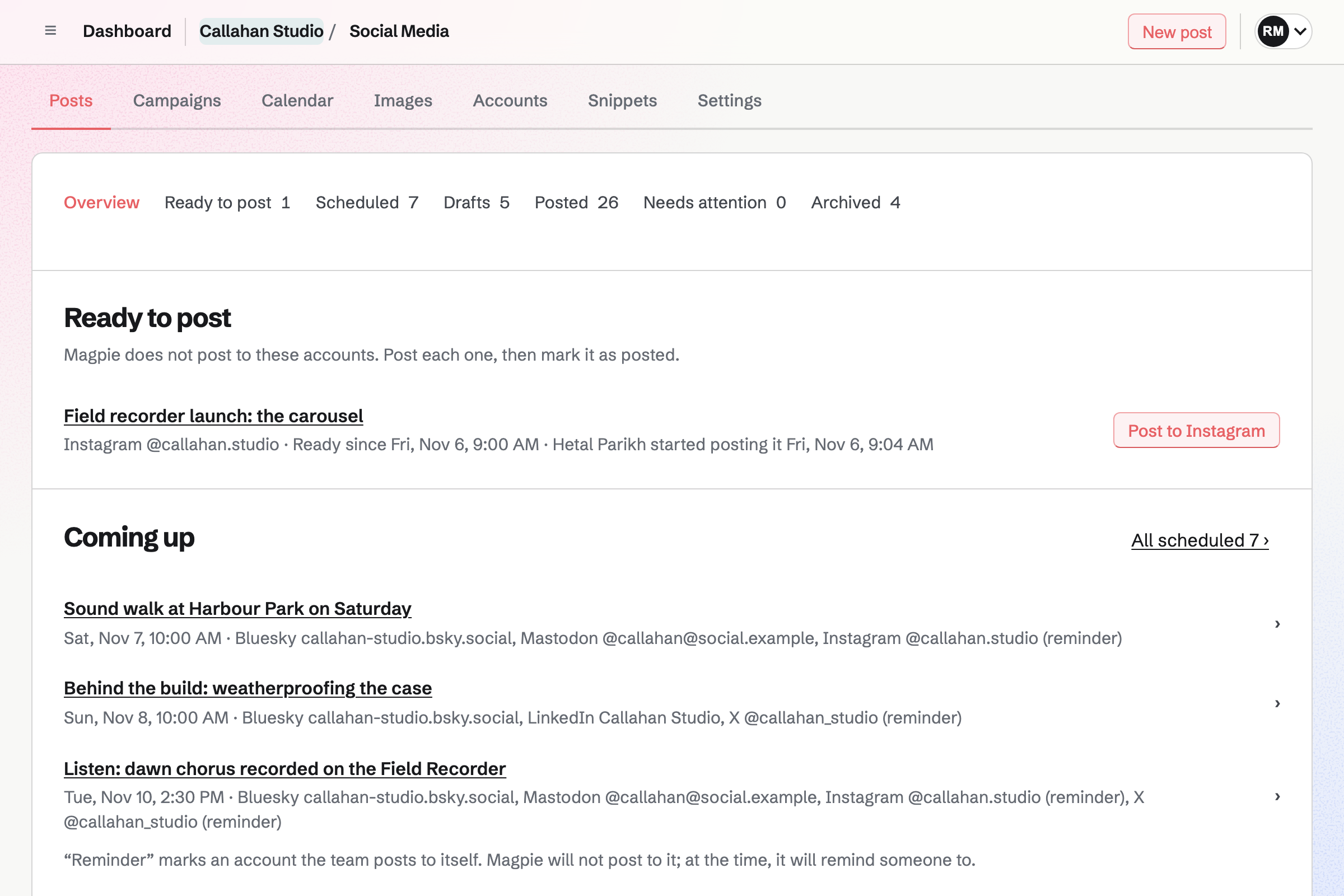
Social Media overview for a fictional studio: an Instagram post ready to post by hand, posts coming up for Bluesky, Mastodon, LinkedIn and X, drafts and a launch campaign.

How is Magpie different?

1. Social posts come with the rest of the business

One Magpie subscription includes the areas a small business would otherwise buy one at a time:

  • Social Media for scheduled posts, campaigns, posting times and pictures in each network's shape
  • Link-In-Bio List for the page your profiles link to, with views and clicks
  • Store for selling online, and Meetings and Appointments for booking pages
  • Newsletter for email to subscribers, and Podcast for episodes
  • Invoicing, Websites, Mail, Helpdesk, Design Canvas and the other areas, in the same team

Everything is in one account with one bill. Buffer covers social media, and leaves the shop, bookings and newsletter to other software.

2. A post starts from what you published

A Store product, a sent Newsletter email, a Podcast episode, a public Calendar event, an open Hiring job and the Appointments booking page each have a button that starts a draft. The draft has the name and the public address, and a product's pictures. Scheduled posts can show in Calendar beside the team's events.

3. Accounts and teammates do not change the price

Social Media has no limit on accounts or scheduled posts, on the Free plan or a paid one. A free team has up to 3 people, and the Team plan is one price for up to 25. Buffer prices each channel, and inviting teammates needs its Team plan.

Comparing Magpie and Buffer

Buffer does more with each network; Magpie does more around the posts. Every line in the tables below was checked against Buffer's own pages, linked from each row, and against Magpie's code and Help.

Platform

WhatBufferMagpie
Scheduled postsWrite once, send to several accounts, now or at a set time Yes Yes
Posting times and a queueRegular times, and posts added to the next free one Yes Yes
Facebook, Threads, TikTok, YouTube Shorts and PinterestPosts published to these networks Yes No
Instagram and XPosts published to these networks by themselves Yes Reminders to post by hand
LinkedInPersonal profiles and company pages Yes Personal profiles
Bluesky and MastodonPosts published to these networks by themselves Yes Yes
Google Business Profile and Substack NotesUpdates posted to a business listing or to Substack Yes No
Content calendarScheduled posts by week or month, moved by dragging Yes Month and list
Video, Reels and StoriesVideos scheduled like pictures Yes No
Posts in a threadSeveral connected posts published as one thread Yes No
Ideas boardPost ideas moved through stages Yes Drafts
AI writingPosts drafted, rewritten and adapted for each network Yes No
Replies to commentsComments from every network answered in one place Yes No
Analytics and reportsReach, engagement and follower change for each post Yes No
ApprovalsPosts approved before they go out Team plan Partly
Pictures in each network's shapeCropped and designed without another app Partly Yes
Delete a published post from the networksWithout opening each network No Yes
Link-in-bio pageA page of links for your profiles Start Page, counted as a channel Yes
Phone appPlan and publish from iPhone or Android Yes No
APISchedule posts from your own software Yes Paid plans
Posts beside meetings and eventsScheduled posts in the same calendar as the team's events No Yes
Shop, bookings and a newsletterThe things a post links to, in the same account No Yes
Free planSchedule posts without paying 3 channels Yes

Good to know: Where Magpie says No or Partly, the line under the row says what Magpie does instead. Each gap has an item on Magpie's roadmap, and the line changes on the day it ships.

Channels

Buffer publishes to Instagram, Facebook, X, LinkedIn, Threads, TikTok, YouTube, Pinterest and more. Magpie publishes to Bluesky, Mastodon and LinkedIn, and reminds the team to post to X and Instagram.

WhatBufferMagpie
Connect the social accounts I post to Source Yes Yes
Have posts published to Instagram, carousels, Reels and Stories included Source Magpie: Magpie does not publish to Instagram. It prepares the caption and up to 20 pictures in Instagram's shapes, reminds the team at the post's time, and shares them to Instagram from the phone's share sheet; the person then selects Mark as posted. Any Instagram account works, but there is no video, so no Reels. Yes Partly
Have posts published to a Facebook Page or group Source Magpie: Facebook cannot be added in Social Media: Help says publishing needs a Meta app approved through Meta's App Review. Square, portrait and landscape copies of a picture can be downloaded from Images to post there by hand. Yes No
Have posts published to X Source Magpie: Magpie does not post to X, because the X API charges for every post. It counts characters as X does, reminds the team at the post's time, and opens X's compose window with the text, or shares the text and pictures from a phone; the person then selects Mark as posted. Yes Partly
Post to my business's LinkedIn page as well as my own profile Source Magpie: Magpie publishes to a LinkedIn personal profile, with a link card or up to 20 pictures. Company pages cannot be connected, and LinkedIn's access has to be renewed about every two months. Yes Partly
Have posts published to Bluesky and Mastodon Source Yes Yes
Have posts published to Threads Source Magpie: Threads cannot be added in Social Media: Help says publishing needs a Meta app approved through Meta's App Review. Yes No
Have videos and photo posts published to TikTok Source Magpie: TikTok cannot be added, and Social Media takes no video. Help says posting needs a TikTok app that TikTok has audited. Yes No
Schedule YouTube Shorts Source Magpie: YouTube cannot be added: Help says its API uploads videos only, and Social Media takes no video. Yes No
Have Pins published to Pinterest Source Magpie: Pinterest cannot be added: Help says creating Pins needs a Pinterest app approved by Pinterest. Yes No
Post updates, offers and events to my Google Business Profile Source Magpie: Social Media has no Google Business Profile account, and nothing in Magpie posts to one. Yes No
Post Substack Notes Source Magpie: Social Media has no Substack account. Magpie's own Newsletter sends email to subscribers, and a sent email with a web copy can start a Social Media post. Yes No
Get a reminder to finish a post myself where it cannot be published by itself Source Yes Yes

Good to know: For X and Instagram, the post moves to Ready to post and Magpie emails a reminder. The posting page shares the text and pictures from a phone, and Mark as posted records who posted it.

Publish: scheduling and the calendar

Both write a post once, give each account its own text, keep posting times and schedule a queue. Buffer adds video, threads, a first comment, bulk upload and a calendar you drag posts on.

WhatBufferMagpie
Write a post once and send it to several accounts, with different text for each Source Yes Yes
Set regular posting times and add posts to the next free one Source Yes Yes
Schedule a post for an exact time, or publish it now Source Yes Yes
Move an urgent post to the front of the queue, or shuffle the queue Source Magpie: A queued post takes the next free posting time when it is added and keeps it; another time is set with Change time. Nothing moves a post ahead of the others or shuffles them. Yes No
Pause everything scheduled for a while, and resume it later Source Magpie: Each post is unscheduled on its own, which returns it to a draft; nothing holds all of a team's or an account's scheduled posts at once. Yes No
See scheduled posts on a calendar and drag one to a new time Source Magpie: Calendar in Social Media shows scheduled and published posts by month or as a list, in your time zone, and each opens its post. There is no week view and no filter by account, and a post's time is changed on the post, not by dragging. Yes Partly
Post several pictures in one post Source Yes Yes
Schedule videos, Reels and Stories Source Magpie: Social Media posts take text, a link and pictures only. Instagram's Story shape prepares a picture for a story posted by hand. Yes No
Publish a thread of several connected posts Source Magpie: A post is one message on each account; text over a network's limit has to be shortened, or written separately for that account. Yes No
Add a first comment, such as hashtags, as the post goes out Source Magpie: Magpie publishes the post on its own; a comment has to be added on the network afterwards. Yes No
Describe each picture for people who use screen readers Source Yes Yes
Save hashtags and phrases to reuse in posts Source Yes Yes
Make a post's picture in each network's shape without another app Source Buffer: Pictures are made elsewhere and brought in from Canva, Dropbox, Google Drive, Google Photos, OneDrive or Unsplash. Partly Yes
Shorten the links in my posts and count their clicks Source Magpie: Links go out as written, or with campaign tracking added. Bluesky and LinkedIn show a link card and Mastodon counts every link as a fixed length, but Magpie makes no short links and counts no clicks. Yes No
Add campaign tracking to links, so web analytics show which posts sent visitors Source Yes Yes
Group posts into campaigns or themes Source Yes Yes
Choose a saved group of accounts when writing a post Source Magpie: A new post goes to every account of the team, and accounts are switched off one by one. A separate team keeps another client's or brand's accounts apart, but there are no saved groups within a team. Yes Partly
Add many posts at once from a spreadsheet Source Magpie: Posts are written one at a time on the website or in the app; Social Media has no import. Yes No
See how scheduled posts will look on my Instagram grid Source Magpie: Each Instagram post shows its own preview in the account's image shape; there is no grid of past and coming posts. Yes No
Delete a published post from the networks without opening each one Source Buffer: Published posts cannot be changed or deleted from Buffer; that is done on each network. No Yes
See posts going out beside my meetings and events Source Buffer: Buffer's calendar cannot be shared, or subscribed to from another calendar. No Yes
Start a post from a product, newsletter, episode or event I published Source Buffer: Buffer has no shop, newsletter, podcast or events of its own; a blog's feed can be added to Content feeds and an article turned into a post by hand. Partly Yes
Schedule to as many accounts as I like without paying for each one Source Buffer: Free connects 3 channels with 10 scheduled posts each. Essentials and Team are paid for each channel, monthly or yearly, with Team costing more and a lower price for each channel above 10. Partly Yes

Good to know: Delete from social accounts removes a published post from the networks that allow it. In Buffer, a published post is changed or deleted on each network.

Create: ideas and writing

Buffer collects ideas on a board, writes posts with its AI Assistant and turns articles from feeds into posts. Magpie keeps drafts and Snippets, and prepares each picture in every network's shape.

WhatBufferMagpie
Collect ideas for posts and move them through stages until they are posted Source Magpie: New post starts a draft that needs nothing else, listed under Drafts; in a campaign, Finished marks each draft that is ready. There is no board of drafts by stage. Yes Partly
Have AI write, rewrite or shorten a post and adapt it for each network Source Magpie: Social Media has no writing help, and the assistant on Dashboard can search Social Media posts but not write them. Yes No
Start a post from a library of ready-made ideas for what to post Source Magpie: Snippets hold text a team wrote itself; Social Media has no library of ready-made posts. Yes No
Follow sites I like and turn their articles into posts Source Magpie: RSS Reader follows RSS and Atom feeds, websites and Bluesky accounts, but an entry cannot start a Social Media post; its address has to be copied into one. Yes Partly
Start a post about the page I am reading from my browser Source Magpie: Magpie's browser extension, still in development and not yet in the browsers' stores, fills Password Vault logins only. A post's pictures come from Your images or an upload. Yes No
Bring in pictures from Canva, Dropbox, Google Drive or a free photo library Source Magpie: Pictures come from Your images, an upload from the computer or phone, the team's Design Systems, or a design saved from Design Canvas. There is no connection to Canva, Dropbox, Google Drive or a photo library. Yes Partly

Good to know: Open in Design Canvas starts a design in a network's size with the picture in it. The design is saved back to Your images.

Insights

Buffer shows reach, engagement and follower change for each post and channel, and exports reports. Magpie collects no figures from the networks, and Buffer does this better than we do today.

WhatBufferMagpie
See how each post and account did: reach, likes, comments and new followers Source Magpie: Each published account links to the post on the network; Magpie collects no likes, reach or follower figures. Yes No
Download a report of results, with my logo, to send to a client Source Magpie: Social Media has no figures to report; Publish log lists each attempt to publish. Yes No
Be told the best times to post Source Magpie: Posting times are the ones a team admin sets; Magpie suggests none. Yes No

Good to know: Each published account links to the post on its network. A campaign adds tracking to its links, so your web analytics show which posts sent visitors.

Community

Buffer's Community gathers comments from ten networks to answer in one place, on every plan. Magpie publishes posts and reads nothing back from the networks.

WhatBufferMagpie
Read and reply to comments on my posts from every network in one place Source Magpie: Magpie publishes posts but reads no comments or replies from the networks; they are answered in each network's own app. Yes No

Good to know: RSS Reader follows Bluesky accounts beside RSS feeds and websites. Helpdesk answers customer email in a shared inbox, with each conversation assigned to a teammate.

Collaborate

Both invite teammates to write and schedule posts. Buffer's Team plan sets access for each channel, sends drafts for approval and adds notes on a post.

WhatBufferMagpie
Invite teammates to write and schedule posts Source Yes Yes
Choose who may post to each account Source Magpie: Roles apply to the whole team: members see posts, editors write drafts, and team admins schedule, publish and manage accounts, unless Who can schedule and publish lets editors publish too. Access cannot differ by account. Yes Partly
Have posts approved before they are scheduled Source Magpie: By default only team admins schedule and publish, so editors' drafts wait for an admin, and in a campaign Finished records who marked a draft ready. There is no request for approval, and nobody is told a draft is waiting. Yes Partly
Leave notes for teammates on a draft Source Magpie: A Social Media post has no comments or notes; the team talks about it elsewhere, such as in Team chat. Yes No

Good to know: By default only team admins schedule and publish in Magpie, so an editor's drafts wait for an admin. Who can schedule and publish lets editors publish too.

Start Page

Both make a link-in-bio page. Buffer's Start Page adds videos, music, a Mailchimp signup and a grid of Instagram posts; Magpie's shows at your own domain.

WhatBufferMagpie
Make a link-in-bio page for my profiles Source Yes Yes
Show my link page at my own domain Source Buffer: A domain you own can be forwarded or masked to the Start Page at your registrar; Buffer warns that this can affect the page's standing in search results. Partly Yes
See how many people open my link page and which links they click Source Buffer: The Start Page feature page advertises traffic and click figures, but the Start Page help article says Start Pages have no analytics. Not stated Yes
Collect email addresses on my link page Source Magpie: A link block can open the Newsletter's signup page, where visitors subscribe. The Newsletter's signup form can be pasted into other websites, but Link-In-Bio List takes no code, so no form shows on the page itself. Yes Partly
Play videos and music on my link page Source Magpie: Link-In-Bio List has link, heading, text and divider blocks; a video or a song is a link to the site that plays it. Yes No
Let followers open the link behind each Instagram post from my bio link Source Magpie: Link-In-Bio List shows only the links added to it; it does not list Instagram posts. Yes No

Good to know: Link-In-Bio List is on every plan and counts views and clicks on each link. It links to the team's Store, Supporters page or website.

AI, API and apps

Both have an API, and AI apps such as Claude and ChatGPT reach both. Buffer's apps are in the app stores, and AI apps can schedule posts through it.

WhatBufferMagpie
Plan and publish posts from a phone app Source Magpie: Social Media works in a phone's browser, where the posting page shares X and Instagram posts from the share sheet. The Magpie app for iPhone and Android writes posts with photos from the phone, schedules them and opens on Ready to post, but it is not yet in the App Store or Google Play. Yes Partly
Create and schedule posts from my own software through an API Source Yes Yes
Ask Claude or ChatGPT to plan and schedule my posts Source Magpie: A connected app such as Claude or ChatGPT can search Social Media posts, with their state and times, but cannot write or schedule them. Yes Partly

Good to know: On a paid plan, an API key reaches Social Media's routes to list, write, schedule and publish posts. A connected AI app can search posts but not write them.

Price comparison

How Buffer charges

Buffer charges per channel, per month or per year, on Free, Essentials or Team. Free connects 3 channels with 10 scheduled posts each, for one user. Essentials adds analytics over any dates, notes and the hashtag manager. Team adds unlimited users, access for each channel and approvals. Prices are on Buffer's pricing page, lower for each channel above 10.

How Magpie charges

Magpie charges by plan, Free or a paid plan, for everything in the account. Social Media is on every plan, with no limit on accounts or posts. The plan sets how many people are in a team, not which areas you can use. The Team plan is one price, not a price per person. Prices are on Magpie's pricing page.

On top of the planBufferMagpie
How you payPer channel, per month or per yearOne plan for every area
Without payingFree: 3 channels, 10 scheduled posts each, one userThe Free plan, with no limit on accounts or posts
Social accountsEach channel adds to the priceNo limit on any plan
TeammatesTeam plan, with no limit on users3 on Free, 25 on the Team plan
Approvals and access by channelTeam planOnly team admins publish, by default
AI writingAI Assistant, on every planNot available
AnalyticsEvery plan; other dates, comparisons and reports on paid plansNot available
Link-in-bio pageStart Page, counted as a channelLink-In-Bio List, included
APIEvery plan, with a monthly limit on requestsAPI keys on a paid plan
Shop, booking pages, invoicing and a newsletterNot offeredIncluded

When to choose Magpie or Buffer

  • Want scheduled posts beside your shop, bookings, newsletter and calendar, with no charge for each account or teammate? Go with Magpie.
  • Want Instagram, TikTok, Facebook and YouTube published by themselves, with video, replies in one place, analytics and AI writing? Buffer is the right choice.

Recommendations by kind of business

For a creator who posts video
Buffer. Reels, Stories, TikToks and YouTube Shorts are scheduled like pictures, and Insights shows how each did. Magpie's posts take text, a link and pictures only.
For a social media manager or an agency
Buffer. Access for each channel, approvals, reports with your logo and one place for replies. Magpie publishes to fewer networks and reads no results back.
For a shop or a maker
Magpie. A Store product starts a draft with its name, address and pictures. Store, the Newsletter and the link-in-bio page are in the same team.
For a service business: a consultant, a salon, a coach
Magpie. A post can share the booking page, and scheduled posts show in Calendar beside the team's events. Booking pages, Invoicing and Helpdesk are included.
For someone on Bluesky, Mastodon and LinkedIn
Either. Both publish to all three by themselves, and both have a Free plan. Buffer's Free plan has 3 channels and figures on each post; Magpie's has no limit on accounts. Choose by whether the figures or the number of accounts matters more.

Frequently asked questions

What is the difference between Buffer and Magpie?

Buffer is a social media tool for publishing, replies, analytics and AI writing, priced per channel. Magpie is one subscription for a small business's software. Its Social Media area is one part, beside Store, booking pages, Invoicing and a Newsletter. Buffer does more with each network; Magpie does more around the posts.

Does Magpie replace Buffer?

Yes, for a business that posts to Bluesky, Mastodon, LinkedIn and X and wants its posts beside the rest of its work. Magpie schedules them, keeps posting times and campaigns, and prepares pictures in each network's shape.

Consider keeping Buffer if you post to Facebook, TikTok, YouTube or Pinterest, or post video. Keep it too if you answer comments in one place, read figures on each post, or want AI to write posts. Buffer does each of these better than Magpie does today.

How much does Buffer cost?

Buffer has Free, Essentials and Team plans, priced per channel, per month or per year. Free connects 3 channels with 10 scheduled posts each, for one user. Inviting teammates needs the Team plan, which has no limit on users. The prices are on Buffer's pricing page.

How much does Magpie cost?

Magpie has a Free plan and paid plans, each covering every area. Social Media has no limit on accounts or scheduled posts on any plan. A free team has 3 people, and the Team plan is one price for up to 25. The prices are on Magpie's pricing page.

Which networks does Magpie publish to?

Bluesky, Mastodon and LinkedIn personal profiles, by themselves at the time you set. For X and Instagram, Magpie prepares the post, emails a reminder at its time, and shares the text and pictures from a phone. Buffer also publishes to Facebook, Threads, TikTok, YouTube Shorts, Pinterest, Google Business Profile and Substack Notes.

Does Magpie post to Facebook or Instagram?

No for Facebook: Facebook Pages cannot be added, because publishing needs a Meta app approved through Meta's App Review. Instagram is posted by hand: Magpie prepares the caption and up to 20 pictures and reminds the team. Buffer publishes Instagram business and creator posts and Facebook Pages by themselves.

Can Magpie post to a LinkedIn company page?

No. Magpie publishes to a LinkedIn personal profile, with a link card or pictures. Its access is renewed about every two months. Company pages are on Magpie's roadmap. Buffer publishes to LinkedIn Pages and personal profiles.

Does Magpie schedule videos or Reels?

No. Social Media posts take text, a link and pictures. Video posts are on Magpie's roadmap. Buffer schedules videos, Reels, Stories, TikToks and YouTube Shorts.

Does Magpie have AI to write posts?

No. Social Media has no writing help, and the assistant can search posts but not write them. Snippets keep saved text, such as hashtags, to insert into a post. Buffer's AI Assistant writes posts, changes their tone or length and adapts them for each network, on every plan.

Does Magpie have social media analytics?

No. Magpie collects no likes, reach or follower figures from the networks. Each published post links to its copy on the network. Analytics are on Magpie's roadmap. Buffer's Insights shows figures for each post and channel, and paid plans export reports.

Can I reply to comments in Magpie?

No. Magpie publishes posts and reads no comments or replies from the networks. They are answered in each network's own app. Buffer's Community gathers comments from ten networks, on every plan.

Does Magpie have an ideas board?

Partly. New post starts a draft that needs nothing else, and drafts are listed under Drafts. In a campaign, Finished marks each draft that is ready. There is no board of drafts by stage. Buffer's Ideas sorts ideas into groups by dragging and turns one into a post.

Can I upload posts in bulk to Magpie?

No. Posts are written one at a time on the website, and Social Media has no import. Importing posts is on Magpie's roadmap. Buffer's Bulk Upload takes a CSV file of up to 100 posts at a time on paid plans.

Can posts be approved before they go out in Magpie?

Partly. By default only team admins schedule and publish, so an editor's drafts wait for an admin. There is no request for approval, and nobody is told a draft is waiting. Buffer's Team plan sends drafts from people with Needs Approval to an admin.

Can I delete a published post from Buffer?

No. Buffer's Help says a published post cannot be changed or deleted from Buffer; that is done on each network. In Magpie, Delete from social accounts removes the published copies from the networks that allow it.

Does Buffer have a shop, booking pages or a newsletter?

No. Buffer covers social media, and a blog's feed can be added to Content feeds to turn its articles into posts. Magpie includes Store, Meetings, Appointments, Invoicing and the Newsletter, and each starts a post with a button.

Does Magpie have a link-in-bio page like Start Page?

Yes. Link-In-Bio List is a page of links, headings, text and social profiles, on every plan. It counts views and the clicks on each link. It shows at a domain of your own if you like. It has no video, music or signup form on the page, which Buffer's Start Page has. A link can open the Newsletter's signup page instead.

Does Magpie have a phone app for social media?

Social Media works in a phone's browser, where the posting page shares X and Instagram posts from the share sheet. The Magpie app writes and schedules posts with photos from the phone. It is not yet in the App Store or Google Play. Buffer has apps for iPhone and Android.

Can I use Buffer and Magpie together?

Yes. Buffer can publish to the networks while Magpie runs the shop, bookings, newsletter and link-in-bio page that the posts link to. Links with campaign tracking show in your web analytics which posts sent visitors.

How do I move from Buffer to Magpie?

Add your Bluesky, Mastodon and LinkedIn accounts in Social Media by signing in on each network, and add X and Instagram by name. Set the team's posting times, then write or copy each scheduled post into a new post. Magpie has no import of posts, so do this before your Buffer plan ends.

What is included in Magpie's Free plan?

Social Media with no limit on accounts or scheduled posts, Link-In-Bio List, booking pages, Invoicing, Store, a website, the Newsletter and Forms. A free team has 3 people. A paid plan adds the API, email at your domain and a larger team.
If a line on this page is wrong, tell us and we will correct it.

Buffer changes, and so does Magpie. If a line is out of date about either product, email support@magpie.diy with the page that shows it. We check the line against that page, change it, and give it the new date. That goes for Buffer's own team as much as for anyone who uses it.

Schedule your social posts on Magpie's Free plan.

Create a Magpie account, then add the accounts you post to in Social Media.

Create account