Beehiiv compared with Magpie

Beehiiv vs Magpie: an in-depth comparison

Beehiiv and Magpie both send a newsletter to subscribers and keep a web copy of each issue. Both let readers pay. They are built around different things.

  1. Beehiiv is a newsletter platform with a website, podcasts, paid subscriptions and an ad network around it. It is built for someone whose newsletter is the business, such as a writer or a media brand growing a list.
  2. Magpie is one subscription for a small business's software, and the Newsletter is one part of it. Beside it are Supporters, Store, Podcast, Courses and the other areas a business runs on. It is built for someone whose newsletter is one part of running the business.
Create account
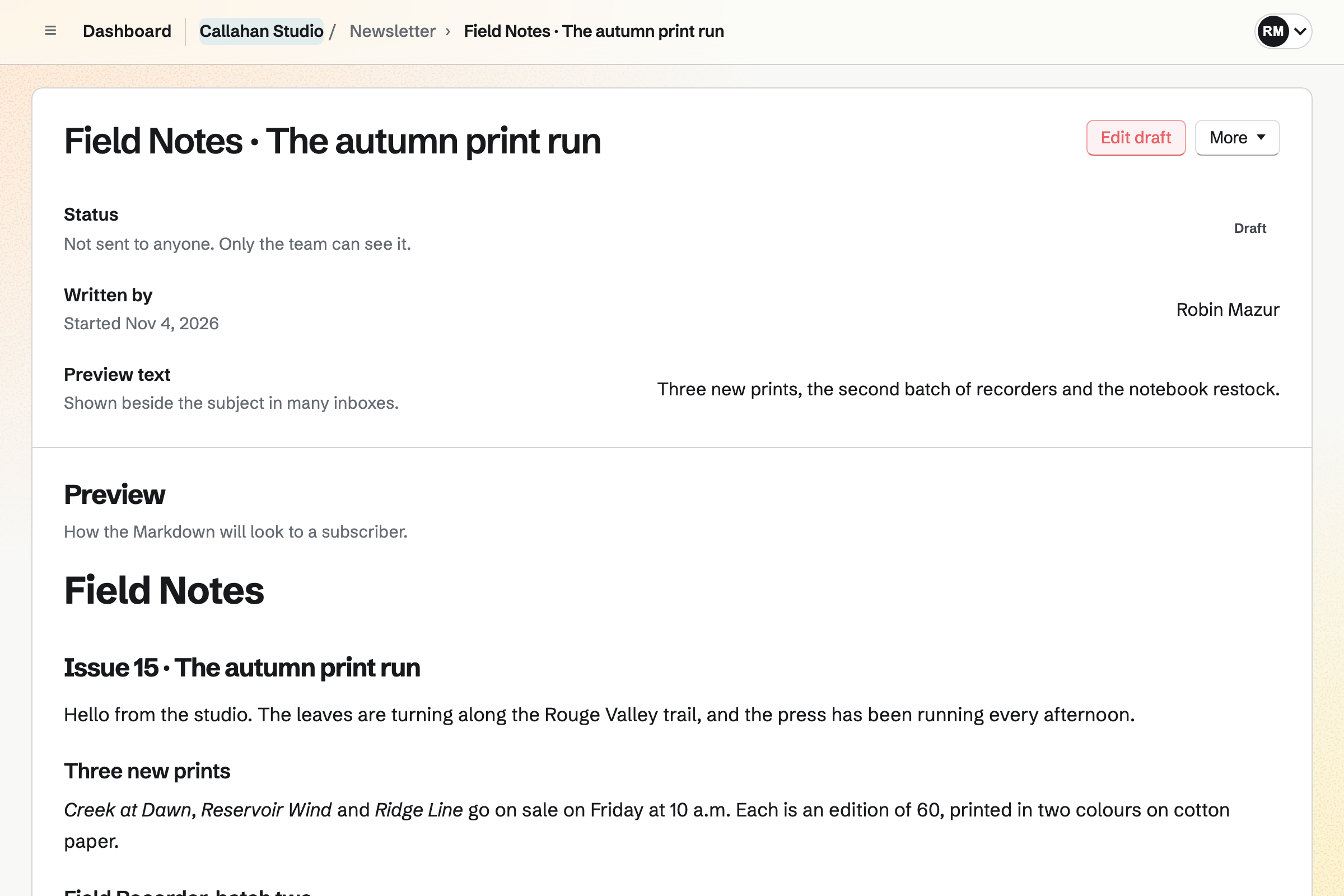
Callahan Studio’s draft of the next Field Notes issue, not sent to anyone yet: who started it, its preview text, and the email as a subscriber will see it, announcing three new prints.

How is Magpie different?

1. The newsletter comes with the rest of the business

One Magpie subscription includes the areas a small business would otherwise buy one at a time:

  • Newsletter for email to subscribers, with a signup page and a web copy of each email
  • Supporters for free and paid tiers, monthly or yearly, and the posts kept for them
  • Store for products that ship and for downloads, and Courses for lessons at a school of your own
  • Meetings and Appointments for booking pages, and Invoicing for invoices paid online
  • Mail, Websites, Podcast, Forms, Helpdesk and the other areas, in the same team

Everything is in one account with one bill. Beehiiv covers the newsletter, its website, podcasts, digital products and ways to earn from the list.

2. A team shares one plan

Everyone in a Magpie team signs in with their own account and writes the team's emails. A free team has 3 members, and the Team plan is one price for up to 25. Members do not pay. Beehiiv's plans include 1 seat on Free, 2 on Lite and 10 on Pro.

3. The shop and the list share one Stripe account

Store sells products that ship, downloads with licence keys and gift cards, through your team's own Stripe account. Supporters and Courses pay into the same account. A buyer who ticks the box at checkout joins the Newsletter when the order is paid.

Comparing Magpie and Beehiiv

Beehiiv does more to grow a newsletter and earn from it; Magpie does more around it. Every line in the tables below was checked against Beehiiv's own pages, linked from each row, and against Magpie's code and Help.

Platform

WhatBeehiivMagpie
Email newslettersWrite an issue and send it to a list Yes Yes
SchedulingSend an issue at a set time Yes Yes
Email builderColumns, pictures and buttons without code Yes Markdown and HTML
Your own email designYour HTML around every email Lite and above Yes
Website for the newsletterPast issues, your own look and pages Yes Signup page and web copies
Your own domainThe newsletter's website at your domain Paid plans No
Send from your own domainEmail from an address at your domain Paid plans No
AutomationsWelcome series and steps that wait and branch Yes No
SegmentsSend an issue to some subscribers only Yes No
Opens and clicksWho opened each issue and what they clicked Yes Delivery counts
Subject line testsTry subjects on part of the list Lite and above No
Signup forms on your websiteEmbedded forms and pop-ups Yes Embedded, no pop-up
Referrals and recommendationsNew subscribers through readers and other newsletters Yes No
Paid subscriptionsReaders pay for issues kept for them Lite and above Supporters, not emailed
Ad network and sponsorsAds found and placed for you, and a page for sponsors Yes No
CommentsReaders reply under a post Yes No
CommunitySpaces where readers talk Yes Message Boards
Podcast hostingA show with an RSS feed for podcast apps Yes Yes
Digital productsDownloads such as ebooks and templates Yes Yes
Products that shipPhysical products with shipping No Yes
Link-in-bio pageA page of links with a signup box Yes No signup box
Booking pagesPeople choose a time with you Paid calls on Pro Yes
InvoicingInvoices paid online No Yes
Email at your domainInboxes at the business's own domain No Paid plans
AI connectionClaude or another AI app reads your results Yes Partly
Free planEmail a list without paying 2,500 subscribers 250 subscribers

Good to know: Where Magpie says No or Partly, the line under the row says what Magpie does instead. Each gap has an item on Magpie's roadmap, and the line changes on the day it ships.

Setting up a publication

Both start a newsletter with a name, set the sender details and import a list. Beehiiv adds your own domain for the website and for sending. It also imports past posts and paying subscribers.

WhatBeehiivMagpie
Start a newsletter with a name and a web address of its own Source Yes Yes
Show my newsletter's website at my own domain Source Magpie: The newsletter's signup page and web copies live at Magpie's address, under /newsletter/. Websites, Store and Link-In-Bio List can use a domain of your own, but Newsletter cannot. Yes No
Send from an address at my own domain, authenticated so it reaches the inbox Source Magpie: Newsletter email comes from Magpie's own sending address with your From name, and replies go to your Reply-to address. Yes No
Choose the sender name, the reply-to address and the footer text Source Yes Yes
Show the pages and emails the service adds in my readers' language Source Yes Yes
Have new subscribers confirm their address before they get email Source Yes Yes
Bring my subscribers over from another email service Source Yes Yes
Bring my past issues over from Substack, WordPress, Ghost or Mailchimp Source Magpie: Newsletter imports subscribers only. Past issues cannot be brought in, so the archive starts with the first email sent from Magpie. Yes No
Move my paying subscribers over without asking them to pay again Source Magpie: Supporters cannot be imported; each paying supporter joins again through the Supporters page and Stripe's checkout. Yes No
Download my subscribers and every issue I have sent Source Magpie: Export CSV downloads the whole subscriber list. An email can be exported as JSON only while it is a draft; a sent email's text can be read one at a time through the REST API on Pro, but there is no download of every issue. Yes Partly
Give teammates their own logins to write and send Source Yes Yes
Let a writer draft issues that someone else checks and sends Source Magpie: Everyone who can edit in the team can also send. With Member access set to View only, members read without writing, but no role writes an email without being able to send it. Yes No
Send emails without the newsletter service's name on them Source Magpie: Every Newsletter email ends with a line saying it was delivered by Magpie, on every plan. Yes No

Good to know: Newsletter imports a CSV file or a Substack export, up to 5 MB. It records where the list came from and how people agreed.

Writing and designing issues

Beehiiv's editor lays out an issue from blocks and greets each reader by name. It adds polls and video. They do it better than we do today.

WhatBeehiivMagpie
Write an issue and send it to my list Source Yes Yes
Schedule an issue to go out later Source Yes Yes
Lay out an issue with columns, pictures, buttons and other blocks, without code Source Magpie: An email's text is written in Markdown or taken from a Document, which keeps its headings, lists, tables and pictures. Its look comes from Design HTML, pasted in or written by an outside chatbot through Use a chatbot. There are no blocks for columns or buttons without writing HTML. Yes Partly
Start each issue from a saved template in my own style Source Magpie: Each email starts with the Newsletter's usual look. Export JSON saves a draft's design and Import JSON puts it into a new one, but there is no gallery of templates, no saved default design and no saved brand colours. Yes Partly
Design my emails in my own HTML Source Yes Yes
Leave comments for teammates on a draft Source Yes Yes
Have AI draft, rewrite or translate an issue Source Magpie: Use a chatbot gives instructions to paste into any outside chatbot, and Import JSON, on The design and the text, takes its subject and text. Nothing in Newsletter writes or translates text itself. Yes Partly
Put a poll or a video in an issue Source Magpie: A Newsletter email holds text and pictures only. A link to a Form can ask a question, but the answers are not tied to subscribers. A Supporters post can show a Screen Recorder video and a Form as a poll, but posts are not emailed. Yes Partly
Greet each subscriber by name Source Magpie: Every subscriber gets the same text. A subscriber can have a name, from an import or Store checkout, but nothing fills it into an email. Outreach fills in each person's name in campaign emails. Yes No
Show different parts of one issue to different readers Source Magpie: Every subscriber gets the whole email. Yes No
Pull my blog's new posts into an issue, or send a regular digest of them by itself Source Magpie: Every Newsletter email is written and sent by hand; nothing reads a feed into an email. Yes No
Name each writer on the issues they wrote, guest writers included Source Magpie: The email's own page tells the team who wrote it, and a guest can be given Newsletter to write from outside the team, but the email and its web copy carry no byline. Yes Partly

Good to know: A Magpie email can take its text from a Document, with its tables, pictures and comments. A test goes to up to 10 addresses first.

Website, podcasts and products

Beehiiv builds the newsletter a website, with comments, a community and an RSS feed. Magpie's signup page and web copies show inside Magpie's own top bar and footer.

WhatBeehiivMagpie
Have a website for my newsletter with past issues, my own look and pages of my own Source Magpie: With Web copies on, each sent email has a public page, and Past emails on the signup page lists them. The signup page shows only the newsletter's name and description inside Magpie's own top bar and footer, with no design or pages of its own. Websites builds sites separately, without the newsletter's issues or a signup box. Yes Partly
Let readers comment on and like my posts Source Magpie: Web copies have no comments or likes. Message Boards takes comments from people signed in to Magpie, but is not tied to the newsletter. Yes No
Let readers install an app for my publication and be told of new posts Source Magpie: Readers get the newsletter by email and read web copies in a browser; nothing notifies them in an app. Yes No
Let people follow my posts in a feed reader Source Magpie: The signup page lists past emails, but Newsletter publishes no RSS feed. Yes No
Host a podcast beside my newsletter and list it in Apple Podcasts and Spotify Source Yes Yes
Let readers listen to a post read aloud Source Magpie: Newsletter emails and web copies are text and pictures only, with no audio version. Yes No
Have a link-in-bio page with my links, my products and a signup box Source Magpie: Link-In-Bio List makes a page of links at Magpie's address or your own domain and counts which links people open, but it cannot hold a newsletter signup box; a link to the signup page goes there instead. The signup form's code goes into a page of another website. Yes Partly
Give my readers a community to talk in, with spaces for paying members Source Magpie: A public Message Board takes posts, comments and votes from anyone signed in to Magpie, but no board can be kept for subscribers or paying supporters. Yes Partly
Sell downloads such as ebooks and templates to my readers Source Yes Yes
Sell physical products, with shipping, to my readers Source Beehiiv: Digital products are files, paid access to pages or content, and paid coaching calls; nothing to be shipped is offered. No Yes
Sell paid coaching calls to my readers Source Yes Yes

Good to know: Store sells products that ship beside downloads, which Beehiiv does not. Podcast hosts a show with an RSS feed for Apple Podcasts and Spotify.

Automations and AI

Beehiiv sends welcome series and runs automations that wait, tag and branch. Magpie's Newsletter sends each email by hand.

WhatBeehiivMagpie
Send new subscribers a welcome email, or a series of them, automatically Source Magpie: A Newsletter signup gets only the email that confirms the address. Supporters sends each new supporter, free tier included, a welcome email with the welcome message from its settings, and Outreach, on Pro or the Team plan, sends a series to people added to a campaign, but nothing sends a series when someone subscribes. Yes Partly
Build automations that wait, branch and act on what subscribers do Source Magpie: Magpie has no rules that tag, email or move a subscriber when they do something. Outreach campaigns send their steps a set number of days apart and stop when someone replies. Yes No
Let Claude or another AI app read my results and draft issues Source Magpie: Connected apps such as Claude or ChatGPT can find the newsletter and its emails, without their text or the subscribers, and cannot write a draft. Yes Partly

Good to know: Supporters sends each new supporter a welcome email. Outreach, on a paid plan, sends a series of emails from your own Mail address.

Growing the list

Beehiiv grows a list with referral rewards, recommendations between newsletters, pop-up forms and segments. Magpie's subscribers come from the signup page, a signup form on your own website, imports and Store checkout.

WhatBeehiivMagpie
Put a signup form on my own website, in the page or as a pop-up Source Magpie: Newsletter settings gives the signup form's code to paste into a page of any website, where visitors subscribe and confirm their address by email. A Store home page can show a Newsletter sign-up section, and Store checkout can add buyers. There is no pop-up form. Yes Partly
Ask visitors for their email address before they read the rest of a post Source Magpie: Web copies are open to everyone, or turned off all together. A Supporters post can be kept for everyone who joins the free tier, but that needs a Magpie account, not only an email address. Yes Partly
Reward readers who bring in new subscribers Source Magpie: Subscribers have no referral link and nothing counts who brought whom. Yes No
Get new subscribers from other newsletters recommending mine Source Magpie: Magpie has no network or directory of newsletters; new subscribers come from the signup page you share, imports and Store checkout. Yes No
Let readers of a partner's newsletter subscribe to mine in one click Source Magpie: Each new subscriber types their address on the signup page and confirms it from an email. Yes No
Send an issue only to subscribers with a tag, a detail or a level of engagement Source Magpie: A Newsletter email goes to every active subscriber, and subscribers have no tags. Outreach, on Pro or the Team plan, can add everyone with a Contacts tag to a campaign sent from your own Mail address. Yes Partly
Run several newsletters and let readers choose which they get Source Magpie: Personal and each team have one newsletter, every active subscriber gets every email, and the unsubscribe page offers only to leave. Yes No
Ask subscribers questions and keep each answer on their profile Source Magpie: Forms builds a survey with its own address to put in an email and shows the answers, but they are not linked to subscribers. The signup page asks only for an email address. Yes Partly

Good to know: A Store home page can show a Newsletter sign-up section. Store checkout adds buyers who tick the box.

Earning

Beehiiv earns from paid subscriptions, its ad network and a sponsor storefront. It takes 0% of paid subscription revenue. Magpie's paid posts are in Supporters, on a page of their own.

WhatBeehiivMagpie
Charge for my newsletter and keep paid issues for paying readers Source Magpie: Supporters charges paid tiers monthly, or yearly where you add a yearly price, through your own Stripe account and keeps posts for paying supporters, with a 4% Supporters fee. Those posts are not emailed, and Newsletter email goes free to every subscriber. Yes Partly
Let paying readers choose monthly or yearly billing Source Yes Yes
Win paying readers with a free trial or a discount code Source Magpie: A paid Supporters tier has a monthly price, and a yearly one if you add it, with no trial or discount code; an admin can give complimentary access instead. Yes No
Let a reader buy a subscription as a gift Source Magpie: An admin can give anyone complimentary access to a tier, with an end date if wanted, but a reader cannot buy it for someone else. Yes Partly
Earn from ads the newsletter service finds and places for me Source Magpie: Magpie finds no advertisers and places no ads; a sponsor's message can only be written into an email by hand. Yes No
Let sponsors find my newsletter, book a slot and pay Source Magpie: Nothing lists a newsletter for sponsors or takes bookings for placements. Invoicing can bill a sponsor you found yourself. Yes No
Let readers send me a one-off tip Source Magpie: Supporters has no one-off tip. A Store product can be pay what you want, with a minimum and a suggested price, so a reader can buy it as a tip. Yes Partly

Good to know: Supporters can have several paid tiers, and a post can be kept for chosen tiers. Magpie takes 4% of each payment.

Data and connections

Beehiiv reports opens, verified clicks and list growth, tests subject lines and sends webhooks. Magpie counts delivered, failed and skipped copies.

WhatBeehiivMagpie
See who opened each issue and which links they clicked, with bots left out Source Magpie: A Newsletter email shows how many copies were delivered, failed and skipped, with no opens or clicks. Outreach, on Pro or the Team plan, lists the links each person followed when Click tracking is on. Yes Partly
See how my list grows and where new subscribers come from Source Magpie: The Newsletter page shows active subscribers, emails sent and copies delivered, and each subscriber's row says whether they came from the signup page, an import or Store checkout. There is no count over time or by referring site. Yes Partly
Try several subject lines and send the best one to the rest Source Magpie: Each email has one subject and goes to every active subscriber at once. Yes No
Email a large list without a low cap on subscribers Source Magpie: Free has 250 subscribers and 1,000 emails a month; Pro and the Team plan allow 5,000 subscribers and 50,000 emails a month. Yes Partly
Connect my own code through an API, and be told by webhook when someone subscribes Source Magpie: Magpie's REST API, on Pro, reads and changes the newsletter, its emails and its subscribers. Its webhooks cover Meetings bookings, Proposals, Issues, Store and Forms responses, not Newsletter. Yes Partly
Connect the other apps I use through Zapier or Make Source Magpie: Store, Supporters, Websites and Meetings are part of Magpie, so they need no connection. There is no Zapier or Make app; the REST API and OpenAPI file are there for your own code. Yes Partly

Good to know: Magpie's REST API, on Pro, reads and changes the newsletter, its emails and its subscribers.

Price comparison

How Beehiiv charges

Beehiiv charges by plan, Free, Lite, Pro or Enterprise, and by the size of the list. Free has up to 2,500 subscribers and sends as many emails as you like. Lite and Pro add paid subscriptions, automations, the ad network and your own domain. Beehiiv takes 0% of paid subscription revenue, and Stripe's fee applies. Prices are on Beehiiv's pricing page.

How Magpie charges

Magpie charges by plan, Free or a paid plan, for every area in the account. The plan sets the Newsletter's subscribers and emails a month, not which areas you can use. Magpie takes 4% of Supporters payments and 4% of Store sales. Stripe's fees come on top. Prices are on Magpie's pricing page.

On top of the planBeehiivMagpie
What the price depends onThe plan and the size of the listThe plan
Subscribers2,500 on Free; up to 100,000 on Lite and 250,000 or more on Pro250 on Free, 5,000 on a paid plan
Emails a monthNo limit1,000 on Free, 50,000 on a paid plan
Fee on paid subscriptions0%4% on Supporters
Card feesStripe's fees, through your own Stripe accountStripe's fees, through your own Stripe account
People who sign in1 seat on Free, 2 on Lite, 10 on Pro3 in a free team, 25 on the Team plan
Newsletters1 publication on Free, 3 on Lite, 10 on ProOne in Personal and one in each team
The service's name on emailsRemoved on Pro and EnterpriseOn every plan
Podcast hosting1 show on Free, 2 on Lite, no limit on Pro1 podcast with 10 episodes on Free, 5 podcasts on a paid plan
A shop, booking pages and invoicingDigital products and paid calls onlyIncluded, with 4% of each Store sale

When to choose Magpie or Beehiiv

  • Want your newsletter beside a shop, paid posts, booking pages, invoices and email at your domain, in one team? Go with Magpie.
  • Want referrals, recommendations, an ad network, automations and open and click reports, free for up to 2,500 subscribers? Beehiiv is the right choice.

Recommendations by kind of business

For a writer growing a large list
Beehiiv. Referral rewards, recommendations from other newsletters and one-click links bring new subscribers that Magpie cannot. Free goes up to 2,500 subscribers, and Pro to 250,000 or more.
For a newsletter that earns from ads
Beehiiv. The Ad Network finds advertisers and pays per open or per click. A sponsor storefront takes bookings. Magpie places no ads.
For a writer with paying readers
Beehiiv. Paid issues go to readers' inboxes, with trials and gifts, and Beehiiv takes 0%. Magpie's Supporters posts are read on a page of their own.
For a business that sends a newsletter
Magpie. The Newsletter is in the same team as the shop, booking pages, invoices and website. Buyers can join it at Store checkout.
For a creator who sells products that ship
Magpie. Store sells physical products with shipping rates and stock, beside downloads and gift cards. Beehiiv's products are files, paid pages and paid calls.
For a coach or a teacher
Magpie. Coaching programs, Courses and invoices are in one account with the Newsletter. Appointments takes payment for a call as it is booked. Beehiiv sells paid calls on Pro.
For a writer with a small free newsletter
Either. Both send each issue to subscribers, schedule it and keep a web copy. Beehiiv's Free plan has 2,500 subscribers and Magpie's 250. Choose by your list's size and whether you want the rest of the business.

Frequently asked questions

What is the difference between Beehiiv and Magpie?

Beehiiv is a newsletter platform built to grow a list and earn from it. It has referrals, an ad network, automations and reports. Magpie is one subscription for a small business's software. Its Newsletter is one area beside Supporters, Store, Podcast and a website. Beehiiv does more for the newsletter; Magpie does more around it.

Does Magpie replace Beehiiv?

Yes, for a business whose newsletter goes free to a list of up to 5,000 people. Magpie imports the list, schedules each email and keeps a web copy of it.

Consider keeping Beehiiv if referrals, recommendations or the ad network bring you subscribers or income. Keep it if you use automations, segments, or open and click reports. Keep it too if your paid issues go to inboxes, or your list is larger than 5,000. Beehiiv does each of these better than Magpie does today.

How much does Beehiiv cost?

Beehiiv has four plans: Free, Lite, Pro and Enterprise, priced by the size of the list. Free has up to 2,500 subscribers and no limit on emails. Beehiiv takes 0% of paid subscription revenue, and Stripe's fee applies. The prices are on Beehiiv's pricing page.

How much does Magpie cost?

Magpie has a Free plan and paid plans, each covering every area. Free has 250 Newsletter subscribers and 1,000 emails a month; a paid plan has 5,000 subscribers and 50,000 emails. Magpie takes 4% of Supporters payments, and Stripe's fees come on top. The prices are on Magpie's pricing page.

Does Magpie send a welcome series or automations?

No. A new Newsletter subscriber gets only the email that confirms the address. Every other email is sent by hand. Supporters welcomes each new supporter. Outreach sends a series of emails to people added to a campaign. Beehiiv sends welcome series and runs automations that wait, tag and branch.

Does Magpie show who opened an email and what they clicked?

No, not for the Newsletter. An email's page shows how many copies were delivered, failed and skipped. Outreach, on a paid plan, lists the links each person followed when Click tracking is on. Beehiiv reports opens and clicks for each send, with bot clicks taken out.

Does Magpie have a referral program for readers?

No. Subscribers have no referral link, and nothing counts who brought whom. Reader referrals are on Magpie's roadmap. Beehiiv gives each subscriber a referral link and rewards at milestones you set, from Lite.

Will other newsletters recommend mine on Magpie?

No. Magpie has no network or directory of newsletters. New subscribers come from the signup page you share, imports and Store checkout. Beehiiv shows recommended newsletters to each new subscriber on every plan. Paid recommendations are on Lite and Pro.

Can I earn from ads in my newsletter on Magpie?

No. Magpie finds no advertisers and places no ads. A sponsor's message can be written into an email by hand. Invoicing can bill the sponsor. Beehiiv's Ad Network places checked ads, and its sponsor storefront takes bookings on Pro.

Does Magpie email paid posts to subscribers?

No. A Supporters post is read on the Supporters page, and nothing emails it out. Newsletter email goes free to every active subscriber. Emailing paid posts is on Magpie's roadmap. Beehiiv keeps chosen issues for paid tiers and sends them to paying readers.

Does Magpie have a drag-and-drop email builder?

No. An email's text is written in Markdown or taken from a Document, with its headings, lists, tables and pictures. Its look comes from your own HTML, or from a design an outside chatbot writes. Beehiiv's editor arranges columns, pictures and videos by dragging.

Can I send to only some of my subscribers?

No. A Newsletter email goes to every active subscriber, and subscribers have no tags. Outreach can add everyone with a Contacts tag to a campaign. Beehiiv builds segments from tags, fields and engagement. A send can include or leave out each one.

Can my Magpie newsletter use my own domain?

No. The signup page and web copies are at Magpie's address, under /newsletter/. Email comes from Magpie's sending address with your From name. Websites, Store and Link-In-Bio List can use your own domain. Beehiiv connects your domain for the website and for sending on paid plans.

Can I put a signup form on my website?

Yes, inside a page, but not as a pop-up. Newsletter settings gives the signup form's code to paste into a page of your website. Visitors subscribe there and confirm their address by email. Beehiiv's subscribe forms go into any site, embedded or as a pop-up.

Does Beehiiv sell products that ship?

No. Beehiiv's digital products are files, paid access to pages and paid calls. Magpie's Store sells physical products with shipping rates and stock, beside downloads, through your own Stripe account.

Does Beehiiv have invoicing or email inboxes?

No. Beehiiv's pricing page lists no invoicing and no inboxes at your domain. Magpie includes Invoicing on every plan. Mail gives mailboxes at your domain on a paid plan.

Can I host a podcast on Magpie?

Yes. Podcast hosts MP3 episodes with a public page and an RSS feed. Podcast Settings shows the steps to add the feed to Apple Podcasts and Spotify. Free has 1 podcast with 10 episodes; a paid plan has 5 podcasts. Beehiiv hosts shows on every plan and sends episodes to the podcast apps itself.

Can I use Beehiiv and Magpie together?

Yes. Beehiiv can send your newsletter while Magpie runs your shop, booking pages, invoices and website. A Magpie website or booking page can link to your Beehiiv signup page. Store exports its customers as a CSV file, which Beehiiv imports.

How do I move from Beehiiv to Magpie?

Start a newsletter, export your subscribers from Beehiiv and import the CSV file in Subscribers. Past issues cannot be imported, so Past emails starts empty. Paying subscribers cannot be imported either: each one joins again through Supporters and Stripe's checkout. Keep Beehiiv until your readers have moved.

How many subscribers can I have on Magpie?

250 on the Free plan and 5,000 on Pro or the Team plan, with 1,000 and 50,000 emails a month. Personal and each team have one newsletter. Beehiiv's Free plan has 2,500 subscribers, and Pro goes to 250,000 or more.

Does Magpie put its name on my emails?

Yes. Every Newsletter email ends with a line saying it was delivered by Magpie, on every plan. Beehiiv removes its branding on Pro and Enterprise.

What is included in Magpie's Free plan?

The Newsletter with 250 subscribers and 1,000 emails a month, scheduling and your own email design. Supporters with 3 paid tiers, a podcast, Store, booking pages, Invoicing, 1 website and a team of 3. A paid plan raises the limits.
If a line on this page is wrong, tell us and we will correct it.

Beehiiv changes, and so does Magpie. If a line is out of date about either product, email support@magpie.diy with the page that shows it. We check the line against that page, change it, and give it the new date. That goes for Beehiiv's own team as much as for anyone who uses it.

Start a newsletter on Magpie's Free plan.

Create a Magpie account, then start your newsletter and import your list.

Create account