Google Forms compared with Magpie

Google Forms vs Magpie: an in-depth comparison

Google Forms and Magpie both build online forms that people answer from a link. They are built around different things.

  1. Google Forms is the form builder in Google Workspace, beside Gmail, Drive and Google Sheets. It has quizzes that mark themselves and grid questions. Responses go into a Google Sheet as they arrive. It is built for someone whose work is already in Google: a school, a club, an office.
  2. Magpie is one subscription for a small business's software, and Forms is one part of it. Beside the forms it includes booking pages, invoicing, contacts, e-signatures, a website and more. It is built for someone whose forms are one part of running the business.
Create account
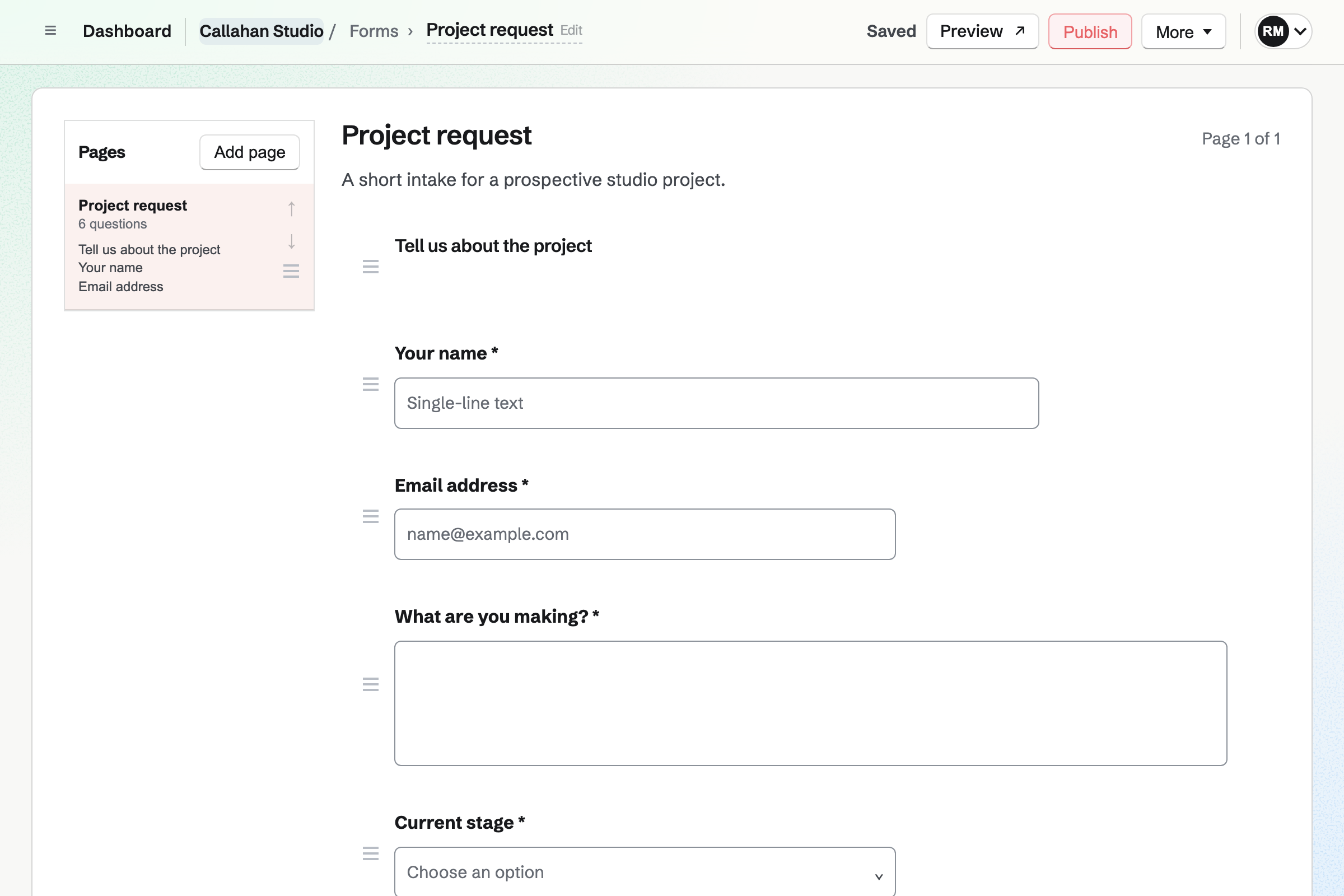
Callahan Studio’s draft Project request Form in the Form builder: a heading, then questions for a name, an email, the project, its stage, a budget and a target date, each with its answer type and reorder controls.

How is Magpie different?

1. Forms come with the rest of the business

One Magpie subscription includes the areas a small business would otherwise buy one at a time:

  • Forms, with pages, conditions, file uploads and paid forms
  • Meetings and Appointments for booking pages
  • E-Signatures for documents people sign
  • Contacts for the people you work with
  • Invoicing, with recurring invoices and online payment, and Store for selling online
  • Websites, Newsletter, Courses, Spreadsheets, Helpdesk and the other areas, in the same team

Everything is in one account with one bill. Google Forms is part of Google Workspace, beside Gmail, Drive, Docs and Sheets.

2. A form can take payment

A paid form charges a fixed amount for each response, by card. It pays into your team's own Stripe account. A registration, a deposit or an entry fee needs no other service. Magpie takes 4% of each payment, and Stripe's card fees apply too.

3. Each response is a record you work through

Each response has a status: New, Reviewed or Archived. All responses shows each one's status. Edits to a published form stay a draft until you choose Publish changes. Each response stays attached to the version of the form it answered.

Comparing Magpie and Google Forms

Google Forms does more inside the form; Magpie does more around it. Every line in the tables below was checked against Google's own pages, linked from each row, and against Magpie's code and Help.

Platform

WhatGoogle FormsMagpie
Forms and surveysQuestions anyone can answer from a link Yes Yes
Starting pointsReady-made forms such as a survey or a sign-up Yes Yes
Pages and conditional questionsQuestions shown by earlier answers Yes Yes
Grid and Other questionsRows of choices, and an answer people type themselves Yes No
Pictures and video in a formImages beside questions, and YouTube videos Yes No
QuizzesAnswers marked, with a score for each person Yes No
Payments in a formCard payment as part of a response Add-ons only Fixed amount
Your own colours and fontsA form in the business's own look Yes Seven themes
Embed on your websiteThe form inside a page of another site Yes Yes
Send a form by emailThe form emailed to the people who should answer Yes No
Responses in a live spreadsheetEach response added to a sheet as it arrives Google Sheets CSV copy
Charts of the answersEach question's answers drawn as a chart Yes Summary table
A status for each responseNew, reviewed or put away No Yes
Building forms togetherSeveral people edit the same form Yes Yes
AI that writes and reads formsQuestions from a description, and answers summed up Gemini, on some plans Partly
Add-ons and scriptsSomething happens when a response arrives Yes Webhooks
Booking pagesPeople choose a time with you No Meetings and Appointments
InvoicingInvoices paid online No Yes
Website and shopPages and products for sale No Yes
Independent security auditSecurity and privacy checked by an outside firm Yes No

Good to know: Where Magpie says No or Partly, the line under the row says what Magpie does instead. Each gap has an item on Magpie's roadmap, and the line changes on the day it ships.

Building a form

Both have the usual question types, pages, conditions and file uploads. Google Forms adds grids, an Other choice, answer rules, pictures, video and formatted text. It also shuffles questions and brings in questions from another form.

WhatGoogle FormsMagpie
Start a form and add questions of the usual kinds Source Yes Yes
Start from a ready-made form, such as a survey or a sign-up Source Yes Yes
Split a long form into pages Source Yes Yes
Show different questions depending on earlier answers Source Yes Yes
Ask the same question about several rows in one grid Source Magpie: Each row has to be its own Radio or Scale question. Yes No
Offer an Other choice where people type their own answer Source Magpie: Radio, Checkboxes and Select take only the choices listed; a Text question with a condition can follow up instead. Yes No
Set rules an answer must meet, such as a number range, a length or a pattern Source Magpie: Email and URL answers must be valid addresses and choices must be from the list, but there are no number ranges, lengths, patterns or limits on how many boxes are ticked. Yes Partly
Let people send a file with their answers Source Magpie: A File question takes one PDF, JPG, PNG, WebP or plain-text file of up to 10 MB, without the respondent signing in; other kinds of file, such as Word documents or videos, and several files at once are not taken. Yes Partly
Put pictures and videos in a form Source Magpie: A form holds questions, headings, text and dividers; there is no picture or video. Yes No
Use bold, links and lists in a form's text Source Magpie: The introduction, headings, text and help text are plain text. Yes No
Show the questions or choices in a different order to each person Source Magpie: Every respondent sees the questions and choices in the order you set. Yes No
Copy a form, or bring in questions from another of my forms Source Magpie: A form cannot be copied, and nothing exports its questions to bring into another; Paste JSON builds a form only from a document written for it. Yes No
Build a form together with other people Source Yes Yes
Change a published form without respondents seeing the edits until I publish them Source Google Forms: Google Forms has Publish and unpublish, but its publishing article does not say whether edits to a published form wait or show at once. Not stated Yes
Build a form and read its responses in a phone app Source Google Forms: On a phone, forms are made in a mobile browser at forms.google.com; there is no Forms app, and the Drive app finds existing forms.Magpie: Forms works in a phone's browser, where forms are built, published and closed and responses read. The Magpie app creates forms, edits every question type, previews and publishes them, and lists, searches and exports responses, but it is not yet in the App Store or Google Play. Partly Partly

Good to know: A Magpie File question takes a PDF, a picture or a plain-text file of up to 10 MB. The person answering does not need to sign in.

How it looks

Google Forms sets your own theme colour, background, header picture and fonts. Magpie offers seven themes: Plain, Paper, Blue, Dark, Magpie, Ink and Sage. Nothing of your own goes beyond them.

WhatGoogle FormsMagpie
Give a form my own colours, header picture and fonts Source Magpie: Appearance offers seven themes, Plain, Paper, Blue, Dark, Magpie, Ink and Sage; there are no colours, header picture or fonts of your own. Yes Partly
Show my own message after someone sends the form Source Magpie: A form has its own completion heading and message, but the website sets them only from a pasted JSON document, at Create form or with Import JSON, which replaces the draft's questions too; the editor has no field for them. The Magpie app's question editor changes them, but it is not yet in the App Store or Google Play. Yes Partly

Good to know: On a paid Magpie plan, you can turn off the Magpie link under each form.

Sharing and collecting answers

Both publish a form at a link of its own, embed it in another website and take one response per signed-in person. Google Forms also emails a form and pre-fills answers. It closes on a date or a count. They do it better than we do today.

WhatGoogle FormsMagpie
Publish a form and send people its link Source Yes Yes
Put the form inside my own website Source Yes Yes
Send a form to people by email Source Magpie: Forms sends nothing to respondents; the link is copied into an email or a Newsletter by hand. Yes No
Send a link with some answers already filled in Source Magpie: The public form always opens empty. Yes No
Let only the people I choose, a group or my organisation answer Source Magpie: Require sign-in lets anyone with a Magpie account answer; there is no list of who may answer and no way to keep a form to the team. Yes Partly
Take only one response from each person Source Yes Yes
Know who sent each response Source Magpie: With Require sign-in on, each response is kept with the account that sent it, but the response page does not show who that was, only the payer's email on a paid form; an Email question asks for the address instead. Yes Partly
Close a form on a set date or once it has enough responses Source Magpie: Close form in Form settings stops new responses by hand, and the public page shows a set closed message. Yes No
Let people leave a long form and carry on later Source Magpie: Answers are kept only while the page is open, and nothing saves a half-finished form to finish later. A response Magpie turns down comes back with every answer as typed. Yes No
Let people change their answers after sending them Source Magpie: A sent response cannot be changed by the person who sent it. Yes No
Email people a copy of their answers Source Magpie: The respondent sees the completion message; Forms emails them nothing. Yes No
Let the people who answer see a summary of everyone's answers Source Magpie: Only people who can view the form see its responses. Yes No
Charge for a form response Source Google Forms: Forms' own features name no payment; extra features come from add-ons. No Yes

Good to know: A paid Magpie form charges each response through your own Stripe account. Magpie takes 4% of each payment.

Reading and using responses

Both email you each new response, export a CSV file and open each response on its own. Google Forms draws charts and adds each response to a Google Sheet as it arrives.

WhatGoogle FormsMagpie
See each question's answers summed up as charts Source Magpie: Summary lists each choice's count and percentage in a table and every text answer, but draws no chart. Yes Partly
Read each response on its own Source Yes Yes
Have responses go into a spreadsheet as they arrive Source Magpie: Export CSV writes every response, and Spreadsheets can import that file as a new spreadsheet, but it is a copy that new responses do not reach. A webhook sends each new response to another app, such as Zapier or Make, as it arrives. Yes Partly
Download the responses as a CSV file Source Yes Yes
Get an email when a response arrives Source Yes Yes
Mark each response as reviewed or put it away Source Google Forms: Responses are read in Summary, Question or Individual view; a response has no status of its own. No Yes
Delete responses Source Yes Yes

Good to know: Each Magpie response keeps the version of the form it answered. Summary lists each choice's count and percentage, and every text answer.

Quizzes

Make this a quiz turns a Google form into a quiz with an answer key, points and feedback. Magpie's forms have no right answers or scores.

WhatGoogle FormsMagpie
Make a quiz that marks the answers and gives each person a score Source Magpie: Forms has no right answers or scores. Courses has quizzes with a pass mark inside a course's lessons, but a form cannot be marked. Yes No

Good to know: Magpie's Courses has quizzes with a pass mark inside a course's lessons, beside video, assignments and certificates.

AI, add-ons and security

Gemini drafts a Google form from a description and sums up written answers, on eligible plans. Add-ons and Apps Script act on each response. Google says outside firms check Forms' security and privacy.

WhatGoogle FormsMagpie
Describe a form and have AI write its questions Source Magpie: The assistant creates a draft form from one of the starting points, and Copy the prompt has your own chatbot write a JSON document to paste, but Magpie writes no questions itself. Yes Partly
Have AI sum up what people wrote Source Magpie: The assistant can list a form's responses by status and date, but it does not read their answers. Yes No
Have something happen on its own when a response arrives Source Magpie: A webhook sends each new response to Zapier, Make or your own server as it arrives, signed and tried again if it fails, and the creator gets an email. Nothing in Magpie itself acts on a response: Automations is built but not open to members yet. Yes Partly
See independent checks of security and privacy before trusting it with answers Source Magpie: Magpie's security page describes encryption and its own reviews, and says it may pursue SOC 2 or ISO 27001 later; there is no independent audit yet. Yes No

Good to know: A Magpie webhook sends each new response to Zapier, Make or your own server as it arrives, on every plan. On Pro, an API key reads forms and their responses through the REST API.

Price comparison

How Google Forms charges

Google lists Forms in every Google Workspace plan: Starter, Standard, Plus and Enterprise. Each plan is priced per user, per month, with a 14-day trial; Enterprise is priced on request. Help me create drafts a form with Gemini. It needs Business Standard and above, or a Google AI plan. Payments in a form come from add-ons. Prices are on Google Workspace's pricing page.

How Magpie charges

Magpie charges by plan, Free or a paid plan, for everything in the account: Forms, bookings, invoicing, a website and the rest. The plan sets how many team members you have and whether the Magpie link shows under a form. It does not limit forms or responses. Magpie takes 4% of paid forms. Prices are on Magpie's pricing page.

On top of the planGoogle FormsMagpie
How a team paysPer user, per month, for Google WorkspaceOne Team plan for up to 25 people
Forms and responsesPart of every Google Workspace planNo limit on any plan
Payments in a formThrough add-ons from the Google Workspace Marketplace4% of each payment, and Stripe's fees
AI that drafts a formBusiness Standard and above, or a Google AI planNot available; the assistant makes a draft from a starting point
File uploadsRespondents sign in to Google; files go to the owner's Drive10 MB a file: PDF, pictures or plain text
Booking pages, invoicing and a websiteNot offeredIncluded

When to choose Magpie or Google Forms

  • Want your forms beside your bookings, invoices, contacts and website, with payment taken in the form? Go with Magpie.
  • Want quizzes, grids and pictures, with responses added to a Google Sheet as they arrive? Google Forms is the right choice.

Recommendations by kind of business

For a teacher setting quizzes
Google Forms. A quiz marks itself, gives points and feedback, and releases scores when you choose. Magpie's forms have no scores; its quizzes are inside Courses.
For a team that works in Google Sheets
Google Forms. Each response is added to a Google Sheet as it arrives. Magpie's responses stay in Forms, with a CSV file to export.
For a researcher running surveys
Google Forms. Grids, shuffled questions, answer rules and charts cover a survey from start to finish. Magpie's Summary lists each choice's count and percentage in a table.
For a paid registration or a deposit
Magpie. A paid form charges each response by card through your own Stripe account. Google Forms takes payment only through an add-on.
For a service business taking enquiries or applications
Magpie. The form, the booking page, the contact and the invoice are in the same team. Each response is marked New, Reviewed or Archived as you work through it.
For a club or a small group collecting sign-ups
Either. Both take sign-ups from a link, with one response per signed-in person. Choose by whether the group already works in Google or needs payments and bookings beside the form.

Frequently asked questions

What is the difference between Google Forms and Magpie?

Google Forms is the form builder in Google Workspace. It has quizzes, grids, pictures and responses that go into Google Sheets. Magpie is one subscription for a small business's software. Its Forms is one area beside booking pages, invoicing, contacts, e-signatures and a website. Google Forms does more inside the form; Magpie does more around it.

Does Magpie replace Google Forms?

Yes, for a business whose forms are enquiries, registrations, applications, feedback and RSVPs. Magpie builds them with pages and conditions, takes files and payments, and has no response limit.

Consider keeping Google Forms if you set quizzes, ask grid questions or put video in a form. Keep it too if responses must reach a Google Sheet as they arrive. Google Forms does each of these better than Magpie does today.

How much does Google Forms cost?

Google lists Forms in every Google Workspace plan: Starter, Standard, Plus and Enterprise. Each is priced per user, per month, with a 14-day trial. Help me create, which drafts a form with Gemini, needs Business Standard and above. The prices are on Google Workspace's pricing page.

How much does Magpie cost?

Magpie has a Free plan and paid plans, each covering every area. No plan limits a form's responses. A paid plan removes the Magpie link under a form. The Team plan is one price for up to 25 people. Magpie takes 4% of paid forms. The prices are on Magpie's pricing page.

Does Magpie have quizzes?

No, not in Forms: a form has no right answers or scores. Courses has quizzes with a pass mark inside a course's lessons. Google Forms turns any form into a quiz with an answer key, points, feedback and marking by hand.

Does Magpie have grid questions or an Other choice?

No. Each row of a grid has to be its own Radio or Scale question. Radio, Checkboxes and Select take only the choices listed. A Text question with a condition can follow up instead. Google Forms has multiple choice and checkbox grids, and an Other option with a text box.

Can I put pictures or video in a Magpie form?

No. A Magpie form holds questions, headings, text and dividers, all in plain text. Google Forms puts images beside questions and answers, and YouTube videos between questions.

Can Magpie send form responses to a spreadsheet?

Not within Magpie. Export CSV writes every response, and Spreadsheets can import that file as a new spreadsheet. New responses do not reach that copy. A webhook sends each new response to another app, such as Zapier, as it arrives. Google Forms adds each new response to a Google Sheet.

Can Magpie send form responses to Zapier or my own server?

Yes. A webhook in Forms sends each new response to Zapier, Make, n8n or your own server as it arrives. Each request is signed, and a failed one is tried again over about two days. A team admin adds webhooks, on every plan. Google Forms acts on a response through add-ons and Apps Script.

Does Magpie draw charts of the responses?

No. Summary lists each choice's count and percentage in a table, and every text answer. Google Forms' Summary tab charts each question's answers as they arrive.

Can I embed a Magpie form on my website?

Yes. Form settings gives a published form's code to paste into a page of your website, and visitors answer it there. A form that takes a payment or needs a sign-in opens on its own page instead. Google Forms also gives embed code to paste into a website.

Can I close a Magpie form on a date or after a number of responses?

No. Close form in Form settings stops new responses by hand, and the public page shows a set message. Google Forms closes on a date or after a set number of responses, with a message you write.

Can people save a Magpie form and finish it later?

No. Answers are kept only while the page is open. Google Forms saves a signed-in respondent's answers as a draft for 30 days.

Does Magpie email people a copy of their answers?

No. The person who answers sees the completion message, and Forms emails them nothing. Google Forms sends respondents a copy of their response when it collects email addresses.

Can I take payments in a Magpie form?

Yes. A paid form charges one fixed amount for each response by card, through your team's own Stripe account. Magpie takes 4% of each payment, and Stripe's card fees apply. Google Forms' own pages name no payment; add-ons from the Google Workspace Marketplace add it.

Does Google Forms have booking pages or invoicing?

No. Google Forms collects answers and names no booking pages or invoices. Magpie includes Meetings, Appointments and Invoicing in every plan, in the same team as Forms.

Does Magpie use AI to build forms?

Partly. The assistant can make a draft form from one of the starting points. Copy the prompt has your own chatbot write a JSON document to paste. Nothing in Magpie writes a form's questions from a description. Google's Help me create drafts a form with Gemini on Business Standard and above.

Has Magpie had an independent security audit?

No. Magpie's security page describes encryption and its own reviews. It says Magpie may pursue SOC 2 or ISO 27001 later. Google says Forms' security, privacy and compliance controls are checked independently.

Can my team build forms together in Magpie?

Yes. A team's forms follow its permissions, and a free team has places for 3 members. Collaborators gives someone Can view or Can edit on one form. Someone from outside the team joins as a guest and sees that form only.

Can I use Google Forms and Magpie together?

Yes. A Google form can link to a Magpie booking page or a Store product in its description. Magpie runs the bookings, invoices, contacts and website, and Google Forms the quizzes and surveys.

How do I move my forms from Google Forms to Magpie?

Make each form again in Forms, or have a chatbot write it. Copy the prompt in Forms gives a chatbot the JSON format. Paste JSON builds the form from what it writes. Nothing reads a Google form directly. Your old responses stay in Google Forms, which downloads them as a CSV file.

What is included in Magpie's Free plan?

Forms with every question type, paid forms and no response limit, with the Magpie link under each form. Booking pages, Invoicing, Contacts, Store, 1 website, the Newsletter and a team of 3. A paid plan removes the Magpie link and adds the API and email at your domain.
If a line on this page is wrong, tell us and we will correct it.

Google Forms changes, and so does Magpie. If a line is out of date about either product, email support@magpie.diy with the page that shows it. We check the line against that page, change it, and give it the new date. That goes for Google's own team as much as for anyone who uses Google Forms.

Make a form on Magpie's Free plan.

Create a Magpie account, then make your first form.

Create account