Feedly compared with Magpie

Feedly vs Magpie: an in-depth comparison

Feedly and Magpie both follow websites, blogs and social accounts in one list. They are built around different things.

  1. Feedly is a news reader with folders of sources, Feedly AI, Boards and phone apps. It is built for someone whose reading is the work: a topic, an industry or a market.
  2. Magpie is one subscription for a small business's software, and RSS Reader is one part of it. Beside the reader it includes Bookmarks, Notes, a newsletter and the rest of a business. It is built for someone whose reading is one part of running the business.
Create account
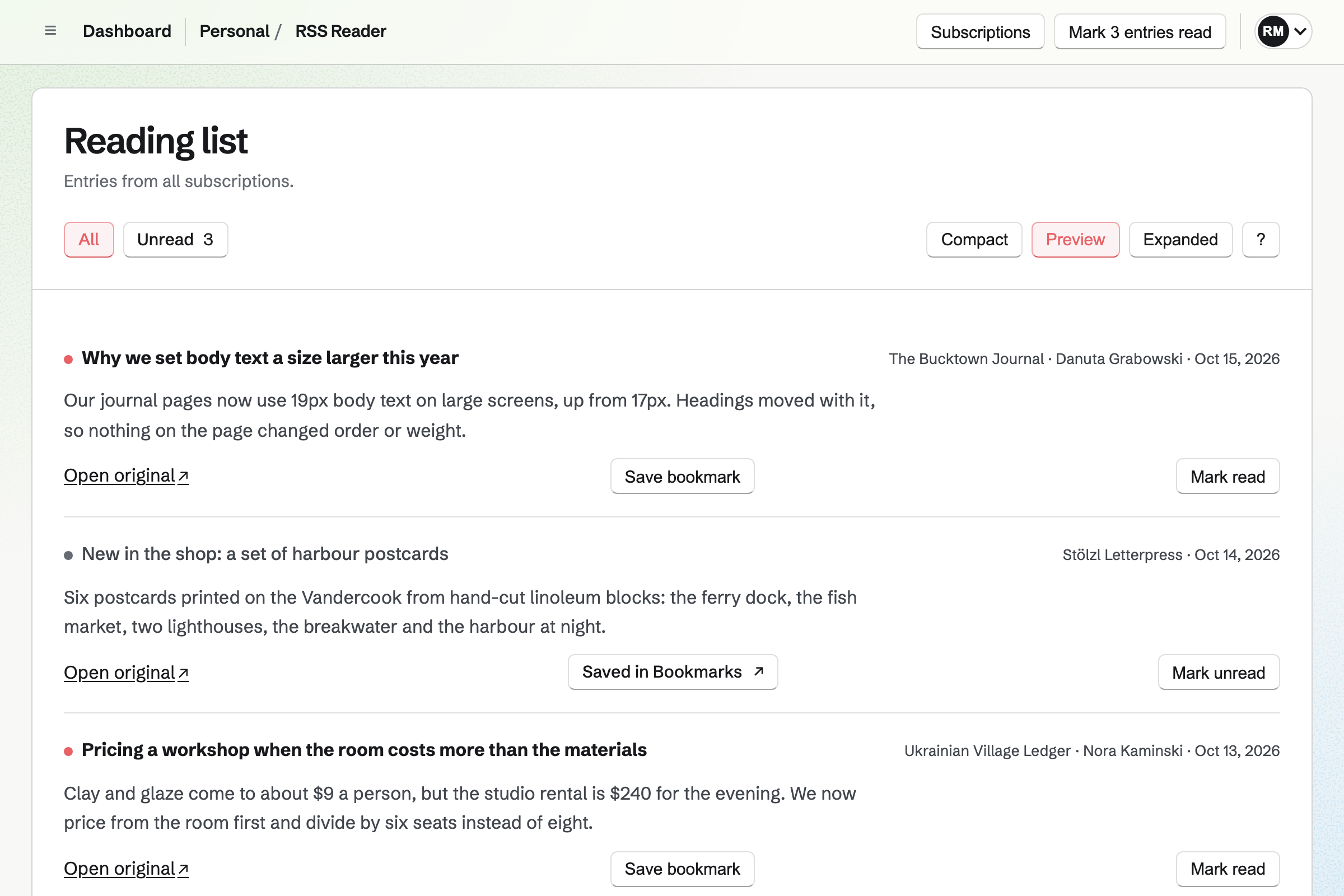
RSS Reader in the Preview view, with the newest entries from fictional blogs, unread entries marked with a red dot, one entry saved in Bookmarks, and buttons to open, bookmark or mark each one read.

How is Magpie different?

1. Your reading comes with the rest of the business

One Magpie subscription includes the areas a small business would otherwise buy one at a time:

  • RSS Reader for feeds, websites, Bluesky and Mastodon accounts, and shared Bookmarks collections
  • Bookmarks for saved entries, with Reader view, highlights and a note on each
  • Notes, where Send to a new note puts a bookmark's link, note and highlights
  • Newsletter for email to subscribers, and Social Media for posts to Bluesky, Mastodon and LinkedIn
  • Meetings, Invoicing, Websites, Store and the other areas, in the same team

Everything is in one account with one bill. Feedly covers reading, AI and sharing, and leaves the rest of the business to other software.

2. Reading an entry does not contact the publisher

RSS Reader removes scripts and embedded content from each entry. It loads no picture from the publisher until you choose Load image from publisher. Opening RSS Reader sends nothing to the publisher's server, on every plan.

3. What you save is shared with your team

Save bookmark on an entry saves it to Bookmarks in the team you have selected. Everyone in the team sees it, with its notes and highlights, on every plan. A free team has 3 people, and the Team plan 25.

Comparing Magpie and Feedly

Feedly does more inside the reader; Magpie does more around it. Every line in the tables below was checked against Feedly's own pages, linked from each row, and against Magpie's code and Help.

Platform

WhatFeedlyMagpie
Feed readerFollow feeds and websites in one list Yes Yes
Social accountsFollow Reddit, Mastodon, Bluesky or X Reddit, Mastodon, X Bluesky, Mastodon
Folders of sourcesSources grouped by topic and read as one list Yes No
Finding sourcesSearch a topic for sources to follow Yes No
Websites without a feedA feed made from a page that lists articles Pro+ and Enterprise No
Newsletters in the readerEmail newsletters read beside the feeds Pro+ and above No
Import and export of feedsAn OPML file from or for another reader Yes No
AI summaries and duplicatesShort summaries, and one copy of a story Yes No
Mute filtersArticles hidden by a word or phrase Pro+ and Enterprise No
Questions about what you readAI answers from your stored articles Intelligence plans Yes
Saved collectionsRead later, and named collections of articles Yes Yes
Highlights and notesPassages kept, with notes of your own Paid plans Yes
Search across articlesWords found in everything your sources published Yes Through the assistant
Public collectionsSaved articles shared on a page of their own Pro and above Yes
Slack and Microsoft TeamsArticles sent to a team's channel Yes No
Zapier and IFTTTNew and saved articles passed to other software Yes No
Email roundupsChosen articles sent to a list on a schedule Yes Newsletter, written by you
Team collectionsTeammates save and annotate articles together Enterprise Yes
Phone appsReading on iPhone and Android Yes In the browser
Bookings, invoices and a websiteThe rest of the business in the same account No Yes

Good to know: Where Magpie says No or Partly, the line under the row says what Magpie does instead. Each gap has an item on Magpie's roadmap, and the line changes on the day it ships.

Following sources

Both follow a feed or a website from its address, and both follow Mastodon accounts. Feedly also finds sources on a topic, makes feeds for sites without one and reads newsletters. They do it better than we do today.

WhatFeedlyMagpie
Follow a website or blog by pasting its address Source Yes Yes
Find new sources on a topic without knowing their addresses Source Magpie: RSS Reader adds only an address you give it: a feed, a website, a Bluesky account or a shared Bookmarks collection. It suggests nothing to follow. Yes No
Follow a website that has no RSS feed Source Magpie: When a website announces no feed, RSS Reader says that no RSS or Atom feed was found at that address, and only the feed's own address will do. Yes No
Read email newsletters in the reader instead of the inbox Source Magpie: RSS Reader follows feeds, Bluesky accounts and Bookmarks collections only. It has no email address, so newsletters stay in your email. Yes No
Follow a keyword and see new articles anywhere that mention it Source Magpie: RSS Reader cannot search for a word by itself, but a Google News search's feed address (news.google.com/rss/search?q= followed by the words) is an ordinary RSS feed it follows. Nothing in RSS Reader makes that address for you. Yes Partly
Follow a Reddit community Source Magpie: A subreddit's feed, its address with .rss added (reddit.com/r/name/.rss), is an ordinary Atom feed that RSS Reader follows. It does not find a community from its name or its page's address. Yes Partly
Follow X accounts, hashtags and searches Source Magpie: RSS Reader has no X source. Yes No
Follow Bluesky accounts Source Feedly: Its help covers sharing an article to Bluesky but says nothing about following a Bluesky account. Not stated Yes
Follow Mastodon accounts Source Yes Yes
Follow YouTube channels and podcasts Source Magpie: A channel's or a show's feed address can be added like any feed, so new videos and episodes appear. A YouTube entry shows only its title, and RSS Reader removes video and audio, so neither plays there: Open original goes to the publisher. Yes Partly
Bring my subscriptions over from another feed reader Source Magpie: Subscriptions are added one address at a time; RSS Reader reads no OPML or other list of feeds. Yes No
Download my list of subscriptions to use elsewhere Source Magpie: RSS Reader has no export. The Subscriptions drawer lists each subscription's address, to copy by hand. Yes No

Good to know: When a check fails, RSS Reader keeps the entries it already has. The error shows under the subscription, with Try again to check it at once.

Reading and organizing

Both mark what you have read, offer three layouts and use the same keys. Feedly adds folders, other sort orders and a choice of font.

WhatFeedlyMagpie
Group sources into folders by topic and read each folder as one list Source Magpie: Subscriptions are one list. The timeline shows every subscription or one at a time, and there are no folders to group them. Yes No
Keep track of what I have read, and show only unread articles Source Yes Yes
Mark everything in a list read at once Source Yes Yes
Choose how much of each article the list shows Source Yes Yes
Sort articles by oldest first or by the biggest stories Source Magpie: The timeline is always newest first. Yes No
Move through articles with the keyboard Source Yes Yes
See new articles soon after they are published Source Yes Yes
Choose the font and text size I read in Source Magpie: RSS Reader has no font or text size setting, and neither does Magpie's account; only the browser's zoom makes entries larger. Light, System and Dark change the colours only. Yes No
Read without the publisher learning that I opened the article Source Feedly: Its reader page promises privacy by default, but neither it nor the help says whether a publisher's images and trackers load when an article is shown. Not stated Yes

Good to know: Removing a subscription removes its entries from RSS Reader. An entry you saved as a bookmark stays in Bookmarks.

Feedly AI

Feedly AI summarizes articles, shows a story once and finds articles beyond your sources. They do it better than we do today. Magpie's assistant answers questions from your stored entries.

WhatFeedlyMagpie
Hide articles that mention a word, person or topic Source Magpie: Every entry a subscription publishes is shown; nothing hides entries by word or topic. Yes No
See a story once when several sources publish it Source Magpie: Each subscription's entries are kept apart, so a story two sources publish appears twice. Yes No
Get a short summary of a long article Source Magpie: Preview shows the start of an entry and Expanded the whole of it; nothing writes a summary. The assistant reads at most 1,600 characters of an entry. Yes No
Have AI gather articles about a topic from across the web Source Magpie: RSS Reader shows what your subscriptions publish and looks nowhere else for a topic. Yes No
Ask questions about what my sources have published Source Yes Yes

Good to know: The assistant on Dashboard searches stored entries by words, author, subscription, read state and date. Apps such as Claude, connected to Magpie, search them too.

Boards, notes and search

Feedly saves articles to Read Later and to Boards. Magpie saves them to Bookmarks, where Reader view keeps the text and holds highlights and notes.

WhatFeedlyMagpie
Save an article to read later Source Yes Yes
Keep saved articles in named collections Source Yes Yes
Highlight passages and add notes to an article Source Yes Yes
Search the articles from the sources I follow Source Magpie: RSS Reader has no search for entries; its Subscriptions drawer searches subscription names and addresses only. The assistant finds stored entries by words, author, subscription, read state and date, and Bookmarks searches what you have saved. Yes Partly
Share a collection of articles publicly Source Yes Yes
Save the page I am on to a collection from the browser Source Yes Yes
Keep a copy of my sources and saved articles in my own storage Source Magpie: Bookmarks downloads every bookmark as HTML, CSV or JSON when you ask. Nothing is copied on a schedule, and RSS Reader's subscriptions cannot be downloaded. Yes Partly

Good to know: Bookmarks imports a browser's bookmarks file or a CSV file. It downloads every bookmark as HTML, CSV or JSON.

Sharing and connections

Feedly shares an article by email, to social sites, to Slack and Teams and through Zapier. Magpie's entries go to Bookmarks and Notes, and links are posted through Social Media.

WhatFeedlyMagpie
Share an article by email or on social media Source Magpie: RSS Reader's entries have Open original and Save bookmark but no Share. Social Media posts a link you paste to Bluesky, Mastodon or LinkedIn, now or on a schedule. Yes Partly
Send articles to my team's Slack or Microsoft Teams channel Source Magpie: Neither RSS Reader nor Bookmarks posts to Team chat, Slack or Microsoft Teams; a link is pasted by hand. Yes No
Send an article to my notes Source Yes Yes
Pass new and saved articles on to my other apps automatically Source Magpie: Nothing in RSS Reader or Bookmarks starts a Zapier or IFTTT step or sends a webhook. Apps connected to Magpie, such as Claude, can search the entries. Yes No
Email a regular roundup of chosen articles to a list Source Magpie: Newsletter sends an email you write, now or at a set time, to its subscribers. Nothing gathers saved bookmarks or RSS Reader entries into it, and it does not send again by itself. Yes Partly

Good to know: A Public Bookmarks collection has an RSS feed of its own. Any feed reader, Feedly included, can follow it.

Teams

Feedly's Team Boards and Team Folders share articles and sources, on Enterprise. Magpie's team shares its bookmarks on every plan, but each person follows their own subscriptions.

WhatFeedlyMagpie
Collect and annotate articles with my team in one place Source Yes Yes
Point a teammate to an article and the passage that matters Source Magpie: A team's bookmarks show their notes and highlights to everyone in the team, but no one can be named in a note or told about it. Yes Partly
Share a set of sources with my team Source Magpie: RSS Reader subscriptions belong to each person's account and are the same in Personal and every team, so a team cannot share them. A team's Bookmarks collection made Unlisted or Public can be followed in RSS Reader by each member. Yes No

Good to know: RSS Reader subscriptions belong to your account. They are the same in Personal and in every team.

Apps and plans

Feedly has apps for iPhone and Android and a free plan of 100 sources. Magpie's RSS Reader works in a phone's browser.

WhatFeedlyMagpie
Read on my phone Source Yes Yes
Follow a hundred sources or more Source Magpie: Free follows 10 subscriptions and Pro 100. Yes Partly

Good to know: Free follows 10 subscriptions and a paid plan 100. Bookmarks has no limit on either plan.

Price comparison

How Feedly charges

Feedly charges by plan: a free Basic plan, then Pro, Pro+ and Enterprise. Basic follows 100 sources in 3 Feeds, with 3 Boards. Pro adds highlights, notes and public Boards. Pro+ adds AI Feeds, Mute Filters, newsletters and feeds for sites without RSS. Enterprise adds Team Boards and Team Feeds. Prices are on Feedly's pricing page.

How Magpie charges

Magpie charges by plan, Free or a paid plan, for everything in the account. The plan sets how many subscriptions, Notes and team members you have, not which areas you can use. RSS Reader and Bookmarks are on every plan. Prices are on Magpie's pricing page.

On top of the planFeedlyMagpie
Free planBasic: 100 sources, 3 Feeds and 3 Boards10 subscriptions, and Bookmarks with no limit
Sources you can follow100 on Basic, more on paid plans10 on Free, 100 on a paid plan
Saved collections3 Boards on Basic, up to 250 personal Boards on paid plansNo limit on any plan
Highlights and notesAny paid planEvery plan, on saved bookmarks
How often feeds are checked30 minutes to a day on Basic, 15 minutes to an hour on Pro, as often as 7 minutes on Pro+As often as every 15 minutes, on every plan
AI Feeds and Mute FiltersPro+ and EnterpriseNot available
Feeds for sites without RSSUp to 25 on Pro+, 100 on EnterpriseNot available
Team collectionsTeam Boards on EnterpriseEvery plan, in a team
Booking pages, invoicing and a websiteNot offeredIncluded

When to choose Magpie or Feedly

  • Want your feeds beside your bookmarks, notes, newsletter and team, in one subscription? Go with Magpie.
  • Want folders of sources, AI summaries and filters, newsletters in the reader and phone apps? Feedly is the right choice.

Recommendations by kind of business

For someone who follows an industry closely
Feedly. Folders, Top Stories, Mute Filters and AI Feeds keep hundreds of sources readable. Magpie's RSS Reader shows one timeline, newest first, with nothing filtered.
For a reader who wants newsletters out of the inbox
Feedly. Feedly gives each newsletter an address and shows its issues beside the feeds. Magpie's RSS Reader follows feeds and social accounts only.
For a small business keeping up with its field
Magpie. A few dozen feeds, saved entries the whole team sees, and notes written from them. The same team has the bookings, invoices and website.
For someone who writes a newsletter from what they read
Either. Feedly's Automated Newsletters fill an email from Team Boards on a schedule, on its business plans. Magpie keeps the saved entries and the Newsletter in one team, and you write each email. Choose by whether the email should fill itself or be written by you.
For a reader who cares who sees what they read
Magpie. RSS Reader loads no picture from the publisher until you ask, and removes scripts from entries. Opening an entry sends nothing to the publisher's server.

Frequently asked questions

What is the difference between Feedly and Magpie?

Feedly is a news reader with folders of sources, Feedly AI, Boards and phone apps. Magpie is one subscription for a small business's software. Its RSS Reader is one area beside Bookmarks, Notes, the Newsletter and the rest. Feedly does more inside the reader; Magpie does more around it.

Does Magpie replace Feedly?

Yes, for someone who follows a few dozen feeds and saves what matters. RSS Reader follows feeds, websites, and Bluesky and Mastodon accounts. Entries are saved to Bookmarks for the team.

Consider keeping Feedly if you sort sources into folders. Keep it if you use AI summaries, Mute Filters or AI Feeds. Keep it too if you read newsletters in it or want phone apps. Feedly does each of these better than Magpie does today.

How much does Feedly cost?

Feedly has a free Basic plan, then Pro, Pro+ and Enterprise. Basic follows 100 sources in 3 Feeds, with 3 Boards. AI Feeds, Mute Filters and newsletters need Pro+, and Team Boards need Enterprise. The prices are on Feedly's pricing page.

How much does Magpie cost?

Magpie has a Free plan and paid plans, each covering every area. RSS Reader follows 10 subscriptions on Free and 100 on a paid plan. Bookmarks has no limit on either. The prices are on Magpie's pricing page.

Does Magpie have folders for feeds?

No. RSS Reader's subscriptions are one list. The timeline shows all of them or one at a time. Folders are on Magpie's roadmap. Feedly sorts sources into Feeds by topic, and each Feed reads as one list.

Can I import my Feedly OPML file into Magpie?

No. RSS Reader adds subscriptions one address at a time and reads no OPML file. It has no export either. Both are on Magpie's roadmap. Feedly imports and exports OPML on its website.

Does Magpie summarize articles with AI?

No. Preview shows the start of an entry and Expanded all of it. Nothing writes a summary. The assistant can answer questions from your stored entries. Feedly AI adds summary highlights to articles.

Does Magpie hide duplicate stories?

No. Each subscription's entries are kept apart, so a story two sources publish appears twice. Feedly AI shows one copy of articles more than 85% alike. Marking it read marks the copies read.

Does Magpie have mute filters?

No. RSS Reader shows every entry a subscription publishes. Hiding entries by word is on Magpie's roadmap. Feedly's Mute Filters hide articles with a keyword or phrase, on Pro+ and Enterprise.

Can I read email newsletters in Magpie's RSS Reader?

No. RSS Reader has no email address, so newsletters stay in your email. Feedly makes an address for each newsletter, on Pro+ and its business plans. Its issues show beside your feeds.

Can Magpie follow a website that has no RSS feed?

No. RSS Reader finds a feed the website announces, and otherwise needs the feed's own address. Feedly's RSS Builder makes a feed from a page that lists articles, on Pro+ and Enterprise.

Can I search my feeds in Magpie?

Partly. RSS Reader searches subscription names, not entries. The assistant finds stored entries by words, author, subscription, read state and date. Bookmarks searches what you saved. Feedly's Power Search looks through Feeds and Boards with AND, OR and NOT.

Does Magpie follow Bluesky and Mastodon accounts?

Yes. A Bluesky handle, profile address or DID becomes a subscription. So does a Mastodon handle such as @name@mastodon.social. Each post appears in the timeline as an entry. Feedly follows Mastodon profiles by their feed address.

Does Magpie have a phone app for RSS?

RSS Reader works in a phone's browser, with the same timeline, Unread view and Save bookmark. The Magpie app has RSS Reader too. It is not yet in the App Store or Google Play. Feedly has apps for iPhone and Android.

Can my team share articles in Magpie?

Yes. Save bookmark saves an entry to Bookmarks in the team you have selected. Everyone in the team sees it, with its notes and highlights, on every plan. Feedly's Team Boards do this on Enterprise.

Can I send articles to Slack or Microsoft Teams from Magpie?

No. Neither RSS Reader nor Bookmarks posts to Team chat, Slack or Microsoft Teams. You paste a link by hand. Feedly shares a Board to Slack and Microsoft Teams.

Does Magpie work with Zapier or IFTTT?

No. Nothing in RSS Reader or Bookmarks starts a Zapier or IFTTT step. Apps such as Claude, connected to Magpie, can search your entries. Feedly's Zapier and IFTTT connections start from new and saved articles.

Can Magpie email a roundup of articles to a list?

Partly. The Newsletter sends an email you write, now or at a set time, to its subscribers. Nothing fills it from your bookmarks or entries. Feedly's Automated Newsletters fill an email from Team Boards and AI Feeds, on the days you set.

Does Feedly have booking pages, invoicing or a website?

No. Feedly's plans cover reading, Feedly AI, Boards and sharing. Magpie includes Meetings, Appointments, Invoicing and Websites in every plan. They are in the same team as RSS Reader.

Can I use Feedly and Magpie together?

Yes. A Public Bookmarks collection in Magpie has an RSS feed that Feedly can follow. The Save to Magpie button saves any page you open from Feedly to Bookmarks. Magpie's other areas work the same either way.

How do I move from Feedly to Magpie?

Export your sources as OPML on Feedly's website; the file lists every RSS feed you follow. Then add each address under Add subscription in RSS Reader, one at a time. Keep your Feedly account until your saved articles are where you want them.

What is included in Magpie's Free plan?

RSS Reader with 10 subscriptions, Bookmarks and 200 Notes. Booking pages, Invoicing, Store, a website, the Newsletter and a team of 3. A paid plan raises the limits.
If a line on this page is wrong, tell us and we will correct it.

Feedly changes, and so does Magpie. If a line is out of date about either product, email support@magpie.diy with the page that shows it. We check the line against that page, change it, and give it the new date. That goes for Feedly's own team as much as for anyone who uses it.

Follow your first feeds on Magpie's Free plan.

Create a Magpie account, then add a subscription in RSS Reader.

Create account