Google Calendar compared with Magpie

Google Calendar vs Magpie: an in-depth comparison

Google Calendar and Magpie both give you a calendar you share with a team. Both have a page where people book time with you. They are built around different things.

  1. Google Calendar is a calendar for one person or a whole company, free with a Google account. It is built for someone whose day runs on the calendar, with repeating events, reminders and apps.
  2. Magpie is one subscription for a small business's software, and Calendar is one part of it. Beside it are booking pages, To-dos, shifts, invoicing, a website and more. It is built for someone whose calendar is one part of running the business.
Create account
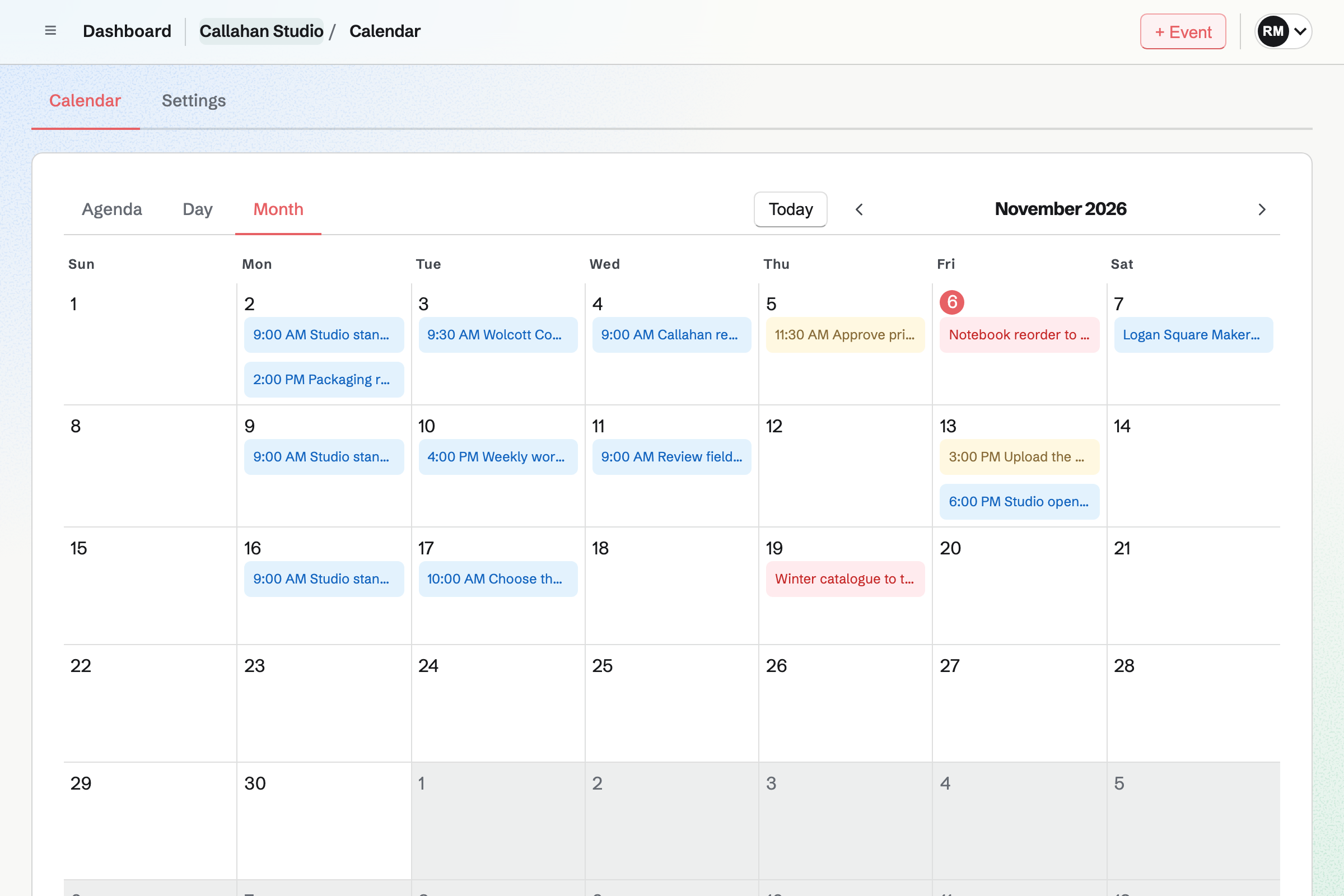
Callahan Studio’s team Calendar in Month view on a computer and Agenda view on a phone, with the studio’s shoots, reviews, a market day and To-do deadlines.

How is Magpie different?

1. The calendar comes with the rest of the business

One Magpie subscription includes the areas a small business would otherwise buy one at a time:

  • Calendar for Personal and for each team, with To-dos on their dates
  • Meetings for your own meeting page, and Appointments for services, staff and rooms
  • Staff Scheduling for the rota, and Social Media for scheduled posts
  • Invoicing, with recurring invoices and online payment, and Store for selling online
  • Contacts, Mail, Websites, Forms, Time Tracking and the other areas, in the same team

Everything is in one account with one bill. Google Calendar comes with Gmail, Meet and Tasks. Invoices, rotas and shops are left to other software.

2. Other areas put their dates on the calendar

A team's Calendar shows the team's work from other areas, with nothing typed twice:

  • each Appointments booking, as an event
  • Hiring interviews, which block every interviewer's time
  • Courses live sessions and the first day of a cohort
  • Company Records due dates and Business Planner milestones, when the team turns them on

Your Personal Calendar adds your meetings and your published shifts. Social Media posts can show there too.

3. A team pays one price

The Team plan is one price for up to 25 people. Everyone shares the team's Calendar and has a meeting page of their own. Adding someone does not change the bill. Google Workspace is priced per user.

Comparing Magpie and Google Calendar

Google Calendar does more inside the calendar; Magpie does more around it. Every line in the tables below was checked against Google's own pages, linked from each row, and against Magpie's code and Help.

Platform

WhatGoogle CalendarMagpie
Day, week and month viewsSee the schedule at different lengths Yes No Week view
Repeating eventsOne event on a pattern Yes Yes
Event remindersAn alert or email before it starts Yes No
Invitations and RSVPsGuests answer, and you see who is coming Yes Yes
Capacity and attendee countStop answers when the event is full No Yes
Several calendars at onceWork, home and the team side by side Yes Partly
Sharing a calendarChosen people see free times or details Yes Partly
Public calendarA page anyone can open Yes Yes
Embed on your websiteThe calendar inside your own site Yes No
Holidays and birthdaysAdded to the calendar for you Yes Partly
Find a time with guestsEveryone's free times side by side Yes No
Video call on an eventA call link added to the event Google Meet Partly
Booking pagesPeople choose a time with you Yes Yes
Payment when someone booksCharged as the time is chosen Eligible paid plans Appointments
Tasks on the calendarDated tasks beside your events Yes To-dos
Shifts and social postsThe rota and scheduled posts beside events No Yes
Timer from an eventTrack the time spent at it No Yes
Other calendar appsApple Calendar, Outlook and the rest Yes Through Google
Import and exportCalendar files in and out Yes No
Outlook and ExchangeWork beside Microsoft calendars Yes No
Phone and watch appsThe calendar on every device Yes In the browser
Restore a deleted eventTrash for events deleted by mistake Yes No
Invoicing, a shop and a websiteThe rest of the business in one account No Yes

Good to know: Where Magpie says No or Partly, the line under the row says what Magpie does instead. Each gap has an item on Magpie's roadmap, and the line changes on the day it ships.

Getting started and views

Google Calendar shows a day, a week, a month, a year or a schedule. It prints each one. Magpie's Calendar shows Agenda, Day and Month. Google does the views better than we do today.

WhatGoogle CalendarMagpie
See your schedule by day, week or month Source Magpie: Calendar shows Agenda, 14 days at a time, Day and Month. There is no Week or Year view. Yes Partly
Move around the calendar from the keyboard Source Yes Yes
Search the calendar for an event Source Magpie: The assistant searches event titles, descriptions and locations, meetings and To-dos on Calendar. Search does not include Calendar events, and Calendar has no search box of its own. Yes Partly
Print a day, week or month Source Magpie: Calendar has no print layout: the browser prints the page as it appears on screen. Yes No
Look at the calendar with no connection Source Google Calendar: In Chrome, offline mode shows events from the last four weeks onwards; events cannot be created or changed until the connection returns.Magpie: Calendar needs a connection; nothing on the website works offline. The Magpie app, not yet in the App Store or Google Play, keeps only a draft of an event being edited on the phone. Partly No
Use the calendar on a phone Source Yes Yes

Good to know: Each view and date in Magpie's Calendar has its own address. Back returns to the view you came from. Single keys move between periods, switch views and start an event.

Events and invitations

Both add events with a time, a place and guests who answer, and both repeat them on a pattern. Google Calendar also sends reminders, attaches files and shows when guests are free. They do each of these better than we do today.

WhatGoogle CalendarMagpie
Add an event with a time, a place and a description Source Yes Yes
Make an event repeat Source Yes Yes
Invite people and see who is coming Source Yes Yes
Answer maybe, add a note, or suggest another time Source Magpie: A guest answers Going or Not going. There is no Maybe, no note with the answer, and no way to suggest another time. Yes No
Be reminded before an event starts Source Magpie: Calendar events send no reminder. A push notification arrives when someone invites you to an event, and To-dos have reminders of their own. Yes No
Add a video call to an event Source Magpie: A meeting booked from your meeting page gets a Zoom or Google Meet link. A Calendar event gets no call: a link typed into its Location is the only way, and Video Chat's scheduled calls are made only by Hiring, Courses and Coaching. Yes Partly
Attach files to an event Source Magpie: An event has a title, a time, a location and a description; no file can be attached, so a link to a document goes in the description. Yes No
Book a room for an event Source Google Calendar: Work and school accounts add a room to an event from their organization's list, which every Workspace plan includes; a personal account makes a calendar for a room or shared space instead.Magpie: Resource Booking books rooms, spaces and equipment with their own hours and approvals, but on its own: a booking is not attached to a Calendar event and does not appear on Calendar. Partly Partly
Keep an event private, or show only that you are busy Source Yes Yes
Share an event by link so people can add themselves Source Yes Yes
Limit how many people can come, and show how many are going Source Google Calendar: Calendar's response tracking lists each guest's answer; its help names no limit on how many can come and no count shown to guests. No Yes
Colour or label events to tell kinds apart Source Magpie: Each kind of item, such as events, meetings, To-dos and shifts, has its own marker, and a team's Social Media posts carry the team's colour; an event's own colour cannot be chosen. Yes No
See when the people you invite are free, and pick a time Source Magpie: Calendar shows one person's or one team's events, not when each guest is free. Hiring finds times when every interviewer is free, for interviews only. Yes No
Track the time spent at an event Source Google Calendar: An event holds guests, a call, attachments and notifications; Calendar's event help names no timer. No Yes

Good to know: A Magpie event can take RSVPs up to a capacity and show how many are going. Who can find it and What they see are set for each event.

Calendars and sharing

Google Calendar keeps several calendars side by side and subscribes to others. It adds holidays and birthdays. Magpie gives Personal and each team a Calendar of its own, seen one at a time.

WhatGoogle CalendarMagpie
Keep separate calendars for work, home and the rest, and see them together Source Magpie: Personal and each team have a Calendar of their own, seen one at a time, and Personal adds your meetings, shifts and Google events. To see a team's events beside your own, both are added to Google Calendar and seen there. Yes Partly
Share your calendar with particular people, choosing what they see Source Magpie: A team's Calendar is shared with its members, and View only members see it without changing it; your Personal Calendar is shared by giving a guest Calendar. Your meetings, shifts and Google events stay in your own view, and no whole calendar can be shared as free and busy only; What they see sets that one event at a time. Yes Partly
A calendar a whole team, or a family, keeps together Source Yes Yes
Publish a calendar anyone can see Source Yes Yes
Show your calendar inside your own website Source Magpie: Magpie's pages refuse to open inside another site's frame, and Websites has no calendar section, so a website links to your public calendar. Yes No
Add someone else's calendar, or one from a web address Source Magpie: Calendar shows Magpie's own events, meetings, To-dos, shifts and Social Media posts, and your Google events; it reads no other calendar or calendar address. Yes No
See public holidays Source Magpie: Calendar shows no holidays of its own. A team adds its holidays in Staff, which suggests the public holidays of Canada, the United States, the United Kingdom, Australia, Ireland and New Zealand. They then show on the Personal Calendar of each person on the team's staff. Yes Partly
See your contacts' birthdays Source Magpie: Contacts keeps no birthday, and Calendar shows none. Yes No
See work shifts and scheduled social posts beside your events Source Google Calendar: Calendar holds events, tasks, birthdays, holidays and events from Gmail; nothing comes from a staff rota or a social media planner. No Yes

Good to know: Your Personal Calendar shows your published shifts from every team. It also shows your time off and your team's holidays from Staff. Calendar settings add Social Media posts from your teams, each with its team's colour.

Appointment schedules

Both publish a page where people book a time with you. Both email a reminder before it and can take payment as people book. Google's appointment schedules add your own questions and co-hosts. Magpie's Appointments adds services, staff and rooms.

WhatGoogle CalendarMagpie
Let people book time with you from a page of your own Source Yes Yes
Check your other calendars before offering a time Source Magpie: Your meeting page leaves out times taken by your meetings, by Calendar events you made or are going to, and by your primary Google calendar. A second Google calendar or account, or an Outlook calendar, is not checked. Yes Partly
Stop last-minute bookings, and set how far ahead people can book Source Magpie: Appointments has Minimum notice and Maximum range. On a meeting page any time that has not started can be booked. Yes Partly
Leave time between appointments, and cap how many come in a day Source Magpie: Appointments keeps a buffer before and after each service. Meetings has no buffer, and neither caps the number of bookings in a day. Yes Partly
Change your bookable hours for one date Source Magpie: A Calendar event you create blocks its time on your meeting page, so an all-day event keeps a day free; hours cannot be added or changed for one date. Yes Partly
Ask your own questions on the booking form Source Magpie: The meeting page asks for a name and an email address, with an optional phone number and notes; no other question can be added. Yes No
Check the booker's email address before the booking counts Source Magpie: A booking is made as soon as the form is sent with a well-formed email address. Yes No
Take payment when someone books Source Yes Yes
Remind the person who booked by email Source Yes Yes
Share a booking page with colleagues as co-hosts Source Magpie: A meeting page belongs to one person. Appointments books a business's staff, giving each booking to one of them. Yes No
Let the person who booked cancel it themselves Source Magpie: Appointments' confirmation email links to a page where the customer reschedules or cancels until the notice you set. A meeting's email asks the person to contact you, and you make the change in All Meetings. Yes Partly
Say where an appointment happens: in person, by phone or on a call Source Magpie: A meeting gets a Zoom or Google Meet link when one is connected, and an Appointments service has a Location; a Meeting Type has no address or phone number of its own. Yes Partly
Offer a few free times in an email for the person to pick Source Magpie: Send meeting page emails one person your page, or one Meeting Type on a preferred day, with your note; it cannot offer particular times. Yes No

Good to know: Appointments books a service with a staff member and a room, with buffers and notice. The customer reschedules or cancels from their confirmation.

Tasks, Gmail and Gemini

Both show tasks beside events, and both have an assistant that finds free times. Google Calendar also adds flights, hotels and restaurant bookings from Gmail by itself.

WhatGoogle CalendarMagpie
See your tasks on the calendar beside your events Source Yes Yes
Put events from your email on the calendar Source Magpie: Mail shows an invitation from Google Calendar, Outlook or another calendar above its message, and Going adds the event to your Calendar, with its repeats and later changes. Nothing reads other email, such as a flight or a booking confirmation, into an event. Yes Partly
Ask an assistant to find a free time and add the event Source Yes Yes

Good to know: A To-do shows on its When date and on its Deadline, with reminders and repeats. The assistant on Dashboard lists your free times on a day. It adds, changes and deletes events.

Settings, time and insights

Google Calendar shows colleagues your working hours and location, and declines invitations while you are away. It also plans across time zones. Magpie's Calendar uses your device's time zone.

WhatGoogle CalendarMagpie
Show colleagues when and where you are working Source Magpie: Availability sets the weekly hours people can book on your meeting page. Colleagues do not see your working hours or where you work, and nothing warns them when they invite you outside your hours. Yes Partly
Block time as away or for focus, and turn down invitations in it Source Magpie: An event you create keeps its time off your meeting page, so nobody books it. Nothing turns down Calendar invitations for you. Yes Partly
Plan across time zones Source Magpie: Calendar shows times in your device's time zone, and an event's page names its organizer's time zone. An event cannot be set in another zone, and no second zone is shown. Yes Partly
See how much of your time goes to meetings, and with whom Source Magpie: Time Tracking reports the hours people record against projects and clients; nothing counts the time spent in meetings or who they were with. Yes No
Choose a light or dark look Source Yes Yes
Get back an event deleted by mistake Source Magpie: Delete event asks first, then removes the event with its invitations and responses; Calendar events do not go to Trash. Yes No

Good to know: An event you create keeps its time off your meeting page, so nobody books you then. Light, System and Dark set the look on every device you sign in to.

Sync, import and other calendars

Google Calendar works both ways with other calendar apps, imports calendar files and exports every calendar. Magpie adds its events to your Google calendar, and other apps see them through Google.

WhatGoogle CalendarMagpie
See your calendar in Apple Calendar, Outlook or another app Source Magpie: Magpie adds Personal's events, your chosen teams' events and each new meeting to your Google calendar, and a meeting downloads as a calendar file. There is no calendar address for Apple Calendar or Outlook, which see Magpie only through Google; Staff Scheduling shifts have a subscription address of their own. Yes Partly
Bring events in from a calendar file, or download them all Source Magpie: Calendar imports nothing and has no download of all its events; a single meeting downloads as a calendar file. Yes No
Work alongside Outlook or Microsoft Exchange calendars Source Magpie: Google Calendar is the only calendar Magpie connects to; Outlook and Microsoft 365 do not connect. Yes No

Good to know: You choose which of Personal and your teams are added to Google. A team can add only the events you are going to. Changing or deleting an event in Magpie changes or deletes its Google copy.

Price comparison

How Google Calendar charges

Google Calendar is free with a Google account. A business pays for Google Workspace, per user, by plan: Business Starter, Business Standard and higher. The plan sets some calendar extras. More than one booking page, payment when someone books and checking other calendars need an eligible plan. Focus time needs Business Standard or higher. Prices are on Google Workspace's pricing page.

How Magpie charges

Magpie charges by plan, Free or a paid plan, for everything in the account: Calendar, booking pages, invoicing and the rest. The plan sets limits, such as how many events Calendar holds, not which areas you can use. The Team plan is one price for up to 25 people. Prices are on Magpie's pricing page.

On top of the planGoogle CalendarMagpie
A calendar for one personFree with a Google accountFree plan, with 100 events in Personal
How a team paysGoogle Workspace, per userOne Team plan for up to 25 people
Booking pagesOne on a personal account or Business Starter; more on eligible plans; none on Frontline and Essentials2 Meeting Types on Free; no limit on Pro
Payment when someone booksThrough Stripe on eligible paid plans, with no Google feeAppointments, through Stripe, with a 4% Magpie fee
RoomsEvery Workspace plan, on work accountsResource Booking, booked apart from events
Focus timeBusiness Standard and higherNot available
Invoicing, a shop and a websiteNot part of Google CalendarIncluded

When to choose Magpie or Google Calendar

  • Want a team calendar beside bookings, To-dos, shifts, invoices and a website, for one price? Go with Magpie.
  • Want reminders, a week view, guests' free times and apps for phones and watches? Google Calendar is the right choice.

Recommendations by kind of business

For your own diary
Google Calendar. Reminders arrive before each event, and holidays and birthdays are added for you. The apps keep it on your phone and watch. Magpie's Calendar events send no reminders, and the Magpie app is not in the stores yet.
For a company that meets a lot
Google Calendar. Find a time shows up to 50 guests' calendars side by side, with rooms. Working hours and Time Insights come with work and school accounts. Magpie shows one person's or one team's events.
For a service business that takes bookings
Magpie. Meetings and Appointments put each booking on Calendar, beside the customer's contact and their invoices. Appointments books a staff member and a room together.
For a shop, a café or a team with a rota
Magpie. Each person's published shifts show on their Personal Calendar, beside their meetings. Scheduled Social Media posts can show there too.
For events people sign up for
Magpie. An event takes RSVPs up to a capacity and shows how many are going. It can be listed on your public calendar. Google Calendar's help names no limit on how many can come.
For a small team already on Google Calendar
Either. Magpie connects to Google Calendar, shows your Google events and adds Magpie's events to Google. Choose by whether the calendar itself or the work around it matters more.

Frequently asked questions

What is the difference between Google Calendar and Magpie?

Google Calendar is a calendar for one person or a company, free with a Google account. Magpie is one subscription for a small business's software. Its Calendar is one area beside booking pages, To-dos, shifts, Invoicing and a website. Google Calendar does more inside the calendar; Magpie does more around it.

Does Magpie replace Google Calendar?

Yes, for a team that wants one shared calendar beside its bookings, To-dos and shifts. Magpie's Calendar takes events, invitations and RSVPs, and other areas add their dates to it.

Consider keeping Google Calendar if you need reminders before events or plan by the week. Keep it too if you find times with many guests or use Outlook or Apple Calendar. Google Calendar does each of these better than Magpie does today.

How much does Google Calendar cost?

Google Calendar is free with a Google account. A business pays for Google Workspace per user. Its plans are Business Starter, Business Standard and higher. Extra booking pages, payments and focus time need certain plans. The prices are on Google Workspace's pricing page.

How much does Magpie cost?

Magpie has a Free plan and paid plans, each covering every area. Personal and each team hold 100 events on Free and 5,000 on a paid plan. The Team plan is one price for up to 25 people, not a price per user. The prices are on Magpie's pricing page.

Can Magpie Calendar events repeat?

Yes. Under Repeats, an event repeats every day, week, month or year, on the weekdays you choose. It can stop on a last date. A change asks whether it is for this event, the following ones too, or all of them. Google Calendar repeats an event on a pattern too, up to 730 times.

Does Magpie send reminders before an event?

No. A Calendar event sends no reminder. A push notification arrives when someone invites you to an event. To-dos have reminders of their own. Event reminders are on Magpie's roadmap. Google Calendar sends an email or an alert a chosen time before each event.

Does Magpie have a week view?

No. Magpie's Calendar shows Agenda, 14 days at a time, Day and Month. A Week view is on Magpie's roadmap. Google Calendar shows a day, a week, a month, a year or a schedule.

Can I connect Google Calendar to Magpie?

Yes. Connect it from Integrations, under Meetings. Your Google events show on your Personal Calendar. Busy times in your primary Google calendar cannot be booked on your meeting page. You choose which Magpie calendars are added to Google. New meetings can be added to Google with the attendee invited.

Can I see my Magpie calendar in Apple Calendar or Outlook?

Only through Google. Magpie adds its events to your Google calendar. An app that shows Google Calendar shows them too. Magpie has no calendar address to subscribe to. A single meeting downloads as a calendar file. Google Calendar gives any app a secret address. Apps that sign in to Google change events both ways.

Does Magpie work with Outlook or Microsoft 365?

No, not yet. Google Calendar is the only calendar members can connect today. A Microsoft 365 connection is built but not yet switched on. Google Calendar works beside Microsoft Exchange through Calendar Interop.

How do I move from Google Calendar to Magpie?

Connect Google Calendar from Integrations, and your Google events show on your Personal Calendar beside Magpie's. Magpie cannot import a calendar file, so the events stay in Google. New events you add in Magpie are added to your Google calendar too.

Can I use Google Calendar and Magpie together?

Yes. Magpie shows your Google events on your Personal Calendar. Your meeting page leaves out times that are busy in Google. It adds Personal's events and your chosen teams' events to Google. Changes in Google to those copies do not change the events in Magpie.

Does Magpie have booking pages like Google's appointment schedules?

Yes. Meetings gives you a meeting page. People choose a Meeting Type and a free time without an account. Appointments books a business's services, staff and rooms. Both email the person who booked a reminder before the time. Google's appointment schedules also ask your own questions, which Magpie's booking pages do not.

Can Magpie take payment when someone books?

Yes, in Appointments. A service takes its full price or a deposit by card as the customer books, through your own Stripe account. Magpie's fee is 4% of each payment. A meeting page in Meetings takes no payment. Google's appointment schedules charge through Stripe on eligible paid plans, with no Google fee.

Can I find a time when everyone is free in Magpie?

No. Calendar shows one person's or one team's events, not when each guest is free. Hiring finds times when every interviewer is free, for interviews only. Google Calendar's Find a time shows up to 50 guests' calendars side by side, with rooms.

Does Google Calendar limit how many people can come to an event?

No. Google Calendar's guest list shows each answer. Its help names no limit on how many can come. Magpie's Capacity stops RSVPs once that many people are going and marks the event full. Show attendee count puts the number on the event's page and your public calendar.

Can I share my Magpie calendar with someone?

Partly. A team's Calendar is shared with its members. View only members see it without changing it. To share your Personal Calendar, give someone Calendar as a guest of Personal. No whole calendar can be shared as free and busy only. Google Calendar shares each calendar by email address, with a choice of what each person sees.

Can I put my Magpie calendar on my website?

No. Magpie's pages do not open inside another site's frame. A website links to your public calendar instead. Embedding is on Magpie's roadmap. Google Calendar gives embed code for a public calendar.

Does Magpie show holidays or birthdays?

Partly. A team adds its holidays in Staff, which suggests the public holidays of six countries. They show on the Personal Calendar of each person on the team's staff. Calendar shows no holidays of its own, and Contacts keeps no birthday. Both are on Magpie's roadmap. Google Calendar adds your region's holidays for you and shows birthdays saved in Google Contacts.

Can I get back an event I deleted in Magpie?

No. Delete event asks first, then removes the event with its invitations and responses. It does not go to Trash. Restoring deleted events is on Magpie's roadmap. Google Calendar keeps deleted events in Trash for 30 days.

Can I add a video call to a Magpie event?

Partly. A meeting booked from your meeting page gets a Zoom or Google Meet link. A Calendar event gets no call of its own. A call link can go in its Location. Google Calendar puts a Google Meet link on an event, or on every event you create.

Does Google Calendar show work shifts or scheduled social posts?

No. Google Calendar holds events, tasks, birthdays, holidays and events from Gmail. Magpie's Personal Calendar shows your published Staff Scheduling shifts from every team. Calendar settings add Social Media posts from Personal and your teams.

Does Magpie have a phone app for its calendar?

Calendar works in a phone's browser, with Agenda, Day and Month, events, invitations and RSVPs. The Magpie app is not yet in the App Store or Google Play. Google Calendar has apps for Android, iPhone, Wear OS and Apple Watch.

What is included in Magpie's Free plan?

Calendar holds 100 events in Personal and each team, beside To-dos. Booking pages have 2 Meeting Types. Invoicing, Store, a website, the Newsletter, Forms and a team of 3 are included too. A paid plan raises Calendar to 5,000 events and adds email at your domain.
If a line on this page is wrong, tell us and we will correct it.

Google Calendar changes, and so does Magpie. If a line is out of date about either product, email support@magpie.diy with the page that shows it. We check the line against that page, change it, and give it the new date. That goes for Google's own team as much as for anyone who uses Google Calendar.

Put your team's calendar beside the rest of the business.

Create a Magpie account, then connect Google Calendar from Integrations.

Create account