Kit compared with Magpie

Kit vs Magpie: an in-depth comparison

Kit and Magpie both send a creator's email to a list of subscribers. Both sell downloads and let readers pay. They are built around different things.

  1. Kit is an email marketing service for creators, formerly ConvertKit. Landing pages, automations, a newsletter site and selling are built around it. It is built for someone whose list is the business, such as a writer or a podcaster.
  2. Magpie is one subscription for a small business's software, and the Newsletter is one part of it. Beside it are Store, Supporters, Courses, Outreach, Helpdesk and the other areas a business runs on. It is built for someone whose newsletter is one part of running the business.
Create account
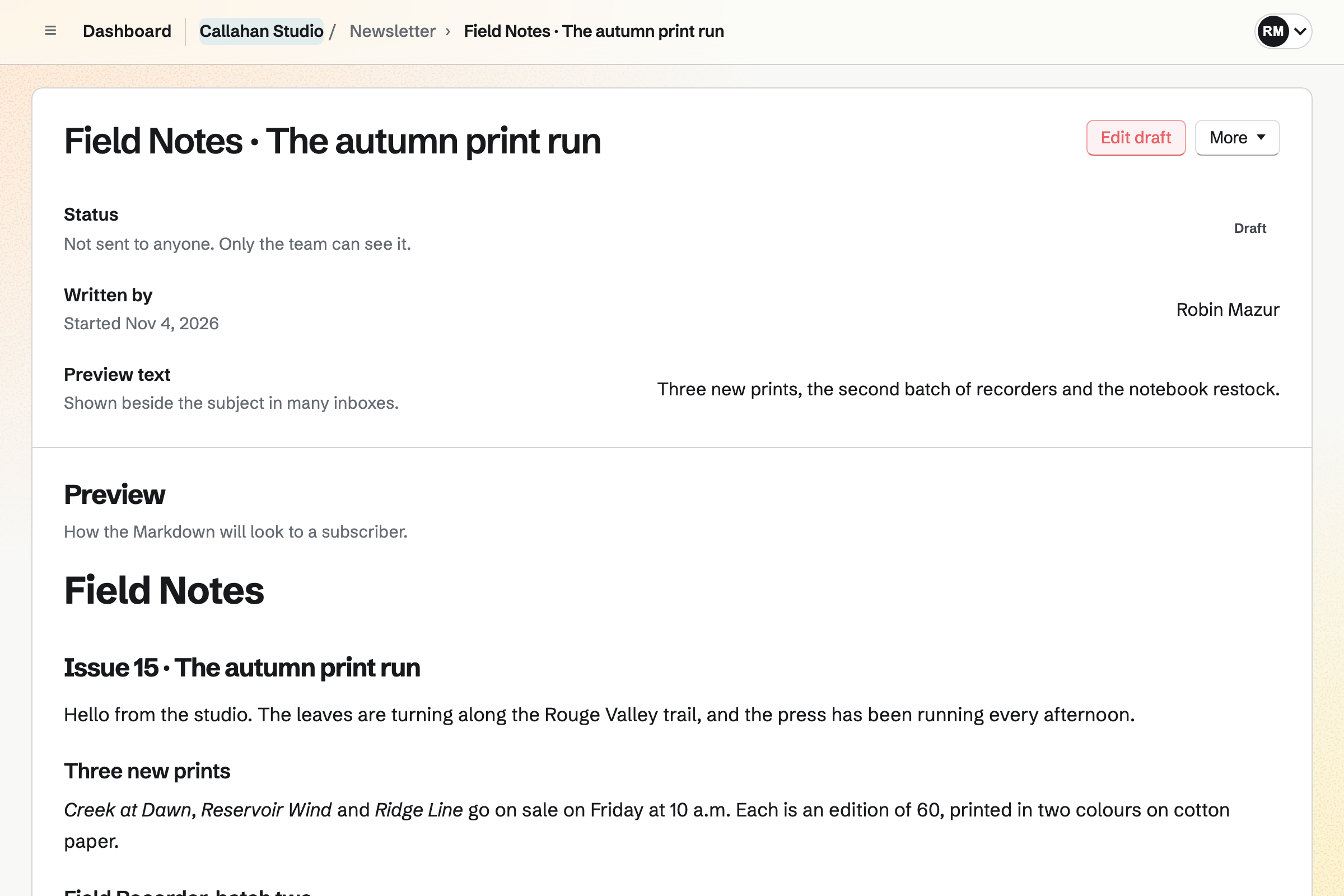
Callahan Studio’s draft of the next Field Notes issue, not sent to anyone yet: who started it, its preview text, and the email as a subscriber will see it, announcing three new prints.

How is Magpie different?

1. The newsletter comes with the rest of the business

One Magpie subscription includes the areas a small business would otherwise buy one at a time:

  • Newsletter for email to subscribers, with a signup page and a web copy of each email
  • Store for downloads, products that ship and gift cards, and Supporters for paid posts
  • Courses for lessons at a school of your own, and Coaching for client programs
  • Meetings and Appointments for booking pages, and Invoicing for invoices paid online
  • Websites, Mail, Helpdesk, Outreach, Forms and the other areas, in the same team

Everything is in one account with one bill. Kit connects to shops, course platforms and booking services from other companies. Shopify, Thinkific and Calendly are among them.

2. A team shares one plan

Everyone in a Magpie team signs in with their own account and writes the team's emails. A free team has 3 members, and the Team plan is one price for up to 25. Members do not pay. Kit's plans include 1 user on Free, 2 on Creator and any number on Pro.

3. Replies and sales email stay in the same team

The Newsletter's Reply-to address can be a Helpdesk inbox. Each reply becomes a conversation a teammate takes, answers and writes notes on. Outreach, on a paid plan, emails people you hope to win from your own Mail address. It sends a series and stops for each person who replies.

Comparing Magpie and Kit

Kit does more to grow a list and email it; Magpie does more around it. Every line in the tables below was checked against Kit's own pages, linked from each row, and against Magpie's code and Help.

Platform

WhatKitMagpie
Email newslettersWrite an email and send it to a list Yes Yes
SchedulingSend an email at a set time Yes Yes
Email builderPictures, buttons, products and timers without code Yes Markdown and HTML
Your own email designYour HTML around every email Yes Yes
Landing pagesPages for a waitlist, a free download or a sale Yes Websites, no signup
Signup forms on your websiteEmbedded forms and pop-ups Yes Embedded, no pop-up
Free download for subscribingAn ebook sent to each new subscriber Yes Social Media offers
Newsletter websitePast issues, products and your own look Yes Signup page and web copies
Your own domainThe newsletter's pages at your domain Yes No
Send from your own domainEmail from an address at your domain Yes No
Tags and segmentsSend an email to some subscribers only Yes No
Recommendations and referralsNew subscribers through other newsletters and readers Yes No
Sequences and automationsWelcome series and steps that tag, wait and branch Creator and Pro No
Opens and clicksWho opened each email and what they clicked Yes Delivery counts
Subject line testsTry two subjects and send the better one Yes No
Digital productsDownloads such as ebooks and templates Yes Yes
Paid newsletterReaders pay for issues kept for them Yes Supporters, not emailed
Tip jarOne-off payments from readers Yes Pay what you want in Store
SponsorshipsSponsors and paid recommendations found for you Creator and Pro No
Online shopProducts that ship, a cart and checkout Connects to Shopify and others Yes
Booking pagesSubscribers choose a time with you Calendly app Yes
Replies with your teamAnswer replies together No Helpdesk
Sales email from your mailboxA series of emails to people you hope to win No Outreach, paid plans
Text messagesMarketing texts beside email SlickText app No
AI connectionClaude or ChatGPT reads the list and drafts email Creator and Pro Partly
Free planEmail a list without paying 10,000 subscribers 250 subscribers

Good to know: Where Magpie says No or Partly, the line under the row says what Magpie does instead. Each gap has an item on Magpie's roadmap, and the line changes on the day it ships.

Growing the list

Kit grows a list with landing pages, pop-up forms, free downloads and the Creator Network. They do it better than we do today. Magpie's subscribers come from the signup page, a signup form on your own website, imports and Store checkout.

WhatKitMagpie
Get a signup page I can share, made for me Source Yes Yes
Build a landing page for a waitlist, a free download or a sale, from a template Source Magpie: Websites builds pages from sections at a Magpie address or your own domain, and can show your Store's products, but has no newsletter signup section. The Newsletter's signup form goes into pages of other websites by pasting its code, and the Newsletter's own signup page has no design of its own. Yes Partly
Put a signup form on my own website, in the page or as a pop-up Source Magpie: Newsletter settings gives the signup form's code to paste into a page of any website, where visitors subscribe and confirm their address by email. A Store home page can show a Newsletter sign-up section, and Store checkout can add buyers. There is no pop-up, slide-in or bar. Yes Partly
Send a free download, such as an ebook, to everyone who subscribes Source Magpie: A Social Media offer has a page where anyone types their email address and is emailed a link to a PDF or ZIP file. With Invite people to the Newsletter on, the page has a box, not ticked, that also subscribes them. A signup on the Newsletter's own page or form gets only the email that confirms the address. Yes Partly
Have a website for my newsletter with past issues, my products and my own look Source Magpie: With Web copies on, each sent email has a public page and Past emails on the signup page lists them. The signup page shows only the newsletter's name and description inside Magpie's own top bar and footer, with no design, categories or products of its own. Yes Partly
Show my newsletter site and landing pages at my own domain Source Magpie: The newsletter lives at Magpie's address, under /newsletter/. Websites, Store and link pages can use a domain of your own, but Newsletter cannot. Yes No
Get new subscribers from other newsletters recommending mine Source Magpie: Magpie has no network or directory of newsletters; new subscribers come from the signup page you share, imports and Store checkout. Yes No
Reward readers who bring in new subscribers Source Magpie: Subscribers have no referral link and nothing counts who brought whom. Yes No

Good to know: A Store home page can show a Newsletter sign-up section, with double opt-in. A buyer who ticks the box at checkout joins when the order is paid.

Subscribers and tags

Both import a list and keep where each subscriber came from. Kit adds tags, segments, custom fields, topic choices and a page for each subscriber.

WhatKitMagpie
Bring my list over from another email service Source Yes Yes
Tag subscribers by what they did, and email only some of them Source Magpie: A Newsletter email goes to every active subscriber, and subscribers have no tags. Store saves customer segments, but no email can be sent to one. Outreach, on Pro or the Team plan, can add everyone with a Contacts tag to a campaign sent from your own Mail address. Yes Partly
Ask for a name or other details, and keep them on each subscriber Source Magpie: The signup page asks only for an email address. An import can bring each person's name, and Store checkout records the buyer's name; there are no other fields. Yes No
See one subscriber's emails, purchases and history on their own page Source Magpie: A subscriber is a row with their address, name, status, where they came from and when they joined. A Store customer's page shows their orders and spending, but it is not joined to the subscriber. Yes Partly
Let subscribers choose which topics they get, instead of leaving Source Magpie: Every active subscriber gets every email, and the unsubscribe page offers only to leave. Personal and each team have one newsletter. Yes No

Good to know: Newsletter imports a CSV file or a Substack export, up to 5 MB. Rows marked unsubscribed or bounced are left out.

Writing and sending email

Both schedule an email, send tests and take your own HTML design. Kit lays out emails from blocks, greets each reader by name and tests subject lines.

WhatKitMagpie
Write an email and send it to my list Source Yes Yes
Schedule an email to go out later Source Yes Yes
Lay out an email from blocks such as pictures, buttons, products and countdown timers, without code Source Magpie: An email's text is written in Markdown or taken from a Document, which keeps its headings, lists, tables and pictures. Its look comes from Design HTML, pasted in or written by an outside chatbot through Use a chatbot. There are no blocks for buttons, columns, products or timers without writing HTML. Yes Partly
Start every email from a template in my brand's colours Source Magpie: Each email starts with the Newsletter's usual look. Export JSON saves an email's design and Import JSON puts it into a new one, but there is no gallery of templates, no saved default design and no saved brand colours. Yes Partly
Design my emails in my own HTML Source Yes Yes
Greet each subscriber by name Source Magpie: Every subscriber gets the same text. Outreach fills in each person's name in campaign emails, but Newsletter has no such fields. Yes No
Show different parts of one email to different subscribers Source Magpie: Every subscriber gets the whole email. Yes No
Put a poll or a video in an email Source Magpie: A Newsletter email holds text and pictures only. A link to a Form can ask a question, but the answers are not tied to subscribers. A Supporters post can show a video and a Form as a poll, but posts are not emailed. Yes Partly
Save a block, such as a sign-off, once and reuse it in many emails Source Magpie: The Footer note setting adds one fixed text under every email. Nothing else can be saved and reused across emails. Yes Partly
Try two subject lines, or two versions of an email, and send the better one Source Magpie: Each email has one subject and one text, and goes to every active subscriber at once. Yes No
Have AI suggest subject lines for my email Source Magpie: Use a chatbot gives instructions to paste into any outside chatbot, and Import JSON, on The design and the text, can take its subject and text. Nothing in Newsletter suggests subject lines itself. Yes Partly
Send an email again to the subscribers who did not open it Source Magpie: Magpie does not record who opens an email, and a sent email cannot be sent again. Yes No
Have each subscriber get the email at the same hour in their own time zone Source Magpie: A scheduled email goes to every subscriber at one time, in the time zone shown under the field. Yes No
Write an email with teammates and go back to an earlier version Source Magpie: A Newsletter draft has no history and does not show who else is editing it. An email can send a Document instead, and in Documents several people write at the same time, named versions can be restored, and people comment and suggest changes. Yes Partly
Read and answer replies to my emails with my team Source Kit: Kit's list of what it does has no inbox where a team reads and answers replies. No Yes

Good to know: A Magpie email can take its text from a Document, with its headings, tables and pictures. A test goes to up to 10 addresses first.

Deliverability

Both confirm each new address and stop emailing people who bounce or complain. Kit also sends from your own domain, and removes its name on paid plans.

WhatKitMagpie
Send from an address at my own domain, authenticated so it reaches the inbox Source Magpie: Newsletter email comes from Magpie's sending address with your From name, and replies go to your Reply-to address. Yes No
Have new subscribers confirm their address, and stop emailing people who bounce, complain or leave Source Yes Yes
See whether my emails reach the inbox at Gmail, Outlook and Yahoo Source Magpie: Each email shows how many copies were delivered, failed and skipped, with no report by provider or inbox placement. Yes No
Send emails without the email service's name on them Source Magpie: Every Newsletter email ends with a line saying it was delivered by Magpie, on every plan. Yes No

Good to know: Public signup on Magpie always uses double opt-in. Every email has an unsubscribe link and a one-click unsubscribe header.

Automations and AI

Kit sends sequences and runs Visual Automations that tag, wait and branch, on Creator and Pro. Magpie's Newsletter sends each email by hand.

WhatKitMagpie
Send a welcome series, or a set of emails after a purchase, automatically Source Magpie: A Newsletter signup gets only the email that confirms the address. Supporters sends each new supporter a welcome email, and Outreach, on Pro or the Team plan, sends a series to people you add to a campaign. Nothing sends a series when someone subscribes or buys. Yes Partly
Build automations that tag, wait, branch and email people by what they do Source Magpie: Magpie has no rules that tag, email or move a subscriber when they do something. Outreach campaigns send their steps a set number of days apart and stop when someone replies. Yes No
Email my new blog posts to subscribers automatically Source Magpie: Every Newsletter email is written and sent by hand. An editor website's blog has a feed, but no post is emailed to subscribers by itself. Yes No
Let Claude or ChatGPT read my list, draft emails and schedule them Source Magpie: Connected apps such as Claude or ChatGPT can list the newsletter and its emails, without their text or the subscribers, and cannot write, schedule or send email. Yes Partly
Send text messages to subscribers as well as email Source Magpie: Newsletter sends email only, and no Magpie area sends marketing text messages. Yes No

Good to know: Supporters sends each new supporter a welcome email. Outreach, on a paid plan, sends a series of emails from your own Mail address.

Reports and audience insights

Kit reports opens, clicks, sales and list growth, for each email and each subscriber. Magpie counts delivered, failed and skipped copies.

WhatKitMagpie
See who opened each email and which links they clicked Source Magpie: A Newsletter email shows how many copies were delivered, failed and skipped, with no opens or clicks. Outreach, on Pro or the Team plan, lists the links each person followed when Click tracking is on. Yes Partly
See how my list grows and where new subscribers come from Source Magpie: The Newsletter page shows active subscribers, emails sent and copies delivered, and each subscriber's row says whether they came from the signup page, an import or Store checkout. There is no count over time or by referring site. Yes Partly
See which subscribers have stopped reading, so I can win them back or stop sending Source Magpie: Magpie does not record opens or clicks, so nothing shows who has stopped reading; an admin removes subscribers by hand. Yes No
Learn who my subscribers are, such as their work, where they live and how many people follow them Source Magpie: A subscriber is an address, an optional name and where they came from; Magpie adds nothing about them. Yes No
See how much I sold from each email Source Magpie: Store's Sales by source shows orders and sales from links that carry campaign tags, such as utm_source=newsletter, which you add to the email's links yourself. An email's own page shows no sales. Yes Partly
Show Facebook and Instagram ads to my most engaged subscribers Source Magpie: Magpie does not make or buy ads, and sends no list to Facebook. Yes No

Good to know: Store's Sales by source counts orders from links tagged for the email, such as utm_source=newsletter. You add the tag to the email's links yourself.

Selling and earning

Both sell downloads with discounts and pay-what-you-want prices. Kit also emails a paid newsletter to paying readers and offers trials. It finds sponsors too.

WhatKitMagpie
Sell an ebook or other download to my subscribers Source Yes Yes
Charge readers for my newsletter, and email paid issues only to them Source Magpie: Supporters charges paid tiers monthly, or yearly where you add a yearly price, through your own Stripe account and keeps posts for paying supporters, with a 4% Supporters fee. Those posts are not emailed, and Newsletter email goes free to every subscriber. Yes Partly
Let paying readers choose monthly, quarterly or yearly billing Source Magpie: A paid Supporters tier can offer a yearly price you set beside its monthly one, and each supporter chooses monthly or yearly when they join. There is no quarterly price. Yes Partly
Win paying readers with a free trial or a discounted price Source Magpie: A paid Supporters tier has a monthly price, and a yearly one if you add it, with no trial or discount code; an admin can give complimentary access instead. Yes No
Let readers send me a one-off tip Source Magpie: Supporters has no one-off tip. A Store product can be pay what you want, with a minimum and a suggested price, so a reader can buy it as a tip through the Store checkout. Yes Partly
Earn from sponsors and from recommending other newsletters, or pay to be recommended Source Magpie: Magpie finds no sponsors and runs no paid recommendations; a sponsor's message can only be written into an email by hand. Yes No
Remind shoppers who left without paying Source Yes Yes
Add buyers to my list when they buy Source Yes Yes
Show my products, with their pictures and prices, in an email Source Magpie: A product's address or buy link can go in an email as a link. No block shows a product's picture and price. Yes Partly
Let subscribers book a call with me Source Yes Yes

Good to know: Store also sells products that ship and gift cards, and reminds shoppers who left without paying. Magpie takes 4% of each sale.

Plans, team and connections

Kit's Free plan has up to 10,000 subscribers. Paid plans add more than 100 connections, and Kit moves your list for you. Magpie's Team plan is one price for a team.

WhatKitMagpie
Email a list of thousands of subscribers without paying Source Magpie: Free has 250 subscribers and 1,000 emails a month; Pro and the Team plan allow 5,000 subscribers and 50,000 emails a month. Yes Partly
Give teammates their own logins to write and send emails Source Yes Yes
Connect my own code through an API, and be told by webhook when someone subscribes Source Magpie: Magpie's REST API, on Pro, reads and changes the newsletter, its emails and its subscribers. Its webhooks cover Meetings bookings, Proposals, Issues, Store and Forms responses, not Newsletter. Yes Partly
Connect the shop, course and website tools I already use Source Magpie: Store, Supporters, Websites and Meetings are part of Magpie, so they need no connection. There is no Zapier app and no ready-made connection to Shopify, Patreon or another outside tool. Yes Partly
Have the service move my list, forms and automations over for me Source Magpie: You import the list yourself from a file or a Substack export; nobody at Magpie moves it, and there is nothing else to move. Yes No
Write, send and check emails from my phone Source Kit: Kit's own pages do not describe a phone app. Not stated Yes
Email people I hope to win as customers, from my own mailbox Source Kit: Kit's rules allow email only to people who gave permission or bought from you, and forbid bought or scraped lists. No Yes

Good to know: The Team plan has up to 25 members, each with their own account. Members who can edit write and send email.

Price comparison

How Kit charges

Kit charges by plan, Free, Creator or Pro, and by the number of subscribers. Free has up to 10,000 subscribers with no limit on broadcasts. Creator and Pro add sequences, automations, more users and connections, and remove Kit's name from emails. Each product sale or paid subscription costs 3.5% plus a fixed fee, card processing included, of which Kit keeps 0.6%. Prices are on Kit's pricing page.

How Magpie charges

Magpie charges by plan, Free or a paid plan, for every area in the account. The plan sets the Newsletter's subscribers and emails a month, not which areas you can use. Magpie takes 4% of Store sales and 4% of Supporters payments. Stripe's fees come on top. Prices are on Magpie's pricing page.

On top of the planKitMagpie
What the price depends onThe plan and the number of subscribersThe plan
SubscribersUp to 10,000 on Free; no limit on paid plans250 on Free, 5,000 on a paid plan
Emails a monthNo limit1,000 on Free, 50,000 on a paid plan
Fee on product sales3.5% of each sale plus a fixed fee, card processing included4% of Store sales, plus Stripe's fees
Fee on a paid newsletter3.5% of each payment plus a fixed fee, card processing included4% on Supporters, plus Stripe's fees
Paid recommendationsKit keeps 23.5%Not offered
People who sign in1 on Free, 2 on Creator, any number on Pro3 in a free team, 25 on the Team plan
The service's name on emailsRemoved on Creator and ProOn every plan
Sequences and automationsCreator and ProNot offered
Moving your listDone for you on paid plansYou import the file yourself
A shop, booking pages and invoicingConnected from other servicesIncluded

When to choose Magpie or Kit

  • Want your newsletter beside a shop, paid posts, courses, booking pages, invoices and a helpdesk, in one team on one bill? Go with Magpie.
  • Want landing pages, sequences, automations, tags, recommendations and open and click reports, free for up to 10,000 subscribers? Kit is the right choice.

Recommendations by kind of business

For a creator growing a large list
Kit. Landing pages, pop-up forms, free downloads for subscribing and the Creator Network bring in subscribers. Free goes up to 10,000 subscribers.
For a creator who sells through automated email
Kit. Sequences and Visual Automations tag each person by what they do. They send the next email by themselves. Magpie's Newsletter sends each email by hand.
For a writer who earns from sponsors
Kit. Kit matches sponsors to your newsletter and pays for recommending other creators. Magpie finds no sponsors and runs no paid recommendations.
For a business that sends a newsletter
Magpie. The Newsletter is in the same team as the shop, booking pages, invoices and website. Replies can go to a Helpdesk inbox the team answers together.
For a creator who sells products that ship
Magpie. Store sells physical products with shipping beside downloads and gift cards, through your own Stripe account. Kit connects to a shop such as Shopify for that.
For a coach or a teacher
Magpie. Coaching programs, Courses and invoices are in one account with the Newsletter. Appointments takes payment for a call as it is booked. Kit sells course and coaching links, and books calls through Calendly.
For a creator with a small free newsletter
Either. Both send each email to subscribers, schedule it and keep a web copy. Kit's Free plan has 10,000 subscribers and Magpie's 250. Choose by your list's size and whether you want the rest of the business.

Frequently asked questions

What is the difference between Kit and Magpie?

Kit is an email marketing service for creators, built to grow a list and email it. It has landing pages, automations, recommendations and reports. Magpie is one subscription for a small business's software. Its Newsletter is one area beside Store, Supporters, Courses and Helpdesk. Kit does more for the list; Magpie does more around it.

Does Magpie replace Kit?

Yes, for a business whose newsletter goes free to a list of up to 5,000 people. Magpie imports the list, schedules each email and keeps a web copy of it.

Consider keeping Kit if sequences or automations send your emails, or if you segment your list. Keep it if landing pages, pop-up forms or recommendations bring you subscribers. Keep it too if you read open and click reports, or your list is larger than 5,000. Kit does each of these better than Magpie does today.

How much does Kit cost?

Kit has three plans: Free, Creator and Pro, priced by the number of subscribers. Free has up to 10,000 subscribers and no limit on broadcasts. Each product sale or paid subscription costs 3.5% plus a fixed fee, card processing included, of which Kit keeps 0.6%. The prices are on Kit's pricing page.

How much does Magpie cost?

Magpie has a Free plan and paid plans, each covering every area. Free has 250 Newsletter subscribers and 1,000 emails a month; a paid plan has 5,000 subscribers and 50,000 emails. Magpie takes 4% of Store sales and 4% of Supporters payments. The prices are on Magpie's pricing page.

Does Magpie send a welcome series or automations?

No. A new Newsletter subscriber gets only the email that confirms the address. Every other email is sent by hand. Supporters welcomes each new supporter, and Outreach sends a series to people added to a campaign. Email series are on Magpie's roadmap. Kit's sequences and Visual Automations send them on Creator and Pro.

Does Magpie show who opened an email and what they clicked?

No, not for the Newsletter. An email's page shows how many copies were delivered, failed and skipped. Outreach, on a paid plan, lists the links each person followed when Click tracking is on. Kit reports opens, clicks and sales for each email and each subscriber.

Can I tag subscribers or email only some of them?

No. A Newsletter email goes to every active subscriber, and subscribers have no tags. Outreach can add everyone with a Contacts tag to a campaign. Kit tags people by what they did and sends to segments on every plan.

Can I put a Magpie signup form on my website?

Yes, inside a page, but not as a pop-up or a bar. Newsletter settings gives the signup form's code to paste into a page of your website. Visitors subscribe there and confirm their address by email. Kit's forms go into any site, in the page, as a pop-up or as a bar.

Can I send a free ebook to everyone who subscribes on Magpie?

Partly. A Social Media offer emails a PDF or ZIP file to anyone who types their address on its page. A box on that page, not ticked, also subscribes them to the Newsletter. A signup on the Newsletter's own page gets only the email that confirms the address. Kit's forms and landing pages send a file to each new subscriber on every plan.

Does Magpie have a newsletter website like Kit's?

Partly. With Web copies on, each sent email has a public page. The signup page lists past emails. The signup page shows the newsletter's name and description inside Magpie's own top bar and footer. Kit's newsletter site has templates, your colours, categories and a Products page.

Can my Magpie newsletter use my own domain?

No. The signup page and web copies are at Magpie's address, under /newsletter/. Email comes from Magpie's sending address with your From name. Websites, Store and Link-In-Bio List can use your own domain. Kit connects your domain to its pages and sends from it on every plan.

Will other newsletters recommend mine on Magpie?

No. Magpie has no network or directory of newsletters, and subscribers have no referral link. New subscribers come from the signup page you share, imports and Store checkout. Kit's Creator Network recommends newsletters to each other on every plan.

Does Magpie email paid issues to paying readers?

No. Supporters charges monthly or yearly tiers and keeps posts for those who pay. A post is read on the Supporters page, and nothing emails it out. Emailing paid posts is on Magpie's roadmap. Kit sends a paid newsletter to paying readers, billed monthly, quarterly or yearly.

Does Magpie have a drag-and-drop email builder?

No. An email's text is written in Markdown or taken from a Document, with its headings, lists, tables and pictures. Its look comes from your own HTML, or from a design an outside chatbot writes. Kit's editor adds blocks for pictures, buttons, products, polls and countdown timers.

Can I test subject lines on Magpie?

No. Each Newsletter email has one subject and one text, and goes to every active subscriber at once. Kit tests two subject lines on every plan. Pro tests up to five, and the content too.

Does Kit have a shared inbox for replies?

No. Kit's list of what it does has no inbox where a team reads and answers replies. In Magpie, the Newsletter's Reply-to address can be a Helpdesk inbox. Each reply becomes a conversation a teammate takes and answers.

Can I use Kit to email people I hope to win as customers?

No. Kit's acceptable use policy allows email only to people who gave permission or bought from you. Magpie's Outreach, on a paid plan, sends a series of emails from your own Mail address. It stops for each person who replies.

Can I use Kit and Magpie together?

Yes. Kit can send your newsletter while Magpie runs your shop, courses, booking pages, invoices and website. A Magpie website or booking page can link to your Kit landing page. Store exports its customers as a CSV file, which Kit imports. Magpie has no ready-made connection to Kit.

How do I move from Kit to Magpie?

Start a newsletter, export your subscribers from Kit and import the file in Subscribers. Paste your email design into Design HTML, with {content} where the text goes. Tags, sequences and automations do not come across, and past broadcasts cannot be imported. Paying readers join again through Supporters. Keep Kit until your readers have moved.

How many subscribers can I have on Magpie?

250 on the Free plan and 5,000 on Pro or the Team plan, with 1,000 and 50,000 emails a month. Personal and each team have one newsletter. Kit's Free plan has up to 10,000 subscribers, and paid plans have no limit.

Does Magpie put its name on my emails?

Yes. Every Newsletter email ends with a line saying it was delivered by Magpie, on every plan. Kit removes its name on Creator and Pro.

What is included in Magpie's Free plan?

The Newsletter with 250 subscribers and 1,000 emails a month, scheduling and your own email design. Supporters with 3 paid tiers, Store, booking pages, Invoicing, 1 website and a team of 3. Outreach and Mail need a paid plan.
If a line on this page is wrong, tell us and we will correct it.

Kit changes, and so does Magpie. If a line is out of date about either product, email support@magpie.diy with the page that shows it. We check the line against that page, change it, and give it the new date. That goes for Kit's own team as much as for anyone who uses it.

Start a newsletter on Magpie's Free plan.

Create a Magpie account, then start your newsletter and import your list.

Create account