Freshdesk compared with Magpie

Freshdesk vs Magpie: an in-depth comparison

Freshdesk and Magpie both turn the email customers send into conversations a team answers together. Freshdesk goes deeper into support; Magpie goes wider around it.

  1. Freshdesk is email-first helpdesk software from Freshworks, with tickets, a knowledge base, a customer portal, automations, Freddy AI and reports. It is built for a support team that sorts, routes and measures its tickets.
  2. Magpie is one subscription for a small business's software, and Helpdesk is one part of it. Beside the shared support inbox it includes contacts, booking pages, invoicing, a website and more. It is built for a small team, where customer email is one part of running the business.
Create account
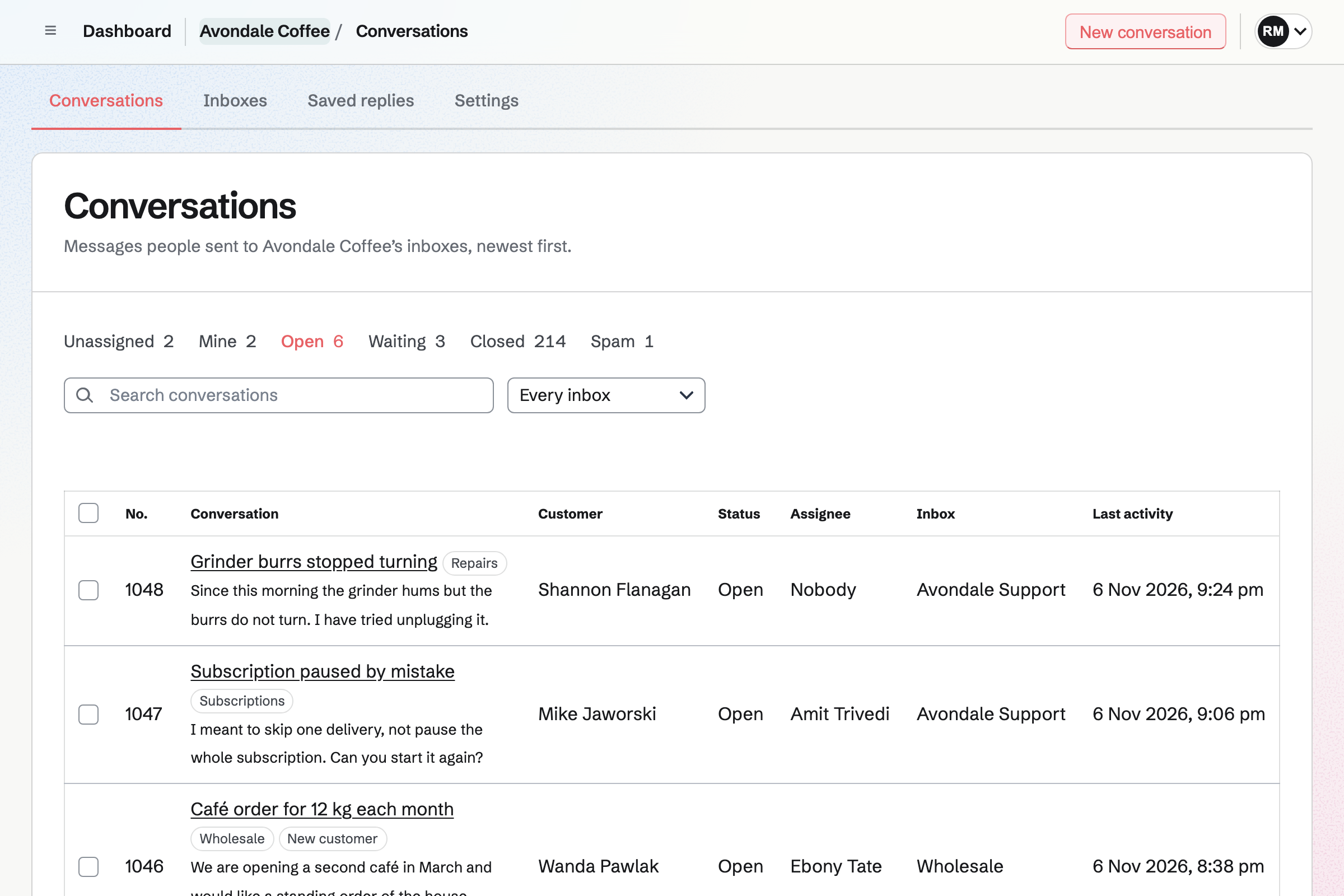
Helpdesk conversations list for a fictional coffee roastery, with open conversations, their customers, assignees and tags.

How is Magpie different?

1. Support comes with the rest of the business

One Magpie subscription includes the areas a small business would otherwise buy one at a time:

  • Helpdesk, for the email sent to a support address and its contact page
  • Contacts, where each customer's invoices, proposals and bookings are listed
  • Meetings and Appointments for booking pages
  • Invoicing, with recurring invoices and online payment, and Store for selling online
  • Mail for email at your domain, and Websites for the site your customers find
  • Time Tracking, Issues, To-dos, Message Boards and the other areas, in the same team

Everything is in one account with one bill. Freshdesk covers customer support in depth and connects to other software for the rest.

2. A team pays one price

The Team plan is one price for up to 25 people. Everyone who answers customers is included, and adding a person does not change the bill. Freshdesk prices every plan per agent, per month.

3. The Free plan has no time limit

A team on Magpie's Free plan has 1 Helpdesk inbox with its contact page. It has up to 3 members. Conversations, customers, tags and saved replies have no limit. Email from your support address comes in through a Mail mailbox, which needs a paid plan.

Comparing Magpie and Freshdesk

Freshdesk does far more inside customer support; Magpie does more around it. Every line in the tables below was checked against Freshdesk's own pages, linked from each row, and against Magpie's code and Help.

Platform

WhatFreshdeskMagpie
Shared support inboxCustomer email answered by the team in one list Yes Yes
Contact formCustomers write from a form, without an email program Yes Yes
Help widget on your websiteArticles and a form in a button on your pages Yes No
Live chatChat with visitors on your website Freshdesk Omni, separate No
Facebook messages and commentsMessenger and Page comments in the same list Growth and above No
Phone supportCalls kept with the customer's tickets Through Freshcaller No
Knowledge baseHelp articles customers search Yes No
Customer portalCustomers see all their requests Yes Partly
Community forumsCustomers answer each other's questions Pro and above Message Boards
AI agentAI answers customers by itself Yes No
AI drafts, summaries and triageAI writes a reply, sums up or sorts a ticket Copilot add-on No
PriorityLow to Urgent on every ticket Yes No
Automation rulesTickets tagged, assigned or answered by themselves Yes No
Groups and automatic assignmentTickets sent to a group and shared out among it Groups; automatic on Pro No
SLAs and business hoursResponse targets that count working time Growth and above No
Custom ticket fieldsYour own details on each ticket and its form Growth and above No
Merging and child ticketsJoin two tickets, or split one into parts Merging; child tickets on Pro No
Time on each ticketTimers and billable time on the ticket Growth and above Time Tracking, not on conversations
ReportsHow many tickets arrive and how fast they are answered Yes No
Satisfaction surveysCustomers rate the help they got Pro and above No
Custom objectsOrders or contracts shown beside the ticket Pro and above On the Contact page
Phone appsAnswer customers on iPhone and Android Yes In the browser
Marketplace of integrationsSlack, Microsoft Teams, Jira and more Yes No
API and webhooksTickets read and changed from your own code Yes API on Pro, no webhooks
Single sign-onSign in through a company identity provider Yes No
Audit logWho changed the helpdesk's settings, and when Enterprise Team changes, not Helpdesk settings
Choice of data locationWhere the account's data is kept Yes No
Health information under HIPAAA business associate agreement Yes No
Booking pagesCustomers choose a time with you No Yes
InvoicingInvoices paid online No Yes
Website and shopPages and products for sale No Yes
One price for the whole teamNot a price for each agent No Yes
Free planAnswer customers without paying Two agents for six months Contact page; email on paid plans

Good to know: Where Magpie says No or Partly, the line under the row says what Magpie does instead. Each gap has an item on Magpie's roadmap, and the line changes on the day it ships.

Ticketing and the shared inbox

Both bring support email into one list, with replies, private notes, saved answers and bulk changes. Both show when a teammate is reading or writing. Freshdesk adds priorities, statuses of your own, saved views, scenarios, merging and custom fields. They do these better than we do today.

WhatFreshdeskMagpie
Bring the email sent to our support address into one list the whole team answers Source Yes Yes
Reply to the customer, or leave a note only the team sees Source Yes Yes
Keep the answers we give most and put one into a reply Source Yes Yes
Answer a common question in one click, with the reply written and the ticket's status, tags and assignee set together Source Magpie: A saved reply puts prepared text into the reply, with the customer's and the inbox's names filled in, but changes nothing else: the status, tags and assignee are set by hand. Yes Partly
Save my own lists of tickets, such as the overdue ones or those for one group Source Magpie: The list has fixed filters (Unassigned, Mine, Open, Waiting, Closed and Spam), a choice of inbox and a search by subject, number, customer or words in a message, and it sorts by any of its columns. It cannot be filtered by tag or by time waiting, and a list cannot be saved. Yes Partly
Mark how urgent each ticket is, and see the urgent ones first Source Magpie: A conversation has a status, an assignee and tags; urgency can only be marked with a tag. The list sorts by number, customer, status, assignee, inbox or last activity, but not by urgency. Yes No
Track each ticket through statuses of our own, such as Waiting on a supplier Source Magpie: Each conversation is Open, Waiting, Closed or Spam, and a customer's message reopens it; the team cannot add statuses of its own. Yes Partly
See when a teammate is reading or answering the same ticket Source Yes Yes
Change many tickets at once Source Yes Yes
Join two tickets about the same problem into one Source Magpie: A customer's later email on the same subject within 14 days joins their open conversation, but two conversations cannot be joined by hand. Yes No
Record our own details on each ticket, such as an order number, and ask for them on the request form Source Magpie: A conversation has a status, an assignee and tags, and nothing of the team's own; the contact page asks only for a name, an address, a message and files. Yes No
Answer customers from a phone Source Magpie: The website works in a phone's browser. Helpdesk is built into the Magpie app for iPhone and Android, with replies, notes, assigning and notifications, but the app is not yet in the App Store or Google Play. Yes Partly
Choose what each person can do, and keep some to their own group's tickets Source Magpie: Team admins set up inboxes, members who can edit answer and write notes, View only members read, and guests can be given Helpdesk. Nobody can be limited to notes or to some inboxes: everyone who can open Helpdesk sees every inbox. Yes Partly

Good to know: Magpie keeps each reply's draft as you type. A line under the box says when someone else replied while you were writing.

Threads, tasks and collaborators

Freshdesk brings teammates and outsiders into a ticket with mentions, watchers, forward threads, child tickets, to-do lists and time logs. In Magpie the team works in one conversation, with notes and an assignee.

WhatFreshdeskMagpie
Mention a teammate in a note so they are told Source Magpie: A note is seen by the team but tells nobody; the assignee hears only of assignments and of their customers' messages. Yes No
Follow one ticket and be told of everything that happens in it Source Magpie: A member follows a whole inbox, to hear of each new conversation, and the assignee hears when its customer writes; one conversation cannot be followed. Yes Partly
Ask a supplier or another team about a ticket by email, with their answers kept beside it Source Magpie: Replies go only to the customer and the people in Cc of their last message; a note reaches only the team. Yes No
Bring someone from outside the team into a ticket to read it and add notes Source Magpie: A guest can be given Helpdesk as a whole, taking no place on the plan, and then sees every inbox; nobody can be brought into one conversation only. Yes Partly
Break a big request into smaller tickets for other people, and close it when they are all done Source Magpie: A conversation stands alone: it cannot have conversations under it or be linked to another, and work for someone else is passed on by assigning it or writing a note. Yes No
Gather every report of the same problem under one ticket, and pass one update to all of them Source Magpie: Each customer's report is its own conversation; they can share a tag, but nothing links them or sends one update to all of them. Yes No
Keep a to-do list on a ticket, with a reminder Source Magpie: To-dos has dates and reminders, and a To-do can be started from the customer's Contact, but not from a conversation, and the conversation shows none. Yes Partly
Record the time spent on each ticket, and report billable hours Source Magpie: Time Tracking starts a timer from a Contact, an Issue, a To-do or a Calendar event, and an entry can name the customer's Contact, be billable and go on an invoice. No timer starts from a conversation, and the conversation shows no time. Yes Partly

Good to know: Time Tracking starts a timer from the customer's Contact. A billable entry can go on an invoice.

Channels

Freshdesk takes email, its portal, a help widget and Facebook, and calls through Freshcaller. Live chat is in Freshdesk Omni, a separate product. Magpie's Helpdesk takes email, its own contact page and a Store's contact form.

WhatFreshdeskMagpie
Let people write to us from a form, without an email program Source Yes Yes
Put a help button on our website that finds answers and takes messages Source Magpie: The contact page is a page on Magpie that the team's website links to; nothing sits on the team's own pages. Yes No
Chat with visitors on our website while they are there Source Freshdesk: Freshdesk itself has no live chat: its widget offers articles and a form. Live chat with people, and an AI agent in chat, is in Freshdesk Omni, sold separately for each agent.Magpie: Helpdesk takes email and its contact page. Magpie's own Live chat is only on Magpie's front page, run by its staff. Partly No
Answer Facebook messages and comments in the same list as email Source Magpie: Conversations come only from email, the contact page and a Store's contact form. Yes No
Take support calls and keep them with the customer's tickets Source Magpie: Helpdesk has no phone line; a note in the conversation is the place to record a call. Yes No
Run support for several brands, each with its own address Source Yes Yes
Send an automatic reply when a new request arrives Source Yes Yes

Good to know: Each Helpdesk inbox has its own address, contact page and signature, and its files count in the team's storage. The contact page takes up to 5 files with a message.

Routing, automations and SLAs

Freshdesk sends tickets to groups, hands them out by itself and runs rules every hour. Its SLA timers count your business hours. In Magpie a member takes or assigns each conversation by hand.

WhatFreshdeskMagpie
Take a ticket or give it to a teammate, and see what nobody has taken Source Yes Yes
Give a ticket to a group, such as Billing, rather than one person Source Magpie: A conversation is assigned to one member or to nobody; tags can mark a group's work. Yes No
Have new tickets handed out automatically to whoever is free Source Magpie: New conversations wait in Unassigned until someone takes them. Yes No
Have rules tag, assign, answer or close tickets by themselves Source Magpie: Every change to a conversation is made by a member, one at a time or in bulk. Yes No
Set our working hours and holidays, so response times count only working time Source Magpie: Helpdesk has no working hours; the acknowledgement goes at any hour when it is on. Yes No
Set how fast we answer, and see which tickets are running late Source Magpie: The list shows each conversation's last activity; there are no targets. Yes No

Good to know: Unassigned lists the open conversations nobody has taken. Mine lists the ones assigned to you.

Customer portal and knowledge base

Freshdesk's portal holds a knowledge base on every plan and lists each customer's tickets. Pro adds community forums. Magpie links each email to its conversation online, and has no knowledge base.

WhatFreshdeskMagpie
Publish help articles customers can search, and link them from replies Source Magpie: Websites publishes pages at the team's own domain, but there is no help centre with search, and replies cannot link to articles. Yes No
Let customers see all their requests with us, and answer online Source Magpie: Every email ends with a link to that conversation, where the customer signs in with a link by email, reads it and answers; there is no page listing all their conversations. Yes Partly
Let customers ask and answer each other's questions in a community Source Magpie: A public Message Board can be read by anyone, and anyone signed in to Magpie posts, comments and votes. A board has no topics inside it, nothing lists a team's public boards for visitors, and a post cannot become a Helpdesk conversation. Yes Partly

Good to know: Every Helpdesk email links to its conversation. The customer signs in with a link by email, then reads and answers it online.

Freddy AI

Freddy AI Agent answers customers' email by itself. The Copilot add-on drafts and rewrites replies, sums up tickets, suggests a priority and translates. Magpie's replies are all written by members.

WhatFreshdeskMagpie
Have AI answer customers' emails by itself, and hand the rest to us Source Magpie: Every answer is written by a member. Yes No
Have AI draft a reply, or tidy one I wrote Source Magpie: Replies are written by hand, with saved replies; the assistant never reads or writes a conversation's messages. Yes No
Get the gist of a long ticket without reading it all Source Magpie: The assistant finds conversations by their subject, number, customer and status, but never reads their messages. Yes No
Have each new ticket sorted, with its priority and group suggested and the customer's mood shown Source Magpie: A conversation is tagged and assigned by a member; nothing reads it to sort it. Yes No
Read and answer customers in their own language Source Magpie: Messages are shown and sent as written. Yes No
Let Claude, ChatGPT or another AI app read and work in our tickets Source Magpie: A connected app such as Claude or ChatGPT finds Helpdesk conversations by subject, number, customer name, inbox and status, but never reads their messages, notes or customers' addresses, and changes nothing. Yes Partly

Good to know: Saved replies fill in the customer's name and the inbox's name. They have no limit, and they import from a JSON document.

Contacts, companies and custom objects

Both show who the customer is beside each ticket. Freshdesk adds companies, fields of your own and custom objects such as orders. Magpie keeps the rest on the customer's Contact page.

WhatFreshdeskMagpie
See who the customer is beside each ticket Source Yes Yes
Group customers by company, and see every ticket from one company together Source Magpie: A Contact records a company name, but Helpdesk lists conversations by customer only, and nothing groups customers by domain. Yes Partly
Keep our own details on each customer, such as their plan or renewal date Source Magpie: A linked Contact keeps a company, several emails, phones and addresses, tags and About text, but no fields of the team's own, and the conversation shows only the name, address and Contact. Yes Partly
See the customer's orders and other records beside their ticket Source Magpie: Magpie keeps them in one place: the customer's Contact page, one click away, lists their invoices, proposals and tracked time, and the meetings they booked with whoever is looking. The conversation itself shows none of it, and the Contact page lists no Store orders. Yes Partly
Bring our customer list in from a spreadsheet Source Magpie: Contacts adds people from a pasted JSON document, which an assistant can write from a spreadsheet. Outreach's From a file or list, on Pro or the Team plan, reads a CSV or TSV file into a campaign and makes each new address a contact with its name and company; no other column comes in, and a vCard file is not read. Yes Partly

Good to know: A customer in Helpdesk is one click from their Contact page. It lists their invoices, proposals, tracked time and booked meetings.

Analytics and satisfaction

Freshdesk reports on volume, speed, agents and groups on every plan. Pro adds satisfaction surveys and reports of your own. Magpie's Helpdesk has no reports yet.

WhatFreshdeskMagpie
See how many tickets we get and how fast we answer them Source Magpie: The list shows how many conversations each filter holds now; there are no reports. Yes No
Ask customers to rate the help they got Source Magpie: Replies carry the inbox's signature and a link to read or answer online, and no rating. Yes No

Good to know: Dashboard lists the conversations assigned to you whose customer wrote last, from every team.

Integrations, security and price

Freshdesk has a Marketplace of apps, single sign-on and a choice of five data regions. It offers a HIPAA agreement, and an audit log on Enterprise. Magpie has none of the first four. Its team audit log lists changes to members, guests and API keys, not to Helpdesk's settings.

WhatFreshdeskMagpie
Connect the helpdesk to the other tools we use Source Magpie: Helpdesk has no ready-made connections to tools such as Slack or Shopify. Only the API and AI apps connected to Magpie reach it, and those apps only search its conversations. Yes No
Turn a customer's bug report into an issue for the developers Source Magpie: Issues has public forms where customers report a bug straight into Triage, without an account, but a Helpdesk conversation cannot make an issue or link to one. Yes Partly
Read and change tickets from our own code, and be told when they change Source Magpie: With an API key on Pro, the version 1 API lists, reads and changes conversations, inboxes and saved replies; Helpdesk sends no webhooks. Yes Partly
Bring our past tickets over from another helpdesk Source Freshdesk: Freshdesk itself imports contacts and companies; past tickets come over through Marketplace apps such as Import2, from Zendesk, Kayako and others, or through the API.Magpie: Saved replies import from a JSON document; earlier conversations stay where they were, and Helpdesk starts with the mail that arrives after setup. Partly No
Sign in through a company identity provider Source Magpie: People sign in with a password and two-factor code, a passkey, a link by email, or a Google, Apple, LinkedIn or GitHub account; there is no SAML. Yes No
See a log of who changed our helpdesk settings, and when Source Magpie: A team's audit log, which its admins open from the team's page, lists who changed its members, roles, guests, API keys and Stripe account, when and from which IP address, for 12 months. Changes to Helpdesk's inboxes and settings are not in it; a conversation shows who assigned, tagged and closed it. Yes Partly
Choose the country or region where our support data is kept Source Magpie: Magpie has no setting for where a team's data is kept. Yes No
Keep patients' health information in the helpdesk under a HIPAA agreement Source Magpie: Magpie offers no business associate agreement. Yes No
Pay one price for the whole support team, not a price for each person Source Freshdesk: Every plan is priced for each agent, a month, billed yearly: Growth, Pro and Enterprise. Day passes cover occasional agents. No Yes
Answer every customer who writes, on a free plan Source Freshdesk: Every new account starts with a 14-day trial, then buys a plan or joins the free program, which keeps two agents at no cost for six months; the free program takes mail at one support address.Magpie: A team on Free has 1 inbox with its contact page and up to 3 members for as long as it likes, with no limit on conversations, customers, tags or saved replies. Email reaches an inbox through a connected Mail mailbox, which needs a paid plan, until Magpie addresses for forwarding are available. Partly Partly

Good to know: Magpie's API reads and changes conversations, inboxes and saved replies with an API key on Pro. Connected AI apps can find conversations, but not read them.

Price comparison

How Freshdesk charges

Freshdesk charges per agent, per month, on Growth, Pro and Enterprise. Day passes cover occasional agents. A new account starts with a 14-day trial, then buys a plan or joins a free program for two agents, for six months. Pro adds automatic assignment, custom objects, forums and satisfaction surveys. Freddy AI Agent sessions, the Copilot add-on, app tasks and MCP actions are paid on top. Prices are on Freshdesk's pricing page.

How Magpie charges

Magpie charges by plan, Free or a paid plan, for everything in the account. Helpdesk, Contacts, bookings and invoicing are all included. The Team plan is one price for up to 25 people. Email through a Mail mailbox needs a paid plan. Prices are on Magpie's pricing page.

On top of the planFreshdeskMagpie
How a team paysPer agent, per month; day passes for occasional agentsOne Team plan for up to 25 people
Answering customers without payingA 14-day trial, then a free program for two agents for six monthsFree plan: 1 inbox with its contact page, 3 members
Support addressesOne on the free program; several from Growth1 inbox on Free, 5 on a paid plan
AI agentThe first 500 sessions included once, then bought in packsNot available
AI drafts, summaries and triageCopilot, an add-on per agent on Pro and EnterpriseNot available
Live chatFreshdesk Omni, a separate productNot available
Phone callsFreshcaller, Freshworks' phone productNot available
Apps and AI connectionsConnector app tasks and MCP actions bought in packsAPI on Pro
Booking pages, invoicing and a websiteNot offeredIncluded

When to choose Magpie or Freshdesk

  • Want a shared support inbox beside your contacts, bookings and invoices, for one price for the whole team? Go with Magpie.
  • Want a knowledge base, automation rules, SLAs, Freddy AI and reports for a support team? Freshdesk is the right choice.

Recommendations by kind of business

For a support team that measures its work
Freshdesk. Groups, automatic assignment, SLAs and reports keep the team's tickets moving and measured. Magpie's Helpdesk is assigned and closed by hand, with no reports.
For a business whose customers look for answers first
Freshdesk. The knowledge base is on every plan. It shows in the portal and in a help widget on your website. Magpie has no knowledge base.
For a clinic or a health business
Freshdesk. Freshworks signs a business associate agreement covering Freshdesk under HIPAA. Magpie offers none.
For a service business with a support@ address
Magpie. Helpdesk shares the support email with the team, with notes and assignees. The same team has the bookings, invoices and contacts, on one bill.
For a small team that pays per agent today
Magpie. The Team plan is one price for up to 25 people. Adding someone to answer customers does not change the bill.
For a small software company
Either. Freshdesk links tickets to Jira or Linear through Marketplace apps. Magpie has Issues, with public bug forms, and Git Repositories in the same team as Helpdesk. Choose by whether your developers already work in Jira.

Frequently asked questions

What is the difference between Freshdesk and Magpie?

Freshdesk is helpdesk software: tickets, a knowledge base, automations, Freddy AI and reports, priced per agent. Magpie is one subscription for a small business's software. Its Helpdesk is one area beside contacts, booking pages, invoicing and a website. Freshdesk does far more inside customer support; Magpie does more around it.

Does Magpie replace Freshdesk?

Yes, for a small team whose customers write by email. Helpdesk shares the support address with the team, with replies, notes, assignees, tags and saved replies. The customer's Contact page, bookings and invoices are in the same team.

Consider keeping Freshdesk if you need a knowledge base, automation rules, SLAs or reports. Keep it too if you rely on priorities, custom fields, Freddy AI or its phone apps. Freshdesk does each of these better than Magpie does today.

How much does Freshdesk cost?

Freshdesk charges per agent, per month, on Growth, Pro and Enterprise. Day passes cover occasional agents. There is a 14-day trial, then a free program for two agents for six months. Freddy AI Agent sessions, the Copilot add-on and app tasks are paid on top. The prices are on Freshdesk's pricing page.

How much does Magpie cost?

Magpie has a Free plan and paid plans, each covering every area. Helpdesk has 1 inbox on Free and 5 on a paid plan. The Team plan is one price for up to 25 people, not a price per agent. The prices are on Magpie's pricing page.

Does Freshdesk have a free plan?

Not on its pricing page. Freshdesk's help centre says a new account can join a free program after its 14-day trial. The program keeps two agents at no cost for six months, with one support address. Magpie's Free plan has no time limit.

Does Magpie have a knowledge base?

No. Websites publishes pages at your own domain, but there is no knowledge base with search. Replies cannot link to articles. A help centre is on Magpie's roadmap. Freshdesk's knowledge base is on every plan. Agents put an article into a reply as they write.

Does Magpie have a help widget for my website?

No. The contact page is a page of its own that your website links to. Nothing is added to your website's pages. A help button for your website is on Magpie's roadmap. Freshdesk's help widget shows articles with search and a contact form on any page.

Does Magpie have live chat?

No. Helpdesk takes email, its own contact page and a Store's contact form. Live chat for Helpdesk is on Magpie's roadmap. Freshdesk itself has no live chat either: its widget offers articles and a form. Live chat is in Freshdesk Omni, which Freshworks sells separately.

Does Magpie take phone calls or Facebook messages?

No. Helpdesk has no phone line, and conversations come only from email, the contact page and a Store's contact form. A note in the conversation can record a call. Both are on Magpie's roadmap. Freshdesk turns Facebook messages and comments into tickets on Growth and above. It takes calls through Freshcaller.

Does Magpie have AI that answers customers?

No. Every reply in Helpdesk is written by a member, with saved replies for common answers. The assistant finds conversations but does not read or write their messages. Freddy AI Agent answers customers' email by itself, with the first 500 sessions included.

Does Magpie have something like Freddy Copilot?

No. Nothing drafts a reply, sums up a conversation, suggests how to sort it or translates it. These are on Magpie's roadmap. Freddy AI Copilot does all four, as an add-on per agent on Pro and Enterprise.

Does Magpie have automation rules or automatic assignment?

No. New conversations wait in Unassigned until someone takes them or is given them. Every change is made by a member, one conversation at a time or many together. Rules, groups and handing out in turn are on Magpie's roadmap. Freshdesk's rules tag, assign and answer by themselves, and Pro shares out a group's tickets.

Does Magpie have SLAs or business hours?

No. The list shows each conversation's last activity, and there are no response targets. Response targets and working hours are on Magpie's roadmap. Freshdesk times first responses and resolutions for each priority, counting only your business hours.

Can I set a priority on a conversation in Magpie?

No. A conversation has a status, an assignee and tags. Urgency can be marked with a tag. The list sorts by its columns, such as status or last activity, but not by urgency. A priority is on Magpie's roadmap. Every Freshdesk ticket has a priority from Low to Urgent.

Does Magpie have reports or satisfaction surveys?

No. The list shows how many conversations each filter holds now. Nothing measures response times or asks customers for a rating. Both are on Magpie's roadmap. Freshdesk has ready-made reports on every plan and satisfaction surveys on Pro and above.

Can I merge or split conversations in Magpie?

No. A customer's later email on the same subject joins their open conversation by itself. Two conversations cannot be joined by hand, and one cannot be split into parts. Both are on Magpie's roadmap. Freshdesk merges tickets, and Pro makes child tickets under a parent.

Can I add my own fields to a conversation?

No. A Helpdesk conversation has a status, an assignee and tags, and nothing of the team's own. The contact page asks only for a name, an address, a message and files. Custom fields are on Magpie's roadmap. Freshdesk has custom ticket fields from Growth, and can require them on the form.

Can I track time on a conversation?

Partly. Time Tracking starts a timer from a Contact, an Issue, a To-do or a Calendar event. An entry can be billable and go on an invoice. No timer starts from a conversation, and the conversation shows no time. Freshdesk logs time on each ticket from Growth.

Does Freshdesk have booking pages or invoicing?

No. Freshdesk is built for customer support and connects to other software through its Marketplace. Magpie includes Meetings, Appointments and Invoicing in every plan, in the same team as Helpdesk.

Can I answer customers from my phone?

Yes, in Magpie through a phone's browser: the list, replies, notes, saved replies, assigning, status and tags. Helpdesk emails you when a conversation is assigned to you or its customer writes. The Magpie app is not yet in the App Store or Google Play. Freshdesk has an app for iPhone and Android.

Can customers see their past requests?

Partly, in Magpie. Every email links to its conversation. The customer signs in with a link by email, then reads and answers it. No page lists all of a customer's conversations. Freshdesk's customer portal lists every ticket a customer raised.

Does Magpie connect to Slack or Jira?

No. Helpdesk has no ready-made connections. The API reads and changes conversations with an API key on Pro, and sends no webhooks. Freshdesk's Marketplace has apps for Slack, Microsoft Teams and Jira.

Can I use Freshdesk and Magpie together?

Yes. Freshdesk can answer your customers while Magpie runs your bookings, invoices, website and email at your domain. A reply from Freshdesk can include a link to a Magpie booking page.

How do I move from Freshdesk to Magpie?

Add an inbox in Helpdesk. On a paid plan, make your support address a shared mailbox in Mail. Then connect it to the inbox. New mail arrives in Helpdesk from then on. Past tickets cannot be imported, so they stay in Freshdesk. Keep your account until you no longer need them.

What is included in Magpie's Free plan?

1 Helpdesk inbox with its contact page, and a team of 3. Booking pages, Invoicing, Store, a website, the Newsletter, Forms and Contacts are included too. Email to your support address comes in through a Mail mailbox, which needs a paid plan.
If a line on this page is wrong, tell us and we will correct it.

Freshdesk changes, and so does Magpie. If a line is out of date about either product, email support@magpie.diy with the page that shows it. We check the line against that page, change it, and give it the new date. That goes for Freshdesk's own team as much as for anyone who uses it.

Answer your customers together on Magpie's Free plan.

Create a Magpie account, then add your first Helpdesk inbox.

Create account