Wave compared with Magpie

Wave vs Magpie: an in-depth comparison

Wave and Magpie both keep a small business's books, send its invoices and run its payroll. Both have a free plan. Wave does more around getting paid; Magpie does more of the business around the books.

  1. Wave is accounting and invoicing software for small businesses in the United States and Canada. Online payments, receipt reading and payroll are paid extras. It is built for a freelancer or a small business that wants free invoicing and bookkeeping.
  2. Magpie is one subscription for a small business's software, and Accounting is one part of it. Beside the books it includes Invoicing, Expenses, Payroll, Proposals, Store, booking pages and a website. It is built for someone whose books are one part of running the business.
Create account
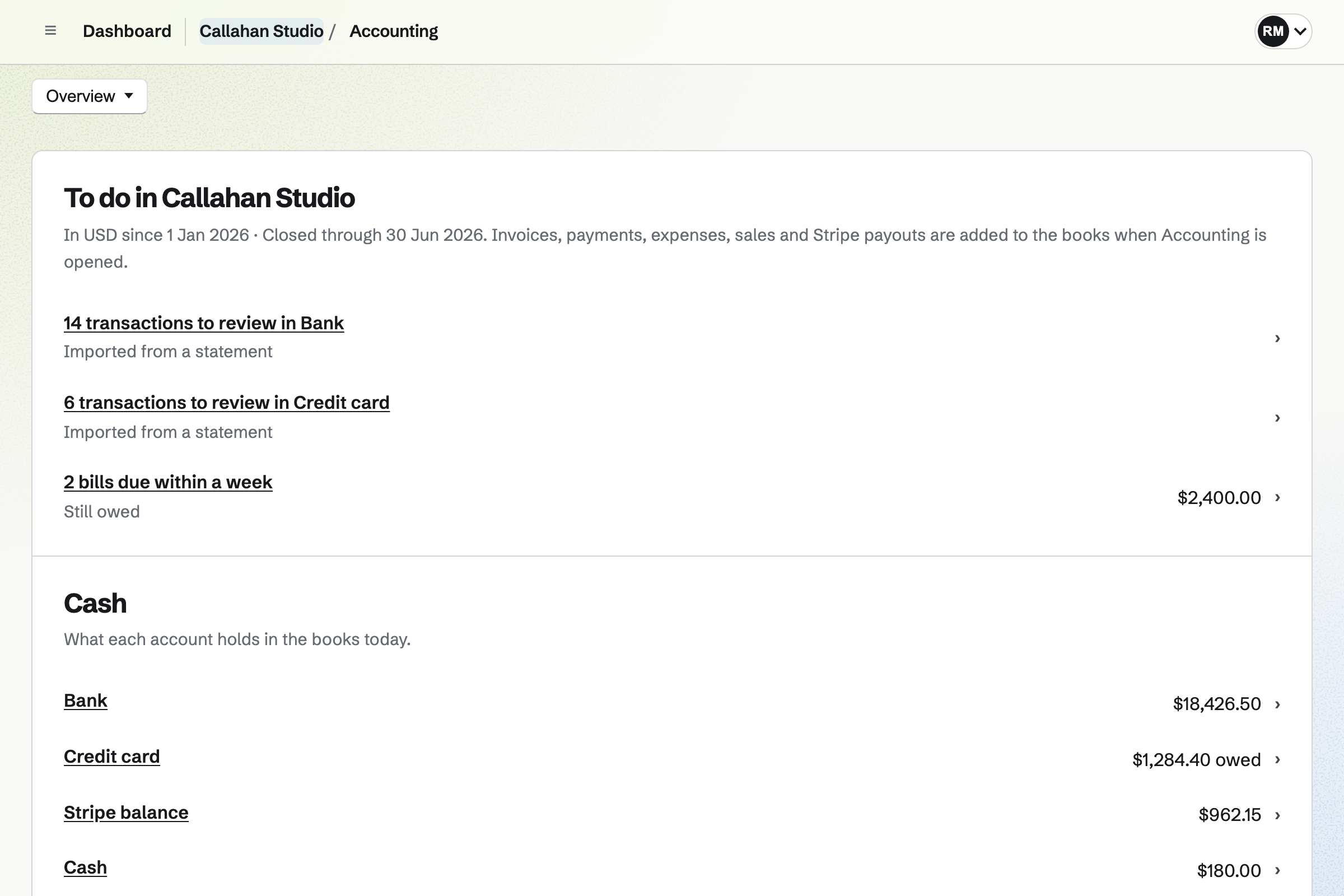
Accounting overview for a fictional studio with transactions to review, bills due, cash by account and this year’s income.

How is Magpie different?

1. The books fill in from the rest of the business

Magpie's other areas add their records to the books by themselves:

  • Invoices and their payments from Invoicing, and proposals' deposits and stages from Proposals
  • Store orders, refunds, gift cards and the cost of what sold
  • Supporter and Form payments, Stripe fees and Stripe payouts
  • Expenses, and the expense reports a team member is paid back for
  • Approved pay runs from Payroll

Wave has no shop of its own. On Pro in the United States, its connections bring in Etsy, Amazon and eBay sales.

2. The books do more of the bookkeeping

Accounting depreciates fixed assets every month and posts the entry by itself. Bills and journal entries repeat on a schedule. Store counts each product's stock and moves its cost to Cost of goods sold when it sells. Budgets, reconciling and the standard reports are on every plan, Free included.

3. Payroll comes in the same subscription

Payroll is in every Magpie plan, not an add-on. A pay run reads hours from Time Tracking or from shifts in Staff Scheduling. It works out salaries and overtime, and each employee reads a payslip in their Magpie account. The Free plan pays up to 2 employees a pay run. Wave Payroll is a separate subscription. It pays and files the payroll taxes, which Magpie does not.

Comparing Magpie and Wave

Wave does more around getting paid; Magpie does more around the books. Every line below was checked against Wave's own pages, linked from each row, and against Magpie's code and Help.

Platform

WhatWaveMagpie
Double-entry booksChart of accounts, journal entries, opening balances Yes Yes
Bank feedsBank and card transactions come in by themselves Pro CSV statements
ReconcilingCheck the books against a statement Yes Yes
InvoicingInvoices with reminders and recurring schedules Yes Yes
Invoice templatesA choice of layout and colour Yes One layout
Saved products and servicesInvoice lines picked from a list Yes No
Estimates and proposalsAccepted online, with a deposit, then invoiced Yes Yes
Card payments on invoicesCustomers pay from the invoice Yes Yes
Bank payments on invoicesCustomers pay from their bank account Yes No
Instant payoutsCard payments in the bank within minutes Yes No
Payment linksA link or QR code that takes payment Yes Yes
Customer statementsWhat a customer owes, sent to them Yes No
Receipt readingA photo of a receipt fills in its details Pro or Receipts No
BillsWhat the business owes suppliers, and what was paid Yes Yes
Recurring billsA regular bill, such as rent, entered by itself No Yes
Reports and sales taxProfit and loss, balance sheet, cash flow, sales tax owed Yes Yes
TagsProfit by project or location Pro Projects
InventoryStock and its cost when it sells No Yes
Fixed assetsEquipment depreciated every month By journal entry Yes
PayrollPay runs from salaries and hours, with payslips Separate subscription Yes
Payroll tax paid and filedWithholding paid and forms filed Yes No
Direct depositEmployees paid from the program Yes No
Contractor paymentsContractors paid in the same payroll Yes No
Bookkeeping serviceA bookkeeper keeps the books for you Wave Advisors No
Online shopProducts, a cart and checkout Connected shops on Pro Yes
Phone appsInvoices and the books on a phone Yes In the browser
Free planKeep books and invoice without paying Yes Yes

Good to know: Where Magpie says No or Partly, the line under the row says what Magpie does instead. Each gap has an item on Magpie's roadmap, and the line changes on the day it ships.

Plans, people and businesses

Both set up the books with a chart of accounts and opening balances, and let an accountant in. Wave's free Starter plan has no limit on invoices. Wave has more roles, such as a Viewer who can only look.

WhatWaveMagpie
Keep the books and send invoices without paying a monthly fee Source Magpie: Accounting and Invoicing are on the Free plan, but it creates 5 invoices a month and keeps 2 bank or card accounts in the books. A paid plan removes both limits, for Personal on Pro and for a team on the Team plan. Yes Partly
Set up the books with a chart of accounts Source Yes Yes
Start the books from the balances the business already has Source Yes Yes
Bring customers, products and unpaid invoices over from another program Source Magpie: Contacts come in as JSON, such as one the assistant writes from another program's export, and a new invoice's form fills in from JSON one invoice at a time. Store imports products as CSV, and Accounting imports a chart of accounts and a trial balance as CSV. Contacts are not read from a CSV file, and unpaid invoices and bills arrive only as totals in the trial balance. Yes Partly
Give my accountant or bookkeeper access to the books Source Yes Yes
Let partners and staff in, each with only the access they need Source Magpie: Team members use Invoicing and their own Expenses without seeing the books, and only the team's admins and accountants open Accounting. No role reads the books without changing them. A team has 3 members on the Free plan and up to 25 on the Team plan. Yes Partly
Keep the books of several businesses under one sign-in Source Yes Yes

Good to know: An accountant joins a Magpie team as a guest with Accounting and sees nothing else. A free team can have 10 guests, and a paid one 100.

Accounting and banking

Both sort bank transactions, match payments already recorded, reconcile and post journal entries. On Pro, Wave connects to the bank and learns from earlier choices. They do it better than we do today.

WhatWaveMagpie
Have bank and card transactions come into the books by themselves Source Magpie: Each statement is downloaded from the bank's website and imported into its account, and overlapping statements add each transaction once. No bank connects to Magpie. Stripe payments, fees and payouts come into the books from Stripe itself. Yes Partly
Upload a statement in the file my bank gives, such as OFX or QFX Source Magpie: A statement is imported as CSV, choosing which column is which; OFX, QFX and QBO files are not read. Yes Partly
Say what each bank transaction was and add it to the books Source Yes Yes
Have transactions sorted from how they were sorted before Source Magpie: Suggestions come from rules a person writes, from entries already in the books with the same amount, and from open invoices and bills; nothing is learned from earlier choices. A rule with Add automatically on adds matching transactions as they are imported. Yes Partly
Match a bank transaction to a payment already recorded, so it is not counted twice Source Yes Yes
Check the books against a bank or card statement Source Yes Yes
Post a journal entry to any account Source Yes Yes
Tag income and spending, such as by project or location, and see the profit of each Source Magpie: Profit by project shares income from invoices and costs from expenses and bill lines across Time Tracking projects, and expenses take tags in Expenses. Bank transactions and journal entries take no project, and the books have no other category to report by. Yes Partly
Bill customers and record bills in other currencies Source Magpie: Invoices, expenses and bills can be in other currencies, but someone types what each was worth in the books' currency, and the difference on payment goes to Exchange gains and losses. Bank and card accounts are in the books' currency, and Magpie fetches no exchange rates. Yes Partly
Track stock and count its cost when it sells Source Wave: Wave does not count units or their value. Its help suggests an inventory asset account, with a journal entry moving the cost of each sale to cost of goods sold, worked out by hand. No Yes
Depreciate equipment over the years it is used Source Wave: Wave keeps no list of assets: each asset gets an account of its own, and its depreciation is a journal entry worked out and posted by hand. Partly Yes

Good to know: In Magpie, a bank statement is imported as a CSV file. Overlapping statements add each transaction once. A transaction matches an entry of the same amount within 10 days.

Receipts and bills

Both record suppliers' bills and what was paid on them. Wave reads receipts from a photo or an email, with Pro or the Receipts plan. Magpie's bills repeat on a schedule, which Wave's do not.

WhatWaveMagpie
Photograph a receipt and have its details filled in Source Magpie: A receipt is photographed, uploaded, dropped or pasted, several at once into Receipt Inbox, and kept with its expense, but its amount, date and merchant are typed in. Yes Partly
Forward receipts by email to have them added Source Magpie: Receipts are uploaded, dropped or pasted, taken with the phone's camera, or saved for later in Receipt Inbox; there is no address to forward them to. Yes No
Record suppliers' bills and what has been paid on them Source Yes Yes
Have a regular bill, such as rent, entered by itself Source Wave: Wave's help says bills cannot repeat, so each one is entered again. No Yes

Good to know: Any member of a Magpie team can put expenses on an expense report. An admin approves it and marks it paid back. Until then, Accounting holds it as owed.

Reports and tax time

Both give profit and loss, the balance sheet, cash flow, who owes what and the sales tax owed. Both work on the accrual or cash basis. Wave's dashboard brings income, expenses, invoices and cash flow together.

WhatWaveMagpie
See the money that matters on one page Source Yes Yes
See profit and loss, the balance sheet, cash flow and who owes what Source Yes Yes
Charge sales tax on invoices and know how much is owed Source Yes Yes

Good to know: Each Magpie report exports as PDF or CSV. On Dashboard, the assistant answers questions about the books for the team's admins and accountants.

Invoicing

Both send invoices with reminders, recurring schedules and your own wording. Wave adds templates, saved products, attached files, statements and seeing when an invoice was opened. They do it better than we do today.

WhatWaveMagpie
Send an invoice with my logo and details Source Yes Yes
Choose how invoices and estimates look Source Magpie: Every invoice uses one layout with the logo, business name, address and tax ID from Settings; its layout, colours, fonts and columns cannot be changed. Proposals take their own accent colour, fonts and logo. Yes Partly
Add invoice lines from a saved list of products and services Source Magpie: Each invoice line is typed. Proposals add lines from a price list, and a Store quote a shopper sends becomes a draft invoice with its products, but a new invoice cannot pick from either. Yes No
Invoice the same thing on a schedule Source Yes Yes
Have a client's recurring invoices charged to their card automatically Source Magpie: A schedule started from an accepted proposal charges the client's saved card for each invoice; one made with Make recurring cannot, so its invoices are paid from their emails. Yes Partly
Remind customers automatically before and after an invoice is due Source Yes Yes
Reuse my own wording in the emails customers get Source Yes Yes
Attach a file, such as a contract or photos of the work, to an invoice Source Magpie: An invoice email carries only the invoice's PDF, and no other file can be added to an invoice. A proposal can offer files, such as a contract, for the client to download. Yes No
See when a customer has opened an invoice Source Magpie: An invoice's Activity shows each email and whether the email service accepted it, then the payments; it does not record the customer opening it. Proposals do show each time they are opened. Yes No
Send a customer a statement of what they owe Source Magpie: Invoices shared to a client's Client Portal are listed there, each with Pay, and the Accounts receivable report shows what each customer owes; there is no statement to send. Yes No
Keep each customer's details with everything sent to them Source Yes Yes
Track time on a job and put it on an invoice Source Wave: Wave has no timer of its own; on Pro, MinuteDock and Swell Time Tracking connect to turn logged hours into invoices.Magpie: Time Tracking runs a timer, and Add unbilled time, which team admins see, puts billable entries on an invoice, but only your own, so a teammate's time is typed in. Partly Partly

Good to know: Magpie's reminders, recurring invoices and email wording are on every plan. The Free plan sends 5 invoices a month, and a paid plan has no limit.

Estimates and deposits

Both send an estimate the customer accepts online, ask for a deposit and turn it into an invoice. Magpie's proposals add packages and a signature with a certificate.

WhatWaveMagpie
Send an estimate the customer accepts online, then invoice it Source Yes Yes
Ask for a deposit before the work starts Source Yes Yes

Good to know: When a Magpie proposal is accepted, its deposit becomes an invoice. Each later stage becomes one too. The Free plan sends 5 proposals a month.

Payments

Both take cards on an invoice and add each payment to the books. Wave adds bank payments, refunds from Wave itself and instant payouts. They do it better than we do today.

WhatWaveMagpie
Let customers pay an invoice online Source Magpie: With Stripe connected, the invoice email has Pay online for a card payment, with Apple Pay and Google Pay where the Stripe account offers them, and the payment is recorded on the invoice. Magpie takes no fee beyond Stripe's. There is no bank payment. Yes Partly
Share a link or QR code that takes payment for a product or service Source Yes Yes
Refund a customer's card payment from the program Source Magpie: A Store order is refunded in full or in part from Magpie, through Stripe. A card payment on an invoice is refunded in Stripe, which records the refund on the invoice by itself, and Record refund notes money given back another way. Yes Partly
Have invoice payments and their fees added to the books by themselves Source Yes Yes
Get card payments into my bank within minutes Source Magpie: Card payments go to the team's own Stripe account and are paid out to the bank on that account's schedule; Magpie has no instant payout. Yes No
Sell online and have every sale and fee in the books Source Wave: Wave has no shop of its own. On Pro in the US, Etsy, Amazon and eBay sales and fees come into the books, and other shops such as Shopify connect through Make.com. Partly Yes

Good to know: Card payments on a Magpie invoice go to your own Stripe account. Magpie takes no fee on invoice payments; Stripe's fees apply.

Payroll

Both pay employees on a schedule, with payslips, and add each payroll to the books. Wave Payroll pays and files payroll tax, pays by direct deposit and pays contractors. They do it better than we do today.

WhatWaveMagpie
Pay employees on a schedule and give each a pay stub Source Yes Yes
Have payroll taxes paid and payroll forms filed for me Source Magpie: Payroll's Summary totals what was withheld for a month, a quarter or a tax year, to pay and report by hand. It files nothing and makes no tax forms. Yes No
Pay employees by direct deposit Source Magpie: In Payroll, the team pays from its own bank and then marks the pay run paid. Magpie moves no money. Yes No
Pay contractors in the same payroll as employees Source Magpie: A contractor is paid at the bank and recorded as a bill or an expense; Payroll pays employees only. Yes No
Keep each employee's leave balance as it builds up Source Yes Yes
Have each payroll added to the books by itself Source Yes Yes

Good to know: In Magpie, the tax to withhold is a standing line your accountant gives you. Summary totals what was withheld for a month, a quarter or a tax year.

Advisors, the app and integrations

Wave has phone apps, connections to Etsy, Amazon and eBay, and Wave Advisors, a bookkeeping service. Magpie works in a phone's browser and adds a shop, booking pages and a website.

WhatWaveMagpie
Have a bookkeeper keep my books for me Source Magpie: Magpie offers no bookkeeping service; an outside accountant or bookkeeper is invited to keep the books as a guest. Yes No
Keep the books and send invoices from a phone Source Yes Yes
Connect the books to the other apps the business uses Source Magpie: On Pro, an API key reaches Accounting and Invoicing as the OpenAPI file lists, and connected apps such as Claude use the assistant's tools. No ready-made app connects to the books, and there is no store of apps. Yes Partly

Good to know: On Pro, a Magpie API key reaches Accounting and Invoicing. No ready-made app connects to the books.

Price comparison

How Wave charges

Wave charges by plan: Starter, which is free, and Pro, billed monthly or yearly for each business. Starter has no limit on invoices, estimates or bills. Pro adds bank feeds, receipt reading, more users and lower card fees. Online payments, Payroll, Receipts and Wave Advisors cost extra. Cards cost 2.9% and a fixed fee, and bank payments 1%. Prices are on Wave's pricing page.

How Magpie charges

Magpie charges by plan too, Free or a paid plan, for everything in the account. The plan sets how much you can do, not which areas you can use. Magpie takes no fee on invoice payments, and 4% of Store sales. Prices are on Magpie's pricing page.

On top of the planWaveMagpie
InvoicesNo limit on every plan5 a month on Free; no limit on paid plans
Bank and card accountsNo limit; bank feeds on Pro2 on Free; no limit on paid plans
Fee on card payments of invoices2.9% and a fixed fee, 3.4% for American Express; Pro drops the fixed fee on the first 10 each monthNo Magpie fee; Stripe's fees apply
Fee on bank payments of invoices1%, with a minimumBank payments not offered
Instant payout1%, with a minimumNot offered; Stripe pays out on its schedule
Receipt readingPro, or the Receipts planNot available
PayrollA separate subscription, priced per month and per personIncluded: 2 employees a pay run on Free, everyone on a paid plan
Payroll tax paid and filedIncluded with PayrollNot available
A bookkeeperWave Advisors, a monthly service with Pro includedNot offered; invite your own as a guest
Accountant accessAdmin, Editor and Viewer collaborators on ProAs guests: 10 on Free, 100 on a paid plan
An online shopConnected shops on ProStore, for 4% of each sale

When to choose Magpie or Wave

  • Want your books filled in by your invoices, proposals, shop, expenses and pay runs, with payroll included? Go with Magpie.
  • Want free invoicing with no limit, bank payments, and payroll taxes paid and filed for you? Wave is the right choice.

Recommendations by kind of business

For a freelancer sending many invoices
Wave. Wave's Starter plan sends as many invoices as you like for nothing. Magpie's Free plan sends 5 a month, and a paid plan removes the limit.
For a US or Canadian business with employees
Wave. Wave Payroll pays and files payroll tax, and pays employees by direct deposit. It pays contractors in the same run. Magpie's Payroll takes the tax you enter and leaves paying and filing to you.
For someone who wants a bookkeeper
Wave. Wave Advisors gives a business its own bookkeeper, who sorts and reconciles the books each month. Magpie offers no bookkeeping service; you invite your own accountant.
For a shop selling online
Magpie. Store's orders, refunds, fees, payouts and costs go into the books by themselves, and stock is counted. Wave has no shop and does not count stock.
For a consultant or a coach
Magpie. A proposal is accepted and signed online, then its deposit and stages become invoices. Booking pages, Time Tracking and Expenses are in the same account.
For a small business keeping its own books
Either. Both reconcile, report and track the sales tax owed. Wave connects to the bank on Pro; Magpie depreciates assets and repeats bills. Choose by whether bank feeds or the rest of the business matter more.

Frequently asked questions

What is the difference between Wave and Magpie?

Wave is accounting and invoicing software for businesses in the United States and Canada. It adds online payments, receipts and payroll as paid extras. Magpie is one subscription for a small business's software. Accounting is one area beside Invoicing, Proposals, Payroll and Store. Wave does more around getting paid; Magpie does more around the books.

Does Magpie replace Wave?

Yes, for a small business whose books are mostly its own invoices, sales and expenses. Magpie adds them to the books by itself. It reconciles, depreciates assets and gives the standard reports.

Consider keeping Wave if you send more invoices than Magpie's Free plan allows. Keep it too for bank feeds, receipt reading, bank payments or payroll tax filed for you. Wave does each of these better than Magpie does today.

How much does Wave cost?

Wave's Starter plan is free, with no limit on invoices, estimates or bills. Pro is billed monthly or yearly for each business. Online payments cost 2.9% and a fixed fee for cards, and 1% for bank payments. Payroll, Receipts and Wave Advisors cost extra. The prices are on Wave's pricing page.

How much does Magpie cost?

Magpie has a Free plan and paid plans, each covering every area, Accounting and Payroll included. Free includes 5 invoices a month and 2 bank and card accounts. Its pay runs pay up to 2 employees. A paid plan removes those limits. The prices are on Magpie's pricing page.

Is Wave free?

Yes. Wave's Starter plan keeps the books and sends invoices and estimates for nothing. It has no limit on how many. Wave charges for online payments, Pro, Payroll, Receipts and Wave Advisors. Magpie's Free plan includes Accounting, Invoicing and Payroll too, with 5 invoices a month.

Does Magpie connect to my bank?

No. You download each statement from your bank as a CSV file and import it. Overlapping statements add each transaction once, and rules can add matching ones by themselves. Bank feeds are on Magpie's roadmap. Wave connects bank and card accounts on Pro.

Can Magpie import OFX or QFX files?

No. A statement is imported as CSV, choosing which column is which. Other file types are on Magpie's roadmap. Wave reads OFX, QBO, QFX and ASO files, and CSV.

Does Magpie read receipts?

No. A receipt is kept with its expense or waits in Receipt Inbox. Its amount, date and merchant are typed in. Reading receipts is on Magpie's roadmap. Wave reads photographed, uploaded and emailed receipts with Pro or the Receipts plan.

Can customers pay a Magpie invoice by bank transfer?

Not online. Pay online takes a card, with Apple Pay and Google Pay where your Stripe account offers them. A bank transfer is recorded as a payment by hand. Wave takes bank payments on an invoice for 1%.

Can I save my products and services for invoices?

No. Each invoice line is typed in. Proposals has a price list and Store keeps products, but neither fills an invoice. A price list for invoices is on Magpie's roadmap. Wave saves products and services with a price and an income account.

Can I see when a customer opens a Magpie invoice?

No. An invoice's Activity shows each email sent and each payment, not when the customer opened it. Proposals do show each time they are opened. Wave marks an opened invoice as Viewed.

Does Magpie send customer statements?

No. Invoices shared to a client's Client Portal are listed there, each with Pay. The Accounts receivable report shows what each customer owes. Statements are on Magpie's roadmap. Wave sends a statement of unpaid invoices, or of activity between two dates.

Does Magpie pay payroll taxes or pay by direct deposit?

No. The tax to withhold is a line on each employee, as your accountant gives it. Summary totals it, to pay and report yourself. You pay employees from your own bank and mark the pay run paid. Wave Payroll pays and files payroll tax, and pays by direct deposit.

Can I pay contractors through Magpie's Payroll?

No. Payroll pays employees only. A contractor is paid at the bank and recorded as a bill or an expense. Wave pays contractors in the same payroll and makes their 1099-NEC or T4A forms.

Does Wave track inventory?

No. Wave's help suggests an inventory account. The cost of each sale is moved by a journal entry worked out by hand. Magpie's Store counts each product's stock and value. It moves the cost of what sold to Cost of goods sold.

Can Wave repeat a bill?

No. Wave's help says bills cannot repeat, so each one is entered again. In Magpie, a bill or a journal entry can repeat every week, month, 3 months or year.

Does Wave have an online shop?

No. On Pro in the United States, Wave brings in Etsy, Amazon and eBay sales and fees. Other shops connect through Make.com. Magpie's Store sells online, and its orders, refunds, fees and payouts go into Accounting by themselves.

Does Magpie have estimates?

Yes, as proposals. A proposal opens in the client's Magpie account, where they choose a package, sign and accept it. Its deposit and each later stage become invoices. Magpie's Free plan sends 5 proposals a month.

Can my accountant work in Magpie?

Yes. Invite them as a guest of the team with Accounting. They keep the books and see nothing else. A free team can have 10 guests. Wave invites accountants as collaborators, with Admin, Editor and Viewer roles on Pro.

Does Magpie have a phone app?

Accounting, Expenses and Invoicing work in a phone's browser. A receipt can be photographed there. The Magpie app is not yet in the App Store or Google Play. Wave has apps for iPhone and Android.

Can I use Wave and Magpie together?

Yes, but they do not connect. You could keep the books in Wave and use Magpie for proposals, booking pages and a shop. Accounting's reports and journal lines export as CSV for your accountant.

How do I move from Wave to Magpie?

Accounting imports a chart of accounts and a trial balance as CSV files. The trial balance becomes your opening balances. Compare its totals with Wave's Trial Balance report. Unpaid invoices and bills arrive as totals, not one by one. Keep Wave until you no longer need its history.

What is included in Magpie's Free plan?

Free includes Accounting with 2 bank and card accounts, and Invoicing with 5 invoices a month. Expenses is included, and Payroll pays up to 2 employees a pay run. Store, booking pages, a website, Proposals and a team of 3 are included too. A paid plan raises the limits.
If a line on this page is wrong, tell us and we will correct it.

Wave changes, and so does Magpie. If a line is out of date about either product, email support@magpie.diy with the page that shows it. We check the line against that page, change it, and give it the new date. That goes for Wave's own team as much as for anyone who uses Wave.

Keep your books beside the rest of the business.

Create a Magpie account, then set up Accounting.

Create account