Kajabi compared with Magpie

Kajabi vs Magpie: an in-depth comparison

Kajabi and Magpie both let a teacher or a coach sell courses, coaching, memberships and downloads. Both come with a website and a newsletter. They are built around different things.

  1. Kajabi is a platform for selling what you know: courses, coaching, communities, memberships, podcasts and newsletters. It is built for a creator whose expertise is the business. Funnels, email automations and an AI that drafts the marketing come with it.
  2. Magpie is one subscription for a small business's software, and Courses is one part of it. Beside the school it includes Coaching, Store, Supporters, Invoicing, booking pages and the rest. It is built for someone whose teaching is one part of running the business.
Create account
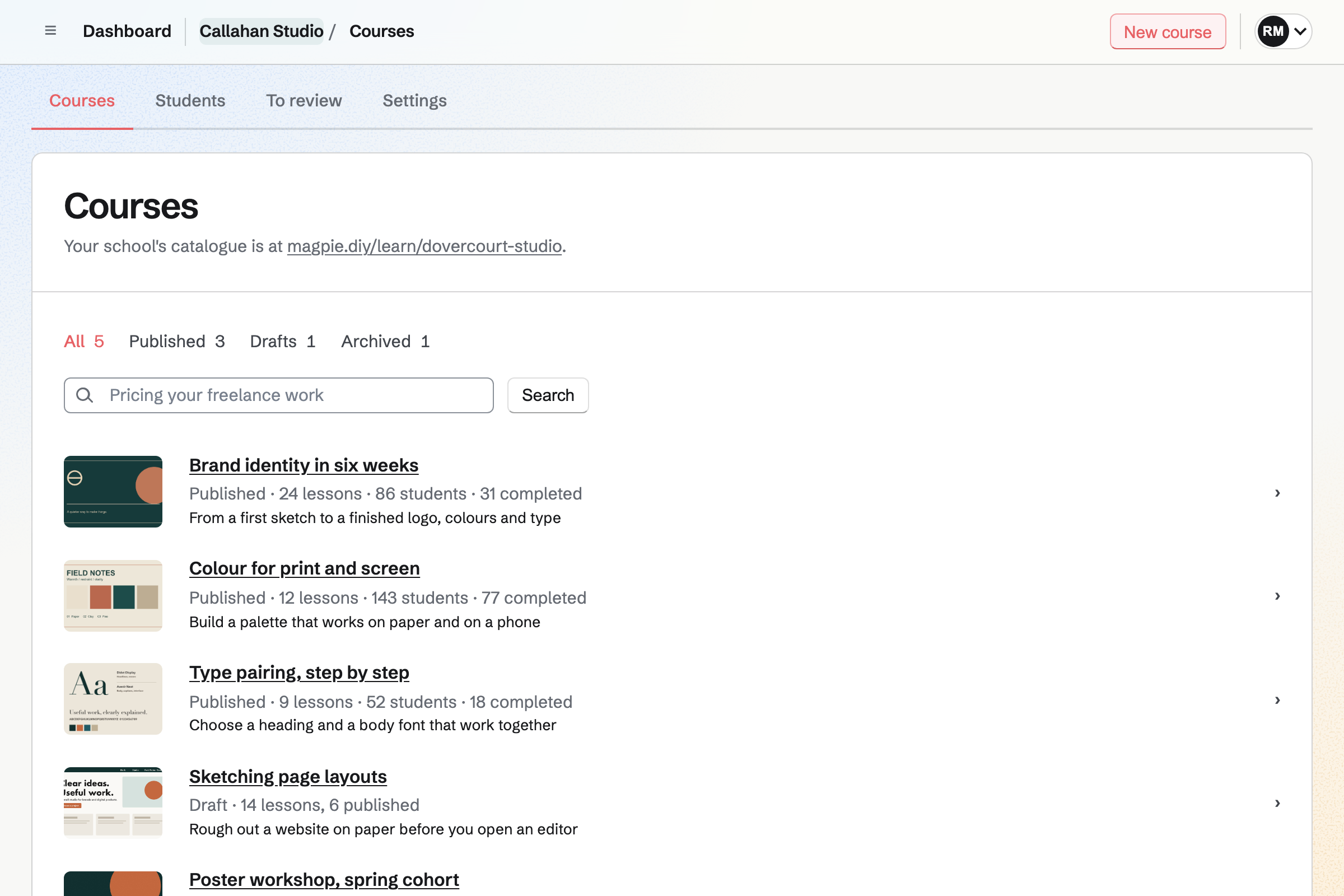
Courses list for a fictional design studio: published courses, each with its cover, lessons, students and completions, a draft, and the address of the school's catalogue.

How is Magpie different?

1. The courses come with the rest of the business

One Magpie subscription includes the areas a small business would otherwise buy one at a time:

  • Courses, with quizzes, assignments, cohorts, live sessions and certificates at a school of your own
  • Coaching for programs, sessions and check-ins, and Client Portal for each client's files and plans
  • Store for courses, downloads and physical products, and Supporters for paid posts
  • Meetings, Appointments and Invoicing for booked time and invoices paid online
  • Newsletter, Podcast, Websites, Mail, Contacts, Helpdesk and the other areas, in the same team

Everything is in one account with one bill. Kajabi covers what a creator sells and markets, and leaves physical products to Shopify.

2. The Free plan publishes a course

Magpie's Free plan publishes 1 course for up to 50 students, and a paid plan has no limit on either. Free also coaches 3 clients and runs a Store. Kajabi starts with a free trial, and a school needs a paid plan after it.

3. A team pays one price

A free team has 3 people, and the Team plan 25. Each can be an admin, a member, view only, or a guest who uses only the areas you give them. Kajabi's plans include 2, 11 or 26 admin users.

Comparing Magpie and Kajabi

Kajabi does more to market a course; Magpie does more around it. Every line in the tables below was checked against Kajabi's own pages, linked from each row, and against Magpie's code and Help.

Platform

WhatKajabiMagpie
Online coursesModules of lessons, quizzes and certificates Yes Yes
Cohorts and live lessonsA group that starts together, with live sessions Growth and Pro Zoom or Video Chat
Coaching programsThe same program for each client, with sessions Yes Yes
Client portalsA private page for each client Yes Yes
Paid session bookingA client books a time and pays for it Yes Yes
CommunityPosts and chat for paying customers Yes Partly
MembershipsTiers people pay for every month or year Yes Supporters
Digital downloadsFiles people buy and download Yes Yes
Physical productsStock, shipping and pickup Through Shopify Yes
PodcastsEpisodes in Apple Podcasts and Spotify Yes Yes
Private podcastA feed for paying listeners Yes No
Email newsletterEmails to subscribers, with a web copy Yes Yes
Website and blogPages and posts at your own domain Yes Yes
Sales funnelsLanding pages, emails and checkout from a template Yes No
Webinars and eventsRegistrations with reminders Yes No
Email sequences and automationsEmails, tags and access when someone signs up or buys Yes No
AffiliatesCommission on sales others send you Growth and Pro No
InvoicingInvoices paid online Yes Yes
Branded phone appAn app under your name in the app stores Pro No
Free plan that sellsPublish and sell without a monthly fee No Yes

Good to know: Where Magpie says No or Partly, the line under the row says what Magpie does instead. Each gap has an item on Magpie's roadmap, and the line changes on the day it ships.

Online courses

Both build a course of modules with video, quizzes, certificates and cohorts. Kajabi captions and translates videos by itself and runs live lessons on its own video. It has a student app too, and they do it better than we do today.

WhatKajabiMagpie
Make an online course of modules and lessons with video, text and files Source Yes Yes
Open lessons on a set date, or a number of days after each student joins Source Yes Yes
Check what students learned with quizzes that mark themselves Source Yes Yes
Have students hand in work for me to review Source Kajabi: A quiz can ask for a file upload or a short answer, which is graded by hand with feedback; there is no assignment of its own with a due date. Partly Yes
Give students a certificate when they complete a course Source Yes Yes
Run a course for a group that starts on a date and moves through it together Source Yes Yes
Teach a live session inside a course, with video, chat and a recording Source Magpie: A live session in Courses gives students a join link, calendar invitations, reminders and attendance, and plays its recording, but the call is on Zoom, a Video Chat call for up to 6 people, or an address you type. Video Chat calls are not recorded; the recording is a video you add. Yes Partly
Let students comment under lessons and talk with each other Source Yes Yes
See each student's progress and where students stop watching Source Yes Yes
Caption and translate videos automatically Source Magpie: A course video takes caption files you upload, WebVTT or SRT, in up to 10 languages, shown to students as a transcript; nothing is made or translated automatically. Of Magpie's areas, only Walkie Talkie makes transcripts. Yes No
Let students take courses in a phone app Source Magpie: Students take courses at the school's address in a browser, on a computer or a phone; the Magpie app delivers no courses, and it is not yet in the App Store or Google Play. Yes No

Good to know: Magpie's Courses has assignments an instructor approves, and a report of where students stop watching each video. A course outline can be pasted in as JSON written by an assistant.

Coaching and client portals

Both deliver a coaching program to each client, with private notes and a client portal. Kajabi records each session and writes a summary of it; Magpie's sessions are noted by hand.

WhatKajabiMagpie
Deliver the same structured coaching program to each client, with milestones and resources Source Yes Yes
Keep private notes on each client's sessions Source Yes Yes
Let a client book a session from my free times and pay for it Source Yes Yes
Sell a package of sessions that the client books over time Source Yes Yes
Give each client a private portal with their plan, files and sessions Source Yes Yes
Record a client session and get a written summary of it Source Magpie: Video Chat calls are not recorded, and nothing writes a summary; notes are written by hand. Yes No

Good to know: A Magpie Coaching program holds goals, habits, check-ins and its sessions. A client joins it from its page, pays in full or monthly, and books each session from your free times.

Communities, memberships and downloads

Kajabi runs a community people pay to join, with channels, chat and challenges. Magpie sells memberships in Supporters and downloads in Store, and its Message Boards are for the team and its guests.

WhatKajabiMagpie
Run a private community for customers, with spaces for posts and chat Source Magpie: Message Boards hold posts, comments, replies and votes, private to a team or public to anyone, and Team chat has channels and direct messages; a customer gets in only as a member or guest of the team, and nothing opens a board to people who paid. Yes Partly
Sell a membership in tiers that people pay for again and again Source Yes Yes
Let members pay yearly as well as monthly Source Yes Yes
Sell files people download, such as PDFs, templates and ebooks Source Yes Yes

Good to know: A Supporters tier can include courses, so a supporter on that tier opens them without paying again. Magpie takes 4% of Supporters payments.

Podcasts and newsletters

Both host a podcast and publish a newsletter by email and on the web. Kajabi also sells a private podcast and a paid newsletter.

WhatKajabiMagpie
Host a podcast and list it in Apple Podcasts and Spotify Source Yes Yes
Sell a private podcast to paying listeners Source Magpie: A Podcast's feed is public while the podcast is on; there is no feed for paying listeners only. Yes No
Publish a newsletter by email and on the web Source Yes Yes
Charge for a newsletter, or keep some issues for paying readers Source Magpie: Supporters posts can be kept for paying supporters on the supporters page, but they are not emailed; Newsletter email goes free to every subscriber. Yes Partly

Good to know: The Newsletter has 250 subscribers on Free and 5,000 on a paid plan. Sign-ups use double opt-in, and each sent email has a public web copy.

Website, funnels and live events

Both build a website with a blog at your own domain. Kajabi adds ready-made funnels, a choice of templates, sign-up forms on any page and events with reminders.

WhatKajabiMagpie
Build a website from a ready-made design, without code Source Magpie: Websites builds an editor website from sections (hero, text, columns, images, Store products) with its own colours and fonts, or serves your own files; every editor website starts from the same starter, with no choice of designs. Free has 1 website and Pro 20. Yes Partly
Show the site at my own domain Source Yes Yes
Change the site's HTML and CSS myself Source Yes Yes
Launch a sales funnel from a template: landing pages, emails and checkout together Source Magpie: A website page, a Newsletter email and a Store checkout are made separately and linked by hand; nothing ready-made puts them together. Yes No
Write a blog on my website Source Yes Yes
Put an email sign-up form on any page of my site, or on another site Source Magpie: Newsletter has its own signup page with double opt-in, and Newsletter settings gives the signup form's code to paste into a page of another website or a files website, where visitors subscribe with the same confirmation email. A Store home page can have a Newsletter sign-up section, and Store checkout can add buyers. An editor website has no sign-up section. Yes Partly
Show my pages without the platform's name Source Magpie: Websites, Store and link pages show your own name and colours, not Magpie's. The Supporters page and the Newsletter signup page sit inside Magpie's own top bar and footer, and a Form shows a Magpie link on the Free plan, which a paid plan turns off. Yes Partly
Run a webinar or live event that people register for, with reminders Source Magpie: Webinars takes registrations, sends reminders and runs the webinar live with chat, Q&A, polls, breakout rooms and a replay, but Webinars is open only to site administrators. A Form can take registrations, paid if you like, without reminders. Yes No

Good to know: Every Magpie editor website has a Code view of each page on every plan. On Kajabi the code editor is on Pro.

Email marketing, contacts and automation

Kajabi sends broadcasts, sequences and automations from one contact list, with affiliates and comment-to-DM. Magpie's Newsletter sends one email at a time to every subscriber, and they do it better than we do today.

WhatKajabiMagpie
Email my whole list now or at a set time Source Yes Yes
Send a series of emails automatically after someone signs up or buys Source Magpie: Outreach, on Pro or the Team plan, sends a series of emails from your own mailbox to people you add by hand or by tag, and stops when they reply; nothing starts a series when someone subscribes or buys, and Newsletter sends one email at a time. Yes Partly
Email only the people with a tag, or who bought something Source Magpie: Outreach, on Pro or the Team plan, can add everyone with a Contacts tag to a campaign sent from your own mailbox, but a Newsletter email goes to every active subscriber, and Store's saved customer segments filter, export and limit discounts but send no email. Yes Partly
See who opened my emails and which links they clicked Source Magpie: Outreach, on Pro or the Team plan, counts clicks and replies for each campaign; a Newsletter email shows only the copies delivered, failed and skipped. Yes Partly
Set rules: when someone buys, signs up or finishes a lesson, tag them, email them or give them access Source Magpie: Issues, Mail and Accounting have rules of their own, which act on issues, arriving mail and bank transactions. A paid Store order gives access to what was bought, and a box at checkout adds the buyer to the Newsletter. Nothing tags, emails or gives access when someone signs up or buys: Automations, which does this, is built but open only to site administrators. Yes No
Keep every customer and subscriber in one contact list, with tags Source Magpie: Contacts has tags and filters, and a Store customer can be added to Contacts by hand, but Newsletter subscribers, Store customers and supporters are each kept in a list of their own. Yes Partly
Email people who started checkout and did not pay Source Yes Yes
Pay people a commission on the sales they send me Source Magpie: Store has no affiliates; a discount code can be given to a partner, but nothing tracks or pays a commission. Yes No
Send a message automatically to people who comment on my Instagram or Facebook posts Source Magpie: Social Media publishes posts to Bluesky, Mastodon and LinkedIn and reminds you to post to Instagram and X. Its offers give each person who comments a word a link to a file for their email address, but you send that message to each commenter yourself: Magpie reads no comments and sends no messages on Instagram or Facebook. Yes No
Reach new customers through other creators' email lists, or earn by featuring offers in mine Source Magpie: Newsletter has no way to buy or sell a place in another team's emails. Yes No

Good to know: Outreach, on Pro or the Team plan, sends a series of emails from your own mailbox and stops when someone replies. Store emails one reminder when a checkout expires unpaid.

Offers, checkout and payments

Both sell from a checkout with discount codes, bundles, pay what you want, sales tax and payment plans. Kajabi offers an upsell after checkout; Magpie sells physical products in the same Store.

WhatKajabiMagpie
Sell a product from a checkout page that takes cards, Apple Pay, Google Pay and pay-later Source Yes Yes
Let buyers pay in instalments Source Magpie: Coaching takes its price in 2 to 24 monthly instalments, each invoiced through Invoicing, and a Courses price can be paid in 2 to 12 monthly payments through Store. Other Store products are paid in full. Yes Partly
Give discount codes Source Yes Yes
Sell several products together as one bundle Source Yes Yes
Offer an add-on at checkout, or another product just after someone buys Source Magpie: A product's Goes with list shows other products on its page and in the Cart; nothing is offered at checkout or after paying. Yes Partly
Let buyers choose what they pay Source Yes Yes
Charge sales tax or VAT at checkout Source Yes Yes
Send invoices and take payment on them Source Yes Yes
Sell physical products, with shipping and stock Source Kajabi: Physical products are sold through a Shopify Buy Button on Kajabi pages, or through an offer that Zapier passes to a fulfilment service such as Amazon. Partly Yes
Start selling with no monthly fee Source Kajabi: Basic, Growth and Pro each have a monthly fee, lower when billed yearly, after a free trial; there is no free plan. Kajabi Payments takes 2.9% plus a fixed fee for each card payment on Basic, for a US business. No Yes

Good to know: A course is sold as a Store product, with its orders, gift cards and refunds. A course price can be paid in 2 to 12 monthly payments.

Analytics, apps, AI and team

Both connect to Claude and ChatGPT, have webhooks and give the team its own sign-ins. Kajabi's AI drafts offers, emails and sales pages, and Pro adds an app under your own name.

WhatKajabiMagpie
See revenue, subscriptions and cancellations over time Source Magpie: Store reports show sales, Stripe fees, margins, stock, buyers and visits for any dates, and Supporters lists each payment with totals; nothing shows recurring revenue or cancellations over time. Yes Partly
Run the business from my phone: sales, contacts and notifications Source Yes Yes
Have AI draft a course, emails and sales pages Source Magpie: The assistant on Dashboard, which uses OpenAI, drafts a Store product's description, writes a website's home page and puts text it writes into a new Document. It does not draft a course, a Newsletter email or an Outreach campaign itself: Courses, Newsletter, Outreach and Websites give you a prompt to copy into an assistant of your own and take its answer as JSON. Yes Partly
Run the business from Claude or ChatGPT Source Yes Yes
Connect other tools through webhooks or an API Source Yes Yes
Give my team their own logins Source Yes Yes
Publish an app under my own brand in the App Store and Google Play Source Magpie: Customers use Magpie's website; there is no app under your own name, and the Magpie app is not yet in the App Store or Google Play. Yes No

Good to know: Magpie's Connected apps let an AI app read your records, and change them when you turn on Allow changes. Webhooks and the API are on Pro.

Price comparison

How Kajabi charges

Kajabi charges by plan, Basic, Growth or Pro, billed monthly or yearly, after a free trial and with no free plan. The plan sets the products, contacts and admin users you have: 5, 50 or no limit on products. Growth and Pro add cohorts, affiliates and advanced automations, and Pro adds the branded app. Kajabi takes no share of sales, and Kajabi Payments charges card fees. Prices are on Kajabi's pricing page.

How Magpie charges

Magpie charges by plan too, Free or a paid plan, for everything in the account: courses, coaching, the shop, invoicing and the rest. The plan sets how many courses, students, clients and team members you have, not which areas you can use. Magpie takes 4% of Store sales, courses included, and 4% of Supporters payments. It takes 4% of payments for appointments. Prices are on Magpie's pricing page.

On top of the planKajabiMagpie
Free planA free trial, then a paid plan1 published course and 50 students on Free
Fee on salesNone from Kajabi4% of Store sales, 4% of Supporters payments and 4% of paid appointments
Card feesKajabi Payments: 2.9%, 2.8% or 2.7% plus a fixed amount, by plan, for a US businessStripe's fees, through your own Stripe account
Other payment providers2% on Basic, 1% on Growth, 0.5% on ProStripe only
Products you can sell5 on Basic, 50 on Growth, no limit on ProNo limit on Store products
Contacts2,500, 25,000 or 100,000 by plan250 Newsletter subscribers on Free, 5,000 on a paid plan
People who can run it2, 11 or 26 admin users by plan3 in a free team, 25 on the Team plan
Physical products and invoicingShopify for physical products; invoices includedIncluded

When to choose Magpie or Kajabi

  • Want your courses beside coaching, a shop, invoices and booking pages, with one price for the team and a Free plan? Go with Magpie.
  • Want funnels, email automations, a paid community and AI that drafts your marketing, all built around selling what you know? Kajabi is the right choice.

Recommendations by kind of business

For a creator launching a flagship course
Kajabi. Ready-made funnels put the landing page, emails and checkout together, and sequences follow up by themselves. Magpie links a page, a Newsletter email and a checkout by hand.
For a membership built around a community
Kajabi. Paid members get channels, chat, meetups and challenges in one place. Magpie's Supporters sells paid posts, and Message Boards are for the team and its guests.
For a coach with one-to-one clients
Magpie. Coaching runs the program, sessions, habits and check-ins, and Client Portal holds each client's files and invoices. Kajabi records each session and writes its summary, which Magpie does not.
For a teacher running cohorts
Either. Both run cohorts with live sessions, quizzes and certificates. Kajabi's live room is its own video for up to 200 people; Magpie uses Zoom or a Video Chat call, and adds assignments with review. Choose by whether the live room or the coursework matters more.
For a business that sells courses beside products or services
Magpie. Store sells the course, the downloads and physical products in one Cart. Invoicing, Meetings and Appointments are in the same team.
For someone starting out
Magpie. The Free plan publishes 1 course for up to 50 students, and Magpie takes 4% of each sale. Kajabi needs a paid plan after its trial.

Frequently asked questions

What is the difference between Kajabi and Magpie?

Kajabi is a platform for selling courses, coaching, communities and memberships, with funnels and email automations to market them. Magpie is one subscription for a small business's software. Its Courses is one area beside Coaching, Store, Invoicing, booking pages and the rest. Kajabi does more to market a course; Magpie does more around it.

Does Magpie replace Kajabi?

Yes, for a teacher or coach whose courses are one part of the business. Magpie's Courses has quizzes, assignments, cohorts, live sessions and certificates. Coaching, Store, Supporters and Invoicing are in the same team.

Consider keeping Kajabi if you sell through funnels and email sequences, or run a paid community. Keep it too if you want captions made for you, a branded app or affiliates. Kajabi does each of these better than Magpie does today.

How much does Kajabi cost?

Kajabi has three plans, Basic, Growth and Pro, billed monthly or yearly, with a free trial and no free plan. Kajabi takes no share of sales; Kajabi Payments charges card fees by plan. Basic includes 5 products and 2 admin users. The prices are on Kajabi's pricing page.

How much does Magpie cost?

Magpie has a Free plan and paid plans, each covering every area. Free publishes 1 course for up to 50 students, and a paid plan has no limit on either. Magpie takes 4% of Store sales, courses included. The prices are on Magpie's pricing page.

Does Magpie have sales funnels?

No. A website page, a Newsletter email and a Store checkout are made separately and linked by hand. Funnels are on Magpie's roadmap. Kajabi's funnels come with their pages, copy and emails put together.

Does Magpie have email automations or sequences?

No. Nothing sends a series of emails, adds a tag or gives access when someone signs up or buys. Outreach, on Pro or the Team plan, sends a series from your own mailbox to people you add. A paid order gives access to what was bought. Kajabi's automations and sequences do all of this.

Does Magpie have a community for paying customers?

Not one people pay to join. Message Boards hold posts, comments and votes for the team and its guests. Each course has its own Discussion page for its students. Kajabi's communities have channels, chat, meetups and challenges, sold as an offer.

Does Magpie have webinars?

No, not yet. Magpie's Webinars is built but open only to site administrators. A live session in a course meets on Zoom or a Video Chat call, with invitations and reminders. Kajabi's events take registrations and send reminders.

Does Magpie have affiliates?

No. A Store discount code can be given to a partner, but nothing tracks or pays a commission. Affiliates are on Magpie's roadmap. Kajabi's affiliates, on Growth and Pro, earn a percentage or an amount on each sale.

Does Magpie caption course videos automatically?

No. A course video takes caption files you upload, WebVTT or SRT, in up to 10 languages. Students read them as a transcript. Kajabi makes a transcript by itself, translates it into more than 70 languages, and uses AI credits for it.

Can students take a Magpie course in an app?

No. Students take courses at the school's address in a browser, on a computer or a phone. The Magpie app delivers no courses, and it is not yet in the App Store or Google Play. Kajabi has a student app, and Pro adds an app under your own name.

Does Magpie have coaching?

Yes. A Coaching program holds goals, habits, check-ins and the sessions it includes. A client joins from the program's page, pays in full or in monthly instalments, and books each session from your free times. Kajabi's coaching also records each session and writes a summary, which Magpie does not.

Can a client pay when they book a session?

Yes, on both. A Magpie Appointments service can take its full price or a deposit by card when the client books, and the client is emailed a reminder before it. A Coaching program takes its first invoice before the client books the sessions it includes. Meetings takes no payment. Kajabi's Scheduler takes payment in the booking.

Can students pay for a course in instalments?

Yes, on both. A Magpie course price can be paid in 2 to 12 monthly payments through Store. Kajabi's payment plans charge monthly, weekly or yearly, with an optional trial or setup fee.

Does Kajabi sell physical products?

Partly. Kajabi sells them through a Shopify Buy Button on its pages, or passes an order to a fulfilment service through Zapier. Magpie's Store sells physical products with stock, shipping, local delivery, pickup and in-person sales.

Does Kajabi have a free plan?

No. Kajabi starts with a free trial, and a paid plan follows it. Magpie's Free plan publishes 1 course for up to 50 students, and runs a Store and a website.

Does Magpie have a private podcast?

No. A Podcast's feed is public while the podcast is on. A feed for paying listeners is on Magpie's roadmap. Kajabi's private podcast opens only to people with its offer.

Can I use Kajabi and Magpie together?

Yes. Kajabi can run your courses and funnels while Magpie runs your coaching, invoices, shop or email. A Kajabi page can link to a Magpie booking page, a Form or a Store product.

How do I move my courses from Kajabi to Magpie?

Make the outline in Courses, or paste it in as JSON written by an assistant with Copy the prompt. Upload each video again, then add students by pasting them or from a CSV file. A paid course is sold through Store once your Stripe account is connected. Keep Kajabi until every student has moved.

Can my team work in it with me?

Yes. A free Magpie team has 3 people and the Team plan 25, as admins, members, view-only members or guests. A course can have up to 20 instructors. Kajabi includes 2, 11 or 26 admin users by plan.

Can an AI app build my course?

On both, from Claude or ChatGPT. Kajabi's MCP server builds pages, emails, offers and courses as drafts. Magpie's Connected apps read and change your records, and Courses takes an outline written as JSON. Kajabi's Cofounder also suggests offers and prices, which Magpie's assistant does not.

What is included in Magpie's Free plan?

1 published course for up to 50 students, and Coaching for 3 clients. Store, Supporters, a website, the Newsletter with 250 subscribers, booking pages, Invoicing and a team of 3. A paid plan raises the limits and adds Mail.
If a line on this page is wrong, tell us and we will correct it.

Kajabi changes, and so does Magpie. If a line is out of date about either product, email support@magpie.diy with the page that shows it. We check the line against that page, change it, and give it the new date. That goes for Kajabi's own team as much as for anyone who uses it.

Publish a course on Magpie's Free plan.

Create a Magpie account, then make your first course.

Create account