Calendly compared with Magpie

Calendly vs Magpie: an in-depth comparison

Calendly and Magpie both give you a page where people book a time with you. Both check it against your calendar. They are built around different things.

  1. Calendly is a scheduling service: a booking page, the calendars it checks, and the reminders, routing and reports around each booking. It is built for someone whose meetings are the work: a salesperson, a recruiter, a team that shares out the calls it gets.
  2. Magpie is one subscription for a small business's software, and booking pages are one part of it. Beside Meetings and Appointments it includes Calendar, Contacts, Invoicing, Coaching, a website, email at your domain and more. It is built for someone whose bookings are one part of running the business.
Create account
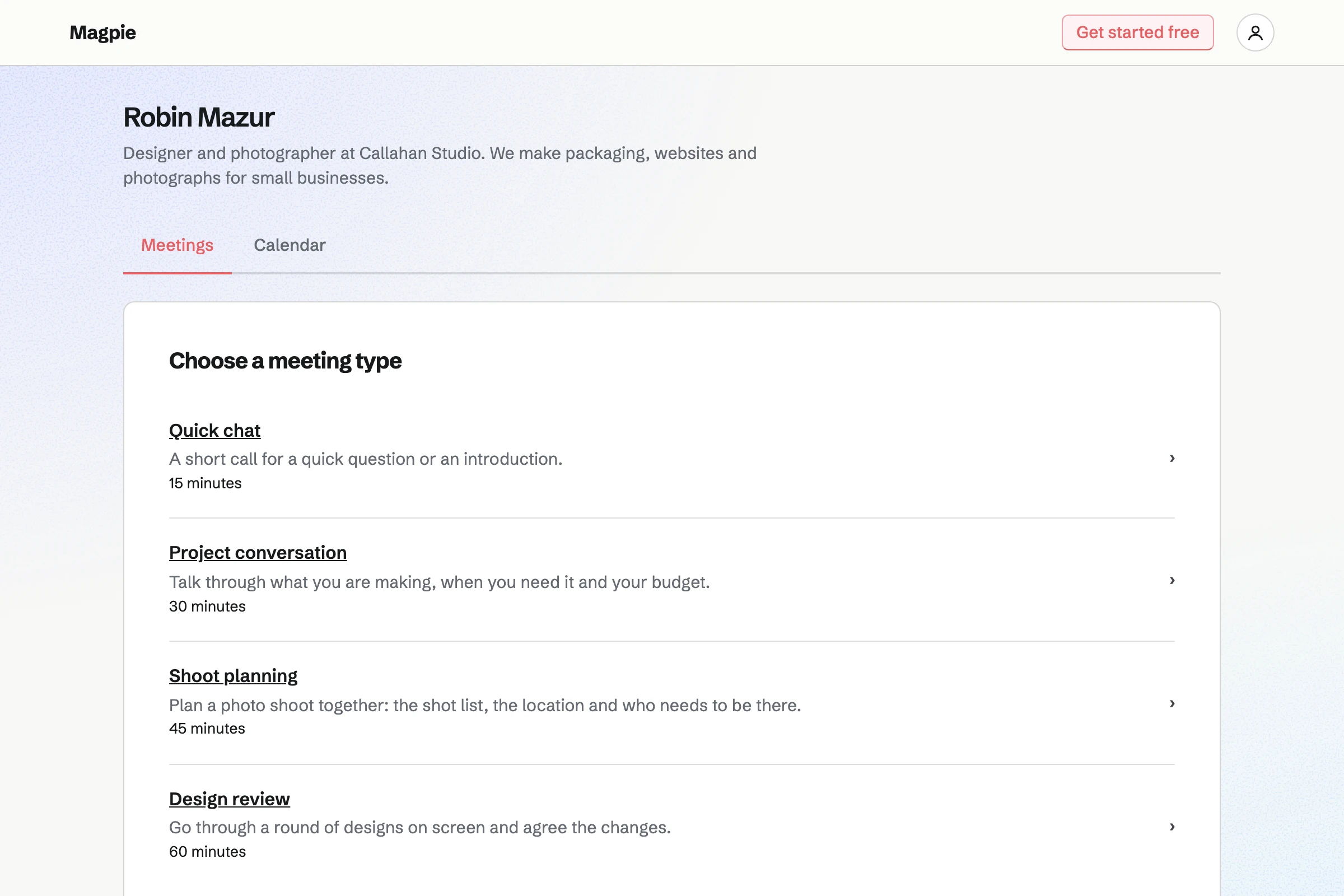
Robin Mazur’s public Meetings page, with a line about Callahan Studio and four meeting types to choose from: Quick chat, Project conversation, Shoot planning and Design review, each with its description and length.

How is Magpie different?

1. Booking comes with the rest of the business

One Magpie subscription includes the areas a small business would otherwise buy one at a time:

  • Meetings for your own meeting page, and Appointments for services, staff and rooms
  • Coaching for programs of sessions that clients pay for and book over time
  • Invoicing, with recurring invoices and online payment through your Stripe account
  • Contacts, where each person's page lists your meetings with them
  • Calendar, Forms, Mail, Websites, Store and the other areas, in the same team

Everything is in one account with one bill. Calendly connects to the software that does the rest, such as HubSpot, Salesforce and Zapier.

2. A team pays one price

The Team plan is one price for up to 25 people. Each person has a meeting page of their own, and adding someone does not change the bill. Calendly's paid plans are priced per seat.

3. Appointments books a person and a room together

An Appointments booking page offers services, each with a length, a price, a location and buffers. Each booking goes to a staff member and reserves a room from Resource Booking when the service needs one. The customer is linked to a contact, or added to Contacts. They can reschedule or cancel from their confirmation until the notice you set.

Comparing Magpie and Calendly

Calendly does more around each booking; Magpie does more around the business. Every line in the tables below was checked against Calendly's own pages, linked from each row, and against Magpie's code and Help.

Platform

WhatCalendlyMagpie
Booking pagePeople choose a time with you, without an account Yes Yes
Your own booking questionsAsk more than a name and email address Yes No
Reminders before a meetingEmail or text the person beforehand Paid plans Yes
Automated follow-upsYour own messages before and after meetings Paid plans No
Several calendars checkedBusy times from more than one calendar Up to 6 One Google calendar
Outlook and Microsoft 365Connect a Microsoft calendar Yes No
Video call linksA call added to each booking Yes Zoom or Google Meet
Embed on your websiteThe booking page inside your own site Yes No
Meeting pollsA group votes on times Yes No
Group sessionsSeveral people book places in one session Paid plans Partly
Sharing bookings across a teamRound Robin and routing forms Teams and above Partly
Several hosts in one meetingTimes when every host is free Standard and above No
Payment when someone booksCharged as the time is chosen Standard and above Appointments only
Packages of sessionsPaid once, booked over time Standard and above Coaching
Staff and rooms booked togetherA service with a person and a room Partly Appointments
ContactsA record of each person who books Yes Partly
Recordings and recapsA call transcribed and summed up Notetaker add-on No
An assistant for your meetingsAsk about meetings, book and move them Callie, in beta Yes
Phone appShare and manage meetings on a phone Yes In the browser
Browser extensionShare times from Gmail, Outlook or LinkedIn Yes No
Meeting reportsBookings, cancellations and busy times Paid plans No
Your own brandingNo product name on the booking page Standard and above No
Invoices and payment linksCharge for work outside a meeting Standard and above Yes
Calendar, a website and emailThe rest of the business in one account No Yes
Single sign-onSign in through a company identity provider Teams add-on No

Good to know: Where Magpie says No or Partly, the line under the row says what Magpie does instead. Each gap has an item on Magpie's roadmap, and the line changes on the day it ships.

Event types and the booking page

Both give you a page where people choose a time without an account. Calendly adds your own questions, several lengths in one event type, email checks and a page of your own after booking.

WhatCalendlyMagpie
Let people book a one-to-one meeting from a page of your own Source Yes Yes
Say where a meeting happens: an address, a phone call or a video link Source Magpie: A meeting gets a Zoom or Google Meet link when one is connected. A Meeting Type has no address or phone number of its own, and the visitor cannot choose where to meet. An Appointments service has a Location, shown to the customer and in their confirmation. Yes Partly
Ask your own questions when someone books Source Magpie: The booking form asks for a name and email address, with an optional phone number and notes. No other question can be added. Yes No
Let the person choose how long the meeting is Source Magpie: Each Meeting Type has one length, from 15 minutes to 2 hours, so offering three lengths takes three Meeting Types. Yes No
Show the booking page and its emails in the visitor's language Source Yes Yes
Show times in the visitor's time zone Source Yes Yes
Check the booker's email address before the booking counts Source Magpie: A booking is made as soon as the form is sent with a well-formed email address. Confirming a meeting yourself only sends the attendee a note. Yes No
Send people to your own web page after they book Source Magpie: The person sees Magpie's confirmation page, with the time in their zone and yours. Yes No
Book a meeting for someone yourself, while you talk to them Source Yes Yes

Good to know: Magpie's Free plan includes 2 Meeting Types, and Pro has no limit. The meeting page and its emails can be in English, French, Spanish or German.

Availability and calendars

Both take weekly hours and keep a connected calendar's busy times free. Calendly adds hours for one date, buffers, daily limits, notice and up to six calendars. They do it better than we do today.

WhatCalendlyMagpie
Set the hours you take meetings each week Source Yes Yes
Change your hours for one date, or keep a holiday free Source Magpie: A Calendar event you create blocks its time, so an all-day event keeps a day free. Hours cannot be added or changed for a single date, and there is no holiday list. Yes Partly
Use different hours for different kinds of meeting Source Magpie: One set of weekly hours applies to every Meeting Type. Yes No
Leave time free before and after each meeting Source Magpie: Appointments keeps a buffer before and after each service. Meetings has none: a time can start the moment another meeting ends. Yes Partly
Cap how many meetings are booked in a day, week or month Source Magpie: Neither Meetings nor Appointments caps the number of bookings; every free time stays open. Yes No
Stop last-minute bookings, and set how far ahead people can book Source Magpie: Appointments has Minimum notice and Maximum range. On a Meetings page any time that has not started can be booked, however soon or far ahead. Yes Partly
Choose how often start times are offered Source Magpie: Appointments has a Start times setting. Meetings offers times back to back at the Meeting Type's length from the start of each range, so a 45-minute type offers 9:00, 9:45 and 10:30. Yes Partly
Keep a connected calendar's busy times from being booked Source Yes Yes
Put each booking on your calendar with the person invited Source Yes Yes
Check several calendars for conflicts before offering a time Source Magpie: Magpie checks the primary calendar of one Google account. Other calendars, and a second account, are not checked. Yes No
Connect an Outlook, Microsoft 365 or Exchange calendar Source Magpie: Google Calendar is the only calendar members can connect today. A Microsoft 365 and Outlook connection is built but not yet switched on. Yes No

Good to know: Appointments has buffers, Minimum notice, Maximum range and Start times. Meetings checks the primary calendar of one Google account.

Sharing and booking

Both share an address with your name in it and email a link to one person. Calendly also embeds the page in a website, pastes times into an email and runs meeting polls.

WhatCalendlyMagpie
Share one address for your booking page, with your name in it Source Yes Yes
Show your booking page inside your own website Source Magpie: Magpie's pages refuse to open inside another site's frame, so a website links to the meeting page instead. Yes No
Email one person a link to book, with a note Source Yes Yes
Paste a few open times into an email for the person to choose from Source Magpie: Send meeting page sends a link to the whole page and names one preferred day at most; no times can be copied into your own email. Yes No
Offer one person times you pick, even outside your usual hours Source Magpie: The meeting page offers the same weekly hours to everyone, and its link can be used again. To meet someone outside those hours, you book the time for them yourself. Yes No
Share links and times from Gmail, Outlook, LinkedIn or the browser toolbar Source Magpie: Magpie's browser extension, still in development and not yet in the Chrome Web Store or Firefox Add-ons, is for Password Vault only. The meeting page's address is copied from Meetings. Yes No
Share, book and manage meetings from a phone Source Yes Yes
Let a group vote on times, then book the one that suits Source Magpie: A Calendar event takes RSVPs for one set time. Nothing collects votes on several times. Yes No

Good to know: Send meeting page emails your page or one Meeting Type to one person, with your note and a preferred day.

Notifications and automations

Both send a confirmation with a calendar file, and an email reminder before the meeting. Calendly adds automated follow-ups, no-show marks and cancel and reschedule links on every booking.

WhatCalendlyMagpie
Send the person a confirmation with a calendar invitation Source Yes Yes
Let the person who booked cancel or move it themselves Source Magpie: Appointments' confirmation email links to a page where the customer reschedules or cancels until the notice you set. On a Meetings page the email asks the person to email you, and you make the change in All Meetings. Yes Partly
Stop people cancelling or moving a booking themselves close to its start Source Calendly: A cancellation policy is text shown to invitees; it does not restrict cancelling or rescheduling. No Yes
Remind the person by email before the meeting Source Yes Yes
Remind the person by text message Source Magpie: With SMS reminders on, an attendee who ticks the box with a US or Canadian number gets one text at the time you chose, up to 50 a month. Numbers in other countries get none, and the section appears only where texting is set up. Yes Partly
Send your own messages automatically before and after meetings, such as a follow-up or a request to reconfirm Source Magpie: Magpie sends its own confirmation, reminder, change and cancellation emails, whose wording cannot be changed, and nothing after a meeting. Automations, which sends emails of your own when something happens, is not open to members yet. Yes No
Mark who did not turn up, and follow up with them Source Magpie: Appointments marks a past appointment Completed or No-show, and sends nothing afterwards. In Meetings a past meeting is marked Completed after its end time, with no no-show status. Yes Partly

Good to know: An Appointments confirmation links to a page where the customer reschedules or cancels. That link closes at the notice you set, and the page then says to contact you.

Team scheduling and routing

Calendly shares bookings across a team with Round Robin, routing forms, collective events and event types an admin manages. A Magpie meeting page belongs to one person; Appointments books a team's staff.

WhatCalendlyMagpie
Share bookings across a team in turn Source Magpie: Appointments' Anyone available gives each booking to the first free staff member; it does not take turns or even out counts. A Meetings page belongs to one person. Yes Partly
Ask questions first, then send each person to the right booking page or teammate Source Magpie: A Form can show questions depending on earlier answers, but its answers do not lead to a booking. Yes No
Let someone book a time when several hosts are all free Source Magpie: A meeting page belongs to one person. Hiring finds times when every interviewer is free, but the team picks the time and invites the candidate. Yes No
Let several people book places in the same session Source Magpie: A Calendar event takes RSVPs up to a capacity, but each event is made by hand and people sign in to answer. A Meeting Type books one person for each time, and Webinars is closed to members. Yes Partly
Set up meeting types once for the whole team, and choose what members can change Source Magpie: Meeting Types belong to each person, and every member sets up their own. Yes No
Reserve a room along with the booking Source Calendly: There is no room to book. The help centre's ways round it are a room set up as a paid user in a collective event type, a room calendar filled through Zapier, or adding the room by hand. Partly Yes

Good to know: An Appointments service can require a room or item from Resource Booking. A time is offered only when it is free, and it is reserved with the appointment.

Payments

Calendly takes payment through Stripe or PayPal as someone books, on Standard and above. Magpie's Appointments takes a price or a deposit as a customer books. Meetings takes no payment, and Coaching and Invoicing take it by invoice.

WhatCalendlyMagpie
Take payment when someone books Source Magpie: Appointments takes a service's full price or a deposit by card when a customer books, through the team's Stripe account, with a Magpie fee of 4%. Meetings takes no payment, so a meeting page booking cannot be paid for. In Coaching, someone joins a program from its page and pays its first invoice before they book the sessions it includes. Yes Partly
Sell a bundle of sessions that the client books over time Source Yes Yes
Send an invoice or a payment link for work outside a meeting Source Yes Yes

Good to know: A Coaching program sets its sessions and its price. Someone joins from its page, pays the first invoice, then books each session in their portal.

Contacts, Notetaker and Callie

Both keep a record of the people who book, and both have an assistant that books and moves meetings. Calendly adds Notetaker, which records a call and writes a recap.

WhatCalendlyMagpie
Keep a record of each person who books, with your past meetings Source Magpie: A contact's page lists your meetings with them when an email address matches, beside notes and follow-ups. Booking a meeting does not add the person to Contacts; the assistant does when it creates one, and each Appointments booking links its customer to a Contact or adds one. Yes Partly
Keep private notes on a meeting Source Magpie: A meeting's notes start as what the person wrote when booking, and you change them from Change time or attendee. They are not private: the email the attendee gets when you confirm the meeting repeats them, and so does the Google Calendar invitation. Appointments keeps Internal notes that the customer never sees. Yes Partly
Record a meeting and get a recap and a follow-up written for you Source Magpie: Meetings use Zoom or Google Meet calls, and a meeting's notes are written by hand. Yes No
Ask an assistant about your meetings, and have it book or move them Source Yes Yes
Copy an assistant into an email thread to arrange the meeting Source Magpie: The assistant works inside Magpie and in connected apps, not from email. Yes No
Book and manage meetings from Claude or ChatGPT Source Yes Yes

Good to know: The Dashboard assistant searches meetings and books, moves, confirms and cancels them. Connected apps give Claude, ChatGPT or Cursor the same meeting tools.

Integrations, reports and admin

Both add Zoom or Google Meet calls, post to Slack and have an API with webhooks. Calendly also connects Microsoft Teams, HubSpot, Salesforce, Zapier and analytics, and reports on meetings.

WhatCalendlyMagpie
Give each meeting a video call link automatically Source Yes Yes
Hold meetings on Microsoft Teams Source Magpie: Calls come from Zoom or Google Meet. Microsoft Teams links come with the Microsoft 365 connection, which is built but not yet switched on. Yes No
Get a message in Slack when someone books Source Yes Yes
Send bookings to a CRM such as HubSpot or Salesforce Source Magpie: Magpie's own Contacts lists your meetings with a contact. Nothing sends them to HubSpot or Salesforce, apart from webhooks you connect yourself. Yes No
Connect bookings to other apps through Zapier Source Magpie: Signed webhooks for each booking change can feed Zapier or any service that takes webhooks, on Pro, but Magpie has no Zapier app to choose. Yes Partly
Read and change bookings from your own code, and hear when they change Source Yes Yes
Track where bookings come from with UTM tags, Google Analytics or Meta Pixel Source Magpie: The meeting page has no tracking settings and keeps no record of where a visitor came from. Yes No
See reports on meetings booked and cancelled, and the busiest times Source Magpie: All Meetings lists upcoming and past meetings with their status; there are no meeting reports, and no export on the website. Yes No
Show the booking page under your own brand Source Magpie: The meeting page shows Magpie's name in its top bar and footer, around your picture, name and bio, and nothing removes them. Yes No
Sign in through a company identity provider Source Magpie: People sign in with a password and two-factor code, a passkey, or a Google, Apple, LinkedIn or GitHub account. Yes No

Good to know: Magpie's REST API lists, creates, changes and cancels bookings on Pro. Signed webhooks report each booking change to any service that takes them.

Price comparison

How Calendly charges

Calendly charges per seat, by plan: Free, Standard, Teams and Enterprise. A seat is for each person who hosts meetings or connects a calendar; the people who book need none. Free has one event type and one calendar. Standard adds more event types, six calendars, reminders, payments and integrations. Teams adds Round Robin and routing. Notetaker is an add-on. Prices are on Calendly's pricing page.

How Magpie charges

Magpie charges by plan too, Free or a paid plan, for everything in the account: booking pages, invoicing, contacts and the rest. The plan sets limits, such as how many Meeting Types you have, not which areas you can use. The Team plan is one price for up to 25 people. Invoicing and Coaching take payment through your own Stripe account with no Magpie fee. Payment taken when someone books an appointment has a Magpie fee of 4%. Prices are on Magpie's pricing page.

On top of the planCalendlyMagpie
How a team paysPer seat, per monthOne Team plan for up to 25 people
Free planOne event type and one calendar2 Meeting Types and one Google calendar
Payment when someone booksStripe or PayPal, on Standard and aboveAppointments only, through your own Stripe account, with a Magpie fee of 4%
Card feesCharged by Stripe or PayPalStripe's fees, through your own Stripe account
Sharing bookings across a teamTeams and aboveAppointments' Anyone available, on every plan
Recordings and recapsNotetaker, an add-onNot available
Single sign-onAn add-on to Teams; part of EnterpriseNot available
API and webhooksOfferedPro
Calendar, a website and email at your domainNot offeredIncluded; email needs a paid plan

When to choose Magpie or Calendly

  • Want booking pages beside invoices, contacts, a website and email, with staff and rooms booked together, for one team price? Go with Magpie.
  • Want your own booking questions, follow-ups, routing, Outlook and several calendars, and a booking page inside your own website? Calendly is the right choice.

Recommendations by kind of business

For a salesperson or a sales team
Calendly. Routing forms send each lead to the right person, and Round Robin shares out the calls. HubSpot and Salesforce get every booking. A Magpie meeting page belongs to one person and connects to neither.
For someone whose calendar is in Outlook
Calendly. Calendly checks Outlook, Microsoft 365 and Exchange calendars and adds Microsoft Teams calls. Magpie connects Google Calendar only today.
For a salon, a clinic or a studio with staff
Magpie. Appointments books a service with a staff member and a room, with buffers and notice. The customer moves or cancels from their confirmation, and each booking adds them to Contacts.
For a coach or a consultant selling sessions
Either. Calendly takes payment as each meeting is booked and sells packages of meetings. Magpie's Appointments takes a price or a deposit as a session is booked. Coaching sells a program by invoice, and the client books each session in a portal with their goals and notes. Choose Calendly for packages of meetings, and Magpie for paid services or a program around the sessions.
For a one-person business
Magpie. Meetings, Invoicing, Contacts, a website and the Newsletter are in one subscription, on the Free plan too. Calendly's Free plan has one event type; Magpie's has 2 Meeting Types.
For a class or a group session
Calendly. A group event type lets several people book places in one session and can show the places left. Magpie's Calendar events take RSVPs up to a capacity, but each is made by hand.

Frequently asked questions

What is the difference between Calendly and Magpie?

Calendly is a scheduling service, built around the booking page and what happens around each booking. Magpie is one subscription for a small business's software. Its Meetings and Appointments are areas beside Invoicing, Contacts, Calendar, a website and email. Calendly does more around each booking; Magpie does more around the business.

Does Magpie replace Calendly?

Yes, for a business that wants a booking page checked against Google Calendar, beside its invoices and contacts. Magpie gives each person a meeting page and books a team's staff and rooms through Appointments.

Consider keeping Calendly if you ask your own booking questions, send your own follow-up emails, or share calls across a sales team. Keep it too if your calendar is in Outlook or you embed the booking page in your website. Calendly does each of these better than Magpie does today.

How much does Calendly cost?

Calendly has a Free plan and three paid ones, Standard, Teams and Enterprise, priced per seat. A seat is for each person who hosts meetings or connects a calendar. Notetaker is an add-on, and single sign-on an add-on to Teams. The prices are on Calendly's pricing page.

How much does Magpie cost?

Magpie has a Free plan and paid plans, each covering every area. Free includes 2 Meeting Types and a team of 3; Pro has no limit on Meeting Types. The Team plan is one price for up to 25 people, not a price per seat. The prices are on Magpie's pricing page.

Does Magpie send reminder emails before a meeting?

Yes. Meetings emails the person who booked a reminder 1 day before, or 1 hour, 2 hours or 2 days before, as you choose in Settings. Its wording is fixed. A text reminder also goes to an attendee who asks for one with a US or Canadian number. Calendly sends email and text reminders on its paid plans.

Can I ask my own questions on a Magpie booking page?

No. The booking form asks for a name and an email address, with an optional phone number and notes. Questions of your own are on Magpie's roadmap. Calendly allows up to 10 questions on each event type, on every plan.

Does Magpie work with Outlook or Microsoft 365?

No, not yet. Google Calendar is the only calendar members can connect today, and calls come from Zoom or Google Meet. A Microsoft 365 connection with Teams links is built but not yet switched on. Calendly connects Google, Office 365, Outlook.com and Exchange calendars, and Microsoft Teams calls.

Can I check more than one calendar in Magpie?

No. Magpie checks the primary calendar of one Google account. It also checks your other meetings and the Calendar events you created or are going to. Calendly's Free plan checks one calendar, and Standard and above check up to six.

Can I embed a Magpie booking page on my website?

No. Magpie's pages do not open inside another site's frame, so a website links to the meeting page instead. Embedding is on Magpie's roadmap. Calendly has inline, pop-up text and pop-up widget embeds.

Can Magpie take payment when someone books?

Partly. Appointments takes a service's full price or a deposit by card as a customer books, with a Magpie fee of 4%. Meetings takes no payment, so a booking from a meeting page cannot be paid for. In Coaching, someone joins a program and pays its first invoice before booking the sessions it includes. Calendly takes payment through Stripe or PayPal as someone books, on Standard and above.

Does Magpie have Round Robin or team scheduling?

Partly. Appointments' Anyone available gives each booking to the first staff member who is free. It does not take turns or even out counts. A Meetings page belongs to one person, and no page finds a time when several hosts are free. Calendly has Round Robin, collective events and routing forms on its Teams plan.

Can people cancel or reschedule a Magpie booking themselves?

In Appointments, yes: the confirmation links to a page where the customer reschedules or cancels, until the notice you set. In Meetings, no: the email asks the person to contact you, and you make the change. Calendly can put cancel and reschedule links in every invitation and reminder, on every plan.

Does Magpie have meeting polls?

No. A Calendar event takes RSVPs for one set time, and nothing collects votes on several times. Meeting polls are on Magpie's roadmap. Calendly's meeting polls offer up to 40 times to up to 40 people, who vote without an account.

Can Calendly book a room with a meeting?

Not directly. Calendly's help centre suggests a room set up as a user, a room calendar filled through Zapier, or adding the room by hand. Magpie's Appointments can require a room from Resource Booking: a time is offered only when the room is free, and the room is reserved with the appointment.

Does Calendly have a website, email or accounting?

No. Calendly is a scheduling service: it has booking pages, contacts, payment links and invoices, and connects to other software for the rest. Magpie includes Calendar, Websites, Mail, Accounting, Forms and the other areas in the same subscription.

Does Magpie record meetings and write notes?

No. Meetings use Zoom or Google Meet calls, and a meeting's notes are written by hand. Recaps of meetings are on Magpie's roadmap. Calendly's Notetaker, an add-on, joins Zoom, Google Meet and Teams calls and writes a recap, action items and a follow-up.

Can an assistant book meetings for me in Magpie?

Yes. Tell the assistant on Dashboard a person's name and a time. It books the meeting and offers to email them. It also searches meetings and moves, confirms and cancels them. Connected apps give Claude, ChatGPT or Cursor the same meeting tools. Calendly's assistant, Callie, is in beta.

Does Magpie have a phone app for bookings?

Meetings works in a phone's browser, where you share your page, confirm, move and cancel meetings and change your hours. Magpie emails you each booking. The Magpie app is not yet in the App Store or Google Play. Calendly has apps for iPhone and Android that notify you of bookings.

Does Magpie have reports on meetings?

No. All Meetings lists upcoming and past meetings with their status, with no reports and no export on the website. Reports are on Magpie's roadmap. Calendly's Analytics shows meetings booked, completed and cancelled, popular times and event types, with a CSV export.

Does Magpie connect to HubSpot, Salesforce or Zapier?

No. Magpie's own Contacts lists your meetings with each person. Signed webhooks on Pro can feed Zapier or any service that takes webhooks. Magpie has no Zapier app to choose. Calendly connects HubSpot and Zapier on Standard and above, and Salesforce on Teams.

Can I use Calendly and Magpie together?

Yes. Calendly can keep your booking page while Magpie runs your invoices, contacts, website and email at your domain. A Magpie website links to your Calendly page. Bookings made in Calendly do not appear in Magpie's Contacts by themselves.

How do I move from Calendly to Magpie?

Add a Meeting Type for each event type, or paste them all at once with Import JSON on Meeting Types. Set your weekly hours and connect Google Calendar, so meetings already booked through Calendly stay busy. Then share your Magpie meeting page's address. Magpie does not read Calendly's bookings, so keep Calendly until its booked meetings are past.

What is included in Magpie's Free plan?

2 Meeting Types on a meeting page of your own, Appointments, Calendar, Contacts, Invoicing, a website, the Newsletter, Forms and a team of 3. A paid plan removes the limit on Meeting Types and adds email at your domain and the API.
If a line on this page is wrong, tell us and we will correct it.

Calendly changes, and so does Magpie. If a line is out of date about either product, email support@magpie.diy with the page that shows it. We check the line against that page, change it, and give it the new date. That goes for Calendly's own team as much as for anyone who uses it.

Make a meeting page on Magpie's Free plan.

Create a Magpie account, then add your first Meeting Type.

Create account