Buzzsprout compared with Magpie

Buzzsprout vs Magpie: an in-depth comparison

Buzzsprout and Magpie both host a podcast with an RSS feed for Apple Podcasts and Spotify. Buzzsprout is built around growing the show. Magpie records it too, and puts it beside the rest of the business.

  1. Buzzsprout is a podcast host with statistics, transcripts, a website for the show and ways to earn from it. It is built for podcasters who record elsewhere and want the show listed, measured and paid for.
  2. Magpie is one subscription for a small business's software, and Podcast is one part of it. Podcast records with guests, edits on a timeline and hosts the show with its feed. It is built for someone whose podcast is one part of running the business.
Create account
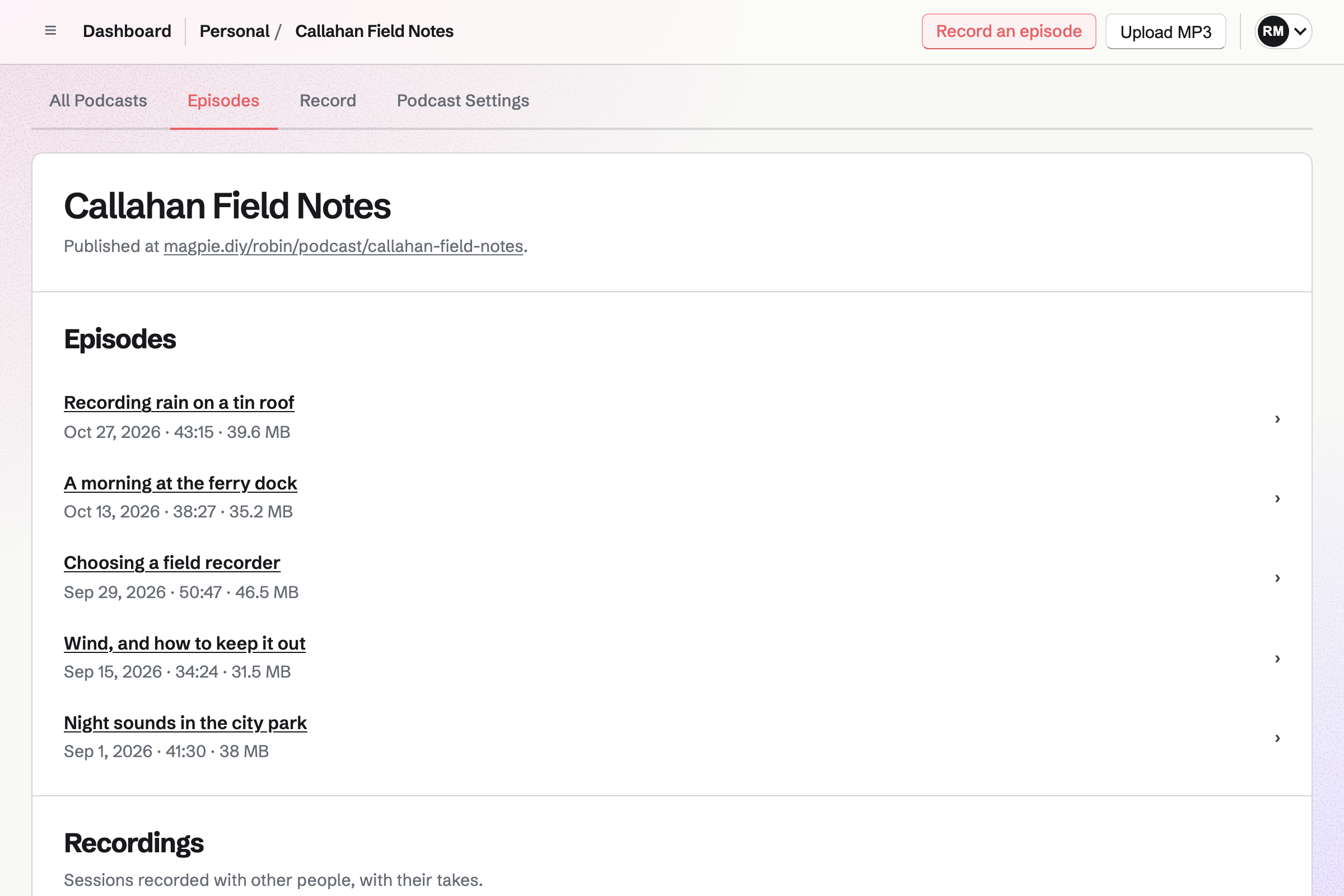
The podcast page for Callahan Field Notes: Record an episode and Upload MP3, the address the show is published at, and five published episodes, each with its date, length and file size.

How is Magpie different?

1. The podcast comes with the rest of the business

One Magpie subscription includes the areas a small business would otherwise buy one at a time:

  • Podcast, the area this page is about, for recording, editing and hosting with an RSS feed
  • Supporters for monthly or yearly support from listeners, and Social Media for posts about each episode
  • Newsletter for email to subscribers, and Websites for the rest of what you publish
  • Meetings, Appointments, Invoicing, Store, Mail and the other areas, in the same team

Everything is in one account with one bill. Buzzsprout covers hosting, statistics and promoting the show, and leaves the rest of the business to other software.

2. Recording and editing are in the same place as hosting

A recording session gives guests an invite link. Each person's browser records their own microphone and uploads it while you talk. The episode's timeline cuts, silences or bleeps a stretch, with Undo. Then Publish episode adds it to the feed. Buzzsprout takes a finished file made in other software.

3. The Free plan keeps every episode, and listening has no limit

The Free plan hosts 1 podcast with up to 10 episodes in 5 GB, kept for as long as you like. Recording with guests is on every plan, with no monthly hours. No plan limits listens, downloads or bandwidth. Only the storage the episodes take is limited.

Comparing Magpie and Buzzsprout

Buzzsprout does more after an episode is published; Magpie does more before it and around it. Every line in the tables below was checked against Buzzsprout's own pages, linked from each row, and against Magpie's code and Help.

Platform

WhatBuzzsproutMagpie
Podcast hosting and RSS feedThe show hosted and followed by podcast apps Yes Yes
Free plan that keeps episodesA published show without paying Kept 90 days Yes
Recording with guestsGuests join from a link, each on their own track No Yes
Editing an episodeCut and tidy the recording before it goes out No Yes
Scheduling episodesAn episode comes out at a time you choose Yes No
Listing in Apple Podcasts and SpotifyThe show submitted to directories from the host Yes Partly
Download countsHow many listeners download each episode Yes Yes
Listeners' apps and placesDownloads by app, device and country Yes No
TranscriptsWritten from each episode and shown in apps Paid plans No
ChaptersListeners skip to a part of an episode Yes No
AI show notesTitles, notes and posts drafted from the episode Cohost AI add-on No
Mastering and noise removalLoudness levelled and background noise cleaned Magic Mastering add-on Partly
A website for the showEpisodes to play on a public page Paid plans Yes
The show's website at your own domainThe show's pages at a domain you own Yes No
Player on your own websiteAn episode's player embedded in another site Yes No
Video episodesVideo in Apple Podcasts, Spotify and YouTube Audio + Video plan No
Messages from listenersA text or voice message sent to the show Fan Mail, paid plans Partly
Monthly support from listenersFans pay each month to support the show Paid plans Supporters
Paid episodes for subscribersBonus or ad-free episodes in a private feed Paid plans No
Ads in episodesAds placed for you, and clips swapped in later Yes No
Team membersOther people work on the show Yes Yes
Phone appRun the show from an iPhone or Android app Yes In the browser
APIPublish episodes from your own software Yes Paid plans
No bandwidth limitAny number of listens at no extra cost 1 TB a month Yes
Booking, invoicing and a newsletterThe rest of the business in the same account No Yes

Good to know: Where Magpie says No or Partly, the line under the row says what Magpie does instead. Each gap has an item on Magpie's roadmap, and the line changes on the day it ships.

Setting up a podcast

Both start a show with its title, description, artwork and category. Buzzsprout also imports a show from another host and redirects its feed when you leave. They do it better than we do today.

WhatBuzzsproutMagpie
Start a podcast with its title, description, artwork and category Source Yes Yes
Give podcast apps the show's language, categories and episode order Source Magpie: Podcast Settings has one category and no language or episode order. The feed always says the show is in English, and apps list its episodes newest first. Yes Partly
Prove to Spotify, YouTube and other apps that the show is yours Source Yes Yes
Get help choosing a new show's name, description, categories and artwork Source Magpie: Until artwork is chosen, Magpie makes the podcast's artwork from its title. Nothing suggests a name, a description or a category. Yes Partly
Run several shows from one account Source Yes Yes
Bring an existing show over from another host Source Magpie: A podcast starts empty. Each old episode would be uploaded as an MP3 by hand and dated the day it was uploaded, and the old feed would need a redirect to Magpie's. Yes No
Move the show to another host later without losing subscribers Source Magpie: A podcast's feed cannot be pointed at another address. Turning Podcast is on off takes the feed down, and subscribers are not sent anywhere. Yes No
Download a copy of the whole show to keep Source Magpie: Each published episode has Download MP3 on its page, one at a time. There is no download of the whole show with its artwork and feed. Yes Partly

Good to know: A Magpie podcast's feed address stays the same through renames and moves between teams. Until you choose artwork, Magpie makes it from the title.

Uploading and publishing episodes

Both publish an episode from an audio file. Buzzsprout also schedules episodes, takes WAV and other formats, and has trailers, bonus episodes and episode artwork.

WhatBuzzsproutMagpie
Publish an episode from an audio file you made Source Yes Yes
Upload an episode as a WAV, M4A or AIFF file and have it made ready for podcast apps Source Magpie: Upload MP3 accepts MP3 files only and refuses other formats, and the file is published as it is. Episodes recorded in Magpie are made into MP3 by Magpie. Yes Partly
Schedule an episode to come out at a time you choose Source Magpie: Publish episode and Upload MP3 add the episode to the feed at once; there is no time to choose. Yes No
Take an episode out of the feed without deleting it Source Magpie: A published episode stays in the feed until Delete episode removes it with its audio, which cannot be undone. Yes No
Replace a published episode's audio with a corrected file Source Magpie: A published episode's audio cannot be changed. The episode has to be deleted and the file uploaded again, which makes a new episode dated that day. Yes No
Mark an episode as a trailer or a bonus, and number episodes in seasons Source Magpie: An episode has a title, a description and its audio. The feed carries no season, episode number or episode type, so apps list episodes by date only. Yes No
Give one episode its own artwork Source Magpie: Every episode uses the podcast's artwork; the feed has no picture of its own for an episode. Yes No
Add the same links and credits to the end of every episode's show notes at once Source Magpie: An episode's description is plain text with line breaks, typed for each episode from Edit details. There is no footer or template. Yes No
List the hosts and guests of the show and each episode, with their photos and links Source Magpie: Hosts, in Podcast Settings, lists the people who present the show, each with a photo and a bio, in the order you set. The public page shows them, and the feed names them for apps that read person tags. An episode names no guests of its own, except in the description typed for it. Yes Partly

Good to know: Upload MP3 takes a file of up to 500 MB. An episode recorded in Magpie is made into an MP3 when it is published.

Getting listed

Both publish an RSS feed for podcast apps. Buzzsprout submits the show to Apple Podcasts, Spotify and others in one step, and puts new episodes on YouTube.

WhatBuzzsproutMagpie
Get an RSS feed that podcast apps follow Source Yes Yes
Get the show listed in Apple Podcasts, Spotify and other apps from the host Source Magpie: The Apple Podcasts and Spotify page in Podcast Settings marks what the apps need as done, gives the feed address and the steps for each app, and shows when Apple lists the show. You fill in each app's own form yourself, at Apple and at Spotify; Magpie submits nothing for you. Yes Partly
Have each new audio episode put on YouTube by itself Source Magpie: Magpie gives no steps for YouTube and puts nothing there itself, though the feed can carry the email address YouTube sends its code to. Episode video makes a video of a published episode's audio over the artwork, with pictures at chosen times, to download as an MP4 and upload to YouTube by hand. Yes Partly

Good to know: Podcast Settings lists what Apple Podcasts and Spotify need, with the steps for each app, and shows when Apple lists the show. New episodes then reach each app by themselves.

Magic Mastering and audio quality

Buzzsprout's Magic Mastering add-on levels every upload, cleans noise and removes filler sounds. Magpie records and edits the episode, which Buzzsprout leaves to other software.

WhatBuzzsproutMagpie
Make every episode sound clear and at the usual podcast loudness Source Magpie: A recording made with other people has everyone's level matched and is set to the usual podcast loudness, with a limiter. A Solo recording and an uploaded MP3 are published at the level they were made. Yes Partly
Remove background noise and echo from a recording Source Magpie: The recorder asks the browser for its echo and noise processing while recording, which can be turned off. A finished or uploaded recording cannot be cleaned. Yes Partly
Have filler sounds such as um and ah taken out for you Source Magpie: The episode's timeline cuts out a selected stretch by hand; nothing finds or removes filler words. Yes No
Record an episode with guests in other places, in the same tool Source Buzzsprout: Buzzsprout publishes recordings made elsewhere; for a live session it suggests recording in Zoom or StreamYard and uploading the audio. No Yes
Cut and tidy an episode before it goes out, in the same tool Source Buzzsprout: Buzzsprout takes a finished file; to change one, the help says to replace the episode's audio with a new file. No Yes

Good to know: A Magpie recording made with other people has everyone's level matched and is set to the usual podcast loudness. A Solo recording and an uploaded MP3 are published as they are.

Transcripts, chapters and Cohost AI

Buzzsprout writes a transcript of each episode on paid plans and adds chapters. Its Cohost AI add-on drafts show notes. Magpie writes nothing from an episode today.

WhatBuzzsproutMagpie
Publish a transcript with each episode Source Magpie: Podcast makes no transcript and has no place to upload one. Yes No
Add chapters so listeners can skip to a part Source Magpie: An MP3 uploaded with chapters keeps them inside the file, but Magpie has no way to add, change or list chapters, and the feed carries none. Yes No
Have titles, show notes, chapters and social posts drafted from the episode Source Magpie: Nothing drafts an episode's title, description or posts from its audio; they are typed by hand. Yes No
Ask an AI assistant such as Claude or ChatGPT about the show's episodes and downloads Source Magpie: The assistant, and apps such as Claude or ChatGPT connected to Magpie, find podcasts and episodes by their titles and descriptions. Download counts are on each podcast's Downloads tab, and neither the assistant nor connected apps read them. Yes Partly

Good to know: The assistant finds podcasts and episodes by title and description. So do apps such as Claude connected to Magpie.

Podcast statistics

Both count the downloads of each episode. Buzzsprout also counts them by app, device and place, and compares a new episode with recent ones. They do it better than we do today.

WhatBuzzsproutMagpie
See how many people download each episode, and how a new one compares Source Yes Yes
See which apps, devices, countries and cities listeners use Source Magpie: The Downloads tab counts listeners, but Magpie keeps nothing about their apps, devices or places: it stores the number of downloads only. Yes No
Be told when the show reaches a milestone, and share it Source Magpie: Downloads are counted on the Downloads tab, but nothing tells you when the show reaches a number, and there is nothing to share. Yes No

Good to know: Magpie sets no limit on listens or bandwidth on any plan, so a popular episode costs nothing more.

Podcast website and players

Both give the show a public page where every episode plays. Buzzsprout's paid website adds a design you choose, your own domain, episode pages and players for other sites.

WhatBuzzsproutMagpie
Give the show a website where people can listen Source Yes Yes
Choose the website's colours, fonts and background Source Magpie: The podcast's page has one design and no pages of its own. Sites builds a website with pages, but it cannot list a podcast's episodes. Yes No
Share a page for one episode, with its own title in link previews Source Magpie: An episode's address opens the show's page at that episode. A link preview shows the show's name, description and artwork, not the episode's. Yes Partly
Put the show's website at your own domain Source Magpie: The podcast's page is at the person's or team's address on Magpie. Sites, Links and the Store can use your own domain; a podcast cannot. Yes No
Show buttons that open the show in Apple Podcasts, Spotify and other apps Source Magpie: The podcast's page links to its RSS feed only. There is no place to give the show's Apple Podcasts or Spotify listing, so a visitor is not offered their app. Yes Partly
Put an episode's player on your own website Source Magpie: Episodes play on the podcast's own page. There is no player to put on another site. Yes No
Share a link that starts an episode at a chosen moment Source Magpie: An episode's link opens the show's page at that episode, which plays from the start, or from where that browser last stopped. Yes No
Keep a show for only the people you give it to Source Buzzsprout: Buzzsprout has no private podcasts: anyone with the feed address can listen. It suggests hiding the website from search engines and not submitting the show to directories.Magpie: A podcast is either on, with a public page and a feed anyone can open, or off and not published. Nothing keeps a published page out of search engines. Partly No

Good to know: A Magpie podcast's page is at your Personal or team public address. It shows the artwork, the description and a player for each episode.

Promotion and Fan Mail

Both help you post about each episode. Buzzsprout makes short soundwave videos of a moment and takes Fan Mail from listeners.

WhatBuzzsproutMagpie
Turn a moment of an episode into a short video for social media Source Magpie: Episode video makes a video of the whole episode's audio over the artwork, with pictures at chosen times. It cannot be limited to a moment and has no soundwave. Yes Partly
Post about each episode on social media Source Yes Yes
Let listeners send the show a text or a voice message from each episode Source Magpie: The Walkie Talkie talk page, a person's own page rather than the show's, takes a voice or written message from anyone, who is given a free Magpie account by sending it, and it arrives under Requests. Its address has to be typed into each episode's description, and messages cannot be shown on the podcast's page. Yes Partly

Good to know: Share episode starts a Social Media post with the episode's name and address. Magpie publishes to Bluesky, Mastodon and LinkedIn.

Listener support, Subscriptions and ads

Both take monthly support from listeners. Buzzsprout also sells episodes to subscribers in a private feed and places ads in episodes.

WhatBuzzsproutMagpie
Ask listeners for support with a link in every episode Source Magpie: Supporters has a page of its own, but a podcast has no place for a support link: not in its feed, its page or its episodes, except typed into each description. Yes Partly
Let fans pay monthly to support the show Source Yes Yes
Sell bonus, early or ad-free episodes to paying listeners Source Magpie: Supporters shows posts with text, images, videos and polls to chosen tiers, but a post cannot carry an episode's audio and no podcast feed is limited to supporters. Yes No
Earn money from ads placed in your episodes Source Magpie: Magpie places no ads. A sponsor has to be read or edited into each episode's audio before it is published. Yes No
Put a clip at the start, middle or end of past and future episodes, and change it later Source Magpie: A clip has to be recorded or edited into each episode's audio before it is published, and stays there. Yes No

Good to know: Supporters is paid into your own Stripe account, each month or each year, at prices you set. Magpie takes 4%, and Stripe's fees apply too.

Video podcasting

Buzzsprout's Audio + Video plan sends video episodes to Apple Podcasts, Spotify and YouTube. Magpie's feed carries audio only.

WhatBuzzsproutMagpie
Publish video episodes to Apple Podcasts, Spotify and YouTube Source Magpie: Episodes are MP3 audio and the feed carries only audio. Episode video makes an MP4 of the audio over the artwork to download and upload elsewhere yourself. Yes No

Good to know: Episode video makes an MP4 of an episode's audio over the artwork, with pictures at chosen times. You upload it to YouTube yourself.

Team, app and plans

Both let other people work on the show and have an API. Buzzsprout has a phone app and roles for each person; Magpie has no limit on bandwidth.

WhatBuzzsproutMagpie
Let other people work on the show without sharing your login Source Yes Yes
Let a helper publish episodes but not delete them or change settings Source Magpie: A team admin chooses which areas each member can use, so someone can be kept out of Podcast. Within it, everyone who can edit can also delete episodes and change the podcast's settings. Yes Partly
Hand a show to someone else without breaking its feed Source Yes Yes
Run the show from a phone app Source Magpie: Podcast works in a phone's browser. The Magpie app for iPhone, iPad and Android records solo and with guests, edits and publishes episodes and changes Podcast Settings, but cannot upload an MP3, and it is not yet in the App Store or Google Play. Yes Partly
Publish and manage episodes from your own software Source Yes Yes
Host a podcast without paying, and keep its episodes Source Buzzsprout: The Free plan uploads 2 hours a month and keeps each episode for 90 days, with no add-ons and no video. Partly Yes
Keep publishing for years without running out of room Source Yes Yes
Let any number of people listen without paying more Source Buzzsprout: Each plan includes 1 TB of bandwidth a month, or 12 TB a year on yearly plans; each extra TB beyond it is billed. Partly Yes
Keep the show online for little or nothing while taking a break Source Yes Yes
Get help from a person when something goes wrong Source Yes Yes

Good to know: Everyone who can edit in a Magpie team works on its podcasts. A free team has 3 people, and the Team plan 25.

Price comparison

How Buzzsprout charges

Buzzsprout charges by plan: Free, Audio, Audio + Video, Multi-Podcast and Archive, billed monthly or yearly. Free uploads 2 hours a month and keeps each episode for 90 days. Audio and Audio + Video upload 72 hours a year for one show. Multi-Podcast shares 180 hours across 5 or 10 shows. Extra hours are billed at the plan's rate. Magic Mastering and Cohost AI are add-ons. Prices are on Buzzsprout's pricing page.

How Magpie charges

Magpie charges by plan, Free or a paid plan, for everything in the account. Podcast follows the plan of Personal or the team that owns the podcast. Free has 1 podcast with 10 episodes in 5 GB; Pro has 5 podcasts in 100 GB. There are no upload hours or bandwidth limits. Prices are on Magpie's pricing page.

On top of the planBuzzsproutMagpie
Hosting without paying2 hours of uploads a month; each episode kept 90 days1 podcast with 10 episodes, kept as long as you like
Upload allowance72 hours a year on Audio, 180 on Multi-Podcast; extra hours billedNo hours; 100 GB on Pro, 1 TB on the Team plan
Bandwidth1 TB a month included; each extra TB billedNo limit
Several showsMulti-Podcast, 5 or 10 shows5 podcasts on Pro
Video episodesAudio + Video planNot available
TranscriptsIncluded on paid plansNot available
Mastering and AI show notesMagic Mastering and Cohost AI, add-onsGroup recordings levelled; no AI show notes
Listener support and subscriptionsBuzzsprout keeps 15%Supporters, 4% plus Stripe's fees
Recording with guestsNot offeredEvery plan, with no monthly hours
Team membersAs many as you like3 in a free team, 25 on the Team plan
Booking pages, invoicing and a newsletterNot offeredIncluded

When to choose Magpie or Buzzsprout

  • Want to record, edit and host an audio podcast in one place, with episodes kept on the Free plan and the rest of the business in one subscription? Go with Magpie.
  • Want statistics by app and country, transcripts, scheduled episodes, one-step listing in every app and ways to earn from listeners? Buzzsprout is the right choice.

Recommendations by kind of business

For a show that wants to grow its audience
Buzzsprout. Buzzsprout counts downloads by episode, app and country, and lists the show in every app in one step. Transcripts and chapters reach Apple Podcasts and Spotify. Magpie counts downloads by episode only.
For a show that earns from its listeners
Buzzsprout. Subscriptions sell bonus and ad-free episodes in a private feed, and Buzzsprout Ads places ads for you. Magpie's Supporters takes monthly or yearly support but carries no episodes.
For a show moving from another host
Buzzsprout. Buzzsprout copies the show and its episodes from the old feed, and can bring its statistics. Magpie starts each podcast empty.
For a coach, a consultant or a small business with a show
Magpie. The podcast is in the same team as the booking pages, invoices, newsletter and website. Guests record from a link, and the show is hosted with its feed on every plan.
For a show recorded with guests in other places
Magpie. Each guest records on their own track from an invite link, and the episode is cut on a timeline. Buzzsprout needs the recording made in other software first.
For a new show trying podcasting without paying
Either. Buzzsprout's Free plan uploads 2 hours a month and keeps each episode for 90 days. Magpie's keeps 10 episodes for as long as you like and records them too. Choose by whether you want statistics from the start or episodes that stay up.

Frequently asked questions

What is the difference between Buzzsprout and Magpie?

Buzzsprout is a podcast host with statistics, transcripts, a website for the show and ways to earn from it. Magpie is one subscription for a small business's software. Its Podcast records, edits and hosts an audio show. The Newsletter, Social Media, a website and the rest are beside it. Buzzsprout does more after an episode is published; Magpie does more before it.

Does Magpie replace Buzzsprout?

Yes, for an audio podcast that you want recorded, edited and hosted in one place. Magpie publishes the feed that Apple Podcasts and Spotify follow, with no limit on listens.

Consider keeping Buzzsprout if you need statistics by app and country, transcripts or scheduled episodes. Keep it too if you earn from subscriptions or ads, or publish video episodes. Buzzsprout does each of these better than Magpie does today.

How much does Buzzsprout cost?

Buzzsprout has Free, Audio, Audio + Video, Multi-Podcast and Archive plans, billed monthly or yearly. Free uploads 2 hours a month and keeps each episode for 90 days. Paid plans upload a number of hours a year, and extra hours are billed. Magic Mastering and Cohost AI are add-ons. The prices are on Buzzsprout's pricing page.

How much does Magpie cost?

Magpie has a Free plan and paid plans, each covering every area. Podcast's Free plan has 1 podcast with 10 episodes in 5 GB. Pro has 5 podcasts, with as many episodes as 100 GB holds. No plan limits upload hours or bandwidth. The prices are on Magpie's pricing page.

Can I record a podcast in Buzzsprout?

No. Buzzsprout publishes recordings made in other software. For a live session, it suggests recording in Zoom or StreamYard. Magpie's Podcast records with guests from an invite link, each person on their own track. It then cuts the episode on a timeline and publishes it.

Does Magpie have podcast statistics?

Partly. Each podcast's Downloads tab counts the listeners who get its episodes through the feed, each once a day. It shows them by day and for each episode. Magpie keeps nothing about apps or places. Buzzsprout counts downloads to the IAB 2.2 standard on every plan, by episode, app, device, country and city.

Can I schedule an episode in Magpie?

No. Publish episode and Upload MP3 add the episode to the feed at once. Scheduling is on Magpie's roadmap. Buzzsprout sets a publish date for each episode, which can be changed later.

Does Magpie make transcripts or chapters?

No. Podcast makes no transcript, and the feed carries no chapters. Both are on Magpie's roadmap. Buzzsprout's paid plans transcribe each episode in English, Spanish or French. Apple Podcasts and Spotify show the transcript. Its chapters are placed on a waveform, with pictures and links.

Can Magpie submit my podcast to Apple Podcasts and Spotify?

Partly. Podcast Settings lists what Apple Podcasts and Spotify need and gives the steps for each app. You fill in each app's form yourself, and Magpie shows when Apple lists the show. Email in the feed adds the address Spotify sends its code to. Buzzsprout submits the show to Apple Podcasts, Spotify and others in one step.

Can I publish a video podcast with Magpie?

No. Episodes are MP3 audio, and the feed carries only audio. Episode video makes an MP4 of the audio over the artwork, to upload to YouTube yourself. Buzzsprout's Audio + Video plan sends video episodes to Apple Podcasts, Spotify and YouTube in 1080p.

Does Magpie have Magic Mastering or noise removal?

Partly. A Magpie recording made with other people has everyone's level matched and is set to the usual podcast loudness. A Solo recording and an uploaded MP3 are published as they are. Nothing removes noise or filler words afterwards. Buzzsprout's Magic Mastering add-on does all three for each upload.

Can I make money from my podcast with Magpie?

Partly. Supporters takes free support, or paid support each month or each year, at prices you set. It is paid into your own Stripe account. Magpie takes 4%. A supporters' post cannot carry an episode, and Magpie places no ads. Buzzsprout sells bonus episodes in a private feed, places ads, and keeps 15% of listener payments.

Does Buzzsprout's Free plan keep my episodes?

For 90 days. Buzzsprout's Free plan uploads 2 hours a month, and each episode is kept for 90 days. Its paid plans keep every episode. Magpie's Free plan keeps up to 10 episodes for as long as you like.

Is there a limit on how many people can listen?

Not in Magpie. No plan limits listens, downloads or bandwidth; only the storage the episodes take is limited. Buzzsprout includes 1 TB of bandwidth a month on each plan, and bills each extra TB beyond it.

Can I put my podcast's player on my own website?

No. Episodes play on the podcast's own Magpie page, and there is no player to embed in another site. An embed player is on Magpie's roadmap. Buzzsprout has players for one episode, the latest one or several, in your colours.

Can my podcast's website use my own domain?

No. The podcast's page is at your Personal or team address on Magpie. Websites, Link-In-Bio List and Store can use your own domain; a podcast cannot yet. Buzzsprout's website uses your own domain or subdomain with a CNAME record.

Can listeners send my show a message?

Partly. The Walkie Talkie talk page takes a voice or written message from anyone, and it arrives under Requests. It is your own page rather than the show's, so you type its address into each episode's description. Buzzsprout's Fan Mail adds a link to every episode by itself, on paid plans.

Can my team work on the podcast?

Yes, in both. Everyone who can edit in a Magpie team works on its podcasts. The Team plan has up to 25 people. Within Podcast, everyone who can edit can also delete episodes. Buzzsprout adds admins and editors, and editors cannot delete episodes.

Is there a phone app?

Buzzsprout has an app for iPhone and Android that publishes episodes and shows statistics. Magpie's Podcast works in a phone's browser, where it records, edits and publishes. The Magpie app is not yet in the App Store or Google Play.

Can I use Buzzsprout and Magpie together?

Yes. You can record in Magpie and download each person's WAV track after a take. Edit them in any editor, then upload the finished episode to Buzzsprout. Buzzsprout then hosts and measures the show. You can use Magpie for the rest of the business either way.

How do I move my podcast from Buzzsprout to Magpie?

Start a podcast in Magpie, then upload each episode as an MP3. Magpie does not import a show from its feed, so each episode is dated the day it was uploaded. Then use Buzzsprout's Redirect tab to point the old feed at Magpie's, so subscribers follow. Importing a show is on Magpie's roadmap.

Can I move my podcast from Magpie to another host later?

Not without losing subscribers today. A Magpie podcast's feed cannot be pointed at another address, so apps keep following the old feed. A feed redirect is on Magpie's roadmap. Buzzsprout's Redirect tab points its feed at a new host.

What is included in Magpie's Free plan?

Podcast with 1 podcast of up to 10 episodes, recording with guests and solo, and 5 GB of storage. Booking pages, Invoicing, Store, a website, the Newsletter with 250 subscribers and a team of 3. A paid plan adds more podcasts, more storage and the API.
If a line on this page is wrong, tell us and we will correct it.

Buzzsprout changes, and so does Magpie. If a line is out of date about either product, email support@magpie.diy with the page that shows it. We check the line against that page, change it, and give it the new date. That goes for Buzzsprout's own team as much as for anyone who uses it.

Record and host a podcast on Magpie's Free plan.

Create a Magpie account, then start a podcast in Podcast.

Create account